


WPCore Plugin Manager
See your WordPress sites on WPCore.com with their versions, plugins and themes, and install the plugins of the collections assigned to each site.

Escolha segura
Yes — WPCore Plugin Manager is a safe, well-maintained plugin to use in 2026. It runs on 9K+ sites, is rated 4.8/5 and was last updated 4 weeks ago, and scores 88/100 on our health check.
- Loved by users — 4.8/5 from 32 reviews
- Desenvolvido ativamente — última atualização 4 semanas atrás
- Testado com as últimas WordPress (7.1)
- Momentum — downloads up 169.5% vs the previous 30 days
Como ele se acumula?
Lado a lado em instalações, atualizações, avaliações e suporte



Downloads diários
Os picos de download geralmente seguem uma nova versão — cada site que atualiza automaticamente é um download.
Rankings
Where WPCore Plugin Manager stands todayWordPress.org Classificações de pesquisa
Posição ao vivo na pesquisa de plugins, top 100| Palavra chave | Posição |
|---|---|
| bulk install | #23 |
| multiple sites | #28 |
| plugin collections | #6 |
| plugin manager | #11 |
| site management | #67 |
Adoção da versão
Compartilhamento de sites ativos por lançamento.
Divisão de classificação
★★★★★★★★★★ 4.8 from 32 reviews
About WPCore Plugin Manager
Do Readme oficial · v2.1.0Descrição
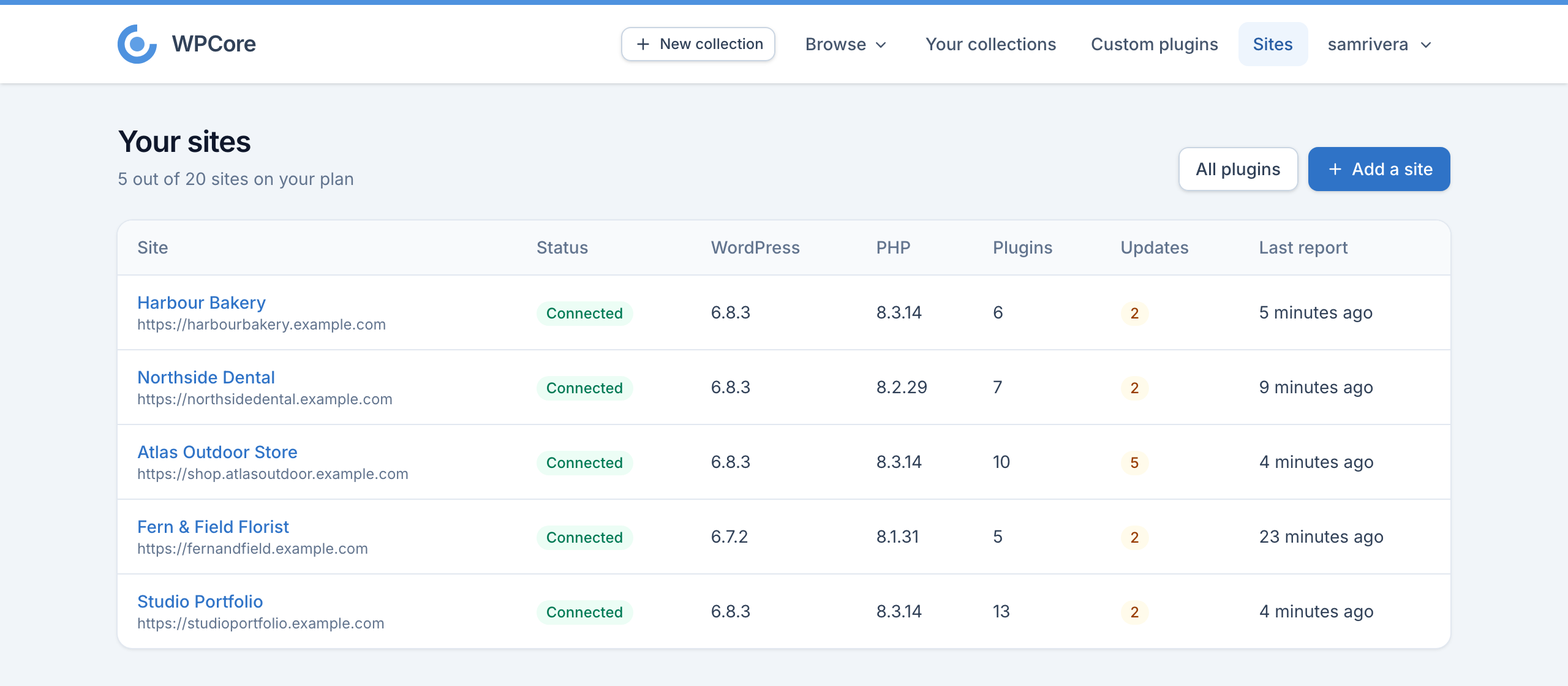
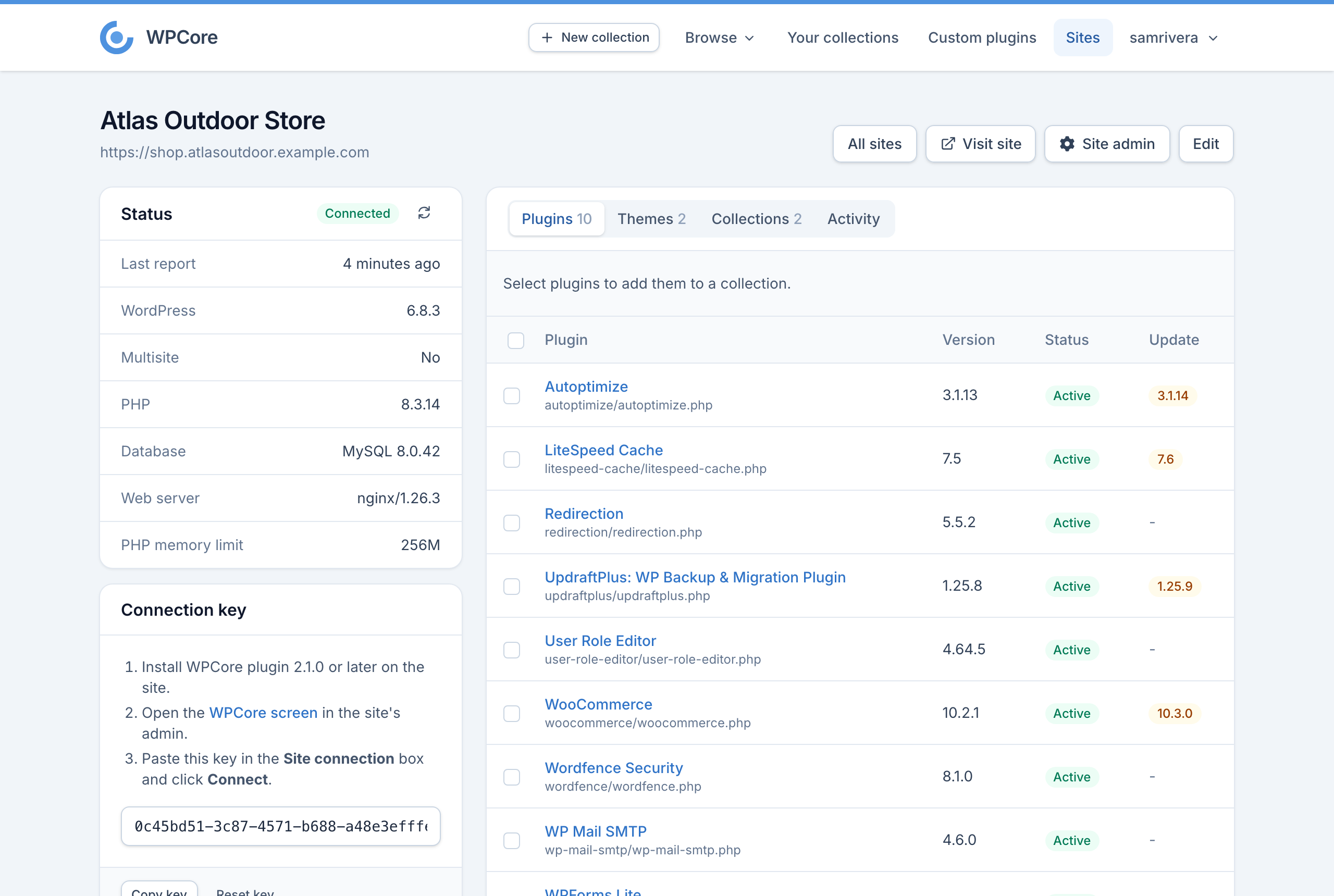
WPCore.com lists all your WordPress sites on one page. Connect a site with this plugin, and its site page on WPCore.com shows the WordPress, PHP, database and web server versions, the plugins and themes with their versions, and the updates waiting.
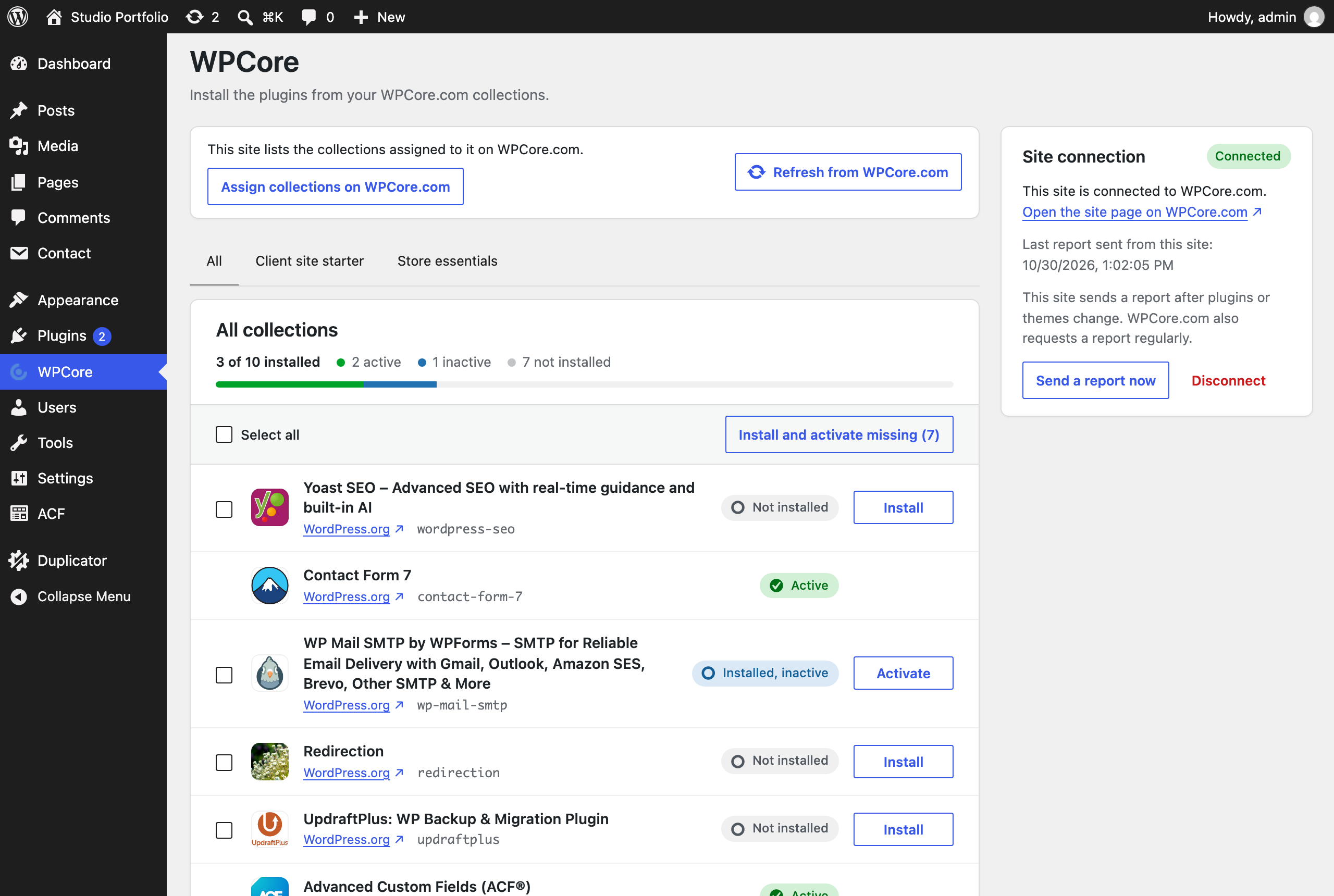
On WPCore.com you also make collections. A collection is a list of plugins. Assign collections to a site on its site page. The WPCore screen on the site lists the plugins of the assigned collections and installs them.
Recursos
- One list of all your sites on WPCore.com.
- For each site: the WordPress, PHP, database and web server versions, and the plugins and themes with their versions and available updates.
- Collections of plugins from the WordPress.org directory, and custom plugins uploaded to WPCore.com as ZIP files.
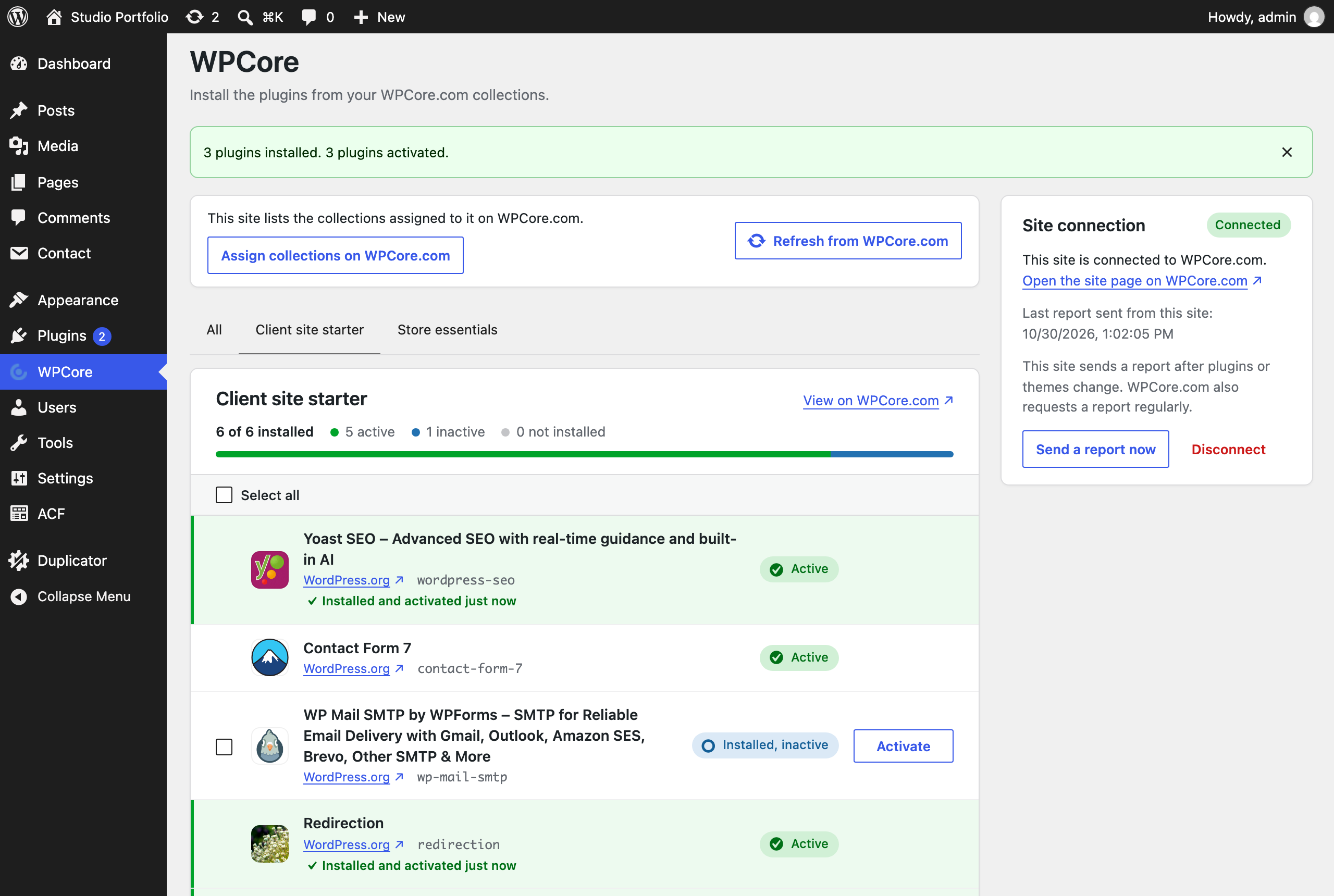
- The WPCore screen installs, or installs and activates, the plugins of the assigned collections, and shows the result for each plugin.
- The plugin sends WPCore.com an update after a plugin or theme change. WPCore.com also requests an update from each site on a schedule.
- WP-CLI commands list and install the plugins of the assigned collections.
Planos
WPCore.com has a free plan and a Pro plan. The plan sets the number of sites, collections and plugins in each collection. Custom plugins need the Pro plan. The WPCore.com help page lists the limits.
Collection keys
A site that is not connected lists the collections whose keys are saved on the WPCore screen. A later version of the plugin removes collection keys. Connect the site and assign its collections on WPCore.com instead. Connecting a site switches it from the saved keys to the assigned collections. Disconnecting the site switches it back to the saved keys.
Wp-cli
wp wpcore list lists the plugins of the collections assigned to the site and their status on the site. `wp wpcore install` installs them. On a site that is not connected, both commands take collection keys.
Source code
The plugin includes the uncompressed source of the admin screen JavaScript and styles in assets/src/. build/ holds the compiled files.
External service
This plugin connects to the WPCore API at https://wpcore.com/api/.
When you save a connection key from the Sites page of wpcore.com, the plugin sends a site report to https://wpcore.com/api/sites/, and the response holds the collections assigned to the site. The plugin also sends the report when the WPCore screen needs the collections and the copy it holds is 5 minutes old, and when WP-CLI installs or lists them. WPCore.com also requests the report from the site on a schedule, at most once an hour. The report contains the WordPress version and available core update, the site title, the home URL, the admin URL, the language, the timezone, the environment type, whether the site is a multisite, the automatic update settings, whether the site uses HTTPS, whether it discourages search engines, the debug, file editing and WP-Cron settings, the time of the last change to a published post, the PHP version, the PHP memory limit, time limit and upload size limit, whether the site uses a persistent object cache, the database server and version, and the web server. For each installed plugin and theme, it contains the name, version and status. For each must-use plugin and drop-in, it contains the name and version. For each plugin and theme, it also contains whether WordPress.org hosts it, whether it updates automatically, and the version and requirements of an available update. For each theme, it also contains the parent theme and whether it is a block theme. The plugin sends no report until you save a connection key, and stops when you disconnect the site or deactivate the plugin. While the site is connected, the plugin also sends the report after a plugin or theme change, at most once a minute.
On a site that is not connected, the plugin reads the collections whose keys you add on the WPCore screen. The request contains the collection keys and the plugin version.
The WPCore terms and privacy policy apply.
Instalação
- In the WordPress admin, go to Plugins > Add New and search for “WPCore”.
- Install and activate WPCore Plugin Manager.
- At wpcore.com, open Sites, click Add a site and enter the site’s name and address.
- On the site page, click Copy key.
- In the WordPress admin, go to WPCore, paste the key into the Site connection box and click Connect. The site page on wpcore.com fills in within a few seconds.
- On wpcore.com, create a collection and add plugins to it.
- On the site page, open the Collections tab and assign the collection.
- On the WPCore screen, click Install and activate missing, or select the plugins and click Install.
Log de Changes
Connect the site to WPCore.com to see its versions, plugins and themes there and to assign collections to it. Your saved collection keys are kept. The plugin sends no site data until you save a connection key.
2.1.0
- Connect the site to WPCore.com in the new Site connection box. WPCore.com then shows the site’s versions, plugins and themes, and the updates waiting.
- A connected site lists the collections assigned to it on WPCore.com instead of the saved collection keys.
- The plugin updates WPCore.com after you install, update, activate or remove a plugin or theme.
- With two or more collections, the WPCore screen shows an All tab and one tab per collection.
- WP-CLI commands on a connected site use the assigned collections.
- Deactivating the plugin disconnects the site from WPCore.com.
- Collection keys still work on a site that is not connected. A later version removes them.
- Removed the export links.
2.0.1
- The plugin includes the uncompressed source of the admin screen JavaScript and styles in
assets/src/.
2.0.0
- Rebuilt the plugin.
- Removed the TGM Plugin Activation library.
- Each collection is cached for 12 hours. A key that matches no collection is cached for 1 hour.
- A saved key that matches no collection is listed as not found.
- Requests to wpcore.com verify the HTTPS certificate.
- Deleting the plugin removes its data from every site in a multisite network.
- Plugins install with the WordPress core plugin installer. Installed plugins are not downloaded again.
- New WPCore screen: add and remove collection keys, select plugins, install or install and activate them, and see the result for each plugin.
- Export links use plugin folder names, and the active plugins export includes network-activated plugins.
1.9.2
- Fixed a bug with PHP 8.
1.9.1
- Removed calls to screen_icon.
1.9.0
- Added WP-CLI support.
Capturas de tela
Para desenvolvedores
Este é o seu plugin? Mostre os números.
Adicione um crachá ao vivo ao seu site, Documentos ou Readme do GitHub. Ele é atualizado por conta própria - nenhuma conta necessária.
Best WPCore Plugin Manager alternatives
All bulk install plugins →FAQ
WPCore Plugin Manager: quick answers
Respostas diretas, extraídas de dados ao vivo WordPress.org.
Fonte: WordPress.org
Is WPCore Plugin Manager free?
Yes. WPCore Plugin Manager is free to download and use from the official WordPress.org plugin directory.
Is WPCore Plugin Manager safe to use in 2026?
Yes — WPCore Plugin Manager is a safe, well-maintained plugin to use in 2026. It runs on 9K+ sites, is rated 4.8/5 and was last updated 4 weeks ago, and scores 88/100 on our health check.
How many websites use WPCore Plugin Manager?
WPCore Plugin Manager is active on 9K+ WordPress websites and has been downloaded 192,166 times since it launched in July 2014. It was downloaded 14,539 times in the last 30 days.
Does WPCore Plugin Manager work with WordPress 7.1?
Yes. The developer has tested WPCore Plugin Manager up to WordPress 7.1.5, the latest release. It requires WordPress 6.4 or newer.
What PHP version does WPCore Plugin Manager need?
WPCore Plugin Manager requires PHP 7.4 or higher. Most hosts run PHP 8.x today, so it works on any modern WordPress hosting.
When was WPCore Plugin Manager last updated?
The latest version, 2.1.0, was released on October 30, 2026 (4 weeks ago).
Who makes WPCore Plugin Manager?
WPCore Plugin Manager is developed and maintained by stueynet.
What are the best alternatives to WPCore Plugin Manager?
The most popular alternatives to WPCore Plugin Manager are Pluginer (formerly Instalis… (10+ installs), One Click Start (10+ installs) and WPBulkify (<10 installs).
Alimentado por PageForge
Um modelo e uma planilha. Uma página real para cada pesquisa.
PageForge Transforma cada linha de um CSV em uma página WordPress com seu próprio título, URL, SEO campos e esquema, construído no layout que você já desenhou. Gratuito em WordPress.org.
- CSV e XLSX, mais Google Sheets em Profissional e Empresarial
- Seu próprio título, URL, SEO campos e esquema para cada página
- Funciona com o editor de blocos, Elementor, Divi e Avada
- Gratuito em WordPress.org, sem cartão de crédito