

WP Go Maps Block
The easiest to use Google Maps and Open Layers Map Plugin is now available as a standalone map block!

Escolha sólida
WP Go Maps Block is a solid plugin choice in 2026, with a few things worth checking first. It runs on 3K+ sites, is rated 5/5 and was last updated 3 months ago, and scores 73/100 on our health check.
- Testado com as últimas WordPress (7.1)
- Momentum — downloads up 42.3% vs the previous 30 days
Como ele se acumula?
Lado a lado em instalações, atualizações, avaliações e suporte



Downloads diários
Os picos de download geralmente seguem uma nova versão — cada site que atualiza automaticamente é um download.
Rankings
Where WP Go Maps Block stands todayWordPress.org Classificações de pesquisa
Posição ao vivo na pesquisa de plugins, top 100| Palavra chave | Posição |
|---|---|
| quadra | #68 |
| Google Mapas | #31 |
| map | #39 |
| map block | #5 |
| maps | #17 |
Adoção da versão
Compartilhamento de sites ativos por lançamento.
Divisão de classificação
★★★★★ ★★★★★ 5 de 19 comentários
About WP Go Maps Block
Do Readme oficial · v1.0.0Descrição
The easiest to use Google Maps and Open Layers Map Plugin is now available as a standalone map block!
Create a custom map block with high-quality markers and add them to your WordPress posts and pages effortlessly. Perfect for contact pages, business locations, event venues, and more!
Map blocks are lightweight and deliver optimal performance, ensuring a seamless experience for your WordPress site. They’re easy to customize, allowing you to quickly add and configure maps to suit your needs without compromising site speed or performance.
If you need more features like multiple markers, shapes, and a store locator, our full (free) WP Go Maps plugin might be perfect for you.
Block Features
- Add unlimited map blocks to your posts/pages
- Choose between Google Maps or OpenLayers for each block
- Edit your marker directly from the block editor
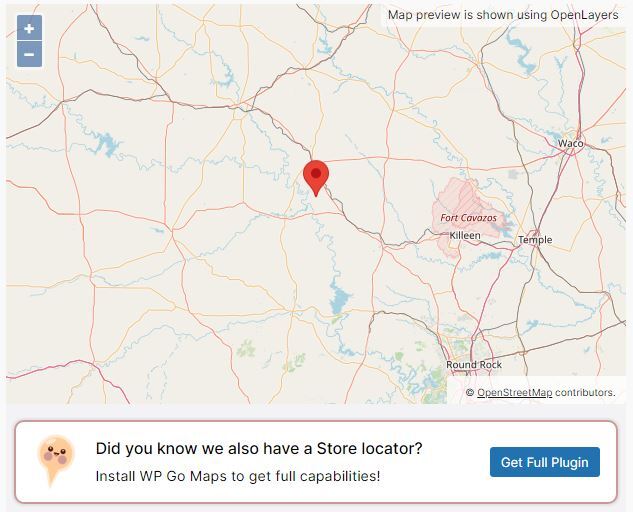
- Set marker location by free location search, or by right-clicking on the map preview
- Preview your map in real time, within the block editor
- Easy to use and customize without any coding experience
- Control width, height and alignment of your maps
- From the team that brought you the most popular Google Maps plugin on WordPress
- Lightweight for optimal performance
- No database queries or tables
- Basic info-window for your marker
- Control zoom level of your map
- Support for localization
- Latest Google Maps API
- Latest OpenLayers API
Already using WP Go Maps? You can still use this block for single locations, as it is fully integrated with both our basic and Pro versions!
References
We make use of a various libraries and 3rd party service providers in order to render maps in your preferred mapping engine. This section will describe each of these in more detail and when they are used.
- OpenLayers: Served from a local library file (lib/ol.js & lib/ol.css), provided by OpenLayers. We use this library when you set your block to use OpenLayers (default). You can find the source files on the OpenLayers GitHub.
- OpenStreetMap: When you select the OpenLayers engine, a default map tile server is used, which is provided by OpenStreetMap. This is a 3rd party service provider that we rely on to render your map. They may also make use of MapBox for some of their assets.
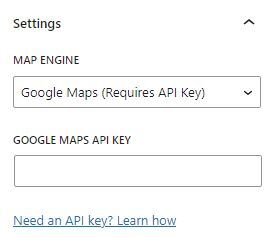
- Google Maps API: If you decide to use Google Maps as your map engine, we will include the Google Maps API as a 3rd party service provider that we rely on to render your maps. In this case, admin map previews are still rendered by OpenLayers and OpenStreetMap.
- Nominatim (OpenStreetMap): If you perform an address search within the admin area, we will make use of the OpenStreetMap Nominatim to lookup locations and suggest addresses to you. This is a 3rd party service provider that we rely on for address searches.
Instalação
Installing and adding a map
- Thank you for choosing WP Go Maps Block! In order to create your first map, simply activate the plugin and edit any post or page.
- From the block menu find the Map Block and place it at your preferred location.
Adding a marker to a map
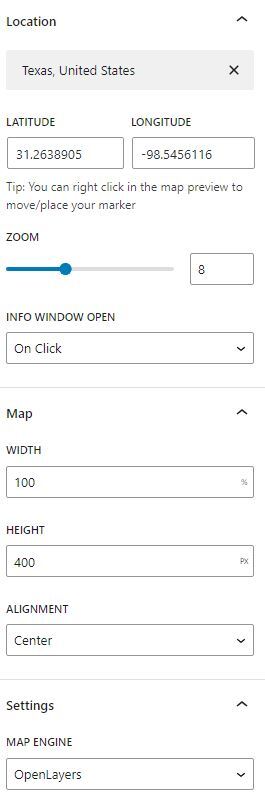
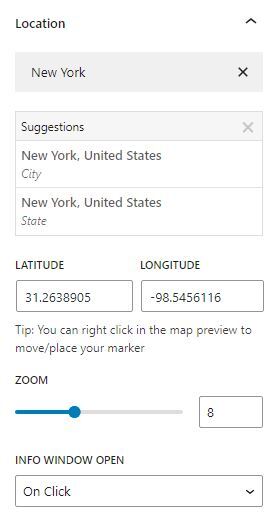
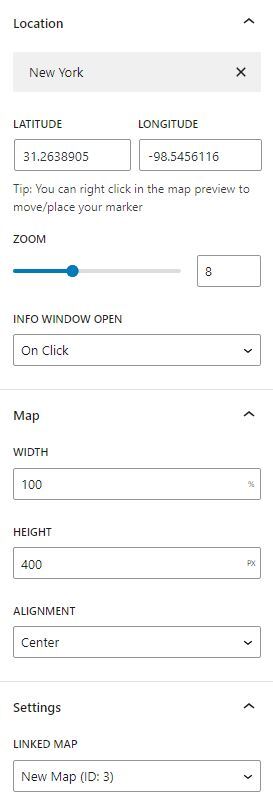
- Select the Map Block within your page and take a look at Location section within the block inspector.
- Search for a location and pick from the provided results.
- If you require more accuracy or your address cannot be found, right click on the map preview to place your marker instead.
- You can enter any “Address” to be shown in your info-window
Additional Options
- Select the Map Block within your page and have a look at the sections in the block inspector
- Here you will find sections for customizing dimensions and alignment, map engine, and info-window behaviour
Capturas de tela

Para desenvolvedores
Este é o seu plugin? Mostre os números.
Adicione um crachá ao vivo ao seu site, Documentos ou Readme do GitHub. Ele é atualizado por conta própria - nenhuma conta necessária.
Best WP Go Maps Block alternatives
Todos os plugins de bloco →




FAQ
WP Go Maps Block: quick answers
Respostas diretas, extraídas de dados ao vivo WordPress.org.
Fonte: WordPress.org
Is WP Go Maps Block free?
Yes. WP Go Maps Block is free to download and use from the official WordPress.org plugin directory.
Is WP Go Maps Block safe to use in 2026?
WP Go Maps Block is a solid plugin choice in 2026, with a few things worth checking first. It runs on 3K+ sites, is rated 5/5 and was last updated 3 months ago, and scores 73/100 on our health check.
How many websites use WP Go Maps Block?
WP Go Maps Block is active on 3K+ WordPress websites and has been downloaded 22,404 times since it launched in July 2024. It was downloaded 949 times in the last 30 days.
Does WP Go Maps Block work with WordPress 7.1?
Yes. The developer has tested WP Go Maps Block up to WordPress 7.1.5, the latest release. It requires WordPress 6.0 or newer.
What PHP version does WP Go Maps Block need?
WP Go Maps Block requires PHP 7.0 or higher. Most hosts run PHP 8.x today, so it works on any modern WordPress hosting.
When was WP Go Maps Block last updated?
The latest version, 1.0.0, was released on August 13, 2026 (3 months ago).
Who makes WP Go Maps Block?
WP Go Maps Block is developed and maintained by WPGMaps.
What are the best alternatives to WP Go Maps Block?
The most popular alternatives to WP Go Maps Block are Spectra Legacy (1M+ installs), Breadcrumb NavXT (700K+ installs) and PDF Embedder (300K+ installs).
Alimentado por PageForge
Um modelo e uma planilha. Uma página real para cada pesquisa.
PageForge Transforma cada linha de um CSV em uma página WordPress com seu próprio título, URL, SEO campos e esquema, construído no layout que você já desenhou. Gratuito em WordPress.org.
- CSV e XLSX, mais Google Sheets em Profissional e Empresarial
- Seu próprio título, URL, SEO campos e esquema para cada página
- Funciona com o editor de blocos, Elementor, Divi e Avada
- Gratuito em WordPress.org, sem cartão de crédito