


WP Easy Uploader
WP Easy Uploader was created to make the life of WordPress bloggers easier by allowing an Administrator to add plugins, themes, and any type of file to WordPress directly from inside WordPress. You no longer have to…

Considere uma alternativa
WP Easy Uploader shows warning signs in 2026 — compare the alternatives below before installing. It runs on 500+ sites, is rated 3.7/5 and was last updated 17 years ago, and scores 30/100 on our health check.
- Base de usuários pequenas (mais de 500 instalações ativas)
- Muito poucos comentários até agora
- No update in 17 years
- Only tested up to WordPress 2.8 (latest is 7.1)
Como ele se acumula?
Lado a lado em instalações, atualizações, avaliações e suporte


Downloads diários
Os picos de download geralmente seguem uma nova versão — cada site que atualiza automaticamente é um download.
Rankings
Where WP Easy Uploader stands todayWordPress.org Classificações de pesquisa
Posição ao vivo na pesquisa de plugins, top 100| Palavra chave | Posição |
|---|---|
| archives | >100 |
| ftp | >100 |
| plugins | >100 |
| themes | >100 |
| upload | >100 |
Adoção da versão
Compartilhamento de sites ativos por lançamento.
Divisão de classificação
★★★★★ ★★★★★ 3,7 de 3 comentários
About WP Easy Uploader
From the official readme · v1.0.11Descrição
WP Easy Uploader was created to make the life of WordPress bloggers easier by allowing an Administrator to add plugins, themes, and any type of file to WordPress directly from inside WordPress. You no longer have to load up an FTP client just to try out that latest plugin or to upload a text document for people to download.
Current Features
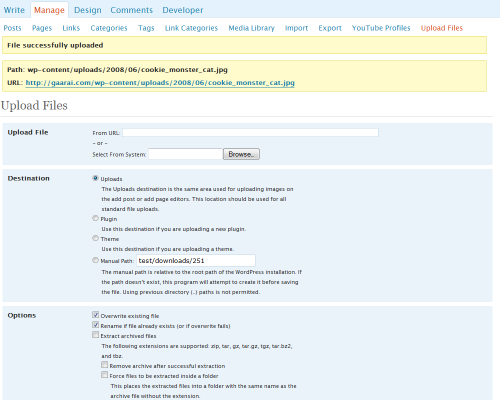
- Upload any type of file to either the standard Uploads directory (just as images do when you are creating posts and pages) or to a path of your choosing.
- Manual paths are automatically created if they don’t exist.
- Easily upload plugins directly to the plugins directory and theme files directly to the themes directory.
- You can select to have archives automatically extracted to their destination. This means that plugins and themes will be taken care of for you, but it also means that you can zip up a large set of files and upload them quickly into a folder on your site. Currently zip, tar, gz, tar.gz, tgz, and tar.bz2 archives are supported.
- Options for overwriting existing files, renaming the fle if a file with that name already exists (or if overwriting fails), removal of the archive after file extraction, and forcing extracted files to be contained in a folder.
- Now supports WordPress Mu.
- Now supports internationalization. The PO file is available in the lang directory. Currently, Turkish (tr), mainland Chinese (zhCN), Brazilian Portuguese (ptBR), German (deDE), Indonesian (idID), and Spanish (esES) translations are available.
Note
Many of the features offered by this plugin are now offered in the core of WordPress. For example, the latest versions of WordPress can now install plugins and themes from the admin interface. You can install plugins by going to Plugins > Add New and themes by going to Appearance > Add New Themes. Thus, this plugin may have limited added value for you.
This plugin is currently useful for doing the following:
- Installing plugins and themes without downloading the files first and then having to upload them back to the server.
- Uploading large batches of files easily by first zipping the files and then having WP Easy Uploader unzip them into the destination directory.
- Load files to specific locations on your site when FTP may be restricted or blocked by the local network.
Planned Features
- Customizable permissions to allow for users with privileges below Administrator to upload files. My idea is for Administrators to have full access to all the uploader’s functionality while people below Administrator won’t have access to upload themes, plugins, or to manual paths and won’t be able to overwrite files or extract archives.
- If the above is implemented, I’d like to provide a menu of options for tailoring what minimum access level is required to access each function.
- Also if the first item is implemented, I’d like to add logging in order to keep track of who uploaded what and when. This would be useful for keeping track of anyone (such as a contributor) who is using the file space inappropriately.
- Track the uploaded files so that they can be removed later on. This is in response to how some people have permissions issues where their FTP/SSH user is different from the user that the webserver runs as.
Requisitos
- PHP 4+
- WordPress 2.2+
Version History
- 1.0.1 – 2008-06-27 – Initial release version
- 1.0.2 – 2008-06-28 – Updated to support WordPress Mu
- 1.0.3 – 2008-06-30 – Added support for PHP 4
- 1.0.4 – 2008-07-02 – Fixed compatibility bug with the BackUpWordPress plugin
- 1.0.5 – 2008-07-02 – Internationalized the plugin. Now it’s ready for translators.
- 1.0.6 – 2008-07-06 – Added Turkish and Spanish translations. Fixed compatibility issue with the WeatherIcon plugin. Fixed parsing error with Windows servers.
- 1.0.7 – 2008-07-08 – Added mainland Chinese and Brazilian Portuguese translations. Added 2.6 support.
- 1.0.7a – 2008-07-10 – Added German translation.
- 1.0.7b – 2008-07-21 – Added Indonesian translation.
- 1.0.8 – 2008-09-27 – Added file required by PEAR in fringe cases.
- 1.0.8a – 2009-07-17 – Updated listed compatibility to WordPress version 2.8.1
- 1.0.9 – 2009-07-17 – WordPress no longer likes letters in versions, so here’s version 1.0.9. 🙂
- 1.0.10 – 2009-07-20 – Updated listed compatibility to WordPress version 2.8.2
- 1.0.11 – 2009-07-20 – readme.txt update
More Information
For more information about this plugin and its development, visit the WP Easy Uploader Home Page.
Instalação
- Download and unzip the latest release zip file
- Upload the entire wp-easy-uploader directory to your
/wp-content/plugins/directory - Ative o plugin através do menu 'Plugins' em WordPress
Using
- Activate the plugin
- Click on “Tools”
- Click on “Upload Files”
Capturas de tela
Para desenvolvedores
Este é o seu plugin? Mostre os números.
Adicione um crachá ao vivo ao seu site, Documentos ou Readme do GitHub. Ele é atualizado por conta própria - nenhuma conta necessária.
Best WP Easy Uploader alternatives
All archives plugins →



FAQ
WP Easy Uploader: quick answers
Respostas diretas, extraídas de dados ao vivo WordPress.org.
Fonte: WordPress.org
Is WP Easy Uploader free?
Yes. WP Easy Uploader is free to download and use from the official WordPress.org plugin directory.
Is WP Easy Uploader safe to use in 2026?
WP Easy Uploader shows warning signs in 2026 — compare the alternatives below before installing. It runs on 500+ sites, is rated 3.7/5 and was last updated 17 years ago, and scores 30/100 on our health check.
How many websites use WP Easy Uploader?
WP Easy Uploader is active on 500+ WordPress websites and has been downloaded 109,138 times since it launched in June 2008. It was downloaded 249 times in the last 30 days.
Does WP Easy Uploader work with WordPress 7.1?
WP Easy Uploader is officially tested up to WordPress 2.8.2, while the latest release is 7.1.5. It may still work, but try it on a staging site first.
When was WP Easy Uploader last updated?
The latest version, 1.0.11, was released on July 20, 2009 (17 years ago).
Who makes WP Easy Uploader?
WP Easy Uploader is developed and maintained by Chris Jean.
What are the best alternatives to WP Easy Uploader?
The most popular alternatives to WP Easy Uploader are Disable Author Archives (10K+ installs), Simple Yearly Archive (6K+ installs) and Advanced Posts/Page (3K+ installs).
Alimentado por PageForge
Um modelo e uma planilha. Uma página real para cada pesquisa.
PageForge Transforma cada linha de um CSV em uma página WordPress com seu próprio título, URL, SEO campos e esquema, construído no layout que você já desenhou. Gratuito em WordPress.org.
- CSV e XLSX, mais Google Sheets em Profissional e Empresarial
- Seu próprio título, URL, SEO campos e esquema para cada página
- Funciona com o editor de blocos, Elementor, Divi e Avada
- Gratuito em WordPress.org, sem cartão de crédito