


WP Auto Updater
WP Auto Updater plugin enables automatic updates of WordPress Core, Themes, Plugins and Translations. Version control of WordPress Core makes automatic update more safely.

Escolha sólida
WP Auto Updater is a solid plugin choice in 2026, with a few things worth checking first. It runs on 7K+ sites, is rated 4.6/5 and was last updated 6 months ago, and scores 67/100 on our health check.
- Momentum — downloads up 24.9% vs the previous 30 days
Como ele se acumula?
Lado a lado em instalações, atualizações, avaliações e suporte



Downloads diários
Os picos de download geralmente seguem uma nova versão — cada site que atualiza automaticamente é um download.
Rankings
Where WP Auto Updater stands todayWordPress.org Classificações de pesquisa
Posição ao vivo na pesquisa de plugins, top 100| Palavra chave | Posição |
|---|---|
| auto-update | #4 |
| Automatic updates | #22 |
| background updates | #10 |
| core updates | #23 |
| updates | #35 |
Adoção da versão
Compartilhamento de sites ativos por lançamento.
Divisão de classificação
★★★★★★★★★★ 4.6 from 10 reviews
About WP Auto Updater
From the official readme · v1.7.4Descrição
WP Auto Updater plugin enables automatic updates of WordPress Core, Themes, Plugins and Translations. Version control of WordPress Core makes automatic update more safely.
Recursos
- Automatically update WordPress Core
- Automatically updates Themes, Plugins and Translations
- Set up a schedule automatic updates
- Disable automatic updating of each Themes and Plugins
- Record update history
- Update notification
Important: before updating, please back up your database and files.
Note: WordPress version 5.5 later, The auto-updates have been implemented for the WordPress Core, as well as themes and plugins. If the auto-updates are enabled, the settings for WordPress Core will take priority over WP Auto Updater plugin. This will result in issues such as no updates at all, or not being updated at the scheduled update date and time. To properly control updates, disable all auto-updates include themes and plugins before enable WP Auto Updater plugin. See Plugin and themes auto-updates
Auto Update Scenario
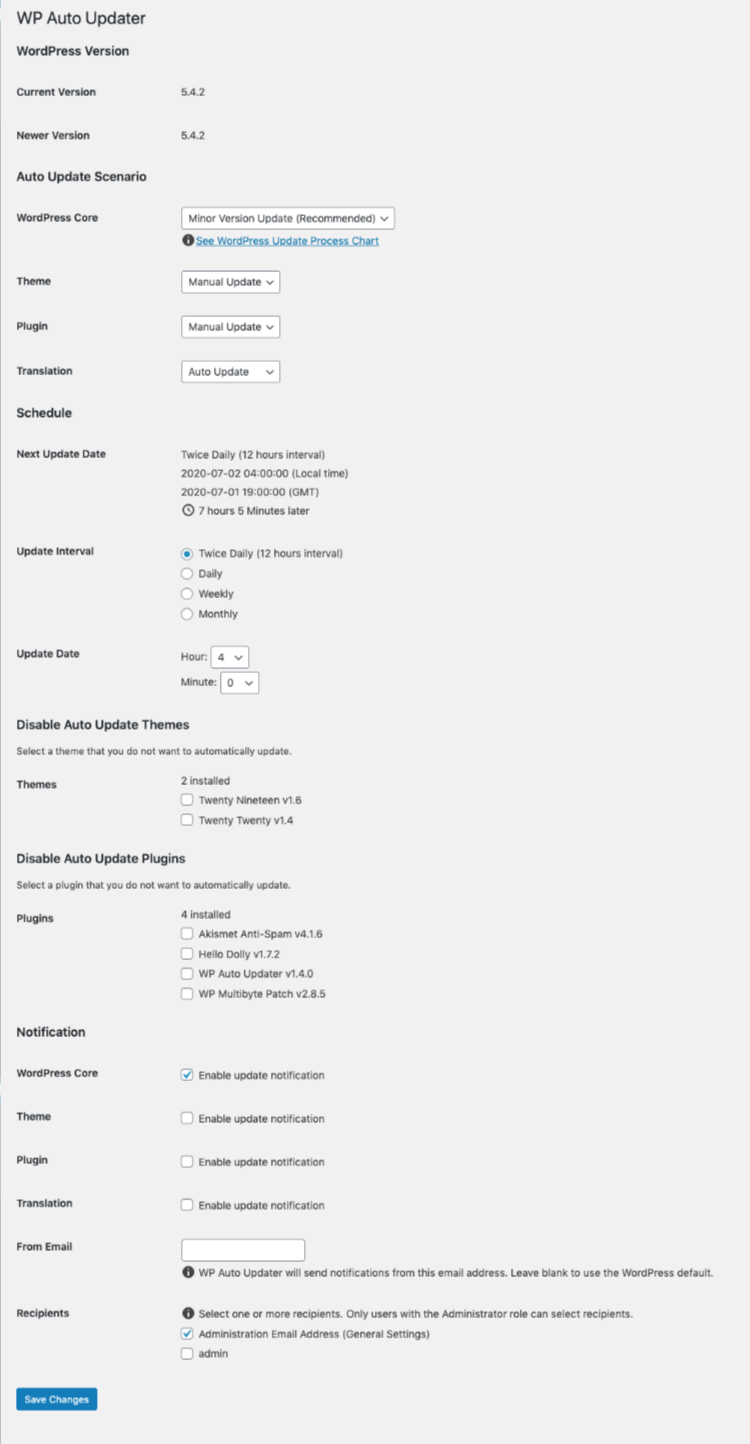
First of all, we will make an Auto Update Scenario which decide the policy of WordPress automatic updates.
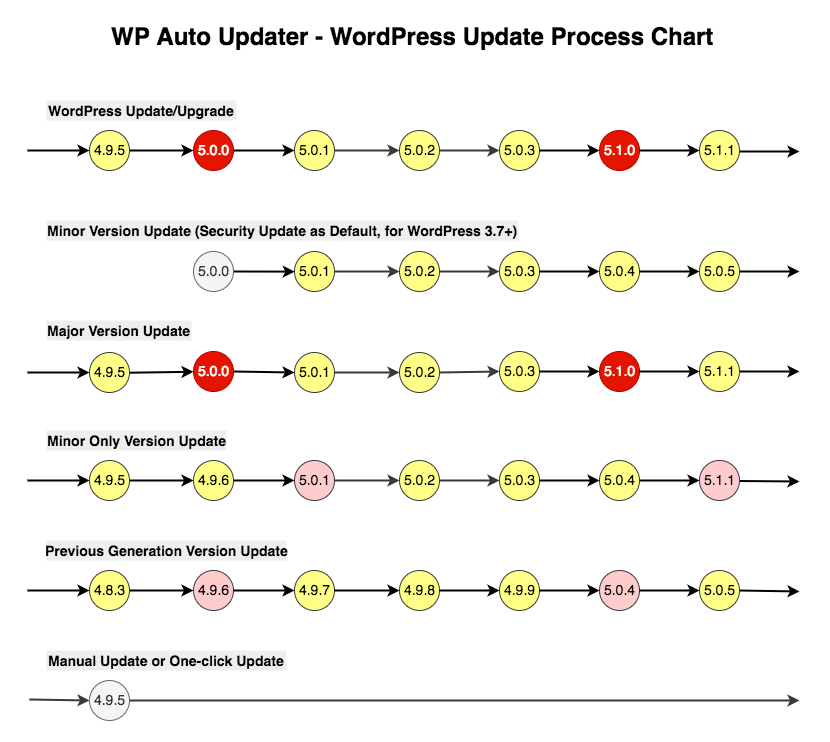
You can choose from the following five automatic updates of WordPress Core.
- Minor Version Update
- Major Version Update
- Minor Only Version Update
- Previous Generation Version Update
- Manual Update
Minor Version Update
Minor Version Update enable minor updates. Minor updates is default behavior in WordPress for security updates. The transition of the version number is as follows: update from 4.8 to 4.8.1, 4.8.2 …
Major Version Update
Major Version Update enable major updates. The transition of the version number is as follows: update from 4.7 to 4.8, 4.9 …
Minor Only Version Update
Minor Only Version Update enable major updates and minor updates except version x.y.0. It make sense to take a “skip” approach to avoid introducing new vulnerabilities into the latest major version release.
Update the WordPress Core version (eg. x.y.1 or later) with security fixed. Not automatically update the latest major version of x.y.0. The transition of the version number is as follows: update from 4.7.z to 4.8.z, 4.9.z … skiped 4.7.0, 4.8.0, 4.9.0 …
Previous Generation Version Update
Previous Generation Version Update enable major updates and minor updates except the latest major version. It make sense to take a “wait and see” approach to ensure the latest major version release is stable before.
With the installed WordPress Core version as 4.6.z. If the latest WordPress Core version released to 4.8.0, automatically update it to version 4.7.z. It will be always automatically updated to the previous generation WordPress Core version with probably security fixed.
Manual Update
Manual Update disable automatic updates. You update WordPress Core manually on the Dashboard Updates Screen.
Automatic updates and manual updates are available for themes, plugins and Translations.
It is also possible to disable automatic updating of each Themes and Plugins.
Scheduled automatic updates
Next we will set up a schedule for automatic updates.
The update interval can be selected from the following four.
- Twice Daily (12 hours interval)
- Daily
- Weekly
- Mensal
You can also set the day, the day of the week, the hour and the minute of the Update Date.
At the time of automatic update, Automatically updates WordPress Core, Themes, Plugins and Translations to be updated.
Apoio
If you have any trouble, you can use the forums or report bugs.
- Forum: https://wordpress.org/support/plugin/wp-auto-updater/
- Issues: https://github.com/thingsym/wp-auto-updater/issues
Contribution
Small patches and bug reports can be submitted a issue tracker in Github. Forking on Github is another good way. You can send a pull request.
Translating a plugin takes a lot of time, effort, and patience. I really appreciate the hard work from these contributors.
If you have created or updated your own language pack, you can send gettext PO and MO files to author. I can bundle it into plugin.
You can also contribute by answering issues on the forums.
- Forum: https://wordpress.org/support/plugin/wp-auto-updater/
- Issues: https://github.com/thingsym/wp-auto-updater/issues
Contribute guidlines
If you would like to contribute, here are some notes and guidlines.
- All development happens on the develop branch, so it is always the most up-to-date
- The master branch only contains tagged releases
- If you are going to be submitting a pull request, please submit your pull request to the develop branch
- See about forking and pull requests
Test Matrix
For operation compatibility between PHP version and WordPress version, see below Github Actions.
Instalação
- Download and unzip files. Or install WP Auto Updater using the WordPress plugin installer. In that case, skip 2.
- Upload wp-auto-updater to the “/wp-content/plugins/” directory.
- Activate the plugin through the ‘ Plugins’ menu in WordPress.
- Configure settings through the Dashboard > Auto Updater menu in WordPress.
- Have fun!
How do I use it ?
- Make an Auto Update Scenario
- Set up a schedule automatic updates
- Disable Auto Update Themes and Plugins if necessary
- Automatically updates WordPress Core, Themes, Plugins and Translations to be updated at the time of automatic update
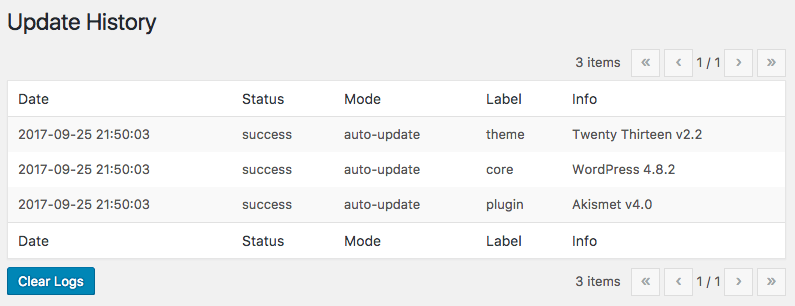
- The update history will be recorded
Log de Changes
Requires at least version 5.9 of the WordPress Requires PHP version 7.4
1.7.4
- tested up to 7.0
- change requires at least to wordpress 5.9
- change requires to PHP 7.4
- edit README
- improve code with phpcs
- fix test case
- change hook to init action, Notice: Function _load_textdomain_just_in_time was called incorrectly
- fix plugin_textdomain rel path
- update github workflows
- update phpunit v9 and wpcs v3
- update composer dependencies
- update wp-tests script
1.7.3
- add phpcs job to ci
- add test case
- fix sanitize for clear logs
1.7.2
- add php 8.3 to matrix and actions/checkout bump up for ci
- imporve code with phpcs
- change the type of a variable
- add phpunit-legacy job to ci
1.7.1
- tested up to 6.4.0
- update japanese translation
- update pot
- imporve code with phpcs, phpmd and phpstan
- change variable type
- fix Undefined property: stdClass
- phpunit bump up to version 8
- ci support php 8.0 later
1.7.0
- tested up to 6.2.0
- update japanese translation
- update pot
- add test case
- add last day to schedule
- fix composer scripts
- update github actions
- set auto_update_core_major to disable when activate
- add support section and enhance contribution section to README
- fix license
- fix wp-plugin-unit-test.yml
1.6.3
- change makepot from php script to wp cli
- change plugin initialization to plugins_loaded hook
- replace assert from assertEquals to assertSame
Capturas de tela
Para desenvolvedores
Este é o seu plugin? Mostre os números.
Adicione um crachá ao vivo ao seu site, Documentos ou Readme do GitHub. Ele é atualizado por conta própria - nenhuma conta necessária.
Best WP Auto Updater alternatives
All auto-update plugins →





FAQ
WP Auto Updater: quick answers
Respostas diretas, extraídas de dados ao vivo WordPress.org.
Fonte: WordPress.org
Is WP Auto Updater free?
Yes. WP Auto Updater is free to download and use from the official WordPress.org plugin directory.
Is WP Auto Updater safe to use in 2026?
WP Auto Updater is a solid plugin choice in 2026, with a few things worth checking first. It runs on 7K+ sites, is rated 4.6/5 and was last updated 6 months ago, and scores 67/100 on our health check.
How many websites use WP Auto Updater?
WP Auto Updater is active on 7K+ WordPress websites and has been downloaded 122,776 times since it launched in September 2017. It was downloaded 1,094 times in the last 30 days.
Does WP Auto Updater work with WordPress 7.1?
WP Auto Updater is officially tested up to WordPress 7.0.9, while the latest release is 7.1.5. It may still work, but try it on a staging site first.
What PHP version does WP Auto Updater need?
WP Auto Updater requires PHP 7.4 or higher. Most hosts run PHP 8.x today, so it works on any modern WordPress hosting.
When was WP Auto Updater last updated?
The latest version, 1.7.4, was released on June 4, 2026 (6 months ago).
Who makes WP Auto Updater?
WP Auto Updater is developed and maintained by thingsym.
What are the best alternatives to WP Auto Updater?
The most popular alternatives to WP Auto Updater are Disable auto-update Email N… (30K+ installs), WP Plugins&Themes Auto Upda… (300+ installs) and Auto Update Copyright Year… (60+ installs).
Alimentado por PageForge
Um modelo e uma planilha. Uma página real para cada pesquisa.
PageForge Transforma cada linha de um CSV em uma página WordPress com seu próprio título, URL, SEO campos e esquema, construído no layout que você já desenhou. Gratuito em WordPress.org.
- CSV e XLSX, mais Google Sheets em Profissional e Empresarial
- Seu próprio título, URL, SEO campos e esquema para cada página
- Funciona com o editor de blocos, Elementor, Divi e Avada
- Gratuito em WordPress.org, sem cartão de crédito