


WP All Import – Drag & Drop Import for CSV, XML, Excel & Google Sheets
“It’s a wonderful plugin that does so much, so well that it’s hard to list all of the features. But I’ll tell you this, I was able to import the content of a pair of websites running the ModX CMS into a WordPress…

Escolha segura
Yes — WP All Import is a safe, well-maintained plugin to use in 2026. It runs on 100K+ sites, is rated 4.7/5 and was last updated 1 week ago, and scores 88/100 on our health check.
- Comprovado em escala em mais de 100 mil sites ativos
- Loved by users — 4.7/5 from 1,966 reviews
- Desenvolvido ativamente — última atualização 1 semana atrás
- Testado com as últimas WordPress (7.1)
Como ele se acumula?
Lado a lado em instalações, atualizações, avaliações e suporte



Downloads diários
Os picos de download geralmente seguem uma nova versão — cada site que atualiza automaticamente é um download.
Rankings
Where WP All Import stands todayWordPress.org Classificações de pesquisa
Posição ao vivo na pesquisa de plugins, top 100| Palavra chave | Posição |
|---|---|
| CSV | #6 |
| datafeed | #4 |
| wordpress csv import | #2 |
| wordpress xml import | #2 |
| xml | #12 |
Adoção da versão
Compartilhamento de sites ativos por lançamento.
Divisão de classificação
★★★★★★★★★★ 4.7 from 1,966 reviews
About WP All Import
From the official readme · v4.2.0Descrição
WP All Import – Simple & Powerful XML, CSV, Google Sheets, and Excel Importer Plugin
“It’s a wonderful plugin that does so much, so well that it’s hard to list all of the features. But I’ll tell you this, I was able to import the content of a pair of websites running the ModX CMS into a WordPress install in less than 30 minutes. No joke!”
Alex Vasquez – DigiSavvy Co-Founder & WordCamp Los Angeles Organizer
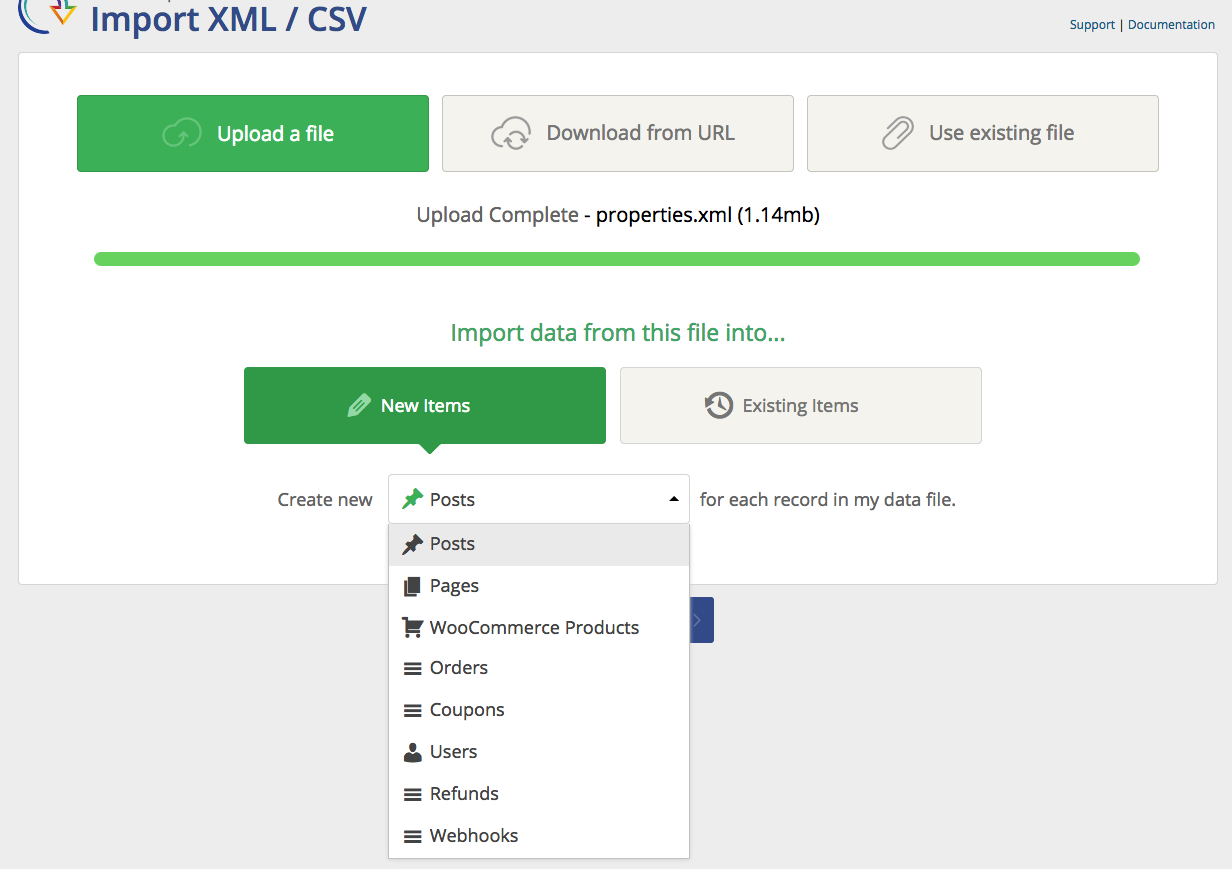
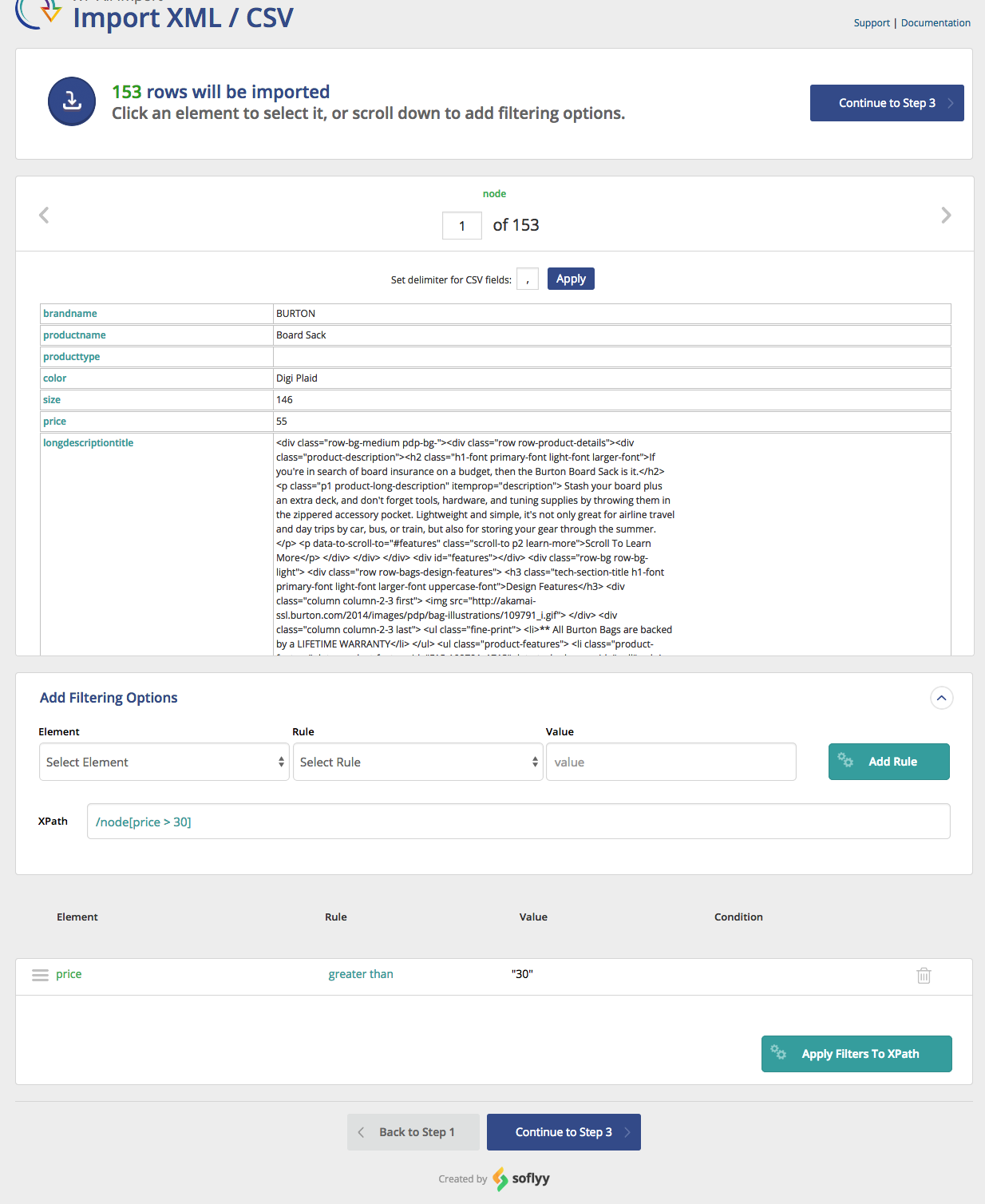
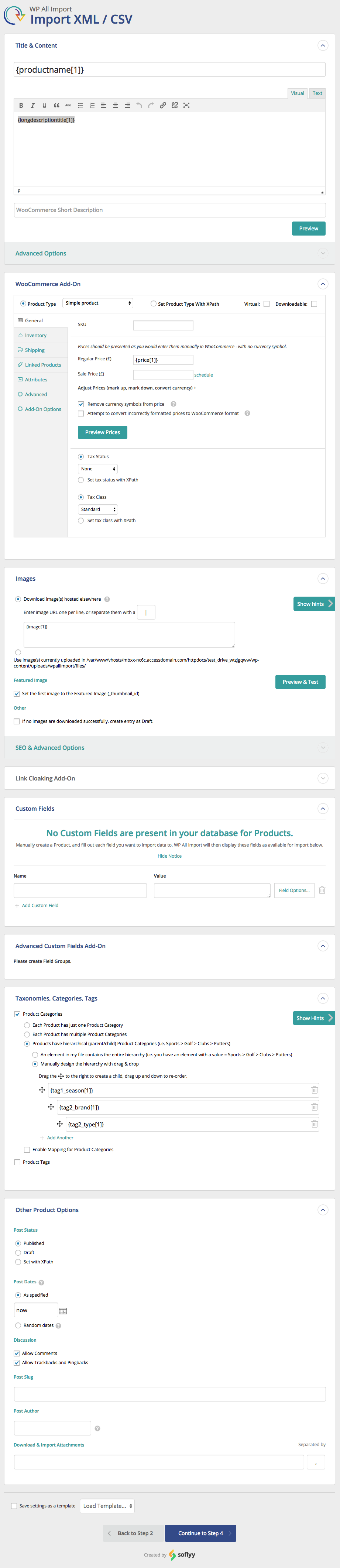
WP All Import has a four-step import process and an intuitive drag-and-drop interface that makes complicated import tasks simple and fast.
There are no special requirements that the elements in your file must be laid out in a certain way. WP All Import can import any XML, CSV, Excel spreadsheet, or Google Sheets file into WordPress.
WP All Import can be used for everything from migrating content from a legacy CMS to WordPress to building a store with affiliate datafeed to displaying live stock quotes or sports scores to building a real estate portal.
Check out our documentation and video tutorials to make the most of WP All Import.
WP All Import integrates with our companion plugin, WP All Export. You can export posts, WooCommerce products, orders, users, or anything else with WP All Export. Then you can edit the WordPress data with Microsoft Excel, Numbers, or maybe something else, and re-import to the same site or migrate the data to another site with WP All Import.
For technical support from the developers, please consider purchasing WP All Import Pro.
WP All Import Pro Version
WP All Import Pro is a paid upgrade that includes premium support and adds the following features:
-
Import data to Custom Fields – used by many themes, especially those using Custom Post Types – to store data associated with the posts.
-
Import images to the post media gallery – WP All Import can download images from URLs in an XML or CSV file and put them in the media gallery.
-
Import files from a URL – Download and import CSV, XML, or Excel WordPress data files from external websites, even if they are password-protected with HTTP authentication.
-
Cron Job/Recurring Imports from external URLs – WP All Import Pro can periodically check a file for updates, and add, edit, and delete the imported posts accordingly.
-
Execution of Custom PHP Functions on data, i.e., use something like [my_function({xpath/to/a/field[1]})] in your template, to pass the value of {xpath/to/a/field[1]} to my_function and display whatever it returns.
-
Guaranteed technical support via e-mail.
Upgrade to the Pro edition of WP All Import.
Need to import XML and CSV to WooCommerce? Check out our WooCommerce add-on.
WordPress CSV Imports
Read on to learn more about the CSV importer functionality of WP All Import. Importing CSVs with WP All Import is exactly the same as importing XML files because internally, WP All Import actually converts your CSV file to an XML file on the fly. You can use the same XPath filtering options and all the same features you have when importing XML files.
CSV imports, including those exported from Excel and Google Sheets, don’t require your file to have a specific structure. Your CSV file can use any column names/headings. You can map the columns in your CSV file to the appropriate places in WordPress during the import process.
When importing CSV files, your CSV should have UTF-8 encoding if you are having trouble importing special characters.
In step 2 of a CSV import, you can specify an alternative delimiter if you aren’t using a comma. WP All Import can import CSVs that are pipe-delimited, # delimited, or delimited/separated by any other character.
For CSV import tutorials and example files, visit our documentation. Please keep in mind CSV imports with WP All Import are just like XML imports – you have all the same functionality, and the process is exactly the same. Any of our tutorial videos that apply to XML files also apply to importing CSV files, so if you see a tutorial with us importing an XML file, know that you can follow the exact same steps for a CSV import.
WordPress Excel Import / Google Sheets Import
Don’t want to convert your Excel or Google Sheets data to CSV? WP All Import also works as a Google Sheets and Excel importer for WordPress. Simply upload your Excel file as you would for CSV and WP All Import will automatically detect the columns in your file.
For Google Sheets, use the ‘Download a file’ option and paste your sheet’s public URL to import data to WordPress.
Add-Ons
A number of premium add-ons are available to add functionality to the importer and make XML, CSV, Google Sheets, and Excel import tasks to complex plugins simple.
- Advanced Custom Fields Add-On – ACF XML & CSV importer
- WooCommerce Add-On – XML & CSV importer for all WooCommerce product types
- User Import Add-On – XML & CSV importer for users, including user_meta
- Link Cloak Add-On – Auto-create redirects for links present during an XML or CSV import
Learn more about our add-ons at http://www.wpallimport.com/add-ons
A developer API (action hooks) is also available.
Related Plugins
Export any WordPress data to XML/CSV
Import Products from any XML or CSV to WooCommerce
Export Products to CSV/XML for WooCommerce
Custom Product Tabs for WooCommerce WP All Import Add-on
Export Orders to CSV/XML for WooCommerce
Export WordPress Users to CSV/XML
Premium Support
You can submit the support form on our website or email us at support@wpallimport.com. While we try to assist users of our free version, please note that support is not guaranteed and will depend on our capacity. For premium support, purchase WP All Import Pro.
Import To WooCommerce
Need to import Excel, XML and CSV to WooCommerce? Check out our WooCommerce add-on.
Log de Changes
4.2.0
- security improvement: SVG files imported through add-on image and file fields are sanitized, and skipped when they cannot be cleaned
- security improvement: update PhpSpreadsheet to 1.30.8
- bug fix: activating WP All Import while WP All Import Pro was deactivated removed the Pro license key
- bug fix: saved order imports stop with a clear message instead of creating orders as plain posts when no order import add-on is active
- bug fix: resolve various PHP notices
4.1.4
- security improvement: files inside an uploaded ZIP are always extracted into the import’s own folder
- security improvement: SVG images imported through add-ons are skipped when they cannot be safely cleaned
- security improvement: updated svg-sanitize to 1.1.1
- new feature: CSV Format setting with automatic detection of standard (RFC 4180) CSV files
- improvement: rebuilt settings screen with six tabs
- improvement: import log timestamps use the site’s timezone
- improvement: imports that update existing records or delete missing records run much faster on sites with large import histories
- improvement: add-ons that import images can download AVIF images
- improvement: emoji are kept in new imports
- bug fix: XLS uploads containing emoji hung until the server timed out
- bug fix: XLS and XLSX cells with a backslash before a quote merged values and lost rows
- bug fix: import names containing percent signs caused a critical error
- bug fix: re-running an import created in WP All Import Pro from an existing file now shows an upgrade message instead of a critical error
- bug fix: a Customers bundle was not refused when only the free User Import Add-On was active
- bug fix: a custom product post type showed a blank WooCommerce icon and WooCommerce-only options without WooCommerce
4.1.3
- improvement: XLS and XLSX imports no longer use, or break, another plugin’s copy of PhpSpreadsheet
- bug fix: XLS and XLSX imports failed on sites with Kirki or a similar plugin active
- bug fix: various PHP notices
4.1.2
- security improvement: update PhpSpreadsheet to 1.30.7
- improvement: UI updates
- bug fix: page number navigation was missing from Manage Imports and History Logs
- bug fix: imported posts ignored the site’s Default Post Category when the feed had no category value
- bug fix: various PHP notices
4.1.1
- security improvement: hardening of inline PHP execution restriction
4.1.0
- security improvement: hardening of database queries
- improvement: ported new add-on API
- API: pmxi_fire_hooks, pmxi_disabled_delete_missing_options, pmxi_hidden_delete_missing_options, pmxi_status_of_removed_options, pmxi_hidden_data_to_update_options
Capturas de tela
Para desenvolvedores
Este é o seu plugin? Mostre os números.
Adicione um crachá ao vivo ao seu site, Documentos ou Readme do GitHub. Ele é atualizado por conta própria - nenhuma conta necessária.
Best WP All Import alternatives
All csv plugins →





FAQ
WP All Import: quick answers
Respostas diretas, extraídas de dados ao vivo WordPress.org.
Fonte: WordPress.org
Is WP All Import free?
Yes. WP All Import is free to download and use from the official WordPress.org plugin directory.
Is WP All Import safe to use in 2026?
Yes — WP All Import is a safe, well-maintained plugin to use in 2026. It runs on 100K+ sites, is rated 4.7/5 and was last updated 1 week ago, and scores 88/100 on our health check.
How many websites use WP All Import?
WP All Import is active on 100K+ WordPress websites and has been downloaded 5,815,746 times since it launched in July 2012. It was downloaded 104,050 times in the last 30 days.
Does WP All Import work with WordPress 7.1?
Yes. The developer has tested WP All Import up to WordPress 7.1.5, the latest release. It requires WordPress 5.0 or newer.
What PHP version does WP All Import need?
WP All Import requires PHP 7.4 or higher. Most hosts run PHP 8.x today, so it works on any modern WordPress hosting.
When was WP All Import last updated?
The latest version, 4.2.0, was released on November 10, 2026 (1 week ago).
Who makes WP All Import?
WP All Import is developed and maintained by WP All Import.
What are the best alternatives to WP All Import?
The most popular alternatives to WP All Import are TablePress (600K+ installs), Import and export users and… (70K+ installs) and wpDataTables (60K+ installs).
Alimentado por PageForge
Um modelo e uma planilha. Uma página real para cada pesquisa.
PageForge Transforma cada linha de um CSV em uma página WordPress com seu próprio título, URL, SEO campos e esquema, construído no layout que você já desenhou. Gratuito em WordPress.org.
- CSV e XLSX, mais Google Sheets em Profissional e Empresarial
- Seu próprio título, URL, SEO campos e esquema para cada página
- Funciona com o editor de blocos, Elementor, Divi e Avada
- Gratuito em WordPress.org, sem cartão de crédito