


Visual Feedback Pins
Pin comments to any spot on your live pages with an automatic screenshot, get email alerts, and track every fix from one admin inbox.

Use com cautela
Visual Feedback Pins works, but test it on a staging site before relying on it in 2026. Was last updated 1 month ago, and scores 60/100 on our health check.
- Testado com as últimas WordPress (7.1)
- Base de usuários pequenas (<10 instalações ativas)
- Muito poucos comentários até agora
Como ele se acumula?
Lado a lado em instalações, atualizações, avaliações e suporte



Downloads diários
Os picos de download geralmente seguem uma nova versão — cada site que atualiza automaticamente é um download.
Rankings
Where Visual Feedback Pins stands todayWordPress.org Classificações de pesquisa
Posição ao vivo na pesquisa de plugins, top 100| Palavra chave | Posição |
|---|---|
| bug reporting | >100 |
| client feedback | >100 |
| screenshot | >100 |
| visual feedback | >100 |
| website annotation | #71 |
About Visual Feedback Pins
From the official readme · v1.1.0Descrição
Stop collecting website feedback in long email threads like “the button near the top looks off”. With Visual Feedback Pins, your team and clients click the exact spot on a live page, type a comment, and send it. The plugin saves where it was placed, takes a screenshot of what the reviewer was looking at, and puts it in an inbox inside your WordPress dashboard.
It runs entirely inside your own WordPress site. There is no SaaS account to create, no monthly fee, no external dashboard, and no third party storing your feedback.
Who it is for
- Agencies and freelancers collecting client revisions before a site goes live.
- Designers reviewing spacing, typography and layout on the real page instead of a mockup.
- Content and QA teams reporting typos, broken elements and layout bugs.
- Site owners who want one place to track every change request.
Como funciona
- A logged in reviewer opens any page on the frontend and clicks the feedback button.
- They click the exact element or spot they want to talk about. A numbered pin appears there.
- They write a comment and can attach an image. The visible area of the page is captured as a screenshot automatically.
- The feedback lands in the admin inbox with the page, the pin position, the screenshot and the reviewer’s details.
- Your team replies, sets a status and priority, and resolves it. The conversation stays attached to the pin on the page.
Recursos
- Pin comments on live pages. Feedback is tied to an exact position and page element, and the numbered pin shows again whenever the page is reopened.
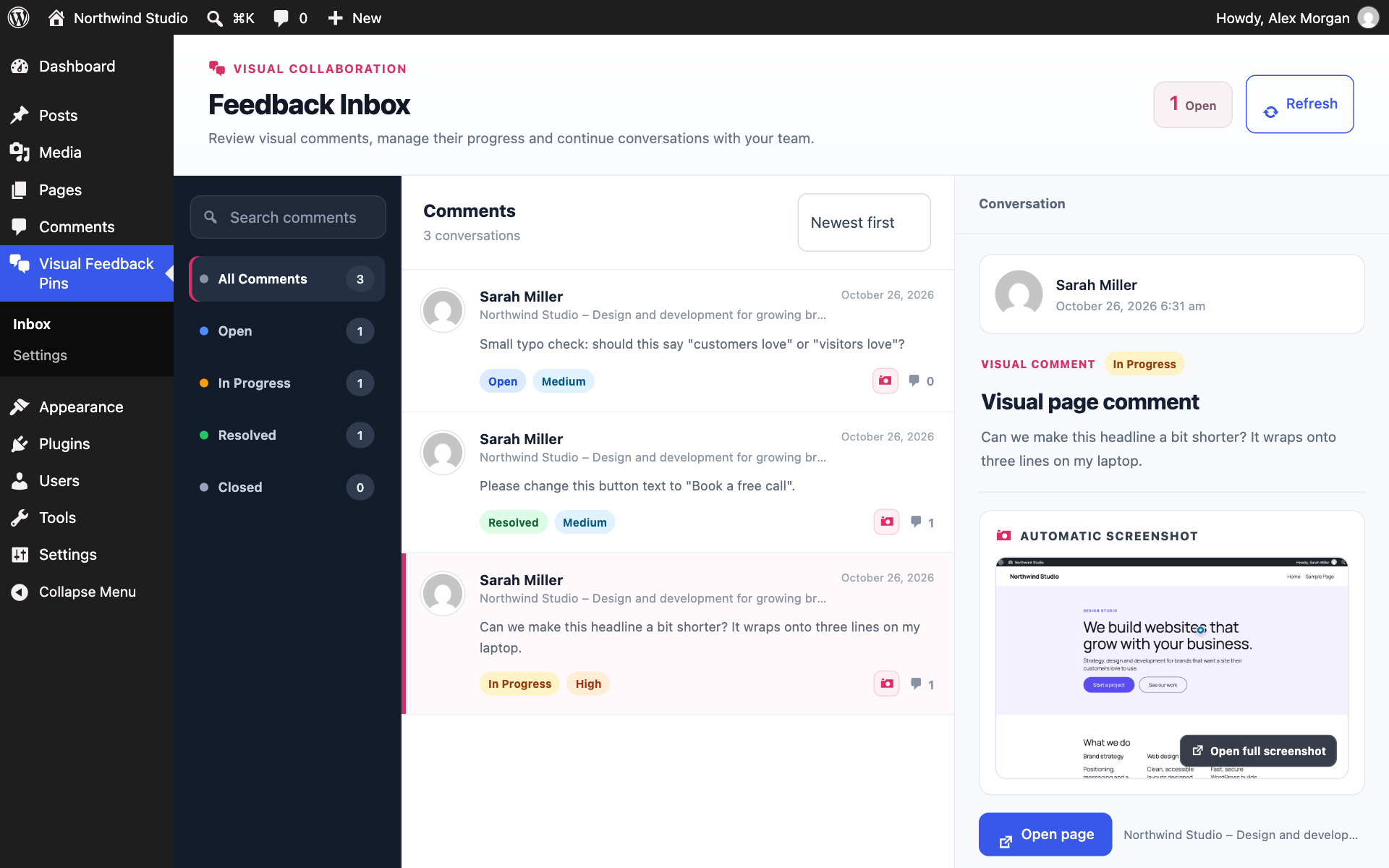
- Automatic screenshots. The visible part of the page is captured in the browser the moment feedback is sent, so you see exactly what the reviewer saw.
- Image attachments. Reviewers can add their own JPG, PNG or WebP image (up to 5 MB) alongside the comment.
- Threaded replies. Discuss each item from the frontend pin or from the admin inbox. Both views stay in sync.
- Feedback inbox. Search all feedback, filter by status, sort by date, and open any item to see its screenshot, attachment, page link and full conversation.
- Email notifications. Get an email when new feedback or a reply arrives, send alerts to several addresses, and let the person who left feedback know when someone replies.
- Status and priority. Move each item through Open, In Progress, Resolved and Closed, and set a priority so the important fixes get done first.
- Technical context included. Each report records the page URL, browser, screen size, viewport size and device pixel ratio, which helps you reproduce layout bugs.
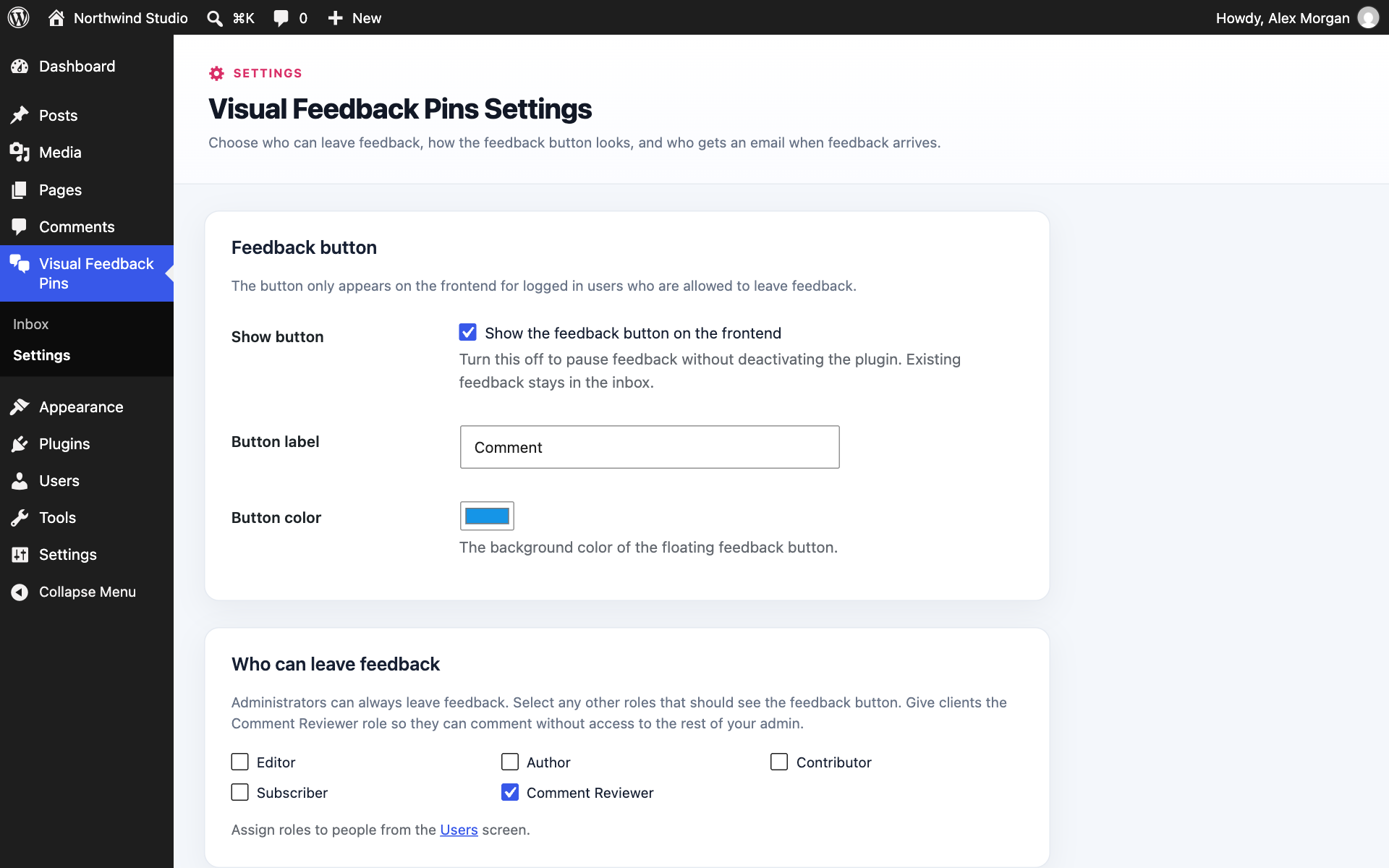
- Reviewer role and role control. Activation adds a Comment Reviewer role for clients and teammates. From the settings page you can also allow Editors, Authors or any other role to leave feedback.
- Simple settings. Change the button label and color, pause the button without deactivating the plugin, and choose who gets notified.
- Clean deletion. Deleting feedback also removes its replies, its screenshot file and its image attachment.
- Lightweight. The feedback interface only loads for logged in users who are allowed to leave feedback. Regular visitors never see it and never load its scripts.
- Self hosted. All data stays in your WordPress database and uploads folder.
Who can use it
- Administrators can leave feedback, reply, and manage everything in the inbox.
- Comment Reviewers can leave feedback and reply on the frontend.
- Any other role you enable on the settings page can do the same.
- Visitors who are not logged in never see the feedback tools.
Privacidade
Visual Feedback Pins stores everything on your own site. For each feedback item and reply it saves the reviewer’s WordPress name, email and user ID, the page URL and title, the pin position and the selected element, and technical details (browser user agent, screen and viewport size, device pixel ratio and IP address). Screenshots are saved in wp-content/uploads/userback/screenshots/. Image attachments are saved in the Media Library.
Nothing is sent to an outside service except Gravatar avatars, explained under External Services below.
Serviços externos
Gravatar
The feedback interface and admin inbox show user avatars through WordPress’s built in avatar feature, which loads images from Gravatar. When an avatar is shown, a hashed version of the user’s email address is sent to Gravatar to fetch the image. Gravatar is not used to store or manage feedback.
Gravatar is operated by Automattic.
- Terms of Service: https://automattic.com/terms-of-service/
- Privacy Policy: https://automattic.com/privacy/
Bundled Library
html2canvas 1.4.1 by Niklas von Hertzen is bundled locally at public/js/vendor/html2canvas.min.js and is used to capture the visible page in the user’s browser. It is distributed under the MIT license, and the full notice is included in public/js/vendor/html2canvas.LICENSE.txt. Existing notices for code bundled within the library are retained.
- Readable source: https://github.com/niklasvh/html2canvas/tree/v1.4.1/src
- Source and build configuration: https://github.com/niklasvh/html2canvas/tree/v1.4.1
- Build scripts and dependencies: https://github.com/niklasvh/html2canvas/blob/v1.4.1/package.json
To build the upstream library, clone https://github.com/niklasvh/html2canvas.git, check out tag v1.4.1, run npm install, then npm run build. The build produces dist/html2canvas.min.js using TypeScript, Rollup and UglifyJS. These tools are only needed to build the library, not to use this plugin.
The file is loaded from the plugin folder. It is never downloaded from a CDN at runtime.
Instalação
- In your WordPress admin, go to Plugins > Add New, search for Visual Feedback Pins, then install and activate it.
- Open Visual Feedback Pins in the admin menu to see the inbox.
- Optional: open Visual Feedback Pins > Settings to choose who gets email notifications, which roles can leave feedback, and the button label and color.
- To invite a client or teammate, go to Users, create or edit their account, and set the role to Comment Reviewer. Administrators can leave feedback right away.
- While logged in, visit any page on your site and click the feedback button to leave your first pin.
No setup is required. The plugin works as soon as it is activated, and email notifications go to the site admin email by default.
Log de Changes
Adds email notifications, a working settings page and a getting started notice. Notifications go to the site admin email by default.
1.1.0
- New: Email notifications for new feedback and replies, sent to one or more addresses.
- New: Optionally email the person who left feedback when someone replies to it.
- New: Settings page to change the button label and color, pause the button, and choose which roles can leave feedback.
- New: Getting started notice after activation that explains where to find the feedback button.
- New directory screenshots.
- Developer: New userback_feedback_created and userback_reply_created actions.
1.0.1
- Renamed the plugin to Visual Feedback Pins. The admin menu and page titles now use the new name.
- Rewrote the plugin description, installation steps and FAQ.
- New plugin icon and banner.
- No changes to features or stored data. Existing feedback is untouched.
1.0.0
- Lançamento público inicial.
- Frontend visual feedback with numbered pins on live pages.
- Automatic viewport screenshot capture.
- Optional image attachments.
- Threaded replies from the frontend and the admin inbox.
- Admin inbox with search, status filters, status and priority management.
- Comment Reviewer role for clients and teammates.
- Screenshot and attachment cleanup when feedback is deleted.
Capturas de tela



Para desenvolvedores
Este é o seu plugin? Mostre os números.
Adicione um crachá ao vivo ao seu site, Documentos ou Readme do GitHub. Ele é atualizado por conta própria - nenhuma conta necessária.
Best Visual Feedback Pins alternatives
All bug reporting plugins →

FAQ
Visual Feedback Pins: quick answers
Respostas diretas, extraídas de dados ao vivo WordPress.org.
Fonte: WordPress.org
Is Visual Feedback Pins free?
Yes. Visual Feedback Pins is free to download and use from the official WordPress.org plugin directory.
Is Visual Feedback Pins safe to use in 2026?
Visual Feedback Pins works, but test it on a staging site before relying on it in 2026. Was last updated 1 month ago, and scores 60/100 on our health check.
How many websites use Visual Feedback Pins?
Visual Feedback Pins is active on <10 WordPress websites and has been downloaded 387 times since it launched in October 2026. It was downloaded 89 times in the last 30 days.
Does Visual Feedback Pins work with WordPress 7.1?
Yes. The developer has tested Visual Feedback Pins up to WordPress 7.1.5, the latest release. It requires WordPress 6.0 or newer.
What PHP version does Visual Feedback Pins need?
Visual Feedback Pins requires PHP 7.4 or higher. Most hosts run PHP 8.x today, so it works on any modern WordPress hosting.
When was Visual Feedback Pins last updated?
The latest version, 1.1.0, was released on October 26, 2026 (1 month ago).
Who makes Visual Feedback Pins?
Visual Feedback Pins is developed and maintained by wolfizsolutions.
What are the best alternatives to Visual Feedback Pins?
The most popular alternatives to Visual Feedback Pins are Honeybadger Application Mon… (10+ installs), Supernifty Bublz (<10 installs) and SnagRelay (<10 installs).
Alimentado por PageForge
Um modelo e uma planilha. Uma página real para cada pesquisa.
PageForge Transforma cada linha de um CSV em uma página WordPress com seu próprio título, URL, SEO campos e esquema, construído no layout que você já desenhou. Gratuito em WordPress.org.
- CSV e XLSX, mais Google Sheets em Profissional e Empresarial
- Seu próprio título, URL, SEO campos e esquema para cada página
- Funciona com o editor de blocos, Elementor, Divi e Avada
- Gratuito em WordPress.org, sem cartão de crédito