


Galeria por portfólio visual
Build photo galleries, image galleries, and portfolio grids with gallery blocks. Masonry, lightbox, sliders, and filters included.

Escolha segura
Yes — Gallery by Visual Portfolio is a safe, well-maintained plugin to use in 2026. It runs on 50K+ sites, is rated 4.8/5 and was last updated 4 days ago, and scores 94/100 on our health check.
- Comprovado em escala em mais de 50 mil sites ativos
- Loved by users — 4.8/5 from 342 reviews
- Desenvolvido ativamente — última atualização 4 dias atrás
- Testado com as últimas WordPress (7.1)
- Momentum — downloads up 472.2% vs the previous 30 days
- Precisa de PHP 8.3 ou mais recente
Como ele se acumula?
Lado a lado em instalações, atualizações, avaliações e suporte



Downloads diários
Os picos de download geralmente seguem uma nova versão — cada site que atualiza automaticamente é um download.
Rankings
Where Gallery by Visual Portfolio stands todayWordPress.org Classificações de pesquisa
Posição ao vivo na pesquisa de plugins, top 100| Palavra chave | Posição |
|---|---|
| galeria | #28 |
| image gallery | #44 |
| photo gallery | #30 |
| portfolio | #1 |
| Galeria de vídeos | #36 |
Adoção da versão
Compartilhamento de sites ativos por lançamento.
Divisão de classificação
★★★★★★★★★★ 4.8 from 342 reviews
About Gallery by Visual Portfolio
From the official readme · v3.11.0Descrição
Photo gallery and portfolio plugin for WordPress
★★★★★
Visual Portfolio is a WordPress gallery plugin built around gallery and portfolio blocks. Use it for photo galleries, image galleries, video galleries, and albums. Pick masonry, justified, tiles, grid, slider, or carousel layouts.
See Live Demo | Documentation | GitHub
Keep it simple with a basic image gallery, or go further with nested galleries, filterable portfolio grids, post grids, and taxonomy grids. Add images, choose a layout, then tweak skins and the lightbox. You do not need to write code.
🏆 Visual Gallery Builder
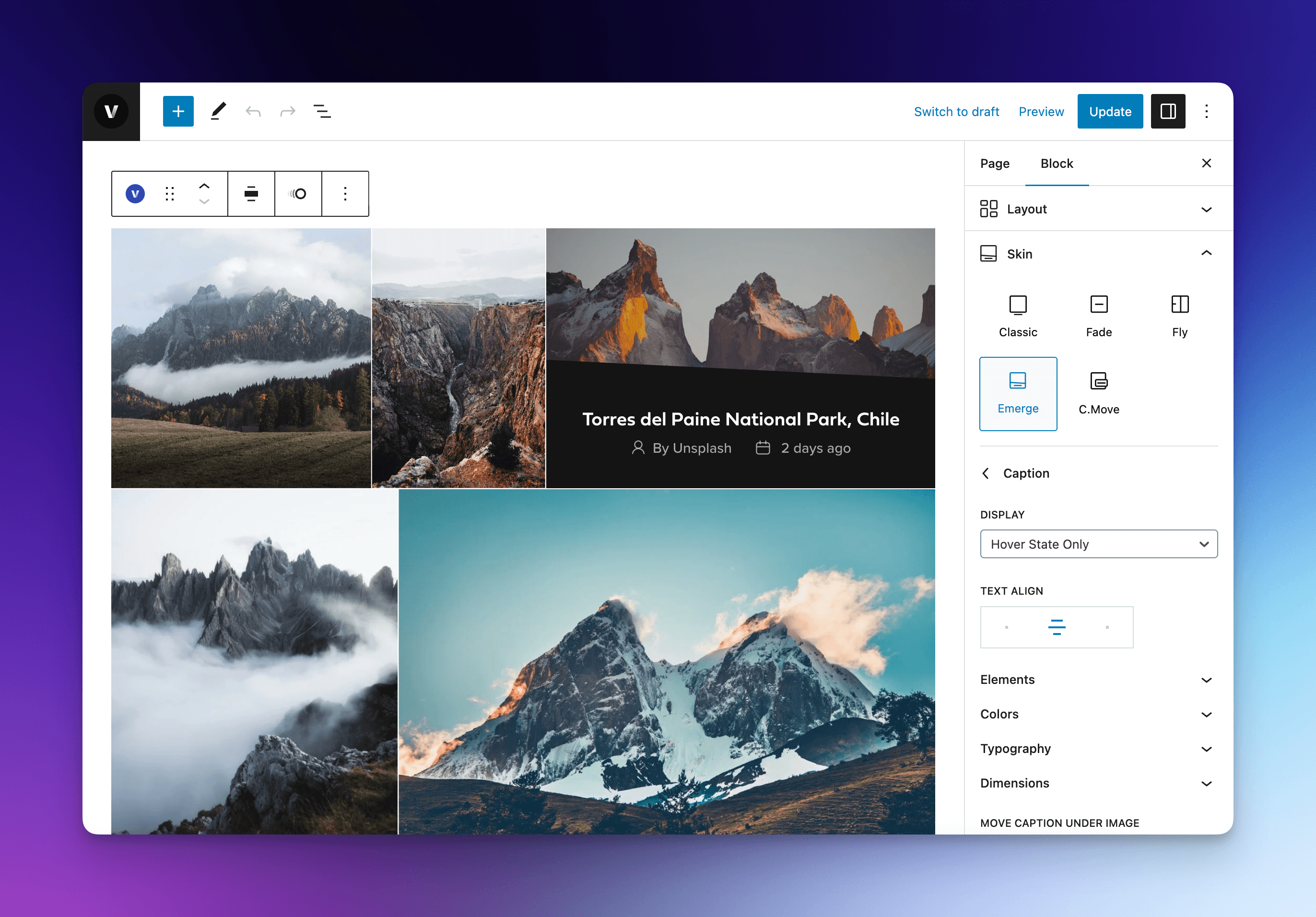
Build gallery and portfolio blocks without coding. Customize layouts visually with live preview in the editor.
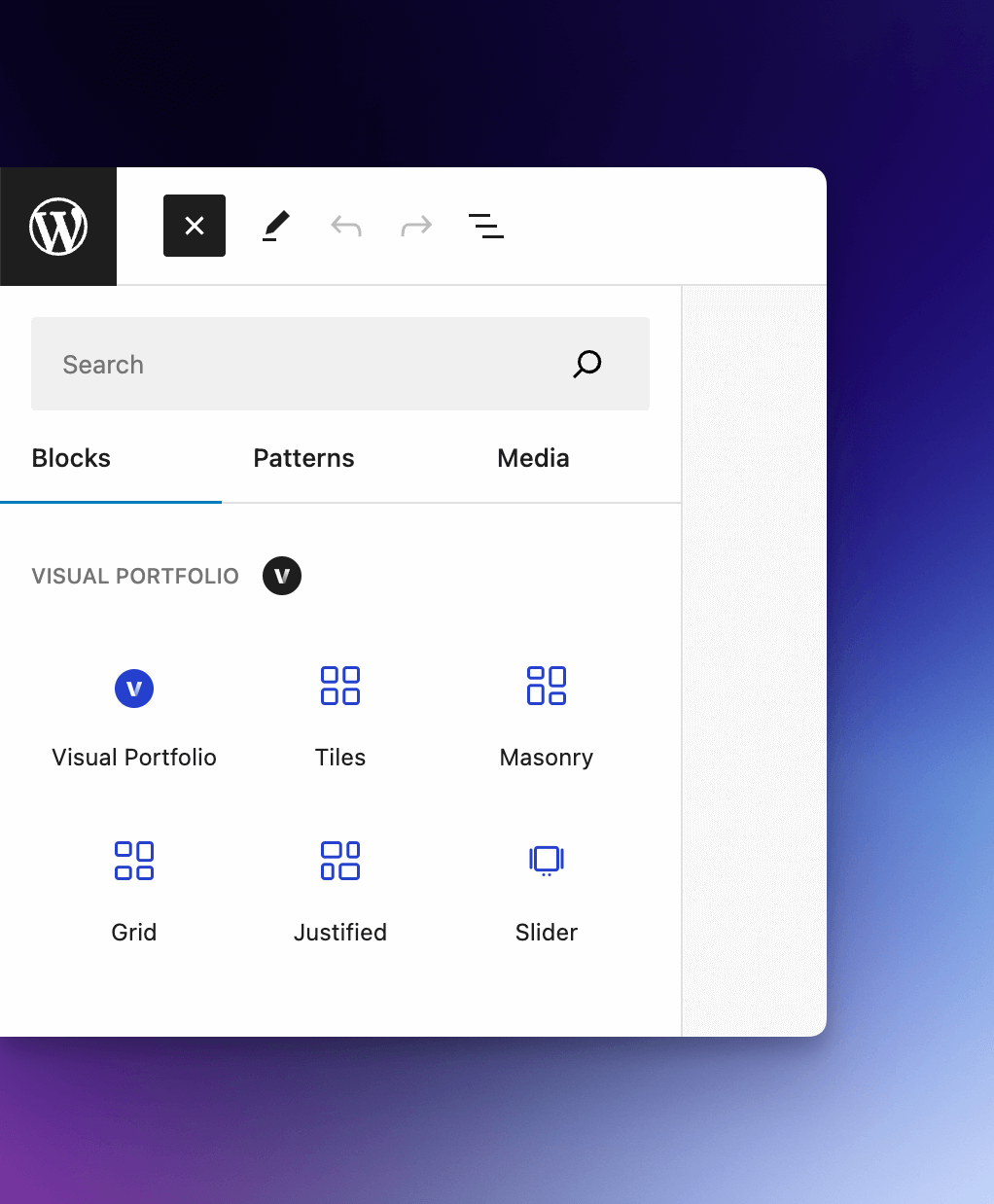
Supported layouts: Masonry, Justified, Tiles, Grid, Slider, and Carousel. You get skins and the usual gallery controls in one place.
🚀 Optimized to be Fast as Native
Despite the rich functionality, the Visual Portfolio is optimized as much as possible, to be fast and lightweight.
Due to the modular code structure, all scripts and styles are loaded only when they are needed for the current page that displays your gallery. So, your pages will never load unused features.
Pictures are not loaded in the main thread due to lazy loading. Moreover, our plugin is compatible with third-party WebP providers and image optimization plugins.
Smart adaptive image sizes fully supported in any gallery, created with Visual Portfolio plugin.
📱 Layouts
Our gallery plugin shipped with popular layouts such as Masonry and Justified (Flickr). Every feature optimized and works seamlessly with all of these layouts, you just need to set up and go with no headache. See it in action:
- Masonry Gallery
- Justified (Flickr) Gallery
- Tiles Gallery
- Grid Gallery
- Slider Gallery (Fade, Carousel, Coverflow)
🎨 Prebuilt Skins
Showcase your projects and gallery images with clean and beautiful skins. See it in action:
⚙️ Easy to Customize
The gallery block with live preview includes a lot of design settings that are point-and-click, no coding knowledge required. If you’re a bit more adventurous, the custom CSS module and PHP filters are set up to be easily used by developers.
📁 Portfolio Post Type
Optional custom post type portfolio will ensure all your portfolios to keep in a single post type. In this way, you can distinguish your portfolios from other post types. Taxonomies are used to categorize your portfolio types, it will help you to group and sort your portfolios. Moreover, you can use these portfolios as a source for your showcase gallery using Visual Portfolio block.
Customize and rename Portfolio archive templates using the gallery block and page builders: https://www.visualportfolio.com/docs/portfolio-archive/
In case you want to use Visual Portfolio plugin for photo gallery only you can disable custom post type registration.
💎 Posts Query Builder
Fine-tune the source of your galleries. Display posts, portfolios, taxonomies, and any other post types, filter by taxonomies, author, and date ranges, include or exclude specific posts, and build post grids or taxonomy grids from the same workflow.
🖼️ Photo Galleries
Create galleries from image sets right inside the gallery block: drop your images in and the gallery is ready. You can create unlimited image galleries with different styles, build album galleries with nested galleries in Pro, and combine images with video items for richer visual storytelling.
⚡ Powerful Lightbox
Visual Portfolio uses only modern solutions, and lightboxes are not an exception. High performance, mobile optimization, retina-ready, and a wide range of features available in Fancybox and PhotoSwipe plugins, that you can choose for your gallery lightboxes.
Mobile Optimized
Looks great on every device. Swipe to navigate, spread/pinch to zoom in/out supported on touch devices.
GPU Accelerated
Hardware accelerated animations for better performance and seamless user experience.
Smart Loading
Gallery images are responsive and loaded progressively using lazy loading on demand.
Social Sharing
You can allow users to share photos on Facebook, X, and Pinterest with social sharing buttons.
📹 Video and 🎵 Audio Support
Visual Portfolio plugin allows you to work with audios and videos within a single gallery. You can paste a supported video or audio URL and it will work automatically in the popup gallery. In Pro, you can also add dedicated video items directly to image galleries and post grids, including autoplay on open or playback on hover. The full list with supported vendors see below.
Supported Video Vendors:
- Youtube
- Vimeo
- Instagram (Reels, video posts and IGTV links)
- TikTok
- Twitch
- Facebook Video
- DailyMotion
- Wistia
- VideoPress
- TED
- Rutube
- Metacafe
- Coub
- Self Hosted Video
Supported Audio Vendors:
- Spotify
- SoundCloud
- Mixcloud
- Beatport
- Self Hosted Audio
📈 SEO-Friendly
Visual Portfolio plugin is built keeping SEO and performance in mind by defining proper structure and tags. Furthermore, due to optimization, it is lightweight and fast when it comes to page load.
In addition our plugin add images in the sitemap for All In One SEO, Rank Math, and Yoast SEO plugins
🏳️ Multilingual & Translation Ready
Visual Portfolio adds a new layer of compatibility for WPML. All blocks are compatible with it and ready for translation. https://www.visualportfolio.com/docs/multilingual/
🛠 Built For Developers
Visual Portfolio gives you a wide range of filters and actions to customize every part of your gallery. Also, it allows you to overwrite templates and change it in the theme directory. Moreover, you can customize separate portfolio lists using custom CSS and CSS Variables.
🔥 Visual Portfolio Pro
The Visual Portfolio plugin is also available in a professional version which includes more features and enhanced performance! Learn more about Visual Portfolio Pro
In order to maintain the free version of the plugin on an ongoing basis, and to provide quick and effective support for free, we offer a Pro version of the plugin. The Pro version allows you to:
-
Video Items in Galleries and Post Grids
Add video items directly into image galleries and post grids, with autoplay on open or play on hover. -
Gallery Format and Albums
Display nested galleries and album-style content in image galleries, posts, and taxonomy grids. -
Taxonomies as Gallery Source
Build galleries directly from taxonomy terms, not only from posts or images. -
Advanced Skin Settings
- Image Filters and Blend Mode – apply Instagram-like filters on images for Normal and Hover states
- Transformations – control the image transformation and border radius for Normal and Hover states
- Typography – control every text part of gallery captions and overlays
- Dimensions – controls paddings, margins and border radius of captions and overlays
-
Stylish Interaction Effects
- Hover Tilt Effect
- Custom Hover Image – useful for animated GIFs
- Caption Move Skin
-
Social Feeds
Automatically fetch posts from your social networks to display in gallery on your site. -
- Watermarks – add your logo or text on top of your images, once or tiled across them, to make them harder to steal
- Password Form – add a password to gallery blocks and send it to your clients
- Age Gate – Protect visitors from viewing adult content
-
Photos Proofing
Communicate with your clients in a modern way:- Create Proofing Gallery – Easily create a gallery with photos, as you did before. Change styling, layout, etc. if you want.
- Send to Clients – Share one gallery with one client or a hundred. Each client gets a personal link, their own selection and private notes on photos.
- Get Approval – Once a client sends their selection, you will be able to compare the picks of all clients and copy filenames for Lightroom or Capture One.
-
Advanced Click Actions
Manually configure how to open specific item types and filter clicking on title or on image. -
Responsive Breakpoints Settings
Manually control the screen sizes, which used by the automatic responsive function to adapt your gallery layouts. -
AJAX Improvements
Requests properly cached and links preloaded before you click. -
Advanced Query Settings
Filter by Author, Date Range, Ignore Sticky Posts, exclude posts without Featured Image, and much more… -
Albums, Gallery Format, and Taxonomy Grids
Build nested gallery structures, output gallery format content, and create visual taxonomy grids from the same workflow. See the Taxonomies demo. -
Quick View for Posts and Pages
Display posts and pages in popup iframe, not only image and video galleries. It’s like works preview in Dribbble and Behance, but on your own site. -
Popup Gallery Deep Linking
Makes URL automatically change when you open popup and you can easily link to a specific popup image. -
White Label
Possibility to use your brand name and logo instead of our “Visual Portfolio”.
Find much more portfolio and gallery features of Visual Portfolio Pro today!
🌟 More Features
-
Lightboxes for Standard WordPress Images
Image lightbox available for Visual Portfolio galleries as well as for standard WordPress images and galleries in your content. -
AJAX Loading and Pagination
Every dynamic part of the Visual Portfolio plugin is using AJAX to update the gallery content in live mode.
Organized galleries and portfolio lists will make your website look more professional, easy to navigate and result in a better user experience. We prepared 3 types of paginations for you:- Infinite Scroll
- Load More button
- Paged pagination
-
Filter
Filter your gallery and portfolio by taxonomies (mostly categories and tags). Let users select a category and see the relevant items. -
Sort gallery items by date and title
Users may sort gallery items by date and title. -
GIFs Support
Our plugin automatically displays the animated GIFs in photo galleries. Also, you can show the animated GIFs on mouseover with the Pro plugin. -
Items Gutters
Manually adjust the spacing between gallery images and projects. -
Images Lazy Loading
Images lazy loading boost your page loading speed. You don’t need to worry about it, just use your beautiful images in the gallery, Visual Portfolio will do all the work for you. -
Images Aspect Ratio
All built-in gallery layouts support custom image aspect ratio. You don’t need to crop the image manually. -
Images Focal Point
Sometimes it is very important to specify the focal point so that the custom aspect ratio does not cut off important parts of the photos. For example, people’s faces on the portrait photos. -
Custom Links for Gallery Images
By default, gallery images will contain the links to original images. You can manually set the custom links, for example, to a website or Youtube video. -
RTL Support
Visual Portfolio natively supports RTL languages, proper styles loaded automatically, without user interaction. -
Elementor and WPBakery Page Builder support
There is a helpful widget for Elementor and shortcode for WPBakery Page Builder, which will let you select one of the available Saved Layouts and output it. -
Responsive and Mobile Ready
Visual Portfolio and Galleries are completely responsive and mobile ready – layouts automagically transforms to display perfectly on your screen size. -
Custom CSS
Deeply customize the look of your gallery using custom CSS and CSS Variables. -
… And Much More
All available features you can find on the plugin’s site and documentation.
Instalação
Instalação automática
Automatic installation is the easiest option as WordPress handles the file transfers itself and you don’t need to leave your web browser. To do an automatic install of Visual Portfolio, log in to your WordPress dashboard, navigate to the Plugins menu and click Add New.
In the search field type “Visual Portfolio” and click Search Plugins. Once you’ve found our plugin you can view details about it such as the point release, rating and description. Most importantly of course, you can install it by simply clicking “Install Now”.
Instalação manual
The manual installation method involves downloading our Visual Portfolio plugin and uploading it to your webserver via your favourite FTP application. The WordPress codex contains instructions on how to do this here.
Log de Changes
3.11.0 – Nov 17, 2026
- improved the experimental Gallery Loop blocks:
- added Saved Layouts built from Gallery Loop blocks. A gallery syncs with one from its block menu, takes the layout’s item design and lightbox, and keeps its own images or posts. A setting changed on the page is marked and can be reset to the layout, and a locked layout allows no changes
- added the Saved Layouts library, with live previews, the pages each layout is used on, filters, duplicate, copy shortcode, export and import. A layout deleted for good leaves the galleries synced with it looking as they did
- added Gallery Loop to the block switcher of the Visual Portfolio and Saved Layout blocks, which converts a legacy gallery with its source, layout, skin, filter, sort, search and pagination
- added folder and ZIP import to image galleries. Files upload three at a time in the order of their names, and files the gallery already holds are skipped
- added Move left, Move right and Remove from gallery to the toolbar of an image in the preview
- added Label and Order settings to the Gallery Filter, and the List tab in the sidebar for the items of a filter shown as a dropdown
- added a choice of formats to the format badge of Item Image
- added Sticky posts to a post types set that includes posts
- added a tablet and phone block gap, and cover padding, set with the editor’s responsive styles
- changed the tablet and phone columns to switch at the theme’s breakpoints, the ones the editor previews, instead of 768px and 576px
- changed the blocks inside an item to be spaced by the theme’s block gap, so a caption no longer sits flush against the picture
- changed the selects, text and date fields of the filter, sort and search blocks to one look in the theme’s type and colors
- changed Justified and Masonry layouts to hold their rows and columns before the page scripts run
- removed the size settings of Item Image and Item Cover from the Justified layout, where they did not change the picture. They come back with their values when the layout changes
- fixed an Item Cover minimum height making a picture taller than its row in the Justified layout
- fixed masonry items overlapping in the editor until the window was resized
- added abilities that let AI agents list, create and change Gallery Loop galleries through the WordPress Abilities API and the MCP Adapter, on WordPress 7.1 and newer
- added a Live Preview to the plugin page on WordPress.org
- changed the Settings, Saved Layouts and Proofing pages, and the Projects, Categories and Tags lists, to one page header with sections as tabs, on a white background
- changed the Settings to show each setting on its own row, with its name and description beside the control
- fixed galleries not laying out again when their container width changed without a window resize
- fixed galleries laying out again and again when they made the page scrollbar appear and disappear
- fixed the lightbox opening a scaled-down copy of a tall image that fits its largest size, such as a long screenshot
- fixed the plugin name missing from the Lazy Loading setting
- Pro:
- added advanced filters to the Gallery Loop:
- the Gallery Filter lists any taxonomy or chosen image categories, takes several terms at once and shows child terms
- added the Gallery Author Filter, Gallery Date Filter and Gallery Field Filter blocks
- added the Gallery Active Filters block, which shows each choice with a way to remove it and clears them all
- added the Gallery Filters Panel block, which puts the filters behind a button that opens a drawer, on phones or always
- every filter works as links or a form, without JavaScript too
- added Import from server, which adds the files uploaded over FTP to the
vp-importfolder in uploads to a gallery, with the same order, duplicate skips and progress as a folder import - added watermarks to Item Cover pictures, so galleries converted from the Fade, Fly, Emerge and Caption Move skins are watermarked too
- added the posts count of a term to Item Meta in a Taxonomies gallery
- added the editor’s Tablet and Mobile screens to Move under image on Item Cover
- added the Taxonomies and Social sources and Photo Proofing selections to the abilities for AI agents
- added Pro settings to the conversion of a legacy gallery: sources, post filters, protection, image effects, Caption Move, typography, infinite scroll, search, quick view, album counts and proofing
- added Changed markers, and reset to the layout, to Pro settings on galleries synced with a Saved Layout
- changed the Social Feeds and Proofing lists to the plugin’s page header
- fixed the Social Feeds and Proofing screens disappearing for administrators and editors when the Portfolio post type was turned off
- removed unused libraries that some hosting scanners flagged as malicious, which makes the plugin 12 MB smaller
3.10.1 – Nov 10, 2026
- changed the WordPress.org changelog to show recent releases with a link to the full history
- Pro:
- fixed a critical error that could stop the plugin from loading when other plugins are active
- fixed text watermark previews having different dimensions from saved copies in some browsers
- fixed galleries added after page load not preloading their next page
3.10.0 – Nov 9, 2026
- improved the experimental Gallery Loop blocks:
- changed the start of a new gallery: add its images first, by upload, Media Library or a drop, then pick a layout from previews drawn with those images. Posts, Taxonomies and Social sit in an “Other sources” menu
- changed a new image gallery to show all its images on one page and open a picture larger
- changed “Change layout” in the toolbar to show on every loop with blocks. Picking a layout replaces the blocks, and undo works
- fixed a picked layout being locked behind “Edit pattern”
- fixed Item Cover leaving a gap on tall tiles
- fixed Query Total and the Carousel Indicator counter showing sample numbers in the editor
- fixed layout previews showing the No Results text, and nearly empty thumbnails in the inserter
- fixed Carousel Thumbnails ignoring a centered row on the page
- fixed an empty carousel showing its controls on the page
- fixed Infinite Scroll reloading without end and never adding a page, and a Load More beside it adding items already shown
- changed the General, Images and Popup & Lightbox settings to WordPress controls, with rarely changed settings in collapsed groups
- fixed Load More doing nothing after one failed request until the page was reloaded
- fixed the Fade, Fly and Emerge item styles taking two taps to open an item on iPhone and iPad
- fixed a custom portfolio base replaced with the site’s post name structure, which returned 404 on ordinary pages. The first request after the update corrects a saved base
- Pro:
- added a separate selection for each client to Photo Proofing:
- one gallery gives every client a personal link, their own selection, private notes on photos and a status
- new galleries start in this mode, and existing galleries keep one shared selection
- clients register with a name on the shared link, or you add them and send invitations
- a review window shows clients by status, one client’s picks, notes and history, and the votes of all who sent
- comments are hidden on these galleries, and notes replace them
- added filename copying for Lightroom, Capture One or one per line, and a CSV download, to Photo Proofing
- added an email for each submission or a daily digest, a copy for the client, and reminders that are each sent once, to Photo Proofing
- added an expiry date to proofing galleries
- changed the default of Copy Filenames on shared proofing galleries to the Lightroom format
- changed a new proofing gallery to ask for photos first, and for the selection mode before publishing
- removed the Activity tab from proofing galleries. Each client shows the moments that matter in one line
- fixed Copy Filenames copying only part of a selection when clicked before every photo had loaded
- fixed saving a proofing gallery from an editor opened earlier bringing back the client’s previous selection and status
- improved Watermarks:
- added the Text source, for a watermark made of your own text in the color you pick
- added the Tiled layout, which repeats the watermark over the whole image with an angle and gaps
- added a preview on photos from your Media Library that follows every change before you save
- added the progress of watermark generation to Settings, with Pause and Resume, and the status of each image to the Media Library and the gallery editor
- fixed watermarks not being generated in the background, including on hosts that block requests a site makes to itself
- fixed galleries showing incomplete watermarked copies while images were regenerated or after a failed run
- fixed the Opacity setting being ignored for a JPEG logo
- fixed watermarked copies saved in the wrong format on sites where WordPress converts image sizes to WebP
- fixed Remove Watermark in the Media Library reporting success while the copies stayed, and the Media Library buttons staying stuck after an error
- added the sync status of each social feed, with its item count and last sync, to the gallery editor and to the account cards in Settings
- changed the White Label, Updates and Social Feeds settings to WordPress controls, matching the free settings
- fixed Sync Now reporting success when a feed failed
- fixed social feeds syncing every 4 hours instead of every 2
- fixed Reconnect on Instagram filling a different account, and added Reconnect to Unsplash and Dribbble
- fixed classic Social galleries showing no items in the block editor
- fixed a deep link to a lightbox slide on a later page of a classic gallery opening the first slide or nothing
- fixed pagination refusing every later page after one page failed to preload, and a login or error page loading in place of gallery items
- fixed the Pause every setting of Infinite Scroll in the Gallery Loop counting pages loaded by a Load More beside it
- fixed the license link on the Updates page and other Pro settings links on sites with the Portfolio post type turned off
- fixed tilt, image effects and other Pro hover effects taking two taps to open an item on iPhone and iPad
3.9.0 – Oct 24, 2026
- added WordPress 7.2 compatibility
- raised the minimum PHP requirement to 8.3
- improved the experimental Gallery Loop blocks:
- added Carousel Navigation, Previous, Next, Indicator, Autoplay and Thumbnails blocks, placed anywhere inside the loop
- added Query Total and End of List blocks, and a Gallery Search block whose search comes with Pro
- added the Fade carousel effect, and carousel effects in browsers without scroll-driven animations
- added a pattern editor for the Tiles layout, with the old patterns kept as presets
- added Sticky posts, Authors, Formats and excluded terms to the Posts source
- added images by URL from outside the Media Library, and Crop and Replace in the image toolbar, to the Media source
- added the filter as a dropdown, the sort as links, row gaps, grid alignment, and tablet and phone column counts
- added the lightbox chosen in Settings, with its caption sources
- added transforms from the Gallery, Latest Posts and Query Loop blocks
- changed the blocks to print nothing below WordPress 7.1
- security fix: a custom query saved by a contributor could show other authors’ drafts
- improved block editor loading: the Custom CSS code editor loads only when it is opened, so the editor starts with about half the JavaScript
- changed the image picking buttons and the chosen image card to the WordPress 7.2 featured image style
- security fix: logged-in users without the needed role could search draft and private post titles, open the gallery preview, or run admin-only plugin requests
- security fix: custom CSS could close the tag it is printed in
- fixed custom CSS losing
&nesting,>selectors, rules wrapped in<style>tags and rules written after a closing style tag - fixed styles and carousels on right-to-left sites
- fixed the Media Settings panel showing empty thumbnails for galleries saved with image IDs only
- fixed the focal point control overlapping the image
- fixed the block editor preview breaking on galleries with a few hundred images
- fixed the welcome screen being skipped right after activation
- Pro:
- improved the experimental Gallery Loop blocks:
- added albums, image effects, tilt, caption move, hover media, video thumbnails, deep links, right-click protection, watermarks and Quick View
- added a marquee mode to the carousel autoplay
- added the Cover, Reveal, Warp, Drop and Stack carousel effects, with more transitions and rows
- added a tiles pattern of its own for tablets and phones
- added mixed social feeds
- fixed every page of a social or taxonomy loop showing the first page
- added a feed source picked in each social gallery, so one connection serves several galleries
- changed “Sync All Accounts” to “Sync Now”, which syncs the feeds galleries show
- added a link on the Updates page to where the license key is
- security fix: users without the needed role could activate the license, change watermark settings, list Facebook pages, search users by email, read album images of non-public content, rewrite an approved proofing selection, or use proofing on a password-protected gallery without its password
- fixed a deep link to a lightbox slide added by Load More opening nothing
- fixed a local video without a cover image showing as an empty item with a PHP warning
- fixed browsers keeping old Pro styles after an update
- fixed Facebook watch links, Instagram links without a trailing slash or with
_or-in their ID, and Twitch videos on sites with a port in the address not opening in the popup
3.8.2 – Sep 10, 2026
- fixed images with empty alt text being written with a valueless attribute, which SEO crawlers counted as missing alt text
- Pro:
- fixed Click Action set to Disabled still linking gallery items that carry an audio or a local video URL
- fixed one failed plugin update leaving the rest of the queue stalled until the page was reloaded
3.8.1 – Aug 31, 2026
- changed Visual Portfolio to stay active next to Visual Portfolio Pro instead of being deactivated
- fixed Pro gallery templates and styles being ignored on networks where Visual Portfolio and Visual Portfolio Pro are activated at different scopes
Capturas de tela

Para desenvolvedores
Este é o seu plugin? Mostre os números.
Adicione um crachá ao vivo ao seu site, Documentos ou Readme do GitHub. Ele é atualizado por conta própria - nenhuma conta necessária.
Best Gallery by Visual Portfolio alternatives
All gallery plugins →


FAQ
Gallery by Visual Portfolio: quick answers
Respostas diretas, extraídas de dados ao vivo WordPress.org.
Fonte: WordPress.org
Is Gallery by Visual Portfolio free?
Yes. Gallery by Visual Portfolio is free to download and use from the official WordPress.org plugin directory. The developer also sells premium add-ons or a Pro version with extra features.
Is Gallery by Visual Portfolio safe to use in 2026?
Yes — Gallery by Visual Portfolio is a safe, well-maintained plugin to use in 2026. It runs on 50K+ sites, is rated 4.8/5 and was last updated 4 days ago, and scores 94/100 on our health check.
How many websites use Gallery by Visual Portfolio?
Gallery by Visual Portfolio is active on 50K+ WordPress websites and has been downloaded 2,544,372 times since it launched in September 2017. It was downloaded 56,748 times in the last 30 days.
Does Gallery by Visual Portfolio work with WordPress 7.1?
Yes. The developer has tested Gallery by Visual Portfolio up to WordPress 7.2, the latest release. It requires WordPress 6.2 or newer.
What PHP version does Gallery by Visual Portfolio need?
Gallery by Visual Portfolio requires PHP 8.3 or higher. Most hosts run PHP 8.x today, so it works on any modern WordPress hosting.
When was Gallery by Visual Portfolio last updated?
The latest version, 3.11.0, was released on November 17, 2026 (4 days ago).
Who makes Gallery by Visual Portfolio?
Gallery by Visual Portfolio is developed and maintained by nK.
What are the best alternatives to Gallery by Visual Portfolio?
The most popular alternatives to Gallery by Visual Portfolio are Smart Slider 3 (800K+ installs), Slider, Gallery, and Carous… (500K+ installs) and Photo Gallery, Sliders, Pro… (300K+ installs).
Alimentado por PageForge
Um modelo e uma planilha. Uma página real para cada pesquisa.
PageForge Transforma cada linha de um CSV em uma página WordPress com seu próprio título, URL, SEO campos e esquema, construído no layout que você já desenhou. Gratuito em WordPress.org.
- CSV e XLSX, mais Google Sheets em Profissional e Empresarial
- Seu próprio título, URL, SEO campos e esquema para cada página
- Funciona com o editor de blocos, Elementor, Divi e Avada
- Gratuito em WordPress.org, sem cartão de crédito