


Vexalyn LLM MD
Generates and serves Markdown files optimized for LLMs (Large Language Models) for your WordPress articles.

Use com cautela
Vexalyn LLM MD works, but test it on a staging site before relying on it in 2026. Was last updated 1 month ago, and scores 60/100 on our health check.
- Testado com as últimas WordPress (7.1)
- Base de usuários pequenas (<10 instalações ativas)
- Muito poucos comentários até agora
Como ele se acumula?
Lado a lado em instalações, atualizações, avaliações e suporte


Downloads diários
Os picos de download geralmente seguem uma nova versão — cada site que atualiza automaticamente é um download.
Rankings
Where Vexalyn LLM MD stands todayWordPress.org Classificações de pesquisa
Posição ao vivo na pesquisa de plugins, top 100| Palavra chave | Posição |
|---|---|
| Ai | >100 |
| artificial intelligence | >100 |
| content export | >100 |
| LLM | >100 |
| markdown | >100 |
About Vexalyn LLM MD
From the official readme · v1.2.0Descrição
Vexalyn LLM MD automatically generates and serves Markdown versions of your WordPress posts and pages, optimized for consumption by Large Language Models (LLMs) such as ChatGPT, Claude, and others.
Whether you want to make your content more accessible to AI tools, build RAG (Retrieval-Augmented Generation) pipelines, or simply expose your content in a clean machine-readable format, this plugin provides a seamless solution directly within WordPress.
Recursos:
- Auto-generates Markdown on post save for selected post types
- Serves Markdown via a clean URL endpoint (
/article.md) appended to any post URL - Also serves Markdown via the
Accept: text/markdownHTTP header for programmatic access - Bulk generation of Markdown for all existing posts at once, via the admin panel or WP-CLI, globally or per post type
- Bulk generation runs in the background in small batches with a live progress bar: no timeout on large sites, and you can leave the page while it continues
- Export all generated Markdown files as a single ZIP archive
- Optional YAML frontmatter (title, URL, dates, author, categories, tags) at the top of each file, configurable globally and per post via the
vexalyn_llm_md_frontmatter_fieldsfilter - Password-protected posts are automatically excluded from Markdown generation and serving
- Markdown is always rendered as a logged-out visitor sees the page, so content reserved to members is never exposed
- Per-content “Exclude from Markdown” checkbox and “Delete generated Markdown” button on the post edit screen, for post types enabled in the admin panel
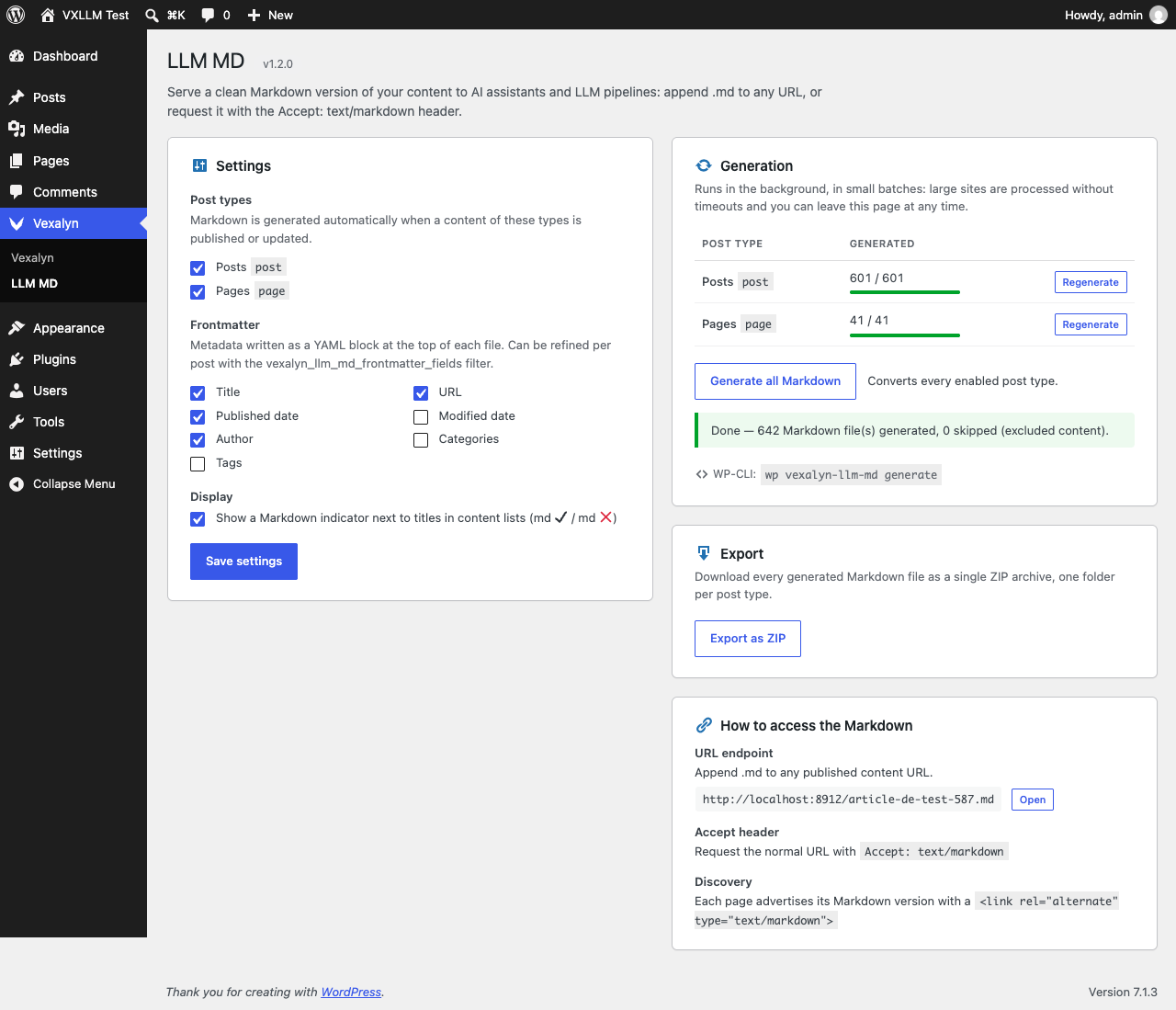
- Dedicated admin panel located under Vexalyn > LLM MD in the WordPress dashboard
Instalação
- Upload the
vexalyn-llm-mdfolder to the/wp-content/plugins/directory, or install the plugin directly through the WordPress plugin screen. - Ative o plugin através da tela plugins em WordPress.
- Navigate to Vexalyn > LLM MD in the WordPress admin menu to configure the plugin settings.
- Select the post types for which Markdown should be automatically generated on save.
- Optionally, use the bulk generation tool to generate Markdown for all existing posts.
Log de Changes
Security fix: content reserved to members could be exposed in the public .md files. Update, then click "Generate all Markdown" to rebuild existing files. Bulk generation now runs in the background.
1.2.0
- Security: Markdown is now always rendered as a logged-out visitor. Previously, content hidden from visitors by shortcodes or blocks (membership, paywall, “logged-in only”) was rendered in full when an administrator saved a post or ran a bulk generation, and was then served publicly through the
.mdendpoint. Regenerate your Markdown after updating if your site restricts content this way. - Security hardening:
.mdresponses now sendX-Content-Type-Options: nosniff. - SEO:
.mdresponses now sendX-Robots-Tag: noindex, so search engines do not index the Markdown copies as duplicate content. - Background generation: a content whose rendering fails (PHP error, exception, memory or time limit) is retried on its own, then skipped and reported with its ID, instead of blocking the whole generation.
- Bulk generation (“Generate all Markdown” and per-type “Regenerate”) now runs in the background: contents are converted in small time-boxed batches driven by the settings page (AJAX) and by WP-Cron, with a live progress bar, a “Cancel” button, and automatic resume when the page is reopened. Large sites no longer hit PHP, proxy or browser timeouts, and leaving the page does not interrupt the generation.
- Fixed the “Regenerate” buttons: they now start the background job instead of a synchronous request, and refreshing the page no longer re-submits the last action (settings and actions follow the post/redirect/get pattern).
- Permalinks: the
.mdrewrite rule is verified on admin page loads and restored automatically if missing, so no manual “Save permalinks” is needed after activation or update. If another plugin keeps removing the rule, the restore is attempted at most once per hour and the settings page shows a warning. A warning is also shown when the permalink structure is “Plain”. - Redesigned settings page: settings, generation (per-type counters with progress), export and endpoint documentation in dedicated cards, with proper WordPress admin styling and responsive layout.
- Fixed the
<link rel="alternate" type="text/markdown">tag, which pointed to the HTML permalink instead of the.mdURL. - The post edit box now shows a direct “View generated Markdown” link when a file exists.
- Autosaves no longer trigger a Markdown regeneration.
- New filters:
vexalyn_llm_md_batch_size(posts per batch, default 20),vexalyn_llm_md_step_budget(seconds per step, default 10),vexalyn_llm_md_cron_max_seconds(max seconds per WP-Cron run, default 120). - WP-CLI:
generateshows a progress bar and lists the posts that could not be converted; newstatusandruncommands for the background job. - Confirmed compatibility with WordPress 7.1.
1.1.0
- Added a “Delete generated Markdown” button in the post edit screen’s LLM MD box, shown whenever a cached file exists, to remove a mistakenly generated
.mdwithout excluding the content from future generation. - Added a “Regenerate” button per post type in the Stats section, to refresh Markdown for a single content type instead of running the full bulk generation.
- Added a per-content “Exclude this content from Markdown generation” checkbox on the post edit screen, shown only for post types enabled under Vexalyn > LLM MD.
- Security: password-protected posts are no longer cached or served as Markdown (endpoint and
Acceptheader now return 404, and existing cache is purged on save). - Added optional YAML frontmatter (title, URL, dates, author, categories, tags), configurable per field in the admin panel, with a
vexalyn_llm_md_frontmatter_fieldsfilter for per-post overrides. - WP-CLI: added
--id=<id>to regenerate a single post, with an explanatory error if it’s skipped (not published, password-protected, excluded, or type not enabled). Bulk generation (all types or--post_type) already skips excluded and password-protected content. - Added
wp vexalyn-llm-md generateWP-CLI command for bulk (re)generation without the admin bulk button’s timeout risk. - Confirmed compatibility with WordPress 7.0.2 (no code change required).
1.0.0
- Lançamento inicial.
- Auto-generation of Markdown on post save for selected post types.
- Markdown served via
.mdURL endpoint. - Markdown served via
Accept: text/markdownHTTP header. - Bulk generation of Markdown for all posts.
- ZIP export of all generated Markdown files.
- Admin panel under Vexalyn > LLM MD.
Capturas de tela

Para desenvolvedores
Este é o seu plugin? Mostre os números.
Adicione um crachá ao vivo ao seu site, Documentos ou Readme do GitHub. Ele é atualizado por conta própria - nenhuma conta necessária.
Best Vexalyn LLM MD alternatives
Todos os plugins de IA →





FAQ
Vexalyn LLM MD: quick answers
Respostas diretas, extraídas de dados ao vivo WordPress.org.
Fonte: WordPress.org
Is Vexalyn LLM MD free?
Yes. Vexalyn LLM MD is free to download and use from the official WordPress.org plugin directory.
Is Vexalyn LLM MD safe to use in 2026?
Vexalyn LLM MD works, but test it on a staging site before relying on it in 2026. Was last updated 1 month ago, and scores 60/100 on our health check.
How many websites use Vexalyn LLM MD?
Vexalyn LLM MD is active on <10 WordPress websites and has been downloaded 1,317 times since it launched in May 2026. It was downloaded 187 times in the last 30 days.
Does Vexalyn LLM MD work with WordPress 7.1?
Yes. The developer has tested Vexalyn LLM MD up to WordPress 7.1.5, the latest release. It requires WordPress 6.0 or newer.
What PHP version does Vexalyn LLM MD need?
Vexalyn LLM MD requires PHP 8.0 or higher. Most hosts run PHP 8.x today, so it works on any modern WordPress hosting.
When was Vexalyn LLM MD last updated?
The latest version, 1.2.0, was released on October 20, 2026 (1 month ago).
Who makes Vexalyn LLM MD?
Vexalyn LLM MD is developed and maintained by Kantari Samy.
What are the best alternatives to Vexalyn LLM MD?
The most popular alternatives to Vexalyn LLM MD are Elementor Agent Ready Websi… (10M+ installs), Jetpack (3M+ installs) and All in One SEO (2M+ installs).
Alimentado por PageForge
Um modelo e uma planilha. Uma página real para cada pesquisa.
PageForge Transforma cada linha de um CSV em uma página WordPress com seu próprio título, URL, SEO campos e esquema, construído no layout que você já desenhou. Gratuito em WordPress.org.
- CSV e XLSX, mais Google Sheets em Profissional e Empresarial
- Seu próprio título, URL, SEO campos e esquema para cada página
- Funciona com o editor de blocos, Elementor, Divi e Avada
- Gratuito em WordPress.org, sem cartão de crédito