


User Profile Picture – Custom Local Avatars
Replace Gravatar with a custom profile picture from your Media Library, shown everywhere WordPress displays avatars. Lightweight, no settings.

Escolha segura
Yes — User Profile Picture is a safe, well-maintained plugin to use in 2026. It runs on 4K+ sites, is rated 5/5 and was last updated 4 weeks ago, and scores 83/100 on our health check.
- Desenvolvido ativamente — última atualização 4 semanas atrás
- Testado com as últimas WordPress (7.1)
- Momentum — downloads up 42.5% vs the previous 30 days
- Muito poucos comentários até agora
Como ele se acumula?
Lado a lado em instalações, atualizações, avaliações e suporte


Downloads diários
Os picos de download geralmente seguem uma nova versão — cada site que atualiza automaticamente é um download.
Rankings
Where User Profile Picture stands todayWordPress.org Classificações de pesquisa
Posição ao vivo na pesquisa de plugins, top 100| Palavra chave | Posição |
|---|---|
| avatar | #6 |
| custom avatar | #3 |
| local avatar | #2 |
| profile picture | #2 |
| user avatar | #7 |
Adoção da versão
Compartilhamento de sites ativos por lançamento.
Divisão de classificação
★★★★★ ★★★★★ 5 de 2 comentários
About User Profile Picture
From the official readme · v1.0.10Descrição
User Profile Picture gives any user a custom profile picture, a local avatar chosen from the WordPress Media Library, instead of their Gravatar.
Choose the picture on the user’s profile screen with the standard WordPress media uploader. From then on it appears everywhere WordPress shows that user’s avatar: comments, author boxes, the admin toolbar, the Users list, the Avatar block, the REST API, and any theme or plugin that uses get_avatar() or get_avatar_url(), such as page builder author boxes and GraphQL APIs.
Recursos
- Custom profile picture for any user, chosen or uploaded with the native WordPress media uploader.
- Shown everywhere avatars appear: comments, post authors, the admin toolbar, the Users screen, the Avatar and Post Author blocks, and themes and plugins that call
get_avatar()orget_avatar_url(). - Avatar URLs in the REST API (
avatar_urls) and in plugins that ask for the avatar URL, such as page builder widgets and GraphQL APIs, use the custom picture too. - Remove the picture with one click to go back to the Gravatar.
- Pictures are served from your own site, so users don’t need a Gravatar account.
- Users without a custom picture keep their Gravatar or your default avatar.
- Keeps the size, alt text, CSS classes and lazy loading your theme asks for.
- Set the picture when creating a user on Users > Add New.
- Lightweight: no settings page, and the media uploader loads only on the user screens.
- Works with block themes, classic themes and multisite.
- For developers: the
dew_profile_img()function and thedpp_avatar_classesfilter.
Como funciona
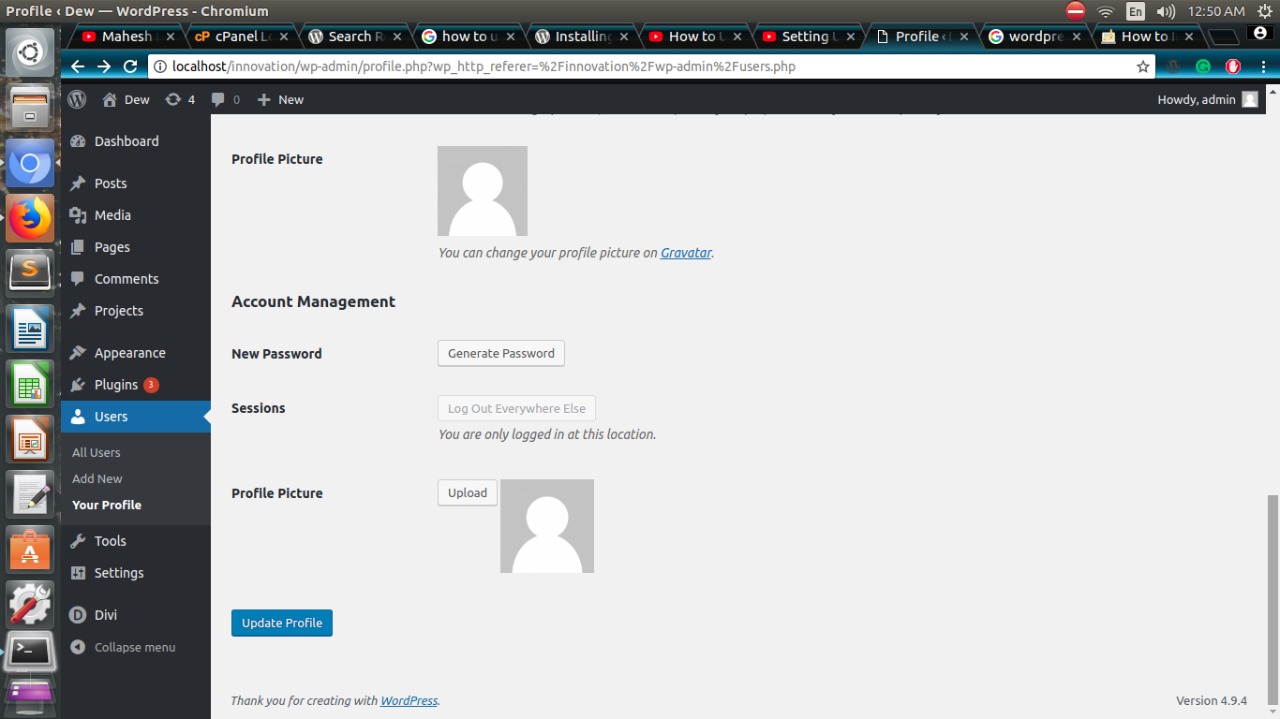
- Go to Users and open a user’s profile, or your own.
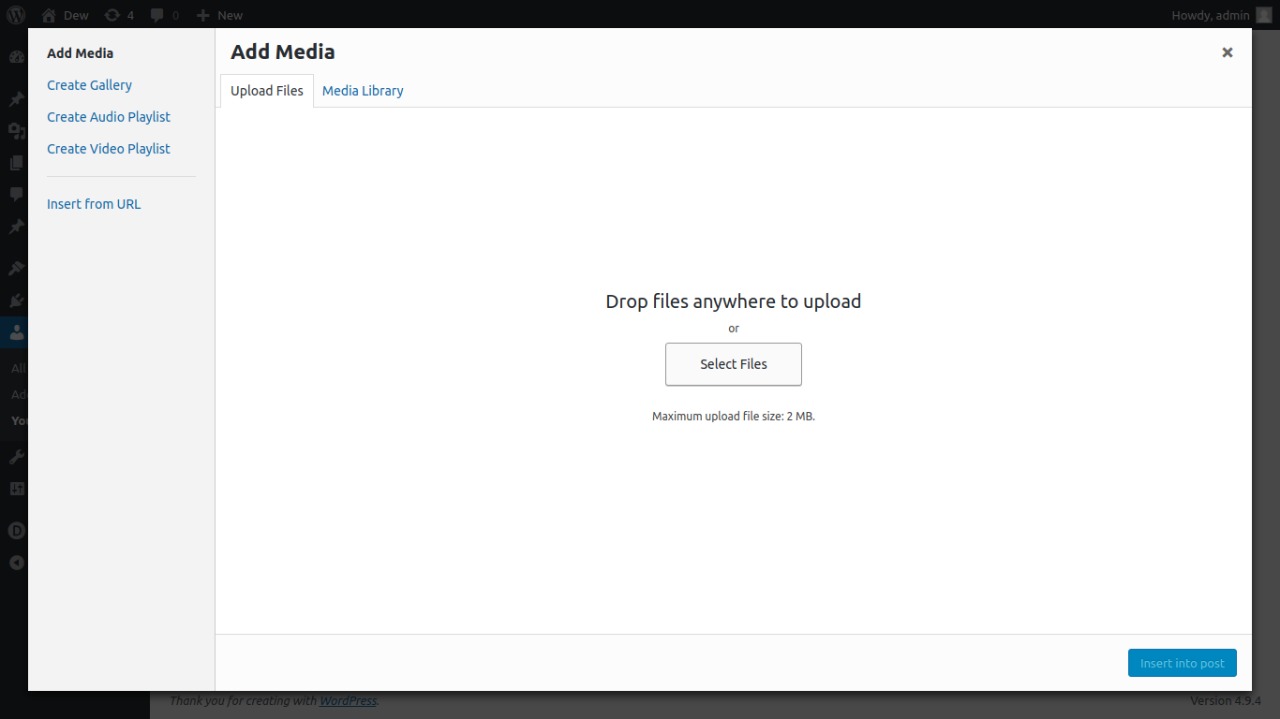
- Under Profile Picture, click Upload and choose or upload an image.
- Click Update Profile. The picture now replaces that user’s Gravatar across your site.
To go back to the Gravatar, click Remove under the picture and then Update Profile.
Profile pictures are set by administrators (users who can edit other users), for any user including themselves.
Like the plugin? Please consider leaving a review. It helps other people find it.
Instalação
From your WordPress dashboard
- Go to Plugins > Add New and search for “User Profile Picture Dew Technolab”.
- Instale e ative o plugin.
- Open Users > Profile, or edit any user, and set the profile picture.
Instalação manual
- Upload the
users-profile-picturefolder to/wp-content/plugins/. - Activate the plugin on the Plugins screen.
Log de Changes
Profile pictures now show in the REST API, page builders, GraphQL APIs and the Avatar block, and can be removed with one click.
1.0.10
- Fix: The profile picture is now also used by code that asks for the avatar URL instead of the image (
get_avatar_url()andget_avatar_data()): the REST APIavatar_urls, page builder author boxes and profile picture tags, GraphQL APIs and the block editor showed the Gravatar. - Fix: The Avatar block’s border and rounded corners were lost on profile pictures. Extra image attributes, height and width passed to
get_avatar()are now kept. - Added: A “Remove” button under the profile picture to go back to the Gravatar.
1.0.9
- Fix: The plugin name showed an unreadable character instead of the dash on the Plugins screen.
1.0.8
- Added: A short, dismissible review request on the user screens (two weeks after first use) and a “Leave a review” link on the Plugins screen.
- Tweak: Clearer plugin name, description and FAQ.
1.0.7
- Fix: The profile picture is now also used when themes request an avatar with a user object, a post or a member’s comment, and keeps the theme’s alt text, CSS classes and lazy loading.
- Fix:
dew_profile_img()printed nothing (and a PHP warning) when called with its default settings, and its default size produced an invalid image size. - Fix: The picture chosen on Users > Add New is now saved.
- Fix: Picture URLs containing “&” were saved HTML-encoded.
- Security: Only http and https picture URLs are accepted, saving checks permission to edit that specific user, and a profile save without the picture field no longer removes the picture.
- Tweak: The media uploader now loads only on the user profile screens instead of every admin page.
- Tweak: The text domain now matches the plugin slug so WordPress.org translations load.
- Tested with WordPress 7.1.
1.0.6
- Added compatibility with WordPress version 7.0.0.
1.0.5
- Added compatibility with WordPress version 6.7.1.
Capturas de tela
Para desenvolvedores
Este é o seu plugin? Mostre os números.
Adicione um crachá ao vivo ao seu site, Documentos ou Readme do GitHub. Ele é atualizado por conta própria - nenhuma conta necessária.
Best User Profile Picture alternatives
All avatar plugins →





FAQ
User Profile Picture: quick answers
Respostas diretas, extraídas de dados ao vivo WordPress.org.
Fonte: WordPress.org
Is User Profile Picture free?
Yes. User Profile Picture is free to download and use from the official WordPress.org plugin directory.
Is User Profile Picture safe to use in 2026?
Yes — User Profile Picture is a safe, well-maintained plugin to use in 2026. It runs on 4K+ sites, is rated 5/5 and was last updated 4 weeks ago, and scores 83/100 on our health check.
How many websites use User Profile Picture?
User Profile Picture is active on 4K+ WordPress websites and has been downloaded 28,725 times since it launched in September 2019. It was downloaded 3,308 times in the last 30 days.
Does User Profile Picture work with WordPress 7.1?
Yes. The developer has tested User Profile Picture up to WordPress 7.1.5, the latest release. It requires WordPress 4.5 or newer.
What PHP version does User Profile Picture need?
User Profile Picture requires PHP 7.4 or higher. Most hosts run PHP 8.x today, so it works on any modern WordPress hosting.
When was User Profile Picture last updated?
The latest version, 1.0.10, was released on October 24, 2026 (4 weeks ago).
Who makes User Profile Picture?
User Profile Picture is developed and maintained by Dew Technolab.
What are the best alternatives to User Profile Picture?
The most popular alternatives to User Profile Picture are Gravatar Enhanced (200K+ installs), Simple Local Avatars (100K+ installs) and One User Avatar (100K+ installs).
Alimentado por PageForge
Um modelo e uma planilha. Uma página real para cada pesquisa.
PageForge Transforma cada linha de um CSV em uma página WordPress com seu próprio título, URL, SEO campos e esquema, construído no layout que você já desenhou. Gratuito em WordPress.org.
- CSV e XLSX, mais Google Sheets em Profissional e Empresarial
- Seu próprio título, URL, SEO campos e esquema para cada página
- Funciona com o editor de blocos, Elementor, Divi e Avada
- Gratuito em WordPress.org, sem cartão de crédito