


Turgenev
SEO content analysis for WordPress: detect over-optimization, keyword stuffing, readability issues, style problems and Yandex Baden-Baden risk.

Escolha sólida
Turgenev is a solid plugin choice in 2026, with a few things worth checking first. It runs on 10+ sites and was last updated 2 months ago, and scores 62/100 on our health check.
- Testado com as últimas WordPress (7.1)
- Pequena base de usuários (10+ instalações ativas)
- Muito poucos comentários até agora
- Precisa de PHP 8.1 ou mais recente
Como ele se acumula?
Lado a lado em instalações, atualizações, avaliações e suporte



Downloads diários
Os picos de download geralmente seguem uma nova versão — cada site que atualiza automaticamente é um download.
Rankings
Where Turgenev stands todayWordPress.org Classificações de pesquisa
Posição ao vivo na pesquisa de plugins, top 100| Palavra chave | Posição |
|---|---|
| Content analysis | >100 |
| copywriting | #25 |
| Readability | >100 |
| SEO | >100 |
| yandex | >100 |
Adoção da versão
Compartilhamento de sites ativos por lançamento.
About Turgenev
Do Readme oficial · v2.0.0Descrição
Professional SEO content analysis directly inside WordPress — without copying drafts into a separate tool.
Turgenev connects the WordPress Block Editor and Classic Editor to the Turgenev content-analysis service. It is built for SEO specialists, copywriters, editors, content teams, agencies and site owners who want to review text quality, search over-optimization and readability before publishing.
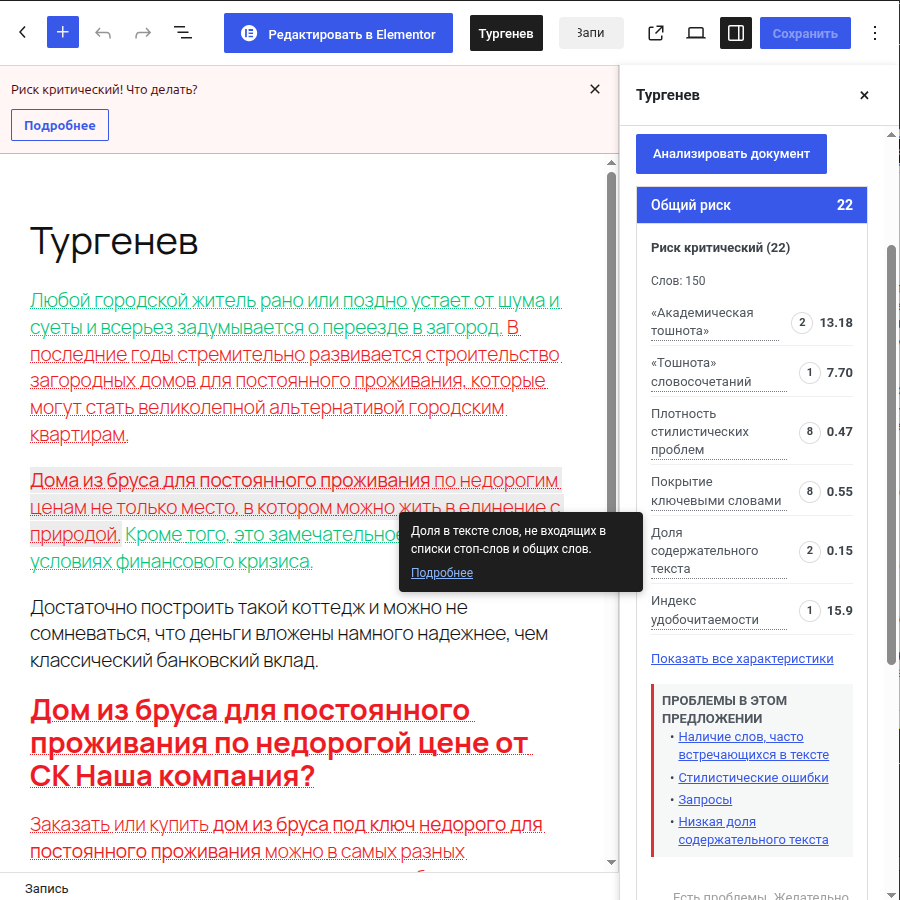
Analyze the current WordPress document, including unsaved changes, and review Turgenev’s overall risk score plus detailed sections for repetition, style, keywords, formality and readability.
No browser extension. No copy/paste workflow. No provider API key exposed to JavaScript.
What Turgenev helps you review
The Turgenev service analyzes text using multiple independent signals. According to the provider, these can help identify content patterns associated with unnatural or over-optimized SEO copy, including:
- SEO over-optimization and signals associated with Yandex Baden-Baden risk;
- keyword stuffing and unnatural keyword repetition;
- unusually frequent words and phrases;
- query / keyword coverage;
- stylistic problems, SEO clichés and bureaucratic wording;
- “wateriness” / low-information wording;
- long or difficult sentences;
- readability;
- the combined Turgenev risk score.
The provider explicitly describes its score as a risk indicator, not a guarantee of a search-engine penalty. The goal is not to chase a zero score mechanically, but to find text that may deserve editorial attention.
Built for SEO and editorial workflows
Turgenev is useful for:
- SEO landing pages;
- commercial category and service pages;
- blog articles;
- product and category copy;
- agency content QA;
- copywriter review;
- editor approval workflows;
- Russian-language SEO content audits;
- pre-publication readability checks;
- detecting repetitive or template-like text.
Instead of switching between WordPress and a separate analysis page, editors can review the current document from the same editing screen.
Gutenberg / Block Editor integration
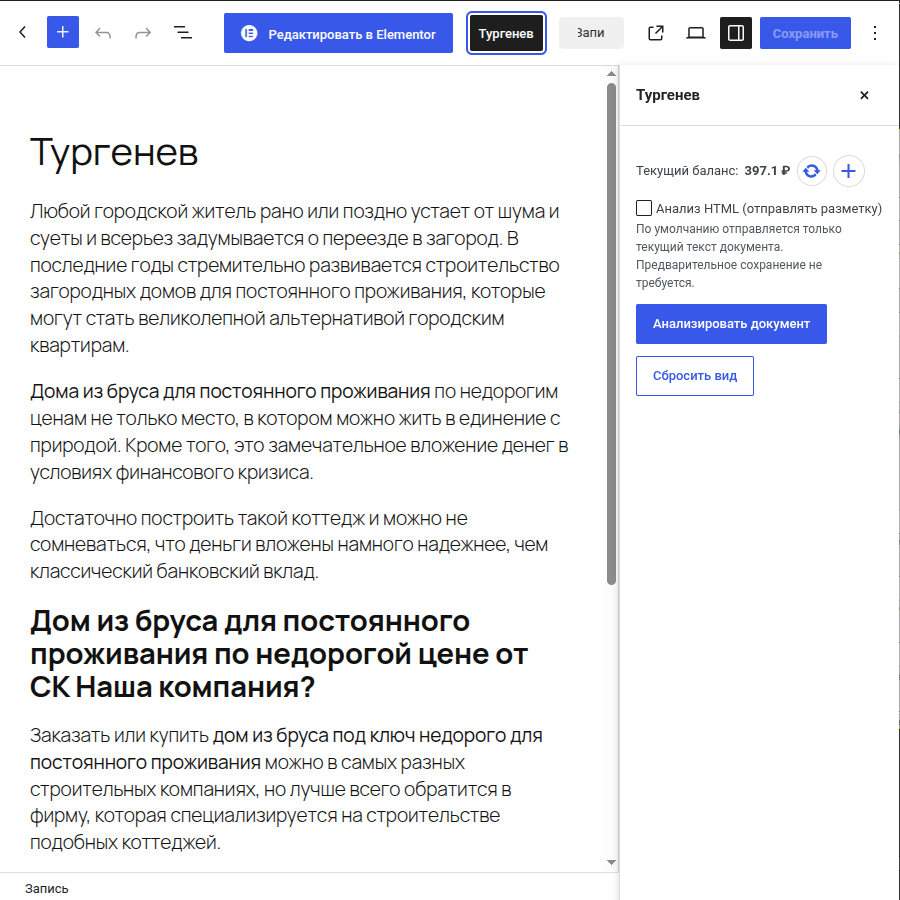
The plugin adds a Turgenev button to the WordPress editor toolbar.
Open it to access a dedicated Turgenev panel with:
- current Turgenev account balance;
- balance refresh;
- a direct balance top-up link;
- Analyze document;
- optional HTML analysis (send markup) mode;
- overall risk;
- detailed analysis sections;
- links to provider reports;
- in-editor highlighting when the server supports the required DOM component.
Analysis is not tied to the currently selected Gutenberg block. Turgenev analyzes the whole current document.
You do not need to save the post first: the plugin reads the current in-memory editor state, including unsaved edits.
Classic Editor support
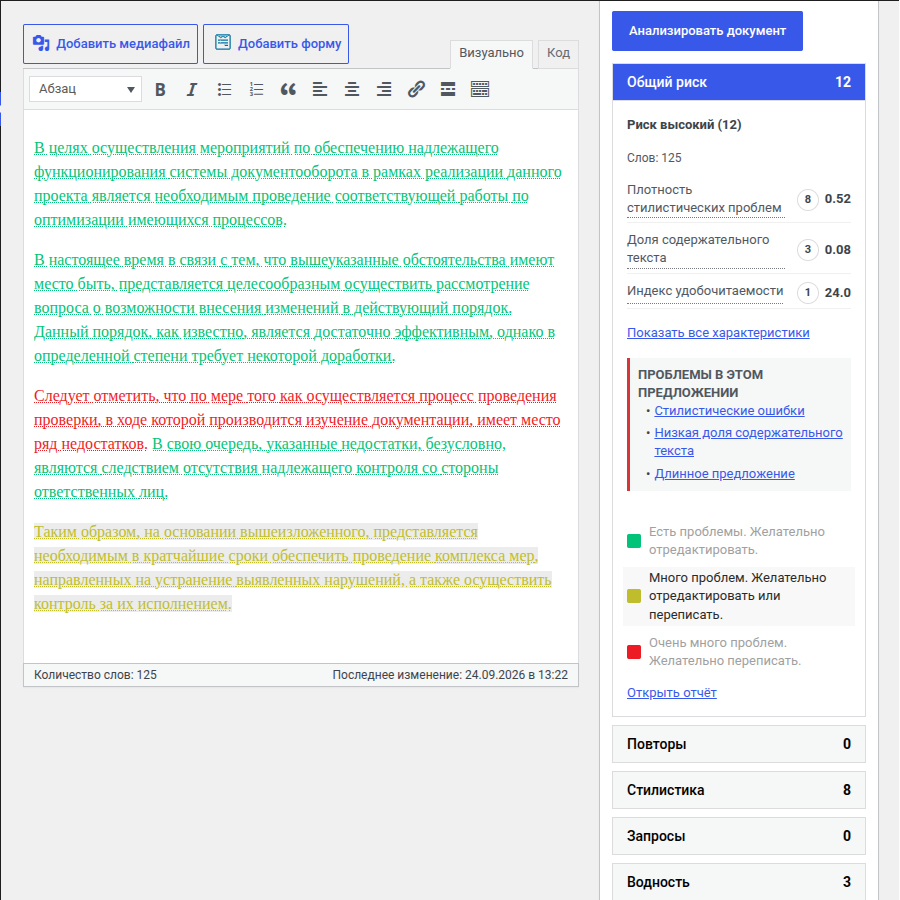
Post types using the Classic Editor receive a Turgenev metabox.
The integration supports both TinyMCE visual mode and the underlying textarea/text mode while using the same secure server-side API bridge as Gutenberg.
Plain-text and HTML analysis
By default, the plugin sends a normalized representation of the visible document text while preserving meaningful block boundaries.
If you explicitly enable HTML analysis (send markup), the provider receives an HTML-aware payload instead.
The runtime accepts up to 50,000 visible Unicode characters per check. Invalid UTF-8 and embedded NUL characters are rejected before an outbound analysis request is made.
API key stays on your WordPress server
The Turgenev API key is stored in WordPress and is never intentionally exposed through:
- localized editor JavaScript;
- HTML source;
- browser-visible AJAX responses;
- Gutenberg configuration objects.
The browser talks to WordPress. WordPress talks to Turgenev.
Every document-analysis request is protected by:
- a WordPress nonce;
- validation of the target post;
current_user_can( 'edit_post', $post_id )for that exact post;- server-side per-post and per-user rate limiting.
Safe API-key replacement
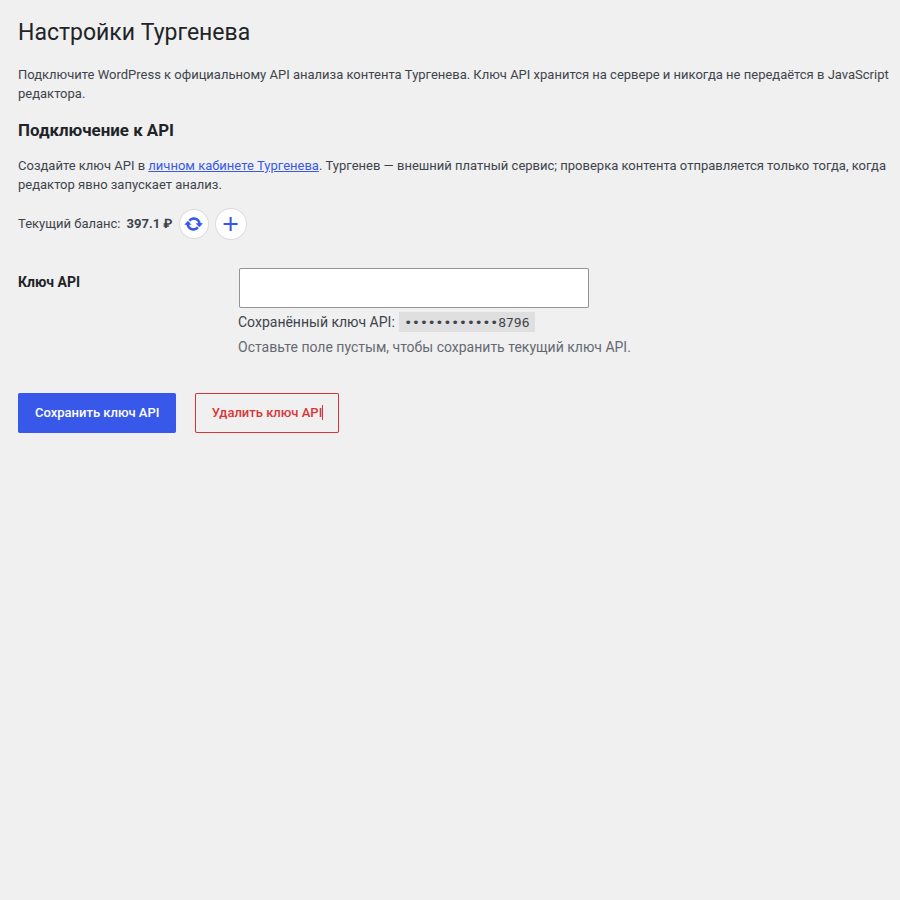
Go to Settings → Turgenev to configure the provider API key.
When you enter a new key, the plugin verifies it through the Turgenev balance operation before replacing the working key.
That means:
- an empty field keeps the current key;
- an invalid replacement does not erase the current key;
- a provider outage during verification does not erase the current key;
- only Delete API Key explicitly removes the saved key.
The saved secret is never printed back into the password field. WordPress displays only a masked suffix.
Report highlighting does not alter your content
Highlighting is visual only.
The plugin does not persist Turgenev highlight markup into post_content, block attributes, revisions or autosaves. Your article remains your article.
Server-side rate limiting
Turgenev is an external service with account usage/billing, so the plugin does not rely only on a disabled button in JavaScript.
The WordPress backend applies independent request limits per user/post and per user across all posts. If either limit is exceeded, the request is rejected before contacting the provider.
Graceful server compatibility
The PHP DOM extension is optional.
Without ext-dom:
- account balance still works;
- normal content analysis still works;
- functionality that requires parsing the provider’s HTML report is disabled gracefully rather than crashing the editor.
How Turgenev scores content
The Turgenev service describes its total risk as the sum of penalties from independent analysis criteria.
Its published documentation discusses, among other signals:
- word-frequency / repetition metrics;
- unusually frequent words;
- style-problem density;
- low-information wording;
- query coverage;
- readability based in part on sentence and word length.
The provider currently describes risk levels beginning around 5 points as medium, 8 as high and 13 as critical. These are the provider’s interpretation thresholds and should be used as editorial guidance, not as a promise or prediction of search-engine action.
Get an account, API key and balance
This plugin requires an account with the external Turgenev service.
Useful provider pages:
The Turgenev website currently publishes separate pricing for its web interface, subscriptions and API usage. Pricing can change, so always treat the provider’s current website as authoritative.
The plugin itself is GPL-licensed and does not include Turgenev service credit.
External Service
This plugin connects WordPress to the external Turgenev service.
The provider is operated by ООО “Интернет-лингвистика” / Internet-Linguistics LLC.
Exactly what is sent:
- Document analysis: after an authenticated editor explicitly starts an analysis, the current document content is sent to Turgenev for processing. This can include unsaved editor changes.
- API key: the API key is added by the WordPress server to provider requests. It is not intentionally exposed to browser JavaScript.
- Balance: balance checks send the API key but do not send document content.
- Report details/highlights: after analysis, report-reference data returned by Turgenev can be used to request the provider report required for detailed sections/highlighting.
The plugin does not control how the external service stores or processes data after it is transmitted.
Provider links:
By configuring this integration, the site administrator is responsible for determining whether sending content to the external service is appropriate for the site’s privacy policy and applicable data-protection requirements.
Instalação
Automatic installation from WordPress
- Sign in to your WordPress administration area.
- Open Plugins → Add New.
- Search for Turgenev.
- Install the plugin.
- Clique em ativar.
- Continue with the API/account setup below.
Manual ZIP installation
- Download the production Turgenev plugin ZIP.
- In WordPress open Plugins → Add New → Upload Plugin.
- Select the ZIP.
- Clique em Instale agora.
- Activate Turgenev.
- Continue with the API/account setup below.
Do not upload a GitHub source archive containing development files. Use the production plugin ZIP.
Create or prepare your Turgenev account
- Open Turgenev.
- Sign in or create a Turgenev account.
- Confirm the account if the provider asks you to verify your email.
- Open the API key / account page.
- Generate or copy your API key.
- If necessary, top up your balance.
The provider controls account registration, billing, subscriptions and API pricing.
Connect WordPress to Turgenev
- In WordPress open Settings → Turgenev.
- Paste your Turgenev API key into API key.
- Click Save API key.
- The plugin verifies the key using the provider balance operation.
- If verification succeeds, WordPress shows the current balance.
- If verification fails, the key is not saved. If an older working key already exists, it is preserved.
Run your first analysis in Gutenberg
- Open a post, page or another post type that uses the Block Editor.
- Click Turgenev in the editor toolbar.
- Confirm that your current balance is available.
- Leave HTML analysis (send markup) disabled for normal visible-text analysis, or enable it when you intentionally want markup-aware analysis.
- Click Analyze document.
- Review Overall risk.
- Open the detailed sections to inspect frequency, style, keywords, formality and readability.
- Use report highlighting where available to inspect problem areas directly in the editor.
- Edit the content and analyze again when appropriate.
Saving the post before analysis is not required.
Run an analysis in the Classic Editor
- Open a post type using the Classic Editor.
- Find the Turgenev metabox.
- Check your balance.
- Choose the analysis mode if needed.
- Click the analysis button.
- Review the returned risk and details.
Top up your Turgenev balance
You can top up your Turgenev balance directly through the provider.
The editor also exposes a Top up Turgenev balance control when appropriate.
After adding funds, use the balance refresh control in WordPress.
Log de Changes
Major security and compatibility update. Existing turgenev[api_key] settings are reused automatically.
2.0.0 – 2026-09-17
- Major production-focused rewrite for WordPress 6.6+ and PHP 8.1+.
- Keep the Turgenev API key server-side instead of exposing it to editor JavaScript.
- Route balance and analysis requests through authenticated WordPress AJAX with nonce and object-level (
edit_post) capability checks; a genericedit_postscapability is never accepted on its own for document operations. - Add independent, server-side, filterable rate limiting for
risk,highlightsandbalance, enforced both per post and per user across all posts combined, so switching between posts cannot be used to exceed the effective budget. Rejected requests never reach the Turgenev provider. - Validate new API keys through the balance endpoint and preserve an existing key when validation fails or the field is left blank.
- Remove the legacy paid
riskrequest that was used only to validate settings. - Add defensive HTTP/JSON/provider-response validation, including strict Unicode-character length limits (50,000 visible characters) and rejection of malformed UTF-8 or embedded NUL bytes before any outbound request.
- Replace provider-controlled
innerHTMLrendering with safe DOM/text rendering; highlight previews are presentation-only and never modify saved post content. - Degrade gracefully when the PHP DOM extension (
ext-dom) is unavailable: analysis and balance are unaffected, and the Highlight action is hidden with a clear notice instead of failing. - Improve Classic Editor handling when TinyMCE is unavailable or in text mode.
- Remove arbitrary low-balance workflow deletion from the editor UI.
- Fix
tbclassAPI documentation typo/ambiguity. - Add GitHub Actions, dependency updates, release packaging, PHP smoke tests, JavaScript tests and Playwright E2E scaffolding (Gutenberg panel, Classic Editor metabox, authorization, nonce validation, no-API-key-exposure and missing-DOM-extension coverage).
- Align project licensing to GPLv2 or later.
1.4 – 2020-07-22
- Bugfix check balance function.
- Add translations.
- Minor fixes.
1.3 – 2020-07-22
- Add balance checker in settings page.
- Add translations.
- Minor fixes.
1.2 – 2020-07-22
- Encode URL for API requests.
1.1 – 2020-07-21
- Bugfix check content function.
1.0 – 2020-07-19
- Primeiro lançamento.
Capturas de tela
Para desenvolvedores
Este é o seu plugin? Mostre os números.
Adicione um crachá ao vivo ao seu site, Documentos ou Readme do GitHub. Ele é atualizado por conta própria - nenhuma conta necessária.
Best Turgenev alternatives
All Content analysis plugins →





FAQ
Turgenev: quick answers
Respostas diretas, extraídas de dados ao vivo WordPress.org.
Fonte: WordPress.org
Is Turgenev free?
Yes. Turgenev is free to download and use from the official WordPress.org plugin directory.
Is Turgenev safe to use in 2026?
Turgenev is a solid plugin choice in 2026, with a few things worth checking first. It runs on 10+ sites and was last updated 2 months ago, and scores 62/100 on our health check.
How many websites use Turgenev?
Turgenev is active on 10+ WordPress websites and has been downloaded 1,785 times since it launched in July 2020. It was downloaded 77 times in the last 30 days.
Does Turgenev work with WordPress 7.1?
Yes. The developer has tested Turgenev up to WordPress 7.1.5, the latest release. It requires WordPress 6.6 or newer.
What PHP version does Turgenev need?
Turgenev requires PHP 8.1 or higher. Most hosts run PHP 8.x today, so it works on any modern WordPress hosting.
When was Turgenev last updated?
The latest version, 2.0.0, was released on September 25, 2026 (2 months ago).
Who makes Turgenev?
Turgenev is developed and maintained by al5dy.
What are the best alternatives to Turgenev?
The most popular alternatives to Turgenev are Yoast SEO (10M+ installs), BoldGrid Easy SEO (40K+ installs) and Semrush SEO Writing Assista… (8K+ installs).
Alimentado por PageForge
Um modelo e uma planilha. Uma página real para cada pesquisa.
PageForge Transforma cada linha de um CSV em uma página WordPress com seu próprio título, URL, SEO campos e esquema, construído no layout que você já desenhou. Gratuito em WordPress.org.
- CSV e XLSX, mais Google Sheets em Profissional e Empresarial
- Seu próprio título, URL, SEO campos e esquema para cada página
- Funciona com o editor de blocos, Elementor, Divi e Avada
- Gratuito em WordPress.org, sem cartão de crédito