


Toolbar Publish Button
Too often it turns out very inconvenient to scroll WordPress admin page back and forth in the quest for the big blue button to save latest changes.

Use com cautela
Toolbar Publish Button works, but test it on a staging site before relying on it in 2026. It runs on 5K+ sites, is rated 4.8/5 and was last updated 5 years ago, and scores 45/100 on our health check.
- Loved by users — 4.8/5 from 46 reviews
- Momentum — downloads up 17.8% vs the previous 30 days
- Nenhuma atualização em 5 anos
- Testado apenas até WordPress 5.8 (mais recente é 7.1)
Como ele se acumula?
Lado a lado em instalações, atualizações, avaliações e suporteDownloads diários
Os picos de download geralmente seguem uma nova versão — cada site que atualiza automaticamente é um download.
Rankings
Where Toolbar Publish Button stands todayWordPress.org Classificações de pesquisa
Posição ao vivo na pesquisa de plugins, top 100| Palavra chave | Posição |
|---|---|
| Publish Button | >100 |
| save button | >100 |
| scroll | >100 |
| scroll less | >100 |
| wp-admin | >100 |
Adoção da versão
Compartilhamento de sites ativos por lançamento.
Divisão de classificação
★★★★★★★★★★ 4.8 from 46 reviews
About Toolbar Publish Button
From the official readme · v1.8Descrição
Too often it turns out very inconvenient to scroll WordPress admin page back and forth in the quest for the big blue button to save latest changes.
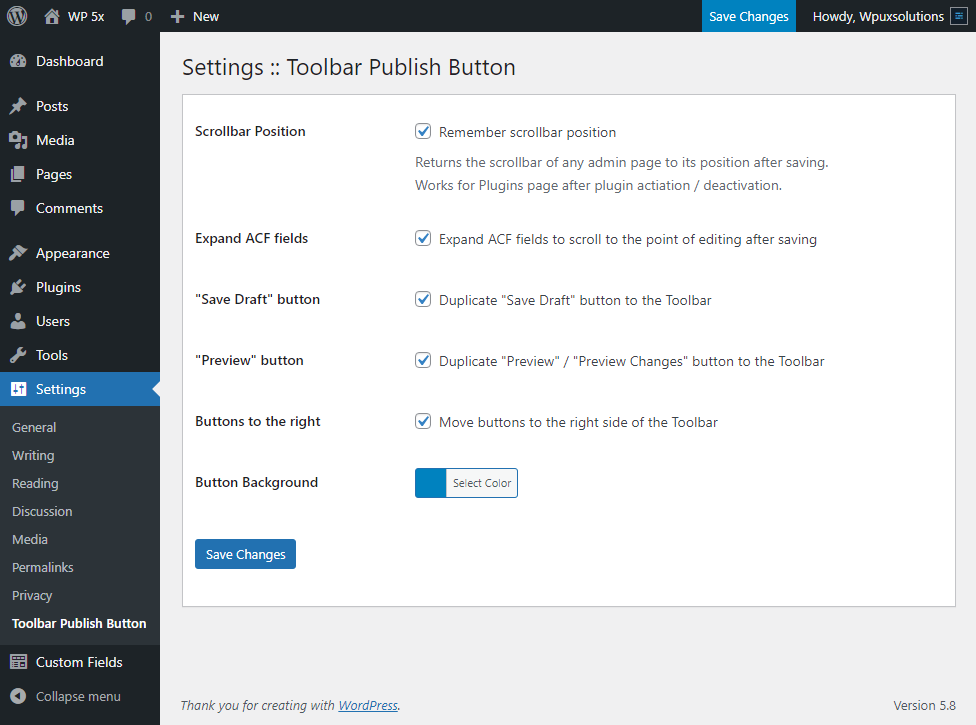
Simple jQuery script of this plugin duplicates Update / Publish / Save Changes / Save Draft / Preview Changes button for posts, pages, custom posts, taxonomies, user profiles, and settings to the top WordPress admin bar, so that it stays on site while you are scrolling your admin page. The plugin options allow to keep the scrollbar position after saving.
The plugin is well-integrated with the Advanced Custom Fields, and capable to leave open ACF field groups after saving your edits.
The plugin does not affect any native WordPress functionality, it just redirects your click to the original button, and uses the current button text, of course, with the current language.
Plugin options allow:
- to keep the scrollbar position after saving for admin pages including Plugins page on activation / deactivation,
- to choose which buttons to show on the admin bar,
- to move buttons to the right side of the Toolbar,
- to set a background color for its buttons to highlight them.
Instalação
-
Upload plugin folder to the ‘/wp-content/plugins/’ directory
-
Activate the plugin through the ‘Plugins’ menu in the WordPress admin
-
Change settings on Settings -> Toolbar Publish Button if you wish
-
Enjoy the clone of the Update / Publish button on the admin top toolbar when editing posts, pages and custom post types.
Log de Changes
1.8
Release Date – August 28, 2021
Melhorias
- Code cleanup and improvements for better performance
- Better colorization for buttons
- A new option was added to control whether to expand ACF fields after saving or not
1.7.1
Release Date – March 09, 2021
Compatibilidade
- WordPress 5.7 compatibility ensured
1.7
Release Date – October 14, 2020
Melhorias
- ACF Field Groups screen compatibility improved
- New option: Move buttons to the right side of the Toolbar
- The buttons are on the colored background from the initial plugin activation
1.6.2
Release Date – August 29, 2018
Bugfixes
- Conflict with ACF scripts fixed
1.6.1
Release Date – August 28, 2018
Melhorias
- Compatibility with the latest ACF versions ensured
1.6
Release Date – February 2, 2017
Melhorias
- “Save Draft” and “Preview” buttons are now optional
- Minor code improvements
Capturas de tela


Para desenvolvedores
Este é o seu plugin? Mostre os números.
Adicione um crachá ao vivo ao seu site, Documentos ou Readme do GitHub. Ele é atualizado por conta própria - nenhuma conta necessária.
Best Toolbar Publish Button alternatives
All Publish Button plugins →| Classificação | Plugin | Instalações ativas |
|---|---|---|
| 2 |
 DC Hide Publish Button
This plugin will come handy for author who often accidentally click publish button when… |
10+ |
| 3 |
 Simple Save Redirect Button
A new "Save" button which is enhanced post's standard "Save" button. It saves post and… |
<10 |
FAQ
Toolbar Publish Button: quick answers
Respostas diretas, extraídas de dados ao vivo WordPress.org.
Fonte: WordPress.org
Is Toolbar Publish Button free?
Yes. Toolbar Publish Button is free to download and use from the official WordPress.org plugin directory.
Is Toolbar Publish Button safe to use in 2026?
Toolbar Publish Button works, but test it on a staging site before relying on it in 2026. It runs on 5K+ sites, is rated 4.8/5 and was last updated 5 years ago, and scores 45/100 on our health check.
How many websites use Toolbar Publish Button?
Toolbar Publish Button is active on 5K+ WordPress websites and has been downloaded 95,231 times since it launched in March 2013. It was downloaded 733 times in the last 30 days.
Does Toolbar Publish Button work with WordPress 7.1?
Toolbar Publish Button is officially tested up to WordPress 5.8.20, while the latest release is 7.1.5. It may still work, but try it on a staging site first.
When was Toolbar Publish Button last updated?
The latest version, 1.8, was released on August 28, 2021 (5 years ago).
Who makes Toolbar Publish Button?
Toolbar Publish Button is developed and maintained by webbistro.
What are the best alternatives to Toolbar Publish Button?
The most popular alternatives to Toolbar Publish Button are DC Hide Publish Button (10+ installs) and Simple Save Redirect Button (<10 installs).
Alimentado por PageForge
Um modelo e uma planilha. Uma página real para cada pesquisa.
PageForge Transforma cada linha de um CSV em uma página WordPress com seu próprio título, URL, SEO campos e esquema, construído no layout que você já desenhou. Gratuito em WordPress.org.
- CSV e XLSX, mais Google Sheets em Profissional e Empresarial
- Seu próprio título, URL, SEO campos e esquema para cada página
- Funciona com o editor de blocos, Elementor, Divi e Avada
- Gratuito em WordPress.org, sem cartão de crédito