


Tepee for HelloAsso
No more entering your events twice! Your HelloAsso events appear on your site automatically, beautifully displayed and always up to date.

Escolha sólida
Tepee for HelloAsso is a solid plugin choice in 2026, with a few things worth checking first. Was last updated 3 weeks ago, and scores 64/100 on our health check.
- Desenvolvido ativamente — última atualização 3 semanas atrás
- Testado com as últimas WordPress (7.1)
- Base de usuários pequenas (<10 instalações ativas)
- Muito poucos comentários até agora
Como ele se acumula?
Lado a lado em instalações, atualizações, avaliações e suporte



Downloads diários
Os picos de download geralmente seguem uma nova versão — cada site que atualiza automaticamente é um download.
Rankings
Where Tepee for HelloAsso stands todayWordPress.org Classificações de pesquisa
Posição ao vivo na pesquisa de plugins, top 100| Palavra chave | Posição |
|---|---|
| agenda | #64 |
| association | >100 |
| calendar | >100 |
| events | >100 |
| helloasso | #3 |
About Tepee for HelloAsso
From the official readme · v1.8.0Descrição
No more double entry between HelloAsso and your association’s website!
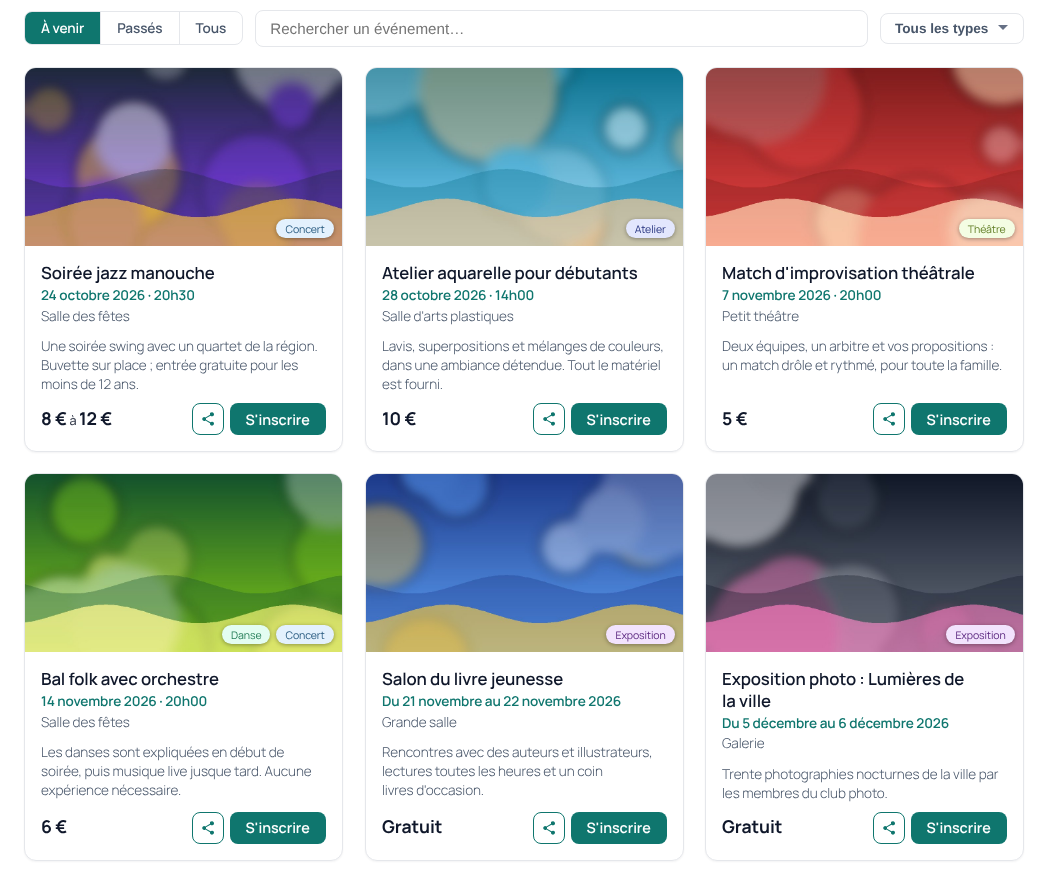
Publish your event once on HelloAsso: Tepee for HelloAsso brings it to your WordPress site automatically, with its image, date, place, price and a “Register” button that leads straight to HelloAsso. New events show up within the hour, and changes follow on their own within a day. You keep managing everything in one place, and your site is always up to date.
Why you’ll love it
- Zero double entry: HelloAsso stays your single source; your site follows by itself.
- Ready in a few minutes: enter your HelloAsso API keys, click “Refresh now”, add the block to a page. That’s it.
- Displays that look great everywhere: cards or list, on computers and phones, with search and tag filters.
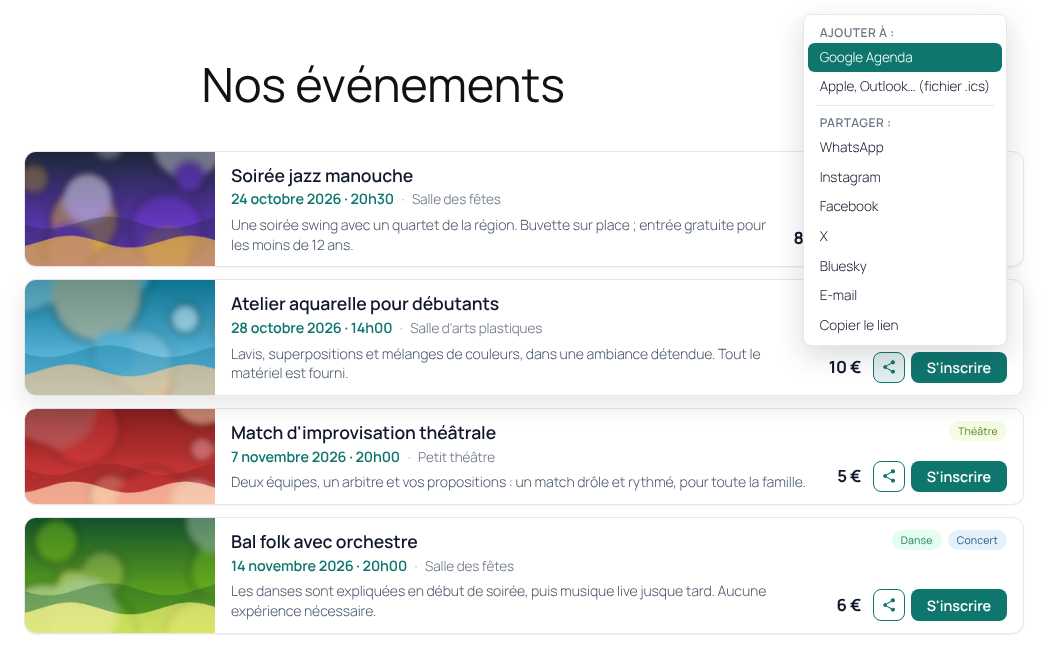
- Spread the word: a “Share” menu for WhatsApp, Instagram, Facebook, X, Bluesky, email or a copied link (and the phone’s own sharing), next to “Add to my calendar”.
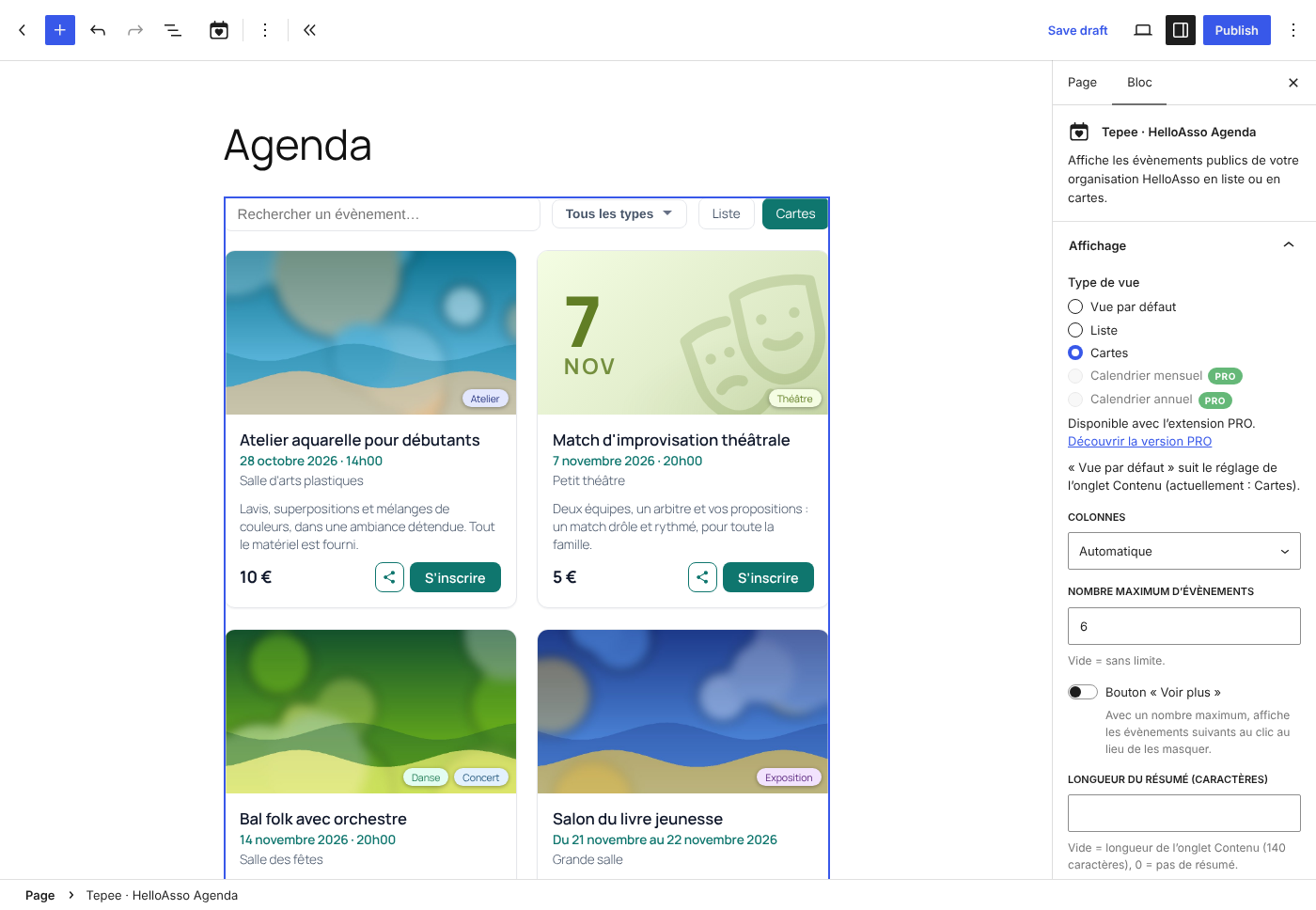
- Two blocks, two uses: “Tepee · HelloAsso Agenda” for a complete agenda page, and “Tepee · HelloAsso Mini agenda” for the next events on your home page, in a sidebar or a footer. All options are in the block sidebar, and a shortcode covers page builders and widgets.
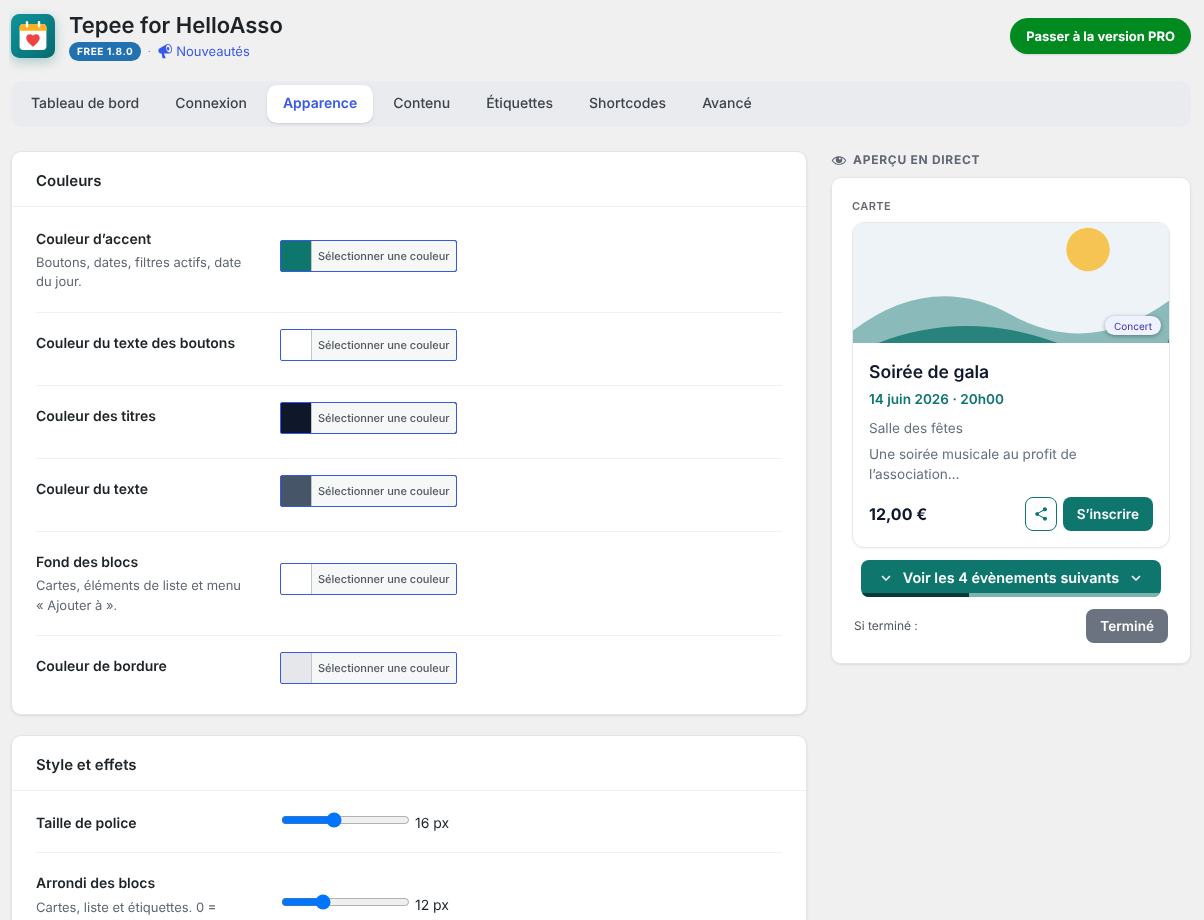
- Matches your theme: colors, corner radius, font size and displayed elements are customizable, with a live preview.
- Respectful: no cookies, no tracking, no advertising. Read-only: the plugin never creates or changes anything on HelloAsso.
This plugin is not affiliated with or endorsed by HelloAsso.
All features
- “Tepee · HelloAsso Agenda” block for the block editor, with all options in the settings sidebar and a real preview of the display.
- “Tepee · HelloAsso Mini agenda” block: a compact list of the next events for the home page, a sidebar or a footer.
[tepee_for_helloasso]shortcode for the classic editor, page builders and widgets.- List view (with thumbnail) and cards view, with an optional view switcher for visitors.
- Optional “Show more” button on long lists.
- “Add to my calendar” button (Google Calendar, .ics file for Apple Calendar, Outlook…).
- “Share” button: WhatsApp, Instagram, Facebook, X, Bluesky, email and “copy the link” (each one can be turned off), plus the phone’s own sharing on mobile. Grouped with “Add to my calendar” in a single menu.
- Past events show an “Ended” button instead of “Register” (customizable text), still linking to HelloAsso.
- Structured data (schema.org) for upcoming events, describing only the events actually visible on the page.
- Automatic refresh in the background, every 3 hours by default (from 1 to 24 hours, Advanced tab); details older than 24 hours are refreshed gradually, so price changes are picked up within a day.
- Search bar (several words = all required, quotes for an exact phrase), tag filters and an Upcoming / Past / All selector.
- Colors (accent, text, block background and border), corner radius, font size, clickable area and displayed elements customizable, with a live preview.
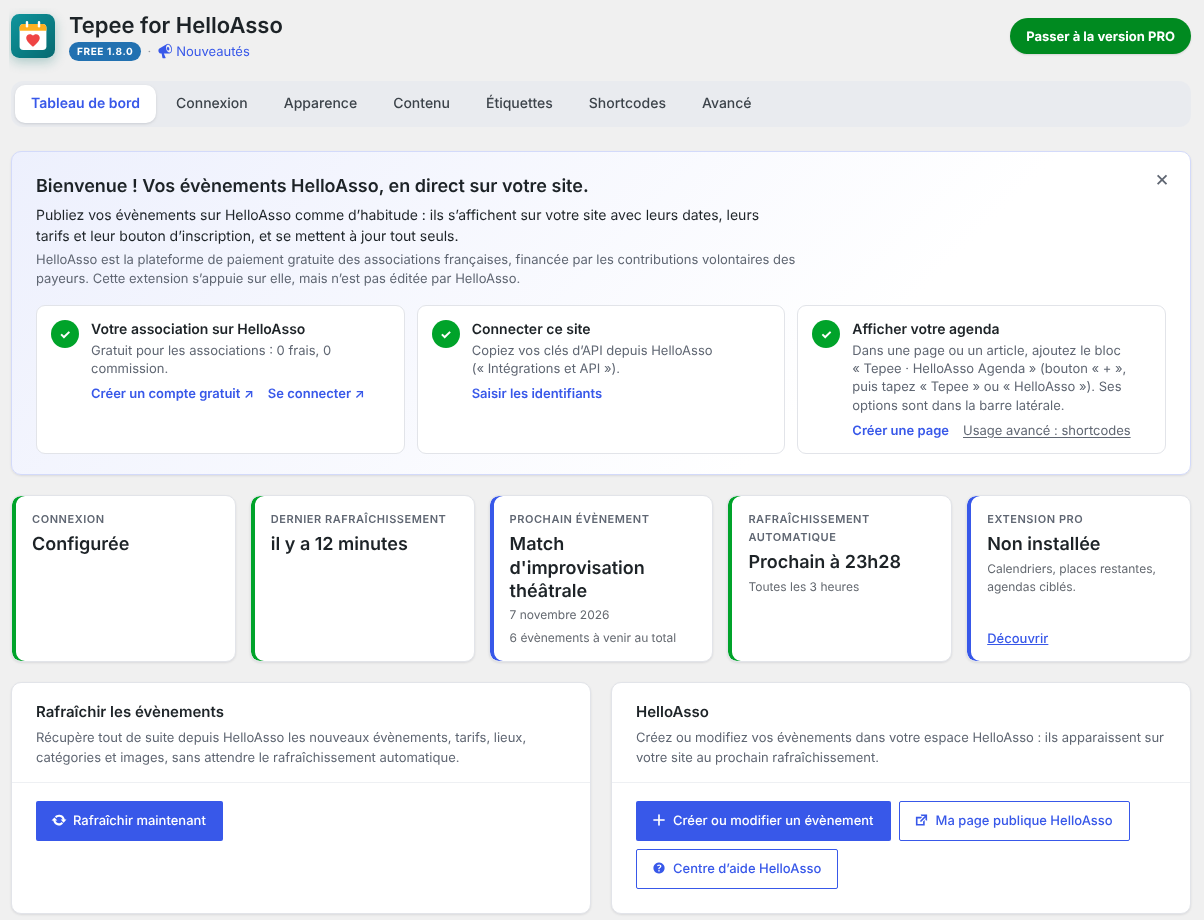
- A clear settings area: a Dashboard showing the synchronization status, then Connection, Appearance, Content, Tags, Shortcodes and Advanced tabs.
- Per-tag colors, based on the activity types detected on HelloAsso.
- Event thumbnails cached on your own site (WebP when available).
- Automatic page-cache clearing after a refresh or a settings change (WP Rocket, W3 Total Cache, WP Super Cache, WP Fastest Cache, LiteSpeed Cache and more).
- Credentials can be defined as constants in wp-config.php.
- No cookies, no tracking, no advertising.
PRO add-on
An optional paid add-on, Tepee for HelloAsso PRO, adds month and year calendars with event windows, remaining places (“Full” button and “Fewer than N places left” badge), targeted agendas (by tags or keywords), one entry per date for multi-date events, advanced design and hover effects, team access, and settings export / import.
The free plugin is complete on its own and is not limited in time or in number of events. The PRO add-on is installed next to it and keeps your settings.
Third-party service and limitation of liability
This plugin depends on HelloAsso and its API, a third-party service that the author does not control. HelloAsso may change, restrict or discontinue its API, or some of the data it provides, at any time. Some features may then stop working until the plugin is updated, or permanently if the data is no longer available.
The plugin is provided “as is”, without warranty of any kind, as stated in the GPL license. To the extent permitted by applicable law, the author cannot be held liable for the unavailability, changes, errors or delays of the HelloAsso service or of the data it provides, nor for their consequences on your site.
Serviços externos
HelloAsso API
This plugin connects to the HelloAsso API (https://api.helloasso.com) to retrieve your organization’s public events, their prices and their dates. It sends your API credentials (to obtain and renew an access token) and your organization slug. Requests are made only by your server: when you click “Test connection” or “Refresh now”, during the automatic refresh (every 3 hours by default, if enabled), and when the event cache expires. Visitors’ browsers never contact the HelloAsso API.
Event images are downloaded once by your server from HelloAsso and then served from your own site, so visitors’ browsers do not contact HelloAsso to display them. If a download fails, or if the TFHA_LOCAL_IMAGES constant is set to false, visitors’ browsers load the image directly from HelloAsso’s servers, which receive the visitor’s IP address like any embedded image.
- HelloAsso terms of use for organizations (section 4.5 covers the API): https://info.helloasso.com/cgu-associations
- HelloAsso privacy policy: https://info.helloasso.com/politique-de-confidentialite
Google Calendário
With the “Add to my calendar” button enabled, a visitor who chooses “Google Calendar” opens a Google Calendar page in a new tab. The link contains the event’s title, dates, place and HelloAsso address. Nothing is sent to Google unless the visitor clicks this link. The .ics file option is generated in the browser and contacts no server.
- Google terms of service: https://policies.google.com/terms
- Google privacy policy: https://policies.google.com/privacy
Sharing (WhatsApp, Instagram, Facebook, X, Bluesky, email)
With the “Share” button enabled, the menu contains simple share links. No script, image or button from these services is loaded on your site. A visitor who clicks one of them opens the service in a new tab (or their email application), with the event’s title, date and HelloAsso address. Nothing is sent to these services unless the visitor clicks. “Copy the link” and the phone’s own sharing contact no server. Instagram does not offer share links for websites: its item copies the event’s address and opens instagram.com (the app on phones), where the visitor pastes it.
- WhatsApp terms and privacy policy: https://www.whatsapp.com/legal/terms-of-service and https://www.whatsapp.com/legal/privacy-policy
- Instagram terms and privacy policy: https://help.instagram.com/581066165581870 and https://privacycenter.instagram.com/policy
- Facebook terms and privacy policy: https://www.facebook.com/terms.php and https://www.facebook.com/privacy/policy/
- X terms and privacy policy: https://x.com/tos and https://x.com/privacy
- Bluesky terms and privacy policy: https://bsky.social/about/support/tos and https://bsky.social/about/support/privacy-policy
Instalação
- Instale e ative o plugin.
- Open the “Tepee for HelloAsso” menu, then the Connection tab. Enter your Client ID, Client Secret and organization slug (see the FAQ), then click “Test connection” and save.
- Go back to the Dashboard and click “Refresh now”.
- Add the “Tepee · HelloAsso Agenda” block to a page, or insert the
[tepee_for_helloasso]shortcode.
Log de Changes
1.8.0
- Advanced tab: a single “Automatic refresh” setting, every 1 to 24 hours (3 hours by default), now sets both the background refresh and the cache duration. On update, a cache duration left at the former default (1 hour) becomes 3 hours; a duration set by hand is kept, within 1 to 24 hours. The TFHA_CACHE_TTL constant (in seconds) sets both.
- French translation included in the plugin, used until the WordPress.org language pack is available (the language pack always takes priority).
- Blocks renamed “Tepee · HelloAsso Agenda” and “Tepee · HelloAsso Mini agenda”, and grouped in a “Tepee” category of the block inserter, so they are not mistaken for HelloAsso’s own block (typing “HelloAsso” still finds them). Pages already using them are not affected.
- Plugin header: the free and PRO versions are shown as badges (FREE in blue, PRO in green, as in the “What’s new” banner), and a “What’s new” link brings the banner of new features back after it has been hidden.
- Dashboard: the status tiles fit on one row, and the action cards (refresh the events, HelloAsso, printable programme of the PRO add-on) sit side by side on large screens.
- Advanced tab: settings on two columns and tools side by side on large screens; the “HelloAsso connection and diagnostics” card shows when the HelloAsso token was last obtained or renewed, and until when the refresh token can be used (no secret is shown).
- Plugins page: “View details” of the PRO add-on, when it is installed but deactivated, now shows its description and changelog (read from the add-on itself) instead of “Plugin not found”.
- List view with images, in a medium-width content area: price and buttons move below the text, so dates and summaries use the full width instead of a narrow column.
- “PRO” is now written the same way everywhere (texts, badges, plugin name).
- Events without an image: instead of an empty frame, cards and the list show a small poster in the color of the event’s tag, with the date in large type and an icon of the activity (one for each HelloAsso campaign type: workshop, concert, show, conference, outing, festival…). The tag sits on the poster as on a photo. Nothing to set up, and nothing is loaded: the poster is drawn by the browser.
- Empty agenda: a card in the style of your event cards (colors, border, rounded corners, shadow) with an icon, a clear message and, when useful, an action: “Clear the search” after a search without results, or “See past events” when only past events exist. Visitors stay on your site. The message adapts to the situation (no results, no upcoming events, no past events).
- New “No events” message in the Content tab, shown when there is no upcoming event (the “No results” message is now kept for searches and filters).
- Choice of the empty-agenda icon in the Content tab: the plugin’s calendar with, in its centre, a broken heart, a surprised, disappointed, sad or knocked-out face, a little ghost, dots, a cross or a crossed-out circle.
- “What’s new” banner at the top of the Dashboard after an update (never after a first installation): the new features at a glance, details on demand, hidden in one click by each administrator. The PRO’s new features appear in the same banner. No notice elsewhere, no remote request.
- PRO presentation window: everything the free plugin offers is listed (views, search and tag filters, calendar and sharing, blocks, automatic refresh, customization), then what the PRO adds; a short “Recently in the PRO” list next to the offer.
- Event images are always served from your site (the “Local images” option is removed, the automatic fallback to the HelloAsso image remains). Hosting spread over several servers can use the TFHA_LOCAL_IMAGES constant.
- French: a free price now reads “Gratuit” (it shared its text with the “Free” column of the PRO comparison, translated “Gratuite”).
- PRO presentation window on phones: it now fits the screen and its close button always stays reachable.
- Empty-agenda icon choice: tiles laid out in a grid (three per row on phones).
- “What’s new” banner: a first installation is recognised reliably (activation), so it only appears after an update.
- List view: when the dates of a multi-date event span several lines, the beginning of each line is no longer cut off.
- An event without an image (or without an address) no longer points to the page itself: no more empty image frame in the windows of the PRO calendars.
- Connection to HelloAsso: the access token is now renewed with its refresh token, as the HelloAsso API requires. The Client ID and Client Secret are only used for the first token, after a change of credentials, or if the renewal is refused.
1.7.0
- “Share” button (WhatsApp, Instagram, Facebook, X, Bluesky, email, copy the link, and the phone’s own sharing), grouped with “Add to my calendar” in a single menu.
- Dashboard: a late automatic refresh (WP-Cron not running) is now reported, with a link to Site Health.
- More compact list view: the image fills the left side, price and buttons sit side by side on the right, categories move onto the image on phones (long names are shortened), about a third less height on computers. The layout follows the actual width of the list, so it also adapts to columns and sidebars.
- “Show more” button now says how many events it adds (“Show the next 4 events”), with a thin gauge along its bottom edge showing how much of the agenda is already displayed.
- More compact “Add to my calendar” / “Share” menu.
- Color pickers offer your theme’s colors in one click.
- Redesigned settings pages: clearer tabs (all visible, also on phones), every section in its own card, and a save bar that stays in view and signals unsaved changes.
- Dashboard: a welcome message (can be hidden) with the three setup steps, and a HelloAsso section with links to your HelloAsso back office, your public page and the help centre.
- Compatibility with the PRO add-on: if it is too old for this version (for example after its licence expired), its features are paused cleanly and the agenda uses the free display meanwhile; a notice, the dashboard and a single email to the site administrator say which version is needed.
- Faster pages: settings are read once per page, and the display’s styles load in the page header when the page content contains it (no unstyled flash).
- Security and robustness: event images are only downloaded from public addresses and must be real images; the background refresh can no longer run twice at the same time; dates written in capitals in rate labels (“12 DÉCEMBRE”) are recognised; the cache of event details no longer keeps deleted events.
- Uninstalling now also removes the local images of every site of a network and the per-user welcome preference.
1.6.0
- Real preview in the block editor: both blocks show the actual display, with your events, settings and colors, instead of a summary.
1.5.0
- First public release.
Capturas de tela

Para desenvolvedores
Este é o seu plugin? Mostre os números.
Adicione um crachá ao vivo ao seu site, Documentos ou Readme do GitHub. Ele é atualizado por conta própria - nenhuma conta necessária.
Best Tepee for HelloAsso alternatives
All agenda plugins →





FAQ
Tepee for HelloAsso: quick answers
Respostas diretas, extraídas de dados ao vivo WordPress.org.
Fonte: WordPress.org
Is Tepee for HelloAsso free?
Yes. Tepee for HelloAsso is free to download and use from the official WordPress.org plugin directory.
Is Tepee for HelloAsso safe to use in 2026?
Tepee for HelloAsso is a solid plugin choice in 2026, with a few things worth checking first. Was last updated 3 weeks ago, and scores 64/100 on our health check.
How many websites use Tepee for HelloAsso?
Tepee for HelloAsso is active on <10 WordPress websites and has been downloaded 232 times since it launched in October 2026. It was downloaded 233 times in the last 30 days.
Does Tepee for HelloAsso work with WordPress 7.1?
Yes. The developer has tested Tepee for HelloAsso up to WordPress 7.1.5, the latest release. It requires WordPress 5.8 or newer.
What PHP version does Tepee for HelloAsso need?
Tepee for HelloAsso requires PHP 7.4 or higher. Most hosts run PHP 8.x today, so it works on any modern WordPress hosting.
When was Tepee for HelloAsso last updated?
The latest version, 1.8.0, was released on October 30, 2026 (3 weeks ago).
Who makes Tepee for HelloAsso?
Tepee for HelloAsso is developed and maintained by Tepee.
What are the best alternatives to Tepee for HelloAsso?
The most popular alternatives to Tepee for HelloAsso are Termin-Kalender (500+ installs), OpenAgenda (400+ installs) and SmartAgenda (300+ installs).
Alimentado por PageForge
Um modelo e uma planilha. Uma página real para cada pesquisa.
PageForge Transforma cada linha de um CSV em uma página WordPress com seu próprio título, URL, SEO campos e esquema, construído no layout que você já desenhou. Gratuito em WordPress.org.
- CSV e XLSX, mais Google Sheets em Profissional e Empresarial
- Seu próprio título, URL, SEO campos e esquema para cada página
- Funciona com o editor de blocos, Elementor, Divi e Avada
- Gratuito em WordPress.org, sem cartão de crédito