


Taskbuilder – Project Management & Task Management Tool With Kanban Board
Project and task management inside WordPress with Kanban boards, task lists, team collaboration and a frontend dashboard. No SaaS needed.

Escolha segura
Yes — Taskbuilder is a safe, well-maintained plugin to use in 2026. It runs on 600+ sites, is rated 4.7/5 and was last updated 7 days ago, and scores 81/100 on our health check.
- Actively developed — last update 7 days ago
- Testado com as últimas WordPress (7.1)
- Momentum — downloads up 99.3% vs the previous 30 days
- Base de usuários pequenas (600+ instalações ativas)
Como ele se acumula?
Lado a lado em instalações, atualizações, avaliações e suporte



Downloads diários
Os picos de download geralmente seguem uma nova versão — cada site que atualiza automaticamente é um download.
Rankings
Where Taskbuilder stands todayWordPress.org Classificações de pesquisa
Posição ao vivo na pesquisa de plugins, top 100| Palavra chave | Posição |
|---|---|
| kanban | #5 |
| kanban board | #4 |
| project management | #7 |
| task management | #4 |
| Team Collaboration | #13 |
Adoção da versão
Compartilhamento de sites ativos por lançamento.
Divisão de classificação
★★★★★★★★★★ 4.7 from 7 reviews
About Taskbuilder
From the official readme · v7.0.2Descrição
Taskbuilder is a complete project and task management solution that helps teams organize projects, assign tasks, track progress, collaborate, and manage their workload — all from inside WordPress. Whether you’re managing a business, agency, organization, client projects, or a remote team, Taskbuilder gives you the tools to keep everyone organized and productive.
No external SaaS subscription required. Your projects and tasks stay inside your WordPress website.
The free plugin includes projects, tasks and subtasks, Kanban boards and task lists, My Tasks, a dashboard, checklists, comments with @mentions, file attachments, email notifications, custom statuses, priorities and categories, and frontend pages through shortcodes.
Premium add-ons (sold separately) add a calendar, Gantt charts, time tracking, reports, custom fields, recurring tasks, due date reminders, email piping, and BuddyPress, WooCommerce and SupportCandy integrations.
Códigos de acesso
Bring project management to your website’s frontend. Add these shortcodes to any page:
[wppm_projects]– Manage projects from the frontend.[wppm_tasks]– Manage tasks from the frontend.[wppm_tasks project="Project name"]– Show only the tasks of one project.[wppm_dashboard]– The Taskbuilder dashboard on the frontend.[wppm_my_tasks]– Tasks assigned to the current user.[wppm_public_projects_tasks]– Tasks of public projects.[wppm_tasks_calendar]– Task calendar (Calendar premium add-on).[wppm_gantt_chart project="Project name"]– Gantt chart of one project (Gantt Chart premium add-on).[wppm_group_projects]– Projects of BuddyPress groups. Filter withgroup_id="15"orgroup="group-name"(BuddyPress premium add-on).[wppm_group_tasks]– Tasks of BuddyPress groups. Filter withgroup_id="15"orgroup="group-name"(BuddyPress premium add-on).
Combine several shortcodes on one page to give your team a central workspace without going into the WordPress admin area.
🌟 Top Features
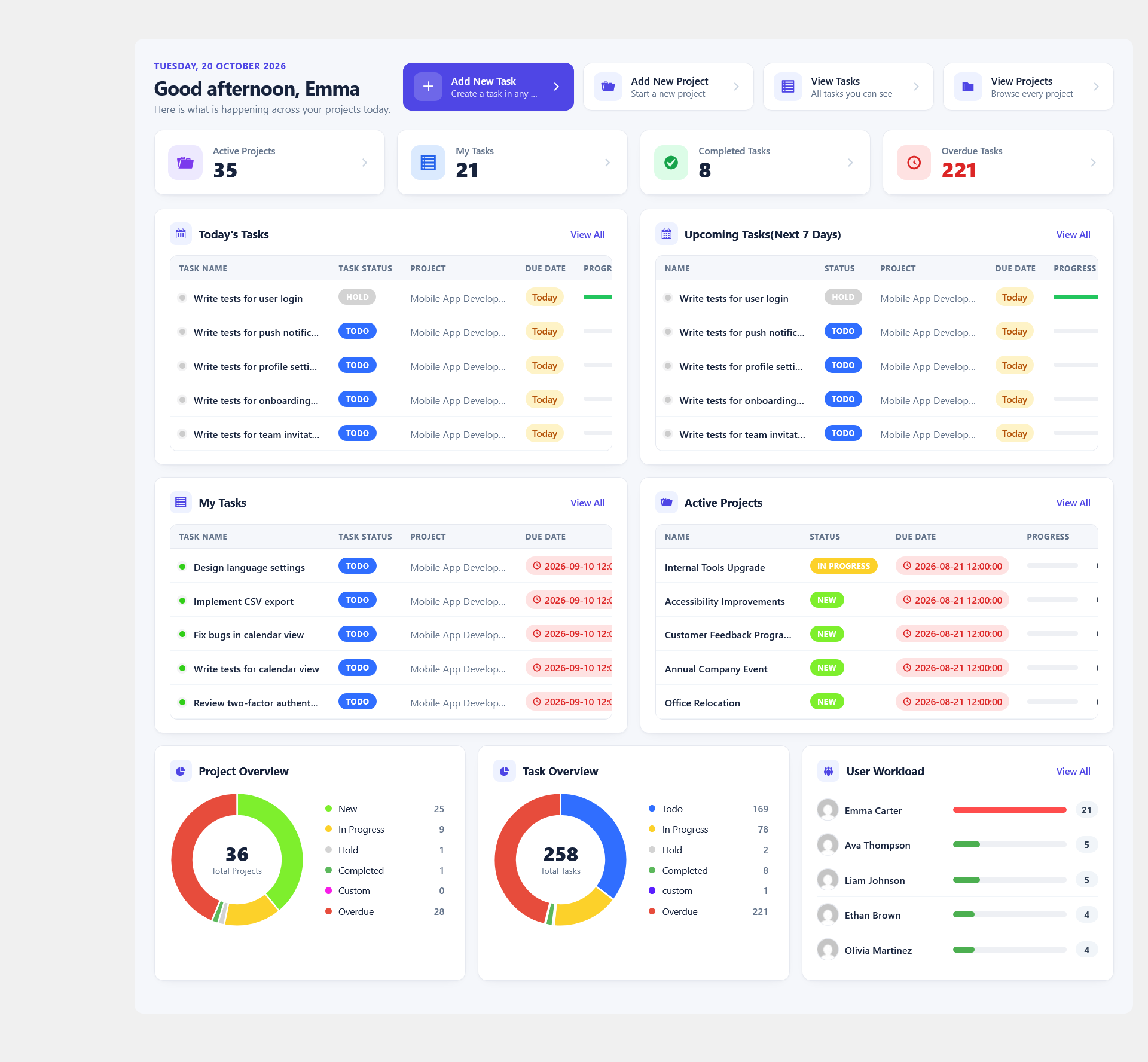
- Modern Dashboard: Get a quick overview of projects, tasks, and team workload in one centralized place.
- Project Management: Create and organize projects, manage project members, monitor progress, and keep all project information in one place.
- Powerful Task Management: Create tasks, assign team members, set priorities, manage deadlines, and track task progress.
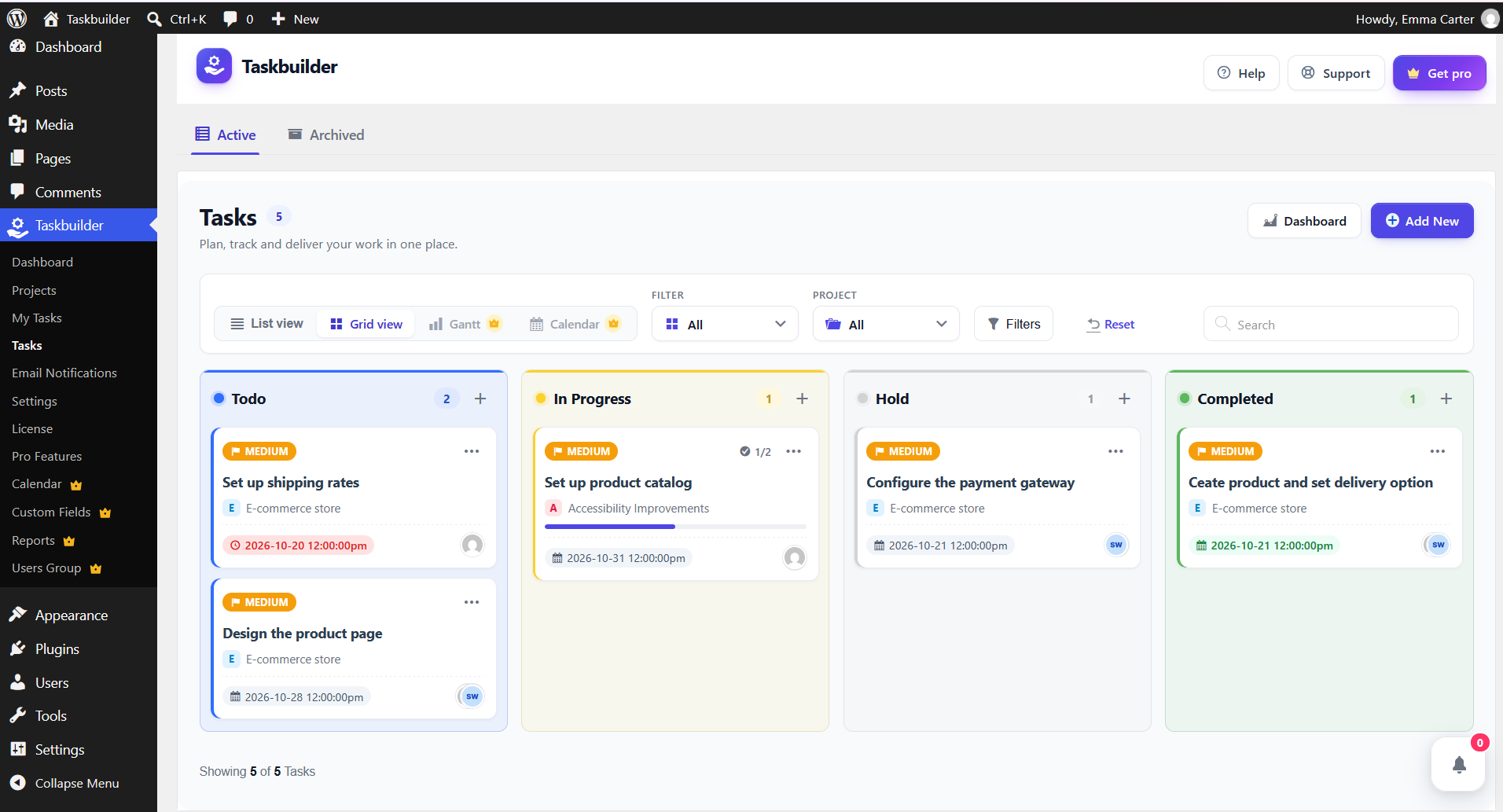
- Kanban Board: Visualize your workflow with an intuitive Kanban board. Each card is a task; drag it from column to column as work progresses so everyone knows its status.
- My Tasks: Give team members a dedicated view of their tasks, helping them focus on their responsibilities and deadlines.
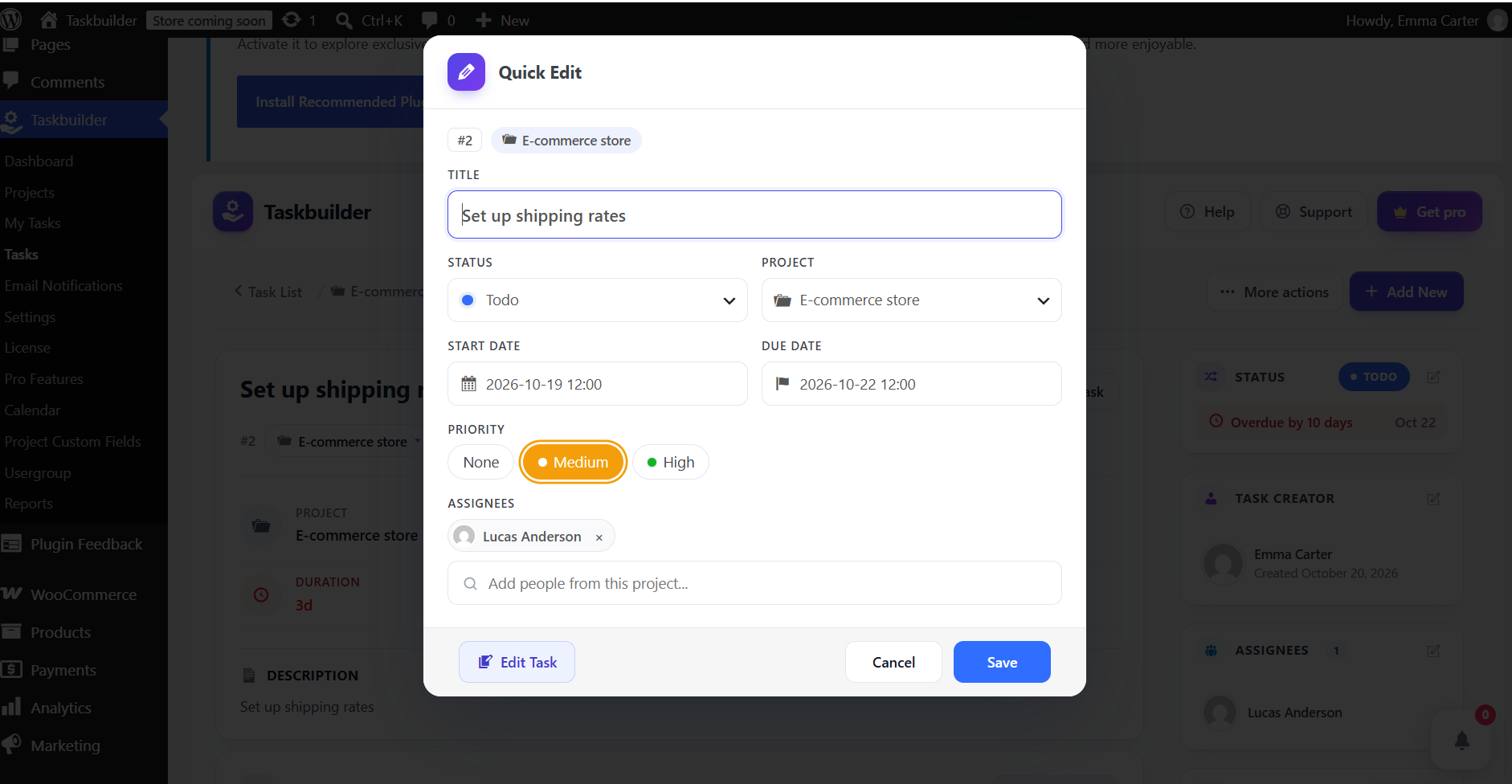
- Quick Edit: Update task and project information quickly without navigating through multiple screens.
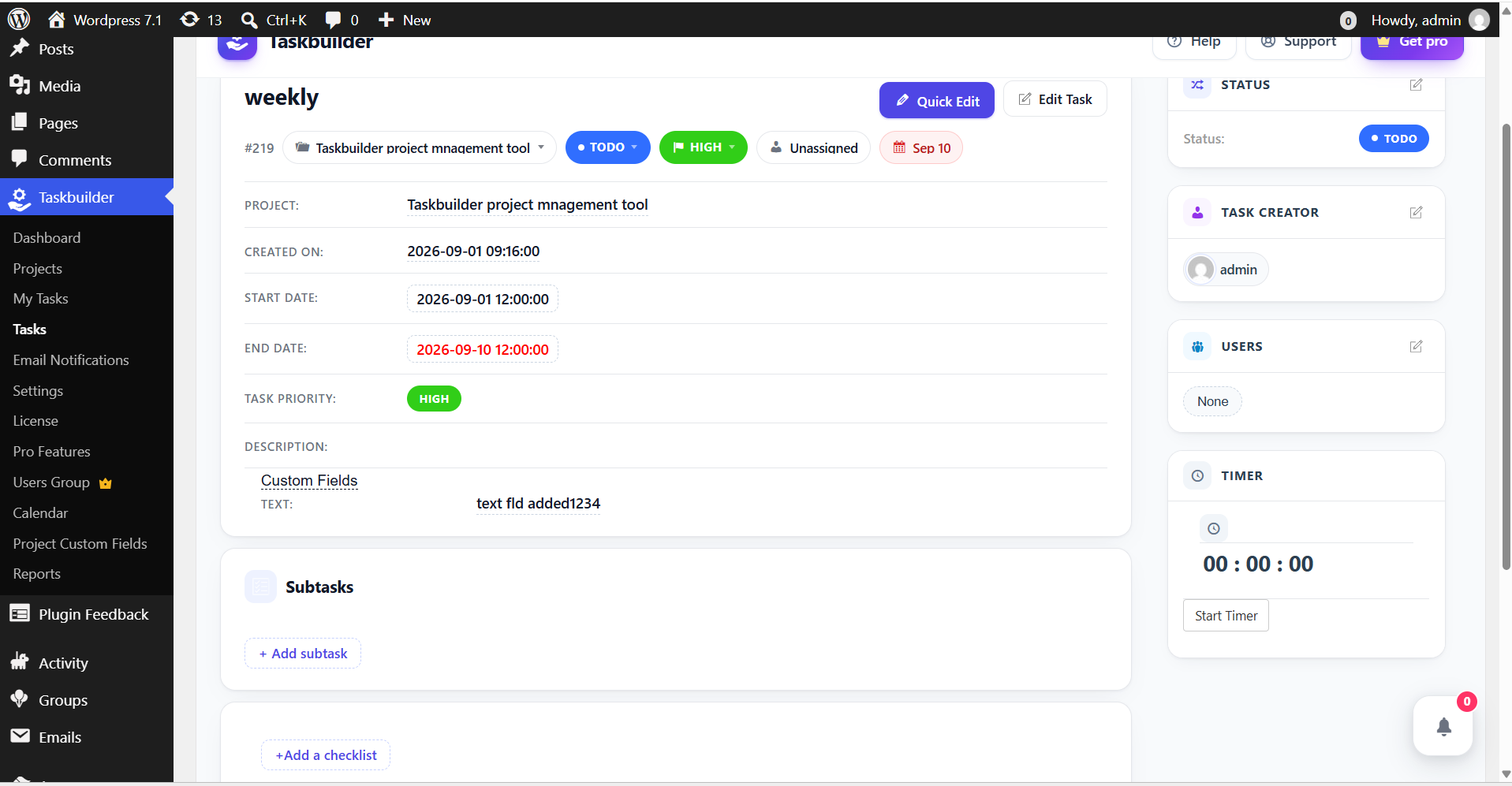
- Task Overview & Collaboration: Keep task discussions, comments, attachments, and change history together so everyone stays informed.
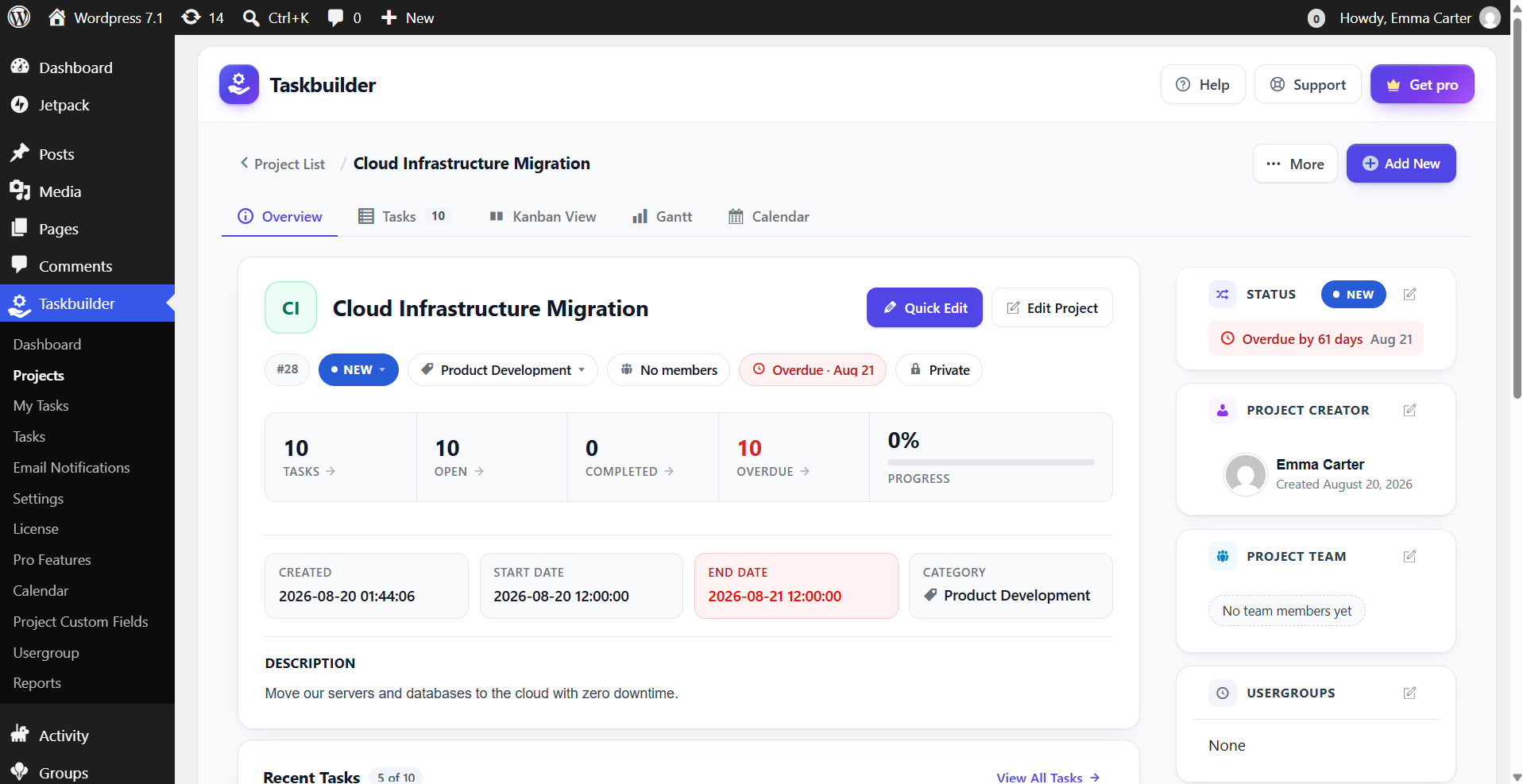
- Project Overview: Get a clear picture of project progress, completed tasks, active tasks, and overdue work.
- Unlimited Co-workers: Add as many co-workers as you need to share the workload. Any registered WordPress user can be a manager, co-worker or client on a project.
- Free Subtasks: Create and manage subtasks for better task organization, and convert subtasks into standalone tasks — completely free.
- Client Access Mode: Add users with a client role to projects and tasks with controlled access.
- Team Collaboration: Work together with your team in real time.
- Task Comment Mentions: Mention team members directly in task comments using @mentions to notify and collaborate with the right people.
- Fast, Ajax-based Interface: Almost every action runs without a page reload.
- Manage Projects & Tasks From the Frontend: Free — no add-on needed.
- Checklist: Break big tasks into small ones, check things off the list, and watch the progress bar reach 100%.
- File Attachments: Attach files to task and project comments.
- Responsive Design: Works on any screen size, so you can work anytime, anywhere. For frontend pages, a full-width page template works best.
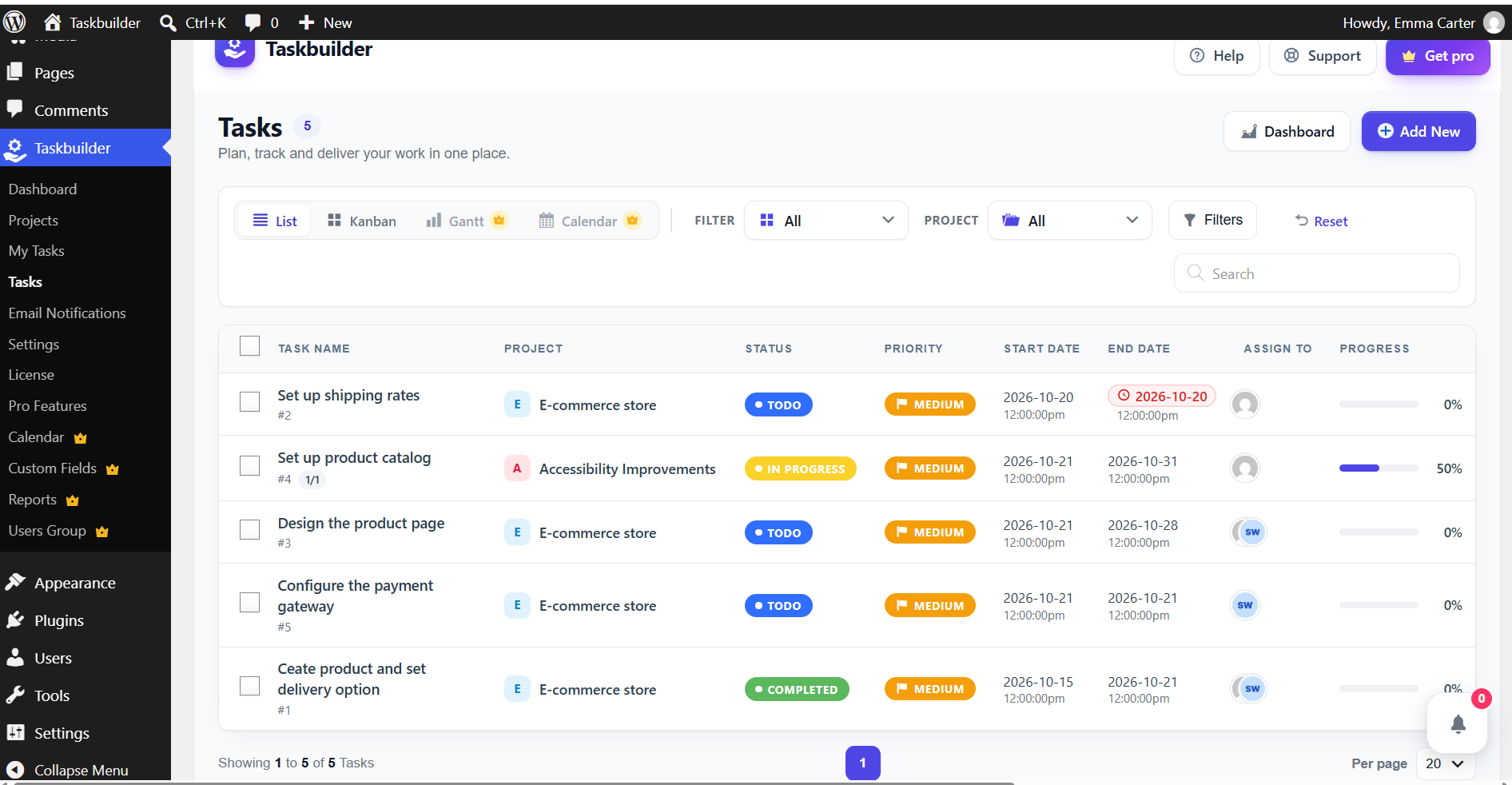
- List View: Manage projects and tasks in a list.
- Filter: Filter tasks and projects by title, project name, status, category, priority and user.
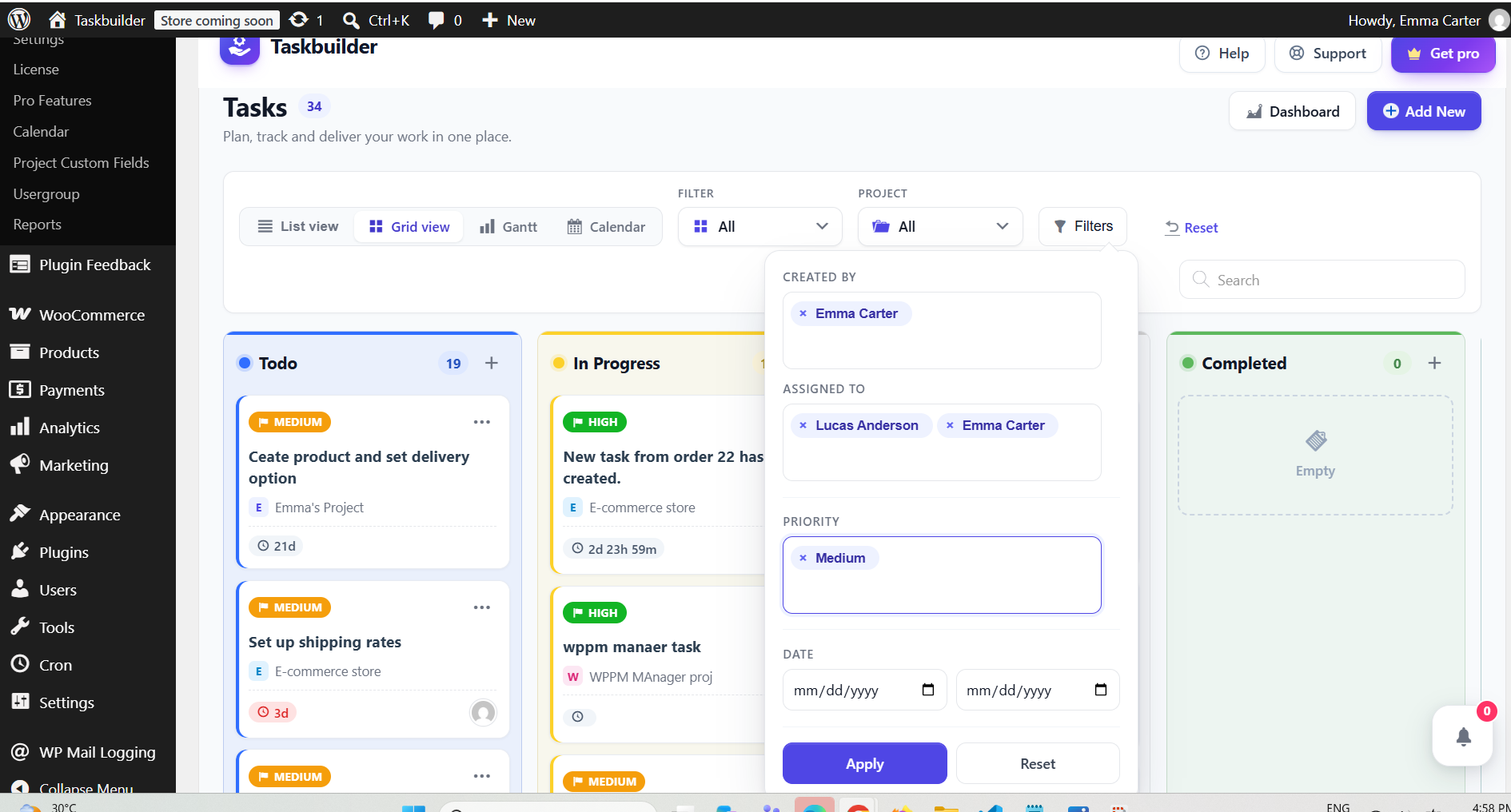
- Advanced Filters: Quickly find the tasks you need using advanced filters such as Created By, Assigned User, Priority, Start Date, and End Date.
- Email Notifications: Customizable email notification templates available for you to customize as per your requirement. You can make use of macro tags for task & projects specific information which gets replaced dynamically.
- Global Notifications: Get notified when you are mentioned in a task comment or assigned a task.
- Custom Statuses: You can create unlimited custom statuses for projects and tasks.
- Custom Priorities: You can create unlimited custom priorities for tasks.
- Custom Categories: You can create unlimited custom categories for projects.
- Appearance Setting: Customizable Appearance to match up with your theme.
- Single-Project Task Pages: Show only one project’s tasks on a page with
[wppm_tasks project="Project name"]. - Archive Tasks and Projects: Keep your workspace organized by archiving completed or inactive tasks and projects instead of permanently deleting them.
🙌 Give Taskbuilder a try — the core plugin is free.
🚀 Why Choose Taskbuilder?
- Built for WordPress: Manage projects and tasks directly from your own WordPress website.
- Complete Project Workflow: Organize projects, create tasks, assign team members, and track completion.
- Visual Task Management: Use Kanban boards and task lists to manage work your way.
- Team-Focused: Give project members clear responsibilities and visibility into their work.
- Flexible Access: Manage project roles and permissions according to your team’s needs.
- Frontend & Backend Management: Let users work with projects and tasks through dedicated frontend pages using shortcodes.
- Extendable: Add more capabilities with Taskbuilder premium add-ons.
Take control of your projects without moving your team’s workflow to another platform.
🔌 Extend Taskbuilder With Premium Add-ons
Need more advanced project management capabilities? Extend Taskbuilder with premium add-ons (sold separately):
- Calendar – Daily, weekly or monthly view of task timelines with drag and drop. Filter by title, project, status, category, priority and user.
- Email Piping – Create tasks directly from email, without logging in to the website.
- Custom Fields – Add custom fields to tasks and projects: Text, Number, Date, Dropdown and File Upload.
- Time Tracker – Track the exact time spent on each task with a start/stop timer.
- Gantt Chart – Plan tasks on a timeline, see upcoming deadlines and keep a bird’s-eye view of every project.
- Duplicate Project – Clone an existing project together with its tasks and checklists.
- Report – Create detailed project progress reports, choose what they show, and download them as PDF or CSV.
- BuddyPress – Create and manage projects and tasks inside BuddyPress groups.
- WooCommerce – Automatically create a task when an order is received, with the order details in the task description.
- Due Date Reminder – Email reminders before a task’s due date to keep your team on track.
- Usergroup – Assign a group of users to a project, then assign the group to the project’s tasks.
- Recurrent Task – Schedule recurring tasks that are created automatically, with flexible recurrence periods and start and end dates.
- Overdue Notifier – Automatic email notifications when a task’s due date has passed and it is not completed.
- SupportCandy – Automatically create a Taskbuilder task for each new SupportCandy ticket, and add private notes to the ticket when the task is created and completed.
👨💻 DOCUMENTATION AND SUPPORT
Available Translations
Taskbuilder is available in these languages:
- Romanian
- Francês (França)
- German (Germany)
- German (formal)
- Turkish
- Português (Brasil)
If you are a translator, you can get free access to all premium add-ons for a year in exchange for translating Taskbuilder into your language, if it is not available already. We will renew the Premium subscription next year if you continue contributing to the translation. If interested, don’t hesitate to contact us via our support page.
Instalação
Plug and play — no setup wizard.
From your WordPress dashboard
- Go to Plugins > Add New Plugin.
- Search for “Taskbuilder”.
- Click Install Now, then Activate.
Manual installation (ZIP file)
- Go to Plugins > Add New Plugin > Upload Plugin.
- Choose the Taskbuilder ZIP file and click Install Now.
- Ative o plugin.
You can also extract the ZIP file and upload the taskbuilder folder to the /wp-content/plugins/ directory, then activate it from the Plugins menu.
After activation
There is no setup wizard. Taskbuilder creates its database tables and default settings automatically and opens the Taskbuilder Dashboard.
- Click “Create Your First Project” on the Dashboard welcome screen.
- After saving, the project opens. Click “Add Your First Task”.
- Optional: follow the “Getting Started with Taskbuilder” checklist on the Dashboard, or dismiss it.
Updating from an older version keeps all your projects, tasks and settings. We recommend a full backup (files and database) before any major update.
Log de Changes
Simpler first-time setup: no setup wizard, and a new project opens straight away so you can add its first task. Your projects, tasks and settings are kept.
7.0.2 (November 23, 2026)
- Fix: Security fix.
7.0.1 (November 7, 2026)
- Improvement: Simpler installation: Install, Activate, Dashboard, Create Project, Create Task. There is no setup wizard and no required configuration screen.
- Improvement: Activating the plugin automatically creates or updates the database tables and default settings, then opens the Taskbuilder Dashboard.
- New: Welcome screen on the Dashboard while there are no projects yet, with one “Create Your First Project” button and optional tips. It never blocks the Dashboard and disappears once a project exists.
- New: After creating a project, its Project Overview opens straight away with “Your project is ready!” and an “Add Your First Task” button. While a project has no tasks, the overview offers to add the first one.
- Improvement: Onboarding is optional. The “Getting Started with Taskbuilder” checklist can be dismissed, and users who are already set up never see it.
7.0.0 (November 1, 2026)
- Important: Taskbuilder 7.0 is a major release with a redesigned interface and new project and task management workflows. We recommend taking a full website backup, including your database and files, before updating.
- New: Completely redesigned modern interface for a cleaner and more efficient project and task management experience.
- New: Task Overview for viewing and managing task details in one place.
- New: Quick Edit for quickly updating important task and project properties.
- New: My Tasks view to easily manage tasks assigned to you across projects.
- New: Project Overview for improved project visibility and progress tracking.
- New: Project avatars with automatic initials for easier project identification.
- New: Added frontend Dashboard and My Tasks shortcodes for easier access to project and task information from the frontend.
- New: Improved project and task list layouts with a modern SaaS-style design.
- New: Improved task and project navigation for a faster workflow.
- New: Improved task property editing for status, priority, assignee, dates, and other key fields.
- New: Improved empty states and interface elements throughout the plugin.
- New: Added pagination options to display 10, 20, 50, or 100 items per page.
- New: Added Task ID and Project ID for easier identification and reference.
- New: Added an Archived filter to the Project List and Task List.
- New: Added a “View All” link to the User Workload dashboard widget to view all users assigned to tasks and their workloads.
- New: Made dashboard statistics cards clickable to quickly view Active Projects, My Tasks, Completed Tasks, and Overdue Tasks.
- New: “Getting Started with Taskbuilder” panel on the Dashboard that guides each user to their next step (create a project, add project members, create tasks, track progress). It adapts to the user’s permissions and project membership, ticks a step only when it is really done, can be dismissed, and is not shown to users who are already set up.
- New: Add New Task explains what to do when you have no project to add a task to (with a Create Project button for users who can create projects) instead of showing an empty form.
- New: The Dashboard “Add New Project” button is shown only to users who can create projects.
- New: “Who can create projects?” explanation in Settings > Co-workers Permission, and a description of the WPPM Manager and WPPM Administrator capabilities on the user profile.
- Fix: My Tasks no longer remembers an old search between visits, which could hide every task, and shows a message with a “Try again” button if the list cannot be loaded.
- Fix: Dates no longer overflow their box on mobile screens.
- Fix: Clicking a notification (mention or task assignment) now opens the task instead of the task list. It opens in the backend when clicked in the admin area, or on the frontend task page (Settings > Page Settings) when clicked on the frontend.
- Fix: Clicking anywhere on a notification now opens the task, not just the “View Task” link.
- Fix: Older task links in emails and notifications now open the task.
- Fix: Users can only mark their own notifications as read.
- New: Added a default task priority and task category on new installations.
- New: Added the ability to add and delete attachments while editing a task comment,project comment.
- New: Added Archive and Restore to Bulk Actions for projects and tasks, and an “Archived” option in the project filter.
- New: Added Custom Fields support to email notification macros.
- New: Added “Assign Users” to the task list Bulk Actions, to add users to or replace the users of several tasks at once.
- New: Added Kanban View to the Project List.
- New: Search the Task List, Task Kanban, Project List and Project Kanban by ID (e.g. “12” or “#12”).
- New: The “+” icon on a Kanban status column now creates a task with that column’s status selected automatically.
- New(Pro feature): Calendar search and BuddyPress group calendar search now also find tasks by ID.
- New(Pro feature): Gantt view on the Tasks page and as a “Gantt” tab inside each project, with Day / Week / Month zoom, tasks grouped by project, a Today line, and drag to move a task or drag its edge to change the due date (Gantt Chart add-on).
- New(Pro feature): Calendar view on the Tasks page and as a “Calendar” tab inside each project, with Month / Week / List layouts, drag to move a task, drag its edge to change the due date, and click a day to add a task on that date (Calendar add-on).
- New(Pro feature): SupportCandy integration automatically creates a Taskbuilder task when a new SupportCandy ticket is created, and adds private notes to the ticket when the task is created and completed (SupportCandy Integration add-on).
- New(Pro feature): Redesigned Calendar page (Taskbuilder > Calendar) in the modern style, with a task count, search with “Clear search”, status legend chips, and tasks shown with a colored status stripe.
- New(Pro feature): In a BuddyPress group, clicking the “Assign users” field now shows the group’s members, so you can assign projects and tasks without typing their names.
- New: Gantt and Calendar appear as locked “Pro” views for site administrators when their add-on is not active.
- New: Clicking the tab or view button you are already on reloads that view.
- Improvement: Cloning a task now also clones its subtasks.
- Improvement: Improved performance of project and task queries on larger sites.
- Improvement: Improved database indexing for frequently used project and task queries.
- Improvement: Displayed frequently assigned users at the top of the user assignment suggestions for faster task assignment.
- Improvement: Improved overall UI consistency across List, Kanban, Project, and Task views.
- Improvement: Refined the Dashboard layout with quick actions in the header and Project Overview, Task Overview and User Workload in one row, with chart totals and per-status counts.
- Improvement: Task Kanban columns now use the full page height instead of scrolling inside each column.
- Improvement: The “Add New” button now looks the same in the Task List and Task Kanban views.
- Improvement: Add Project and Bulk Assign user pickers now open their suggestions when the field is clicked.
- Improvement(Pro feature): Calendar drag and drop saves without reloading the page, keeps the month or week you are viewing, and shows a confirmation message.
- Improvement(Pro feature): On busy calendar days, short tasks are shown first and the “+ more” list scrolls, so every task can be opened and moved.
- Improvement(Pro feature): Calendar, Gantt Chart and BuddyPress add-on scripts and styles now refresh automatically after an update (no browser cache clearing needed).
- Improvement: Updated translation templates (POT files); the core template is now named taskbuilder.pot.
- Improvement: Existing projects, tasks, permissions, settings, and integrations remain supported.
- Developer: Added action hooks for project and task updates, project deletion, archiving, and settings changes (wppm_project_updated, wppm_task_updated, wppm_before/after_delete_project, wppm_before_delete_task, wppm_after_settings_updated and more).
- Fix: Restoring an archived task now works correctly.
- Fix: The “Filters” button no longer overlaps the Filter dropdown on frontend Project and Task lists.
- Fix: The “Archived” option in the frontend Project List Filter dropdown now opens the archived projects.
- Fix(Pro feature): BuddyPress group Projects in Kanban View now show only the projects of the current group.
- Fix(Pro feature): BuddyPress group Project List counts, stat cards, Reset and the Active Projects card now stay limited to the current group’s projects and tasks.
- Fix(Pro feature): The “Archive Project” button is no longer shown in the Project List inside a BuddyPress group.
- Fix(Pro feature): Calendar drag and drop now saves the exact dates the task is dropped on, including tasks with only a start or only a due date.
- Fix(Pro feature): Tasks without a start date no longer fill every month on the Calendar; they now show only on their due date.
- Fix(Pro feature): Calendar tasks with a time of day are no longer drawn one day longer than their dates.
- Fix(Pro feature): Security: calendar drag and drop now checks a security token and the user’s permission to edit the task.
- Fix: Various minor UI and usability issues.
- Fix: Fixed an issue where the project category order was not saved in the settings.
- Fix: Updated the Dashboard My Tasks widget to display only tasks assigned to the current user, excluding tasks created by the user but assigned to others.
6.0.7 (October 2, 2026)
- New(Pro feature): BuddyPress Group Projects shortcode [wppm_group_projects] to display group-associated projects on any frontend page. Supports filtering by Group ID [wppm_group_projects group_id=”15″] or Group Name/Slug [wppm_group_projects group=”group-name”].
- New(Pro feature): BuddyPress Group Tasks shortcode
[wppm_group_tasks]to display tasks associated with groups on any frontend page. Supports filtering by Group ID[wppm_group_tasks group_id="15"]or Group Name/Slug[wppm_group_tasks group="group-name"]. Use[wppm_group_projects]and[wppm_group_tasks]together to create a centralized Group Projects & Tasks dashboard. - New(Pro feature): Automatic BuddyPress Group Member Synchronization. Automatically adds new Group Members to associated Taskbuilder Projects and removes them when they leave the Group. Applies only to projects created with “Automatically add all group members as project users” enabled. Added setting under Taskbuilder → Settings → BuddyPress Integration → Removing members from a Group to control member removal synchronization.
- New(Pro feature): Buddypress Integration group owner can create project.
- New(Pro feature): You can select option while creating project to automatically assign all group member to project.
- New(Pro feature): The Group Name has been added to the Task List table.
- New(Pro feature): The Group Name has been added to the Project List table.
- New(Pro feature): Group name in table redirected to associated group.
- New(Pro feature): Group Tasks in Calendar. Display the BuddyPress Group name with the Task name for group-associated tasks, making it easier to identify the Group for each task.
6.0.6 (September 17, 2026)
- New: Added Subtasks – break a task down into child tasks with their own status and assignee, tracked separately from the main task list.
- New: Added a setting to show or hide Global Popup Notifications(Dashboard > Taskbuilder > Settings > General > Default Mention Notifications).
- New: Added Advanced Project Filters for easier project management and organization.
- New: Added an Appearance setting to customize the Project List header button color.
- Fix: Fixed a SQL injection vulnerability in task date filters.
- Fix: Fixed an issue where resetting filters in Archived Tasks displayed active tasks.
- Fix: Fixed Project Task Kanban filter reset issue.
- Fix: Fixed an issue where buttons were not displaying correctly in the Open Task view.
- Fix: Fixed a fatal error that occurred when the Timer add-on was deactivated.
The changelog for older versions is in the changelog.txt file.
Capturas de tela

Para desenvolvedores
Este é o seu plugin? Mostre os números.
Adicione um crachá ao vivo ao seu site, Documentos ou Readme do GitHub. Ele é atualizado por conta própria - nenhuma conta necessária.
Best Taskbuilder alternatives
All kanban plugins →




FAQ
Taskbuilder: quick answers
Respostas diretas, extraídas de dados ao vivo WordPress.org.
Fonte: WordPress.org
Is Taskbuilder free?
Yes. Taskbuilder is free to download and use from the official WordPress.org plugin directory.
Is Taskbuilder safe to use in 2026?
Yes — Taskbuilder is a safe, well-maintained plugin to use in 2026. It runs on 600+ sites, is rated 4.7/5 and was last updated 7 days ago, and scores 81/100 on our health check.
How many websites use Taskbuilder?
Taskbuilder is active on 600+ WordPress websites and has been downloaded 49,062 times since it launched in October 2021. It was downloaded 2,802 times in the last 30 days.
Does Taskbuilder work with WordPress 7.1?
Yes. The developer has tested Taskbuilder up to WordPress 7.1.5, the latest release. It requires WordPress 5.6 or newer.
What PHP version does Taskbuilder need?
Taskbuilder requires PHP 7.4 or higher. Most hosts run PHP 8.x today, so it works on any modern WordPress hosting.
When was Taskbuilder last updated?
The latest version, 7.0.2, was released on November 23, 2026 (7 days ago).
Who makes Taskbuilder?
Taskbuilder is developed and maintained by taskbuilder.
What are the best alternatives to Taskbuilder?
The most popular alternatives to Taskbuilder are FluentBoards (6K+ installs), Project Manager (5K+ installs) and Kanbanz (4K+ installs).
Alimentado por PageForge
Um modelo e uma planilha. Uma página real para cada pesquisa.
PageForge Transforma cada linha de um CSV em uma página WordPress com seu próprio título, URL, SEO campos e esquema, construído no layout que você já desenhou. Gratuito em WordPress.org.
- CSV e XLSX, mais Google Sheets em Profissional e Empresarial
- Seu próprio título, URL, SEO campos e esquema para cada página
- Funciona com o editor de blocos, Elementor, Divi e Avada
- Gratuito em WordPress.org, sem cartão de crédito