


Speeseek – encontre o que atrasa o seu site WordPress
Slow site or slow wp-admin? Find the cause — autoload bloat, heavy plugins, database weight, a cache that isn't working — and a ranked fix plan.

Escolha sólida
SpeeSeek is a solid plugin choice in 2026, with a few things worth checking first. Is rated 5/5 and was last updated 3 days ago, and scores 71/100 on our health check.
- Desenvolvido ativamente — última atualização 3 dias atrás
- Testado com as últimas WordPress (7.1)
- Base de usuários pequenas (<10 instalações ativas)
- Muito poucos comentários até agora
Como ele se acumula?
Lado a lado em instalações, atualizações, avaliações e suporte


Downloads diários
Os picos de download geralmente seguem uma nova versão — cada site que atualiza automaticamente é um download.
Rankings
Where SpeeSeek stands todayWordPress.org Classificações de pesquisa
Posição ao vivo na pesquisa de plugins, top 100| Palavra chave | Posição |
|---|---|
| autoload | #48 |
| diagnostics | >100 |
| execução | >100 |
| profiler | #24 |
| slow | >100 |
Divisão de classificação
★★★★★ ★★★★★ 5 de 1 comentários
About SpeeSeek
From the official readme · v1.7.1Descrição
Your site is slow and PageSpeed only tells you to “reduce server response time”.
That number is decided inside WordPress — by autoloaded options loaded on every request,
a database full of leftovers, a page cache that is installed but not actually serving
pages, a plugin quietly running hundreds of queries. Speed tests can’t see any of it.
SpeeSeek looks at your site from the inside and tells you, in plain language, what
is slowing it down, why it matters, and exactly how to fix it — then puts the fixes in
order, so you know what to do first.
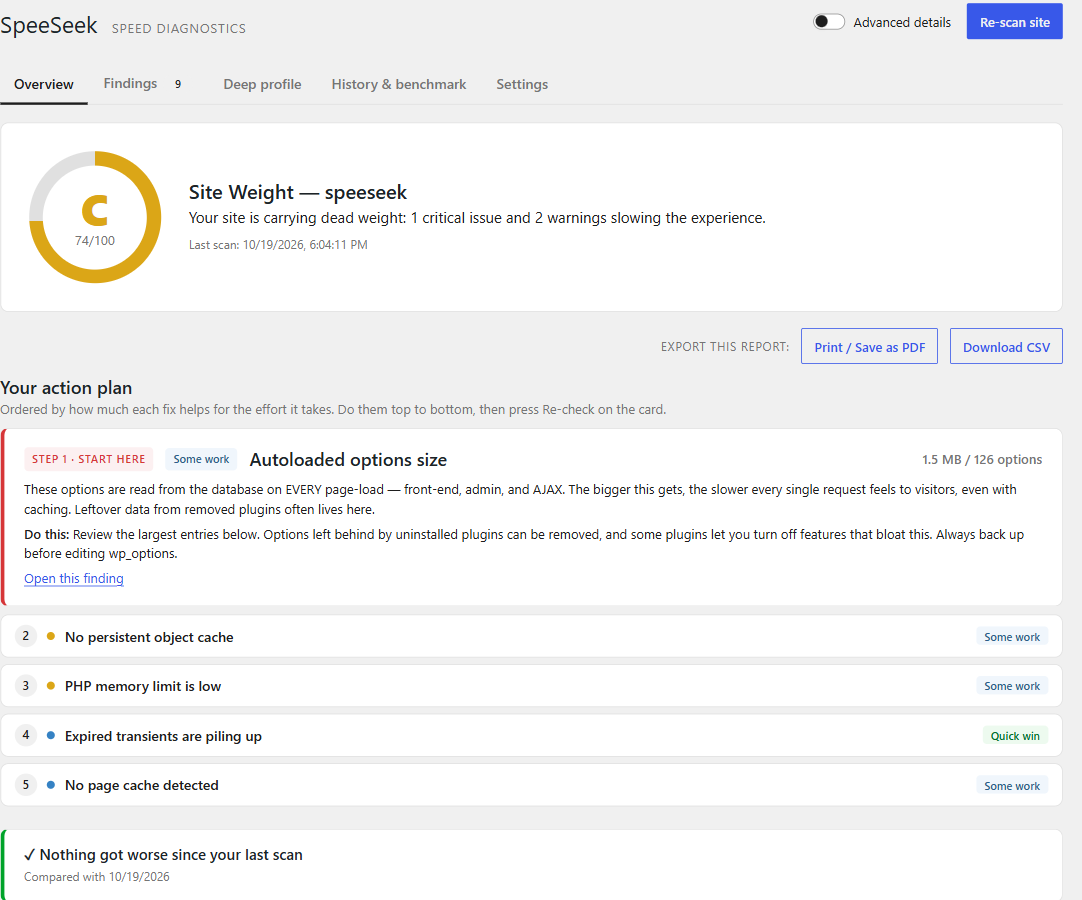
- A ranked action plan. Up to five steps, ordered by how much each fix helps for the
effort it takes. A two-minute cleanup comes before a hosting migration. - “I fixed it — re-check.” Re-run just the check behind a finding and see it turn
green, without a full scan. - It measures, not guesses. Page caching is tested with a real request to your home
page, so you learn whether your cache actually works — not just whether one is
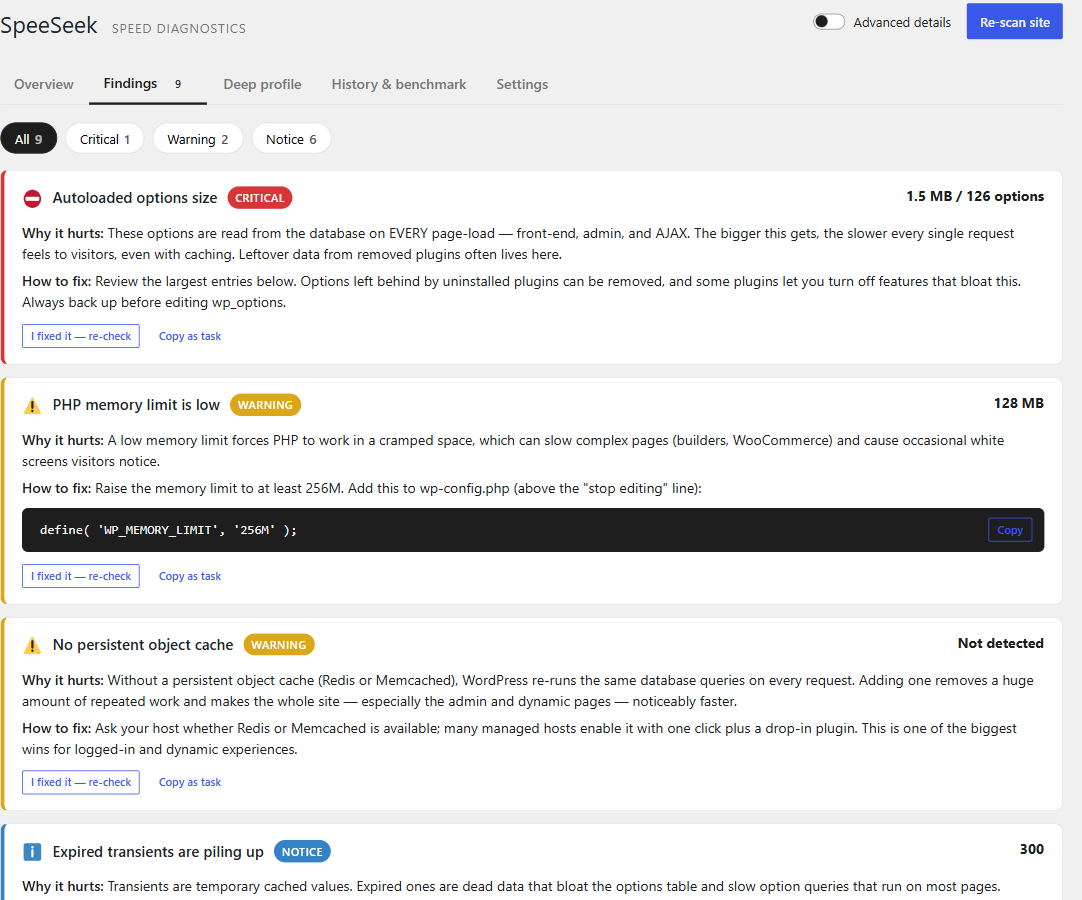
installed. The deep profiler times a real page load, front end or wp-admin. - Every finding is What → Why it hurts → How to fix, with a copy-paste-ready
snippet, and “Copy as task” to hand it to your developer.
SpeeSeek is advise-only. It is not an optimizer and it never changes your data
or your settings. It diagnoses; you decide. There is zero front-end footprint —
nothing is added to your site’s public pages, nothing is added to autoload, and scans
run on demand from the admin only.
Why it’s different
- Reads what external tools can’t: autoloaded options bloat, cron backlog, database
overhead, object cache / OPcache / page-cache behaviour, page-builder weight. - Its own transparent Site Weight grade across four categories — Server Response,
Database Weight, Request Load, and Maintenance Health — instead of a single opaque
Google score. - Built for site owners, not just developers. Query Monitor is a superb tool for
developers debugging one request; SpeeSeek is the plain-language report for the person
who owns the site — and it works well alongside Query Monitor. - Safe on big sites: heavy database checks are time-limited and skip themselves on huge
tables instead of locking anything up, and a check that fails is shown as “not
measured” rather than taking the whole scan down. - Lightweight by design: read-only, on-demand, and it refuses to be the bloat it detects.
It remembers, so it’s a keeper — not a one-time scan
- History & regression alerts — every completed scan is snapshotted, so SpeeSeek
can tell you what changed since last time and which plugin or update caused it. - Per-plugin cost attribution — the “who’s the culprit” finder attributes autoloaded
weight back to the plugins that created it. - Consequence translator — not “1.2 MB of autoload” but “~16 ms added to every page
load,” with the math shown under an Advanced toggle. Never fake precision. - A “✓ what we verified is healthy” panel, so you can trust the verdict.
Scanners included
- Environment (PHP version / EOL, memory limit)
- Autoloaded Options — size + top offenders loaded on every request (signature finding)
- Cost by Plugin, Plugin Footprint
- Database Weight (expired transients, orphaned metadata, table overhead)
- Post Revisions (page-builder aware), Media Library, Comment Hygiene
- Scheduled Tasks (overdue / duplicate cron, cron-on-page-load)
- Caching (persistent object cache, OPcache, page cache)
- WooCommerce (Action Scheduler backlog, stale sessions — when active)
- Page builders: generic builder weight plus a dedicated Elementor scanner
- Jet / Crocoblock (custom-table weight, SmartFilters indexer, widget packs)
Optional deep profiler
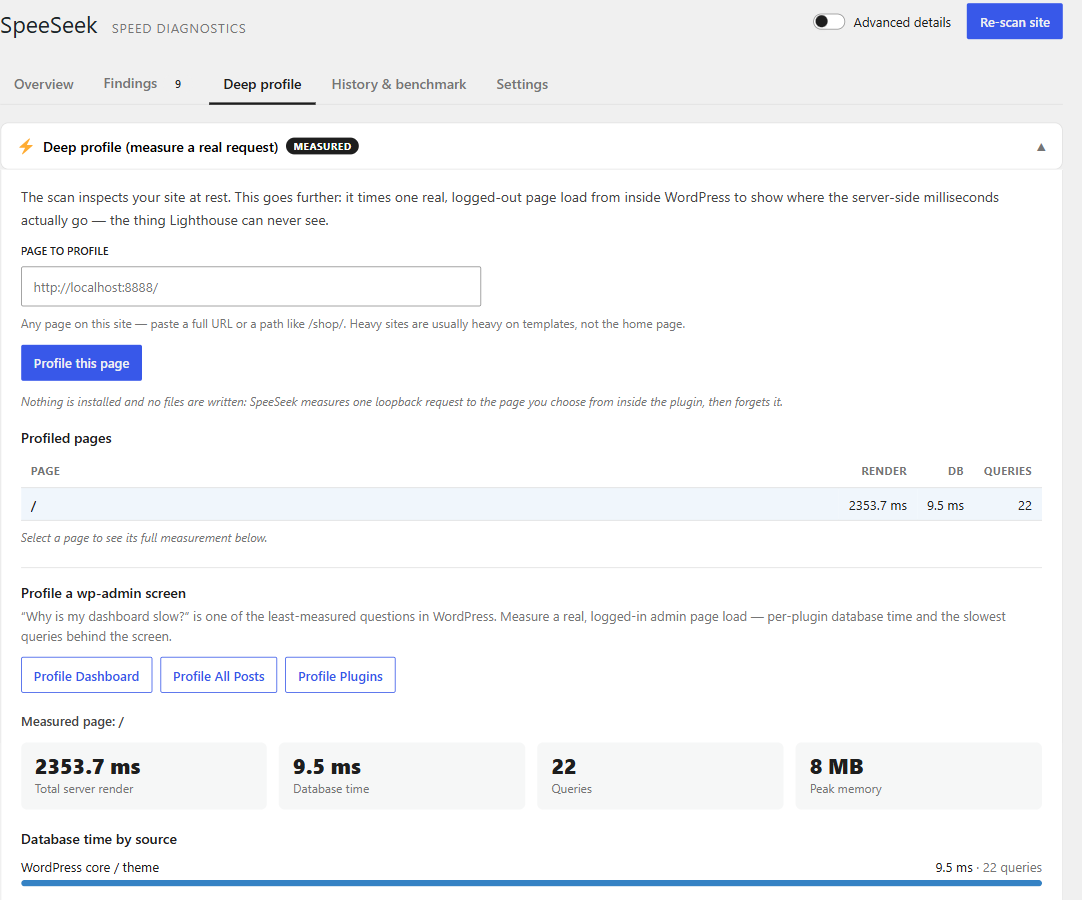
On demand, SpeeSeek measures (rather than estimates) real server render time, database
time per plugin, query count, peak memory, front-end asset weight, and outbound HTTP
during a single request to any page on your site — or to a logged-in wp-admin screen such
as the Dashboard or the Posts list (“why is my admin slow?”). Nothing is installed and no
file is written: SpeeSeek measures from inside itself during that one request, then
forgets it. After a few pages it points out the templates that do the most work.
Works with AI assistants
On WordPress 6.9+, SpeeSeek registers read-only abilities through WordPress’ built-in
Abilities API. Connect an AI assistant to your site (via the MCP Adapter plugin or the
WordPress AI Client) and it can ask SpeeSeek for your latest Site Weight report, list the
findings, see what changed since the last scan, and trigger a fresh scan — so you can ask
“why is my site slow?” in plain language and get an answer grounded in real diagnostics.
It’s administrator-gated and read-only, and your assistant connects to your site, so
nothing new leaves it and there is no API key to set up.
Traduções
Ships ready in English, German (de_DE), and Persian (fa_IR), with full RTL support for
Persian. The German and Persian translations are AI-drafted and welcome a native-speaker
review pass.
Serviços externos
SpeeSeek connects to external services in two clearly-scoped cases. No personal data and
no content from your site is ever transmitted.
-
WordPress.org API (api.wordpress.org) — The “External HTTP” scanner performs a
single test request tohttps://api.wordpress.org/core/stable-check/1.0/to measure
your server’s real outbound latency to a known-good endpoint. Only a standard HTTP GET
is made; no data about your site is sent. This request only happens while you run a
scan in the admin, and it respects theWP_HTTP_BLOCK_EXTERNALconstant.
WordPress.org terms: https://wordpress.org/about/privacy/ . -
SpeeSeek Benchmark service (opt-in, OFF by default) — If — and only if — you
explicitly enable “Compare against other sites” in SpeeSeek’s settings, the plugin
sends a small set of anonymous numeric “weight” metrics (for example: total
autoloaded bytes, query count, database overhead size) to the SpeeSeek Benchmark API
so it can show you where your site sits relative to aggregate percentile bands of
other sites. No URLs, no site identity, no personal data, and no content are sent —
only whitelisted numbers. This happens at most once per day, and never while the
setting is disabled.
Endpoint:https://benchmark-backend-cf.leoworking96.workers.dev(hosted on
Cloudflare Workers). Service privacy & terms:
https://benchmark-backend-cf.leoworking96.workers.dev/privacy .
Cloudflare’s terms: https://www.cloudflare.com/website-terms/ .
Código-fonte e construir
SpeeSeek ships its full, human-readable source. The admin dashboard is written in
React/JSX and lives in the src/ directory, bundled inside the plugin alongside
the compiled assets in build/. The PHP in includes/ has no build step.
The compiled build/ assets are generated with the official WordPress build
tooling (@wordpress/scripts, which wraps webpack/Babel). To regenerate them
from source:
npm install
npm run build:assets
That compiles src/ into build/. No other build step is required.
Instalação
- In your WordPress admin, go to Plugins → Add New → Upload Plugin and
upload the SpeeSeek zip, or install it directly from the Plugin Directory. - Activate the plugin through the Plugins screen.
- Open SpeeSeek in the admin menu and click Run your first scan.
No configuration is required. Scheduled scans, an email digest, report export (HTML/CSV),
and the optional benchmark comparison can be enabled from SpeeSeek’s Settings tab.
Log de Changes
WordPress 7.2 compatibility, and the AI abilities now work when an assistant calls them without input.
1.7.1
- WordPress 7.2 compatibility. Tested with WordPress 7.2.
- Fixed: SpeeSeek’s AI abilities (site weight report, findings, changes since last scan, run a scan) now work when an assistant calls them without any input. Before, such a call was rejected with “input is not of type object”.
- On WordPress 7.2 and later, the abilities also declare that they need an administrator, so assistants can see that before they call them.
1.7.0
- New: your action plan. The report now leads with up to five fixes in order — ranked by how much each one helps for the effort it takes, each marked “Quick win”, “Some work”, or “Needs your host or a developer”. The same plan heads the exported report and the email digest.
- New: “I fixed it — re-check” on every finding re-runs just that check and confirms the fix, without a full scan.
- New: “Copy as task” turns a finding into a ready-made checklist item for a ticket or a message to your developer.
- New: the dashboard is organised into tabs — Overview, Findings, Deep profile, History & benchmark, Settings — and each tab has its own link.
- Improved: page caching is now tested with a real logged-out request to your home page, so SpeeSeek tells you whether pages are actually served from cache, not just whether a cache plugin is installed. Cloudflare on its own is no longer mistaken for a page cache.
- Improved: OPcache is no longer reported as missing on hosts that restrict its status API.
- Improved: scans are far more robust. A check that fails is retried, and if it still fails it is shown as “not measured” while the rest of the scan completes. Skipped measurements never show up as fake improvements or regressions in your history.
- Improved: heavy database checks are time-limited and skip themselves on very large tables, so scans stay fast and safe on big sites.
- Improved: scan progress is stored per user, so two administrators can scan at the same time, and a persistent object cache can no longer lose a scan midway.
- Improved: clearer deep-profiler errors when a page redirects, is blocked, or returns an error.
- Fixed: multisite — tables are created for every site on network activation and for new sites, and cleaned up when a site is deleted or the plugin is uninstalled.
- Fixed: scheduled-scan settings are no longer re-checked on every front-end page load.
- Fixed: the CSV export escapes values that a spreadsheet could otherwise treat as formulas.
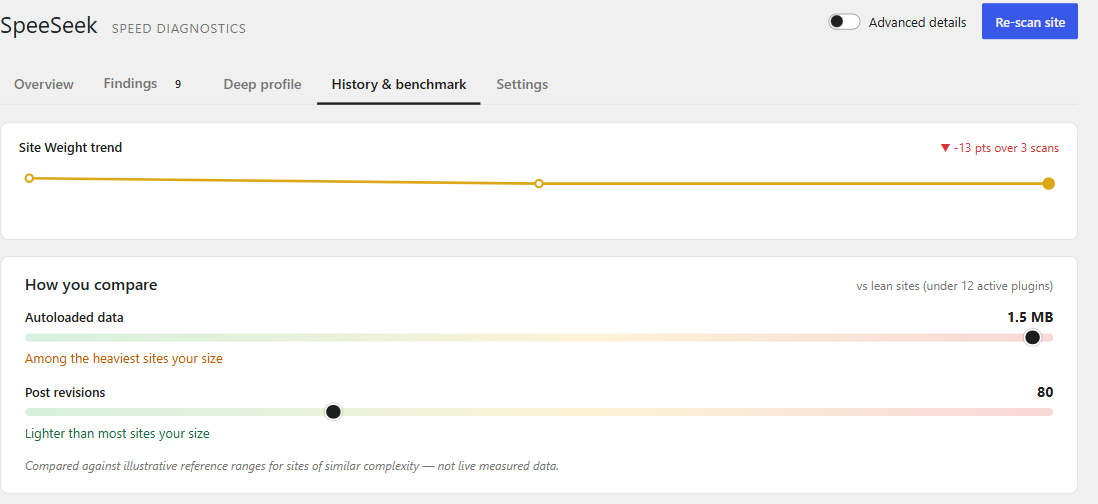
- Fixed: the Site Weight trend showed a falling score in green; a drop is now red and a rise green.
- Fixed: sizes of 1 MB and up show one decimal (“1.5 MB”), so a total no longer rounds up past the change shown beside it.
- Fixed: uninstalling now also clears cached scan sessions on sites with a persistent object cache (Redis/Memcached).
- Fixed: style changes now reach the browser right after an update instead of waiting for a stale cached stylesheet to expire.
1.6.0
- New: profile a real wp-admin screen — “why is my dashboard slow?”, a question almost no tool answers. Measure a logged-in Dashboard, Posts list, or Plugins page and see per-plugin database time and the slowest queries behind it. Nothing is installed; your browser loads the screen once so the measurement uses your real admin session.
- New: template hotspots — after profiling a few pages, SpeeSeek points out which templates do the most work (“your product page runs 4× the queries of your home page”), turning raw numbers into the next thing to look at.
- Both are read-only and add no front-end footprint, like the rest of SpeeSeek.
1.5.0
- New: works with AI assistants. SpeeSeek registers read-only “abilities” through WordPress’ built-in Abilities API (WordPress 6.9+), so an AI assistant connected to your site — via the MCP Adapter or the WordPress AI Client — can answer “why is my site slow?” using your real diagnostics.
- Four abilities: get the latest Site Weight report, list the findings, see what changed since the last scan, and run a fresh scan. All gated to administrators, and — like the rest of SpeeSeek — read-only: they never change your content or settings.
- Nothing leaves your site: your assistant connects to WordPress, so there is no new external service and no API key to configure. On WordPress below 6.9 the feature is simply absent; nothing else changes.
1.4.0
- New: block theme (Full Site Editing) checks — measures the global styles inlined on every page and flags a pile-up of Site Editor template customizations stored in your database.
- New: deeper WooCommerce — tells you whether High-Performance Order Storage is on (the single biggest order-storage speed win) and whether the product attribute lookup table is enabled for fast filtering.
- New: detects the Bricks, Oxygen, and Breakdance builders and measures the layout data they store, just like the existing builders.
- New: recognises GoDaddy Managed WordPress and Nexcess hosting so caching advice stays accurate on those hosts.
1.3.0
- New: profile any page on your site, not just the home page — paste a full URL or a path like /shop/. Heavy sites are usually heavy on templates, not the front page.
- New: a “Profiled pages” comparison table shows server render time, database time, and query count side by side, so you can see which template actually costs the most.
- Each profiled page keeps its own most-recent measurement (up to ten), and only same-site URLs can be profiled.
Capturas de tela
Para desenvolvedores
Este é o seu plugin? Mostre os números.
Adicione um crachá ao vivo ao seu site, Documentos ou Readme do GitHub. Ele é atualizado por conta própria - nenhuma conta necessária.
Best SpeeSeek alternatives
All autoload plugins →




FAQ
SpeeSeek: quick answers
Respostas diretas, extraídas de dados ao vivo WordPress.org.
Fonte: WordPress.org
Is SpeeSeek free?
Yes. SpeeSeek is free to download and use from the official WordPress.org plugin directory.
Is SpeeSeek safe to use in 2026?
SpeeSeek is a solid plugin choice in 2026, with a few things worth checking first. Is rated 5/5 and was last updated 3 days ago, and scores 71/100 on our health check.
How many websites use SpeeSeek?
SpeeSeek is active on <10 WordPress websites and has been downloaded 883 times since it launched in June 2026. It was downloaded 180 times in the last 30 days.
Does SpeeSeek work with WordPress 7.1?
Yes. The developer has tested SpeeSeek up to WordPress 7.1.5, the latest release. It requires WordPress 6.2 or newer.
What PHP version does SpeeSeek need?
SpeeSeek requires PHP 7.4 or higher. Most hosts run PHP 8.x today, so it works on any modern WordPress hosting.
When was SpeeSeek last updated?
The latest version, 1.7.1, was released on November 26, 2026 (3 days ago).
Who makes SpeeSeek?
SpeeSeek is developed and maintained by danialpg.
What are the best alternatives to SpeeSeek?
The most popular alternatives to SpeeSeek are AAA Autoload Optimizer (9K+ installs), WP Healthcheck (1K+ installs) and Enhanced Autoload Manager (600+ installs).
Alimentado por PageForge
Um modelo e uma planilha. Uma página real para cada pesquisa.
PageForge Transforma cada linha de um CSV em uma página WordPress com seu próprio título, URL, SEO campos e esquema, construído no layout que você já desenhou. Gratuito em WordPress.org.
- CSV e XLSX, mais Google Sheets em Profissional e Empresarial
- Seu próprio título, URL, SEO campos e esquema para cada página
- Funciona com o editor de blocos, Elementor, Divi e Avada
- Gratuito em WordPress.org, sem cartão de crédito