


Shilpi Image Kit
Free stock photography for AI-built pages. One call finds the right picture and files it in the media library, credit attached.

Escolha sólida
Shilpi Image Kit is a solid plugin choice in 2026, with a few things worth checking first. Was last updated 4 weeks ago, and scores 64/100 on our health check.
- Desenvolvido ativamente — última atualização 4 semanas atrás
- Testado com as últimas WordPress (7.1)
- Base de usuários pequenas (<10 instalações ativas)
- Muito poucos comentários até agora
Como ele se acumula?
Lado a lado em instalações, atualizações, avaliações e suporte



Downloads diários
Os picos de download geralmente seguem uma nova versão — cada site que atualiza automaticamente é um download.
Rankings
Where Shilpi Image Kit stands todayWordPress.org Classificações de pesquisa
Posição ao vivo na pesquisa de plugins, top 100| Palavra chave | Posição |
|---|---|
| free images | >100 |
| image search | >100 |
| media library | >100 |
| stock images | >100 |
| webp | >100 |
About Shilpi Image Kit
Do Readme oficial · v1.0.2Descrição
Generating an image with AI takes a minute or more per picture. A landing page needs a dozen. Shilpi Image Kit fills those slots from the free stock libraries instead, in about a second each.
One call to auto_image searches Pexels, Pixabay, Openverse and Wikimedia Commons together, ranks the results against the slot the image has to fill, downloads the winner, resizes it, converts it to WebP, sets the alt text and returns a URL.
Ranking that knows about the slot. Aspect ratio, minimum width and the site’s brand colour all feed the score, so a 16:9 hero gets a wide photograph in the right palette rather than whatever matched the keyword first.
Ranking that knows about the licence. A CC0 photograph outranks one that requires a credit, which outranks one that adds share-alike terms. What lands on a client site is the picture with the fewest obligations attached to it.
One round trip. All four sources are queried together, not one after another, and results are cached for 24 hours.
No duplicates. The same source URL always resolves to the same attachment, so rebuilding a page does not fill the library with copies.
Credits kept. The photographer, the source and the licence are stored on every attachment, shown in a Credit column in the media library and available through the [shilpi_image_credits] shortcode.
Fontes
- Pexels and Pixabay need a free API key. Both allow, and Pixabay requires, copying the file to your own server.
- The WordPress Photo Directory is WordPress.org’s own community photo library. No key, and everything in it is CC0, so no attribution is required.
- Openverse, WordPress.org’s own media search, works with no key at all.
- Wikimedia Commons works with no key and covers real places, food, plants and local life far better than the curated libraries.
Shutterstock, Adobe Stock, Envato Elements and Canva are deliberately not supported: their terms do not allow a plugin to license and redistribute their images on your behalf.
Using it by hand
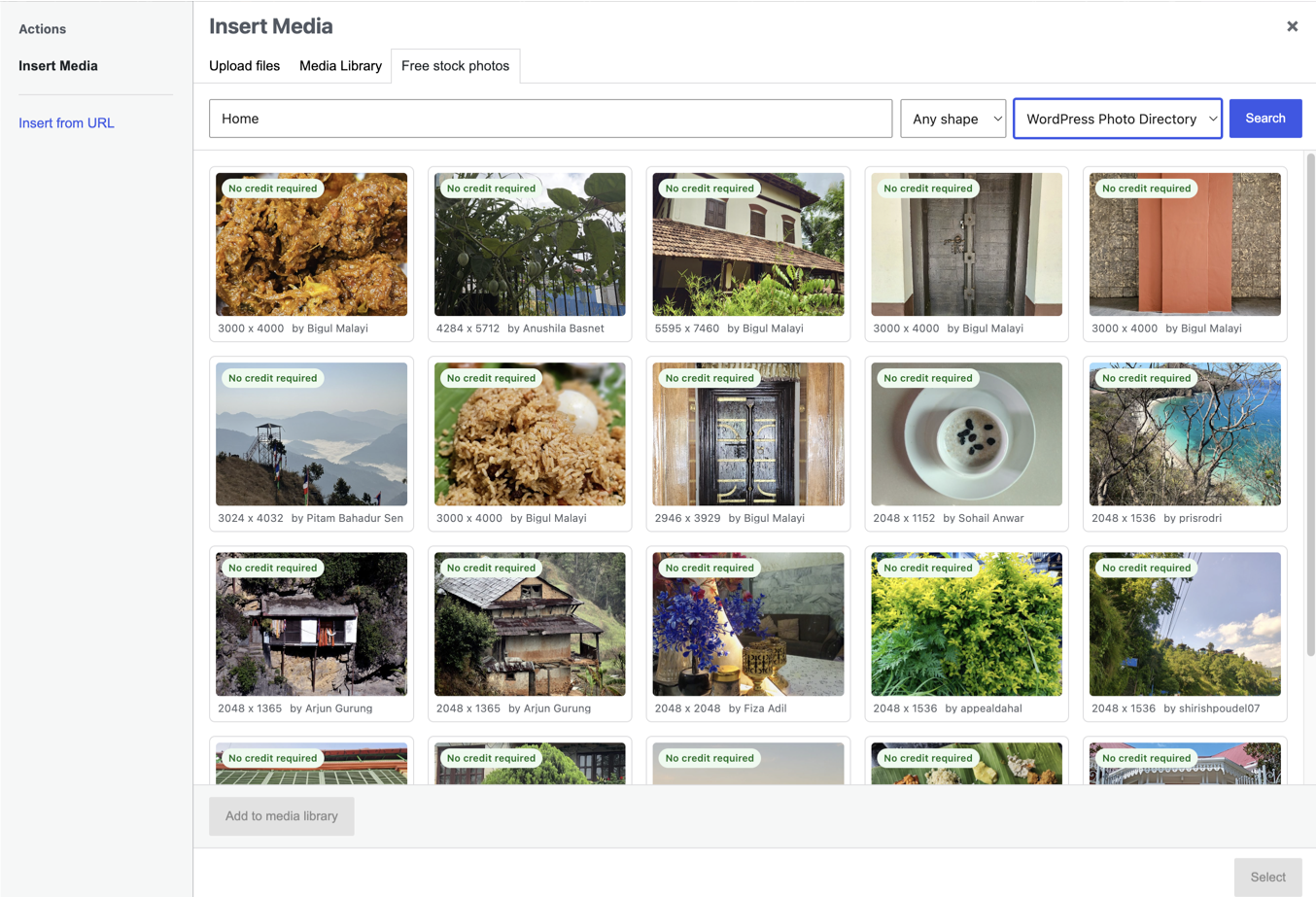
Wherever WordPress opens “Choose an image”, a Free stock photos tab sits
beside “Upload files” and “Media Library”. Search, pick, and the photograph is
downloaded, resized, credited and selected, without leaving the dialog.
Descanse API
For integrations, authenticated WordPress REST endpoints are available at /wp-json/shilpi-image-kit/v1/. They support searching free images and importing a selected result into the Media Library.
Serviços externos
This plugin searches external image services and downloads selected image files. A search is sent only when an authenticated WordPress user with permission to upload files uses the Free stock photos tab or an authenticated integration calls the plugin’s REST API. An image is downloaded only after that user chooses it or requests automatic import. The site server’s IP address and HTTP user agent are necessarily visible to each contacted service.
The plugin does not send WordPress usernames, email addresses, post content, analytics, or tracking identifiers to these services. It does not contact them on ordinary public page views. Search responses are cached on the WordPress site for the configured period.
WordPress Photo Directory
Used to search WordPress.org’s CC0 photo collection and download a selected photo. The plugin sends the search phrase, requested orientation, colour, pagination parameters, and result limit to WordPress.org when a search is performed. No account or API key is required.
- Service: https://wordpress.org/photos/
- Terms of Service: https://wordpress.org/about/terms-of-service/
- Privacy Policy: https://wordpress.org/about/privacy/
Openverse
Used to search openly licensed images. The plugin sends the search phrase, requested image type, orientation, licence filters, page, and result limit to the Openverse API when a search is performed. If the site owner configures an optional Openverse access token, that token is sent in the request authorization header. When an image is imported, its image host receives a download request.
- Service: https://openverse.org/
- Terms of Use: https://docs.openverse.org/terms_of_service
- Privacy Policy: https://openverse.org/privacy
Wikimedia Commons
Used to search freely licensed media. The plugin sends the search phrase, file-type restriction, pagination parameters, and result limit to the Wikimedia Commons API when a search is performed. No account or API key is required. When an image is imported, Wikimedia’s image server receives the download request.
- Service: https://commons.wikimedia.org/
- Terms of Use: https://foundation.wikimedia.org/wiki/Policy:Terms_of_Use
- Privacy Policy: https://foundation.wikimedia.org/wiki/Policy:Privacy_policy
Pexels
Used to search and import stock photographs when the site owner enables Pexels and supplies a Pexels API key. The plugin sends that API key in the authorization header together with the search phrase, requested orientation, page, and result limit when a search is performed. When an image is imported, Pexels’ image server receives the download request and the source page is sent as the HTTP referrer.
- Service and API: https://www.pexels.com/api/
- Terms of Service: https://www.pexels.com/terms-of-service/
- Privacy Policy: https://www.pexels.com/privacy-policy/
Pixabay
Used to search and import stock photographs and illustrations when the site owner enables Pixabay and supplies a Pixabay API key. The plugin sends that API key, the search phrase, image type, orientation, safe-search choice, colour, page, and result limit to the Pixabay API when a search is performed. When an image is imported, Pixabay’s image server receives the download request and the source page is sent as the HTTP referrer.
- Service and API: https://pixabay.com/api/docs/
- Terms of Service: https://pixabay.com/service/terms/
- Privacy Policy: https://pixabay.com/service/privacy/
Instalação
- Instale e ative o plugin.
- Go to Settings, Image Kit.
- Add a Pexels or Pixabay key, or just leave Openverse and Wikimedia Commons enabled, which need none.
Keys can also be defined in wp-config.php as SHILPI_IK_PEXELS_KEY, SHILPI_IK_PIXABAY_KEY and SHILPI_IK_OPENVERSE_TOKEN, which then take precedence over the settings screen.
Log de Changes
1.0.2
- Changed: every class, constant, function, hook, transient, meta key, script handle and CSS class now uses the unique “shilpi_ik” prefix (Shilpi_IK_ for classes, SHILPI_IK_ for constants) instead of the short “sik” prefix.
- Changed: the optional wp-config.php keys are now SHILPI_IK_PEXELS_KEY, SHILPI_IK_PIXABAY_KEY and SHILPI_IK_OPENVERSE_TOKEN.
1.0.1
- Fixed: moved settings-page CSS to a properly enqueued local stylesheet.
- Changed: uniquely prefixed the credit shortcode as
[shilpi_image_credits]. - Added: full disclosure of every external image service, the data sent, when it is sent, and links to terms and privacy policies.
- Changed: removed WordPress.org directory artwork from the installable plugin package.
1.0.0
- Added: a “Free stock photos” tab in the WordPress media modal. Search every source by hand wherever WordPress opens “Choose an image”, pick one, and it is imported, selected and handed straight back to whatever opened the dialog.
- The tab honours the same ranking, licence gate and credit storage as the agent tools, and says why a search came back empty rather than leaving you guessing.
1.3.0
- Added: a licence gate. The site chooses which licences it will accept, and search enforces it. The default allows only images that oblige nothing, so a placeholder nobody replaces cannot become a licence problem after delivery.
- Added: when a search is emptied by that gate, the response says how many images were refused and why, instead of looking like a library with nothing to offer.
1.2.0
- Changed: results are now ranked by what the licence obliges the site owner to do. A CC0 image outranks a CC BY one, which outranks CC BY-SA, so the picture that reaches a client site is the one least likely to cause trouble later.
- Changed: sources are listed and weighted with the fewest strings attached first, led by the CC0 WordPress Photo Directory.
- Added: every search result reports an obligation of none, attribution or share-alike.
- Changed: the settings screen is rebuilt as source cards showing each source’s licence, what it is good for, whether it is ready, and its key field in place, with storage options separated out.
1.1.0
- Added: the WordPress Photo Directory as a fifth source. Community-contributed, CC0, no key and no attribution required, with real orientation and colour filtering through its taxonomies.
- Added: a source introduced by an update is switched on automatically on sites that already have saved settings, unless the owner had previously unticked it.
Capturas de tela
Para desenvolvedores
Este é o seu plugin? Mostre os números.
Adicione um crachá ao vivo ao seu site, Documentos ou Readme do GitHub. Ele é atualizado por conta própria - nenhuma conta necessária.
Best Shilpi Image Kit alternatives
All free images plugins →

FAQ
Shilpi Image Kit: quick answers
Respostas diretas, extraídas de dados ao vivo WordPress.org.
Fonte: WordPress.org
Is Shilpi Image Kit free?
Yes. Shilpi Image Kit is free to download and use from the official WordPress.org plugin directory.
Is Shilpi Image Kit safe to use in 2026?
Shilpi Image Kit is a solid plugin choice in 2026, with a few things worth checking first. Was last updated 4 weeks ago, and scores 64/100 on our health check.
How many websites use Shilpi Image Kit?
Shilpi Image Kit is active on <10 WordPress websites and has been downloaded 339 times since it launched in October 2026. It was downloaded 345 times in the last 30 days.
Does Shilpi Image Kit work with WordPress 7.1?
Yes. The developer has tested Shilpi Image Kit up to WordPress 7.1.5, the latest release. It requires WordPress 6.4 or newer.
What PHP version does Shilpi Image Kit need?
Shilpi Image Kit requires PHP 8.0 or higher. Most hosts run PHP 8.x today, so it works on any modern WordPress hosting.
When was Shilpi Image Kit last updated?
The latest version, 1.0.2, was released on October 30, 2026 (4 weeks ago).
Who makes Shilpi Image Kit?
Shilpi Image Kit is developed and maintained by Mojibur Rahman.
What are the best alternatives to Shilpi Image Kit?
The most popular alternatives to Shilpi Image Kit are Instant Images (100K+ installs), StockPack (6K+ installs) and Dreamstime Stock Photos (200+ installs).
Alimentado por PageForge
Um modelo e uma planilha. Uma página real para cada pesquisa.
PageForge Transforma cada linha de um CSV em uma página WordPress com seu próprio título, URL, SEO campos e esquema, construído no layout que você já desenhou. Gratuito em WordPress.org.
- CSV e XLSX, mais Google Sheets em Profissional e Empresarial
- Seu próprio título, URL, SEO campos e esquema para cada página
- Funciona com o editor de blocos, Elementor, Divi e Avada
- Gratuito em WordPress.org, sem cartão de crédito