


SEO Repair Kit – SEO, 301 Redirection, Internal Linking, Spam Monitor, Meta Manager, Schema Manager, SEO Content Monitoring, GSC Integration
Monitor and repair WordPress SEO with link scans, redirects, metadata, schema, Internal Linking, Search Console insights, and indexed-spam monitoring.

Escolha sólida
SEO Repair Kit is a solid plugin choice in 2026, with a few things worth checking first. It runs on 2K+ sites, is rated 5/5 and was last updated 4 days ago, and scores 72/100 on our health check.
- Desenvolvido ativamente — última atualização 4 dias atrás
- Testado com as últimas WordPress (7.1)
- Momentum — downloads up 99.7% vs the previous 30 days
Como ele se acumula?
Lado a lado em instalações, atualizações, avaliações e suporte



Downloads diários
Os picos de download geralmente seguem uma nova versão — cada site que atualiza automaticamente é um download.
Rankings
Where SEO Repair Kit stands todayWordPress.org Classificações de pesquisa
Posição ao vivo na pesquisa de plugins, top 100| Palavra chave | Posição |
|---|---|
| 301 redirect | #20 |
| 404 monitor | #10 |
| Vinculação interna | #8 |
| Marcação do esquema | #25 |
| SEO | #41 |
Adoção da versão
Compartilhamento de sites ativos por lançamento.
Divisão de classificação
★★★★★ ★★★★★ 5 de 7 comentários
About SEO Repair Kit
From the official readme · v2.1.14Descrição
SEO Repair Kit by TorontoDigits helps WordPress site owners monitor, identify, and fix practical SEO issues from one dashboard.
It combines link health monitoring, 404 tracking, redirects, metadata management, sitemap controls, image alt-text checks, Search Console insights, schema tools, Internal Linking, bot management, automated reports, and indexed-spam monitoring.
SEO Repair Kit is designed for site owners, developers, marketers, content teams, and agencies that want actionable SEO tools without managing several separate workflows.
Core Features
Links Manager
* Scan links, review statuses, export findings, and create redirects
* Access Link Scan, 404 Monitor, Auto Scan, Notifications, and Smart Redirects
Auto Scan
* Schedule link scans with flexible intervals, scope, batch, timeout, and history settings
Notifications
* Send automated scan reports and broken-link or clean-scan alerts by email
* Configure recipients and email notification preferences
* Review alert history from the Links Manager
Smart Redirects
* Create eligible archive redirects from broken singular URLs and manage generated records
Redirection + 404 Monitoring
* Create and manage 301/302 redirects
* Track redirect hits and logs
* Monitor 404 errors with actionable details
* Convert recurring 404 URLs into redirects quickly
Meta Manager
* Manage SEO titles, descriptions, robots directives, templates, and editor overrides
KeyTrack (Search Console Insights)
* View Search Console clicks, impressions, CTR, position, page/query trends, and reports
Schema Manager (Pro)
* Build and manage JSON-LD schema with visual controls
* Map WordPress content to supported schema properties
* Preview configured schema before output
Internal Linking (Paid Plan)
* Find contextual internal-link opportunities
* Review orphan content, approved links, target keywords, and reports
* Use Auto Linking, Gutenberg suggestions, and AI/semantic workflows when enabled
AI Chatbot (Pro)
* Get contextual SEO Repair Kit guidance directly inside WordPress
* Ask questions about plugin features and common SEO workflows
Sitemap Manager
* Include/exclude post types and taxonomies from WordPress core sitemap
* Keep wp-sitemap.xml focused on important content
* Note: this controls only core WordPress sitemap output
Bot Manager
* Edit and validate robots.txt
* Generate and manage llms.txt
* Allow/block selected AI crawlers
Alt Text Manager
* Identify images missing alt text
* Update alt text records efficiently
Spam Monitor (Pro)
* Scan indexed Google results for suspicious URLs, configure rules, review history, schedule scans, and send alerts
Custom SERP-provider connections and other advanced Spam Monitor capabilities are included with every paid SEO Repair Kit plan.
Weekly SEO Summary
* Receive scheduled email summaries with key SEO status metrics
* Includes Search performance, link health, Spam Monitor status, image alt coverage, and redirect insights
Configurations & Usage
After activation, open SEO Repair Kit from the WordPress admin menu.
Initial Setup & Onboarding
- After activating the plugin, you’ll be guided through an interactive onboarding process.
- During onboarding, you can configure:
- Post types to scan for broken links
- Enable/disable KeyTrack feature
- Set up link scanning schedule (manual, weekly, or monthly)
- Select default schema types to use
- Configure notification preferences (weekly reports, KeyTrack alerts, broken links notifications)
- Enable alt text scanning
- Enable redirection management
- Review Spam Monitor settings when available
- Review Internal Linking plan access and settings when available
- Set notification email address
- Complete the onboarding to save your preferences, or skip and configure later in Settings.
Dashboard Overview
Open SEO Repair Kit from the WordPress admin menu to view site health, plan status, reports, and quick-access tools including Internal Linking when available.
Paid Plans & License Connection
Starter, Growth, Pro, and Agency include the same paid toolkit with allowances of 1, 10, 25, and 100 websites respectively. WordPress and custom websites share the allowance managed by your SEO Repair Kit account.
After upgrading to 2.1.14, websites with a saved license key connect automatically on an administrator page load. If prompted, open the plugin license screen and use Connect License or Reconnect License with the key assigned to this website. Existing subscriptions, renewal dates, and legacy pricing remain unchanged.
Links Manager
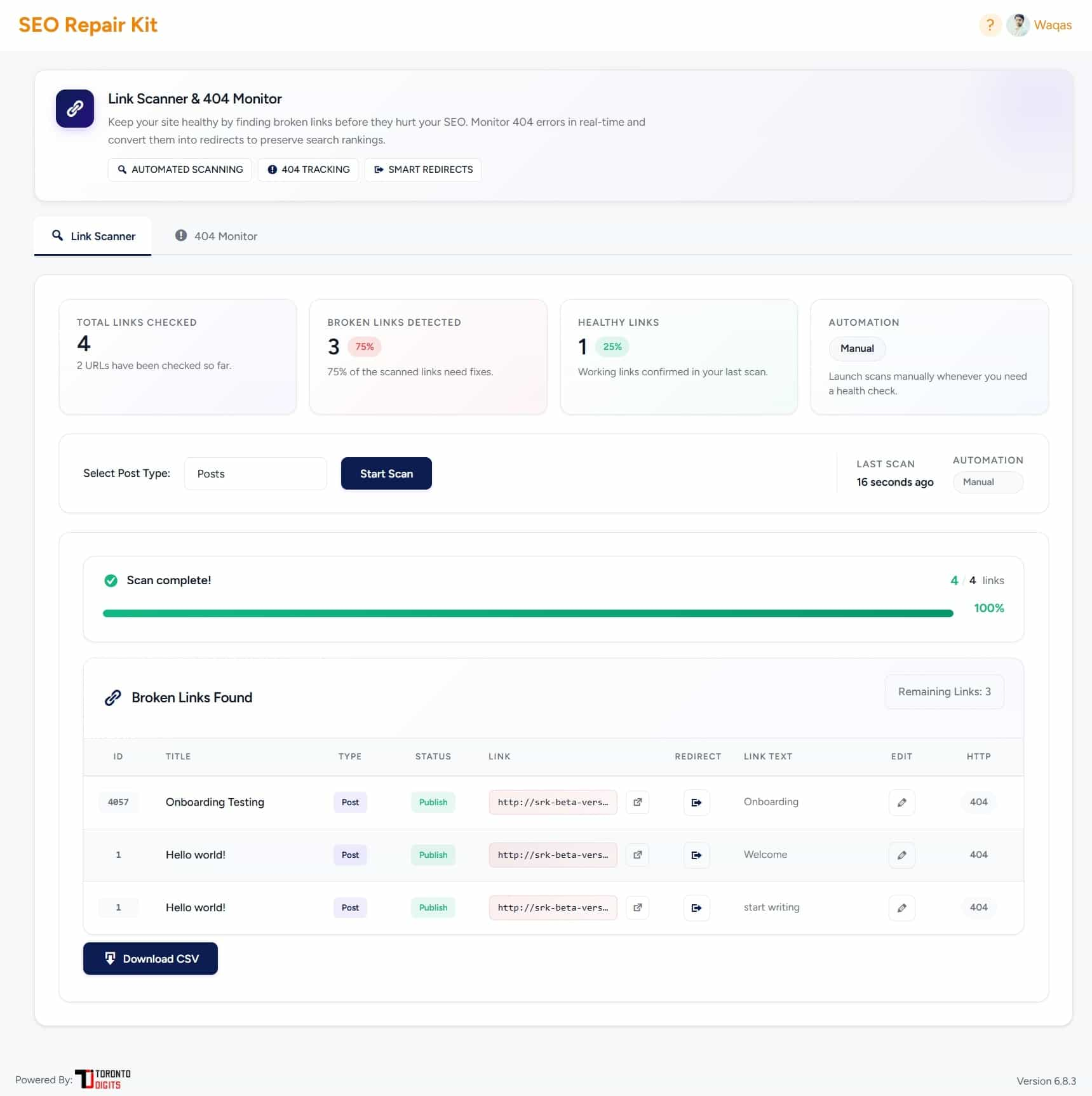
Go to “SEO Repair Kit” > “Links Manager” to manage link health from one place. It includes Link Scan, 404 Monitor, Auto Scan, Notifications, and Smart Redirects.
Link Scan
Use the Link Scan tab to manually scan selected post types, review link URLs, HTTP status codes, link context, and quickly export broken links or create redirects from scan results.
Auto Scan
Use the Auto Scan tab to schedule automatic link scans. Enable Automation, choose the scan interval, set link scope, scan coverage, batch limits, request timeout, email alerts, and save settings.
Important: Automation must be enabled before scheduled scans can run.
Notificações
Use the Notifications tab to review automated scan email history, including scan time, trigger type, checked links, broken links, email status, subject, and recipients. Reports are sent for broken-link scans and clean scans when alerts are enabled.
Smart Redirects
Use Smart Redirects to create eligible 301 archive redirects for broken internal singular URLs. Enable supported post types, review generated records, reset records, and manage linked redirects in Redirection Manager.
Alt Text Manager
Open SEO Repair Kit > Image Alt Missing to find images without alt text, update records individually or in bulk, and filter by post type or status.
Redirection Manager
Open SEO Repair Kit > Redirection to create, edit, delete, import, and export 301/302 redirects with status controls, optional regex support, hit tracking, ordering, and logs.
404 Error Monitor
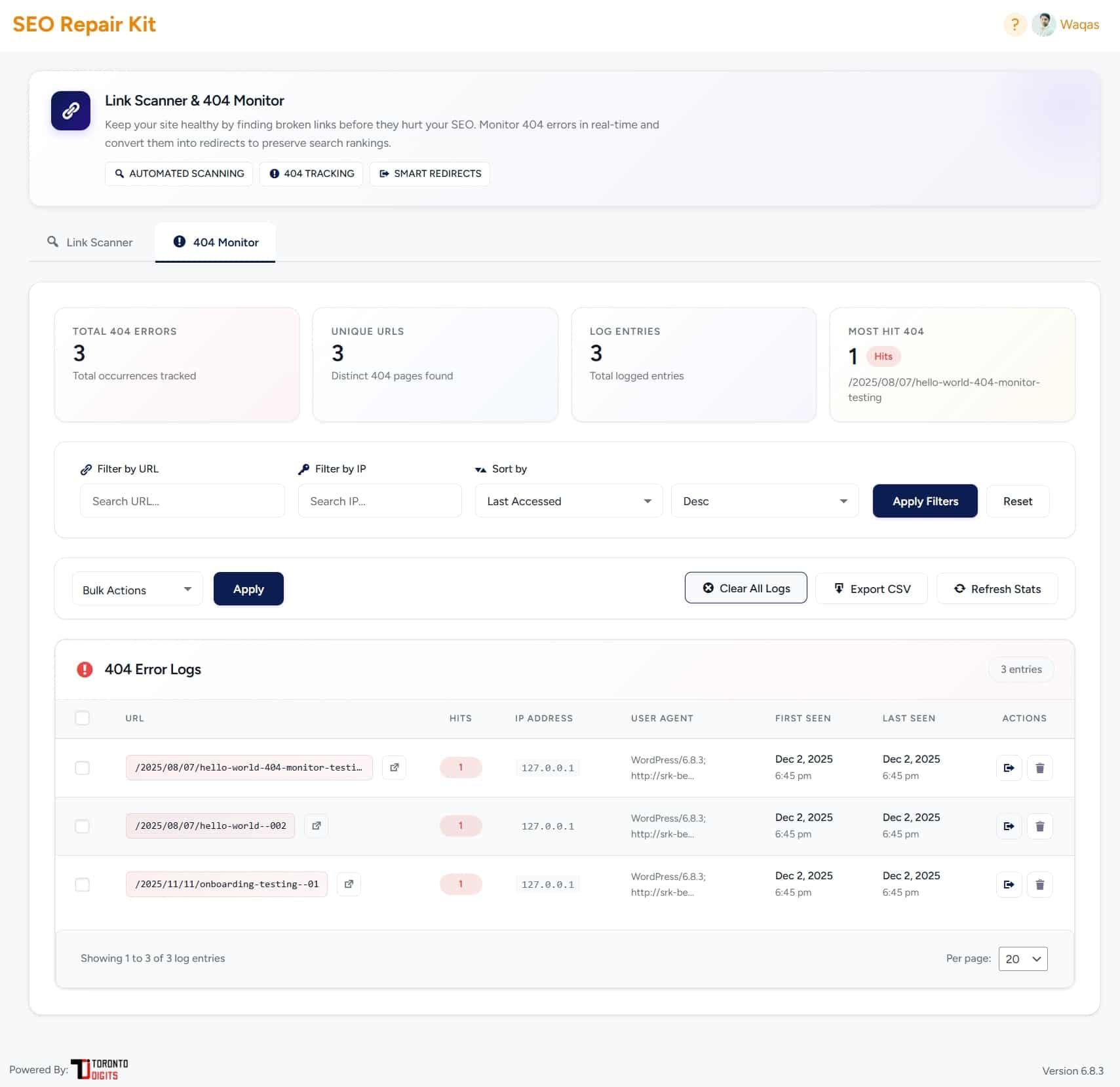
Open SEO Repair Kit > 404 Manager to review requested URLs, referrers, user agents, IPs, counts, and timestamps. Filter logs and create redirects directly from recurring 404s.
Sitemap Control
Open SEO Repair Kit Sitemap Control to choose which post types and taxonomies appear in the WordPress core sitemap. If the sitemap does not refresh, resave WordPress permalinks.
Bot Manager
Open SEO Repair Kit > Bot Manager to manage robots.txt, generate llms.txt, and configure supported AI crawler access.
KeyTrack – Keyword Performance Tracking
Install Google Site Kit, connect Search Console, then open SEO Repair Kit > KeyTrack to review clicks, impressions, CTR, position, pages, queries, thresholds, reports, charts, and exports.
Schema Manager (Pro Feature)
With an active paid plan, open SEO Repair Kit > Schema Manager, choose a schema type, configure its field mappings, and save the schema.
Configured schema is output as JSON-LD on applicable pages.
Internal Linking (Paid Plan)
With an active paid plan, open SEO Repair Kit > Internal Linking to index content, review link opportunities, manage target keywords, configure Auto Linking, check orphan content, and use Gutenberg suggestions. If website access is inactive or expired, Internal Linking is locked while existing data remains preserved.
Spam Monitor (Pro Feature)
Open SEO Repair Kit > Spam Monitor to scan indexed Google results, configure spam rules, review risky URLs, manage cleanup notes, view alerts, and schedule reports. Free users can use the trial provider; paid access unlocks supported custom SERP providers.
Meta Manager
Open SEO Repair Kit > Meta Manager to configure global meta, content type templates, taxonomy/archive settings, robots directives, canonical URLs, and per-page metadata. Gutenberg and Elementor editor controls are supported.
AI Chatbot (Pro Feature)
With an active paid plan, open SEO Repair Kit > AI Chatbot for plugin guidance, SEO workflow help, schema setup, redirection fixes, and KeyTrack insights.
Serviços externos
Some SEO Repair Kit features integrate with external services. These services are used only for functionality that requires external data or processing.
SEO Repair Kit Licensing / Plan Entitlement
SEO Repair Kit contacts its licensing service to activate an installation credential, validate plan and website access, and report plugin status. Requests may include the website URL, a generated installation identifier, plugin version, license key during connection, and activation or deactivation status.
Privacy Policy: https://seorepairkit.com/privacy-policy/
Terms of Service: https://seorepairkit.com/terms-and-conditions/
Google Site Kit / Google Search Console
KeyTrack uses Google Site Kit to access connected Google Search Console performance data such as clicks, impressions, CTR, queries, pages, and average position.
Learn more:
Google Site Kit
Third-Party SERP Providers
When configured in supported paid workflows, Spam Monitor may send SERP requests to the selected provider. Requests may include the domain, search parameters, and provider credentials required to retrieve search-result data.
Serper.dev: https://serper.dev/
SerpApi: https://serpapi.com/
DataForSEO: https://dataforseo.com/
SEO Repair Kit Cloud / AI Workflows
When paid AI-assisted workflows are configured, SEO Repair Kit may send required content or metadata to the configured SEO Repair Kit cloud/API endpoint.
Settings Configuration
- Go to “SEO Repair Kit” > “Settings” in the admin menu.
- Post Types Settings:
- Select which post types to scan for broken links
- Choose from all public post types
- Save your selection
- 404 Monitoring Settings:
- Enable or disable automatic 404 error tracking
- 404 errors will be logged when enabled
- Weekly Report Email Settings:
- Enable or disable weekly SEO summary emails
- View last report status and timestamp
- Reports are sent to your admin email address
- Save all settings to apply changes.
Weekly SEO Summary Email
- Enable weekly reports in Settings (enabled by default).
- Reports are automatically sent every week to your admin email.
- Each report includes:
- Search performance metrics from KeyTrack
- Broken links analysis and health scores
- Image alt text optimization status
- Redirection statistics and analytics
- Spam Monitor status and scan-risk highlights when available
- Pro plan status and upgrade information
- Reports are sent in beautiful HTML format with:
- Visual charts and metrics
- Actionable insights
- Direct links to fix issues
- Dashboard access links
- View the last report status in Settings to verify delivery.
Solução de problemas
-
If paid access needs reconnecting after the 2.1.13 update, use Connect License or Reconnect License on the plugin license screen. The website domain must match the domain assigned to the active license.
-
If KeyTrack shows no data, confirm Google Site Kit is installed and connected to the correct Google Search Console property.
- If Spam Monitor scans or provider settings are unavailable, verify the active plan, configured SERP provider, and scan settings.
- If schema is not output, confirm Schema Manager is active and the schema assignment applies to the current content.
- If Internal Linking is locked, confirm that this website is connected to an active paid plan and refresh license status from the plugin license screen.
- If links are not detected, confirm the relevant post type is included in the scan settings.
- If
llms.txtredirects to the homepage, resave the Bot Managerllms.txtconfiguration and ensure SEO Repair Kit is installed.
Instalação
- Download the plugin zip file.
- Go to your WordPress admin panel and navigate to Plugins > Add New.
- Click “Upload Plugin” and select the
seo-repair-kit.zipfile. - Click “Install Now” and then “Activate Plugin”.
- After activation, you’ll be guided through an onboarding process to configure the plugin.
For manual installation, upload the seo-repair-kit directory to /wp-content/plugins/ and activate the plugin from the WordPress Plugins screen.
Log de Changes
Restores free and legacy installation reporting compatibility while keeping paid license validation and connected-site reporting securely signed.
2.1.14
- Restored the established plugin-data and status reporting flow for free and legacy installations.
- Kept site-specific signed reporting for connected paid installations while preserving compatibility with previously released plugin versions.
- Kept paid license validation protected by per-installation credentials; compatibility reporting cannot grant premium access.
2.1.13
- Deferred automatic scan scheduling and translation loading until init to prevent early text-domain notices on WordPress 6.7 and later.
- Updated the translation template for 2.1.13, clarified placeholder context for translators, and numbered robots.txt validation placeholders so translations can reorder them safely.
- Made Bot Manager editor hints extractable for translation and added singular/plural license-expiry messages.
- Added per-installation credentials and signed CRM requests for license validation and plugin status reporting.
- Added automatic credential migration for sites with a saved license key and a manual Reconnect License flow for other paid sites.
- Replaced feature-by-feature upgrade messaging with unified Starter, Growth, Pro, and Agency plans based on website allowance.
- Clarified that every paid plan includes the complete SEO Repair Kit toolkit, including Spam Monitor, Internal Linking, Schema Manager, and unlimited link scanning.
Capturas de tela



Para desenvolvedores
Este é o seu plugin? Mostre os números.
Adicione um crachá ao vivo ao seu site, Documentos ou Readme do GitHub. Ele é atualizado por conta própria - nenhuma conta necessária.
Best SEO Repair Kit alternatives
All 301 redirect plugins →





FAQ
SEO Repair Kit: quick answers
Respostas diretas, extraídas de dados ao vivo WordPress.org.
Fonte: WordPress.org
Is SEO Repair Kit free?
Yes. SEO Repair Kit is free to download and use from the official WordPress.org plugin directory.
Is SEO Repair Kit safe to use in 2026?
SEO Repair Kit is a solid plugin choice in 2026, with a few things worth checking first. It runs on 2K+ sites, is rated 5/5 and was last updated 4 days ago, and scores 72/100 on our health check.
How many websites use SEO Repair Kit?
SEO Repair Kit is active on 2K+ WordPress websites and has been downloaded 42,370 times since it launched in May 2024. It was downloaded 3,169 times in the last 30 days.
Does SEO Repair Kit work with WordPress 7.1?
Yes. The developer has tested SEO Repair Kit up to WordPress 7.1.5, the latest release. It requires WordPress 5.0.0 or newer.
What PHP version does SEO Repair Kit need?
SEO Repair Kit requires PHP 7.4.3 or higher. Most hosts run PHP 8.x today, so it works on any modern WordPress hosting.
When was SEO Repair Kit last updated?
The latest version, 2.1.14, was released on November 16, 2026 (4 days ago).
Who makes SEO Repair Kit?
SEO Repair Kit is developed and maintained by TorontoDigits.
What are the best alternatives to SEO Repair Kit?
The most popular alternatives to SEO Repair Kit are 301 Redirects (300K+ installs), Simple 301 Redirects by Bet… (100K+ installs) and 404 to 301 (100K+ installs).
Alimentado por PageForge
Um modelo e uma planilha. Uma página real para cada pesquisa.
PageForge Transforma cada linha de um CSV em uma página WordPress com seu próprio título, URL, SEO campos e esquema, construído no layout que você já desenhou. Gratuito em WordPress.org.
- CSV e XLSX, mais Google Sheets em Profissional e Empresarial
- Seu próprio título, URL, SEO campos e esquema para cada página
- Funciona com o editor de blocos, Elementor, Divi e Avada
- Gratuito em WordPress.org, sem cartão de crédito