


Sendfleet – e-mail em seu próprio Amazon SES
Send every WordPress email through your own Amazon SES with SendFleet. One API key, no SMTP settings. Free for 3,000 emails a month.

Escolha sólida
SendFleet is a solid plugin choice in 2026, with a few things worth checking first. Was last updated 2 weeks ago, and scores 64/100 on our health check.
- Desenvolvido ativamente — última atualização 2 semanas atrás
- Testado com as últimas WordPress (7.1)
- Base de usuários pequenas (<10 instalações ativas)
- Muito poucos comentários até agora
Como ele se acumula?
Lado a lado em instalações, atualizações, avaliações e suporte



Downloads diários
Os picos de download geralmente seguem uma nova versão — cada site que atualiza automaticamente é um download.
Rankings
Where SendFleet stands todayWordPress.org Classificações de pesquisa
Posição ao vivo na pesquisa de plugins, top 100| Palavra chave | Posição |
|---|---|
| Amazon SES | #59 |
| o email | >100 |
| SMTP | >100 |
| transactional email | >100 |
| wp-mail | >100 |
About SendFleet – Email on Your Own Amazon SES
From the official readme · v1.1.0Descrição
This is the official WordPress plugin for SendFleet: email on your own Amazon SES. SendFleet is a transactional email API, campaigns, signup forms and automations in one place. You keep your AWS account, your sender reputation and your data, and pay a flat monthly fee, never per contact.
This plugin handles the transactional side for WordPress. It sends every email your site sends through SendFleet instead of PHP mail() or SMTP: password resets, new-user emails, WooCommerce orders, contact form submissions, comment notifications, and anything else that calls wp_mail().
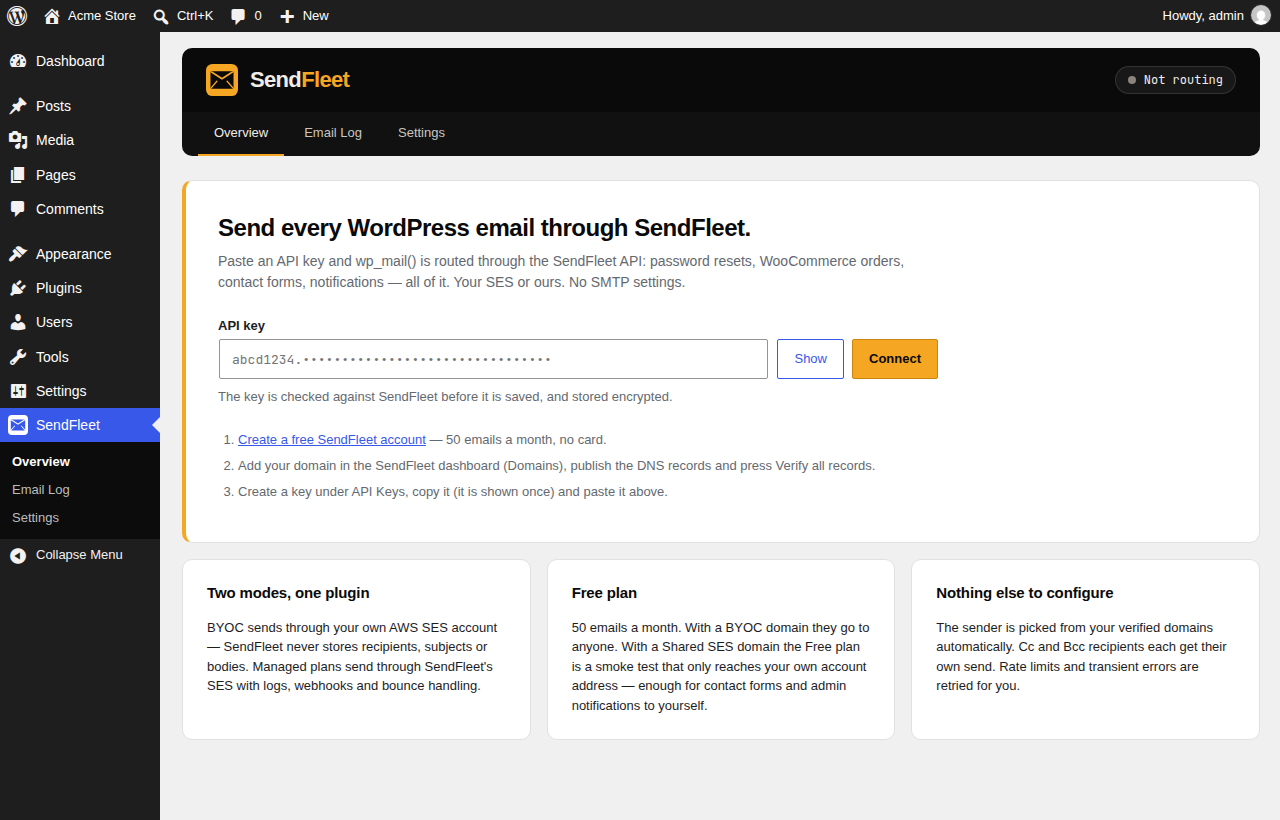
Setup is one field. Paste your API key. The plugin checks it, reads your plan and verified sending domains from SendFleet, and picks a sender address on one of those domains automatically. There are no SMTP hosts, ports or passwords to configure.
Your SES or ours
SendFleet has two sending modes. The plugin works the same way with both.
- BYOC (bring your own SES), recommended. Email goes out through your own Amazon SES account, so the sender reputation is yours alone. Connect it with one click; SendFleet sets up delivery tracking, bounce protection and production access in your account for you, and never stores the messages your site sends. Free for 3,000 emails a month; Pro and Scale are flat monthly plans. Amazon bills you for SES separately.
- Managed. Vetted transactional sending through SendFleet’s own Amazon SES, for sites whose AWS account is not ready yet. Apply from the SendFleet dashboard; once a person approves the application, verify your domain with a few DNS records and you are sending. Email logs, delivery webhooks and bounce and complaint handling are included. Every Managed account shares one sender reputation, so the rules are strict: every link must point to your own domain or a link domain you listed. We recommend moving to BYOC for production mail when you are ready.
What it does for you
- Takes over wp_mail() cleanly. Uses WordPress’
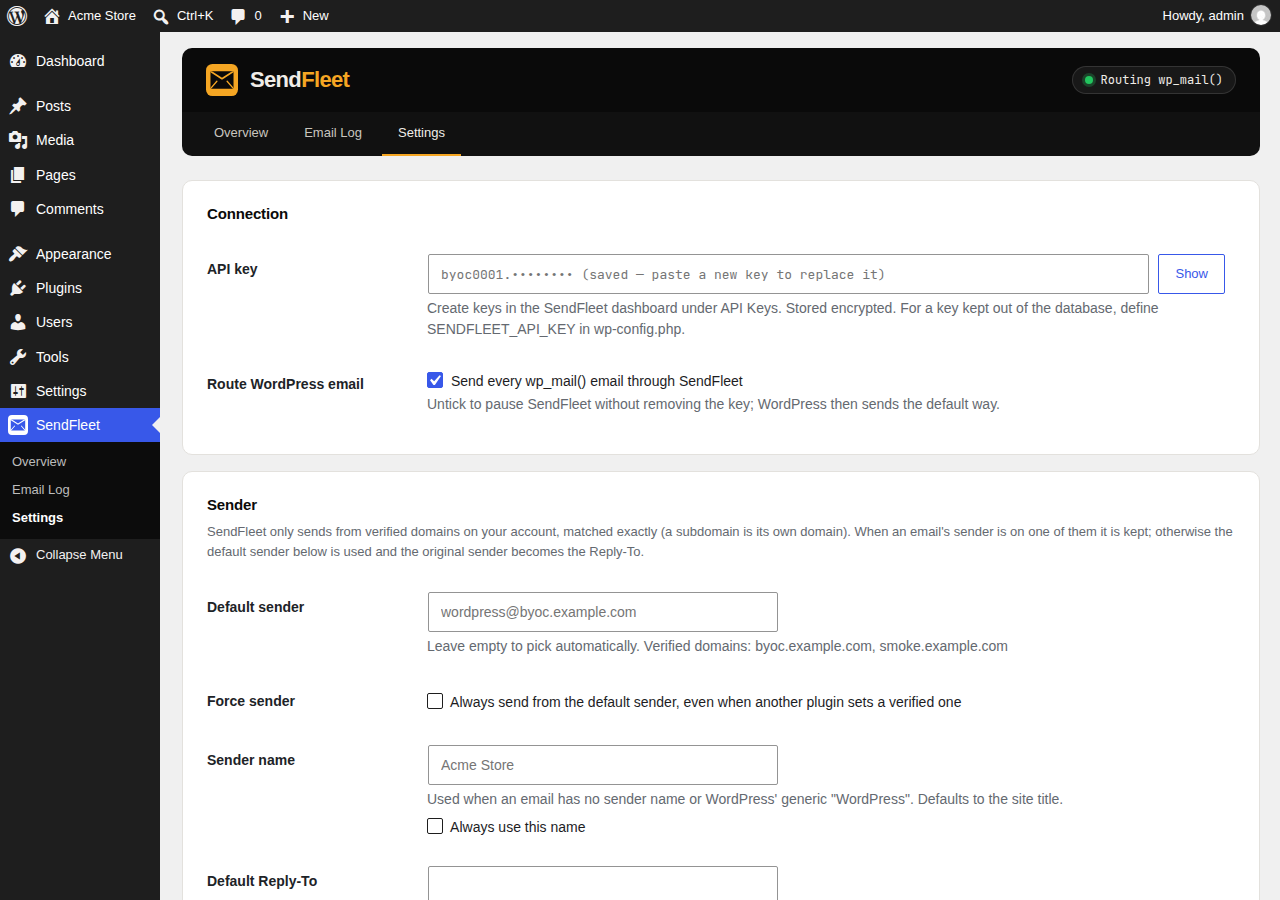
pre_wp_mailfilter rather than replacing the pluggable function, and builds each message exactly like WordPress does, sowp_mail_from,wp_mail_content_type,phpmailer_initand every other mail filter keep working (WooCommerce’s plain-text alternative included). - Always sends from a verified domain. If a plugin sets a sender on a domain your SendFleet account cannot send from, the plugin sends from your default sender instead and puts the original address in Reply-To, so replies still reach the right person.
- To, Cc and Bcc. Each email goes out as one message with its To, Cc and Bcc recipients, and every recipient appears in the log on their own row. The per-message limits of each sending mode are handled for you (see the FAQ).
- HTML and plain text. A readable plain-text version is generated for HTML-only emails.
- Attachments. Checked against SendFleet’s limits (20 files, 25 MB each, 37 MB in total, no executables). A file that would be refused is left out and noted in the log, rather than failing the whole email.
- Retries that cannot double-send. Rate limits and other failures where SendFleet confirms nothing was sent are retried automatically from a queue. A timeout is never retried automatically, because the email may already have been accepted.
- Circuit breakers. A rejected key, a used-up plan or a suspended account stops further API calls at once, instead of retrying into the same refusal.
- An email log without bodies. Recipient, sender, subject, status, sending mode, SendFleet message ID and the plugin that sent it. Message bodies are never stored in the log, and entries are deleted after 30 days by default.
- Delivery status and suppressions (paid plans). Point a SendFleet webhook at the plugin and delivered, bounced and complained statuses appear in the log. Hard bounces and spam complaints are added to a local suppression list, so the site stops spending sends on addresses that will never accept mail.
- Background sending (optional). Queue emails and send them from WP-Cron so checkout and form pages respond faster.
- Fallback (optional). If SendFleet cannot take an email, send it the default WordPress way instead.
- Built for operations. Site Health checks, a WP-CLI command, wp-config.php constants for every secret, encrypted key storage, multisite support, and personal data export and erasure.
Avaliação
The plugin is free. SendFleet plans are billed monthly, in USD:
- Free – 3,000 emails and 1,000 contacts a month on your own Amazon SES, no card. On a Managed domain the Free plan is a smoke test that only delivers to your own SendFleet account address.
- Pro – $29 a month with 100,000 emails included, then $0.10 per 1,000 up to a monthly cap you set. Unlimited contacts, delivery webhooks, automations. Email logs included.
- Scale – $99 a month with 1,000,000 emails included, then $0.10 per 1,000 up to your cap. Everything in Pro, plus priority support.
- Managed – $29 a month, 25,000 transactional emails through SendFleet’s SES, by approved application.
Transactional and marketing emails share one monthly allowance. On Free, Pro and Scale, Amazon bills its own SES charges to your AWS account.
Full details are on the SendFleet pricing page.
Requisitos
- A SendFleet account. Create one for free, no card needed.
- A sending domain added and verified in the SendFleet dashboard (DNS records for ownership and DKIM).
- An API key from SendFleet → API Keys.
Serviços externos
This plugin connects to the SendFleet API (https://api.sendfleet.net), operated by SendFleet, to send email. That is its whole purpose; it sends nothing until you save an API key.
- When an email is sent (any call to
wp_mail()while the plugin is connected), the plugin sends a request toPOST https://api.sendfleet.net/v1/sendcontaining the recipient address, the sender address and name, the Reply-To address, the subject, the plain-text and HTML body and any attachments. - When you connect, when you open the plugin’s screens (at most every 10 minutes), after a send fails because of an account or domain problem, and otherwise twice a day, the plugin calls
GET https://api.sendfleet.net/v1/meto read your account’s name and email address, plan, current-month usage and verified sending domains. - Every request carries your API key in the
X-API-Keyheader and identifies the plugin, WordPress and PHP versions in theUser-Agentheader. No other site data is sent. - Webhooks are optional and inbound: if you configure one in the SendFleet dashboard, SendFleet sends delivery events to this site’s REST endpoint (
/wp-json/sendfleet/v1/webhook), which verifies an HMAC signature before accepting them.
Depending on your SendFleet plan, mail is delivered through your own Amazon SES account (BYOC; SendFleet never stores message bodies, and keeps recipients, subjects and delivery status for 14 days only while email logs are on, which they are by default and you can turn off) or through SendFleet’s managed Amazon SES infrastructure (Managed plans; SendFleet keeps an email log including content for 14 days).
- SendFleet terms and conditions: https://sendfleet.net/terms-and-conditions/
- SendFleet privacy policy: https://sendfleet.net/privacy-policy/
Instalação
- In WordPress, go to Plugins → Add New, search for SendFleet, then Install and Activate.
- In SendFleet, add your domain under Domains, publish the DNS records and press Verify all records.
- In SendFleet, create a key under API Keys and copy it (it is shown once).
- In WordPress, open SendFleet in the admin menu, paste the key and press Connect.
- Send a test email from the same screen.
To keep the key out of the database, add it to wp-config.php instead:
define( 'SENDFLEET_API_KEY', 'abcd1234.your-secret-part' );
Other constants: SENDFLEET_FROM_EMAIL, SENDFLEET_FROM_NAME, SENDFLEET_WEBHOOK_SECRET and SENDFLEET_ENCRYPTION_KEY (a custom key for encrypting stored secrets).
Log de Changes
Supports SendFleet's Pro, Scale and Managed plans. No settings change.
1.1.0
- Knows SendFleet’s current plans: Free, Pro, Scale and Managed. The overview, Site Health and the plan label use the new names and limits, and Scale is treated like Pro for BYOC routing and quota messages.
- Updated descriptions: SendFleet is email on your own Amazon SES, and Managed is transactional sending by approved application.
1.0.2
- Fix: the Free plan’s limit is 3,000 emails a month. 1.0.1 still measured it against 50, so the overview and Site Health warned that the limit was reached when it was not.
- Webhooks are described as available on every paid plan, BYOC included.
1.0.1
- The Free plan is 3,000 emails a month, and the BYOC plan now includes delivery tracking and webhooks; the plugin’s screens say so.
1.0.0
- First release: routes wp_mail() through the SendFleet API (BYOC and Managed), automatic sender selection, Free plan smoke-test support, attachments, retries and queue, background sending, fallback, email log, webhooks with a local suppression list, Site Health, WP-CLI, multisite and privacy tools.
Capturas de tela


Para desenvolvedores
Este é o seu plugin? Mostre os números.
Adicione um crachá ao vivo ao seu site, Documentos ou Readme do GitHub. Ele é atualizado por conta própria - nenhuma conta necessária.
Best SendFleet alternatives
Todos os plugins do Amazon SES →





FAQ
SendFleet: quick answers
Respostas diretas, extraídas de dados ao vivo WordPress.org.
Fonte: WordPress.org
Is SendFleet free?
Yes. SendFleet is free to download and use from the official WordPress.org plugin directory.
Is SendFleet safe to use in 2026?
SendFleet is a solid plugin choice in 2026, with a few things worth checking first. Was last updated 2 weeks ago, and scores 64/100 on our health check.
How many websites use SendFleet?
SendFleet is active on <10 WordPress websites and has been downloaded 448 times since it launched in October 2026. It was downloaded 334 times in the last 30 days.
Does SendFleet work with WordPress 7.1?
Yes. The developer has tested SendFleet up to WordPress 7.1.5, the latest release. It requires WordPress 6.2 or newer.
What PHP version does SendFleet need?
SendFleet requires PHP 7.4 or higher. Most hosts run PHP 8.x today, so it works on any modern WordPress hosting.
When was SendFleet last updated?
The latest version, 1.1.0, was released on November 10, 2026 (2 weeks ago).
Who makes SendFleet?
SendFleet is developed and maintained by SendFleet.
What are the best alternatives to SendFleet?
The most popular alternatives to SendFleet are FluentSMTP (700K+ installs), WP Offload SES Lite (10K+ installs) and SendGrail SMTP (10+ installs).
Alimentado por PageForge
Um modelo e uma planilha. Uma página real para cada pesquisa.
PageForge Transforma cada linha de um CSV em uma página WordPress com seu próprio título, URL, SEO campos e esquema, construído no layout que você já desenhou. Gratuito em WordPress.org.
- CSV e XLSX, mais Google Sheets em Profissional e Empresarial
- Seu próprio título, URL, SEO campos e esquema para cada página
- Funciona com o editor de blocos, Elementor, Divi e Avada
- Gratuito em WordPress.org, sem cartão de crédito