


Saddle Analytics
Cookieless site stats kept in your own database. See who visits, what they read, and how many people AI chat apps send you.

Escolha sólida
Saddle Analytics is a solid plugin choice in 2026, with a few things worth checking first. It runs on 20+ sites and was last updated 3 weeks ago, and scores 67/100 on our health check.
- Desenvolvido ativamente — última atualização 3 semanas atrás
- Testado com as últimas WordPress (7.1)
- Base de usuários pequenas (mais de 20 instalações ativas)
- Muito poucos comentários até agora
- Precisa de PHP 8.1 ou mais recente
Como ele se acumula?
Lado a lado em instalações, atualizações, avaliações e suporte


Downloads diários
Os picos de download geralmente seguem uma nova versão — cada site que atualiza automaticamente é um download.
Rankings
Where Saddle Analytics stands todayWordPress.org Classificações de pesquisa
Posição ao vivo na pesquisa de plugins, top 100| Palavra chave | Posição |
|---|---|
| Ai | >100 |
| analytics | >100 |
| cookieless | #50 |
| privacy | >100 |
| statistics | >100 |
Adoção da versão
Compartilhamento de sites ativos por lançamento.
About Saddle Analytics
From the official readme · v1.1.0Descrição
Saddle Analytics shows who visits your site and what they do there. It counts visits without cookies. All the data stays in your own database.
It also counts something most stats tools miss: people sent to you by AI chat apps like ChatGPT, Claude and Perplexity.
Everything on one page
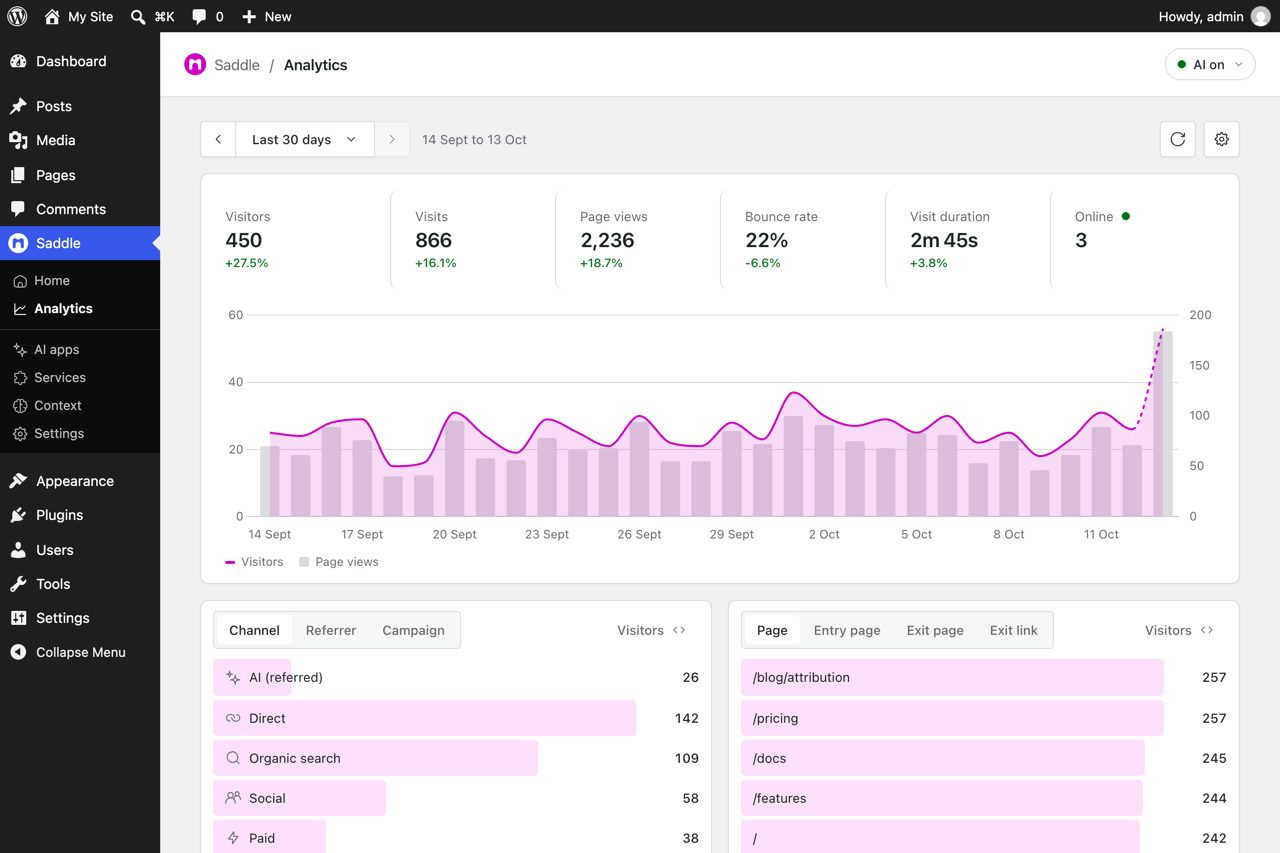
Open Saddle → Analytics. All your stats are on a single screen, with no menus to dig through.
- Totals: visitors, visits, page views, time on site and bounce rate (visits that saw only one page).
- Change: how each total moved since the period before.
- Chart: visitors and page views for each day.
- Online now: who visited in the last 30 minutes. A small box on your WordPress Dashboard shows this too.
- Filters: click a source, country or browser, and every number on the page shows only those visitors.
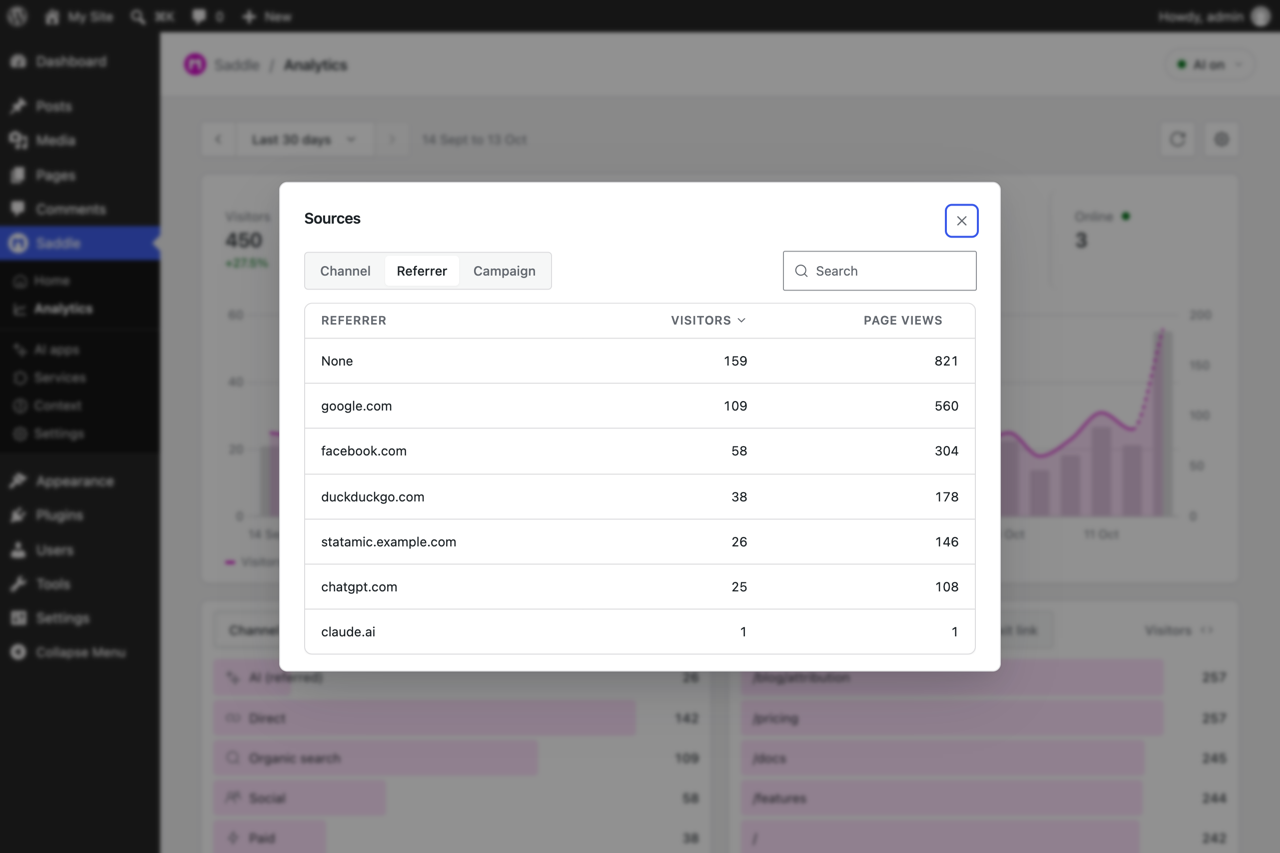
- Details: open any card as a full list, with search.
Where visitors come from
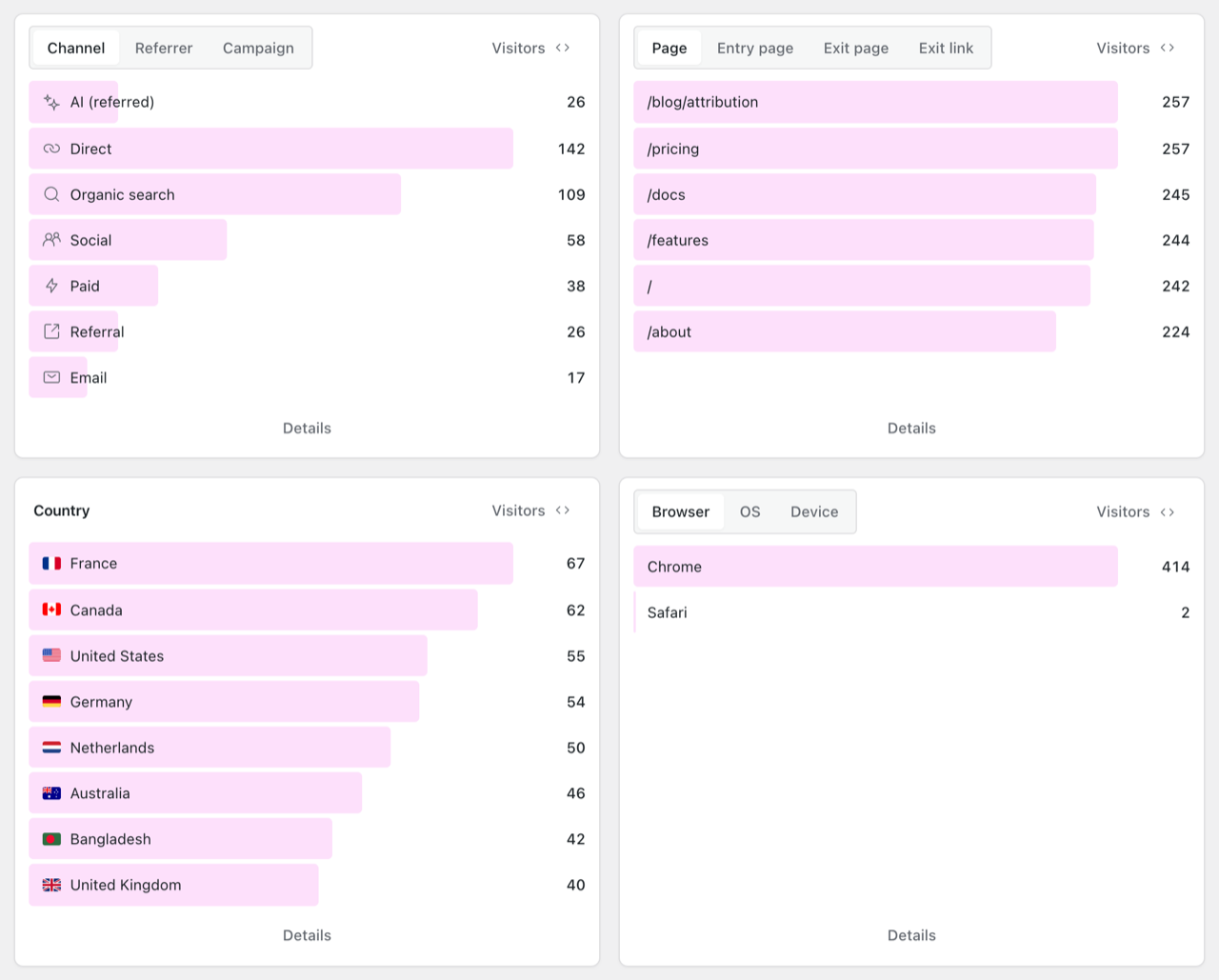
- Channels: AI, search, social, paid, email, other sites and direct.
- Referrers: the sites that link to you.
- Campaigns: the UTM tags you add to your own links.
- Pages: your top pages, the first page of each visit and the last one.
- Exit links: links to other sites that visitors click.
- Audience: country, browser, operating system and device.
AI traffic
More people now find websites through AI chat apps. Saddle Analytics puts those visits in their own channel, called AI, at the top of the list. It knows ChatGPT, Claude, Perplexity, Gemini, Copilot, DeepSeek, Grok and more.
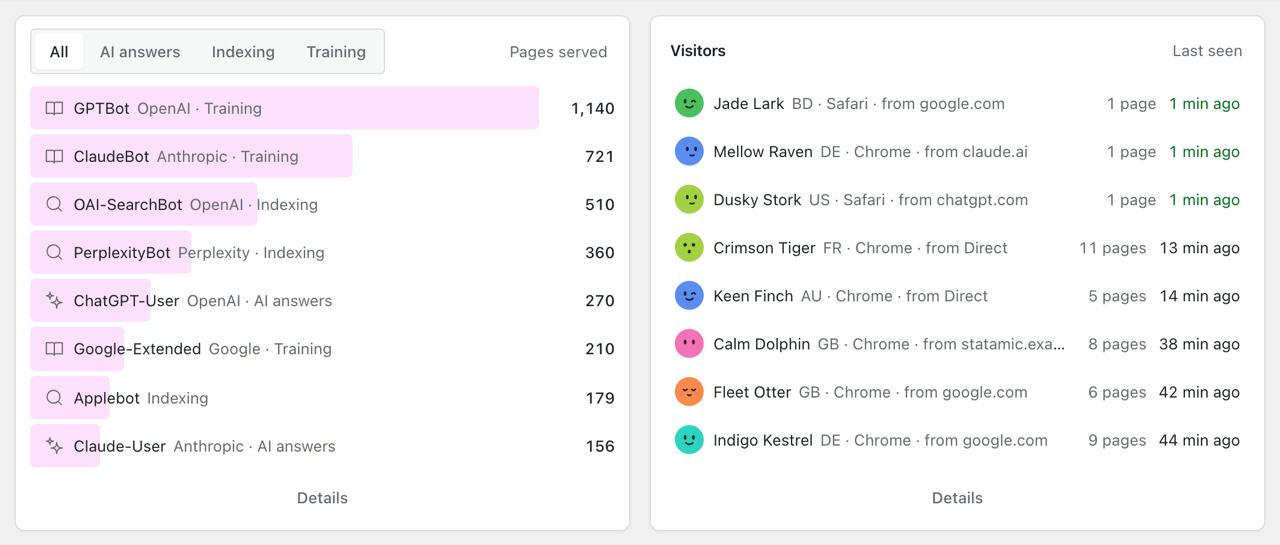
AI bots also read your pages, and the AI crawlers card shows which ones. It sorts them by why they came:
- Training: collecting pages to train AI models.
- Indexing: building an AI search engine.
- Answers: fetching a page because someone just asked a question about it.
- Search engines: Googlebot, bingbot and Applebot, by name. Google’s AI Overviews, Copilot and Apple Intelligence are built on them.
Saddle Analytics and Saddle Rank use the same list of AI bots, sorted the same way.
One visitor at a time
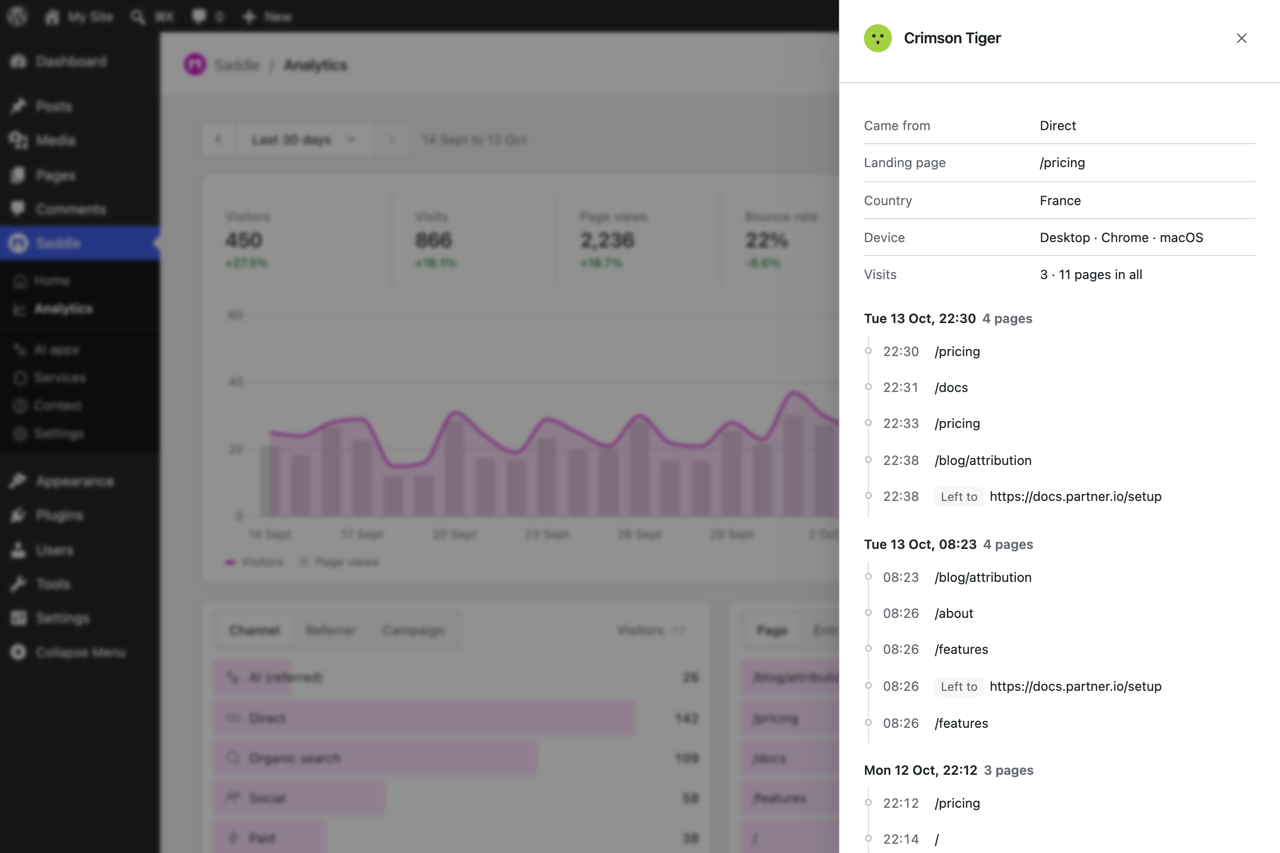
Each visitor gets a made-up name and a little face. Click one to see their path: where they came from, and every page they opened, in order. You never see a real name, email or IP address.
Light tracker
The tracking script is under 1 KB. It loads after the rest of the page. It sends small messages to your own site only.
Definições
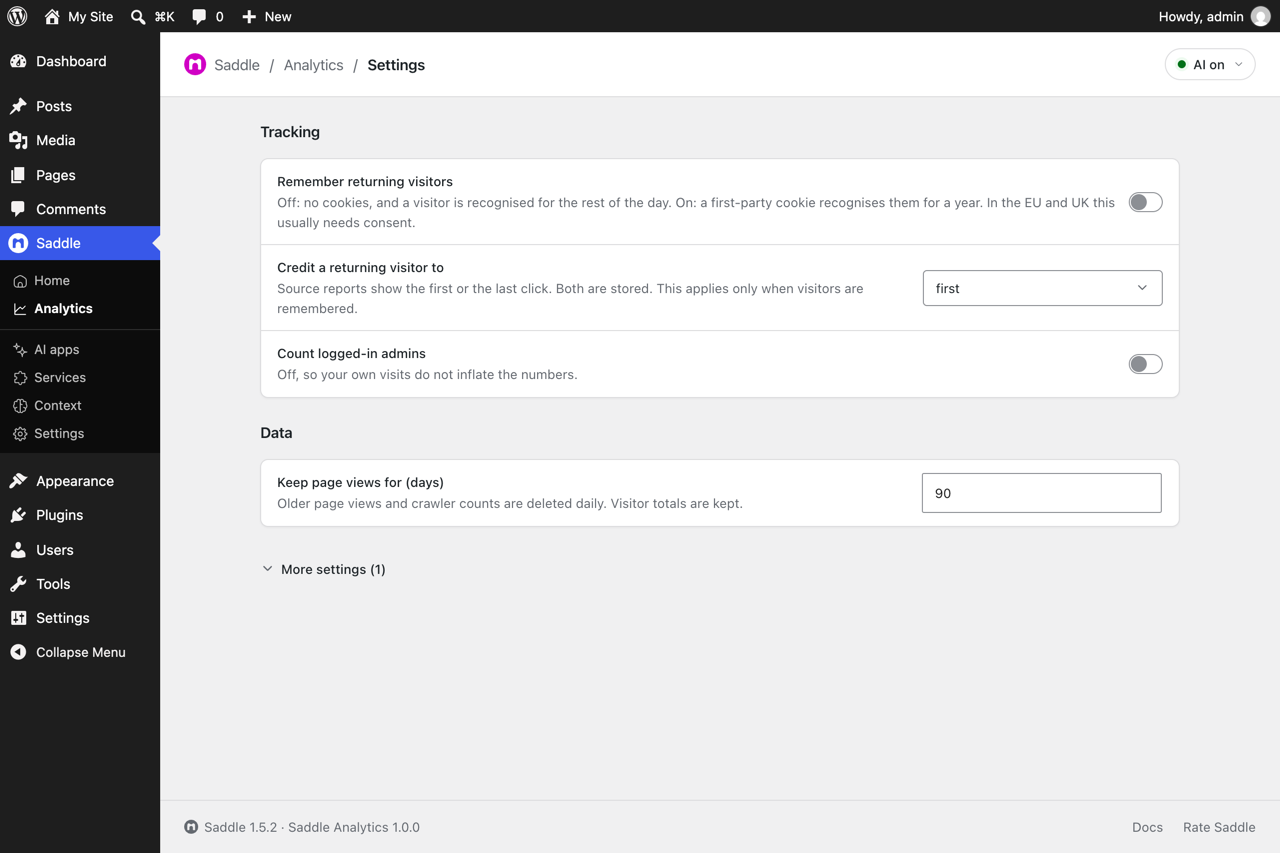
- Remember returning visitors: off by default. Turn it on to use a cookie and count returning visitors across days.
- Credit a returning visitor to: the source of their first visit, or of their latest one.
- Keep page views for: 90 days by default, anywhere from 7 days to 3 years.
- Count logged-in admins: off by default, so your own visits do not count.
- Delete all data on uninstall: off by default.
Ask your AI assistant
Saddle Analytics works inside Saddle, a free plugin that connects AI assistants to your site. Connect one, such as Claude, ChatGPT or Cursor. Then ask it: “How many visitors came from ChatGPT this week?” It answers from the same numbers you see on the page. Saddle Analytics gives it nine tools that can only read. They cannot change anything.
Para desenvolvedores
- WP-CLI:
wp saddle-analyticsprints every report, checks your setup and runs the move from Loggle. - Hooks: add your own AI answer sources with
saddle_analytics_ai_referrersand your own bots withsaddle_analytics_bots.
Privacidade
- Saved in your own database: visitor counts, page paths, referring sites, UTM campaign names, links to other sites that visitors click, country, browser, operating system and device type.
- IP addresses are never saved. Without cookies, a visitor is known only by a code that changes every day (see “How does it count visitors without cookies?”).
- Country comes from Cloudflare’s
CF-IPCountryheader, and only when the request really came through Cloudflare. - With “Remember returning visitors” on, it sets two first-party, HTTP-only cookies:
_saddle_analytics_v(a random id, 1 year) and_saddle_analytics_s(a random session id, 30 minutes). - Visitors who send Do Not Track or Global Privacy Control are not counted.
- Page views are deleted after the number of days you choose. A short summary of each visitor (first and last source, landing page, country, browser, operating system, device and totals) stays until you delete the plugin’s data.
Serviços externos
Your visitor data never leaves your site. Saddle Analytics loads no scripts, fonts or images from other servers.
It can send data to PlugPress Console (https://console.plugpress.io), only after you click:
- “Allow” on the card: the name and email of the account that clicked it (for support), your site address and title, WordPress and PHP versions, language, timezone, theme, and plugins with their versions, then once a week while it is on, only when something changed. “No thanks” sends nothing. Turn it off with “Stop sharing site info” under the plugin on the Plugins screen. One answer covers every Saddle plugin on the site.
- The “Saddle news” box ticked on that card, or “Subscribe” on the news card: your email, for news, tips and fixes (you confirm it by email).
- “Send and deactivate” when you turn the plugin off: the reason you picked, what you typed, your email if you asked for a reply, the plugin’s version, and your WordPress and PHP versions and language.
The × and “Skip” send nothing. Add define( 'PLUGPRESS_INSIGHT', false ); to wp-config.php to remove both. Privacy policy: https://plugpress.io/privacy/
Source code
The admin screens are built from the source files in the plugin’s src/ folder. package.json and package-lock.json are included. To rebuild them, run npm ci && npm run build (it uses @wordpress/scripts). The interface parts come from Saddle at runtime and are not bundled. The tracker, assets/tracker.js, is plain JavaScript and is not compiled.
Créditos
- Charts: Chart.js, MIT License.
- Country flags: country-flag-icons, MIT License (see
assets/flags/LICENSE). - Channel icons: Simple Icons, CC0.
- Full licence texts:
THIRD-PARTY-LICENSES.txt.
Instalação
- Go to Plugins → Add New and install Saddle and Saddle Analytics. Both are free.
- Activate both. Counting starts right away.
- In the admin menu, go to Saddle → Analytics.
- To change settings, click the gear icon at the top of the page.
If your site uses a page cache, clear it once so your pages load the tracker.
Log de Changes
1.1.0
- The AI crawlers card knows 24 AI bots, the same list Saddle Rank uses. New: meta-webindexer, meta-externalfetcher, Amzn-SearchBot, Amzn-User, Google-Agent, OAI-AdsBot, MistralAI-User, DuckAssistBot and cohere-ai.
- Googlebot, bingbot and Applebot show by name under Search engines. They used to count as Other.
- Amazonbot now counts as Training and GoogleOther as Other, as in Saddle Rank. Visits counted before keep the purpose they had.
- New: A small card asks once whether to share your name, email and basic site info with PlugPress for better support, and offers Saddle news by email. Nothing is sent until you click Allow or Subscribe.
- New: When you deactivate Saddle Analytics, a short form asks why. Skip sends nothing. The card and the form use WordPress’s own buttons and your admin colour scheme.
- Changed: AI apps are now called AI agents.
1.0.0
- First release, replacing Loggle.
- Counts visitors without cookies by default.
- One page with your totals, a chart and cards for sources, pages, countries, devices, AI bots and visitors.
- AI chat apps get their own channel.
- Each visitor gets a made-up name and face.
- Nine read-only tools let AI assistants read your stats through Saddle.
- Moves your data from Loggle, then deletes Loggle’s copy.
- Left behind from Loggle: revenue tracking, goals and the licence code.
Capturas de tela
Para desenvolvedores
Este é o seu plugin? Mostre os números.
Adicione um crachá ao vivo ao seu site, Documentos ou Readme do GitHub. Ele é atualizado por conta própria - nenhuma conta necessária.
Best Saddle Analytics alternatives
Todos os plugins de IA →





FAQ
Saddle Analytics: quick answers
Respostas diretas, extraídas de dados ao vivo WordPress.org.
Fonte: WordPress.org
Is Saddle Analytics free?
Yes. Saddle Analytics is free to download and use from the official WordPress.org plugin directory.
Is Saddle Analytics safe to use in 2026?
Saddle Analytics is a solid plugin choice in 2026, with a few things worth checking first. It runs on 20+ sites and was last updated 3 weeks ago, and scores 67/100 on our health check.
How many websites use Saddle Analytics?
Saddle Analytics is active on 20+ WordPress websites and has been downloaded 567 times since it launched in October 2026. It was downloaded 380 times in the last 30 days.
Does Saddle Analytics work with WordPress 7.1?
Yes. The developer has tested Saddle Analytics up to WordPress 7.1.5, the latest release. It requires WordPress 6.9 or newer.
What PHP version does Saddle Analytics need?
Saddle Analytics requires PHP 8.1 or higher. Most hosts run PHP 8.x today, so it works on any modern WordPress hosting.
When was Saddle Analytics last updated?
The latest version, 1.1.0, was released on November 5, 2026 (3 weeks ago).
Who makes Saddle Analytics?
Saddle Analytics is developed and maintained by Fahim Reza.
What are the best alternatives to Saddle Analytics?
The most popular alternatives to Saddle Analytics are Elementor Agent Ready Websi… (10M+ installs), Jetpack (3M+ installs) and All in One SEO (2M+ installs).
Alimentado por PageForge
Um modelo e uma planilha. Uma página real para cada pesquisa.
PageForge Transforma cada linha de um CSV em uma página WordPress com seu próprio título, URL, SEO campos e esquema, construído no layout que você já desenhou. Gratuito em WordPress.org.
- CSV e XLSX, mais Google Sheets em Profissional e Empresarial
- Seu próprio título, URL, SEO campos e esquema para cada página
- Funciona com o editor de blocos, Elementor, Divi e Avada
- Gratuito em WordPress.org, sem cartão de crédito