

Rusnet Interactive Map for Yandex Maps
A simple yet powerful plugin to add interactive Yandex Maps to WordPress with markers, clustering, and filtering.

Considere uma alternativa
Rusnet Interactive Map for Yand… shows warning signs in 2026 — compare the alternatives below before installing. It runs on 20+ sites and was last updated 5 months ago, and scores 34/100 on our health check.
- Base de usuários pequenas (mais de 20 instalações ativas)
- Muito poucos comentários até agora
- Testado apenas até WordPress 6.9 (mais recente é 7.1)
Como ele se acumula?
Lado a lado em instalações, atualizações, avaliações e suporte


Downloads diários
Os picos de download geralmente seguem uma nova versão — cada site que atualiza automaticamente é um download.
Rankings
Where Rusnet Interactive Map for… stands todayWordPress.org Classificações de pesquisa
Posição ao vivo na pesquisa de plugins, top 100| Palavra chave | Posição |
|---|---|
| cluster | #41 |
| custom icons | >100 |
| interactive | >100 |
| marker | >100 |
| yandex maps | #15 |
Adoção da versão
Compartilhamento de sites ativos por lançamento.
About Rusnet Interactive Map for Yandex Maps
From the official readme · v2.2.1Descrição
Rusnet Interactive Map is a full‑featured solution for integrating Yandex Maps into WordPress. The plugin lets you easily create maps with custom markers, group them into clusters, filter by categories, and display detailed information about each object in a side panel.
Principais características
- Custom Post Type “Marker” – all markers are stored as individual posts, managed via the standard WordPress interface.
- Marker Categories – group markers by category, set a custom icon and color for each category.
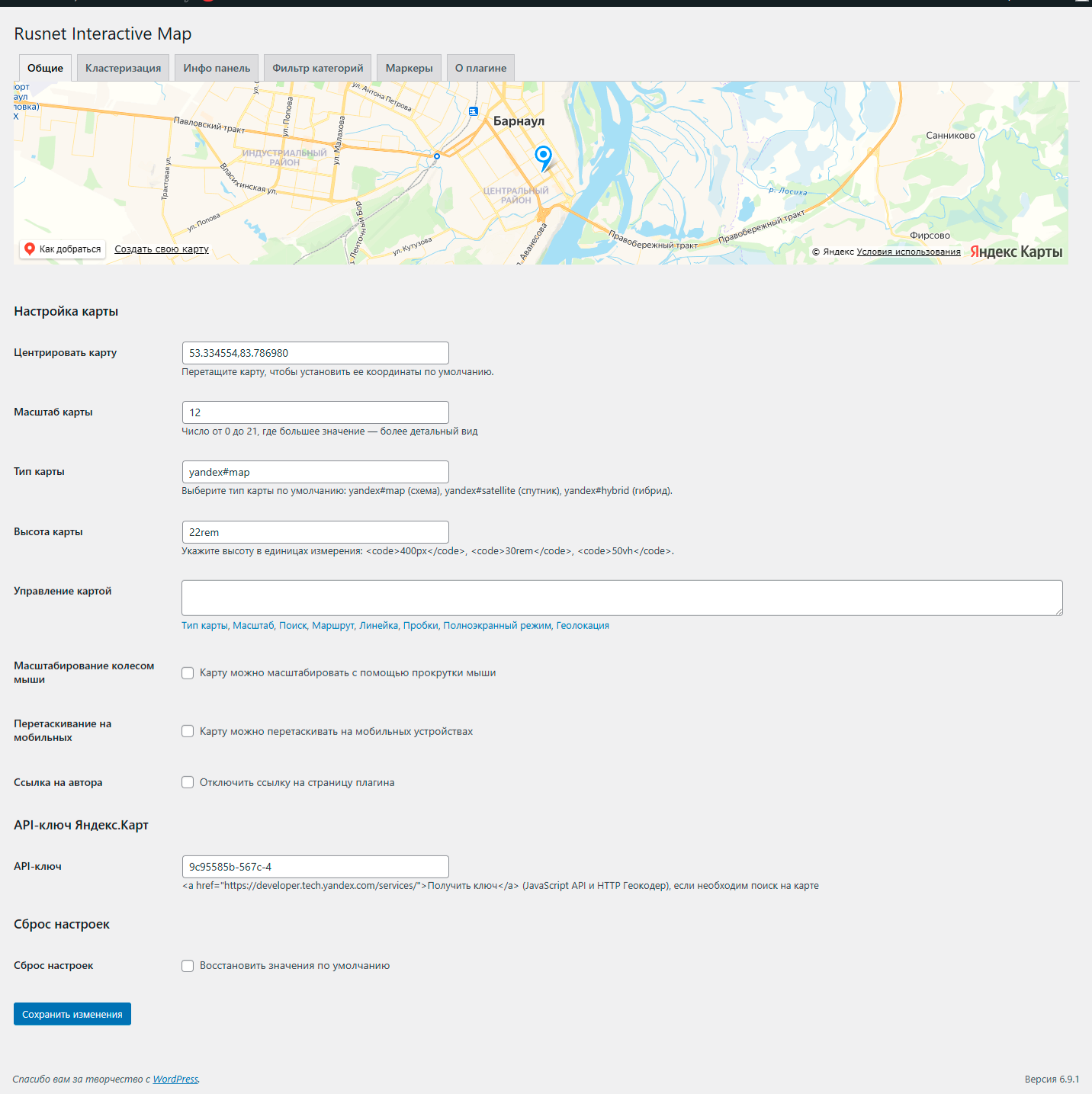
- Flexible Map Settings – center, zoom, type (scheme, satellite, hybrid), height, set of controls.
- Clustering – automatically group nearby markers into clusters; adjust grid size and cluster color.
- Information Panel – when a marker is clicked, a panel appears showing the title, description, image gallery, and a link.
- Category Filter – buttons for quickly switching between marker categories; fully customisable appearance.
- TinyMCE Shortcode Editor – easily insert and edit maps directly in the visual editor.
- Multilingual – the plugin is fully translation‑ready and respects the WordPress locale.
Serviços externos
This plugin uses the Yandex.Maps API to display interactive maps. When a map is loaded, your visitor’s browser connects to api-maps.yandex.ru and transmits the map parameters (center coordinates, zoom level, etc.) and the user’s locale. No personal data is sent by the plugin itself. For more information, please refer to Yandex’s Terms of Use and Privacy Policy.
Requisitos
- WordPress 5.0 or higher.
- Php 7.2 ou superior.
- Yandex.Maps API key (JavaScript API and HTTP Geocoder) – enter it in the plugin settings.
Instalação
- Upload the plugin folder to
/wp-content/plugins/. - Activate the plugin via the “Plugins” menu.
- Go to Rusnet Map to configure the settings.
- Enter your Yandex.Maps API key (if needed).
- Create markers under the Markers menu.
- Insert the
[rusnetim_map]shortcode into a post or page.
Log de Changes
2.2.1
Fixed: Marker icon now correctly inherits from its category when the marker does not have a custom icon set.
2.2.0
- Added “Favorites” feature: users can add markers to favorites via the info panel. A “Favorites” button appears next to category filters; clicking it shows only favorite markers on the map. Favorites are stored in the browser’s localStorage.
- Fixed favorites functionality: When clicking the “Favorites” button, only markers added to favorites are now correctly displayed (clustering is taken into account). A list of favorite markers appears in the info panel — similar to the list shown when clicking on a cluster.
- Clicking any favorite marker (on the map or in the list) smoothly centers the map on it and automatically zooms in to level 12 (if the current zoom is lower). Exiting favorites mode is done by clicking the “Favorites” button again or selecting another category.
- Fixed displaying the favorites list in the info panel: now the panel opens with a list of favorite markers (similar to cluster click) correctly on both desktop and mobile devices.
- Improved panel opening logic for favorites mode – the info panel now always becomes visible, regardless of previous state.
- Mobile devices: the favorites panel and cluster lists now slide out correctly from the chosen side (left or right) with smooth animation and a dimmed overlay for closing.
- The “Favorites” button is now always visible, even when the favorites list is empty; on mobile devices it is centered below the category filter.
- New settings in the “Markers” tab.
- The circle automatically disappears when clicking on the map, switching categories, or closing the info panel.
- Added “single marker mode”: when a marker is clicked, all other markers and clusters are hidden, leaving only the selected marker visible. This prevents other markers from reappearing when zooming or panning while the info panel is open.
- Marker icons, colors, and custom images are now preserved in single marker mode.
- The map automatically returns to its previous state (category filter, favorites, clustering) after closing the info panel.
- Fixed highlight circle attachment to the selected marker when zooming or panning the map. The circle now always follows the marker.
- Fixed map zoom on marker click: the map now smoothly zooms so that the highlight circle (with the configured radius) fits entirely on the screen.
- Fixed incorrect marker positioning on initial map load – markers no longer appear in the center and no longer require zooming to snap to correct positions.
- Category filter container alignment (
cat_filter_container_justify) now works correctly and respects global alignment settings on mobile devices. - Unified panel styling: favorites and cluster lists now use the global info panel settings (background, padding, border radius) and include a close button.
- Added optional “Print / Save PDF” button to the info panel.
- Added “Enable favorites” option in Markers settings. When disabled, the Favorites button is hidden and the favorites feature is completely turned off.
- Performance optimization: implemented asynchronous batched marker loading (50 markers per batch).
2.1.9
- Fixed mobile info panel issue: when opening a marker with left-side panel, it no longer shifts to the right or goes off-screen.
- Fixed panel “sticking” after closing on mobile devices –
left-sideandright-sideclasses are now properly removed, and inline styles are reset. - Improved slide-in animation: transform now correctly respects the chosen side.
- Optimized
resizeevent handling when the screen orientation changes.
2.1.8
- Added Russian translation.
2.1.7
- Code cleanup: removed debug console.log statements and redundant HTML comments.
- Full internationalization: all strings are now translatable. The plugin is ready for translation.
2.1.6
- Fixed marker filtering in the category dropdown: selected category now correctly displays markers, including child categories when a parent category is chosen (added hierarchy support similar to button filters).
- Fixed
ReferenceError: cat is not definedthat occurred when using the dropdown filter. - Improved category string normalization to lowercase to avoid case‑sensitive errors.
- Enhanced event handling for the dropdown filter – uses event delegation to ensure it works even with dynamically created elements; filtering is performed directly, independent of button filters.
- Added compatibility with custom select libraries (e.g., Nice Select): resolved conflict that blocked the
changeevent; synchronised the hidden select value with the visual component; added CSS rules to hide the third‑party wrapper and force display of the native<select>with a unique class and inline styles. - Improved map centering after category change: the map automatically and smoothly adjusts to show all markers of the selected category. Smart centering: if only one marker is selected, the map centers on it without zoom change; if multiple markers are selected, the map zooms and pans so that all markers are visible with a small padding.
- Added cluster header settings: a global cluster header and a per‑category cluster header (if a cluster contains markers of only one category and that category has its own header, it is used instead of the global one).
- Improved the info panel on mobile devices: now opens full‑screen with a slide‑out animation from the chosen side (right/left) and a dimmed background for closing by clicking outside the panel. On desktop, behaviour remains unchanged – the panel stays next to the map. Added automatic mode switching when screen width changes (≤ 767px).
Capturas de tela


Para desenvolvedores
Este é o seu plugin? Mostre os números.
Adicione um crachá ao vivo ao seu site, Documentos ou Readme do GitHub. Ele é atualizado por conta própria - nenhuma conta necessária.
Best Rusnet Interactive Map for Ya… alternatives
All cluster plugins →FAQ
Rusnet Interactive Map for Yandex M…: quick answers
Respostas diretas, extraídas de dados ao vivo WordPress.org.
Fonte: WordPress.org
Is Rusnet Interactive Map for Yand… free?
Yes. Rusnet Interactive Map for Yand… is free to download and use from the official WordPress.org plugin directory.
Is Rusnet Interactive Map for Yand… safe to use in 2026?
Rusnet Interactive Map for Yand… shows warning signs in 2026 — compare the alternatives below before installing. It runs on 20+ sites and was last updated 5 months ago, and scores 34/100 on our health check.
How many websites use Rusnet Interactive Map for Yand…?
Rusnet Interactive Map for Yand… is active on 20+ WordPress websites and has been downloaded 1,168 times since it launched in March 2026. It was downloaded 83 times in the last 30 days.
Does Rusnet Interactive Map for Yand… work with WordPress 7.1?
Rusnet Interactive Map for Yand… is officially tested up to WordPress 6.9.12, while the latest release is 7.1.5. It may still work, but try it on a staging site first.
When was Rusnet Interactive Map for Yand… last updated?
The latest version, 2.2.1, was released on June 14, 2026 (5 months ago).
Who makes Rusnet Interactive Map for Yand…?
Rusnet Interactive Map for Yand… is developed and maintained by Дмитрий.
What are the best alternatives to Rusnet Interactive Map for Yand…?
The most popular alternatives to Rusnet Interactive Map for Yand… are Pixel Clusters (30+ installs), Awesome Google Maps (10+ installs) and CraftyWebbies Pillar & Clus… (<10 installs).
Alimentado por PageForge
Um modelo e uma planilha. Uma página real para cada pesquisa.
PageForge Transforma cada linha de um CSV em uma página WordPress com seu próprio título, URL, SEO campos e esquema, construído no layout que você já desenhou. Gratuito em WordPress.org.
- CSV e XLSX, mais Google Sheets em Profissional e Empresarial
- Seu próprio título, URL, SEO campos e esquema para cada página
- Funciona com o editor de blocos, Elementor, Divi e Avada
- Gratuito em WordPress.org, sem cartão de crédito