


Royal WordPress Backup, Restore & Migration Plugin – Backup WordPress Sites Safely
Royal Backup, Restore & Migration is a powerful and easy-to-use WordPress backup plugin that helps you protect your website by creating full site backups, database backups, and automatic scheduled backups in just a few…

Escolha sólida
Royal WordPress Backup, Restore… is a solid plugin choice in 2026, with a few things worth checking first. It runs on 30K+ sites, is rated 5/5 and was last updated 6 months ago, and scores 75/100 on our health check.
- Comprovado em escala em mais de 30 mil sites ativos
Downloads diários
Os picos de download geralmente seguem uma nova versão — cada site que atualiza automaticamente é um download.
Rankings
Where Royal WordPress Backup, Res… stands todayWordPress.org Classificações de pesquisa
Posição ao vivo na pesquisa de plugins, top 100| Palavra chave | Posição |
|---|---|
| backup plugin | #9 |
| database backup | #12 |
| migrate | #34 |
| restore | #10 |
| wordpress backup | #9 |
Adoção da versão
Compartilhamento de sites ativos por lançamento.
Divisão de classificação
★★★★★ ★★★★★ 5 de 7 comentários
About Royal WordPress Backup, Restore & Migra…
From the official readme · v1.0.27Descrição
Royal Backup, Restore & Migration is a powerful and easy-to-use WordPress backup plugin that helps you protect your website by creating full site backups, database backups, and automatic scheduled backups in just a few clicks. The Powerfull and Easy to use Migration feature lets you migrate, clone or copy any website from staging website to Live Website easily, Whether you want to secure your website from crashes, plugin conflicts, hacking attempts, or update failures, this plugin ensures your WordPress site can always be restored quickly and safely.
Unlike other WordPress backup plugins, Royal Backup includes a unique smart backup reminder system that automatically prompts you to create a backup before updating plugins, themes, or installing new ones — preventing accidental data loss.
With Royal Backup, you can create complete WordPress backups including database, plugins, themes, uploads, and wordpress core files (PRO version), then restore your website instantly with one-click restore. The plugin also supports automatic backup scheduling (PRO version), allowing you to run hourly, daily, weekly, or monthly backups without manual effort.
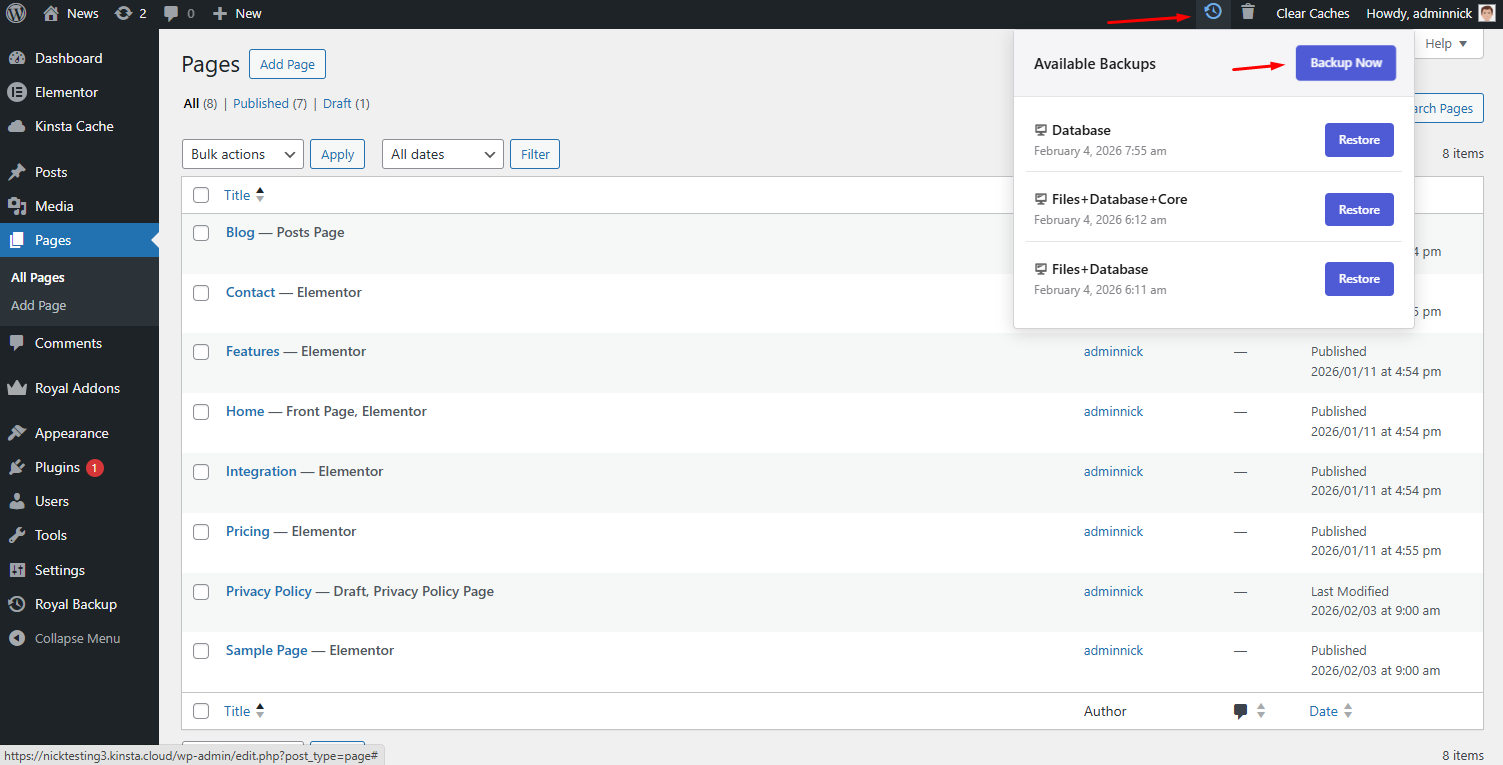
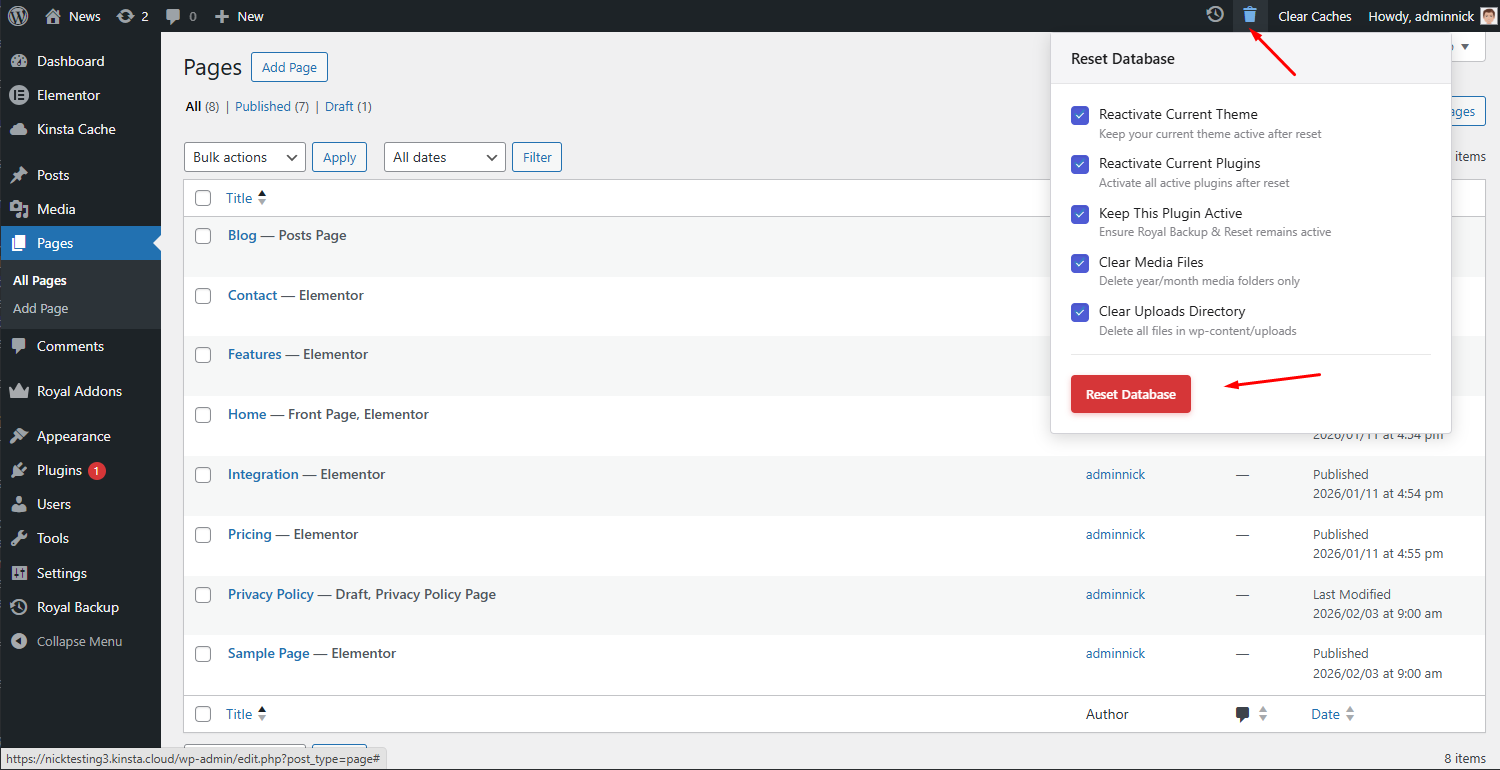
You can also securely store backups in cloud storage (PRO version) such as Google Drive, Dropbox, and Amazon S3, manage multiple backup locations, and perform selective backup and restore operations. Additionally, the built-in database reset tool lets you instantly reset WordPress to a fresh state without reinstalling.
🚀 Visit Plugin Homepage
✅Key Features of Free Version
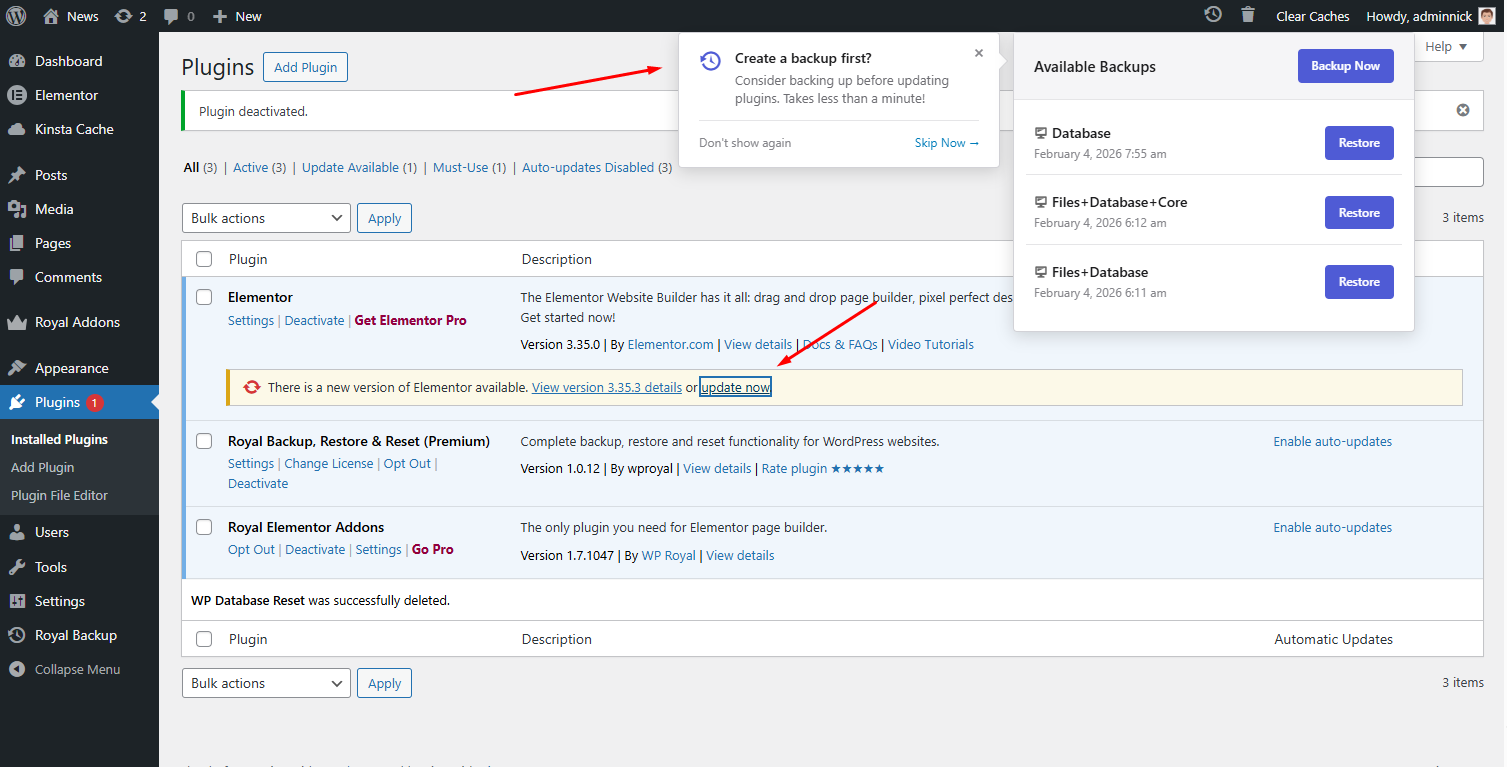
- Unique Feature – Backup Notification During Theme or Plugin Updates or Installation – No other plugin offers this feature – ⏩ See Video. Plugin will remind you to make wordpress backup before activating or updating themes or plugins.
- Full Website Backups – Backup your entire WordPress website including database, plugins, themes, uploads, and other files.
- Full Website Restore – Restore your entire WordPress website including database, plugins, themes, uploads, and other files.
- Full Website Migration – Clone – ⏩ See Video Migrate, clone or copy any website from staging website to Live Website easily.
- Assign Custom Names to your Backups – Assign custom names to wordpress backups for easy identification and organization.
- Backup Component Downloads – Download individual wordpress backup components such as the database, plugins, themes, and more.
- Background Backup – Feel free to refresh or close the browser window during wordpress backups — this won’t break the backup process.
- Backup & Restore Progress Tracking – Real-time progress updates during wordpress backup and restore operations
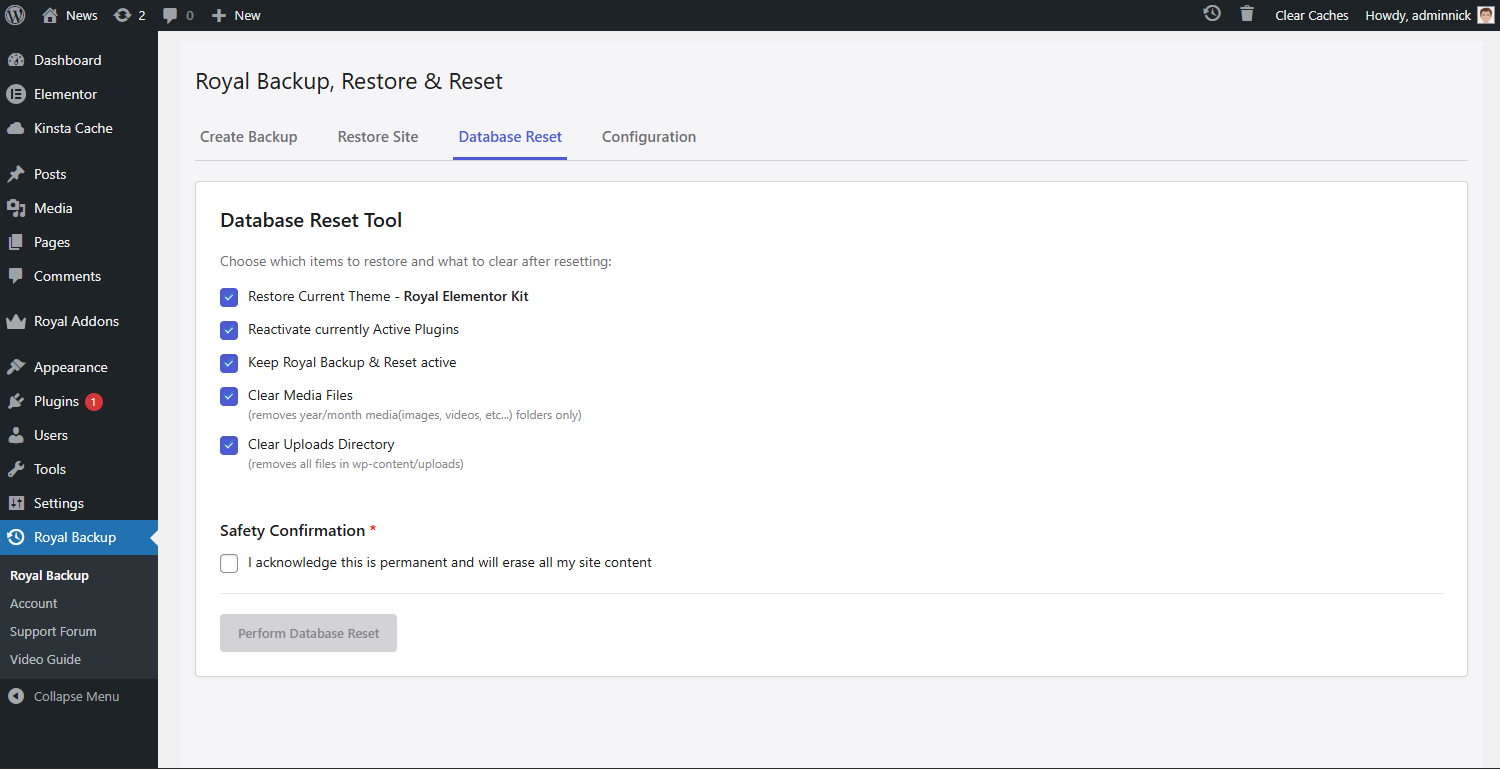
- Database Reset – Reset your WordPress database to a fresh installation – You do not need to reinstall WordPress, simple one click and your WordPress reverts to original fresh state.
- Backup Management Simple User interface – View, download, restore, and delete website backups from a simple interface
✅Video overview of Backup Notification During Theme or Plugin Updates
✅Migration Overview (Quick Guide)
🌟Key Features of PRO Version
- Backup Core WordPress Files – Backup all core WordPress files including wp-admin, wp-includes, and essential root files such as wp-config.php, .htaccess, and more. If something damages or alters these core files — such as viruses, hacker attacks, plugin updates, theme changes, or WordPress updates — you can always revert and restore the original WordPress files.
- Schedule Backups – Schedule backup to run every 1 hour, 12 hours, daily, weekly, once every two weeks and monthly. So you can ‘set and forget’ about Backups. Backup Schedule can be configured for Files and databases separately.
- Unlimited file Size for Migraiton – Migrate websites without file size limits. Migrate websites from remote storage services such as Google Drive, Dropbox, and Amazon S3.
- Google Drive Cloud Backup – Store backups securely on Google Drive. One Click Configuration.
- Dropbox Cloud Backup – Store backups securely on Dropbox. One Click Configuration.
- Amazon S3 Cloud Backup – Store backups securely on Amazon S3. Other Popular Cloud Backup Providers.
- **Save Backups in multiple locations simultaneously. ** – Backups can be created and saved simultaneously on your wordpress site and on Cloud storage (Google Drive, Dropbox, Amazon S3) as well. If one Backup location fails, you’ll still have the option to restore or download from the others.
- Backup Retention – Automatically delete older backups to save disk space while retaining recent ones — with full control over how many backups to keep.
- Selective Backup – Choose specific components to backup — such as the database, plugins, themes, WordPress core files, or uploads — individually.
- Selective Restore – Choose specific components to restore – such as the database, plugins, themes, WordPress core files, or uploads — individually.
- Backup Rename – Rename your backups to improve identification, organization, and management.
- Customizable Defaults – Save your preferred WordPress backup and restore settings as defaults — so you don’t need to preselect them every time you perform a backup or restore.
- Incremental Backups (Coming Soon) – Backup only the files and folders that have changed since your last backup, saving both time and storage space.
- WordPress Multisite Network Support (Coming Soon) – Full support for WordPress Multisite networks, all WordPress Multisite files and databases will be stored in the backup.
- Clear Uploads Directory – Perform a full cleanup of the uploads folder during a database reset for a completely fresh start.
- Priority Support – Get direct support from the developers whenever you need help with your backups.
Casos de uso
- Regular Backups – Manually create backups of your WordPress site and give them name.
- Development & Testing – Reset your WordPress database for testing or development purposes. This process deletes all files, settings, and posts — giving you a fresh WordPress installation without needing to reinstall WordPress manually. If you’re a tester, you can also create predefined testing backups. For example, create a backup named “Test 1” with pre-installed plugins or themes you frequently use. Or create a backup named “Astra Theme – Template Imported”, where an Astra theme template is already imported — so you can instantly restore your preferred setup from backups without having to re-import everything.
- Pre-Update Safety – Sometimes we forget to create a backup before updating plugins or themes, or when installing new ones. Our smart notification system reminds you to create a backup before these potentially risky actions.
- Only Database Backup – If you’re creating new content daily on your WordPress website — such as posts, pages, and more — you can choose to backup only the database, saving significant storage space. Full file backups can be performed less frequently, such as once per week.
- Only File Backups – If you only want to backup specific WordPress files without the database, you can do so and restore them whenever needed.
- Only WordPress Core files Backup – Securely backup your WordPress core files and easily restore them if they become damaged — for example, by viruses or caching plugins that modify critical files like .htaccess and wp-config.php.
- Automatic Schedule Backups – Our backup plugin will automatically create backups in the background while you work on your WordPress website.
Technical Features
- Built following WordPress coding standards and security best practices
- Nonce verification and capability checks on all operations
- Proper input sanitization and output escaping
- Resumable backups for large websites
- AJAX-powered interface for seamless user experience
Instalação
WordPress Admin Method
- Go to your administration area in WordPress
Plugins > Add - Look for
Royal Backup(use search form) - Click on Install and activate the plugin
- After activating Royal Backup plugin you will see it in the admin dashboard menu with the name Royal Backup
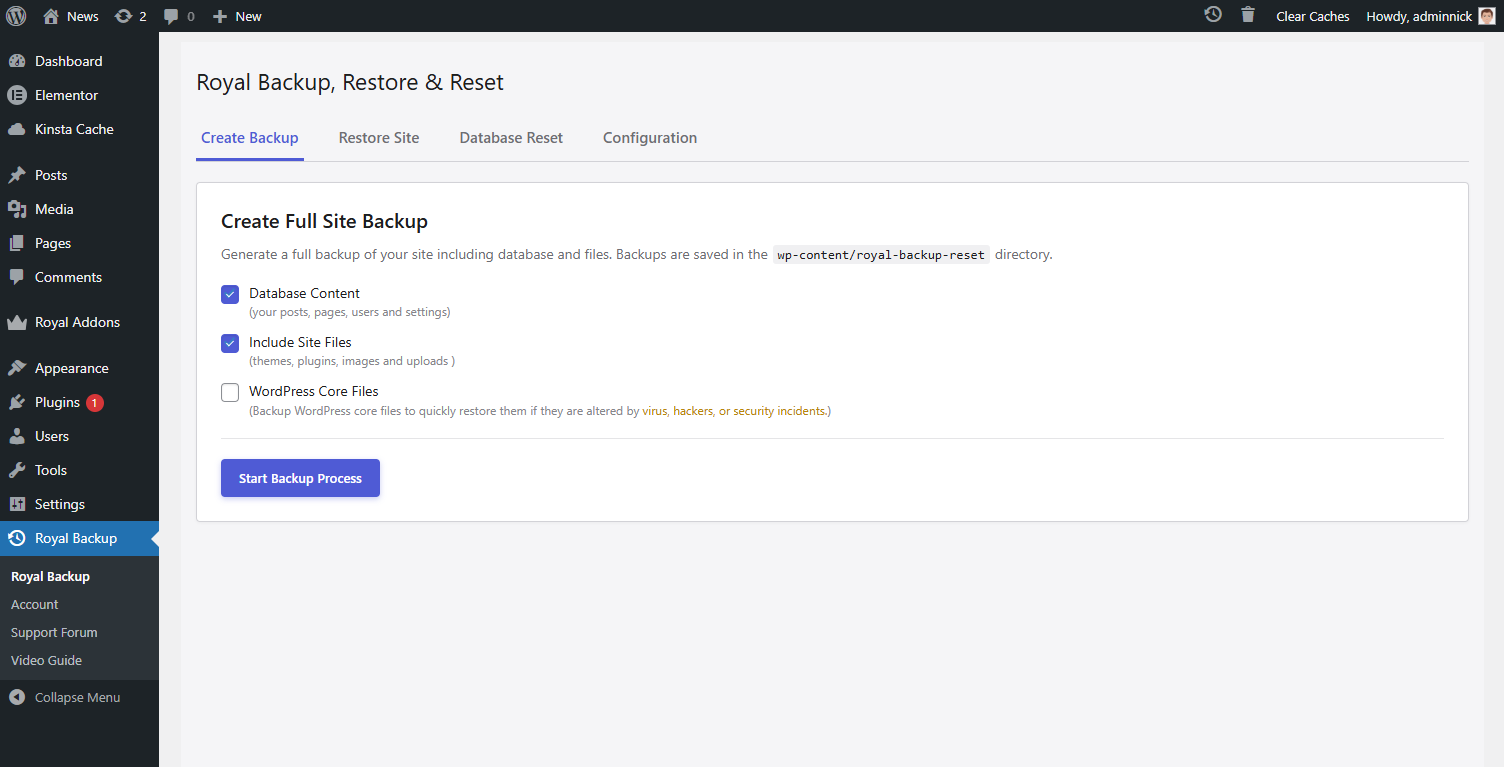
- Create your first backup using the “Create Backup” tab > Select what to include in the backup, Press “Start Backup Process” Button
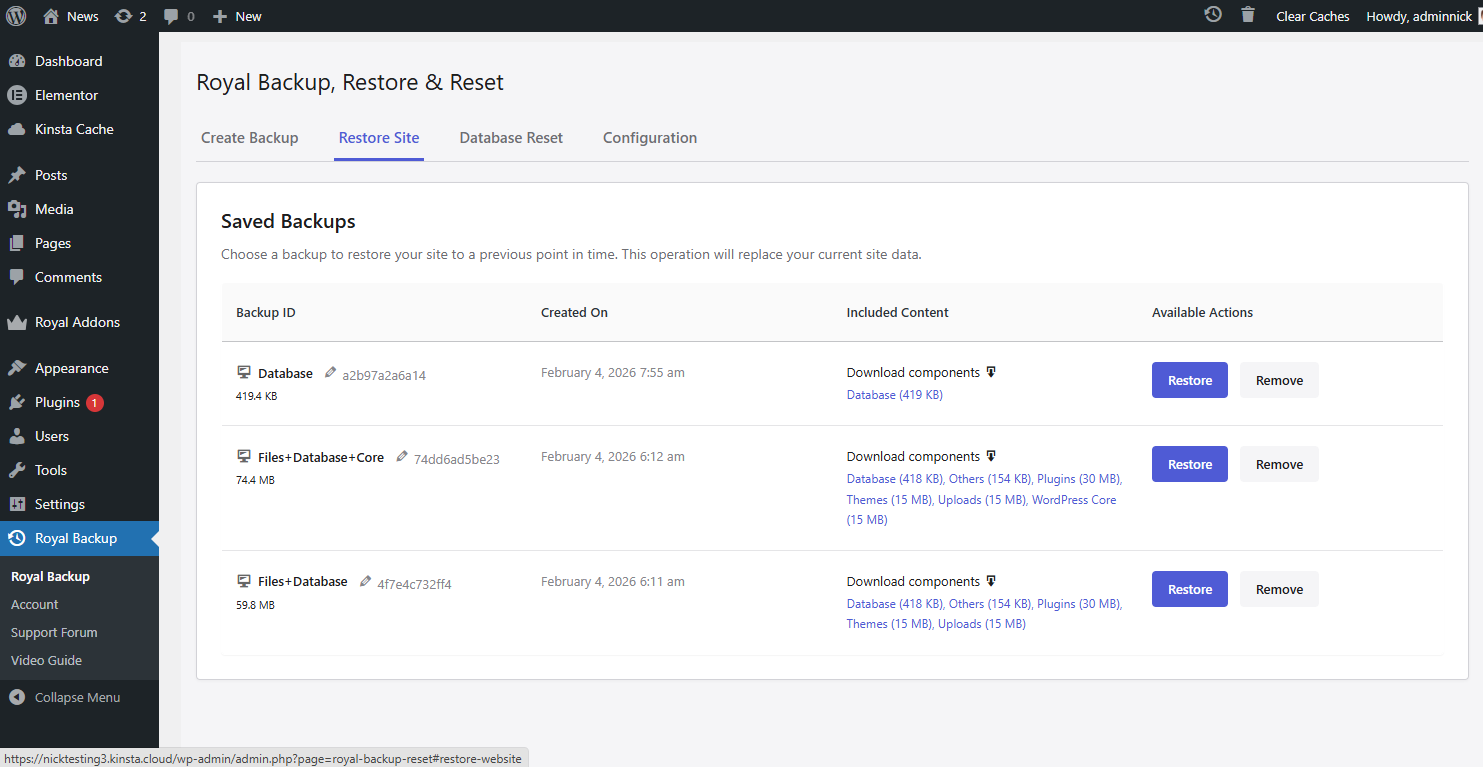
- To Restore your backup navigate to Restore Site section, choose backup to restore and press Restore button
- To Delete your backup navigate to Restore Site section and press Remove button. This will completely remove all backups files and folders. This action can’t be undone
FTP Method
- Carregue a pasta
royal-backup-resetpara o diretório/wp-content/plugins/ - Activate the Royal Backup, Restore & Reset plugin through the ‘Plugins’ menu in WordPress
- In the WordPress appearance menu go to in Royal Backup to start using the plugin
- Create your first backup using the “Create Backup” tab > Select what to include in the backup > Press “Start Backup Process” Button
- To Restore your backup navigate to Restore Site section, choose backup to restore and press Restore button
- To Delete your backup navigate to Restore Site section and press Remove button. This will completely remove all backups files and folders. This action can’t be undone
Log de Changes
New Website Migration feature added.
1.0.27
- Fixed Small visual issues.
1.0.26
- Video Tutorial Renewed.
1.0.25
- Video Tutorial Renewed.
1.0.24
- Minor Improvements.
1.0.23
- Minor Improvements.
1.0.22
- Minor Improvements.
Capturas de tela
Para desenvolvedores
Este é o seu plugin? Mostre os números.
Adicione um crachá ao vivo ao seu site, Documentos ou Readme do GitHub. Ele é atualizado por conta própria - nenhuma conta necessária.
FAQ
Royal WordPress Backup, Restore & M…: quick answers
Respostas diretas, extraídas de dados ao vivo WordPress.org.
Fonte: WordPress.org
Is Royal WordPress Backup, Restore… free?
Yes. Royal WordPress Backup, Restore… is free to download and use from the official WordPress.org plugin directory.
Is Royal WordPress Backup, Restore… safe to use in 2026?
Royal WordPress Backup, Restore… is a solid plugin choice in 2026, with a few things worth checking first. It runs on 30K+ sites, is rated 5/5 and was last updated 6 months ago, and scores 75/100 on our health check.
How many websites use Royal WordPress Backup, Restore…?
Royal WordPress Backup, Restore… is active on 30K+ WordPress websites and has been downloaded 169,415 times since it launched in November 2025. It was downloaded 7,193 times in the last 30 days.
Does Royal WordPress Backup, Restore… work with WordPress 7.1?
Royal WordPress Backup, Restore… is officially tested up to WordPress 7.0.9, while the latest release is 7.1.5. It may still work, but try it on a staging site first.
What PHP version does Royal WordPress Backup, Restore… need?
Royal WordPress Backup, Restore… requires PHP 7.4 or higher. Most hosts run PHP 8.x today, so it works on any modern WordPress hosting.
When was Royal WordPress Backup, Restore… last updated?
The latest version, 1.0.27, was released on June 8, 2026 (6 months ago).
Who makes Royal WordPress Backup, Restore…?
Royal WordPress Backup, Restore… is developed and maintained by WP Royal.
Alimentado por PageForge
Um modelo e uma planilha. Uma página real para cada pesquisa.
PageForge Transforma cada linha de um CSV em uma página WordPress com seu próprio título, URL, SEO campos e esquema, construído no layout que você já desenhou. Gratuito em WordPress.org.
- CSV e XLSX, mais Google Sheets em Profissional e Empresarial
- Seu próprio título, URL, SEO campos e esquema para cada página
- Funciona com o editor de blocos, Elementor, Divi e Avada
- Gratuito em WordPress.org, sem cartão de crédito