


Transferência de tipo de postagem
Transfer posts, pages, and custom post types in bulk or one by one. Works from the editor, Quick Edit, and Bulk Edit. No coding needed.

Escolha segura
Yes — Post Type Transfer is a safe, well-maintained plugin to use in 2026. It runs on 2K+ sites, is rated 5/5 and was last updated 1 month ago, and scores 83/100 on our health check.
- Testado com as últimas WordPress (7.1)
- Precisa de PHP 8.1 ou mais recente
Como ele se acumula?
Lado a lado em instalações, atualizações, avaliações e suporteDownloads diários
Os picos de download geralmente seguem uma nova versão — cada site que atualiza automaticamente é um download.
Rankings
Where Post Type Transfer stands todayWordPress.org Classificações de pesquisa
Posição ao vivo na pesquisa de plugins, top 100| Palavra chave | Posição |
|---|---|
| acf fields | #83 |
| post import | #27 |
| pós-pedido | #23 |
| post transfer | #2 |
| Tipo de postagem | #9 |
Adoção da versão
Compartilhamento de sites ativos por lançamento.
Divisão de classificação
★★★★★ ★★★★★ 5 de 7 comentários
About Post Type Transfer
From the official readme · v1.7Descrição
Get Pro Version | Documentation | Support Forum | Rate the Plugin
Post Type Transfer lets you change the post type of any WordPress content. It works with standard Posts, Pages, and all custom post types.
Open a post. Pick the new post type from a dropdown. Click Update. The content transfers. Nothing is deleted. Nothing is lost. Only the post type classification changes.
No developer needed. No database access. No technical knowledge required. More than 3000+ active sites use Post Type Transfer to keep their content structure clean.
Post Type Transfer is free to download and use. The core transfer features have no restrictions. Need more? Post Type Transfer Pro adds bulk transfer, drag-and-drop post reordering, post duplication, WP-CLI support, and priority support.
Why You Need Post Type Transfer
Wrong post type assignments happen on every WordPress site. Here are the situations that come up constantly:
• A case study published as a blog post because the custom post type did not exist yet
• A landing page sitting under Pages when it belongs in a custom post type
• Hundreds of legacy posts that need migrating to a new structure after a site redesign
• A client site with no content organization that needs sorting before launch
• Content published under the wrong type by a team member who did not know the difference
Without this plugin, fixing any of those means manually recreating content, editing the database, or paying a developer. Post Type Transfer handles it from the WordPress dashboard you already use every day.
How It Works
Choose any of the two available methods to transfer a post between post types. Each method takes less than a minute.
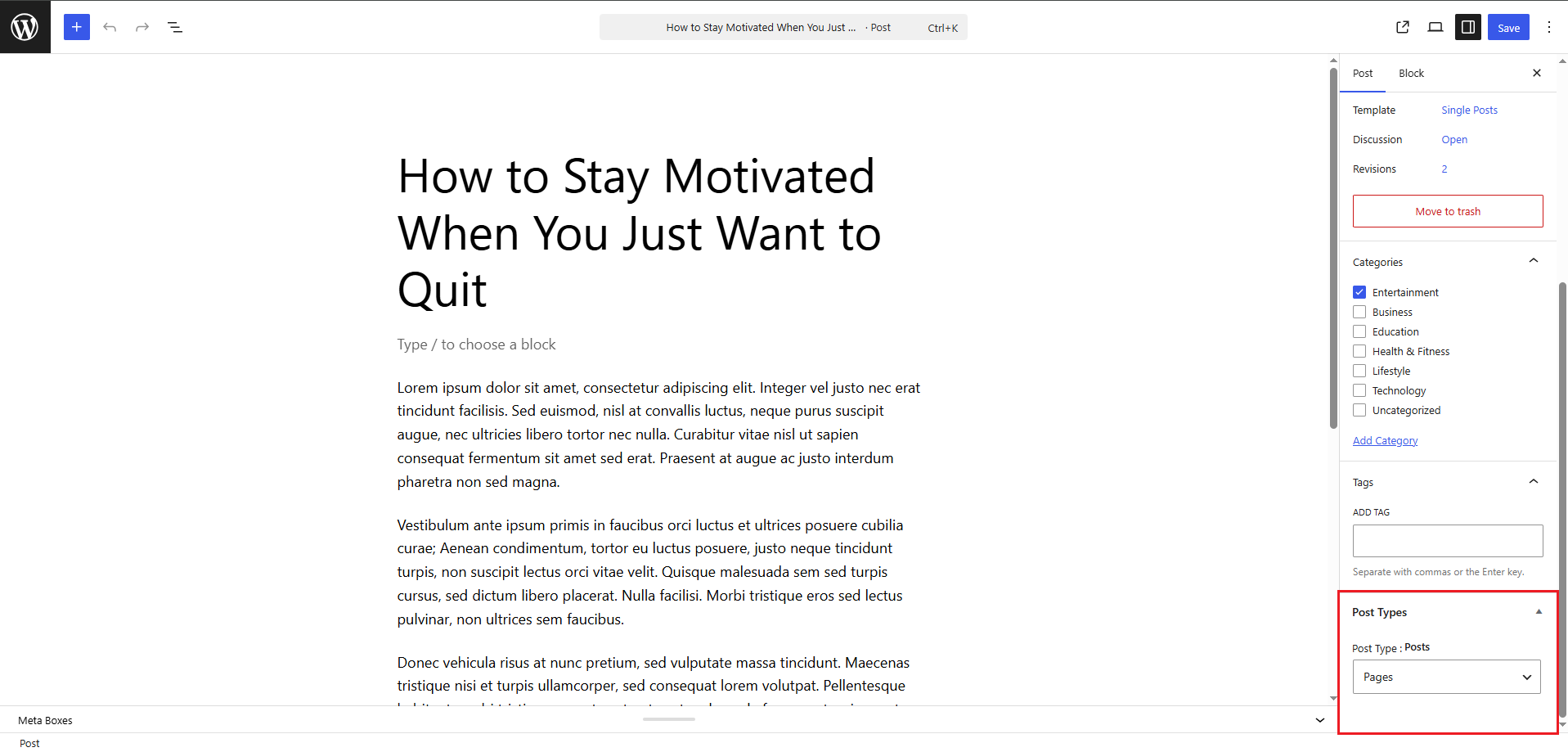
Method 1: Transfer from the Post Editor
- Log in to your WordPress Admin Dashboard.
- Navigate to the post you want to transfer and click Edit.
- In the right-hand sidebar, select the Post tab and locate the Post Type section.
- Choose the desired post type from the dropdown menu.
- Click Update to save your changes.
The post is transferred instantly while retaining all existing content, metadata, and settings.
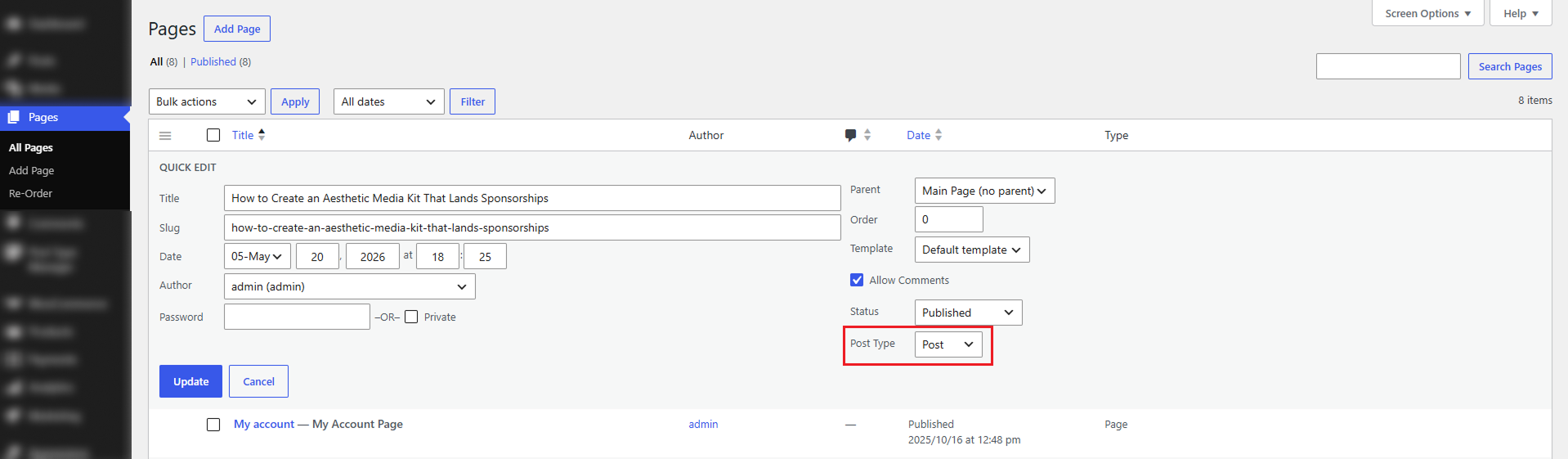
Method 2: Transfer Using Quick Edit
The Quick Edit option transfers a post without opening the full editor.
- Go to the Posts listing screen.
- Hover over the post you want to transfer and click Quick Edit.
- Locate the Post Type dropdown within the Quick Edit panel.
- Select the target post type.
- Clique em Atualizar.
The post is transferred immediately without loading the editor screen.
What Post Type Transfer Includes
Features marked [PRO] are available in the Pro version.
- Post Editor Transfer: Change the post type directly from the editor sidebar with a dropdown selection.
- Quick Edit Transfer: Convert any post without opening the full editor. Works directly from the post listing page.
- Custom Post Type Support: Supports all registered WordPress post types automatically, Whether it’s WooCommerce products, CPT UI post types, ACF post types, or any custom post type added by plugins or themes, they will be available for transfer.
- Zero Content Loss: The transfer changes the post type label. That’s it. Content, custom fields, metadata, settings — none of it moves. It’s still all there after.
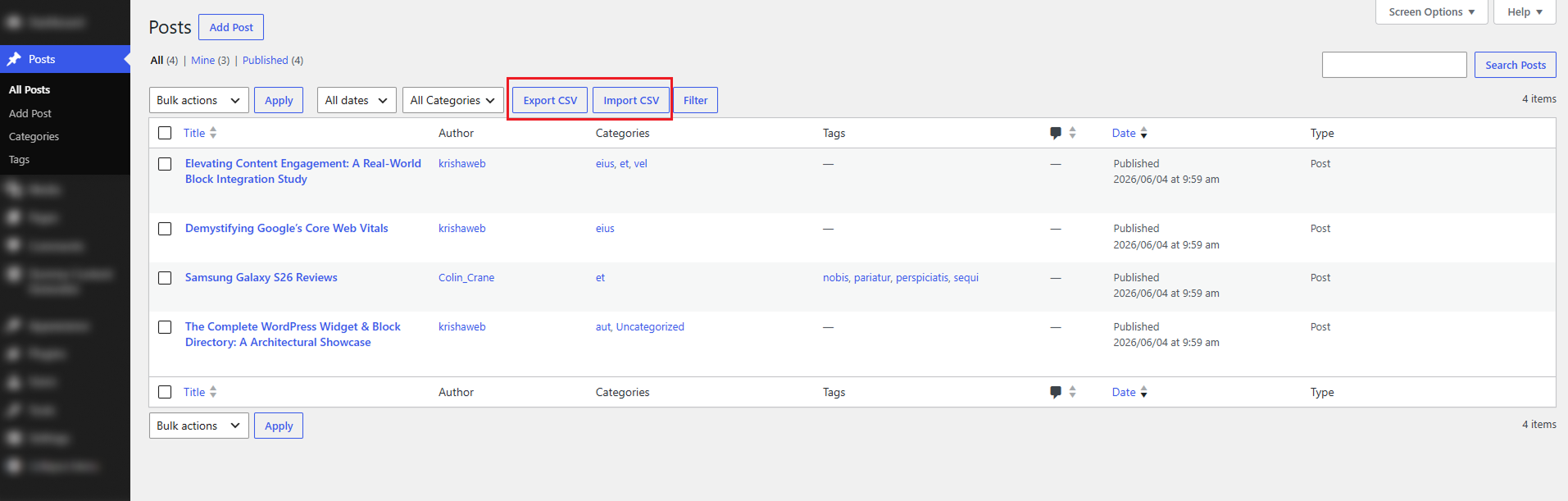
- CSV Export: One click downloads a spreadsheet(CSV) of any post type, drafts included. Titles, content, featured image URLs, categories, tags, original publish dates. Good for backups, content audits, and handing a site off to a new owner without losing the history.
- CSV Import: Upload a previously exported CSV file to recreate those posts on any WordPress site or move them between post types on the same install. Publish dates come across as-is.
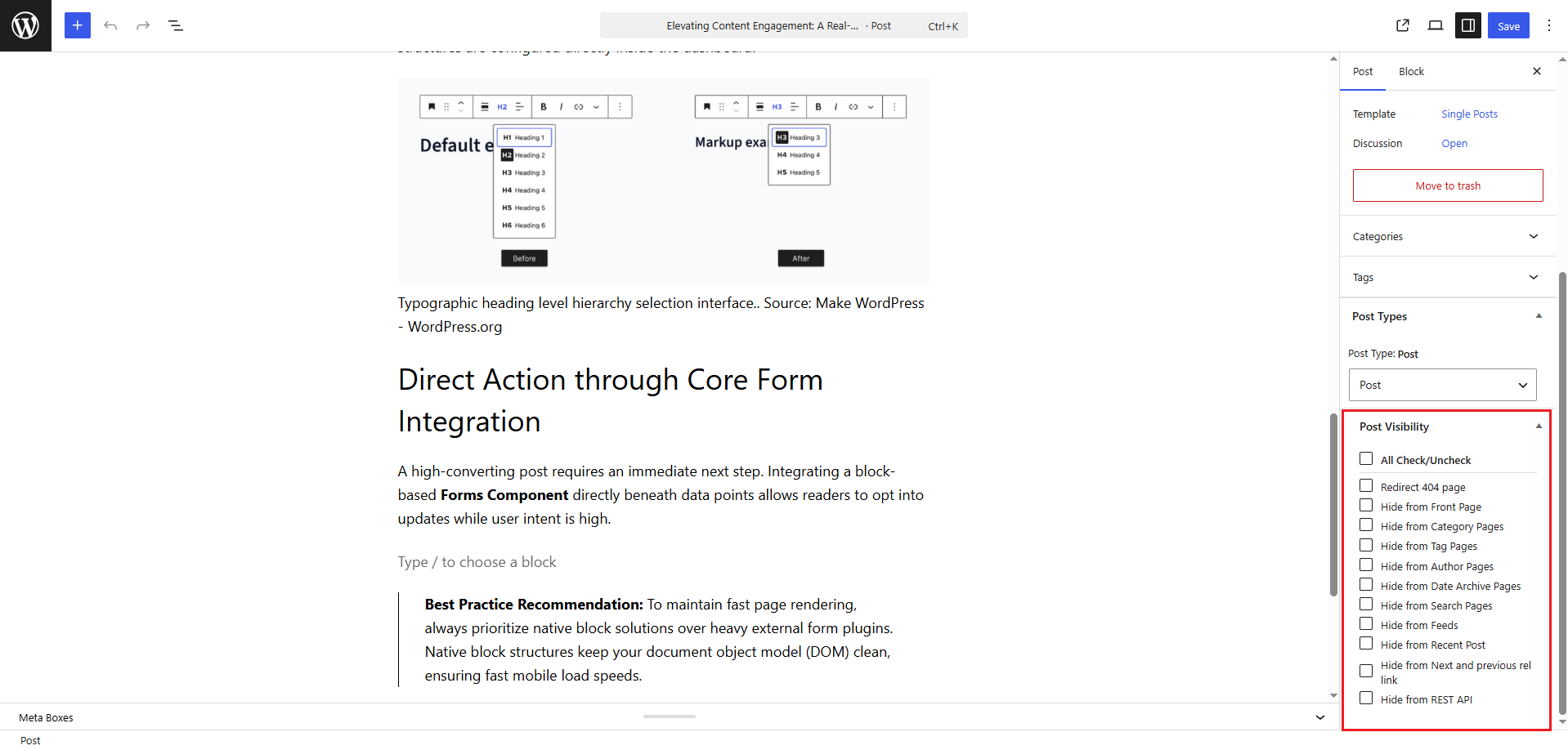
- Post Visibility Controls: Keep posts published but hide them from specific parts of the site. Eleven independent visibility toggles. See the full list below..
- Translation Ready: Fully translatable and compatible with multilingual WordPress websites.
- Selective Enablement [PRO]: You decide which post types show the transfer option. No need to have the dropdown everywhere. Turn it off where it’s not relevant and the admin stays clean.
- Bulk Edit Transfer [PRO]: Check multiple posts, open Bulk Edit, pick the new type, and click Update. All of them move at once. This is the method that actually saves time on larger sites.
- Taxonomy Management [PRO]: Choose how categories, tags, and custom taxonomies behave during each transfer. Keep existing, map to new, or create a fresh taxonomy.
- Drag-and-Drop Post Reordering [PRO]: Rearrange posts within any post type using a drag-and-drop interface in the admin listing.
- AutoSort [PRO]: AutoSort pushes the custom back-end post order to your front end automatically.
- Advanced Re-order Page [PRO]: Dedicated reorder interface with pin, Move to Top, Move to Bottom, Undo, Save Order, and Reset to Default
- Post Duplication [PRO]: Clone any post as a draft with full control over what copies: title, content, custom fields, taxonomies, and featured image.
- Page Builder Ready [PRO]: Works smoothly with Elementor, WPBakery, Divi, and other major page builders for hassle-free content reordering.
- WordPress Multisite Support [PRO]: Post transfers, reordering, and duplication all work across WordPress multisite networks.
Post Type Transfer Pro
Post Type Transfer Pro includes all free features plus advanced features for agencies, developers, and content-heavy websites.
- Taxonomy Management: Control exactly how categories, tags, and custom taxonomies behave during every transfer. Keep existing, map to new, or register a fresh taxonomy on the fly.
- Drag-and-Drop Post Reordering: Set the display order of any post type directly from the admin listing using drag-and-drop handles.
- AutoSort: The custom back-end order you set automatically mirrors on the front end of the site.
- Advanced Reorder Interface: A full ordering screen in its own interface. Pin posts to keep them fixed at the top, bulk move others up or down, undo anything you don’t want, and save or reset when you’re done.
- Post Duplication: Clone any post as a draft and choose exactly what carries over. Title, content, excerpt, custom fields, taxonomies, featured image, and check what you need, leave out what you don’t.
- Page Builder Ready: Works smoothly with Elementor, WPBakery, Divi, and other major page builders for hassle-free content reordering.
- WordPress Multisite Support: All features work across sites in a multisite network.
- Upgrade to Pro: Get access to advanced transfer, organization, and content management tools with Post Type Transfer Pro.
Get Pro Version: Post Type Transfer Pro
Instalação
- In your WordPress Dashboard go to “Plugins” -> “Add Plugin”.
- Search for “Post Type Transfer”.
- Install the plugin by pressing the “Install” button.
- Activate the plugin by pressing the “Activate” button.
- From the post edit screen, above the “Publish” button is the “Post Type Transfer” interface.
- Change post type as needed.
Log de Changes
1.7
- Fixed: Post visibility filtering returned all posts when a query used an OR meta_query relation
- Add
ptt_enable_post_visibilityfilter to disable the post visibility feature - Fixed: Duplicate post visibility meta join in Query Loop block queries
- Tested up to 7.1
1.6
- Tested up to 7.0
- Add import/export feature
- Add post visibility feature
1.5
- Code quality improvements
- Tested up to 6.8
1.4
- Fixed: Compatibility with ACF Pro repeater field
1.3
- Bugfix
1.2
- Compatible with ACF
Capturas de tela
Para desenvolvedores
Este é o seu plugin? Mostre os números.
Adicione um crachá ao vivo ao seu site, Documentos ou Readme do GitHub. Ele é atualizado por conta própria - nenhuma conta necessária.
Best Post Type Transfer alternatives
All acf fields plugins →| Classificação | Plugin | Instalações ativas |
|---|---|---|
| 2 |
 xfive Plato – Reliable Sync Watcher for ACF
Monitors ACF's acf-json for unsynced field groups and warns you of potential database… |
<10 |
FAQ
Post Type Transfer: quick answers
Respostas diretas, extraídas de dados ao vivo WordPress.org.
Fonte: WordPress.org
Is Post Type Transfer free?
Yes. Post Type Transfer is free to download and use from the official WordPress.org plugin directory. The developer also sells premium add-ons or a Pro version with extra features.
Is Post Type Transfer safe to use in 2026?
Yes — Post Type Transfer is a safe, well-maintained plugin to use in 2026. It runs on 2K+ sites, is rated 5/5 and was last updated 1 month ago, and scores 83/100 on our health check.
How many websites use Post Type Transfer?
Post Type Transfer is active on 2K+ WordPress websites and has been downloaded 31,560 times since it launched in February 2018. It was downloaded 1,683 times in the last 30 days.
Does Post Type Transfer work with WordPress 7.1?
Yes. The developer has tested Post Type Transfer up to WordPress 7.1.5, the latest release. It requires WordPress 6.6 or newer.
What PHP version does Post Type Transfer need?
Post Type Transfer requires PHP 8.1 or higher. Most hosts run PHP 8.x today, so it works on any modern WordPress hosting.
When was Post Type Transfer last updated?
The latest version, 1.7, was released on October 28, 2026 (1 month ago).
Who makes Post Type Transfer?
Post Type Transfer is developed and maintained by KrishaWeb.
What are the best alternatives to Post Type Transfer?
The most popular alternatives to Post Type Transfer are xfive Plato (<10 installs).
Alimentado por PageForge
Um modelo e uma planilha. Uma página real para cada pesquisa.
PageForge Transforma cada linha de um CSV em uma página WordPress com seu próprio título, URL, SEO campos e esquema, construído no layout que você já desenhou. Gratuito em WordPress.org.
- CSV e XLSX, mais Google Sheets em Profissional e Empresarial
- Seu próprio título, URL, SEO campos e esquema para cada página
- Funciona com o editor de blocos, Elementor, Divi e Avada
- Gratuito em WordPress.org, sem cartão de crédito