


Pixalty Media Explorer
A file-explorer-style media organizer with virtual folders, drag-and-drop organization, folder colors, ZIP export, and galleries.

Use com cautela
Pixalty Media Explorer works, but test it on a staging site before relying on it in 2026. Was last updated 4 months ago, and scores 49/100 on our health check.
- Base de usuários pequenas (<10 instalações ativas)
- Muito poucos comentários até agora
Como ele se acumula?
Lado a lado em instalações, atualizações, avaliações e suporte



Downloads diários
Os picos de download geralmente seguem uma nova versão — cada site que atualiza automaticamente é um download.
Rankings
Where Pixalty Media Explorer stands todayWordPress.org Classificações de pesquisa
Posição ao vivo na pesquisa de plugins, top 100| Palavra chave | Posição |
|---|---|
| file manager | >100 |
| folders | >100 |
| galeria | >100 |
| media library | >100 |
| media organizer | #62 |
About Pixalty Media Explorer
From the official readme · v1.1.0Descrição
Pixalty Media Explorer adds a virtual folder layer to the WordPress media library. It keeps files in their normal WordPress upload locations while giving administrators a faster way to organize, search, move, and reuse media.
Current features:
- Hierarchical virtual folders for media attachments.
- Dedicated manager under the WordPress Media menu.
- Drag files into folders.
- Drag local files into the manager to upload them into the current folder.
- Drag one or many folders into another folder.
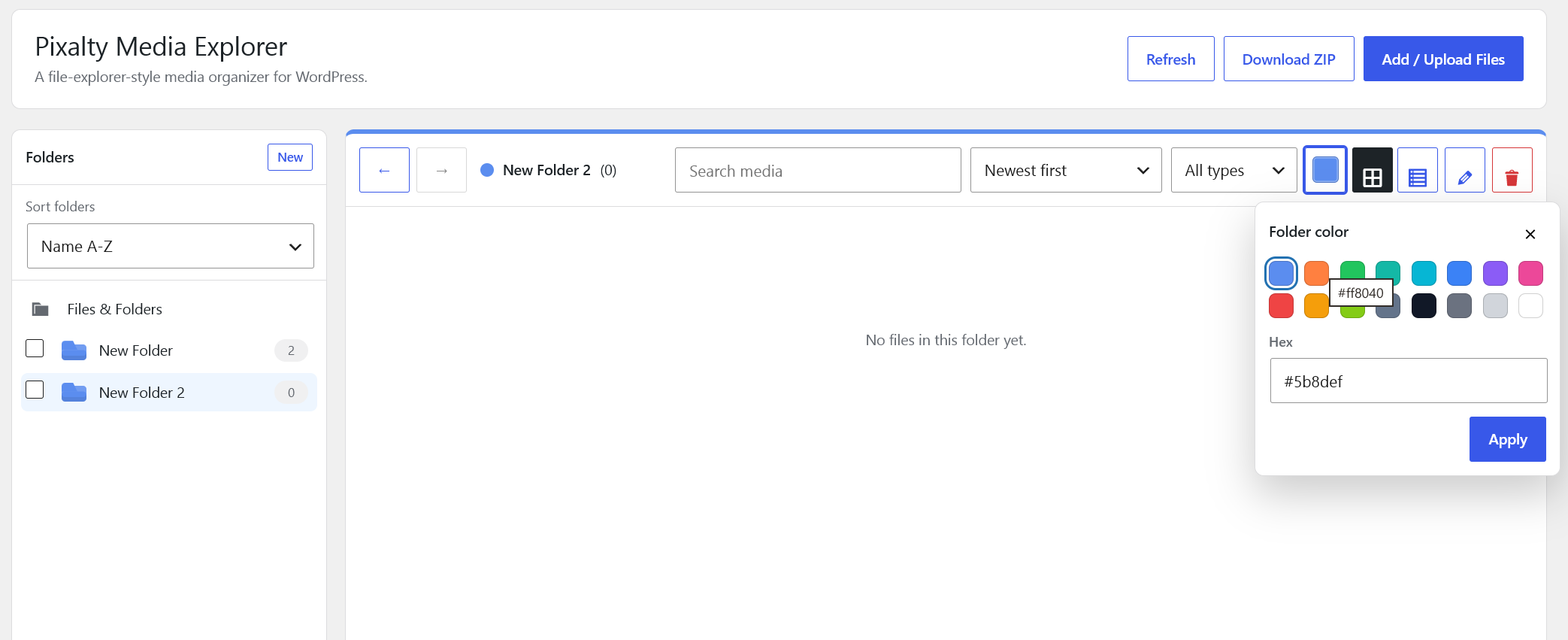
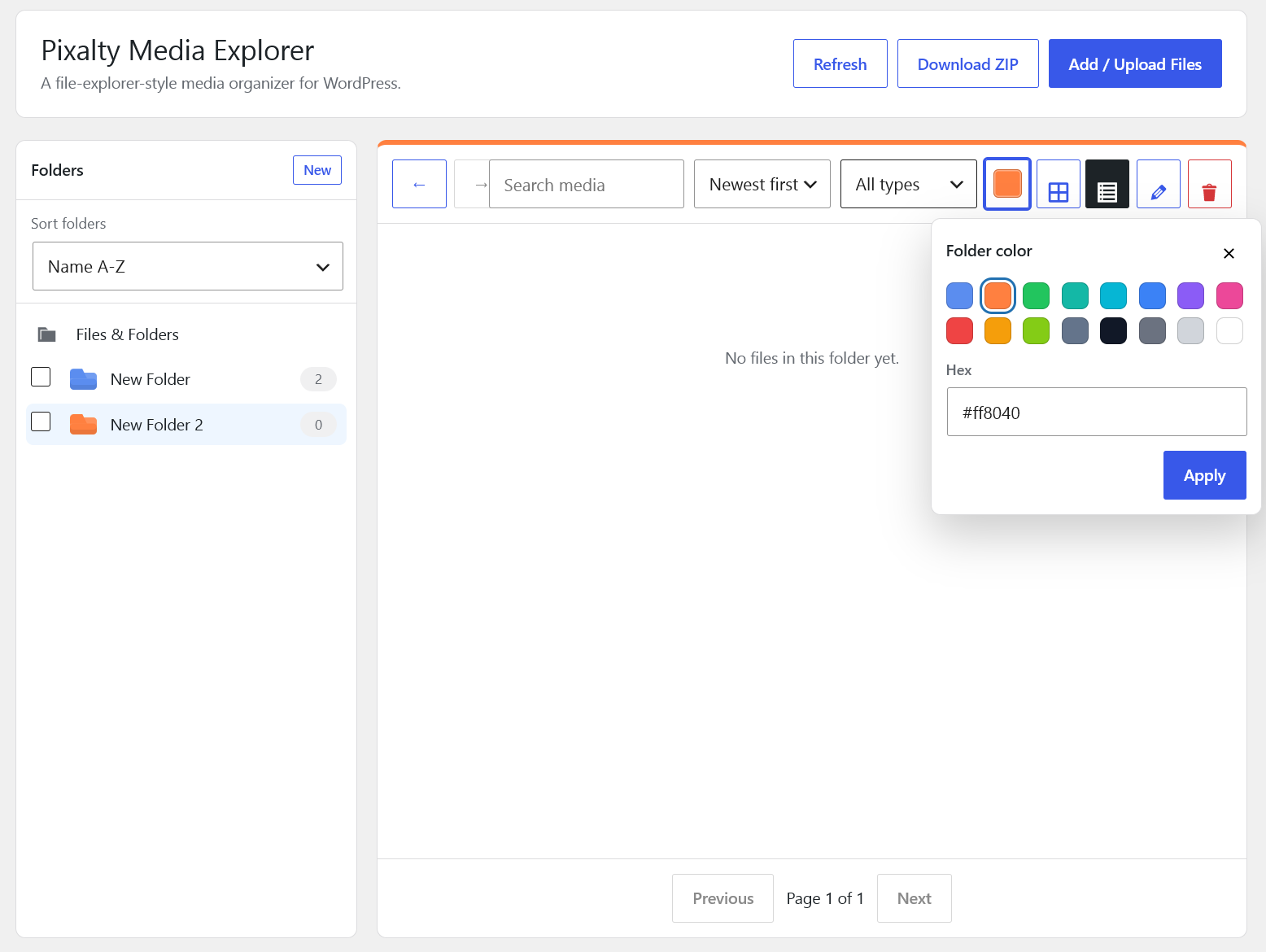
- Folder colors.
- Create, rename, delete, and move folders.
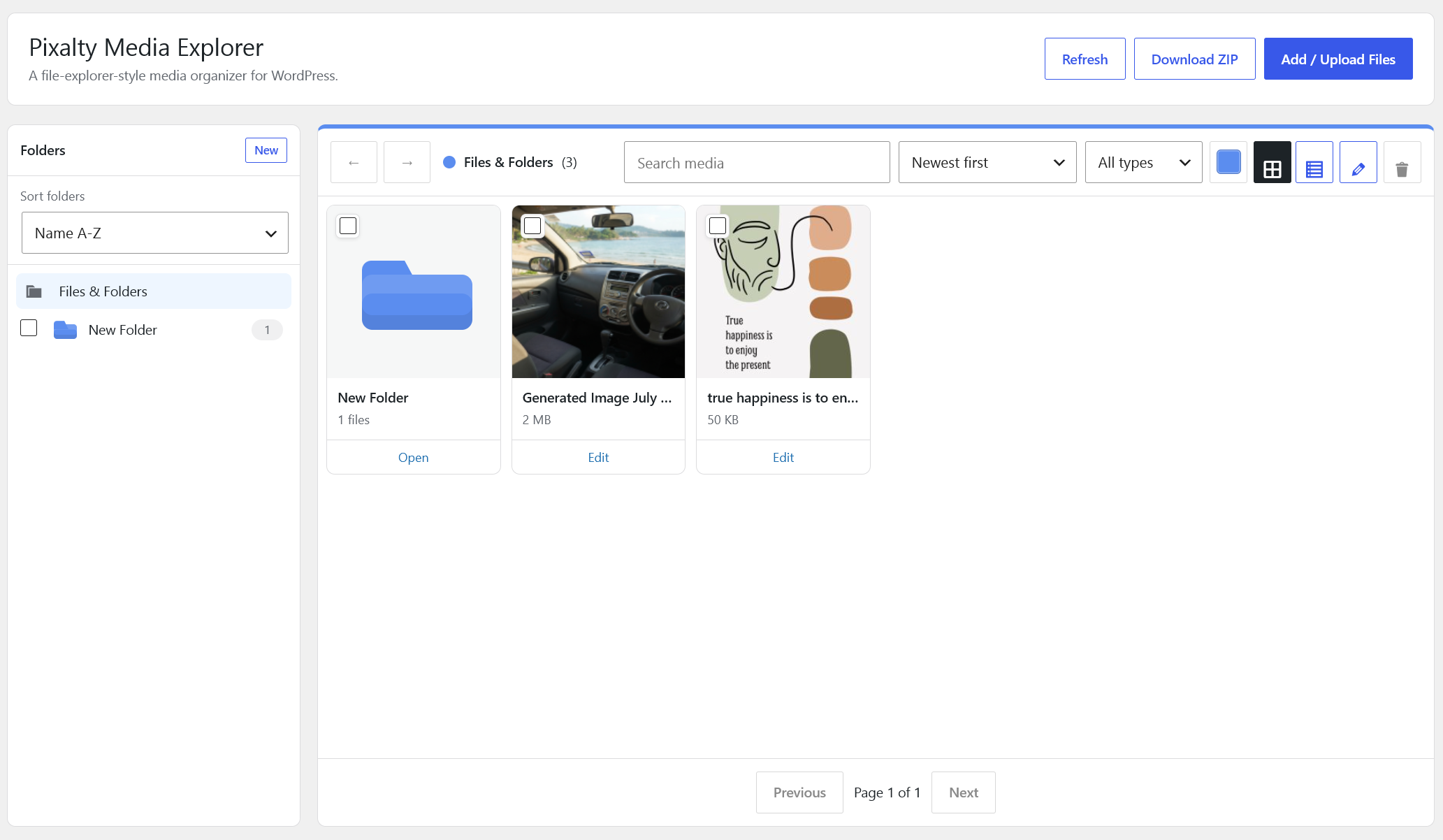
- Folders-first explorer view, with subfolders shown in the main file area.
- Back and forward folder navigation.
- Gallery view and list view.
- Click and Ctrl-click selection in the sidebar and main window.
- Sort folders and files inside the manager.
- Filter the manager by file type.
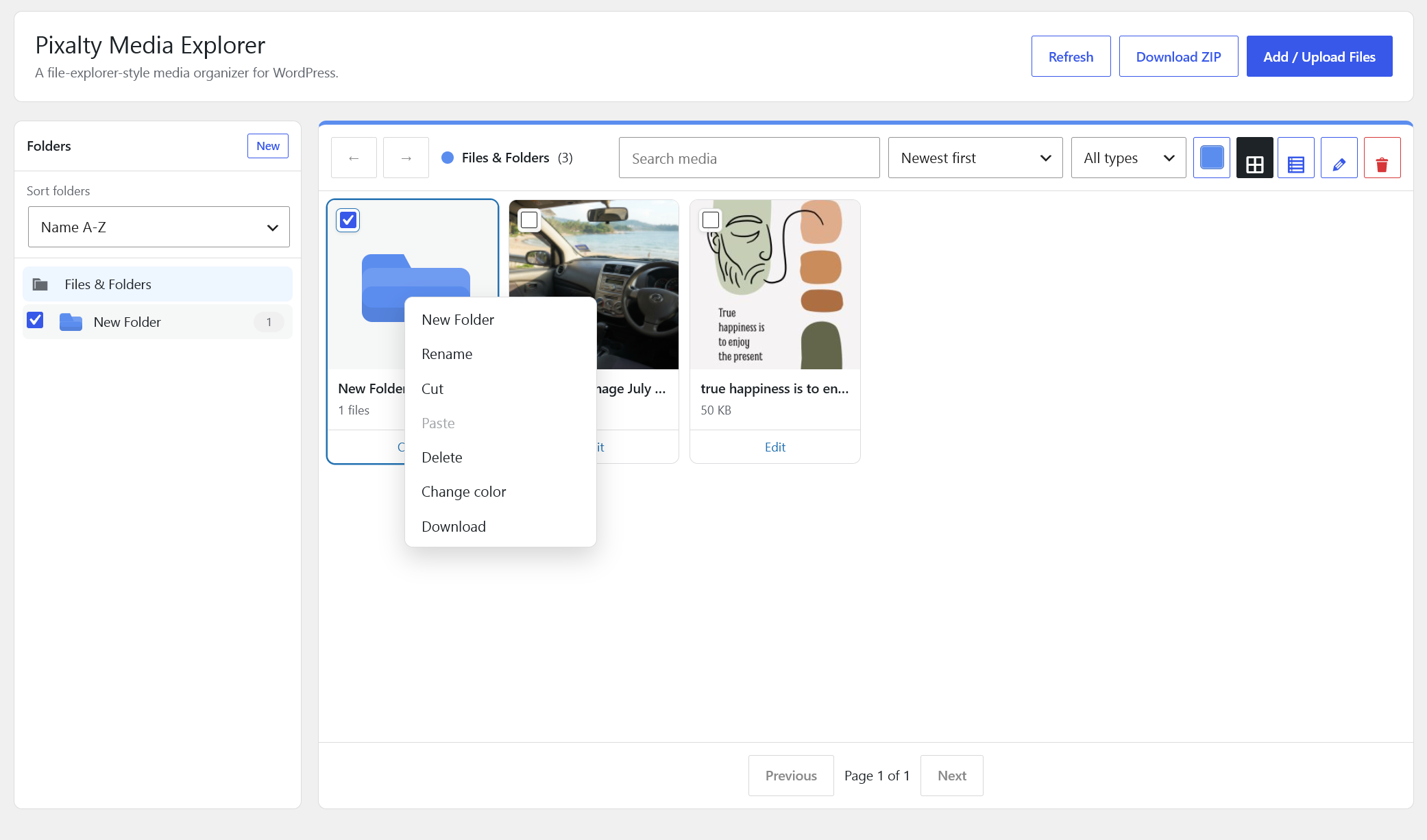
- Right-click context menu in the sidebar and main window with New Folder, Rename, Cut, Paste, Delete, Change color, and Download.
- Built-in attachment editor for title, alt text, caption, description, and folder assignment.
- Assign files through the WordPress media modal.
- Media Library list filter and folder column.
- Media modal folder filter for WooCommerce product editors and page builders that use the WordPress media modal.
- Folder selector on attachment edit screens.
- Download a folder as a ZIP file when ZipArchive is available.
- SVG upload support for administrators with in-place sanitization.
- Front-end gallery shortcode with local lightbox: [pixalty_gallery folder=”123″ columns=”3″].
- Front-end document library shortcode: [pixalty_document_library folder=”123″].
- Best-effort folder sync for translated media attachments in WPML and Polylang.
Pixalty Media Explorer is an original implementation by Pixalty. It is designed to solve the same broad media-organization problem as popular folder plugins while avoiding proprietary code, copied assets, copied UI artwork, or third-party branding.
Shortcode
Use this shortcode to display image files from a folder:
[pixalty_gallery folder="123" columns="3" size="medium_large" link="file" limit="60"]
Attributes:
folder: Required folder term ID.columns: Number of columns from 1 to 8.size: WordPress image size.link:fileorattachment.limit: Maximum number of images, up to 100.
Use this shortcode to display a browsable document library:
[pixalty_document_library folder="123" limit="100" include_children="yes" show_images="no" order="title_asc"]
Attributes:
folder: Required folder term ID.limit: Maximum number of documents, up to 300.include_children:yesorno.show_images:yesorno.order:title_asc,title_desc,date_asc, ordate_desc.
Compatibilidade
Pixalty Media Explorer stores folders as a private attachment taxonomy and does not move physical upload files. Existing URLs, WooCommerce product images, Elementor media selections, Divi media selections, and normal WordPress content references continue to use the standard WordPress attachment system.
The plugin adds a media folder filter to the WordPress media modal. Page builders and WooCommerce screens that use the standard media modal can browse by folder.
For multilingual sites, Pixalty Media Explorer attempts to sync folder assignment across translated attachment records when WPML or Polylang APIs are available.
Privacidade
Pixalty Media Explorer does not contact external services, load third-party assets, or track users. All folder, gallery, document library, SVG sanitization, and ZIP download features run locally inside WordPress.
Notas
Folders are virtual. Moving files between folders does not move files on disk and does not change existing media URLs.
ZIP export requires PHP’s ZipArchive extension.
SVG uploads are restricted to administrators by default and are sanitized before storage. Sites can change the capability with the pixalty_media_explorer_svg_upload_capability filter.
Instalação
- Upload the plugin folder to
/wp-content/plugins/. - Activate Pixalty Media Explorer from the Plugins screen.
- Open Media Explorer from the WordPress Media menu.
Log de Changes
1.1.0
- Added the Pixalty icon to the admin manager header.
- Added flat two-tone SVG folder icons with darker same-color tabs across sidebar, grid, and list views.
1.0.0
- Renamed the public plugin branding to Pixalty Media Explorer.
- Renamed the root manager view to Files & Folders.
- Improved folder icons with a more recognizable tabbed folder shape.
- Enabled toolbar Rename for a single selected folder or file in the root view.
- Moved the manager under the WordPress Media menu and compacted the explorer toolbar with icon-only actions.
0.3.9
- Made Files & Folders the default manager home view.
- Removed the separate catch-all explorer view.
- Show root folders inside the Files & Folders view for a more file-explorer-like layout.
0.3.8
- Improved file explorer drag-and-drop reliability with mouse, touch, and pointer fallback handling.
- Added small multi-select checkboxes to explorer grid and list items.
0.3.7
- Removed colored folder row borders from list view.
0.3.6
- Fixed drag-and-drop uploads so files are assigned to the selected media folder during upload.
Capturas de tela
Para desenvolvedores
Este é o seu plugin? Mostre os números.
Adicione um crachá ao vivo ao seu site, Documentos ou Readme do GitHub. Ele é atualizado por conta própria - nenhuma conta necessária.
Best Pixalty Media Explorer alternatives
All file manager plugins →





FAQ
Pixalty Media Explorer: quick answers
Respostas diretas, extraídas de dados ao vivo WordPress.org.
Fonte: WordPress.org
Is Pixalty Media Explorer free?
Yes. Pixalty Media Explorer is free to download and use from the official WordPress.org plugin directory.
Is Pixalty Media Explorer safe to use in 2026?
Pixalty Media Explorer works, but test it on a staging site before relying on it in 2026. Was last updated 4 months ago, and scores 49/100 on our health check.
How many websites use Pixalty Media Explorer?
Pixalty Media Explorer is active on <10 WordPress websites and has been downloaded 284 times since it launched in August 2026. It was downloaded 68 times in the last 30 days.
Does Pixalty Media Explorer work with WordPress 7.1?
Pixalty Media Explorer is officially tested up to WordPress 7.0.9, while the latest release is 7.1.5. It may still work, but try it on a staging site first.
What PHP version does Pixalty Media Explorer need?
Pixalty Media Explorer requires PHP 7.4 or higher. Most hosts run PHP 8.x today, so it works on any modern WordPress hosting.
When was Pixalty Media Explorer last updated?
The latest version, 1.1.0, was released on August 9, 2026 (4 months ago).
Who makes Pixalty Media Explorer?
Pixalty Media Explorer is developed and maintained by Pixalty.
What are the best alternatives to Pixalty Media Explorer?
The most popular alternatives to Pixalty Media Explorer are File Manager (1M+ installs), FileBird (200K+ installs) and FileOrganizer (200K+ installs).
Alimentado por PageForge
Um modelo e uma planilha. Uma página real para cada pesquisa.
PageForge Transforma cada linha de um CSV em uma página WordPress com seu próprio título, URL, SEO campos e esquema, construído no layout que você já desenhou. Gratuito em WordPress.org.
- CSV e XLSX, mais Google Sheets em Profissional e Empresarial
- Seu próprio título, URL, SEO campos e esquema para cada página
- Funciona com o editor de blocos, Elementor, Divi e Avada
- Gratuito em WordPress.org, sem cartão de crédito