


Pattern Builder
Pattern Builder puts a theme’s pattern files and the patterns saved in the editor on one screen under Appearance, opens either kind in the WordPress editor, and writes theme patterns back to the theme’s files. Nothing…

Escolha sólida
Pattern Builder is a solid plugin choice in 2026, with a few things worth checking first. It runs on 10+ sites, is rated 5/5 and was last updated 1 month ago, and scores 69/100 on our health check.
- Testado com as últimas WordPress (7.1)
- Pequena base de usuários (10+ instalações ativas)
- Muito poucos comentários até agora
Como ele se acumula?
Lado a lado em instalações, atualizações, avaliações e suporte



Downloads diários
Os picos de download geralmente seguem uma nova versão — cada site que atualiza automaticamente é um download.
Rankings
Where Pattern Builder stands todayWordPress.org Classificações de pesquisa
Posição ao vivo na pesquisa de plugins, top 100| Palavra chave | Posição |
|---|---|
| block patterns | >100 |
| Bloco-editor | >100 |
| Gutenberg | >100 |
| MCP | >100 |
| patterns | #99 |
Adoção da versão
Compartilhamento de sites ativos por lançamento.
Divisão de classificação
★★★★★ ★★★★★ 5 de 1 comentários
About Pattern Builder
Do Readme oficial · v2.3.3Descrição
Pattern Builder puts a theme’s pattern files and the patterns saved in the editor on one screen under Appearance, opens either kind in the WordPress editor, and writes theme patterns back to the theme’s files. Nothing is mirrored into the database, so the theme in your repository is the theme on the site.
It also gives an AI agent a proper set of tools for the same work. Connect Claude from the Agents tab and it can read the site’s design system, write patterns that use it, check them before they’re saved, and read and write the theme’s templates and template parts. Every operation is a tool of its own, so you can let it read freely and approve each change it makes.
Working with an agent
Connecting is one paste. The Agents tab checks what a connection needs, installs the MCP Adapter plugin for you when it’s missing, creates a password only the agent uses, and hands you a message for Claude Code. Paste it in and Claude sets the connection up itself. Each connection is listed with when it was last used, and any of them can be revoked in one click.
What the agent can do. List, read, render, create and update patterns. Read the design system and add to it: color, spacing and type presets, global styles, block style variations and the layout widths. Find the images the site already has, and add images and fonts. Read, create, change and delete the theme’s templates and template parts. With an account connected, upload patterns to patternbuilderwp.com and install from it through your account, without ever holding a cloud credential.
What the writes refuse. A write that fails Pattern Builder’s checks is refused with the problem named, and the authoring guide has the agent run the block validator, against the WordPress your site runs, before it saves anything. A theme pattern file can’t be made to carry PHP, so permission to edit patterns is never permission to run code on the site.
The skills that travel with it. pattern-author is how a pattern gets written: the theme’s own design tokens, markup that checks as valid, and sections factored out so a layout is built once and placed many times. design-reproduction is for rebuilding a design that already exists, whether a live site, a screenshot or a Figma file. Claude installs either one from your site with a single command.
No model inside. Pattern Builder has no AI in it and sends nothing to any AI service. The tools are WordPress core’s Abilities API, served over REST and, through the MCP Adapter plugin, as MCP tools, so any MCP client can connect; the Agents tab writes the message for Claude Code. The agent tools need WordPress 6.9 or later. Everything else works on 6.8.
Editing patterns yourself
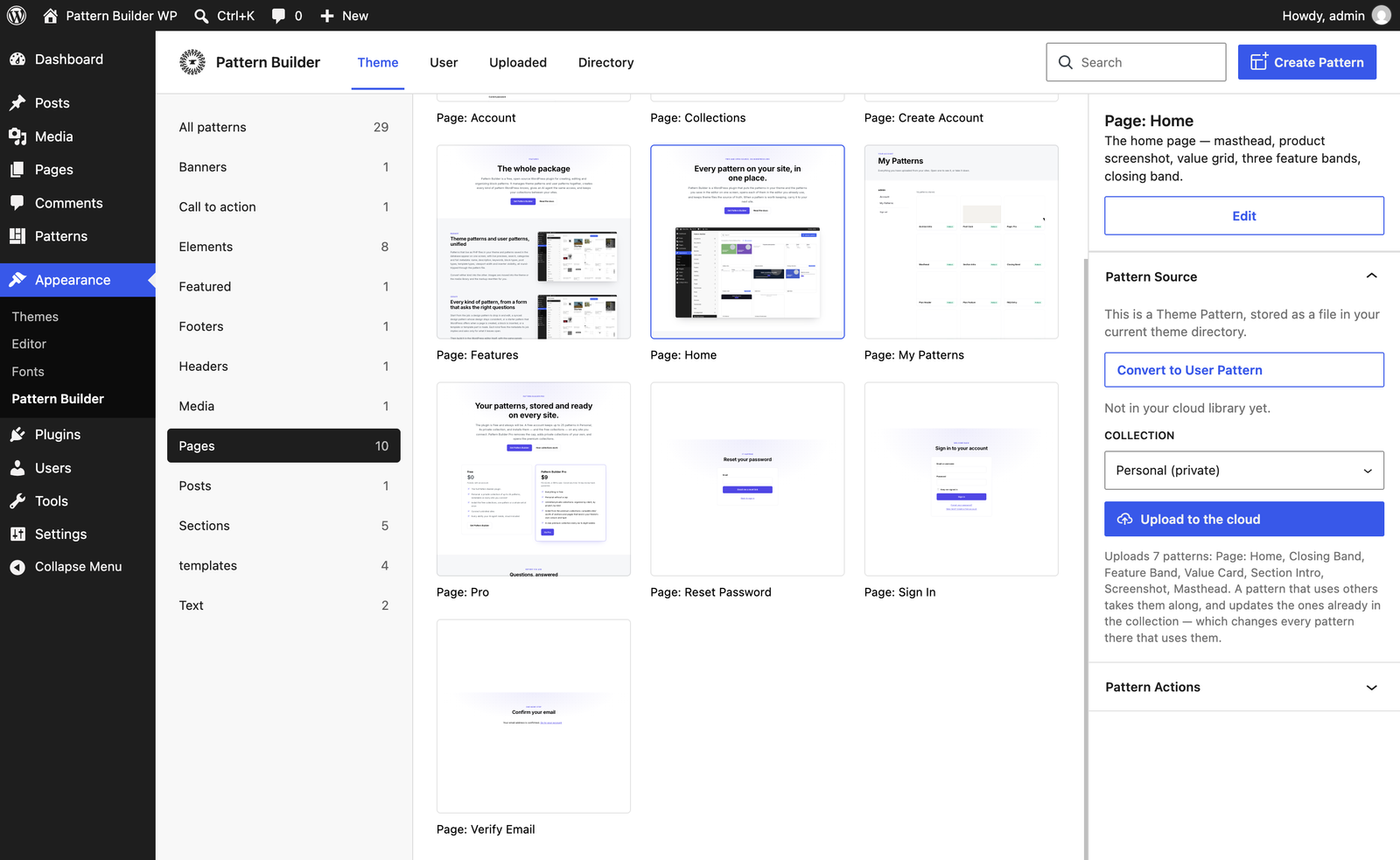
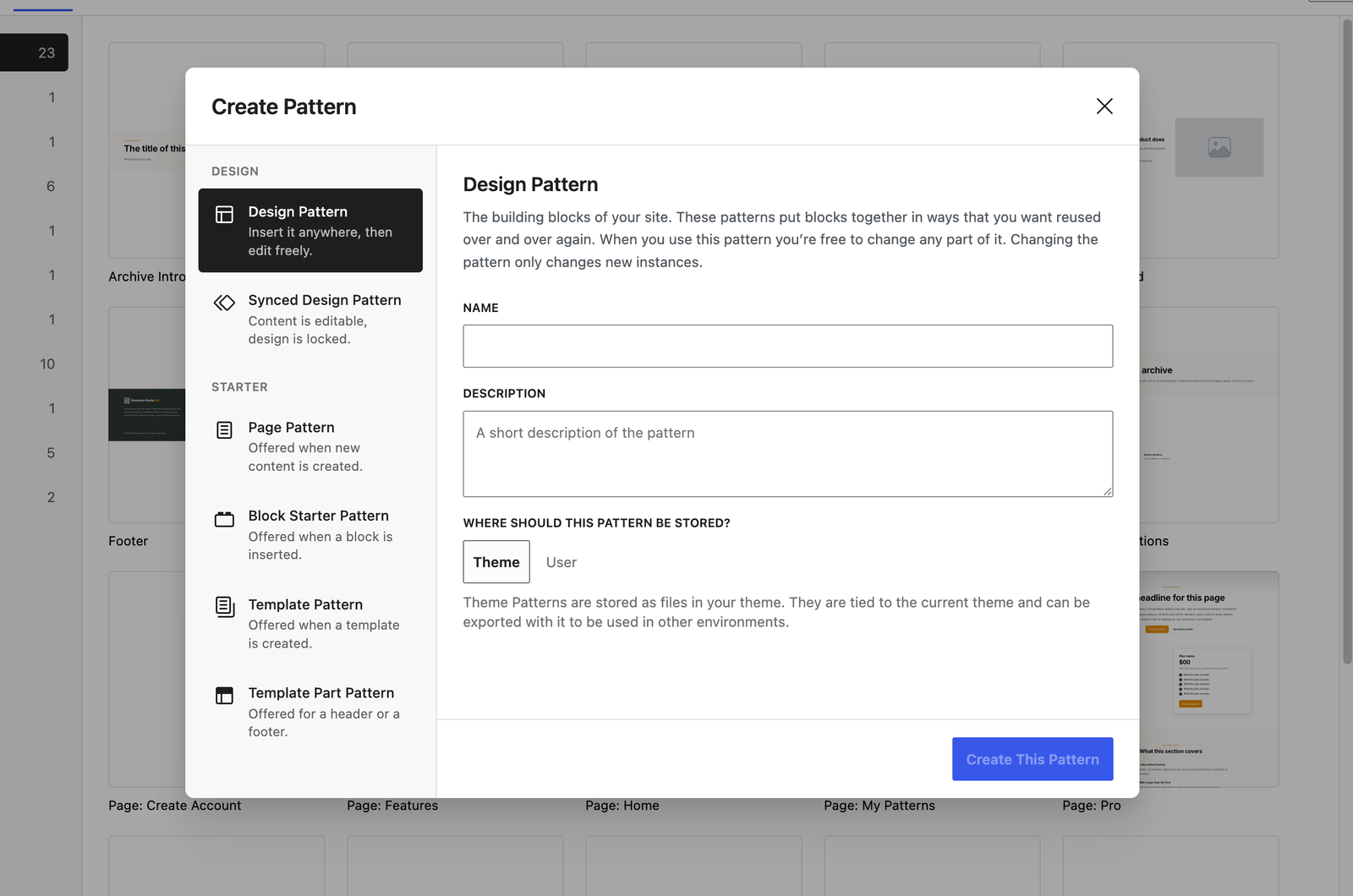
Theme and user patterns on one screen. Theme patterns (the PHP files in your theme’s patterns folder, parent theme included) and user patterns (the ones saved in the editor) are browsed together, with the same previews, search and categories, and each opens in the WordPress editor. A theme pattern is written back to its file with everything in its header: title, description, categories, keywords, block types, post types, template types, viewport width, inserter visibility and synced status.
Synced theme patterns. A synced pattern kept in a file is placed through the core pattern block, so inserted copies stay linked to the file and each copy can override the content you’ve opened up for editing. Design stays locked to the theme. Content stays editable.
Pattern Bindings. Bind a block’s value to a post type’s custom fields, to Advanced Custom Fields, or to any registered binding source, picked per attribute from the fields that post type really offers. Or leave a slot for whoever places the pattern to fill in.
The patterns your plugins register. The Plugin tab browses them beside your own. A plugin owns those, so they’re read-only until you copy one into the theme, which brings its images and every pattern it’s built from, and from then on it’s yours to edit.
Shipping the theme. A production site that only needs to render synced theme patterns can run Synced Patterns for Themes, the free runtime, instead of this plugin. When the theme is updated, only the theme’s changes arrive, and the site uses the patterns without being able to change them.
Your patterns on other sites
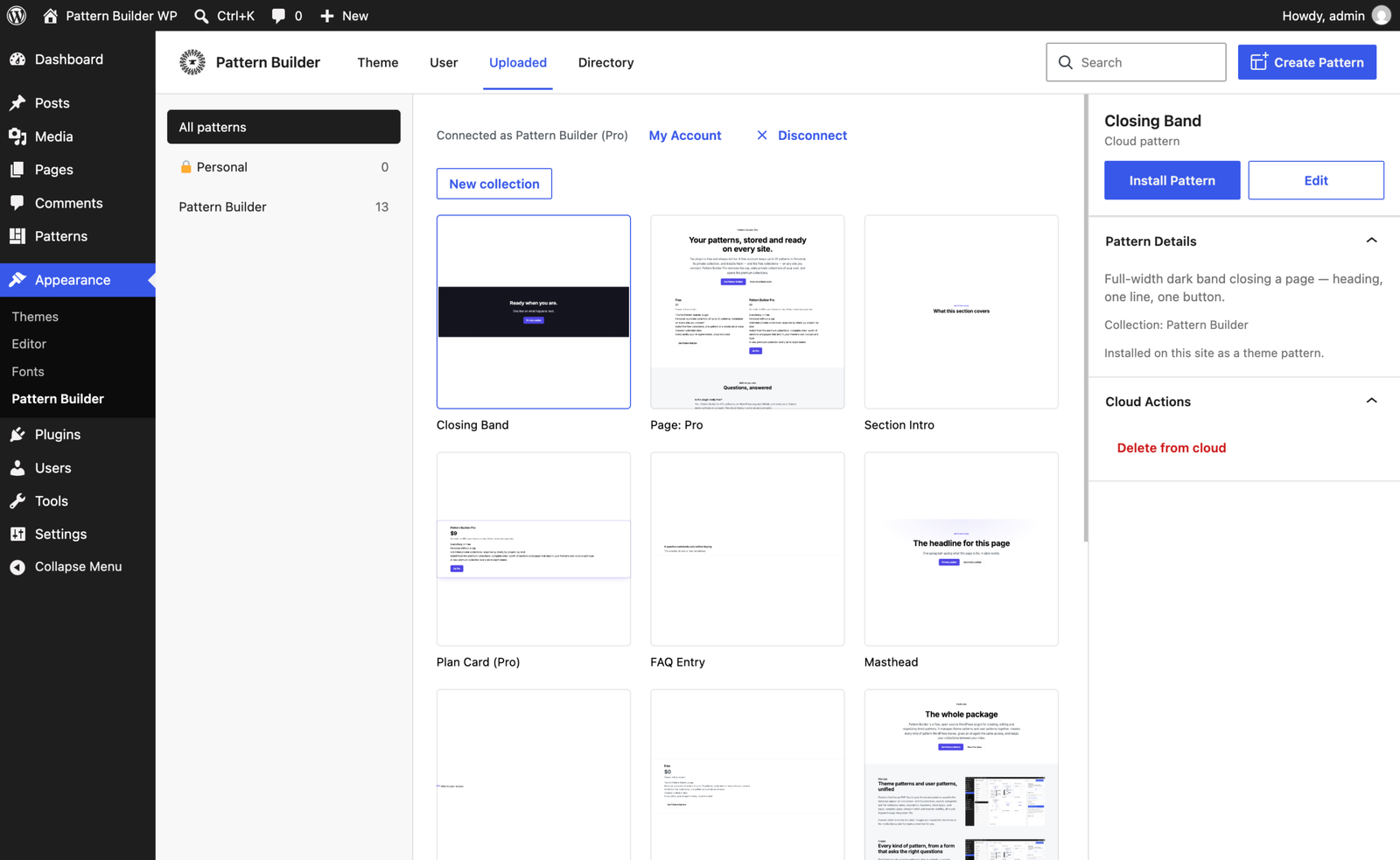
Everything above works without an account. If you want a pattern somewhere other than the theme it was built in, sign in to patternbuilderwp.com from Appearance > Pattern Builder. A free account keeps up to 25 patterns in a private Personal collection and installs them on any number of connected sites. The Directory tab browses the collections Twenty Bellows and partner studios publish; save one pattern or a whole collection to a site, with the design tokens it needs, as theme patterns or user patterns, images included. A page pattern travels with the patterns it references.
Pro is a subscription on your account, $9 a month or $89 a year, not a license for the plugin. It removes the cap, adds private collections of your own, and opens the premium collections. Cancel, and what you’ve uploaded stays readable and installable.
Serviços externos
Everything local works without an account and without sending anything anywhere. The services below are involved only when you choose to use them.
patternbuilderwp.com: the cloud library and its directory of curated collections, and the account behind them. When you sign in or create an account from Appearance > Pattern Builder, your email and password are relayed once, server-side, to patternbuilderwp.com; only the returned access token is stored, on this site, for your WordPress user. Browsing the Uploaded and Directory tabs, managing your collections, uploading patterns and installing patterns or whole collections, starting a password reset, and confirming a purchase all talk to patternbuilderwp.com through this site. Pattern Builder is the only way to install anything from patternbuilderwp.com: the website shows collections and sends people here. Anonymous usage reporting, if you allow it, goes there too (see below). Terms: https://patternbuilderwp.com/terms/ and privacy: https://patternbuilderwp.com/privacy/
Freemius: the checkout for Pattern Builder Pro. Choosing Go Pro loads Freemius’s checkout script (https://checkout.freemius.com/js/v1/) on the Pattern Builder screen and opens their checkout; nothing from Freemius loads anywhere else or before that click. Terms: https://freemius.com/terms/ and privacy: https://freemius.com/privacy/
Google Fonts, through WordPress.org: installing a font. Adding a font family (from the pattern authoring tools, or by an agent using the add-font ability) fetches the list of available families from WordPress.org (https://s.w.org/), which is the same list WordPress core’s own Manage Fonts screen uses, and then downloads the font files you chose from Google’s font server (https://fonts.gstatic.com/). The files are saved to your site and served from it, so your visitors’ browsers never request anything from Google. No request is made until you install a font. Google Fonts terms: https://developers.google.com/fonts/terms and privacy: https://policies.google.com/privacy
Usage reporting (opt-in)
The first time the pattern browser opens on a site, it asks once whether Pattern Builder may report anonymous usage, with Allow and No thanks buttons. Nothing is sent unless an administrator chooses Allow, and the choice can be changed on the same screen at any time. What is sent when allowed: which features are used (the browser opened, a pattern created, the community browsed, an upload or download) and the environment (WordPress, PHP and plugin versions, locale, active theme, multisite, and environment type), under a random install id. What is never sent: the site’s address or name, pattern content, or anything about the site’s visitors.
Development
Pattern Builder is developed in the open by Twenty Bellows. Report a bug or send a change at the GitHub repository.
Instalação
Install it from Plugins > Add New by searching for “Pattern Builder”, activate it, and open Appearance > Pattern Builder. Your theme’s patterns are already there.
To connect Claude, open the Agents tab on that screen. It tells you what the site still needs, if anything, and gives you the message to paste.
The source is on GitHub, with build instructions in its readme: https://github.com/Twenty-Bellows/pattern-builder
Log de Changes
2.3.3
- The WordPress.org listing says what the plugin does and what a connected agent can do with it, in that order, and has screenshots
2.3.2
- Agents can read, create, change and delete the active theme’s templates and template parts through five new abilities, with the same checks and warnings a pattern gets, a guide to what belongs in a template, a part or a pattern, and a Site Editor customization folded into the theme’s file when one is updated
- Theme patterns may link to the site’s own pages with home_url() and reach the theme’s own files with get_theme_file_uri(), the calls theme authors already write; saving a pattern writes them back, so such patterns open for editing instead of read-only, and a link typed as this site’s address follows the theme to any site
- Links to the site’s own pages travel through patternbuilderwp.com as pages of whichever site installs the pattern, rather than as links back to the site that uploaded it
- A theme’s own images are no longer downloaded and copied into the theme on every save
- A block style variation can carry CSS for a kind of block placed inside it, scoped to that block, and the guides now say where a look belongs: theme.json, the block’s settings, a variation, and a stylesheet last
- The block validator notes a class that nothing in WordPress styles, and reports a group that pads its own sides to place its content, which saving a pattern now warns about as well
- The authoring guides place sections at the theme’s Wide and Regular widths rather than as padded full-width bands, and cover per-viewport block styles on WordPress 7.1
- Fixed: a synced pattern placed in a template reached the Site Editor as an unlinked copy with its slot content replaced by placeholder text, and saving the template stored that copy
2.3.1
- Agents give each color they add to your design system a name for the job it does (base, surface, primary, accent, hairline and so on) rather than its hue, so a restyle never leaves a color misnamed, and a name outside that list is refused
- Font sizes added by agents are limited to x-small, small, medium, large and x-large; heading sizes are set on the headings themselves, and other text takes the nearest of the five
- Reproducing an existing site maps its colors and type onto those names instead of copying the source’s own
- Agents describe a pattern in one sentence saying what it is for and roughly what is in it, and saving a pattern warns when a description runs longer
- Fixed: synced patterns kept in folders inside the theme’s patterns folder, as every pattern installed from the cloud is, were inserted into the editor as copies instead of staying linked
2.3.0
- Connect Claude to your site from the new Agents tab in Appearance → Pattern Builder: it checks what a connection needs, installs the MCP Adapter plugin for you when it is missing, and gives you a message to paste into Claude, which sets the connection up itself
- Your connections are listed with when each was last used, and any of them can be revoked in one click
- With the MCP Adapter plugin active, every Pattern Builder ability is an MCP tool of its own, so you can let an agent read freely and still approve each change it makes
- Agents install the pattern-author and design-reproduction skills from your site with one command and no password, instead of fetching every file through the conversation
- Saving a pattern warns when a row or grid will not lay out as written, such as cards that stack one above another instead of sitting side by side
- The block validator checks against the WordPress your site runs now, with nothing to save between runs, and its one dependency is installed once per computer rather than in every project
- Security: theme pattern files can no longer be made to carry PHP beyond the code Pattern Builder generates itself, so permission to edit patterns cannot be used to run code on the site
- Fixed: localizing text containing a backslash before a quote could write a pattern file that ran that text as code
2.2.0
- A Plugin tab in Appearance → Pattern Builder browses the patterns your plugins register, with the same previews, search and categories as your own
- Copy any of them into your theme (images and all, and with every pattern it is built from) and it is yours to edit, to build on, and to upload to a cloud collection
- Copying is repeatable: a pattern you have already copied is the one you get back, so two pages built from the same section share one copy of it
- A pattern whose blocks are stored in an older form can be rewritten in place from its details, instead of being opened in the editor and saved
- Fixed: a pattern carrying images imported into the theme was read as a file containing PHP, which showed a notice saying it could not be saved and then refused to save it
- Fixed: saving a theme pattern answered with the markup it had just replaced, so the editor and the details sidebar could show a save as having not taken
- Agents can list, read and render the patterns a plugin registers, and copy one into the theme with everything it places
2.1.1
- Editing a theme pattern no longer discards the rest of its file header: the @package block a theme carries, or a note written beside it, is kept exactly as it was and can be edited in the Pattern Metadata panel
- A pattern file that runs PHP is now recognized and never written over. Reading one runs it, so saving would have replaced the code with the output of a single run; the pattern still lists, opens and previews, and the editor says why it cannot be saved
- Patterns built around the Content block now preview as themselves instead of drawing the site’s home page inside the pattern, and open in the editor instead of reporting that the block cannot be rendered inside itself
- The plugin’s version constant is reported correctly again. It had fallen a release behind, which left the 2.1.0 upgrade step unrun and pattern previews serving what they had drawn before the update
Capturas de tela


Para desenvolvedores
Este é o seu plugin? Mostre os números.
Adicione um crachá ao vivo ao seu site, Documentos ou Readme do GitHub. Ele é atualizado por conta própria - nenhuma conta necessária.
Best Pattern Builder alternatives
All block patterns plugins →





FAQ
Pattern Builder: quick answers
Respostas diretas, extraídas de dados ao vivo WordPress.org.
Fonte: WordPress.org
Is Pattern Builder free?
Yes. Pattern Builder is free to download and use from the official WordPress.org plugin directory.
Is Pattern Builder safe to use in 2026?
Pattern Builder is a solid plugin choice in 2026, with a few things worth checking first. It runs on 10+ sites, is rated 5/5 and was last updated 1 month ago, and scores 69/100 on our health check.
How many websites use Pattern Builder?
Pattern Builder is active on 10+ WordPress websites and has been downloaded 1,722 times since it launched in August 2025. It was downloaded 225 times in the last 30 days.
Does Pattern Builder work with WordPress 7.1?
Yes. The developer has tested Pattern Builder up to WordPress 7.1.5, the latest release. It requires WordPress 6.8 or newer.
What PHP version does Pattern Builder need?
Pattern Builder requires PHP 7.4 or higher. Most hosts run PHP 8.x today, so it works on any modern WordPress hosting.
When was Pattern Builder last updated?
The latest version, 2.3.3, was released on October 29, 2026 (1 month ago).
Who makes Pattern Builder?
Pattern Builder is developed and maintained by Twenty Bellows.
What are the best alternatives to Pattern Builder?
The most popular alternatives to Pattern Builder are Starter Sites & Templates b… (100K+ installs), Cozy Blocks (6K+ installs) and BlockMeister (1K+ installs).
Alimentado por PageForge
Um modelo e uma planilha. Uma página real para cada pesquisa.
PageForge Transforma cada linha de um CSV em uma página WordPress com seu próprio título, URL, SEO campos e esquema, construído no layout que você já desenhou. Gratuito em WordPress.org.
- CSV e XLSX, mais Google Sheets em Profissional e Empresarial
- Seu próprio título, URL, SEO campos e esquema para cada página
- Funciona com o editor de blocos, Elementor, Divi e Avada
- Gratuito em WordPress.org, sem cartão de crédito