


Onlinefotka Parcel Shipping with GLS for WooCommerce
GLS shipping for WooCommerce — generate labels, track parcels, automate workflows, and offer Parcel Shop & Parcel Locker at checkout.

Escolha sólida
Onlinefotka Parcel Shipping wit… is a solid plugin choice in 2026, with a few things worth checking first. It runs on 10+ sites and was last updated 2 months ago, and scores 62/100 on our health check.
- Testado com as últimas WordPress (7.1)
- Pequena base de usuários (10+ instalações ativas)
- Muito poucos comentários até agora
Como ele se acumula?
Lado a lado em instalações, atualizações, avaliações e suporte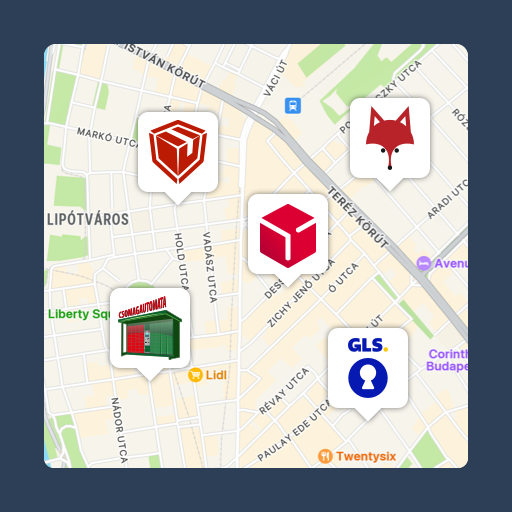



Downloads diários
Os picos de download geralmente seguem uma nova versão — cada site que atualiza automaticamente é um download.
Rankings
Where Onlinefotka Parcel Shipping… stands todayWordPress.org Classificações de pesquisa
Posição ao vivo na pesquisa de plugins, top 100| Palavra chave | Posição |
|---|---|
| gls | #21 |
| label | >100 |
| parcel | #56 |
| expedição | >100 |
| WooCommerce | >100 |
Adoção da versão
Compartilhamento de sites ativos por lançamento.
About Onlinefotka Parcel Shipping with GLS fo…
From the official readme · v1.2.2Descrição
Onlinefotka Parcel Shipping with GLS is a full-featured GLS carrier integration for WooCommerce. Connect your GLS account, generate shipping labels directly from the order screen, send return labels to customers, and give customers the option to pick up their parcels at a GLS Parcel Shop or Parcel Locker.
Built with full HPOS (High Performance Order Storage) and WooCommerce Checkout Blocks compatibility, plus a clean modern settings interface.
Shipping Methods
- GLS Standard — home delivery, weight-based pricing, free shipping threshold
- GLS Parcel Shop — customer selects a pickup point from an interactive map at checkout
- GLS Parcel Locker — customer selects a 24/7 automated locker at checkout
- Per-method: enable/disable, custom title, default price, weight-based rates, free shipping above, supported countries
- Estimated delivery time — optional display of business-day ranges per destination country shown at checkout below the shipping rate (SK/CZ 1–2 days, HU/HR/SI 2–3 days, etc.)
Label Management
- Generate GLS shipping labels directly from the WooCommerce order screen
- Return labels — generate a GLS return label (customer → store) with one click; the label PDF is automatically emailed to the customer
- Print individual or bulk labels (PDF)
- Smart bulk print — pre-flight options form before bulk printing: skip already-printed orders (default) or filter by label creation date; each bulk print records the date on the order so previously-printed labels are not re-printed next time
- Label print-status badge in the admin orders list — an orange New badge appears next to the PDF link for any label that has not yet been bulk-printed (or was regenerated after the last bulk print); a green date (e.g. ✓ 18.09.) shows when it was last bulk-printed; at a glance you know which labels still need printing
- A4 and thermal printer support with configurable print position
- Customizable client reference and parcel content fields
- Delete labels (also cancels the parcel in GLS system when possible)
- Automatic label file cleanup — daily WP-Cron job deletes PDF files older than a configurable number of days (default 90) to free up server space
Advanced GLS Services
- Contact Service (CS1) — sends customer phone number to the courier
- Flexible Delivery Email (FDS) — customer can reschedule via email link
- Flexible Delivery SMS (FSS) — reschedule via SMS
- SMS Service (SM1) — tracking number sent by SMS with custom text
- SMS Pre-advice (SM2) — pre-delivery SMS notification
- Addressee Only (AOS) — parcel delivered only to the named recipient
- Insurance (INS) — insures parcel for the full order value
- 24H Guaranteed / Express — expedited delivery options
Automação
- Auto-generate GLS label when order moves to selected WooCommerce status
- Live Tracking Sync via Action Scheduler (WooCommerce built-in) — periodically fetches GLS parcel status from the API and saves it to each order (status badge, order notes, customer delivery email); runs only for orders with an existing GLS label; configurable interval (every 30 min, 1 h, 2 h, 4 h, twice daily, or daily); configurable “Monitored statuses” setting to control which WooCommerce order statuses are processed (supports custom statuses from third-party plugins)
- Auto WC Status Change — a separate, independent Action Scheduler job that reads the last saved GLS status and automatically changes the WooCommerce order status according to configurable mapping rules (by GLS code or keyword); runs on its own schedule without making any GLS API calls
- Status mapping rules — define which GLS status code or text keyword triggers a WooCommerce order status change (e.g. GLS code 5 → Completed); rules are applied by the Auto WC Status Change cron
- Complete GLS status code map — all 90 status codes from the official MyGLS API documentation (Appendix G, ver. 25.12.11) with accurate labels for all supported countries (SK, CZ, HU, HR, RO, SI, PL, DE)
Rastreio
- Tracking numbers injected automatically into all WooCommerce order emails
- Resend tracking email — button in the order admin panel to resend a configurable WooCommerce email to the customer; the email type is selected in plugin settings (Automation tab) and can be any registered WooCommerce email
- Self-service tracking page via
[gls_tracking]shortcode — customers look up their parcel using order number + billing email [gls_tracking_link]shortcode for use in email templates (e.g. YayMail text blocks) — outputs a clickable GLS tracking link for the order being emailed; use this in email bodies instead of[gls_tracking]- GLS tracking status visible in My Account → Orders — tracking numbers shown in the orders list and on the order detail page
- Manual Refresh Tracking button in the order admin panel — shows the full event history (date, city, status) for all parcels
- Tracking status filter in the admin orders list — filter orders by GLS status: In Transit, Delivered, Problem, or No GLS Label
- Customer delivery email — optional WooCommerce email sent when GLS tracking confirms delivery; customizable in WooCommerce → Settings → Emails
- GLS status badge in admin orders list — latest status displayed as a colored badge (green = delivered, blue = in transit, red = problem)
- Bulk action Refresh GLS Tracking — sync tracking for multiple orders at once from the orders list
Emails
Two additional WooCommerce emails are registered by the plugin (configurable in WooCommerce → Settings → Emails):
- GLS Delivered — sent to the customer when GLS tracking confirms delivery (status codes 5, 54, 55, 58, 92, 93)
- GLS Return Label — sent to the customer when a return label is generated; the PDF is attached automatically
Admin Dashboard Widget
A dashboard widget on the WordPress admin home screen shows monthly GLS shipping statistics at a glance:
- Total labels generated this month
- Delivered parcels
- In-transit parcels
- Problem parcels (delivery failed, returned, etc.)
WP-CLI Support
Manage GLS labels and tracking directly from the command line:
wp gls generate --order=<id>— generate a label for an orderwp gls sync [--order=<id>]— sync GLS tracking status (all active orders or a specific one)wp gls status --order=<id>— display full tracking event history for an orderwp gls cleanup [--days=<n>]— manually delete old label PDF files
Requisitos
- WordPress 6.0 or higher
- WooCommerce 7.0 or higher
- PHP 7.4 or higher
- Active GLS account with MyGLS REST API access
Serviços externos
This plugin connects to two external services provided by GLS:
1. MyGLS REST API (api.mygls.*)
Used for generating shipping labels, retrieving delivery-point (Parcel Shop / Parcel Locker) data, and tracking parcel status. The plugin sends data to this service when:
- You generate a GLS label from an order — sends sender address, recipient address, parcel weight, and selected GLS services to the API.
- You request the list of Parcel Shop or Parcel Locker locations — sends the country code and optional search coordinates.
- The automatic tracking sync (WP-Cron) fetches parcel status — sends parcel numbers.
The exact API endpoint depends on the GLS subsidiary country configured in the plugin settings (e.g. api.mygls.sk, api.mygls.cz, api.mygls.hu).
- GLS Group website: https://gls-group.eu/
- MyGLS portal: https://mygls.sk/ (country-specific variants available)
- GLS Privacy Notice: https://gls-group.com/GROUP/en/data-protection/
- GLS Terms of Use: https://mygls.sk/podmienky-pouzivania/ (varies by country subsidiary)
2. GLS Delivery Point Map widget (map.gls-{country}.com)
When the GLS Parcel Shop or Parcel Locker shipping method is active, the plugin loads a JavaScript widget from the GLS country-specific domain (e.g. map.gls-slovakia.com, map.gls-czech.com, map.gls-hungary.com, etc.) at checkout to display an interactive map for selecting a pickup point. The exact domain is determined by the GLS country configured in the plugin settings. This widget is provided by GLS and may set its own cookies or collect usage data per GLS’s privacy policy linked above.
Instalação
- Install the plugin via Plugins → Add New → Upload Plugin, or upload the folder to
/wp-content/plugins/manually. - Ative o plugin.
- Go to WooCommerce → GLS Shipping and open the API & Account tab.
- Enter your GLS Client Number, API Username, and API Password. Select your GLS Country (SK, CZ, HU, etc.) and switch Mode to Production when ready to ship. Click Save Settings, then Test API Connection to verify.
- Go to WooCommerce → Settings → Shipping, create a shipping zone, and add the GLS shipping method(s) you want to offer.
- In WooCommerce → GLS Shipping → Sender Address, fill in your company name, street, house number, city, postcode, country, and phone. This address is printed on every GLS label as the pickup address.
- In the Label tab, choose your printer type (A4 or thermal) and default print position. Optionally customize the client reference format and parcel content text.
- (Optional) Add the GLS Parcel Shop and/or GLS Parcel Locker shipping methods to your shipping zone. Customers will see an interactive map at checkout to select their preferred pickup point. Works with both classic and block-based checkout.
- (Optional) In the Automation tab, enable Auto-generate GLS Label and select the order status(es) that should trigger label creation (e.g. Processing). Enable Live Tracking Sync to have WP-Cron periodically fetch GLS parcel status from the API and save it to each order — choose an interval (every 30 min, 1 h, 2 h, 4 h, twice daily, or daily). Enable Auto WC Status Change to automatically update the WooCommerce order status based on the last saved GLS status — configure its own interval and define mapping rules (e.g. GLS code 5 → Completed). The two crons run independently on their own schedules.
- (Optional) In the Automation tab, enable Send delivery email to notify customers automatically when GLS confirms delivery.
- (Optional) To send return labels: click Generate Return Label in any order’s GLS meta box. The PDF is generated via GLS API and emailed to the customer automatically. Customize the email in WooCommerce → Settings → Emails → GLS Return Label.
- (Optional) Create a new WordPress page, add the shortcode
[gls_tracking], and publish it. Customers can enter their order number and billing email to look up their parcel status. To embed a clickable tracking link inside a WooCommerce email template (e.g. YayMail), use[gls_tracking_link]in the email’s text block instead — it renders a direct tracking link, not a form. - (Optional) In the Other tab, enable Estimated Delivery at Checkout to display business-day delivery ranges below the GLS shipping rate at checkout.
- (Optional) In the Other tab, enable Label File Cleanup and set the number of days after which PDF files are deleted (default: 90 days).
Log de Changes
Refactors email HTML rendering to proper WooCommerce template files — compatible with YayMail and other email customizer plugins. Adds editable body text field to "GLS Return Label" email. No database changes — safe to update.
1.2.2
- Fix: ZIP code with spaces (e.g.
974 01) no longer causes “Invalid data in Delivery Zip Code” — whitespace is now stripped from both delivery and pickup (sender) address before sending to GLS API - Fix: Parcel-level errors from GLS
PrintLabelsErrorList(invalid address field, missing COD, weight exceeded, etc.) were silently ignored — they are now collected and shown as an error message in the order meta box - Fix: Failed label generation (and return label) now writes the error message to WooCommerce order notes for a permanent audit trail
1.2.1
- New: YayMail Pro 4.x integration — “GLS Parcel Delivered” and “GLS Return Label” emails are now registered with YayMail’s visual builder via
BaseEmail; both appear in YayMail with source “Onlinefotka GLS Shipping”, open the drag-and-drop editor on click, and include a default layout (Logo, Heading, Text, Order Details, Footer) - Fix: Added
woocommerce_locate_templatefilter so GLS email templates are discoverable via WooCommerce’s standard template locator regardless of which path the caller uses
1.2.0
- New: Label print-status badge in GLS Tracking column — orders list now shows an orange “New” badge next to the PDF link when a label has not yet been bulk-printed, and a green date (e.g. ✓ 18.09.) when the label was last bulk-printed; labels regenerated after a previous print are re-flagged as “New”
- Fix: YayMail “Template not found” — plugin now auto-creates
templates/emails/directory and both email template files on first load if they are missing; also settemplate_html+template_baseproperties on both GLS email classes so YayMail Pro can locate and build visual templates for GLS Parcel Delivered and GLS Return Label emails
1.1.9
- Fixed: “GLS Parcel Delivered” and “GLS Return Label” email preview blank when the plugin’s
templates/emails/directory was not yet deployed —get_content_html()now falls back to inline rendering viaob_start()when the template file is not found, so emails render correctly in all environments - Fixed: duplicate “Tlacit GLS stitky” entry in WooCommerce bulk actions dropdown — caused by a now-superseded standalone
onlinefotka-orders.phpfile registering theonlinefotka_print_existing_labelsaction; that section has been removed since the new GLS plugin covers bulk label printing
1.1.8
- Refactored GLS email HTML rendering to use WooCommerce template files (
templates/emails/ofgls-parcel-delivered.phpandtemplates/emails/ofgls-return-label.php) — themes can now override these templates; compatible with YayMail and other email customizer plugins that rely on WC template loading - Added editable body text field to “GLS Return Label” email (WooCommerce → Settings → Emails), matching the existing body field on “GLS Parcel Delivered”; supports {order_number}, {order_date}, {order_link} placeholders
1.1.7
- New: Bulk “Print GLS Labels” now shows a pre-flight options form before printing — checkbox “Only print labels not yet printed” (default: checked, skips already bulk-printed orders) and a date filter “Label created after” that appears when the checkbox is unchecked; after each successful bulk print, orders are marked with the print date so they are automatically skipped next time
- New:
_ofgls_label_generated_atmeta saved on every label generation — used by the date filter in bulk print and available for custom queries
Para desenvolvedores
Este é o seu plugin? Mostre os números.
Adicione um crachá ao vivo ao seu site, Documentos ou Readme do GitHub. Ele é atualizado por conta própria - nenhuma conta necessária.
Best Onlinefotka Parcel Shipping w… alternatives
All gls plugins →





FAQ
Onlinefotka Parcel Shipping with GL…: quick answers
Respostas diretas, extraídas de dados ao vivo WordPress.org.
Fonte: WordPress.org
Is Onlinefotka Parcel Shipping wit… free?
Yes. Onlinefotka Parcel Shipping wit… is free to download and use from the official WordPress.org plugin directory.
Is Onlinefotka Parcel Shipping wit… safe to use in 2026?
Onlinefotka Parcel Shipping wit… is a solid plugin choice in 2026, with a few things worth checking first. It runs on 10+ sites and was last updated 2 months ago, and scores 62/100 on our health check.
How many websites use Onlinefotka Parcel Shipping wit…?
Onlinefotka Parcel Shipping wit… is active on 10+ WordPress websites and has been downloaded 899 times since it launched in August 2026. It was downloaded 93 times in the last 30 days.
Does Onlinefotka Parcel Shipping wit… work with WordPress 7.1?
Yes. The developer has tested Onlinefotka Parcel Shipping wit… up to WordPress 7.1.5, the latest release. It requires WordPress 6.5 or newer.
What PHP version does Onlinefotka Parcel Shipping wit… need?
Onlinefotka Parcel Shipping wit… requires PHP 7.4 or higher. Most hosts run PHP 8.x today, so it works on any modern WordPress hosting.
When was Onlinefotka Parcel Shipping wit… last updated?
The latest version, 1.2.2, was released on October 1, 2026 (2 months ago).
Who makes Onlinefotka Parcel Shipping wit…?
Onlinefotka Parcel Shipping wit… is developed and maintained by onlinefotka.
What are the best alternatives to Onlinefotka Parcel Shipping wit…?
The most popular alternatives to Onlinefotka Parcel Shipping wit… are Hungarian Pickup Points & S… (7K+ installs), SmartyParcel Shipping (7K+ installs) and DEPRECATED (4K+ installs).
Alimentado por PageForge
Um modelo e uma planilha. Uma página real para cada pesquisa.
PageForge Transforma cada linha de um CSV em uma página WordPress com seu próprio título, URL, SEO campos e esquema, construído no layout que você já desenhou. Gratuito em WordPress.org.
- CSV e XLSX, mais Google Sheets em Profissional e Empresarial
- Seu próprio título, URL, SEO campos e esquema para cada página
- Funciona com o editor de blocos, Elementor, Divi e Avada
- Gratuito em WordPress.org, sem cartão de crédito