


OnCue Liveblogging
Team liveblogging for WordPress, built for the reporter in the field with a phone.

Use com cautela
OnCue Liveblogging works, but test it on a staging site before relying on it in 2026. It runs on 10+ sites and was last updated 5 days ago, and scores 55/100 on our health check.
- Desenvolvido ativamente — última atualização 5 dias atrás
- Testado com as últimas WordPress (7.1)
- Pequena base de usuários (10+ instalações ativas)
- Muito poucos comentários até agora
Como ele se acumula?
Lado a lado em instalações, atualizações, avaliações e suporte


Downloads diários
Os picos de download geralmente seguem uma nova versão — cada site que atualiza automaticamente é um download.
Rankings
Where OnCue Liveblogging stands todayWordPress.org Classificações de pesquisa
Posição ao vivo na pesquisa de plugins, top 100| Palavra chave | Posição |
|---|---|
| Breaking News | >100 |
| live blogging | #43 |
| liveblog | #5 |
| slack | >100 |
| telegram | >100 |
Adoção da versão
Compartilhamento de sites ativos por lançamento.
About OnCue Liveblogging
Do Readme oficial · v1.3.0Descrição
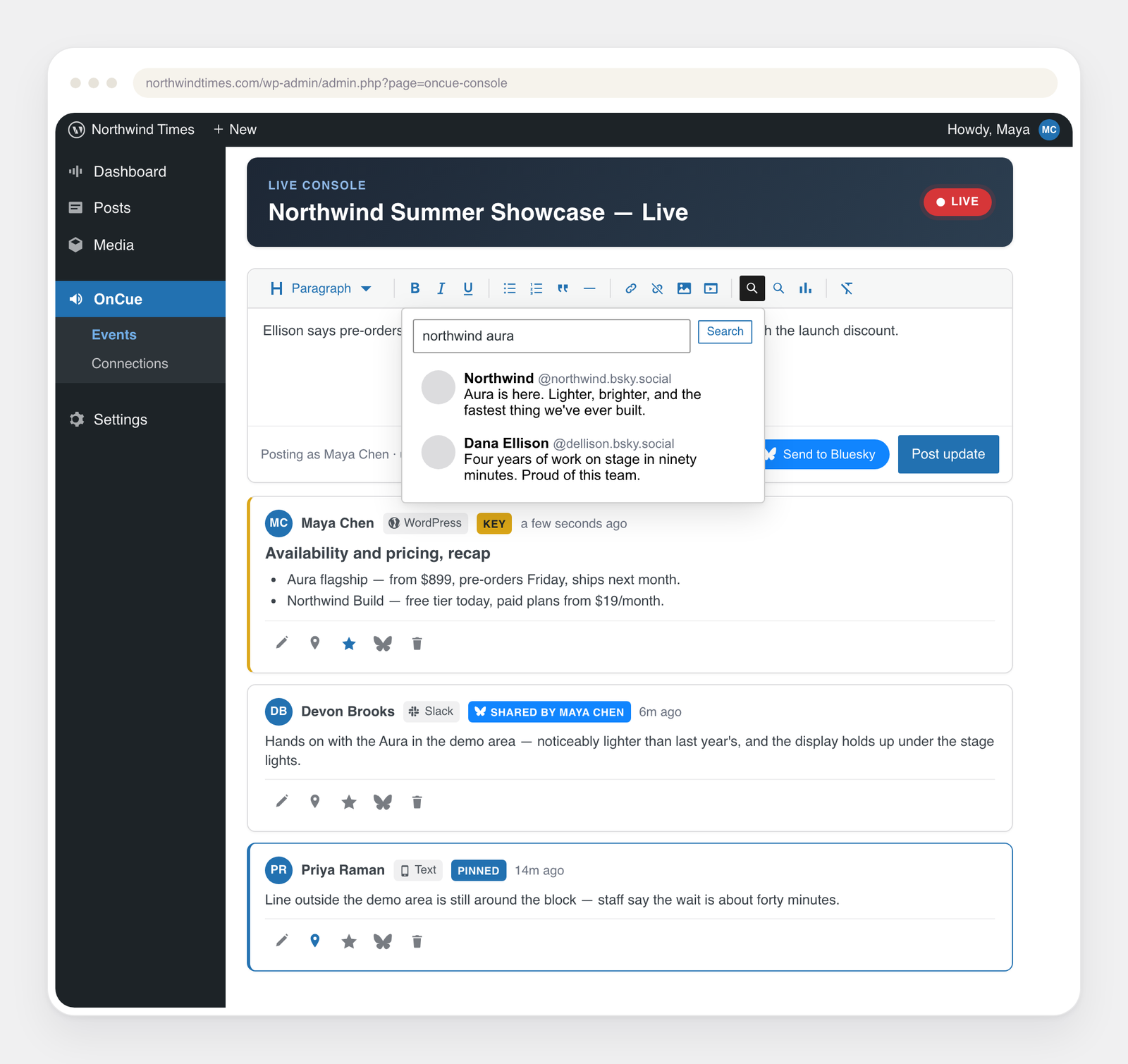
OnCue’s core is a real-time liveblog posted from the WordPress admin: create an
event, drop the OnCue block into a post, and post updates from the live console.
Everything beyond the core is an opt-in module, off by default:
- Slack ingestion — a dedicated channel becomes the liveblog feed.
- Telegram ingestion — a bot in a group (or DM) posts every message.
- More Coverage — a linked-headline list of the publication’s own articles for the event.
- Reader share cards — readers share any update to X, Bluesky, Threads,
Mastodon, Facebook, LinkedIn or Flipboard. The post’s own words fill their
post, and the liveblog’s preview card (its share image, the Live badge, the
event name and your site’s name) appears under the link. - Moderation gate — per-event approval queue for contributors’ posts.
A disabled module registers no REST routes and schedules no jobs; the attack
surface is exactly the set of enabled features.
Security note on stored secrets
OnCue encrypts stored channel credentials (Slack/Telegram tokens and secrets)
at rest with libsodium, on by default. The encryption key never lives in the
database, so a database dump alone cannot decrypt them. Key source:
ONCUE_ENCRYPTION_KEYinwp-config.php(a 32+ char random string) if you
set one — preferred, because you can rotate it independently of WordPress; or- your existing WordPress security keys (AUTH_KEY etc.), which are already in
wp-config.php — so encryption works with no extra setup on any properly
installed site.
Only a site with neither (no real salts and no dedicated key) falls back to
plaintext, and the Connections screen flags that loudly.
What is not encrypted, by design: liveblog entries and other public content
(they are served to readers; encrypting them would break the live stream), and
non-secret identifiers like the house-account user ID or the public Slack
client ID. Encrypting the whole database or disk is the host’s responsibility
(encrypted volumes / MySQL TDE), not a plugin’s.
Changing the key source (e.g. rotating WordPress salts without setting a
dedicated key) makes previously stored credentials undecryptable — re-enter
them under Connections if that happens.
Typography
The reader inherits the host theme’s fonts throughout, including buttons and
form controls. The generated share-card image uses the site’s own typeface
too: OnCue resolves the theme’s body font (theme.json / Font Library) to a
local TTF/OTF file for GD. If the theme ships fonts only as woff2 (which GD
cannot read), upload a TTF of the same family to the Font Library, or point
the oncue_card_font filter at a font file; otherwise the card uses the
bundled Inter typeface.
Inter is copyright 2016 The Inter Project Authors and is licensed under the
SIL Open Font License 1.1 (assets/fonts/Inter-LICENSE.txt), which is
compatible with the GPL. Source: https://github.com/rsms/inter
Each liveblog has one share card, saved as an image file in
wp-content/uploads/oncue-share-cards/ (one folder per event) and never added
to the Media Library. It is redrawn automatically when the event’s name,
status, share image or accent color changes. OnCue adds the card to the
liveblog page’s social preview tags; with Yoast SEO or Rank Math active, it is
passed to their tags instead.
Serviços externos
OnCue does not phone home and ships with every integration off. It contacts a
third-party service only when you enable that integration and provide your own
account or API key, and only to deliver the feature you turned on. Nothing is
sent to OnCue’s authors. The services, what triggers a request, and what data
leaves your site:
When you save a connection’s keys on the Connections screen, OnCue also makes
one small request to that service to confirm they work — a sign-in, an account
or model lookup, or, for Microsoft Teams and Google Chat webhooks (which can’t be
checked any other way), a one-line test message into the channel you connected.
These checks send your keys to the service they belong to and no liveblog
content.
- Slack (ingestion / relay) — only if you connect Slack. Sends liveblog entries
you relay out, and receives messages from a channel you designate. Terms:
https://slack.com/legal — Privacy:
https://slack.com/trust/privacy/privacy-policy - Telegram (ingestion / relay / contributor sign-in) — only if you connect a
Telegram bot. Sends relayed entries and receives messages from the bot’s chat.
Separately, once a bot is connected, OnCue loads Telegram’s official login
widget script (https://telegram.org/js/telegram-widget.js) inside wp-admin so
contributors can link their Telegram account in one click; Telegram receives
the request for that script and the sign-in it performs. That script is never
loaded on the public side of your site, and never loaded at all until you
connect a bot. Contributors who prefer not to use it can link by opening the
bot in the Telegram app instead. Terms: https://telegram.org/tos — Privacy:
https://telegram.org/privacy - Twilio (SMS relay) — only if you connect Twilio. Sends entry text to the
numbers you configure. Terms: https://www.twilio.com/en-us/legal/tos —
Privacy: https://www.twilio.com/en-us/legal/privacy - Facebook Messenger / Meta (ingestion) — only if you connect a Facebook Page.
Receives messages sent to your Page through the webhook you register with
Meta; when you save the Page token, OnCue looks up the Page’s name
(graph.facebook.com) to confirm it works. Terms:
https://www.facebook.com/legal/terms — Privacy:
https://www.facebook.com/privacy/policy - Microsoft Teams / Google Chat / Signal (relay) — only if you connect them.
Sends relayed entry text to the webhook/space you configure. Microsoft:
https://www.microsoft.com/servicesagreement — Google:
https://policies.google.com/terms — Signal: https://signal.org/legal/ - Bluesky / ATProto (curation / relay) — only if you connect a Bluesky account.
Searches public posts and, if enabled, mirrors marked entries out. Terms:
https://bsky.social/about/support/tos — Privacy:
https://bsky.social/about/support/privacy-policy - Threads / Meta (relay) — only if you connect a Threads account by pasting a
long-lived access token. Publishes the entries you mark into one thread on
that account (via graph.threads.net) and periodically refreshes the token.
Nothing is sent unless you enable Threads for an event and mark a post. Terms:
https://www.facebook.com/legal/terms — Privacy:
https://privacycenter.instagram.com/policy - Embedded Bluesky posts — only when a contributor posts a link to one.
WordPress already embeds links from YouTube, X, and others; OnCue adds Bluesky
to that list. Your site sends the post’s URL to embed.bsky.app once to fetch
the embed, and a reader’s browser then loads the post and its embed script
from there. No key is used and no liveblog content is sent. Terms:
https://bsky.social/about/support/tos — Privacy:
https://bsky.social/about/support/privacy-policy - YouTube Data API (coverage) — only if you add a YouTube API key. Sends search
queries for the event’s coverage. Terms: https://www.youtube.com/t/terms —
Google Privacy: https://policies.google.com/privacy - Google Analytics (Stats) — only if you enable the analytics bridge and/or add
a GA4 service-account key. Reader interactions flow through the Google tag
already on your pages (your tag’s consent tooling governs them); Stats reads
aggregate figures back from your own GA4 property. Terms:
https://marketingplatform.google.com/about/analytics/terms/us/ — Privacy:
https://policies.google.com/privacy - AI providers for the “Key highlights” summary (Crawler) — only if you choose a
provider and add your own key. The chosen event’s own updates and coverage are
sent to generate the summary. Anthropic:
https://www.anthropic.com/legal/consumer-terms /
https://www.anthropic.com/legal/privacy — OpenAI:
https://openai.com/policies/terms-of-use /
https://openai.com/policies/privacy-policy — Google Gemini:
https://ai.google.dev/gemini-api/terms /
https://policies.google.com/privacy — Self-hosted / OpenAI-compatible: governed
by the endpoint you point it at.
Development
The complete, unminified sources for the block editor and console bundles ship
in src/ inside this plugin, alongside the webpack.config.js used to build
them.
npm install && npm run buildbuilds the block editor and console bundles.npm run env:startboots a local WordPress with the plugin active (requires Docker).
Instalação
- Install and activate OnCue. A top-level OnCue menu appears in wp-admin.
- Go to OnCue → New liveblog and create an event.
- Edit the post or page that should carry the liveblog and insert the
OnCue Liveblog block, choosing your event. The[oncue]shortcode works
in classic editors and page builders. - Post updates from OnCue → Live console.
Everything beyond that is optional. To let reporters post from Slack or
Telegram, go to OnCue → Connections, enable the module, and follow the
setup steps for that platform. No integration is enabled by default, and none
is required to run a liveblog.
Log de Changes
1.3.0
- Formatting survives every way of posting. Bold, italics, underline, and links
are kept when an update is written in WordPress, sent from Slack or Telegram,
or pasted from Google Docs or Microsoft Word. Only the font is dropped, so
updates match your site. - Paragraph and line breaks are kept from every source, and pasted documents no
longer add blank lines or run paragraphs together. - Photos added from the WordPress composer land where you were typing instead
of at the top of the post, and several can be picked at once. - Two or more photos in one update display as a gallery that works on phones
and desktops. Tap any photo to swipe through them all. - A small expand icon on each photo replaces the “Click or tap the image to
enlarge it” line. - Updates longer than 300 words fold behind a Read More button.
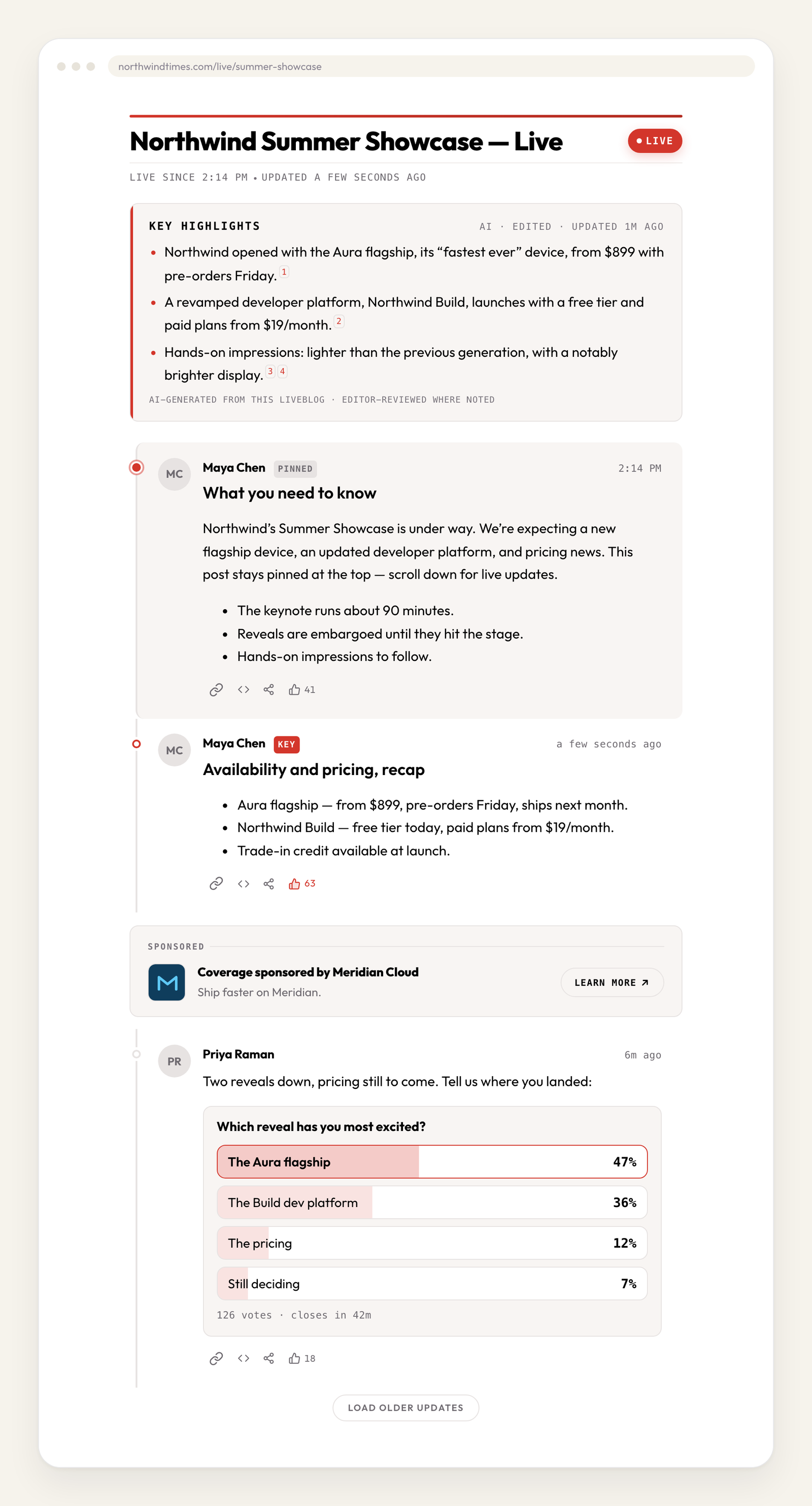
- A new liveblog header: a Live or Ended badge with the date and start time on
one line, the headline below it, and a running “Updated” time. Headlines size
themselves to their length and use the full width. - Event names are limited to 80 characters, with a counter as you type.
- A new option under the event name hides the headline when your page already
shows the same title above the liveblog. - The “new updates” button now floats at the top of the screen wherever readers
are in the liveblog, below any sticky header, and takes them to the new posts. - Key highlights: delete any highlight, and the AI won’t bring it back. Use the
new lightbulb on a post to make sure the highlights cover it. - The event Tags field now searches every tag on your site, starting from the
first letter, instead of showing a short capped list. - Sharing reworked. A shared update now carries the post’s own words, with its
paragraphs and bullet points, trimmed to each network’s limit, and one preview card per liveblog appears under the
link: your share image, a Live badge, the event name, and your site’s name.
Liveblog pages now provide social preview tags (or pass the card to Yoast SEO
or Rank Math). Share cards use the bundled Inter typeface when your theme’s
fonts can’t be used for images. - Deleting OnCue now keeps all liveblog data, so reinstalling restores
everything. An administrator can choose to erase it instead under
Connections. - New “Save as a regular post” turns a liveblog into an ordinary WordPress post
that stays readable without OnCue. “Save all as regular posts” does every
liveblog at once. - Clicking Deactivate on the Plugins screen explains what happens to your
liveblogs, replacing the permanent warning under OnCue’s row. - Share cards left in the Media Library by older versions are now cleared even
on hosts where WordPress’s scheduled tasks don’t run.
1.2.1
- Embedded posts and videos show at full size again. A YouTube video shrank into
the corner of its frame, and a post from Bluesky, X, or Instagram was cut off
partway down. Photos are unaffected. - X posts copied with an x.com address now embed. Only the older twitter.com
address did before. - Spotify and SoundCloud players no longer sit above a black band.
- A Bluesky post that arrives while a reader has the page open now appears
without a refresh.
1.2.0
- A dropped connection now delays a post instead of losing it. Every update
written in the live console goes into an outbox and is sent from there, so a
post that can’t get through sits in your own feed marked “waiting for a
connection,” with the text intact, and goes out by itself when the network
returns. The queue is kept in the browser, so it survives a reload, a closed
laptop, or a crashed tab. A post the site itself refused (coverage ended, the
session expired) stops and waits for you, with Try now and Discard on it. - Late posts keep their place in the timeline. A post held up by a connectivity
gap publishes at the time it was written and reads in order with everything
around it, rather than jumping to the top. That covers the console’s outbox,
the wait while a photo uploads, and messages from Slack, Telegram, and
Messenger, which are now dated from the platform’s own send time. A stamp in
the future, or more than a day old, is ignored and the post takes the time it
arrived. Twilio SMS carries no send time, so a delayed text still dates from
when it reached the site. - A retry can no longer post twice. Each console post carries the id it was
written under, and the site returns the existing update for an id it has
already seen — the same protection chat messages get from their platform’s
message id. - A post belongs to whoever wrote it. Editing, deleting, pinning, starring, and
pushing a post to Bluesky or Threads are now permitted only to that post’s
author, or to an Editor or Administrator. Creating the event, or being
assigned to it, no longer carries authority over another contributor’s words.
This is a change for existing sites: an Author who could previously edit
anything in an event they created can now edit only their own posts. Refusals
say which rule applied instead of a flat “you cannot edit this entry,” and the
Slack emoji shortcut for sharing a post follows the same rule as the button. - Photos stay true to the file. A photo is turned the right way up on the way in
(Slack stripped the orientation tag, Telegram and the REST route did not), and
is scaled to a sensible size before WordPress sees it. If something on the
site’s upload path reshapes the pixels — an image optimization plugin is the
usual cause — OnCue puts the original back, and says so in the log when it
can’t. - Photos in the reader are never drawn out of shape, including against themes
whose own rules would stretch them, and the enlarged view now shows the photo
at its true proportions. A line under each photo says it can be tapped to
enlarge; it is left off images too small to be worth enlarging, and emoji are
no longer treated as photos.
1.1.0
- Connections are checked live when you save them. The Connections screen says
what OnCue reached (the Slack workspace, the Bluesky account, the AI model,
and so on) or gives the service’s own reason for refusing, and a connection
whose keys stop working reads “Needs attention” instead of “Connected.”
Microsoft Teams and Google Chat webhooks are confirmed with a one-line test
message. - Every connect, sign-in, and save now confirms itself inside the card or
prompt you used, instead of in a notice at the top of the page. Steps that
finish outside WordPress, such as inviting the bot to a private Slack channel
or tapping Start in the Telegram app, update the page on their own. - The approval gate is simpler and easier to follow. When it is on, posts from
anyone other than an Editor, an Administrator, or the event’s creator are
held, whatever channel they came from; the per-source setting is gone, so an
event that held only some sources now holds all of them. Held posts sit in
the live console feed at the time they were written, marked “Awaiting
approval,” with Approve and Reject on the post. Approved posts keep their
original time, and open reader pages still receive them. A rejected post
stays visible to its author until they dismiss it. In Slack, the hourglass
on a held message changes to a check mark or a cross once it is decided. - The prefix that keeps a chat message off the liveblog is now %%. Slack,
Teams, and Telegram open a command menu on a leading slash, which made the
old // awkward to type. - The More Coverage tag picker is searchable and reaches every tag on the site.
The old list stopped at 200 tags, and re-saving an event could drop a saved
tag past that point. It warns as soon as a broad tag is picked, and says so
when a saved tag has been deleted. - A link typed on the first line of a console post now becomes a preview card.
- Fixed connecting a Slack account from event setup or the live console, which
could fail with “the link you followed has expired.” Returning from Slack
while signed out of WordPress now asks you to sign in and completes the link.
1.0.9
- Compatible with WordPress 7.1. The liveblog block, the live console, and the
event setup screens were reviewed against 7.1’s always-iframed editor, its
persistent admin toolbar, and its refreshed editor components. - Pictures added from the live console stay a sensible size when they are
inserted moments after uploading. WordPress 7.1 prepares image sizes in the
browser, and a picture chosen before that finished could previously be placed
at its full original resolution.
1.0.8
- Share cards are generated only for posts that carry an image. A text-only post
is no longer rendered into a picture and saved to the Media Library. Its social
preview uses the event’s fallback share image instead, or no preview image at
all when the event has none set. - Generated share cards now leave with the post they belong to. Retracting a
post, deleting an event, or uninstalling the plugin clears its cards, and cards
created by earlier versions are swept out once on update. Images posted to a
liveblog, from WordPress or from a connected chat platform, are never touched.
Capturas de tela
Para desenvolvedores
Este é o seu plugin? Mostre os números.
Adicione um crachá ao vivo ao seu site, Documentos ou Readme do GitHub. Ele é atualizado por conta própria - nenhuma conta necessária.
Best OnCue Liveblogging alternatives
All Breaking News plugins →




FAQ
OnCue Liveblogging: quick answers
Respostas diretas, extraídas de dados ao vivo WordPress.org.
Fonte: WordPress.org
Is OnCue Liveblogging free?
Yes. OnCue Liveblogging is free to download and use from the official WordPress.org plugin directory.
Is OnCue Liveblogging safe to use in 2026?
OnCue Liveblogging works, but test it on a staging site before relying on it in 2026. It runs on 10+ sites and was last updated 5 days ago, and scores 55/100 on our health check.
How many websites use OnCue Liveblogging?
OnCue Liveblogging is active on 10+ WordPress websites and has been downloaded 661 times since it launched in August 2026. It was downloaded 185 times in the last 30 days.
Does OnCue Liveblogging work with WordPress 7.1?
Yes. The developer has tested OnCue Liveblogging up to WordPress 7.1.5, the latest release. It requires WordPress 6.5 or newer.
What PHP version does OnCue Liveblogging need?
OnCue Liveblogging requires PHP 8.0 or higher. Most hosts run PHP 8.x today, so it works on any modern WordPress hosting.
When was OnCue Liveblogging last updated?
The latest version, 1.3.0, was released on November 21, 2026 (5 days ago).
Who makes OnCue Liveblogging?
OnCue Liveblogging is developed and maintained by TheLetterTwo.
What are the best alternatives to OnCue Liveblogging?
The most popular alternatives to OnCue Liveblogging are T4B News Ticker (6K+ installs), News Ticker (100+ installs) and OXP Breaking News Ticker (100+ installs).
Alimentado por PageForge
Um modelo e uma planilha. Uma página real para cada pesquisa.
PageForge Transforma cada linha de um CSV em uma página WordPress com seu próprio título, URL, SEO campos e esquema, construído no layout que você já desenhou. Gratuito em WordPress.org.
- CSV e XLSX, mais Google Sheets em Profissional e Empresarial
- Seu próprio título, URL, SEO campos e esquema para cada página
- Funciona com o editor de blocos, Elementor, Divi e Avada
- Gratuito em WordPress.org, sem cartão de crédito