


NiroRoadmap – Public Product Roadmap & Kanban Board
Share a public product roadmap as a Kanban board, a list or a timeline. Visitors see what's planned and shipped, vote, comment and suggest ideas.

Escolha sólida
NiroRoadmap is a solid plugin choice in 2026, with a few things worth checking first. It runs on 30+ sites and was last updated 2 weeks ago, and scores 71/100 on our health check.
- Desenvolvido ativamente — última atualização 2 semanas atrás
- Testado com as últimas WordPress (7.1)
- Base de usuários pequenas (mais de 30 instalações ativas)
- Muito poucos comentários até agora
Como ele se acumula?
Lado a lado em instalações, atualizações, avaliações e suporte



Downloads diários
Os picos de download geralmente seguem uma nova versão — cada site que atualiza automaticamente é um download.
Rankings
Where NiroRoadmap stands todayWordPress.org Classificações de pesquisa
Posição ao vivo na pesquisa de plugins, top 100| Palavra chave | Posição |
|---|---|
| feature requests | >100 |
| experiência | >100 |
| kanban | #12 |
| roadmap | #45 |
| votação | #84 |
Adoção da versão
Compartilhamento de sites ativos por lançamento.
About NiroRoadmap
Do Readme oficial · v1.3.0Descrição
Also from NiroSuite: NiroHelp · NiroCache · NiroSitemap
NiroRoadmap turns your WordPress site into a public product roadmap. Add roadmap items, group them into statuses such as Planned, In Progress and Completed, and publish the roadmap on any page with a shortcode or block, as a Kanban board, a sortable list or a timeline by quarter.
Visitors can open any item for the full details, upvote or downvote it, join the discussion and suggest ideas of their own. You find out what your users care about most, and they can see what you’re working on.
Everything is optional and off by default where it matters: comments, idea submissions, the search toolbar and the view switcher are switched on from NiroRoadmap → Settings, and each board can override them with a shortcode attribute or block option.
Recursos
- Kanban board: Items are grouped into status columns, each with its own accent color and item count.
- Item details popup: Clicking an item opens a popup with its status, tags, description and votes. It zooms out of the card in the style of macOS Quick Look.
- Voting: Anyone can upvote or downvote an item, with no account needed. One vote per visitor per item, enforced on the server. Optionally require a login, let voters change their vote, hide the downvote button, or show downvote counts to administrators only.
- Comments: Visitors discuss an item right in its popup, with threaded replies and a Team badge on staff replies. Comments are normal WordPress comments, so your moderation tools and spam plugins apply. Require a login, choose the order, and close comments automatically when an item is completed.
- Suggest an idea: A Suggest an idea button opens a short form. While the visitor types a title, similar existing items are listed so duplicates are caught early. Ideas arrive as Pending items, are never public until you approve them, and can notify you by email. A one-click Approve action is added to the Items list.
- Search, sort and filter toolbar: Visitors search the board and sort by most votes, newest, oldest or most commented. They can filter by tag and product too. The toolbar loads no extra script or styles on boards that don’t use it.
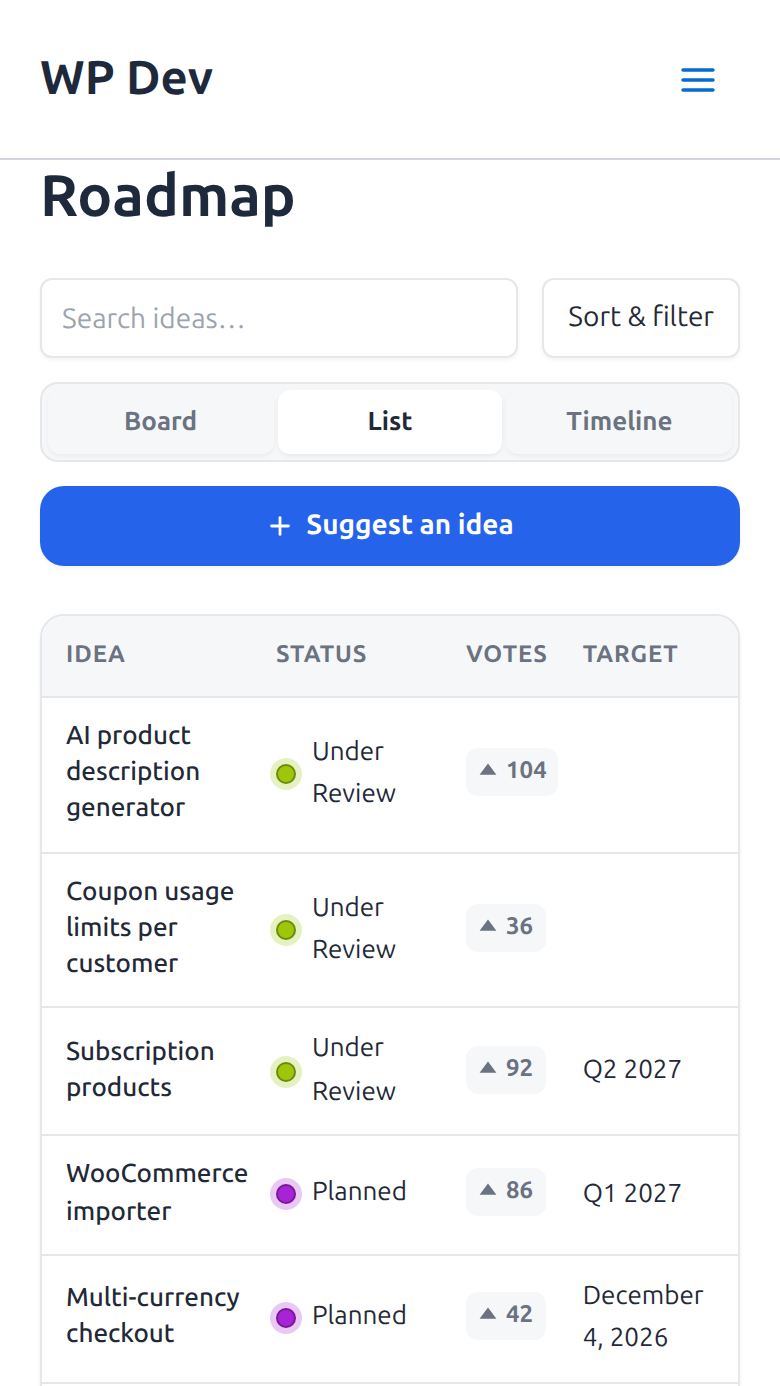
- Board, List and Timeline views: Show the roadmap as Kanban columns, a compact sortable table, or a timeline grouped by quarter, month or Now / Next / Later. A switcher lets visitors choose, and their choice is remembered and can be shared in the page address. Boards that don’t use the extra views load no extra script or styles.
- Drag and drop: Editors and administrators can drag items between columns and reorder them right on the public board.
- Sortable statuses: Drag statuses into the order you want on the admin screen. The public board uses the same order.
- Products: Run separate roadmaps for several products and show one product per board.
- Tags: Label items (e.g. Payments, Checkout). Tags are shown on each card.
- Item details: Give an item a target (a date or a quarter like Q4 2026), a release date and version, a link, a cover image (its Featured image), an effort size and private notes for your team. Pin an item to the top of its column, or hide its vote counts.
- Status history: See who moved an item to which status and when, and optionally show visitors the path an item took.
- Shortcode and block: Use the
[niroroadmap]shortcode or the Roadmap block. - Settings page: Eight tabs (General, Voting, Comments, Submissions, Toolbar, Views, Appearance, Advanced) control everything without code.
- Appearance: Light, dark or automatic color scheme, an accent color, the corner radius and your own custom CSS.
- Responsive: On phones the columns scroll sideways with snapping and the toolbar collapses into a Sort & filter button. The list view can be the default on narrow screens.
- Accessible: Cards can be opened with the keyboard, Esc closes the popup, and the animation is replaced by a plain fade for visitors who prefer reduced motion.
- Theme-friendly: Colors, borders and spacing are CSS custom properties you can override from your theme.
- Developer-friendly: A REST API under
niroroadmap/v1, a dozen filters and actions, and a regular custom post type.
Começando
On activation, NiroRoadmap creates a Roadmap page and four statuses (Under Review, Planned, In Progress, Completed), so the board works straight away, and opens a Getting Started screen with a checklist (until you finish it, it also stays under NiroRoadmap → Getting Started). It can also add example content (items, products, tags and votes) so you see a working board in one click, and remove it again.
- Adjust the columns under NiroRoadmap → Statuses if you like. Rename them, pick colors, and drag them into order.
- Optionally add your products under NiroRoadmap → Products and your labels under NiroRoadmap → Tags.
- Add items under NiroRoadmap → Add New. Give each one a status, and optionally a product, tags and the Roadmap details (target, release date and version, link, effort, pin).
- Open NiroRoadmap → Settings and turn on what you want: comments, the Suggest an idea button, the search toolbar, a dark color scheme.
- Visit the Roadmap page. To show the board somewhere else, use the
[niroroadmap]shortcode or the Roadmap block.
Definições
Find them under NiroRoadmap → Settings.
- General: the Roadmap page, a default product, linking status names to their archive, and what the board shows: vote counts, tags, the downvote button, an item’s target and its status timeline.
- Voting: who can vote (everyone or logged-in users), whether voters may change their vote, and who sees downvote counts.
- Comments: turn comments on, require login, choose the order, and close comments when an item is moved to Completed.
- Submissions: turn the Suggest an idea button on, require login, ask for name and email (not asked, optional or required), pick the status new ideas start in, count the submitter’s own upvote, and set the notification email.
- Toolbar: turn the toolbar on, pick the initial sort and which filters to offer (search, tag, product).
- Views: the default view, whether visitors get the Board / List / Timeline switcher, opening boards as a list on narrow screens, how the timeline groups items, and how many items each Board column shows before “Load more”.
- Appearance: light, dark or auto color scheme, accent color, corner radius and custom CSS.
- Advanced: delete all plugin data on uninstall, and reset every setting to its default.
Managing ideas and item details
- Ideas visitors suggest appear in NiroRoadmap → All Items as Pending, with a Submitted by column. Click Approve to publish one, or edit it first.
- Each item has a Roadmap details box with its target (a date or a quarter like Q4 2026), release date, version, link, effort size (XS to XL), private team notes, and switches to hide its votes or pin it to the top of its column.
- A Status history box on the item screen shows every status change, who made it and when.
- The Items list has Target and Votes columns.
Shortcode
[niroroadmap] shows every item.

[niroroadmap product="12"] shows only the items of one product. Use the term ID from **NiroRoadmap → Products**.

[niroroadmap toolbar="yes" sort="votes" filters="search,tag"] adds a search, sort and filter toolbar. `toolbar` is `yes` or `no`; `sort` is `manual`, `votes`, `newest`, `oldest` or `commented`; `filters` is a comma list of `search`, `tag` and `product` (or `none`). Without these options a board follows **Settings → Toolbar**. The Roadmap block has the same options in its sidebar.

[niroroadmap view="timeline" switcher="yes" group="month"] opens the board as a timeline and lets visitors switch views. `view` is `board`, `list` or `timeline`; `switcher` is `yes` or `no`; `group` is `quarter`, `month` or `nownext` (Now / Next / Later). Without these options a board follows **Settings → Views**. Visitors can share a link to a view with `?nr_view=list` in the address. The Roadmap block has the same options in its sidebar.

[niroroadmap per_column="20"] shows 20 items in each Board column, with a **Load more** button for the rest. The number at the top of a column always counts every item. The default is 10 (**Settings → Views**); `0` shows every item. The Roadmap block has the same option in its sidebar.

[niroroadmap submissions="yes"] shows a "Suggest an idea" button on that board even when it is off site-wide; `submissions="no"` hides it.
Options combine, for example [niroroadmap product="12" toolbar="yes" sort="votes" submissions="yes"].
The older [roadmap] shortcode still works.
Para desenvolvedores
Filters:
niroroadmap_setting_{$key}: filter any setting value, e.g.niroroadmap_setting_comments_enabled.niroroadmap_show_stage_links: returntrueto link each column title to its status archive.niroroadmap_get_posts: filter the items loaded for a column.niroroadmap-localized_vars: filter the variables passed to the front-end scripts.niroroadmap_vote_fingerprint,niroroadmap_voter_ip: change or disable how anonymous voters are recognised.niroroadmap_vote_rate_limit,niroroadmap_comment_rate_limit,niroroadmap_submission_rate_limit: change the rate limits (array( count, seconds )).niroroadmap_comment_max_length,niroroadmap_comment_show_avatars: limit comment length, or hide avatars.niroroadmap_completed_status_slugs: the status slugs that count as completed for closing comments (defaultcompleted).niroroadmap_submission_verify: returnfalseor aWP_Errorto reject an idea, for example to add a CAPTCHA.niroroadmap_submission_max_title,niroroadmap_submission_max_description,niroroadmap_submission_min_time: limits for the suggestion form.niroroadmap_submission_notify_to: change the recipient of the new-idea email.
Actions:
niroroadmap_comment_created: fires after a visitor’s comment is saved.niroroadmap_submission_created: fires after an idea is submitted.niroroadmap_archive_urls_changed: fires once after an update has moved stored links to the new archive addresses, with the old and new address bases.
REST API (namespace niroroadmap/v1): GET /tasks/{id}, POST /tasks/{id}/vote, GET and POST /tasks/{id}/comments, POST /tasks/submit and GET /tasks/search are public and rate limited. Moving and ordering items and statuses (/tasks/{id}/move, /tasks/order, /stages/order) need an editor or administrator.
The board’s look can be changed by overriding these CSS custom properties on .nr-kanban-columns and .nr-modal-overlay: --nr-bg, --nr-card, --nr-border, --nr-text, --nr-muted, --nr-accent, --nr-radius.
Helper: niroroadmap_get_setting( $key ) returns a plugin setting.
Roadmap data is stored as a regular custom post type (niroroadmap_item) with the taxonomies niroroadmap_status, niroroadmap_product and niroroadmap_tag, so it works with the standard WordPress APIs.
Source code and build tools
The full source code is publicly available at github.com/codexpertio/niroroadmap.
The only compiled file is the block script in build/roadmap/. Its human-readable source ships with the plugin in app/Blocks/roadmap/. To rebuild it, run npm install and then npm run build:blocks (uses @wordpress/scripts). PHP dependencies are listed in composer.json; run composer install to install them.
Privacidade
NiroRoadmap makes no requests to external services. To allow one vote per visitor per item, it recognises voters like this:
- Logged-in users are identified by user ID.
- Other visitors get a random token in a first-party cookie,
niroroadmap_voter(1 year,SameSite=Lax,HttpOnly,Secureon HTTPS), set when they first vote. They are also recognised by a salted hash (HMAC-SHA256, keyed with your site’s WordPress salts) of their IP address and browser user agent, so clearing cookies doesn’t reset their votes.
The vote table stores only these hashes, the item, the vote type and the time. The raw IP address and user agent are never stored. A salted hash is still pseudonymous data, so mention it in your privacy policy. To stop using IP addresses at all, return an empty string from the niroroadmap_vote_fingerprint filter; votes are then recognised by cookie only. Votes are also shown as plain counts on each item, and the visitor’s browser keeps a list of the items it has voted on in local storage (niroroadmap_votes) to display the buttons correctly. That list is never sent to the server. A short-lived counter keyed by a hash of the IP address limits how fast votes can be sent. Vote data is deleted when you uninstall with “Delete all data” turned on.
When comments are turned on, a comment is a standard WordPress comment. WordPress stores the commenter’s name, email address, IP address and browser user agent with it, the same as on any post, and your spam plugin may send these to its own service. The roadmap board never shows email addresses or IP addresses. It does show each commenter’s avatar, which for people without a profile picture is a Gravatar image whose address contains a hash of their email; return false from the niroroadmap_comment_show_avatars filter to turn avatars off. A hidden form field and a per-IP rate limit (using a hash of the IP address, as for votes) help keep out spam. Comments are deleted with their item, and when you uninstall with “Delete all data” turned on.
When visitors can suggest ideas, an idea is stored as a pending item, like any other. If you ask for a name and email, or the person is logged in, those are stored privately with the idea so you can follow up. They are shown only in the admin Items list, and never on the board or in the public API. The idea itself becomes public only when you publish it. A hidden form field, a minimum fill-in time and a per-IP rate limit (using a hash of the IP address, as for votes) help keep out spam, and a filter lets you add a CAPTCHA. If you turn on the email notification, the idea and the submitter’s name and email are sent to the address you choose. Ideas, and the name and email stored with them, are deleted with the item, and when you uninstall with “Delete all data” turned on.
Item details: the target is shown to visitors only if you turn that on in Settings → General. The release date, version, link and cover image are shown when filled in. The effort size and the internal notes are for your team only: they are never shown on the board or returned by the public API.
Status history: each time an item moves to another status, the plugin records which status, when, and the ID of the user who moved it (0 when it was done by code or by a visitor’s submission). Only your team sees who; the optional timeline shown to visitors has statuses and dates only. The history is deleted with the item, and when you uninstall with “Delete all data” turned on.
Instalação
- In your dashboard, go to Plugins → Add New, search for “NiroRoadmap”, then install and activate it. Or upload the
niroroadmapfolder to/wp-content/plugins/and activate it from the Plugins screen. - A Roadmap page and default statuses are created for you. If a page already shows the roadmap, it’s used instead of creating a new one.
- Add items under NiroRoadmap → Add New.
Log de Changes
Status, product and tag pages move to /roadmap-status/, /roadmap-product/ and /roadmap-tag/ so they no longer clash with WooCommerce. Old addresses redirect, and links in your menus, posts and widgets are updated automatically after the update. Clear your page cache or CDN afterwards. Now also runs on PHP 7.4.
1.3.0 – 2026-11-18
Works on PHP 7.4 again, plays nicely with WooCommerce and other shop plugins, and fixes votes, comments and ideas on cached pages.
Archive pages and links
* Changed: status, product and tag pages now live at /roadmap-status/, /roadmap-product/ and /roadmap-tag/. The old /product-cat/, /product-brand/ and /product-tag/ addresses clashed with shop plugins: on sites with WooCommerce, product tag pages opened the roadmap or showed “Page not found”.
* New: old addresses redirect to the new ones, including their feeds and page 2, 3 and so on, so links in search results, bookmarks and other sites keep working.
* New: after updating, links to the old addresses in menus, navigation blocks, templates, widgets, posts and pages are updated automatically in the background. Every changed post keeps a revision. Nothing needs to be done by hand.
* Fixed: status, product and tag pages no longer show “Page not found” until Permalinks are saved. The plugin refreshes the site’s links itself once after updating.
Fixes
* Fixed: visitors can vote, comment and suggest ideas on pages served from a page cache. Before, these failed once the cached page was more than a day old.
* Fixed: a suggested idea is accepted when Product is left at “— Choose —”. Before, it failed with “Your idea could not be sent”.
* Fixed: “Delete all data” on uninstall also removes items in the Trash, with their votes, comments and submitter details.
* Fixed: Remove example content also removes example items in the Trash, and keeps a product or tag that a trashed item still uses.
* Fixed: on PHP 7.4, unpinned items keep their manual order on the board.
Compatibility
* NiroRoadmap now requires PHP 7.4 or later (was 8.0) and runs on PHP 7.4 through 8.5.
Developers
* New: action niroroadmap_archive_urls_changed, fired once after the old links are updated, with the old and new address bases, so cache and SEO plugins can purge.
* Removed: niroroadmap_get_field_factory() and the unused Helper\Field classes, which could not be used.
1.2.0 – 2026-10-18
Long boards are easier to scan: each Board column now shows its first items, with a Load more button for the rest.
Board
* New: “Max items per column” setting (Settings > Views). Each Board column shows that many items, 10 by default, followed by a Load more button that reveals the same number again. Use 0 to show every item.
* New: per_column shortcode attribute, for example [niroroadmap per_column="20"], and a matching “Max items per column” option in the Roadmap block sidebar.
* Improved: the number at the top of a column always counts every item in it, not just the ones showing. While a toolbar filter is active it counts the matching items.
* Improved: search, filters and sorting in the toolbar still reach every item, including ones not yet loaded. Matches beyond the limit get their own Load more button.
* Improved: an item an editor drags into a column stays visible instead of being hidden by the limit.
* The List and Timeline views are unchanged.
1.1.0 – 2026-10-07
Setup is now guided: a Getting Started screen walks new sites from activation to a working public roadmap, and one click fills the board with example content.
Getting started
* New: Getting Started screen (NiroRoadmap > Getting Started) with a four-step checklist: set up your columns, add your first item, see your public roadmap and choose what visitors can do. Each step ticks off by itself, based on what the site actually has.
* New: the screen opens once each time the plugin is activated. It is skipped for bulk activation and in the network admin.
* New: “New here? Follow the Getting Started guide” reminder on every NiroRoadmap screen until all four steps are done. Sites that are already set up never see it. The menu entry is hidden at the same point; the screen stays reachable from the Plugins list.
* New: “Add example content” adds seven example items with votes and targets, two products and a few tags, and makes sure the statuses and the Roadmap page exist. “Remove example content” deletes only what it added. Statuses and the Roadmap page are kept, and a product or tag your own items now use is kept too.
* New: example items never count towards the checklist, so it still reflects your own roadmap.
* New: the screen also explains the [niroroadmap] shortcode and the Roadmap block, and links to the website, the support site and the support email.
* New: Getting Started, Documentation and Support links on the Plugins screen.
Settings
* Improved: every setting now has a description. Ten settings had none, and the Roadmap page, Default product, Corner radius and Custom CSS descriptions say more.
Developers
* New: filters niroroadmap_docs_url and niroroadmap_support_url change where the Documentation and Support links point.
1.0.0.1 – 2026-10-04
A big release: three ways to view the roadmap, a settings page, comments, visitor submissions and much stronger voting.
Views
* New: List and Timeline views alongside the Kanban board, with an optional view switcher, a remembered choice, and shareable ?nr_view= links.
* New: List view is a compact table, sortable by title, status, comments, votes and target.
* New: Timeline view groups items by quarter, month or Now / Next / Later, with undated items listed last. It is offered only when targets are shown, so private targets never leak.
* New: Settings > Views tab: default view, switcher, list on narrow screens and timeline grouping.
* New: view, switcher and group shortcode attributes and matching block sidebar options.
* New: all three views share the same items, toolbar search and filters, and popup. View assets load only on boards that use them.
Settings
* New: Settings page (NiroRoadmap > Settings) with General, Voting, Comments, Submissions, Toolbar, Views, Appearance and Advanced tabs. Invalid values are rejected with a message and the saved value is kept.
* New: choose the roadmap page and default product, show or hide vote counts, tags, status archive links and the downvote button, and decide who can vote and who sees downvote counts.
* New: light, dark and auto color schemes, accent color, corner radius and custom CSS.
* New: “Delete all data on uninstall” option (off by default) and a reset to defaults.
Voting
* New: one vote per visitor per item is now enforced on the server, not only in the browser. Logged-in users are identified by user ID, anonymous visitors by a first-party cookie plus a salted hash, so clearing cookies does not reset a vote. Raw IP addresses and user agents are never stored.
* New: “Let voters change their vote” setting (off by default).
* New: vote rate limit per visitor (default 30 votes per 10 minutes).
* Improved: the popup shows the visitor’s real recorded vote instead of trusting local storage.
* Improved: hidden vote counts are left out of API responses, not just hidden with CSS.
* Existing vote counts are kept as they are.
Comments
* New: visitors can discuss an item in its popup, with threaded replies, a “Team” badge, “Load more” and comment counts on the cards. Off by default.
* New: built on native WordPress comments, so moderation, spam plugins, the disallowed words list and flood control keep working. Held comments are shown only to their author, labeled “Awaiting moderation”.
* New: require login, set the order, and automatically close comments when an item moves to Completed.
* New: rate limit per visitor (default 5 comments per 10 minutes, moderators exempt). Emails and IP addresses are never returned.
Suggest an idea
* New: “Suggest an idea” button and dialog. Ideas are saved as pending items, so nothing appears on the board or in the public API until you publish it. Off by default.
* New: similar existing ideas are suggested while the visitor types a title, to cut down duplicates.
* New: optional name and email (off, optional or required), the submitter’s own upvote counted automatically, and a status for new ideas (default Under Review).
* New: email notification for each submission, a “Submitted by” column and an Approve row action in the Items list.
* New: spam protection with a honeypot, minimum fill-in time, rate limit per visitor, login-only mode and a niroroadmap_submission_verify filter for CAPTCHA. Works on cached pages.
* New: submissions shortcode attribute and block option.
* New: accessible dialog with focus trapping, Escape to close and screen reader announcements.
Toolbar
* New: search, sort and filter toolbar above the board. Live search over title and tags with highlighted matches, sort by most votes, newest, oldest or most commented, and filter by tag or product.
* New: shows “Showing X of Y”, live column counts and a Reset button. State is kept in the URL (nr_q, nr_sort, nr_tag, nr_product), so filtered boards can be shared.
* New: toolbar, sort and filters shortcode attributes and block options. Several boards on one page work independently.
* Improved: on narrow screens the search stays and the rest folds behind a button.
* Improved: editors cannot drag cards while a filter or sort is active, so the saved order never goes wrong.
Item details and history
* New: “Roadmap details” box on the item edit screen: target (a date or a quarter such as “Q4 2026”), release date, version and link, shown in the popup when filled in.
* New: team-only effort (XS to XL) and private notes, never shown on the board or returned by any API.
* New: pin an item to the top of its column, and hide an item’s vote counts.
* New: cover image from the item’s featured image, shown at the top of the popup.
* New: status change history recording from, to, who and when for every change, including drag and drop, Quick and bulk edit and imports. Shown in a “Status history” box on the edit screen.
* New: optional public timeline of status changes in the popup (statuses and dates only, never who).
* New: sortable Target and Votes columns in the Items list.
Developers
* New: hooks niroroadmap_vote_fingerprint, niroroadmap_vote_rate_limit, niroroadmap_comment_created, niroroadmap_comment_max_length, niroroadmap_comment_rate_limit, niroroadmap_comment_show_avatars, niroroadmap_completed_status_slugs and niroroadmap_submission_verify.
* New: REST routes for the visitor’s own vote, comments (GET/POST /tasks/{id}/comments), idea submission (POST /tasks/submit) and similar ideas (GET /tasks/search).
* New: integration tests, run with composer test.
* New: database tables for votes and status history, created on activation and on update.
Fixes
* Fixed: on phones the whole page scrolled sideways when comments were on.
* Fixed: a guest who must log in to comment saw no form and no login link on an item without comments.
0.9 – 2026-09-26
- Initial release with Kanban board, task voting, shortcode support, REST API integration, and customizable taxonomy columns.
Capturas de tela


Para desenvolvedores
Este é o seu plugin? Mostre os números.
Adicione um crachá ao vivo ao seu site, Documentos ou Readme do GitHub. Ele é atualizado por conta própria - nenhuma conta necessária.
Best NiroRoadmap alternatives
All feature requests plugins →





FAQ
NiroRoadmap: quick answers
Respostas diretas, extraídas de dados ao vivo WordPress.org.
Fonte: WordPress.org
Is NiroRoadmap free?
Yes. NiroRoadmap is free to download and use from the official WordPress.org plugin directory.
Is NiroRoadmap safe to use in 2026?
NiroRoadmap is a solid plugin choice in 2026, with a few things worth checking first. It runs on 30+ sites and was last updated 2 weeks ago, and scores 71/100 on our health check.
How many websites use NiroRoadmap?
NiroRoadmap is active on 30+ WordPress websites and has been downloaded 1,701 times since it launched in September 2026. It was downloaded 391 times in the last 30 days.
Does NiroRoadmap work with WordPress 7.1?
Yes. The developer has tested NiroRoadmap up to WordPress 7.1.5, the latest release. It requires WordPress 6.0 or newer.
What PHP version does NiroRoadmap need?
NiroRoadmap requires PHP 7.4 or higher. Most hosts run PHP 8.x today, so it works on any modern WordPress hosting.
When was NiroRoadmap last updated?
The latest version, 1.3.0, was released on November 18, 2026 (2 weeks ago).
Who makes NiroRoadmap?
NiroRoadmap is developed and maintained by NiroSuite.
What are the best alternatives to NiroRoadmap?
The most popular alternatives to NiroRoadmap are Roadmap and Feedback Plugin… (40+ installs), Product Feature Request (40+ installs) and Product Roadmap (10+ installs).
Alimentado por PageForge
Um modelo e uma planilha. Uma página real para cada pesquisa.
PageForge Transforma cada linha de um CSV em uma página WordPress com seu próprio título, URL, SEO campos e esquema, construído no layout que você já desenhou. Gratuito em WordPress.org.
- CSV e XLSX, mais Google Sheets em Profissional e Empresarial
- Seu próprio título, URL, SEO campos e esquema para cada página
- Funciona com o editor de blocos, Elementor, Divi e Avada
- Gratuito em WordPress.org, sem cartão de crédito