


Order Sync with Zendesk for WooCommerce
Manage Customer Support Tickets and Orders with Zendesk Woo Order Sync

Use com cautela
Order Sync with Zendesk for Woo… works, but test it on a staging site before relying on it in 2026. It runs on 30+ sites, is rated 5/5 and was last updated 4 months ago, and scores 59/100 on our health check.
- Base de usuários pequenas (mais de 30 instalações ativas)
- Muito poucos comentários até agora
Downloads diários
Os picos de download geralmente seguem uma nova versão — cada site que atualiza automaticamente é um download.
Rankings
Where Order Sync with Zendesk for… stands todayWordPress.org Classificações de pesquisa
Posição ao vivo na pesquisa de plugins, top 100| Palavra chave | Posição |
|---|---|
| customer support ticket system | #83 |
| help desk | #48 |
| integration | >100 |
| order sync | #12 |
| zendesk | #4 |
Adoção da versão
Compartilhamento de sites ativos por lançamento.
Divisão de classificação
★★★★★ ★★★★★ 5 de 2 comentários
About Order Sync with Zendesk for WooCommerce
From the official readme · v2.2.3Descrição
Order Sync with Zendesk for WooCommerce plugin will provide a managed process for dealing with new tickets and assembling customers’ order data. It is a two-way integration between Zendesk and WooCommerce.
The admin needs to install the WooCommerce Orders (from Zendesk Marketplace) before syncing this plugin. It is essentially, a Zendesk-oriented solution that will only work for WooCommerce orders.
The admin can directly verify ticket details from their WooCommerce, removing the need to check their Zendesk account each time. Order Sync with Zendesk for WooCommerce plugin enhances the workflow of WooCommerce stores and improves customer support ticket management. It also helps customers register their queries and follow up on them efficiently.
Zendesk integration with WordPress And WooCommerce plugin enhances the workflow of WooCommerce stores and improves ticket management. Also, it helps customers register their queries and follow up on them efficiently.
Zendesk WordPress & WooCommerce Integration is a remarkable way to improve the user experience. It helps establish better communication between the customers and store owners through chat ticketing, strengthening the customer-buyer relationship. And keeps the customers satisfied
NOTE: For using Order Sync with Zendesk for WooCommerce plugin, you need to install the WooCommerce Orders App from the Zendesk Marketplace.
MAIN FEATURES FOR ADMIN
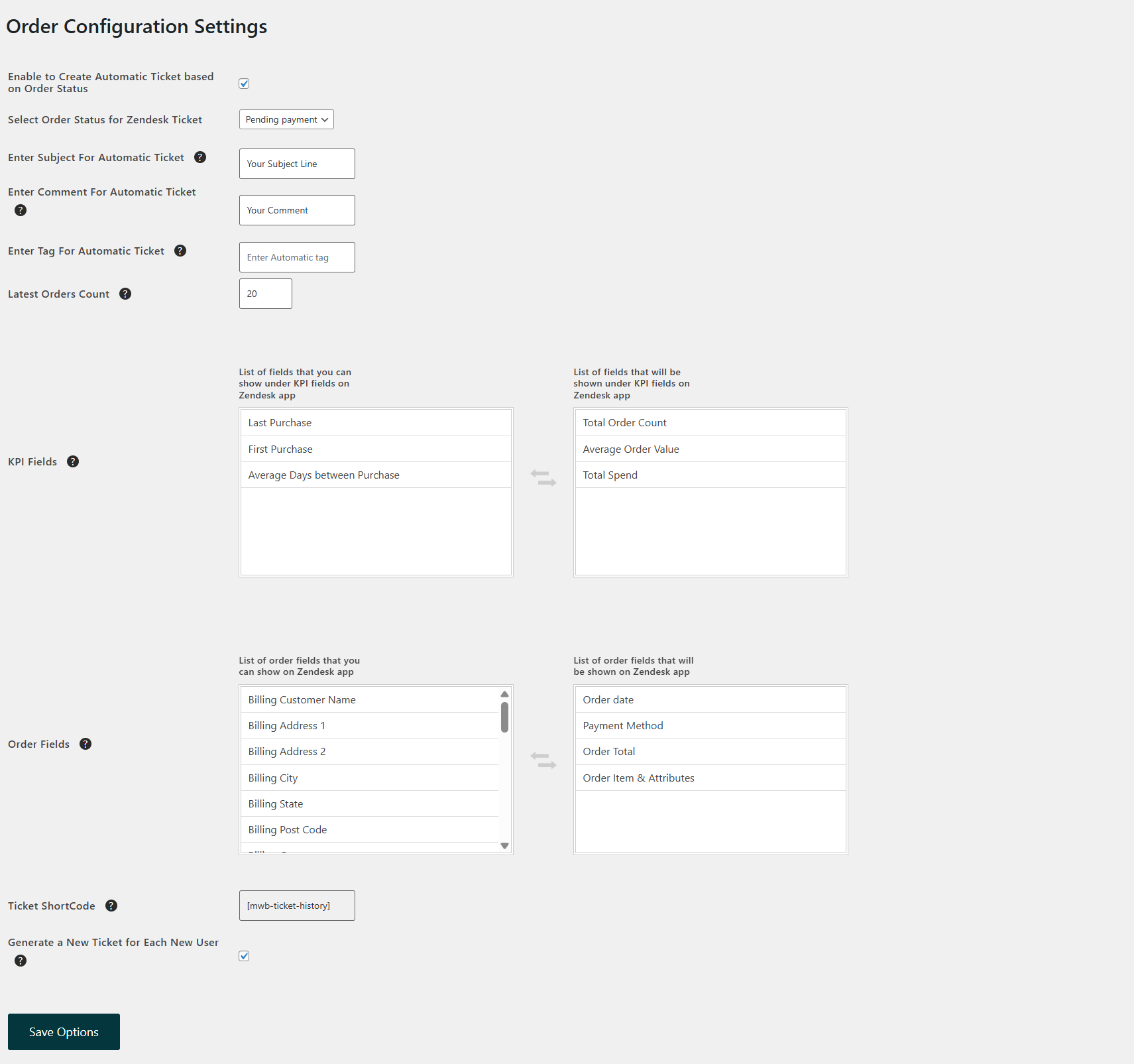
Admin can decide the number of WooCommerce orders and details of new customers’ requests to be displayed.
- A New Report Section has been added for admin to quickly view all the important details in a glance this report include subject, customer, status, ticket priority etc
- You have the option to automatically generate a ticket when a new user registers on your website. This saves time and ensures immediate assistance for users right from the start.
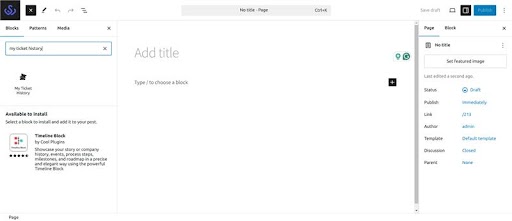
- A custom widget has been created, which you can place on anywhere on the website to show the ticket history. This enhances user experience by providing easy access to past support interactions.
- Our WooCommerce Zendesk Integrations is compatible with the HPOS (High-Performance Order Sync) feature of WooCommerce.
- WooCommerce Orders App provides live information about your customers’ orders.
- Whenever a ticket is raised, the WooCommerce order app fetches the live order values and the total number of orders in your Zendesk dashboard.
- Admins can see all the tickets generated by any particular customer.
- The order data fetched by Zendesk from the WooCommerce store contains the order items and their attributes.
- The Admin can enable the option for email notification to get notified with all the details related to the ticket when a customer raises a ticket.
- The Admin can completely customize the email template from the WooCommerce email section.
- Along with the order details, the admin can also sync the order meta keys on Zendesk using Order Fields from Order Configuration Settings.
- The admin can configure the plugin to automatically sync the order status with CRM and create a Zendesk ticket based on the chosen order status.
MAIN FEATURES FOR CUSTOMERS
- In the Ticket History tab, customers can view all the tickets that they have generated. The ticket list will contain tickets generated from different billing email addresses.
- Customers can create a new Zendesk ticket upon clicking the “Create Ticket” button in the My Account section by using any of their billing emails—no need to go to Zendesk to create tickets.
- Customers can also add their comments from WooCommerce. It will be reflected in the admin’s Zendesk account.
- Customers can review their chat history with your agents for tickets from the Ticket History section. This allows them to keep track of their interactions in one place.
- Customers and Admin both will get an email notification when a customer raises a ticket.
Visit Order Sync with Zendesk for WooCommerce Documentation to learn more about the features and working of the plugin. Check out our Zendesk Plugin knowledge base for some deep insights and FAQs on the plugin.
ZENDESK FOR WOOCOMMERCE PLUGIN COMPATIBILITIES
- WooCommerce HPOS: Our Order Sync with Zendesk for WooCommerce plugin is fully compatible with WooCommerce HPOS (High-Performance Order Sync).
This compatibility improves your store’s performance by enabling speedier and smoother order synchronization for large volumes, ensuring that your operations function normally even during periods of heavy demand.
Apoio
If you need support or have questions, kindly use our online chat window here and discover all types of WooCommerce Extensions for your eCommerce store.
Get Huge Discount offers – Get More Offers
If our documentation doesn’t contain the solution to your problem, you can visit the WP Swings Forums Community or Generate a ticket
Create and Revamp your eCommerce store with WooCommerce Services
Instalação
Instalação automática
Automatic installation is the easiest option as WordPress handles the file transfers and you don’t need to leave your web browser. To automatically install Order Sync with Zendesk for WooCommerce, log in to your WordPress dashboard, navigate to the Plugins menu, and click Add New.
In the search field type “Order Sync with Zendesk for WooCommerce” and click Search Plugins. Once you’ve found our Order Sync with Zendesk for WooCommerce plugin you can view details about it such as the point release, rating, and description. Most importantly, of course, you can install it by simply clicking “Install Now”.
Instalação manual
The manual installation method involves downloading our Order Sync with Zendesk for WooCommerce and uploading it to your web server via your favorite FTP application. The WordPress codex contains instructions on how to do this here.
Log de Changes
New: Latest WP(7.0.2) and WC(10.9.4) Fix: Vulnerability Fixes
2.2.3 – Released on 05 August 2026
- New: Latest WP(7.0.2) and WC(10.9.4)
- Fix: Vulnerability Fixes
2.2.2 – Released on 08 April 2026
- New: Latest WP(6.9.4) and WC(10.6.2)
- Fix: Sync of KPI fields on WooCommerce Orders app
2.2.1 – Released on 25 August 2025
- New: Latest WP(7.8.2) and WC(10.1.1)
- New: Admin report section for ticket listing
- Fix: Modification in chat history in term of showing date
2.2.0 – Released on 27 March 2025
- New: Generate Ticket for New User Registration – A ticket is now automatically generated when a new user registers
- New: Added Block Widget for Ticket History – Introduced a block widget to display ticket history.
- New: Compatibility with latest WC( 9.7.1) and WP( 6.7.2)
2.1.2 – Released on 10 October 2024
- New: Shortcode For Ticket History and Ticket Creation – mwb-ticket-history
- New: Compatibility with latest wc( 9.3.3) and wp( 6.6.2)
2.1.1 – Released on 08 August 2024
- New: Sync or create a Zendesk ticket automatically based on the order status selected by the admin from the plugin setting.
- New: Compatibility with the Latest WP (6.6.1) and WC (9.1.4) Update
Capturas de tela



Para desenvolvedores
Este é o seu plugin? Mostre os números.
Adicione um crachá ao vivo ao seu site, Documentos ou Readme do GitHub. Ele é atualizado por conta própria - nenhuma conta necessária.
FAQ
Order Sync with Zendesk for WooComm…: quick answers
Respostas diretas, extraídas de dados ao vivo WordPress.org.
Fonte: WordPress.org
Is Order Sync with Zendesk for Woo… free?
Yes. Order Sync with Zendesk for Woo… is free to download and use from the official WordPress.org plugin directory. The developer also sells premium add-ons or a Pro version with extra features.
Is Order Sync with Zendesk for Woo… safe to use in 2026?
Order Sync with Zendesk for Woo… works, but test it on a staging site before relying on it in 2026. It runs on 30+ sites, is rated 5/5 and was last updated 4 months ago, and scores 59/100 on our health check.
How many websites use Order Sync with Zendesk for Woo…?
Order Sync with Zendesk for Woo… is active on 30+ WordPress websites and has been downloaded 7,549 times since it launched in September 2019. It was downloaded 207 times in the last 30 days.
Does Order Sync with Zendesk for Woo… work with WordPress 7.1?
Order Sync with Zendesk for Woo… is officially tested up to WordPress 7.0.9, while the latest release is 7.1.5. It may still work, but try it on a staging site first.
What PHP version does Order Sync with Zendesk for Woo… need?
Order Sync with Zendesk for Woo… requires PHP 7.4 or higher. Most hosts run PHP 8.x today, so it works on any modern WordPress hosting.
When was Order Sync with Zendesk for Woo… last updated?
The latest version, 2.2.3, was released on August 6, 2026 (4 months ago).
Who makes Order Sync with Zendesk for Woo…?
Order Sync with Zendesk for Woo… is developed and maintained by WP Swings.
Alimentado por PageForge
Um modelo e uma planilha. Uma página real para cada pesquisa.
PageForge Transforma cada linha de um CSV em uma página WordPress com seu próprio título, URL, SEO campos e esquema, construído no layout que você já desenhou. Gratuito em WordPress.org.
- CSV e XLSX, mais Google Sheets em Profissional e Empresarial
- Seu próprio título, URL, SEO campos e esquema para cada página
- Funciona com o editor de blocos, Elementor, Divi e Avada
- Gratuito em WordPress.org, sem cartão de crédito