


Yoga Schedule Momoyoga
Display your Momoyoga class and event schedule directly on your WordPress website.

Escolha sólida
Yoga Schedule Momoyoga is a solid plugin choice in 2026, with a few things worth checking first. It runs on 1K+ sites, is rated 5/5 and was last updated 2 weeks ago, and scores 77/100 on our health check.
- Desenvolvido ativamente — última atualização 2 semanas atrás
- Testado com as últimas WordPress (7.1)
- Momentum — downloads up 214.6% vs the previous 30 days
- Muito poucos comentários até agora
Como ele se acumula?
Lado a lado em instalações, atualizações, avaliações e suporte


Downloads diários
Os picos de download geralmente seguem uma nova versão — cada site que atualiza automaticamente é um download.
Rankings
Where Yoga Schedule Momoyoga stands todayWordPress.org Classificações de pesquisa
Posição ao vivo na pesquisa de plugins, top 100| Palavra chave | Posição |
|---|---|
| bookings | >100 |
| calendar | >100 |
| momoyoga | #1 |
| horário | #16 |
| yoga | #1 |
Adoção da versão
Compartilhamento de sites ativos por lançamento.
Divisão de classificação
★★★★★ ★★★★★ 5 de 2 comentários
About Yoga Schedule Momoyoga
From the official readme · v3.1.0Descrição
Display your Momoyoga schedule directly on your WordPress website and allow your yogis to explore and book classes and events in just a few clicks.
The Momoyoga Website Integration makes it easy for yoga studios and teachers to show their live schedule on their website. Visitors can browse upcoming classes and events, filter by teacher, view class details, and book sessions through Momoyoga, all from the “book now” button on your website.
Your website schedule stays automatically synchronised with your Momoyoga account, so when you update classes, events, or teachers in Momoyoga, the changes appear instantly on your site.
You’ll need an active Momoyoga account to use this plugin.
Key Features
Display your live schedule on your website
Embed your Momoyoga schedule on any WordPress page.
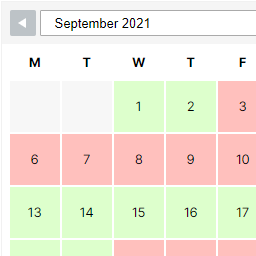
Weekly schedule view or List view
Visitors can explore your schedule week by week or in a list, depending on your desired appearance.
Teacher filters
Students can filter classes by teacher and find the instructors they enjoy practicing with.
Images for classes, events, and teachers
Visual elements in your schedule reflect the personality and identity of your studio’s brand.
Customisation options
Choose which information appears in your schedule, including:
* Teachers
* Class and Event end times
* Images
Apply your brand colours so the schedule integrates naturally with your website design.
Instalação
- Log in to your WordPress admin area.
- Go to Plugins in the left-hand menu.
- Click on Add Plugin.
- In the search bar, type “Momoyoga”.
- Find the Momoyoga plugin and click Install Now.
- Once installed, click Activate.
Add the schedule to a page
- Go to Pages.
- Select the page you want to add the schedule to.
- Add a block (+ icon).
- Click on Momoyoga Schedule (you can find this below Widgets).
- Enter the URL of your Momoyoga schedule. For example:
https://www.momoyoga.com/your-studio-schedule. - Click on Save.
Using the shortcode
The shortcode can be used in a shortcode block or in other elements of your website (e.g. in a (HTML) widget or the classic editor).
Insert the following shortcode in a short code block on your page. You need to replace the schedule_url value with the URL of your Momoyoga schedule.
[momoyoga-schedule schedule_url="https://www.momoyoga.com/your-studio-schedule/"][/momoyoga-schedule]
Instalação manual
- Upload the
momoyoga-integrationto the/wp-content/plugins/directory. - Activate the Momoyoga plugin through the Plugins menu in the WordPress admin area.
- Follow the steps above to add the schedule to a page.
For more details, visit our Support Center.
Log de Changes
3.1.0
Release Date – 12 November 2026
- Added customisation option to show classes/events only
- Added customisation option to hide empty days when the “list” view is used
The full changelog can be found in the changelog.txt file of the plugin.
Capturas de tela


Para desenvolvedores
Este é o seu plugin? Mostre os números.
Adicione um crachá ao vivo ao seu site, Documentos ou Readme do GitHub. Ele é atualizado por conta própria - nenhuma conta necessária.
Best Yoga Schedule Momoyoga alternatives
All bookings plugins →




FAQ
Yoga Schedule Momoyoga: quick answers
Respostas diretas, extraídas de dados ao vivo WordPress.org.
Fonte: WordPress.org
Is Yoga Schedule Momoyoga free?
Yes. Yoga Schedule Momoyoga is free to download and use from the official WordPress.org plugin directory.
Is Yoga Schedule Momoyoga safe to use in 2026?
Yoga Schedule Momoyoga is a solid plugin choice in 2026, with a few things worth checking first. It runs on 1K+ sites, is rated 5/5 and was last updated 2 weeks ago, and scores 77/100 on our health check.
How many websites use Yoga Schedule Momoyoga?
Yoga Schedule Momoyoga is active on 1K+ WordPress websites and has been downloaded 29,395 times since it launched in June 2018. It was downloaded 1,598 times in the last 30 days.
Does Yoga Schedule Momoyoga work with WordPress 7.1?
Yes. The developer has tested Yoga Schedule Momoyoga up to WordPress 7.1.5, the latest release. It requires WordPress 6.5 or newer.
What PHP version does Yoga Schedule Momoyoga need?
Yoga Schedule Momoyoga requires PHP 7.4 or higher. Most hosts run PHP 8.x today, so it works on any modern WordPress hosting.
When was Yoga Schedule Momoyoga last updated?
The latest version, 3.1.0, was released on November 12, 2026 (2 weeks ago).
Who makes Yoga Schedule Momoyoga?
Yoga Schedule Momoyoga is developed and maintained by Stefan | Momoyoga.
What are the best alternatives to Yoga Schedule Momoyoga?
The most popular alternatives to Yoga Schedule Momoyoga are Events Manager (60K+ installs), WP Events Manager (20K+ installs) and WP Simple Booking Calendar (10K+ installs).
Alimentado por PageForge
Um modelo e uma planilha. Uma página real para cada pesquisa.
PageForge Transforma cada linha de um CSV em uma página WordPress com seu próprio título, URL, SEO campos e esquema, construído no layout que você já desenhou. Gratuito em WordPress.org.
- CSV e XLSX, mais Google Sheets em Profissional e Empresarial
- Seu próprio título, URL, SEO campos e esquema para cada página
- Funciona com o editor de blocos, Elementor, Divi e Avada
- Gratuito em WordPress.org, sem cartão de crédito