


Modern Footnotes
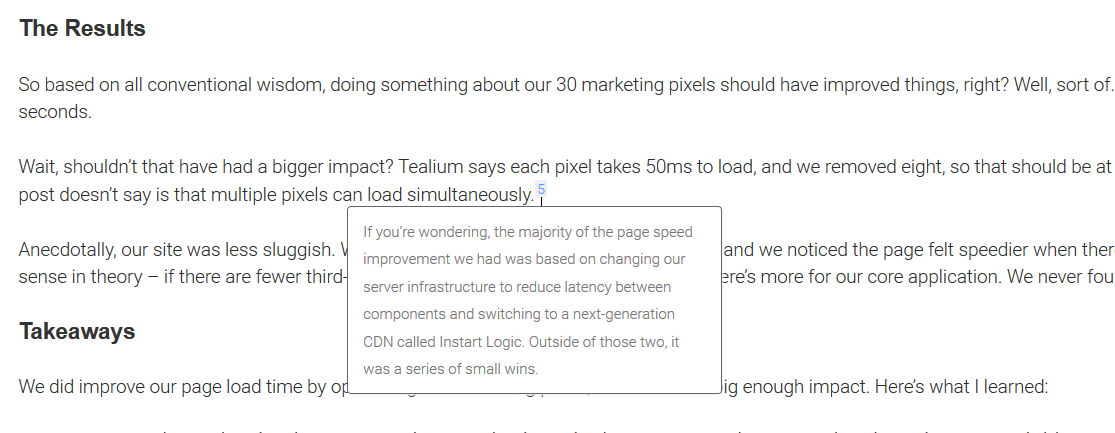
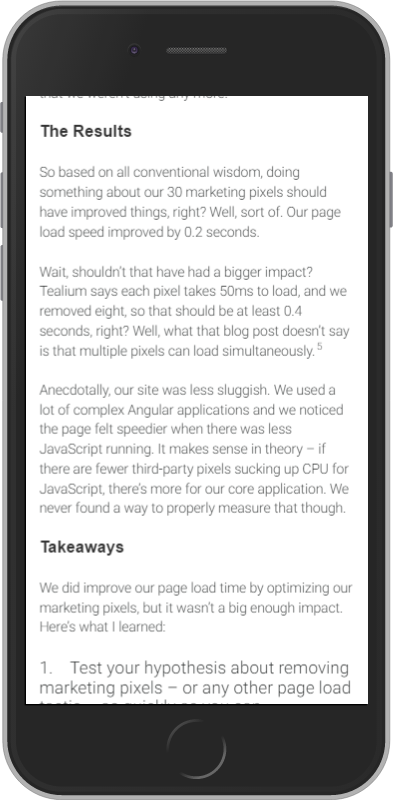
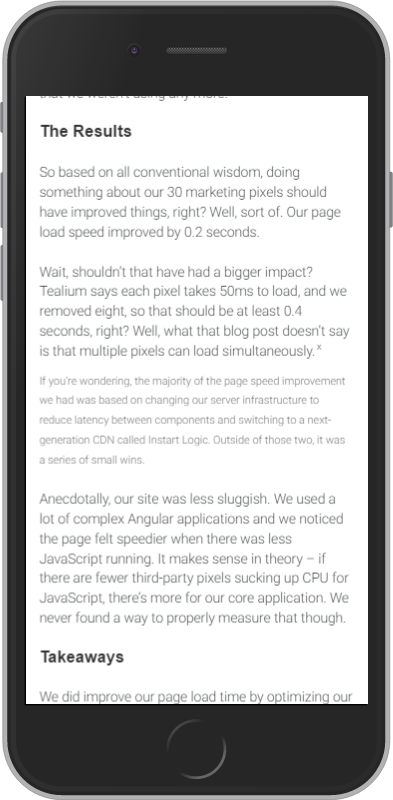
Add inline footnotes to your posts. On desktop, the footnotes will appear as tooltips. On mobile, the footnote will expand beneath the text.

Escolha sólida
Modern Footnotes is a solid plugin choice in 2026, with a few things worth checking first. It runs on 6K+ sites, is rated 4.8/5 and was last updated 3 months ago, and scores 73/100 on our health check.
- Loved by users — 4.8/5 from 32 reviews
- Testado com as últimas WordPress (7.1)
- Momentum — downloads up 92% vs the previous 30 days
Como ele se acumula?
Lado a lado em instalações, atualizações, avaliações e suporte



Downloads diários
Os picos de download geralmente seguem uma nova versão — cada site que atualiza automaticamente é um download.
Rankings
Where Modern Footnotes stands todayWordPress.org Classificações de pesquisa
Posição ao vivo na pesquisa de plugins, top 100| Palavra chave | Posição |
|---|---|
| citations | #1 |
| footnotes | #2 |
| inline citations | #1 |
| inline footnotes | #1 |
| mobile-friendly citations | #1 |
Adoção da versão
Compartilhamento de sites ativos por lançamento.
Divisão de classificação
★★★★★★★★★★ 4.8 from 32 reviews
About Modern Footnotes
From the official readme · v1.5.1Descrição
Footnotes optimized for desktop and mobile, inspired by the styles of Grantland and FiveThirtyEight.
Use a footnote in your post by using the footnote icon in the WordPress editor or by using the shortcode: [mfn]this will be a footnote[/mfn] The plugin will automatically associate sequential numbers with each plugin.
On desktop, footnotes will appear as a tooltip when the user clicks on the number. On mobile, footnotes will expand as a section below the current text.
You can also use the [mfn_list] shortcode to display a list of footnotes used in the article.
The official GitHub repository is at https://github.com/seankwilliams/modern-footnotes
Shortcode options
You can modify some behaviours or styles of your footnotes by using the following options within our shortcode.
[mfn referencenumber=3]This footnote will have the number 3[/mfn]
[mfn class=’my-pretty-class’]This footnote will have ‘my-pretty-class’ as additional class, allowing for custom styling of individual footnotes.[/mfn]
[mfn referencereset=’true’]This footnote will reset the footnote counter and therfore receive 1 as its number. Following footnotes will also receive their number according to this new start.[/mfn]
Instalação
- Upload the modern-footnotes folder to your wp-content/plugins directory.
- Activate the plugin in the WordPress Plugins section.
- Use a footnote in your post by using the footnote icon in the WordPress editor or by using the shortcode: [mfn]this will be a footnote[/mfn]
- Reference numbers will be automatically assigned sequentially so the first footnote is labeled 1, then the next footnote is 2, then 3, etc. You can specify custom reference numbers by using the “referencenumber” attribute to specify a particular reference number. For example: [mfn referencenumber=3]This will have the number 3 with it.[/mfn]
- If you want to customize the styles, you can do so by overriding the following styles in custom CSS for your theme:
.modern-footnotes-footnote – The superscript element displaying the footnote number
.modern-footnotes-footnote–selected – A superscript element that is currently active
.modern-footnotes-footnote__note – Styling that applies to both mobile and desktop footnotes
.modern-footnotes-footnote__note–mobile – The styling for a mobile footnote
.modern-footnotes-footnote__note–desktop – The styling for a desktop footnote
Log de Changes
1.5.1
- Fix PHP warning for unefined global
1.5.0
- Add links from footnote list up to footnote location
- Add links from footnote tooltip down to footnote location
- Minor internal rewrite of the logic when multiple footnotes share the same reference label.
1.4.21
- Formatting fix for block editor in WordPress 7.0.
1.4.20
- Security fix for XSS issue. Thanks to muhammad yudha and Patchstack for identifying the issue.
1.4.19
- Fix compatibility issue with Relevanssi
1.4.18
- Fix PHP warning when $GLOBALS[‘post’] was not a WP_POST instance
Capturas de tela
Para desenvolvedores
Este é o seu plugin? Mostre os números.
Adicione um crachá ao vivo ao seu site, Documentos ou Readme do GitHub. Ele é atualizado por conta própria - nenhuma conta necessária.
Best Modern Footnotes alternatives
All citations plugins →





FAQ
Modern Footnotes: quick answers
Respostas diretas, extraídas de dados ao vivo WordPress.org.
Fonte: WordPress.org
Is Modern Footnotes free?
Yes. Modern Footnotes is free to download and use from the official WordPress.org plugin directory.
Is Modern Footnotes safe to use in 2026?
Modern Footnotes is a solid plugin choice in 2026, with a few things worth checking first. It runs on 6K+ sites, is rated 4.8/5 and was last updated 3 months ago, and scores 73/100 on our health check.
How many websites use Modern Footnotes?
Modern Footnotes is active on 6K+ WordPress websites and has been downloaded 133,709 times since it launched in April 2017. It was downloaded 2,922 times in the last 30 days.
Does Modern Footnotes work with WordPress 7.1?
Yes. The developer has tested Modern Footnotes up to WordPress 7.1.5, the latest release. It requires WordPress 4.6 or newer.
When was Modern Footnotes last updated?
The latest version, 1.5.1, was released on August 24, 2026 (3 months ago).
Who makes Modern Footnotes?
Modern Footnotes is developed and maintained by prismtechstudios.
What are the best alternatives to Modern Footnotes?
The most popular alternatives to Modern Footnotes are Footnotes Made Easy (2K+ installs), LexonRank: AI Link Building… (800+ installs) and CM Footnotes (100+ installs).
Alimentado por PageForge
Um modelo e uma planilha. Uma página real para cada pesquisa.
PageForge Transforma cada linha de um CSV em uma página WordPress com seu próprio título, URL, SEO campos e esquema, construído no layout que você já desenhou. Gratuito em WordPress.org.
- CSV e XLSX, mais Google Sheets em Profissional e Empresarial
- Seu próprio título, URL, SEO campos e esquema para cada página
- Funciona com o editor de blocos, Elementor, Divi e Avada
- Gratuito em WordPress.org, sem cartão de crédito