


Mloun MenuScope
Hide or block admin menus per role/user, reorder with drag & drop, rename menus, hide plugins and users.

Escolha sólida
Mloun MenuScope is a solid plugin choice in 2026, with a few things worth checking first. Was last updated 3 weeks ago, and scores 64/100 on our health check.
- Desenvolvido ativamente — última atualização 3 semanas atrás
- Testado com as últimas WordPress (7.1)
- Base de usuários pequenas (<10 instalações ativas)
- Muito poucos comentários até agora
Como ele se acumula?
Lado a lado em instalações, atualizações, avaliações e suporte


Downloads diários
Os picos de download geralmente seguem uma nova versão — cada site que atualiza automaticamente é um download.
Rankings
Where Mloun MenuScope stands todayWordPress.org Classificações de pesquisa
Posição ao vivo na pesquisa de plugins, top 100| Palavra chave | Posição |
|---|---|
| admin menu | >100 |
| hide menu | >100 |
| menu order | >100 |
| plugin visibility | >100 |
| user roles | >100 |
About Mloun MenuScope
From the official readme · v1.4.3Descrição
Mloun MenuScope lets you clean up the WordPress dashboard for clients and team members:
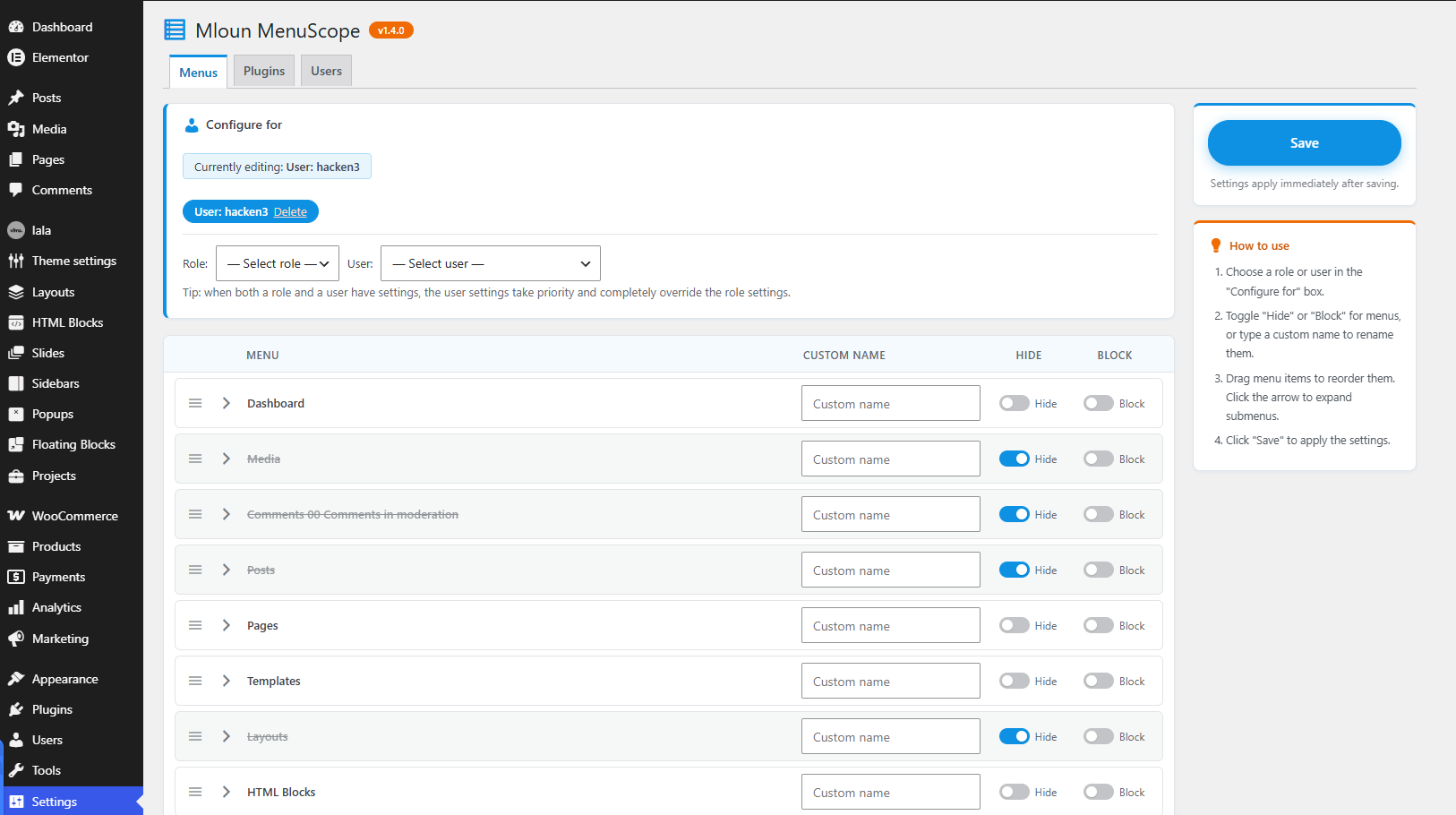
- Hide menus per role or user — the menu disappears but the URL stays reachable.
- Hide & block menus per role or user — direct URL access is denied with a 403 error.
- Drag & drop menu ordering — reorder top-level menus and submenus per role or user. Submenus are collapsible in the editor.
- Rename menus per role or user — give any admin menu or submenu a custom label for a specific role or user.
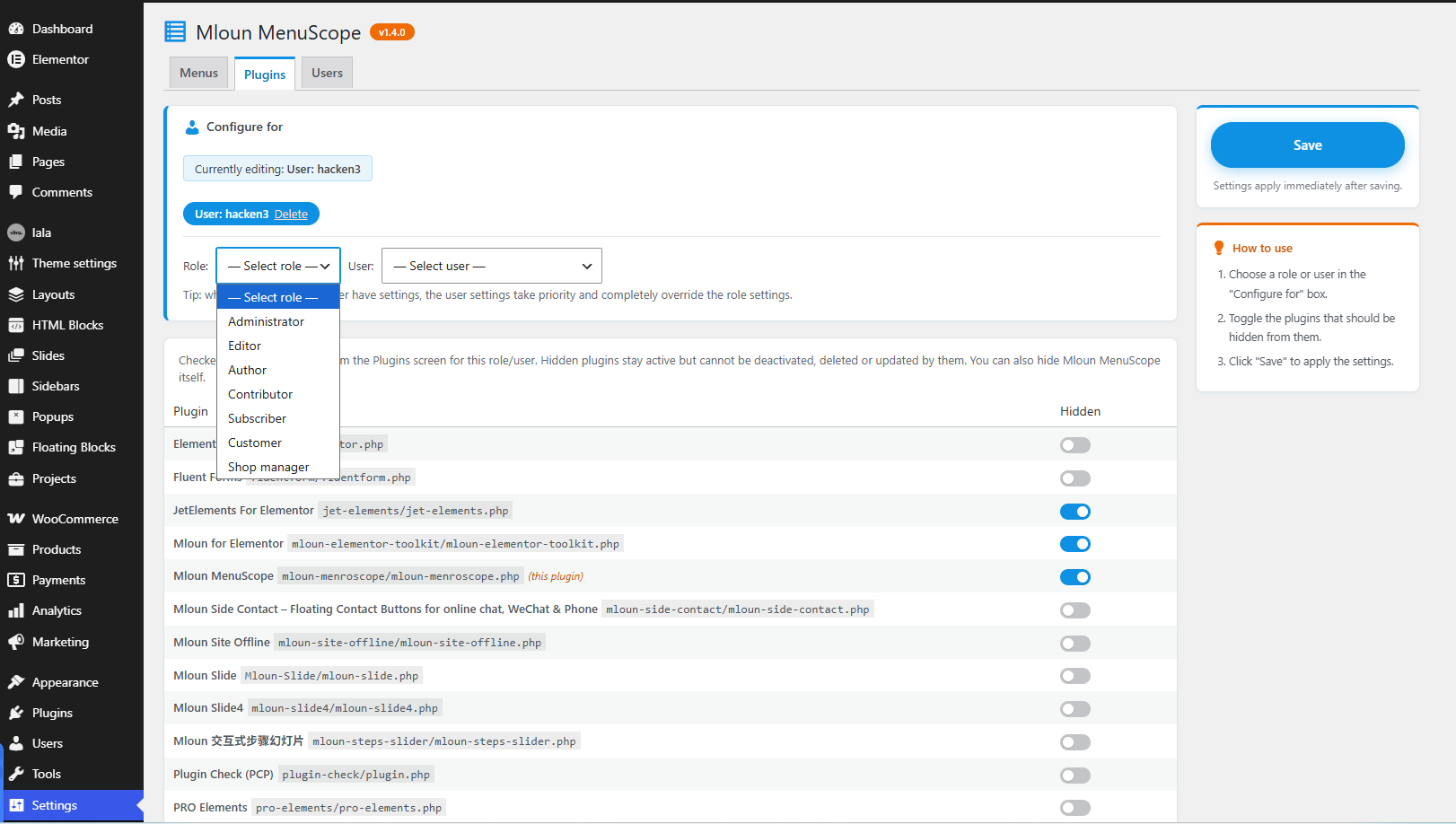
- Hide plugins per role or user — hidden plugins vanish from the Plugins screen and cannot be deactivated, deleted or updated by them. You can hide Mloun MenuScope itself.
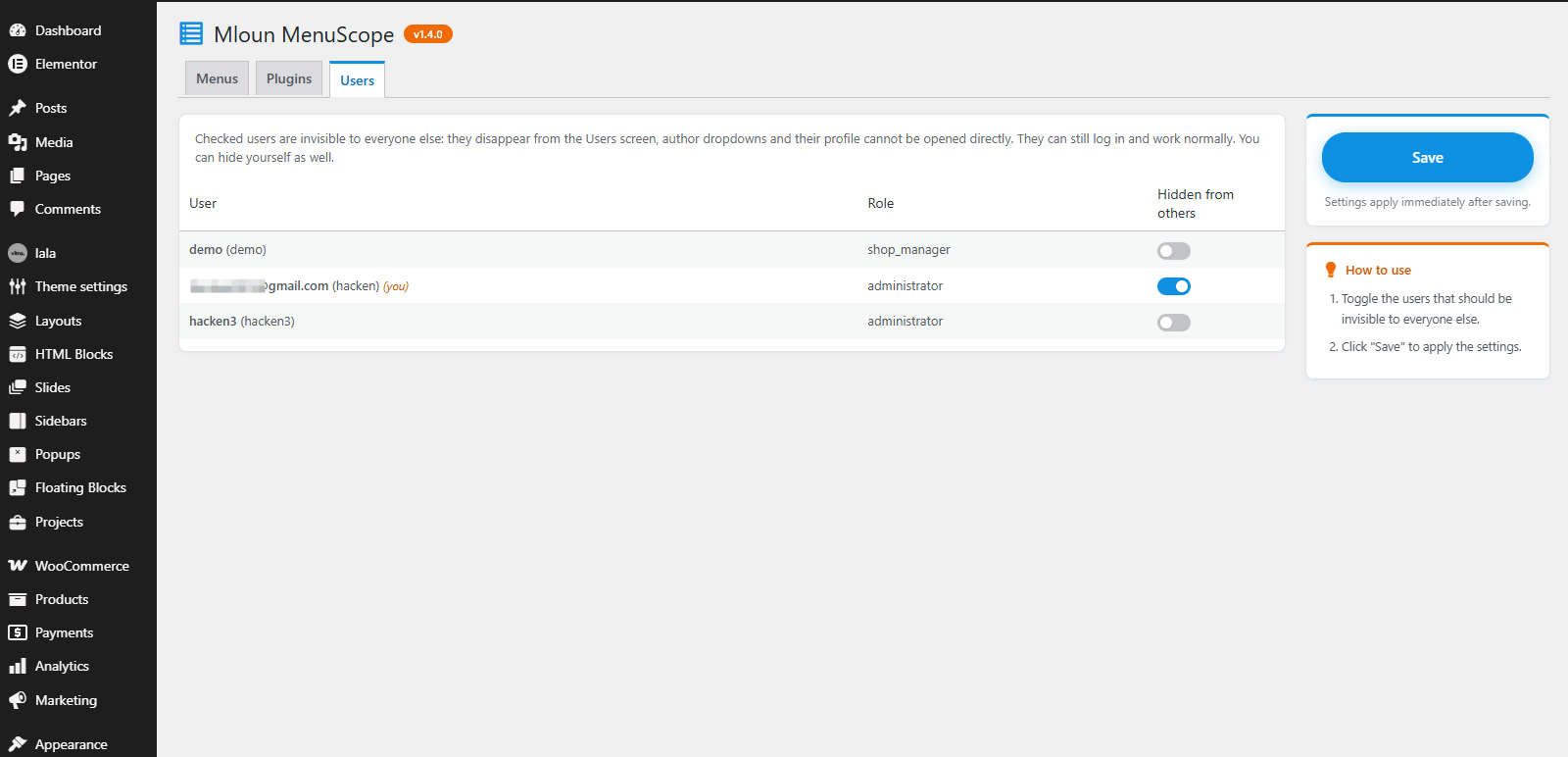
- Hide users — selected users become invisible to everyone else: they disappear from the Users screen, author dropdowns, and their profile page cannot be opened directly. They can still log in and work normally. You can hide yourself.
- User settings override role settings — when both a role and a user have settings for the same section, the user settings win completely.
Find it under Settings → MenuScope.
All strings are translatable (text domain: mloun-menroscope). Community translations are managed at translate.wordpress.org.
Instalação
- Upload the plugin zip via Plugins → Add New → Upload Plugin, or copy the
mloun-menroscopefolder towp-content/plugins/. - Ative o plugin.
- Go to Settings → MenuScope.
Log de Changes
1.4.3
- Fixed Plugin Check warnings: the blocked-URL matcher now unslashes and sanitizes the query argument it compares, so
$_GETis no longer read raw. - Fixed Plugin Check warnings: uninstall cleanup runs inside a closure and no longer leaks unprefixed variables into the global scope.
- Removed an unpublished filter introduced in 1.4.2 in favour of a fixed 2000-user limit.
1.4.2
- Security: an administrator can no longer lock themselves (and every other administrator) out of wp-admin by blocking the Settings parent menu. Blocking infrastructure menus is now downgraded to “hide” for administrators.
- Security: hidden plugins can no longer be updated through the updater, nor opened in the plugin file editor.
- Security: hidden users are now filtered out of REST API user lists and front-end author queries, not only out of wp-admin.
- Fixed a PHP 8 “Array to string conversion” warning when a blocked URL carried an array query argument.
- The user picker now lists up to 2000 users instead of 500.
- Uninstall now removes the settings on every site of a multisite network.
1.4.1
- Added the
languages/mloun-menroscope.pottemplate so the community can translate the plugin via GlotPress.
1.4.0
- Renamed to “Mloun MenuScope” (slug
mloun-menroscope) to avoid confusion with existing “Admin Menu” plugins. - Removed bundled translation files; translations are now delivered via translate.wordpress.org.
- Dropped the “Domain Path” header (no bundled languages folder); WordPress automatically loads community translations under the plugin slug for WordPress.org-hosted plugins.
1.3.2
- Added a “Settings” action link under the plugin name on the Plugins screen.
1.3.1
- Author URI updated to mloun.com. No functional changes.
Capturas de tela
Para desenvolvedores
Este é o seu plugin? Mostre os números.
Adicione um crachá ao vivo ao seu site, Documentos ou Readme do GitHub. Ele é atualizado por conta própria - nenhuma conta necessária.
Best Mloun MenuScope alternatives
All admin menu plugins →



FAQ
Mloun MenuScope: quick answers
Respostas diretas, extraídas de dados ao vivo WordPress.org.
Fonte: WordPress.org
Is Mloun MenuScope free?
Yes. Mloun MenuScope is free to download and use from the official WordPress.org plugin directory.
Is Mloun MenuScope safe to use in 2026?
Mloun MenuScope is a solid plugin choice in 2026, with a few things worth checking first. Was last updated 3 weeks ago, and scores 64/100 on our health check.
How many websites use Mloun MenuScope?
Mloun MenuScope is active on <10 WordPress websites and has been downloaded 327 times since it launched in October 2026. It was downloaded 198 times in the last 30 days.
Does Mloun MenuScope work with WordPress 7.1?
Yes. The developer has tested Mloun MenuScope up to WordPress 7.1.5, the latest release. It requires WordPress 5.8 or newer.
What PHP version does Mloun MenuScope need?
Mloun MenuScope requires PHP 7.4 or higher. Most hosts run PHP 8.x today, so it works on any modern WordPress hosting.
When was Mloun MenuScope last updated?
The latest version, 1.4.3, was released on November 11, 2026 (3 weeks ago).
Who makes Mloun MenuScope?
Mloun MenuScope is developed and maintained by Mloun.
What are the best alternatives to Mloun MenuScope?
The most popular alternatives to Mloun MenuScope are Admin Menu Search (3K+ installs), My Wp Brand (2K+ installs) and Wider Admin Menu (2K+ installs).
Alimentado por PageForge
Um modelo e uma planilha. Uma página real para cada pesquisa.
PageForge Transforma cada linha de um CSV em uma página WordPress com seu próprio título, URL, SEO campos e esquema, construído no layout que você já desenhou. Gratuito em WordPress.org.
- CSV e XLSX, mais Google Sheets em Profissional e Empresarial
- Seu próprio título, URL, SEO campos e esquema para cada página
- Funciona com o editor de blocos, Elementor, Divi e Avada
- Gratuito em WordPress.org, sem cartão de crédito