


Controle de visibilidade do menu
Control WordPress menu item visibility based on login status, user roles, device type, or specific pages — lightweight and theme-agnostic.

Escolha sólida
Menu Visibility Control is a solid plugin choice in 2026, with a few things worth checking first. It runs on 800+ sites, is rated 5/5 and was last updated 2 months ago, and scores 77/100 on our health check.
- Testado com as últimas WordPress (7.1)
- Base de usuários pequenas (mais de 800 instalações ativas)
- Muito poucos comentários até agora
Como ele se acumula?
Lado a lado em instalações, atualizações, avaliações e suporte


Downloads diários
Os picos de download geralmente seguem uma nova versão — cada site que atualiza automaticamente é um download.
Rankings
Where Menu Visibility Control stands todayWordPress.org Classificações de pesquisa
Posição ao vivo na pesquisa de plugins, top 100| Palavra chave | Posição |
|---|---|
| condicional | >100 |
| cardápio | #39 |
| navigation | >100 |
| roles | >100 |
| visibility | #7 |
Adoção da versão
Compartilhamento de sites ativos por lançamento.
Divisão de classificação
★★★★★ ★★★★★ 5 de 3 comentários
About Menu Visibility Control
From the official readme · v1.1.0Descrição
Menu Visibility Control is a lightweight, privacy-friendly WordPress plugin that lets you decide exactly who sees each menu item, directly inside the WordPress menu editor.
No settings pages.
No lock-in.
No performance overhead.
Everything is managed where it belongs: Appearance → Menus.
👁️ Visibility Options Per Menu Item
You can control visibility based on:
- 👥 Everyone
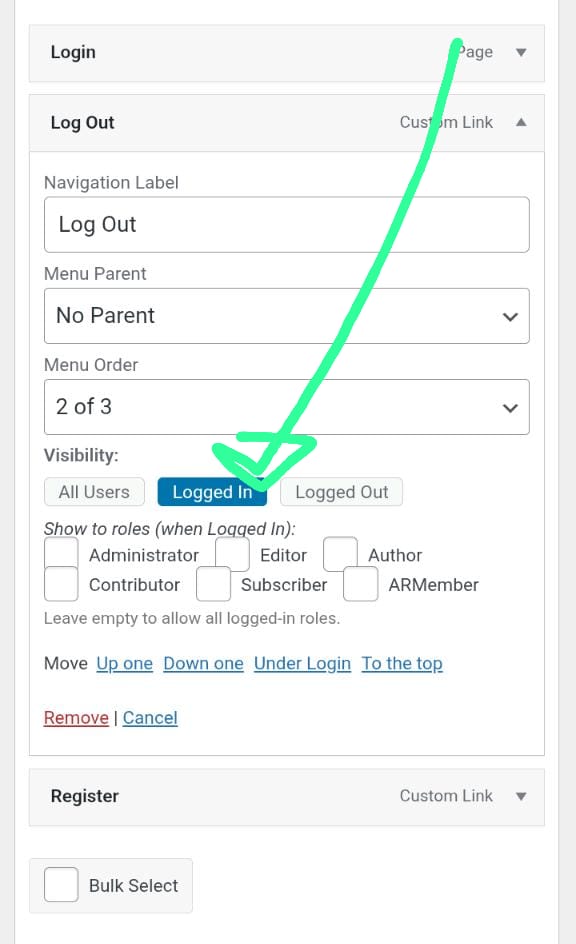
- 🔒 Logged-in users
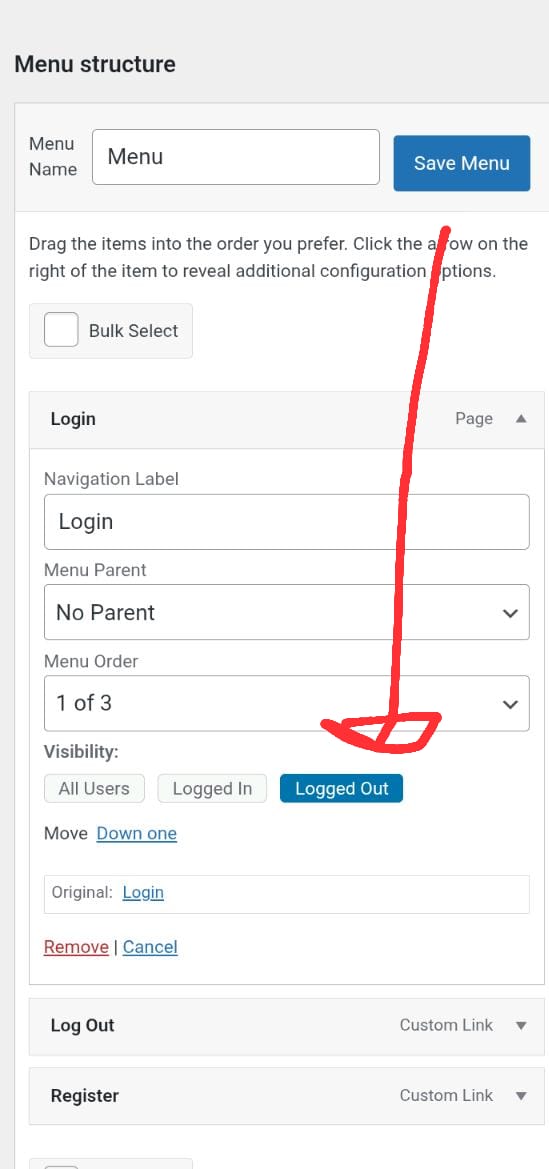
- 🚪 Logged-out users
- 🧩 Specific user roles (Administrator, Editor, Subscriber, etc.)
- 📱 Device type (Desktop / Mobile)
- 📄 Specific pages (auto-detected list)
All conditions are optional and safely combined.
💡 Perfect For
- Membership and community websites
- Client dashboards and intranets
- Multi-role WordPress sites
- Sites with mobile-specific navigation
- Blogs that need different menus for visitors vs members
🔧 Key Features
- Native integration with Appearance → Menus
- Works with any theme or page builder
- Role-based menu visibility
- Device-based menu visibility
- Page-specific menu visibility
- Auto-hidden UI (only shows options when enabled)
- Secure (nonces, sanitization, strict validation)
- Performance-optimized (runs only during menu rendering)
- 100% free, open-source, and donation-supported
🧠 Why Use Menu Visibility Control?
Unlike large menu or membership plugins, this plugin:
- Uses only WordPress core hooks
- Stores minimal metadata
- Is compatible with caching, multilingual sites, and block themes
- Does not track users or collect data
It does one thing — and does it well.
Apoio
Need help or want to share feedback?
- Visit the support forum
- Leave a review
- Support development via donation
License
This plugin is licensed under the GPL v2 or later.
You are free to use, modify, and redistribute it under the same license.
Code is Poetry. ❤️
Instalação
- Upload the plugin folder to
/wp-content/plugins/menu-visibility-control/, or install it from the WordPress Plugin Directory. - Activate the plugin via Plugins → Installed Plugins.
- Go to Appearance → Menus.
- Expand a menu item and choose its Visibility options.
No configuration required.
Log de Changes
Safe update. Existing menu visibility settings are preserved. Review your role and page selections after updating.
1.1.0
- Updated plugin and author links to the current Davis Vawiz website and GitHub repository.
- Refreshed the Appearance → Menus controls and admin notice styling.
- Added capability checks to menu-setting saves and notice dismissal.
- Tightened validation of saved visibility values and role selections.
- Corrected saving of cleared role and page selections.
- Updated compatibility metadata for WordPress 7.1.
1.0.9
- Improved admin notice design on the Appearance → Menus screen.
- Added informative admin notice with documentation, review, and support links.
- Enhanced notice UX with dismiss handling and once-per-day visibility.
- Minor UI polish and internal code cleanup.
1.0.8
- Added device-based menu visibility (desktop, tablet, mobile).
- Added page-specific visibility with automatic page selector.
- Improved menu editor UI with auto-hidden options.
- Performance optimizations.
- No changes to existing user settings.
1.0.4
- Security hardening and nonce validation.
- Confirmed compatibility with WordPress 6.9.
1.0.3
- Performance improvements and internal cleanup.
1.0.2
- Added role-based menu visibility.
Capturas de tela
Para desenvolvedores
Este é o seu plugin? Mostre os números.
Adicione um crachá ao vivo ao seu site, Documentos ou Readme do GitHub. Ele é atualizado por conta própria - nenhuma conta necessária.
Best Menu Visibility Control alternatives
Todos os plugins condicionais →




FAQ
Menu Visibility Control: quick answers
Respostas diretas, extraídas de dados ao vivo WordPress.org.
Fonte: WordPress.org
Is Menu Visibility Control free?
Yes. Menu Visibility Control is free to download and use from the official WordPress.org plugin directory.
Is Menu Visibility Control safe to use in 2026?
Menu Visibility Control is a solid plugin choice in 2026, with a few things worth checking first. It runs on 800+ sites, is rated 5/5 and was last updated 2 months ago, and scores 77/100 on our health check.
How many websites use Menu Visibility Control?
Menu Visibility Control is active on 800+ WordPress websites and has been downloaded 3,789 times since it launched in October 2025. It was downloaded 595 times in the last 30 days.
Does Menu Visibility Control work with WordPress 7.1?
Yes. The developer has tested Menu Visibility Control up to WordPress 7.1.5, the latest release. It requires WordPress 5.8 or newer.
What PHP version does Menu Visibility Control need?
Menu Visibility Control requires PHP 7.2 or higher. Most hosts run PHP 8.x today, so it works on any modern WordPress hosting.
When was Menu Visibility Control last updated?
The latest version, 1.1.0, was released on October 11, 2026 (2 months ago).
Who makes Menu Visibility Control?
Menu Visibility Control is developed and maintained by Davis Simiyu Wanyonyi.
What are the best alternatives to Menu Visibility Control?
The most popular alternatives to Menu Visibility Control are Dynamic Visibility for Elem… (40K+ installs), Ele Conditions for Elementor (2K+ installs) and Content Visibility for Divi… (2K+ installs).
Alimentado por PageForge
Um modelo e uma planilha. Uma página real para cada pesquisa.
PageForge Transforma cada linha de um CSV em uma página WordPress com seu próprio título, URL, SEO campos e esquema, construído no layout que você já desenhou. Gratuito em WordPress.org.
- CSV e XLSX, mais Google Sheets em Profissional e Empresarial
- Seu próprio título, URL, SEO campos e esquema para cada página
- Funciona com o editor de blocos, Elementor, Divi e Avada
- Gratuito em WordPress.org, sem cartão de crédito