


MaxiCharts
Create beautiful HTML5 charts from Gravity Forms submission data with a simple shortcode. You can also visualise CSV files as graphs.

Considere uma alternativa
MaxiCharts shows warning signs in 2026 — compare the alternatives below before installing. It runs on 100+ sites, is rated 4.4/5 and was last updated 5 years ago, and scores 35/100 on our health check.
- Base de usuários pequenas (mais de 100 instalações ativas)
- Nenhuma atualização em 5 anos
- Testado apenas até WordPress 5.8 (mais recente é 7.1)
Como ele se acumula?
Lado a lado em instalações, atualizações, avaliações e suporte



Downloads diários
Os picos de download geralmente seguem uma nova versão — cada site que atualiza automaticamente é um download.
Rankings
Where MaxiCharts stands todayWordPress.org Classificações de pesquisa
Posição ao vivo na pesquisa de plugins, top 100| Palavra chave | Posição |
|---|---|
| chart | >100 |
| chartsjs | #2 |
| formulários | >100 |
| graph | >100 |
| gravity | >100 |
Adoção da versão
Compartilhamento de sites ativos por lançamento.
Divisão de classificação
★★★★★★★★★★ 4.4 from 9 reviews
About MaxiCharts
From the official readme · v1.7.6Descrição
Create beautiful Chartsjs charts from Gravity Forms submission data or CSV data with a simple shortcode.
Use all your past data to visualize advanced statistics in a few clics. You NEED to install at least one add-on in order to use shortcodes.
Requires Gravity Forms v2.3+
All code has been moved to GitHub now : MaxiCharts on Github
Add-ons
You NEED to install at least one of them:
- Maxicharts Gravity Forms source add-on : chart all Gravity Forms submission data
- MaxiCharts CSV add-on : in order to graph CSV files
Optional add-ons:
- MaxiCharts Gravity View add-on : in order to filter entries on Gravity View “approved” ones
- MaxiCharts Query Builder add-on : Real time filter entries on graph using Query Builder
- MaxiCharts Extended Colors add-on “Extended Colors”) : Extended colors sets
Uso
Use the post visual editor brand new button to add as many shortcodes as you want in a few clics !
You need to install the core MaxiCharts plugin in any case, then if you use, for example Gravity Forms add-on, the shortcode processed is:
[gfchartsreports gf_form_id="form_id" include="fieldNb1,fieldNb2,fieldNb3,.." exclude="fieldNb4,fieldNb5,..." color_set="set" type="graphType" width="width(px|%)" float="true|false" chart_js_options="options"]
where all parameters are optional:
- gf_form_id : expects the form ID in Gravity Forms (defaults to first form : id=1)
- type : is the type of graph, at the moment only line,pie,doughnut,bar,horizontalBar available (defaults to pie)
- include : expects the field ids to include (example :
include="1,3,4") - exclude : expects the field ids to exlude (example :
exclude="2,4,6")
see all parameters on demonstration site
Exemplos
Display all fields of form #1 as pie charts with custom chartjs options for titles:
[gfchartsreports chart_js_options="title: {display: true, text: 'My Funky Chart Title', fontSize:28,fontFamily:'Arial',fontColor:'#00B88A',fontStyle:'bold',padding:20}"]
Displays fields 4, 7 and 18 of gravity form #3 with bar charts. Default colors used.
[gfchartsreports gf_form_id="3" include="4,7,18" type="bar"]
Displays field 2 of gravity form #2 with default pie chart. Use red color set, with not randomization.
[gfchartsreports gf_form_id="2" include="2" color_set="red"]
Displays all but fields 4,7,18 of gravity form #8 with horizontalBar type charts. Use blue color set, randomized.
[gfchartsreports gf_form_id="8" exclude="4,7,18" color_set="blue" color_rand="true" type="horizontalBar"]
More examples here : >> Demonstration site <<
Instalação
Easy
- Search via plugins > add new.
- Find the plugin listed and click activate.
- Use the Shortcode
Log de Changes
-
1.7.6 – php warning fixed
-
1.7.5 – log level as a parameter
-
1.7.4 – new maximum_fraction_digits parameter
-
1.7.3 – js rounding issue fixed
-
1.7.2 – information_source bug fix
-
1.7.1 – more parameters on datalabels
-
1.7.0 – introducing datalabels
-
1.6.7 – log level back to normal (warn)
-
1.6.6 – reduce space before : in tooltips
-
1.6.5 – no_entries_custom_message bug fixed
-
1.6.4 – automatic std dev annotation
-
1.6.3 – automatic mean for numeric datasets added
-
1.6.2 – box annotation added
-
1.6.1 – previous options fixed
-
1.6.0 – charjs upgraded to 2.9.3 / annotation plugin added
-
1.5.2 – better labels cleaning
-
1.5.1 – filter parameter fix
-
1.5.0 – new singleton structure
-
1.4.12 – bug fix on gf_entry_id
-
1.4.11 – bug on line charts
-
1.4.10 – bug on array access : https://wordpress.org/support/topic/php-warning-error-7/#post-11700240
-
1.4.9 – bug fix for : https://wordpress.org/support/topic/php-warning-error-7/
-
1.4.6 – more error msg feedback
-
1.4.5 – date_end filter added : accepts any strtotime input
-
1.4.4 – date_start filter added : accepts any strtotime input
-
1.4.3 – half doughnuts and pies
-
1.4.2 – radar charts with alpha backgrounds
-
1.4.1 – CSV patch added : https://wordpress.org/support/topic/proposed-bugfix-csv-source-always-assumes-multiset-of-data-even-when-untrue/
-
1.4.0 – Radar charts enhancements
-
1.3.4 – betsy bug
-
1.3.3 – bug fix on field filters, and log level set to info
-
1.3.2 – radar tests
-
1.3.1 – randomize color sets upon new ones
-
1.3 – color management upgraded for new add-on
-
1.2.5 – boolval bug fix for PHP < 5.5
-
1.2.4 – data conversion now converts to locale (solves , or . problems)
-
1.2.3 – table round precision set to 0 (parameter in next versions)
-
1.2.2 – multiple custom criteria (query builder and user custom) managed
-
1.2.1 – adjustments on number formats for UK clients
-
1.2 – tiny mce editor button gf forms pre-load fixed
-
1.1.4 – tick size fixed
-
1.1.3 – stepSize: 1
-
1.1.2 – back to only int fields
-
1.1.1 – new mode parameter compatibility
-
1.1 – query builder compatibility
-
1.0.9 – bug on button editor boolean values fixed
-
1.0.8 – only_data internal parameter added in order to manage query builder add-on
-
1.0.7 – multisite management for button in editor
-
1.0.6 – bug on tooltips
-
1.0.5 – warning fixed : https://wordpress.org/support/topic/warning-missing-argument-1-3/
-
1.0.4 – tinymce still bugs
-
1.0.3 – random
-
1.0.2 – tinymce bug fixed
-
1.0.1 – logger issues fixed
-
1.0 – First stable release.
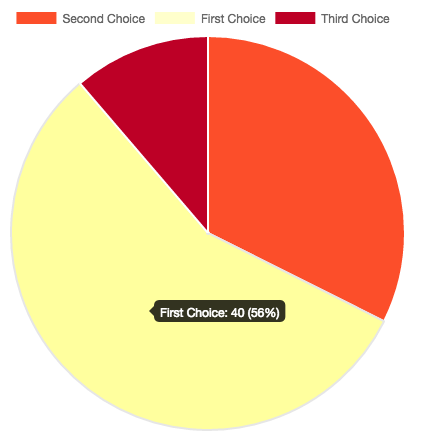
Capturas de tela


Para desenvolvedores
Este é o seu plugin? Mostre os números.
Adicione um crachá ao vivo ao seu site, Documentos ou Readme do GitHub. Ele é atualizado por conta própria - nenhuma conta necessária.
Best MaxiCharts alternatives
All chart plugins →




FAQ
MaxiCharts: quick answers
Respostas diretas, extraídas de dados ao vivo WordPress.org.
Fonte: WordPress.org
Is MaxiCharts free?
Yes. MaxiCharts is free to download and use from the official WordPress.org plugin directory.
Is MaxiCharts safe to use in 2026?
MaxiCharts shows warning signs in 2026 — compare the alternatives below before installing. It runs on 100+ sites, is rated 4.4/5 and was last updated 5 years ago, and scores 35/100 on our health check.
How many websites use MaxiCharts?
MaxiCharts is active on 100+ WordPress websites and has been downloaded 21,150 times since it launched in July 2017. It was downloaded 178 times in the last 30 days.
Does MaxiCharts work with WordPress 7.1?
MaxiCharts is officially tested up to WordPress 5.8.20, while the latest release is 7.1.5. It may still work, but try it on a staging site first.
When was MaxiCharts last updated?
The latest version, 1.7.6, was released on September 20, 2021 (5 years ago).
Who makes MaxiCharts?
MaxiCharts is developed and maintained by termel.
What are the best alternatives to MaxiCharts?
The most popular alternatives to MaxiCharts are wpDataTables (60K+ installs), Chartify (3K+ installs) and Stock Market Ticker (2K+ installs).
Alimentado por PageForge
Um modelo e uma planilha. Uma página real para cada pesquisa.
PageForge Transforma cada linha de um CSV em uma página WordPress com seu próprio título, URL, SEO campos e esquema, construído no layout que você já desenhou. Gratuito em WordPress.org.
- CSV e XLSX, mais Google Sheets em Profissional e Empresarial
- Seu próprio título, URL, SEO campos e esquema para cada página
- Funciona com o editor de blocos, Elementor, Divi e Avada
- Gratuito em WordPress.org, sem cartão de crédito