

MangaFocus – Panel-by-Panel Manga Reader
Publish comics on WordPress with Focus Mode: enlarge panels in reading order, or read whole pages, spreads and fullscreen vertical layouts.

Escolha sólida
MangaFocus is a solid plugin choice in 2026, with a few things worth checking first. It runs on 10+ sites, is rated 5/5 and was last updated 1 week ago, and scores 73/100 on our health check.
- Desenvolvido ativamente — última atualização 1 semana atrás
- Testado com as últimas WordPress (7.1)
- Pequena base de usuários (10+ instalações ativas)
- Muito poucos comentários até agora
Como ele se acumula?
Lado a lado em instalações, atualizações, avaliações e suporte



Downloads diários
Os picos de download geralmente seguem uma nova versão — cada site que atualiza automaticamente é um download.
Rankings
Where MangaFocus stands todayWordPress.org Classificações de pesquisa
Posição ao vivo na pesquisa de plugins, top 100| Palavra chave | Posição |
|---|---|
| comic | #8 |
| Gutenberg | >100 |
| manga | #3 |
| reader | #61 |
| viewer | >100 |
Adoção da versão
Compartilhamento de sites ativos por lançamento.
Divisão de classificação
★★★★★ ★★★★★ 5 de 1 comentários
About MangaFocus – Panel-by-Panel Manga Reader
From the official readme · v0.6.1Descrição
Comics for your WordPress site
MangaFocus is a free plugin that adds a dedicated comic viewer to WordPress posts and pages. Select your comic images and let readers browse single pages, two-page spreads, fullscreen views or vertical scrolling.
Its distinctive feature is Focus Mode: readers move through the panel regions you define, enlarged in reading order. This helps readers follow panels on smaller screens.
Use hand-drawn or AI-assisted comics, service introductions, brochures and illustrated guides. MangaFocus displays existing images; it does not generate comic images or automatically send content to an AI API.
Recursos gratuitos
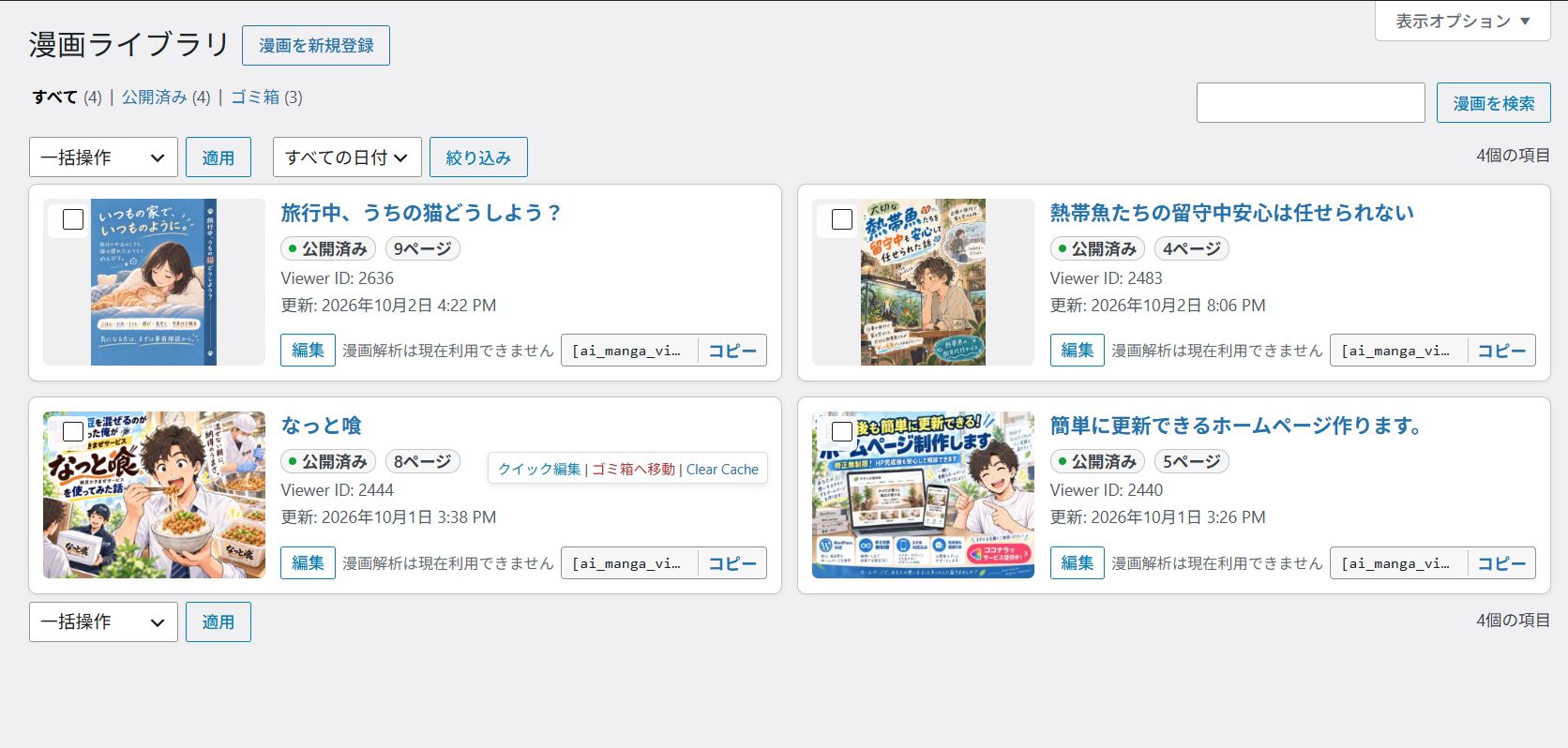
- Publish and reuse: place a MangaFocus block directly in a post or page, or register a comic in Manga Library and reuse it with the Registered Viewer block or a shortcode.
- Focus Mode: define panel regions and their reading order, with optional separate regions for smartphone screens.
- Reading layouts: single pages, two-page spreads and responsive automatic layouts; fullscreen page navigation, vertical scrolling and fullscreen viewing of one complete page at a time.
- Presentation: right-to-left or left-to-right binding; standalone cover and landscape pages; cover launch buttons. Enable inline, fullscreen and Focus Mode independently.
- Controls: zoom, pan, swipe, keyboard and page-edge navigation. Normal page transitions can be instant, page-turn, fade or slide, with reduced-motion support.
Start with a post or a reusable comic
For one location, add a MangaFocus block directly to a post or page. This Direct Viewer stores images and settings in that block.
For reuse, save the comic in Manga Library and select it with Registered Viewer blocks or shortcodes. Edit the library entry to update those placements. See Installation for both workflows.
You can also use “Register in Manga Library” on a Direct Viewer. This creates an independent copy of its current configuration; later edits to the original block and the library entry are not synchronized automatically.
Choose how readers view the comic
- Normal reading: move through whole pages, or a complete two-page spread at a time.
- Fullscreen: use the available screen area for page navigation or continuous vertical scrolling.
- Focus on one page at a time: within a fullscreen spread, enlarge each complete page in reading order.
- Focus Mode: enlarge the author-defined panel regions within each page, in the order you set. Pages without configured panels remain in sequence as full pages.
To configure Focus Mode, select a page in the MangaFocus block, turn on “Enable Focus Mode”, then choose “Add panel” and drag over the image. Repeat and use the panel list’s Previous and Next controls to set reading order. Preview before publishing. At least one panel is needed to use Focus Mode alone.
See the Japanese manual.
Optional Pro add-on
Free works independently: comic display, Focus Mode and Manga Library do not require Pro.
Pro adds calls to action (CTA), comic reading analytics, consultation documents and comic-production prompts for external AI services. The AI helpers prepare text locally for you to review and copy; they do not automatically send it to an AI API or generate images.
Without Pro, comics use the Free Viewer; saved Pro settings remain for later reuse.
Data and privacy
Free alone does not collect reader events on the public site or automatically send comic content to an external AI API. It does not send telemetry, use an external analytics service or depend on a CDN.
Pro Analytics is disabled by default and is designed to store its data in the WordPress site’s local database. Administrators can set a retention period and delete stored analytics data. Free includes the analytics table lifecycle, retention schedule and deletion settings to support Pro compatibility and manage retained data; without Pro, no new reader events are collected.
External image URLs connect readers’ browsers to the image host.
Development
The distributed plugin contains its human-readable PHP, JavaScript, and CSS source. It does not use minified, bundled, or transpiled runtime files.
The maintained development repository is available at https://github.com/cni-works/mangafocus.
The matching source revision contains the build script scripts/build-release.ps1. From the repository root, run powershell -File scripts/build-release.ps1 to build the plugin ZIP. The build script is excluded from the ZIP.
Instalação
Install and activate MangaFocus, then choose a workflow.
Publish directly in a post or page
- Open a post or page in the block editor and add the MangaFocus block.
- In “Page images”, select comic images in reading order.
- Set the reading modes, layout and binding direction. If using Focus Mode, add panel regions as described above.
- Preview the desktop and mobile layouts, then publish or update the post or page.
Register a comic for reuse
- Open Manga Library, choose “Add New” and open the “Register New Comic” screen.
- Add page images and configure the MangaFocus block’s reading settings, then publish the library entry.
- In a post or page, add the Registered Viewer block and select the registered comic.
- Preview, then publish or update the post or page.
Use Classic Editor
Create and edit the comic in Manga Library, which uses the block editor. Copy its shortcode from the library list and paste it into your Classic Editor post or page, for example:
[ai_manga_viewer id="123"]
Replace 123 with the registered comic’s ID. Posts and pages keep their existing editor preferences; MangaFocus does not change Classic Editor’s global settings.
Log de Changes
既存の漫画・設定・表紙を保持します。表示モードを変更するまでは旧設定を維持します。1ページ目からのアイキャッチ自動設定は行いません。
0.6.1
- Customize the fullscreen launch button label in the comic block settings. The label is also preserved when registering a comic in Manga Library.
- Zoom up to 400% in fullscreen vertical reading.
0.6.0
- On phones, fullscreen vertical reading now keeps zoom and exit controls in a collapsible menu so more of the comic stays visible.
- Improved how the viewer closes and starts again.
- Made switching between reading modes more reliable.
- Added support for a compatible Pro add-on to suggest another comic at the end of reading. Free reading works independently.
- Fixed reading issues and improved compatibility with existing comics and editor settings.
0.5.1
- Fixed an issue where the manga library editor could open in Classic Editor mode when Classic Editor was set as the default.
- Manga library entries now use the block editor while respecting editor preferences for other post types.
0.5.0
-
Renamed panel reading to Focus Mode; it enlarges configured panels in sequence.
-
Added page-turn, fade, slide and instant transitions, preserving legacy settings and reduced-motion support.
0.4.1
- Added website/manual links and clarified Pro’s upcoming release. No feature or data changes.
0.4.0
- 通常表示・全画面表示・コマ読みを個別に選択可能に。旧設定と保存値を保持。
- 設定画面とコマ読み開始位置の選択肢を整理。1ページ表示では見開き専用設定を非表示。
- ブロック設定に表紙画像を追加。アイキャッチの自動設定を廃止し、既存表紙を維持。
- 縦長表紙の左右余白と、画像を覆わない案内矢印の配置を改善。
- 自由ズームOFF時の縦読みと、中間ページからの開始位置を修正。
- 小画面の全画面ページ送り配置と日本語の設定説明を改善。
Capturas de tela





Para desenvolvedores
Este é o seu plugin? Mostre os números.
Adicione um crachá ao vivo ao seu site, Documentos ou Readme do GitHub. Ele é atualizado por conta própria - nenhuma conta necessária.
Best MangaFocus alternatives
All comic plugins →


FAQ
MangaFocus: quick answers
Respostas diretas, extraídas de dados ao vivo WordPress.org.
Fonte: WordPress.org
Is MangaFocus free?
Yes. MangaFocus is free to download and use from the official WordPress.org plugin directory.
Is MangaFocus safe to use in 2026?
MangaFocus is a solid plugin choice in 2026, with a few things worth checking first. It runs on 10+ sites, is rated 5/5 and was last updated 1 week ago, and scores 73/100 on our health check.
How many websites use MangaFocus?
MangaFocus is active on 10+ WordPress websites and has been downloaded 620 times since it launched in October 2026. It was downloaded 298 times in the last 30 days.
Does MangaFocus work with WordPress 7.1?
Yes. The developer has tested MangaFocus up to WordPress 7.1.5, the latest release. It requires WordPress 6.3 or newer.
What PHP version does MangaFocus need?
MangaFocus requires PHP 7.4 or higher. Most hosts run PHP 8.x today, so it works on any modern WordPress hosting.
When was MangaFocus last updated?
The latest version, 0.6.1, was released on November 21, 2026 (1 week ago).
Who makes MangaFocus?
MangaFocus is developed and maintained by cniworks.
What are the best alternatives to MangaFocus?
The most popular alternatives to MangaFocus are Word Balloon (10K+ installs), Toocheke Companion (1K+ installs) and ComicPress to Comic Easel M… (300+ installs).
Alimentado por PageForge
Um modelo e uma planilha. Uma página real para cada pesquisa.
PageForge Transforma cada linha de um CSV em uma página WordPress com seu próprio título, URL, SEO campos e esquema, construído no layout que você já desenhou. Gratuito em WordPress.org.
- CSV e XLSX, mais Google Sheets em Profissional e Empresarial
- Seu próprio título, URL, SEO campos e esquema para cada página
- Funciona com o editor de blocos, Elementor, Divi e Avada
- Gratuito em WordPress.org, sem cartão de crédito