


Lock Pages
NOTE: This plugin is not tested with Gutenberg, and we have no near-term plans to do so. If using WP > 5.0, use the Classic Editor if there are problems.

Considere uma alternativa
Lock Pages shows warning signs in 2026 — compare the alternatives below before installing. It runs on 300+ sites, is rated 4/5 and was last updated 8 years ago, and scores 30/100 on our health check.
- Base de usuários pequenas (mais de 300 instalações ativas)
- Muito poucos comentários até agora
- Nenhuma atualização em 7 anos
- Testado apenas até WordPress 4.9 (mais recente é 7.1)
Como ele se acumula?
Lado a lado em instalações, atualizações, avaliações e suporte



Downloads diários
Os picos de download geralmente seguem uma nova versão — cada site que atualiza automaticamente é um download.
Rankings
Where Lock Pages stands todayWordPress.org Classificações de pesquisa
Posição ao vivo na pesquisa de plugins, top 100| Palavra chave | Posição |
|---|---|
| Administrador | >100 |
| administration | >100 |
| cms | >100 |
| página | >100 |
| pages | >100 |
Adoção da versão
Compartilhamento de sites ativos por lançamento.
Divisão de classificação
★★★★★★★★★★ 4 from 2 reviews
About Lock Pages
From the official readme · v0.3.1Descrição
NOTE: This plugin is not tested with Gutenberg, and we have no near-term plans to do so. If using WP > 5.0, use the Classic Editor if there are problems.
NOTE: This plugin was originally designed to only lock pages, and only later added custom post type functionality. Hence the name, and sometimes the terminology will say “pages” when it means “any post type”.
Sometimes some pages or other posts are too important to allow them to be casually moved about or deleted by site editors. An editor may think nothing of renaming a page’s slug, or deleting a page to replace it with something similar, perhaps unaware of effects on SEO. Also, certain pages might be essential to keep in place because of a site’s structure, or because of aspects of a custom theme.
This plugin lets administrators “lock” any or all pages, and any post of any post type. “Locking” here basically means preventing non-admins from:
- Editing the item’s slug
- Changing the item’s parent
- Changing the item’s template
- Deleting the item
- Changing the item’s status
- Changing the item’s password protection
Locking is implemented by preventing the actual database update being performed as well as, where possible, having the interface element for that field removed. Where possible interface elements are removed via WP filters on the server; otherwise, jQuery is used on the client.
NOTE: Currently, I’ve been unable to get this working with the Quick Edit functionality. As a stop-gap measure, which is only in place because it seems to be better than nothing, the Quick Edit link is removed for users who can’t edit locked pages. I know, it’s not great. But until I work out how to selectively block Quick Editing, I’m assuming a locked page should be locked. Users can always edit the other fields via the normal edit page.
Go to GitHub for development code and issue tracking.
Known issues
- Quick Edit presents problems. I’ve worked out how to create hidden fields in the Quick Edit box, and to put the values in the hidden div, but I can’t work out how to dynamically populate the fields with the values, so the old values can be used if necessary on saving. For now Quick Edit is blocked for users who can’t edit locked pages.
- Although I’ve fixed the lock_parent function so it allows uploaded files to be attached to a locked page, it still prevents media already in the library from being attached when inserted.
Ideas
- Include the locking checkbox for admins in the Quick Edit form.
- On the settings screen, use a drop-down for selecting which capability is needed for editing locked page elements.
- Implement a system to deal with descendants, e.g. an option to lock all descendants of a locked page or not.
Instalação
It’s easiest to use the built-in plugin installer inside WordPress. Go to Plugins > Add New, and search for “lock pages”.
To install manually:
- Upload the
lock-pagesfolder into your site’s/wp-content/plugins/folder. - Go to the list of installed Plugins in WordPress and activate it.
- Go to Settings > Lock Pages and change configuration if necessary.
That’s it!
Log de Changes
0.3.1 (2018-12-18)
- Added ‘protect from all’ option, to allow lock protection to apply even if user has capability to lock posts
- Added proper defaulting for updates, to include new option defaults (thanks Kevin VandeKrol!)
- Fixed issue with 4th parameter for
user_has_capsfilter, and issue with arrays passed for$args[0] - Fixed minor PHP errors
0.3 (2015-08-19)
- Added locking of posts and custom post types
- Changed PNG lock icon to dashicon
- Changed admin headings to H1
0.2.4
- Changed the way the parent drop-down is removed to prevent inteference with other uses of
wp_dropdown_pages
0.2.3
- Removed PHP 4 constructor
0.2.2
- Added locking of page template
0.2.1
- Fixed clash with Simple Page Ordering plugin
Capturas de tela
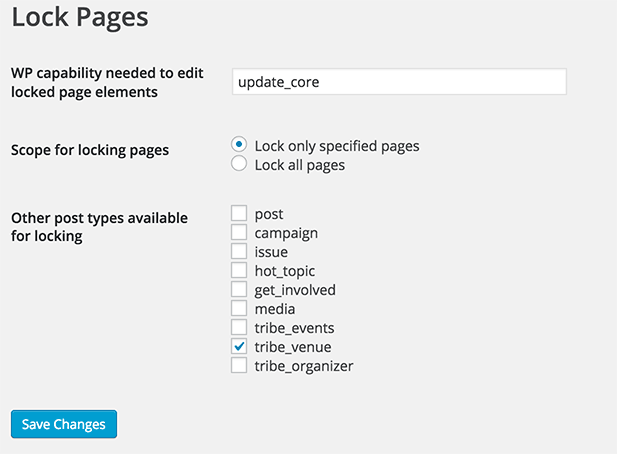


Para desenvolvedores
Este é o seu plugin? Mostre os números.
Adicione um crachá ao vivo ao seu site, Documentos ou Readme do GitHub. Ele é atualizado por conta própria - nenhuma conta necessária.
Best Lock Pages alternatives
Todos os plugins de administrador →




FAQ
Lock Pages: quick answers
Respostas diretas, extraídas de dados ao vivo WordPress.org.
Fonte: WordPress.org
Is Lock Pages free?
Yes. Lock Pages is free to download and use from the official WordPress.org plugin directory.
Is Lock Pages safe to use in 2026?
Lock Pages shows warning signs in 2026 — compare the alternatives below before installing. It runs on 300+ sites, is rated 4/5 and was last updated 8 years ago, and scores 30/100 on our health check.
How many websites use Lock Pages?
Lock Pages is active on 300+ WordPress websites and has been downloaded 18,523 times since it launched in November 2009. It was downloaded 162 times in the last 30 days.
Does Lock Pages work with WordPress 7.1?
Lock Pages is officially tested up to WordPress 4.9.36, while the latest release is 7.1.5. It may still work, but try it on a staging site first.
When was Lock Pages last updated?
The latest version, 0.3.1, was released on December 19, 2018 (8 years ago).
Who makes Lock Pages?
Lock Pages is developed and maintained by Steve Taylor.
What are the best alternatives to Lock Pages?
The most popular alternatives to Lock Pages are Loginizer (1M+ installs), Redux Framework (800K+ installs) and Admin Menu Editor (300K+ installs).
Alimentado por PageForge
Um modelo e uma planilha. Uma página real para cada pesquisa.
PageForge Transforma cada linha de um CSV em uma página WordPress com seu próprio título, URL, SEO campos e esquema, construído no layout que você já desenhou. Gratuito em WordPress.org.
- CSV e XLSX, mais Google Sheets em Profissional e Empresarial
- Seu próprio título, URL, SEO campos e esquema para cada página
- Funciona com o editor de blocos, Elementor, Divi e Avada
- Gratuito em WordPress.org, sem cartão de crédito