


Locations and Areas – Leaflet Map with Region Tabs
An awesome map with features like: multiple regions as tabs, no API keys needed, frontend location adding, marker clustering & beautiful map and marker styles.

Considere uma alternativa
Locations and Areas shows warning signs in 2026 — compare the alternatives below before installing. It runs on 100+ sites, is rated 5/5 and was last updated 2 years ago, and scores 24/100 on our health check.
- Base de usuários pequenas (mais de 100 instalações ativas)
- Muito poucos comentários até agora
- Nenhuma atualização em mais de um ano
- Testado apenas até WordPress 6.7 (mais recente é 7.1)
Como ele se acumula?
Lado a lado em instalações, atualizações, avaliações e suporte


Downloads diários
Os picos de download geralmente seguem uma nova versão — cada site que atualiza automaticamente é um download.
Rankings
Where Locations and Areas stands todayWordPress.org Classificações de pesquisa
Posição ao vivo na pesquisa de plugins, top 100| Palavra chave | Posição |
|---|---|
| area | >100 |
| leaflet | #37 |
| location | >100 |
| map | >100 |
| region | >100 |
Adoção da versão
Compartilhamento de sites ativos por lançamento.
Divisão de classificação
★★★★★ ★★★★★ 5 de 3 comentários
About Locations and Areas
From the official readme · v1.7.3Descrição
An awesome map with features like: multiple regions as tabs, no API keys needed, frontend location adding, marker clustering & beautiful map and marker styles.
O que ele faz?
An awesome map with features like: multiple regions as tabs, no API keys needed, frontend location adding, marker clustering & beautiful map and marker styles.
If you want to focus on letting your visitors add markers by themselves check out my other more popular plugin Open User Map. It’s based on this plugin but has a lot more features.
Look at the Demo and use-cases here. You can even add your own locations right away. Give it a try!
Showcase widely distributed locations on a single map with additional navigation tabs for regions. The map is based on Leaflet JS and offers you several free map styles. So you do not need an API Key, Access Token or any other external registration. There are no API request limits.
Adding locations is as simple as dropping a location marker on a map. You can search for addresses worldwide to quickly find the right spots. Use the Gutenberg Block to integrate your map or place the shortcode anywhere on your site. Close by locations will group together in clusters. This is optional.
🎅✨ The PRO Version now has a free 7-day trial period. No credit card required!
Let your visitors “fly” back and forth between widely distributed locations with the additional area navigation
Make use of Areas (Regions) to provide different focus points to your visitor.
Your visitors can add locations directly inside the map (frontend) [PRO Feature]
Just by clicking a “+”-Button a form will popup to let them enter location details the same comfortable way you do it in the backend. After submit the location proposal will be “pending” and wait for your review approval to get published.
List of free Features:
- based on Leaflet
- no API Keys
- multiple map styles
- multiple marker styles
- locations with images
- Shortcode with optional attributes
- Gutenberg Bloco
- marker clustering
PRO Features 🚀🚀🚀:
- Frontend adding
- Admin approval for pending locations
- custom “Thank you”-message
- More beautiful map styles
- More marker icon styles
- Direct support from the developer
- Access all future PRO features
- Request for features
A possible use case:
You have offices in Europe, Asia and North America and don‘t want to include a whole world map or three separate maps for that. This plugin let‘s you set multiple focus areas within one map. Your visitors will switch (literally ”fly”) between your focus areas just by clicking the links on top of the map.
Another use case:
You have several stores in different cities. Your site visitors will be able to ”fly” between the cities to get an overview of the exact locations inside every city. You can set the zoom level for every area individually.
…and another use case:
You want to build a map service where your visitors can add locations on their own. This could be a travel blog or a something like our map with 500+ kite and windsurfing spots worldwide.
**The possibilities are endless. We are very curious about what you are building with the help of our plugin. Please don’t hesitate to let us know or ask for feature requests in the support forum. As this plugin is under permanenent development we are keen to know what are the features that you need? Contact us!
Instalação
From your WordPress dashboard
- Visit Plugins > Add New
- Search for “Locations and Areas”
- Install and activate Locations and Areas from your Plugins page
- Click on the new menu item “Locations” and create your first Location!
- Use the Gutenberg Block “Locations and Areas Map” (category “Widgets”) or just use the shortcode
[locations-and-areas-map]to show the map on your site.
Log de Changes
1.7.3
- Freemius SDK Update
1.7.2
- Freemius SDK Update
1.7.1
- Security Update
1.7.0
- better responsive styles for small screens
- better initial map position when adding another location
- better frontend form
- escaping single quotes from HTML input
- new feature: use shortcode attributes to set initial map focus
- code optimization
1.6.9
- Code optimization
- better style & wording for opt in screen
1.6.8
- Code optimization
- Style & Wording optimization
Capturas de tela


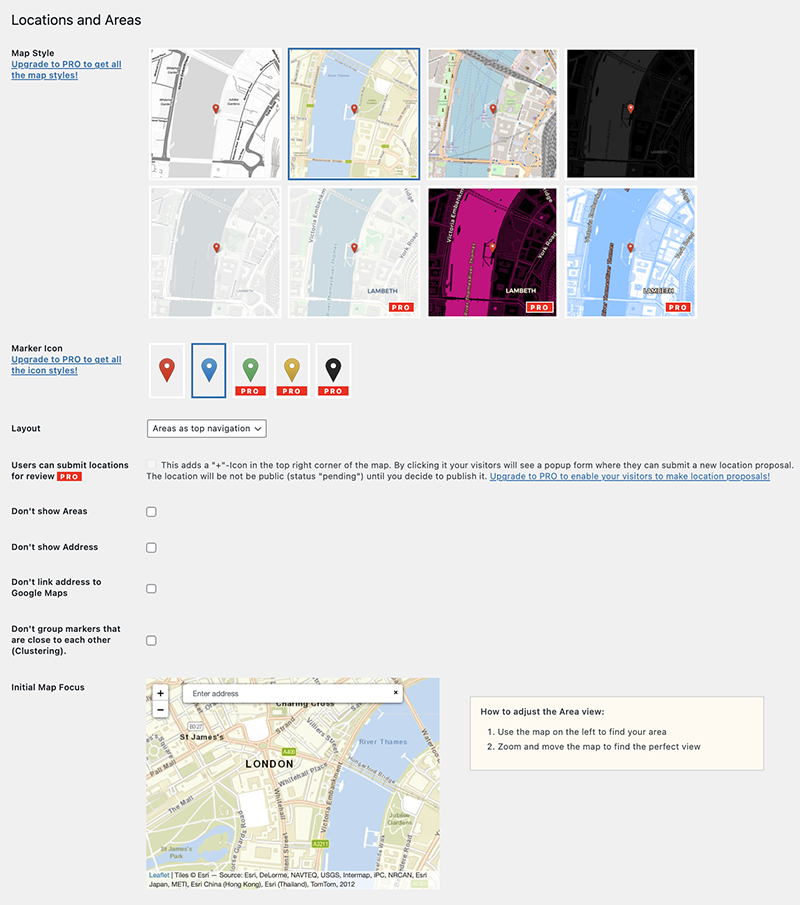

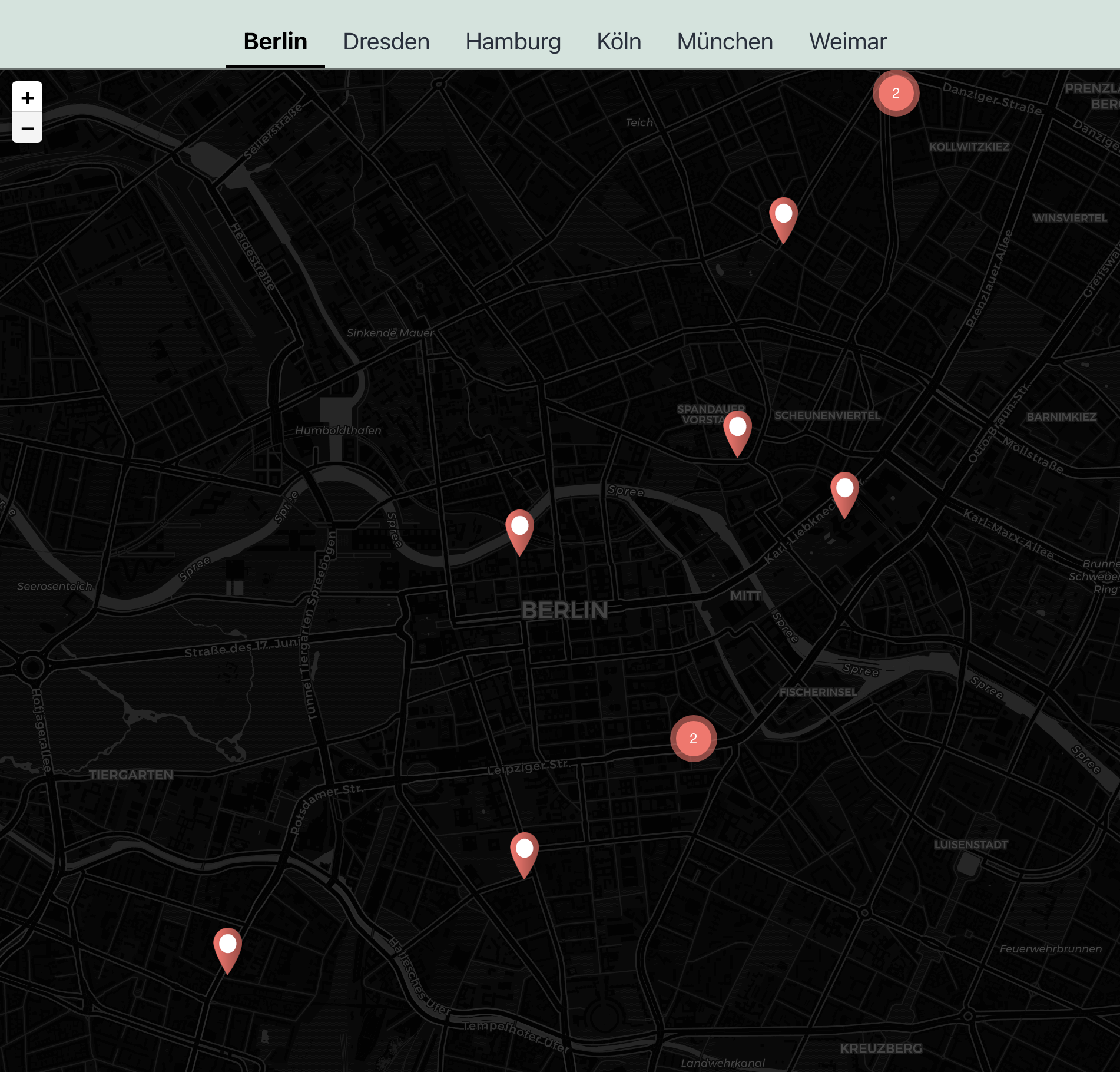
Para desenvolvedores
Este é o seu plugin? Mostre os números.
Adicione um crachá ao vivo ao seu site, Documentos ou Readme do GitHub. Ele é atualizado por conta própria - nenhuma conta necessária.
Best Locations and Areas alternatives
All area plugins →


FAQ
Locations and Areas: quick answers
Respostas diretas, extraídas de dados ao vivo WordPress.org.
Fonte: WordPress.org
Is Locations and Areas free?
Yes. Locations and Areas is free to download and use from the official WordPress.org plugin directory.
Is Locations and Areas safe to use in 2026?
Locations and Areas shows warning signs in 2026 — compare the alternatives below before installing. It runs on 100+ sites, is rated 5/5 and was last updated 2 years ago, and scores 24/100 on our health check.
How many websites use Locations and Areas?
Locations and Areas is active on 100+ WordPress websites and has been downloaded 10,653 times since it launched in August 2020. It was downloaded 181 times in the last 30 days.
Does Locations and Areas work with WordPress 7.1?
Locations and Areas is officially tested up to WordPress 6.7.12, while the latest release is 7.1.5. It may still work, but try it on a staging site first.
What PHP version does Locations and Areas need?
Locations and Areas requires PHP 7.0 or higher. Most hosts run PHP 8.x today, so it works on any modern WordPress hosting.
When was Locations and Areas last updated?
The latest version, 1.7.3, was released on February 10, 2025 (2 years ago).
Who makes Locations and Areas?
Locations and Areas is developed and maintained by 100plugins.
What are the best alternatives to Locations and Areas?
The most popular alternatives to Locations and Areas are Simple Members Area (60+ installs), Private Area for WordPress (60+ installs) and Delivery Area with Google M… (50+ installs).
Alimentado por PageForge
Um modelo e uma planilha. Uma página real para cada pesquisa.
PageForge Transforma cada linha de um CSV em uma página WordPress com seu próprio título, URL, SEO campos e esquema, construído no layout que você já desenhou. Gratuito em WordPress.org.
- CSV e XLSX, mais Google Sheets em Profissional e Empresarial
- Seu próprio título, URL, SEO campos e esquema para cada página
- Funciona com o editor de blocos, Elementor, Divi e Avada
- Gratuito em WordPress.org, sem cartão de crédito