


Link View
The purpose of this plugin is to to show the wordpress integrated links in a list or a slider by using a shortcode or a widget.

Considere uma alternativa
Link View shows warning signs in 2026 — compare the alternatives below before installing. It runs on 600+ sites, is rated 4.7/5 and was last updated 6 years ago, and scores 38/100 on our health check.
- Base de usuários pequenas (600+ instalações ativas)
- Nenhuma atualização em 6 anos
- Only tested up to WordPress 5.6 (latest is 7.1)
Como ele se acumula?
Lado a lado em instalações, atualizações, avaliações e suporte



Downloads diários
Os picos de download geralmente seguem uma nova versão — cada site que atualiza automaticamente é um download.
Rankings
Where Link View stands todayWordPress.org Classificações de pesquisa
Posição ao vivo na pesquisa de plugins, top 100| Palavra chave | Posição |
|---|---|
| blogroll | #21 |
| link | >100 |
| Links | >100 |
| linkview | #1 |
| view | >100 |
Adoção da versão
Compartilhamento de sites ativos por lançamento.
Divisão de classificação
★★★★★★★★★★ 4.7 from 11 reviews
About Link View
From the official readme · v0.8.0Descrição
The purpose of this plugin is to to show the wordpress integrated links in a list or a slider by using a shortcode or a widget.
Current Features:
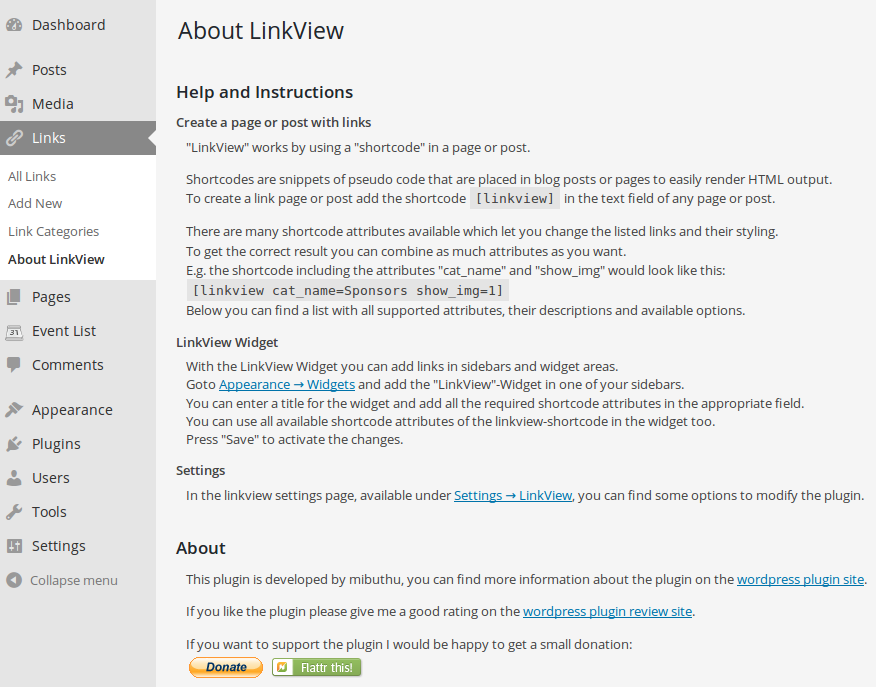
- the shortcode [linkview] can be used to add the links in a post or page
- the widget “LinkView” can be used to add links in a sidebar
- the links can be displayed in a list or in a slider
- there are many options available to adjust the output of the links (see shortcode options in the “About LinkView” page)
- the image of the link can also be displayed
- categories and/or links can be displayed in multicolumn layout
- option to set additional css styles for the link-lists and link-sliders
- the required user roles to edit links can be adjusted in the settings page
Development:
If you want to follow the development status have a look at the git-repository on github.
Feel free to add your merge requests there, if you want to help to improve the plugin.
Translations:
Please help translating this plugin into multiple languages.
You can submit your translations at transifex.com.
There the source strings will be kept in sync with the actual development version. And in each plugin release the available translation files will be updated.
Instalação
The easiest version of installing is to go to the admin page. There you can install new plugins in the menu Plugins -> Add new. Search for “Link View” and press “Install now”.
If you want to install the plugin manually download the zip-file and extract the files into your wp-content/plugins folder.
Log de Changes
0.8.0 (2020-11-29)
- raise minimum required PHP version to 5.6
- some internal code refactoring (namespaces, file structure, …)
- added setting to add custom css classes
- added a shortcode attribute to add custom css classes
- added category css classes for each link
- change shortcode boolean attributes from ‘1’ and ‘0’ to ‘true’ and ‘false’ (numbers are still working)
- changed css class prefix from ‘lv’ to ‘lvw’. Attention: If you use these class names in your CSS or the custom CSS option you have to update the CSS there!
0.7.3 (2020-04-19)
- fixed warnings for PHP-versions < 7.0
- small improvement in link_rel handling
- prepare missing texts for translation and improve helptexts
- updated german translation
0.7.2 (2018-11-25)
- complete code rewrite:
- switched to wordpress coding standard
- added comments for all files, classes and functions
- code check with phpcs and phan
- use shortcode class instances instead of singleton
0.7.1 (2017-08-13)
- added shortcode attribute “show_num_links”
- changed default value for cat_filter from “all” to an empty string (“all” is deprecated now)
- splitted admin about page in 2 tabs (general and shortcode attributes)
- added information about translations
- updated masonry script to version 4.2
- prepare more strings for translation add added german translations for them
- Rise mimimum required WordPress version to 3.8
- moved screenshots to assets folder
0.7.0 (2017-01-20)
- added multi-language-support (not all strings translatable yet)
- added german translation
- moved helptexts into separate file and only load them if required
- updated masonry script from version 3.2.2 to 4.1.1
- removed deprecated shortcode attributes “cat_name” and “target”
- changed link to renamed github-repository
Attention: Due to a change of a filename the plugin probably gets deactivated after upgrade! Please check the plugin settings and activate link-view again if required!
0.6.4 (2016-10-31)
- added minified version of slider-script
- consolidate and improve multi-column support for categories and link-lists
- updated help texts for multi-column support
- some css changes for multi-column support
- security improvement for external links
Attention: This version includes some modifications in multi-column layout, which can break existing shortcodes! So if you already use the multi-column feature for categories and/or links please check the output of your link page after the update. If the layout is broken you can find help in the admin page: Links -> About LinkView.
Capturas de tela


Para desenvolvedores
Este é o seu plugin? Mostre os números.
Adicione um crachá ao vivo ao seu site, Documentos ou Readme do GitHub. Ele é atualizado por conta própria - nenhuma conta necessária.
Best Link View alternatives
All blogroll plugins →




FAQ
Link View: quick answers
Respostas diretas, extraídas de dados ao vivo WordPress.org.
Fonte: WordPress.org
Is Link View free?
Yes. Link View is free to download and use from the official WordPress.org plugin directory.
Is Link View safe to use in 2026?
Link View shows warning signs in 2026 — compare the alternatives below before installing. It runs on 600+ sites, is rated 4.7/5 and was last updated 6 years ago, and scores 38/100 on our health check.
How many websites use Link View?
Link View is active on 600+ WordPress websites and has been downloaded 56,100 times since it launched in February 2012. It was downloaded 238 times in the last 30 days.
Does Link View work with WordPress 7.1?
Link View is officially tested up to WordPress 5.6.24, while the latest release is 7.1.5. It may still work, but try it on a staging site first.
What PHP version does Link View need?
Link View requires PHP 5.6 or higher. Most hosts run PHP 8.x today, so it works on any modern WordPress hosting.
When was Link View last updated?
The latest version, 0.8.0, was released on November 29, 2020 (6 years ago).
Who makes Link View?
Link View is developed and maintained by mibuthu.
What are the best alternatives to Link View?
The most popular alternatives to Link View are Link Manager (20K+ installs), Eazy Enable Blogroll (1K+ installs) and Better Blogroll (300+ installs).
Alimentado por PageForge
Um modelo e uma planilha. Uma página real para cada pesquisa.
PageForge Transforma cada linha de um CSV em uma página WordPress com seu próprio título, URL, SEO campos e esquema, construído no layout que você já desenhou. Gratuito em WordPress.org.
- CSV e XLSX, mais Google Sheets em Profissional e Empresarial
- Seu próprio título, URL, SEO campos e esquema para cada página
- Funciona com o editor de blocos, Elementor, Divi e Avada
- Gratuito em WordPress.org, sem cartão de crédito