


jQuery Comment Replies
Simple plugin to show/hide comment replies, rather than have them all listed. An options page makes it really easy to change different parts of your comment calls.

Considere uma alternativa
jQuery Comment Replies shows warning signs in 2026 — compare the alternatives below before installing. It runs on 10+ sites, is rated 3.3/5 and was last updated 13 years ago, and scores 25/100 on our health check.
- Pequena base de usuários (10+ instalações ativas)
- Low rating so far — 3.3/5 from only 4 reviews
- Nenhuma atualização em 12 anos
- Only tested up to WordPress 3.9 (latest is 7.1)
Como ele se acumula?
Lado a lado em instalações, atualizações, avaliações e suporte



Downloads diários
Os picos de download geralmente seguem uma nova versão — cada site que atualiza automaticamente é um download.
Rankings
Where jQuery Comment Replies stands todayWordPress.org Classificações de pesquisa
Posição ao vivo na pesquisa de plugins, top 100| Palavra chave | Posição |
|---|---|
| COMENTÁRIOS | >100 |
| expand | >100 |
| jquery | >100 |
| replies | >100 |
Adoção da versão
Compartilhamento de sites ativos por lançamento.
Divisão de classificação
★★★★★★★★★★ 3.3 from 4 reviews
About jQuery Comment Replies
Do Readme oficial · v1.2.4Descrição
Simple plugin to show/hide comment replies, rather than have them all listed. An options page makes it really easy to change different parts of your comment calls.
Recursos
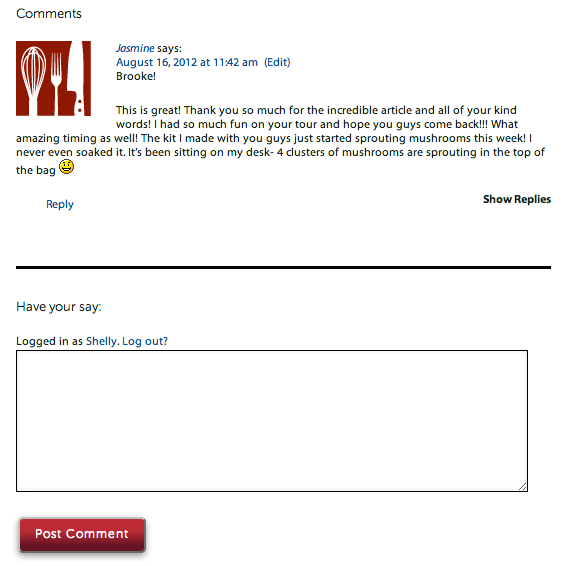
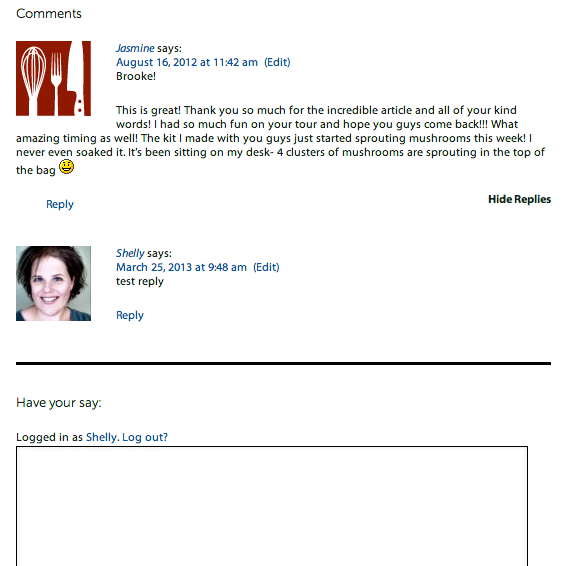
This keeps the default “wp_list_comments()” features. A clickable span that triggers the action to expand the replies is also added.
New features are including easing options, as well as allowing images. An options page has been added for further customizations, making it even easier to use.
Other Info
Known Issues
None at this time.
Given that this is free, I offer limited support. If you have issues with the plugin working I will do whatever I can to help you fix the issue, but when it comes to customization, I’m in limited supply. I’ll do what I can, but no guarantees. This is your standard “as is” application. In all honesty, ask customization questions in the forums – if I can’t help, perhaps someone else can. (If you want to hire me to customize it, that’s another story – feel free to contact me to do so!)
PLEASE NOTE that the WordPress support system DOES NOT notify me when someone leaves a support question. It requires me to come back and check manually to see if anyone has had an issue. Sometimes, I don’t get to do that for a while. If you left a support request on the forums, and it’s been at least a week since you left it with no response, please drop me an email to let me know so I can attempt to help you out. I’m pretty good at helping out – but I’m not so good at coming to check the forums – especially when I’m busy with client work.
Instalação
- Unzip the package.
- Upload to your plugins directory.
- Go to “Plugins” and activate.
Options Page
The items you can mess with here will edit the arguments for wp_list_comments(), so you no longer need to add arguments to your call. In fact, if you have arguments in your bb_list_comments call, they will be ignored (but if they are there, it won’t break anything). The only sections to comment on (because they are not a part of the Codex) are:
-
Show Replies Text/Hide Replies Text. These items are the text you set for the show/hide links.
-
Stylesheets. The plugin will see what theme you are using. If you’re using a default WordPress theme, then styles will be applied that match your active theme. Otherwise, no styles will be applied. You can go to the wp-content/plugins/jquery-expandable-comments/css folder and use any of these stylesheets as a reference to style it yourself in your own theme stylesheet.
-
Slide Speed (both open and close). This is the speed of the animation for opening and closing the replies. You can use “fast” or “slow”; or set how long (in milliseconds) you want the animation to take.
-
Easing Type. The jQuery Easing plugin has been added so you have more animation options. Simply choose which animation you want to use, and it will be applied to both the opening and closing of replies.
I’ll also comment on the “callback” section – it is discussed in the codex, but there’s no example of how to use it. If you want to format the layout of your comments, then you need to use a callback function to rearrange the HTML. This plugin comes with a callback function you can use. It’s NOT set as the default. If you’d like to use it, enter in bb_jcr_format_comment to this text field, and your comment layout will use the callback supplied in the plugin. if you still want to edit the layout, feel free to copy the function (located within jQuery-comments.php, around line 73) and paste it into your theme’s functions.php file. You WILL have to rename the function, or you’ll get a fatal error. Once you rename the function, take that name and pop it into the “callback” field on the settings page, then feel free to edit the function to get the exact layout you want to have.
There’s several tutorials available for how to edit the comment layout, but Jeremy Clark‘s is the one that actually started this plugin.
Log de Changes
** IMPORTANT ** bb_list_comments() is now deprecated. You WILL need to switch back to wp_list_comments() in your theme files. This should fix the old conflict issue with Spam Free WordPress. I sincerely apologize for the issus with the plugin for the past couple of releases. I had a bit of trouble with the repository, and now all the issues have been resolved.
1.2.4
- further troubleshooting issues with bb-toggle-kids.js – issues repaired.
- tested in default WordPress themes from Twenty Ten to Twenty Fourteen.
- edited and streamlined options page a bit
- deprecated the “Callback” in the options page. You can still use it, but I’d move away from it – the next release will probably only have it as a reference and not use it at all.
1.2.2
- further troubleshoting issues with the repository. Discovered the CDN is not allowed to be added to the plugin, so have reverted back to including the jQuery easing js file.
1.2.1
- had some issues with updating the WordPress repository (for some reason, wouldn’t upload certain files, refused to delete others). Finally got it all sorted. Sorry for the delay.
1.2
- removed local jquery easing library, reverted to cdn
- edited script to work with TwentyThirteen (TwentyThirteen renamed the ‘li.commentlist’ to ‘li.comment-list’)
- added previously unavailable “div” option.
- fixed script localization
- removed the necessity of rewriting the Walker_Comment class. This renders the use of bb_list_comments() unneccessary.
- previously, there were no styles set for this plugin, but due to popular demand, I’ve put in a default stylesheet.
- finally actually figured out how to set up translation correctly. Yay! pot/mo files added.
1.1
- fixed a bug when clicking show/hide made the child divs “bounce”
1.0
- Newly revamped code, been rewritten for WordPress 3.5 and cleaned up a bit.
- Options page added to make it really easy to edit text, animations, and speed, as well as making other options for wp_list_comments easy to manage.
Capturas de tela
Para desenvolvedores
Este é o seu plugin? Mostre os números.
Adicione um crachá ao vivo ao seu site, Documentos ou Readme do GitHub. Ele é atualizado por conta própria - nenhuma conta necessária.
Best jQuery Comment Replies alternatives
Todos os plugins de comentários →



FAQ
jQuery Comment Replies: quick answers
Respostas diretas, extraídas de dados ao vivo WordPress.org.
Fonte: WordPress.org
Is jQuery Comment Replies free?
Yes. jQuery Comment Replies is free to download and use from the official WordPress.org plugin directory.
Is jQuery Comment Replies safe to use in 2026?
jQuery Comment Replies shows warning signs in 2026 — compare the alternatives below before installing. It runs on 10+ sites, is rated 3.3/5 and was last updated 13 years ago, and scores 25/100 on our health check.
How many websites use jQuery Comment Replies?
jQuery Comment Replies is active on 10+ WordPress websites and has been downloaded 8,127 times since it launched in April 2009. It was downloaded 43 times in the last 30 days.
Does jQuery Comment Replies work with WordPress 7.1?
jQuery Comment Replies is officially tested up to WordPress 3.9.40, while the latest release is 7.1.5. It may still work, but try it on a staging site first.
When was jQuery Comment Replies last updated?
The latest version, 1.2.4, was released on April 17, 2014 (13 years ago).
Who makes jQuery Comment Replies?
jQuery Comment Replies is developed and maintained by Doodlebee.
What are the best alternatives to jQuery Comment Replies?
The most popular alternatives to jQuery Comment Replies are Akismet Anti-spam: Spam Pro… (5M+ installs), Disable Comments (1M+ installs) and Antispam Bee (700K+ installs).
Alimentado por PageForge
Um modelo e uma planilha. Uma página real para cada pesquisa.
PageForge Transforma cada linha de um CSV em uma página WordPress com seu próprio título, URL, SEO campos e esquema, construído no layout que você já desenhou. Gratuito em WordPress.org.
- CSV e XLSX, mais Google Sheets em Profissional e Empresarial
- Seu próprio título, URL, SEO campos e esquema para cada página
- Funciona com o editor de blocos, Elementor, Divi e Avada
- Gratuito em WordPress.org, sem cartão de crédito