


Woody Code Snippets – Insert PHP, CSS, JS, and Header/Footer Scripts
Insert PHP, JavaScript, CSS, HTML, ads & tracking code into WordPress headers, footers, pages & content with conditional logic — no theme editing.

Escolha segura
Yes — Woody Code Snippets is a safe, well-maintained plugin to use in 2026. It runs on 50K+ sites, is rated 4.5/5 and was last updated 4 days ago, and scores 93/100 on our health check.
- Comprovado em escala em mais de 50 mil sites ativos
- Loved by users — 4.5/5 from 221 reviews
- Desenvolvido ativamente — última atualização 4 dias atrás
- Testado com as últimas WordPress (7.1)
Como ele se acumula?
Lado a lado em instalações, atualizações, avaliações e suporte



Downloads diários
Os picos de download geralmente seguem uma nova versão — cada site que atualiza automaticamente é um download.
Rankings
Where Woody Code Snippets stands todayWordPress.org Classificações de pesquisa
Posição ao vivo na pesquisa de plugins, top 100| Palavra chave | Posição |
|---|---|
| code-snippets | #4 |
| custom css | #19 |
| header footer | #5 |
| insert PHP | #2 |
| php | #1 |
Adoção da versão
Compartilhamento de sites ativos por lançamento.
Divisão de classificação
★★★★★★★★★★ 4.5 from 221 reviews
About Woody Code Snippets
From the official readme · v2.8.1Descrição
Woody Code Snippets is a WordPress plugin that helps you insert code into your site without editing theme files.
Many WordPress users still add PHP, JavaScript, CSS, tracking pixels, or ad scripts directly into functions.php, header.php, or footer.php. This approach breaks easily when themes update and becomes hard to manage as your site grows.
Woody solves this by giving you a centralized code snippet manager where you can safely add header scripts, footer scripts, PHP snippets, custom CSS, JavaScript, and HTML from the WordPress admin.
You can use Woody as a header and footer code manager, a PHP snippet plugin, or a way to reuse content and scripts across your site using shortcodes or automatic insertion.
Each snippet can be enabled or disabled instantly, placed in specific locations like before content or after paragraphs, and shown only when certain conditions are met.
Quick Links
📘 Documentation – Complete setup and configuration guide
💬 Support Forum – Community help and expert support
⭐ Go Pro – Unlock advanced features and priority support
What Problems Does Woody Solve?
Woody is built for real WordPress workflows. It helps you:
- Insert code into headers and footers without editing theme files
- Add analytics scripts, tracking pixels, and ad code safely
- Manage PHP snippets without touching functions.php
- Reuse scripts and content across pages using shortcodes
- Control where code runs using placement rules and conditions
- Enable, disable, or roll back snippets without breaking your site
Whether you are building client sites, running marketing experiments, or maintaining your own project, Woody gives you control without unnecessary complexity.
How It Works
Woody lets you create code snippets and control where and when they run, all from the WordPress admin.
Example #1
Create a JavaScript snippet and add your analytics or tracking code.
Place it in the site header and add a condition to exclude administrators so your own visits are not tracked.
Example #2
Create a text snippet with reusable content or a shortcode.
Add conditions to show it only to logged-in users, then insert it anywhere using the snippet shortcode or automatic placement rules.
This makes it easy to manage repeated logic and content without editing theme files.
Who Should Use Woody Code Snippets
Woody is designed for:
- Developers who want a structured way to manage custom code
- Marketers adding analytics, ads, and tracking scripts
- Solopreneurs who want flexibility without editing theme files
- Agencies managing multiple sites and shared snippets
If you regularly need to insert code into WordPress, Woody fits naturally into your workflow.
Supported Snippet Types
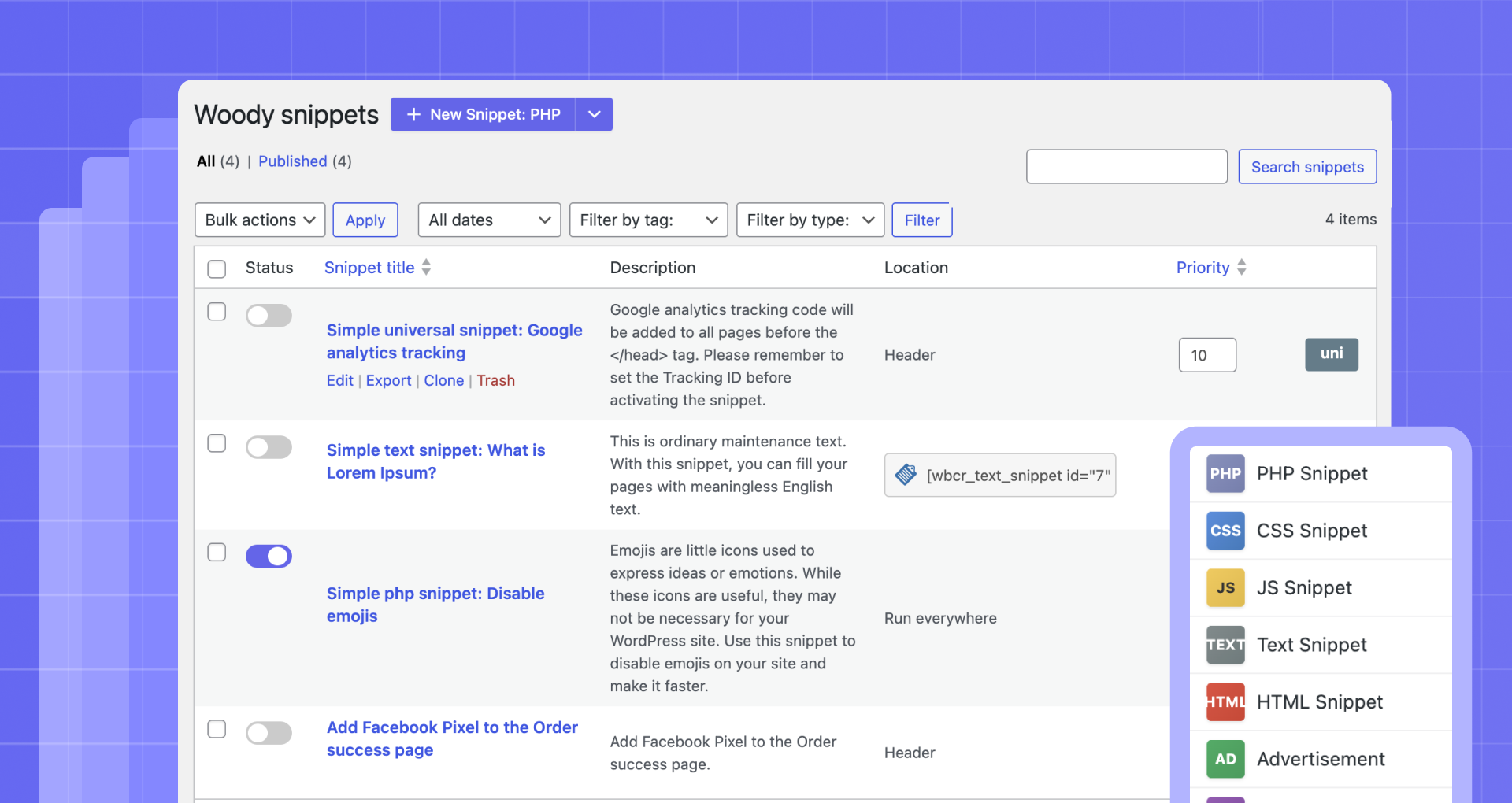
Woody supports multiple snippet types, so you can manage all custom code in one place. You can create:
- PHP snippets for functions, hooks, classes, and global variables
- JavaScript snippets for analytics, integrations, and interactive features
- CSS snippets to add custom styles without editing theme files
- HTML snippets for markup and layout elements
- Text snippets using the WordPress editor for reusable content
- Ad snippets for ads and banners
- Universal snippets that combine PHP, HTML, CSS, and JavaScript
Why do you need this plugin?
- Insert Google AdSense Ads, Amazon Native Shopping Contextual Ads, Yandex Direct Ads, Media.net on your website.
- Insert Google Analytic Tracking code, Yandex Metrika Tracking Code, Yandex Counter to Header, Footer.
- Insert PHP Code Snippets and execute on your website. Register PHP functions, classes, global variables everywhere.
- Insert Social media widgets, add any external resources widgets.
- Insert Facebook Pixels, Facebook Scripts, Facebook og:image Tag, Google Conversion Pixels, Vk Pixels.
Header and Footer Code Management
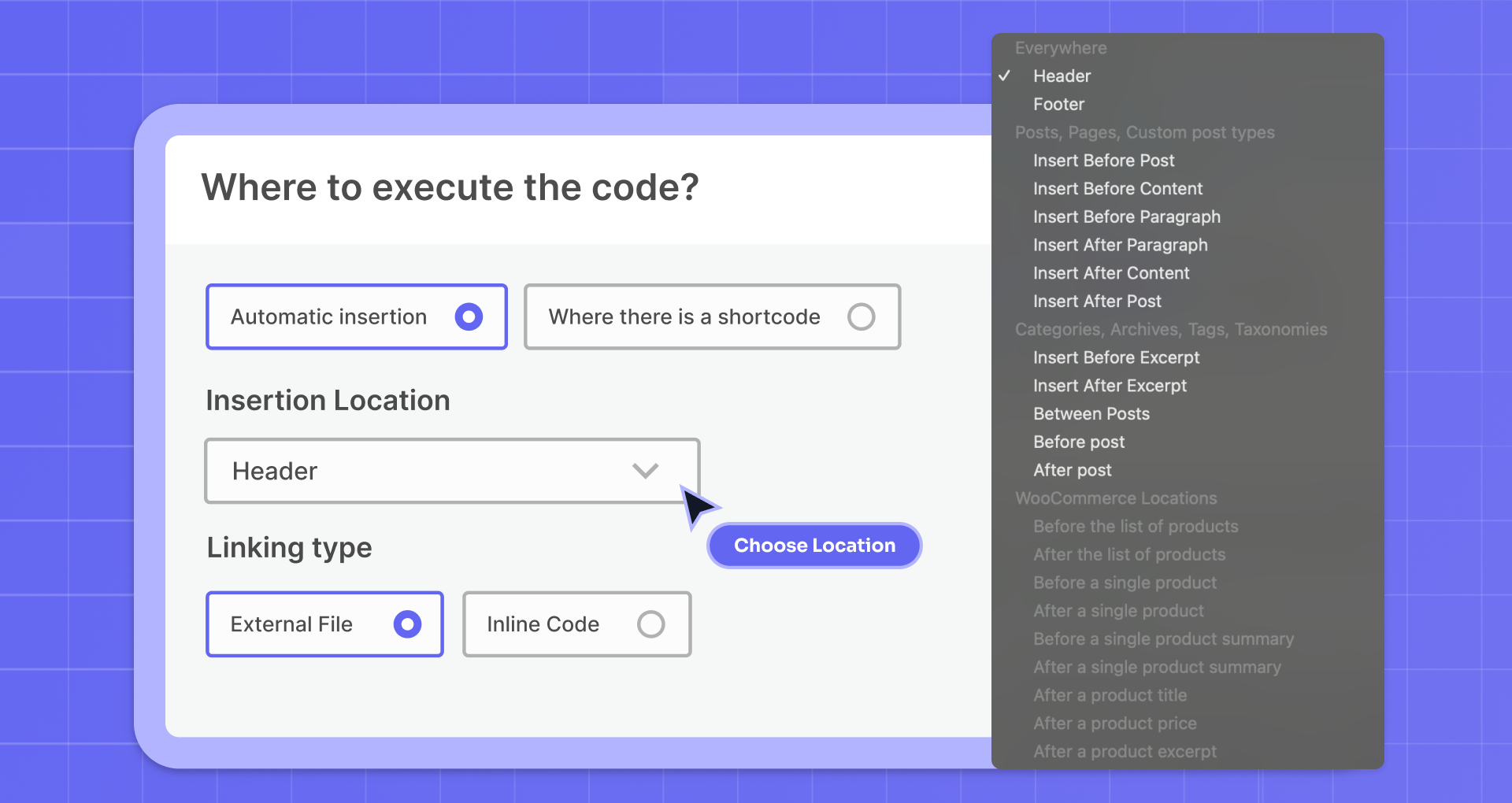
Woody works as a full header and footer code manager.
You can insert snippets:
– Into the site header before the closing tag
– Into the site footer before the closing tag
Common examples include analytics scripts, tracking pixels, verification tags, and global JavaScript or CSS.
Advanced Placement Options
Beyond headers and footers, Woody lets you insert snippets into specific locations.
You can place code:
- Before or after post or page content
- Before or after a specific paragraph
- Before or after a post
- Inside archives, categories, and taxonomy pages
- Between posts on archive pages
WooCommerce Pages
Woody supports automatic snippet placement on WooCommerce pages.
You can insert snippets:
- Before or after the product list
- Before or after a single product
- Before or after the single product summary
- After the product title, price, or excerpt
Common use cases include conversion tracking, promotional banners, custom JavaScript, and trust notices.
Shortcodes and Reusable Content
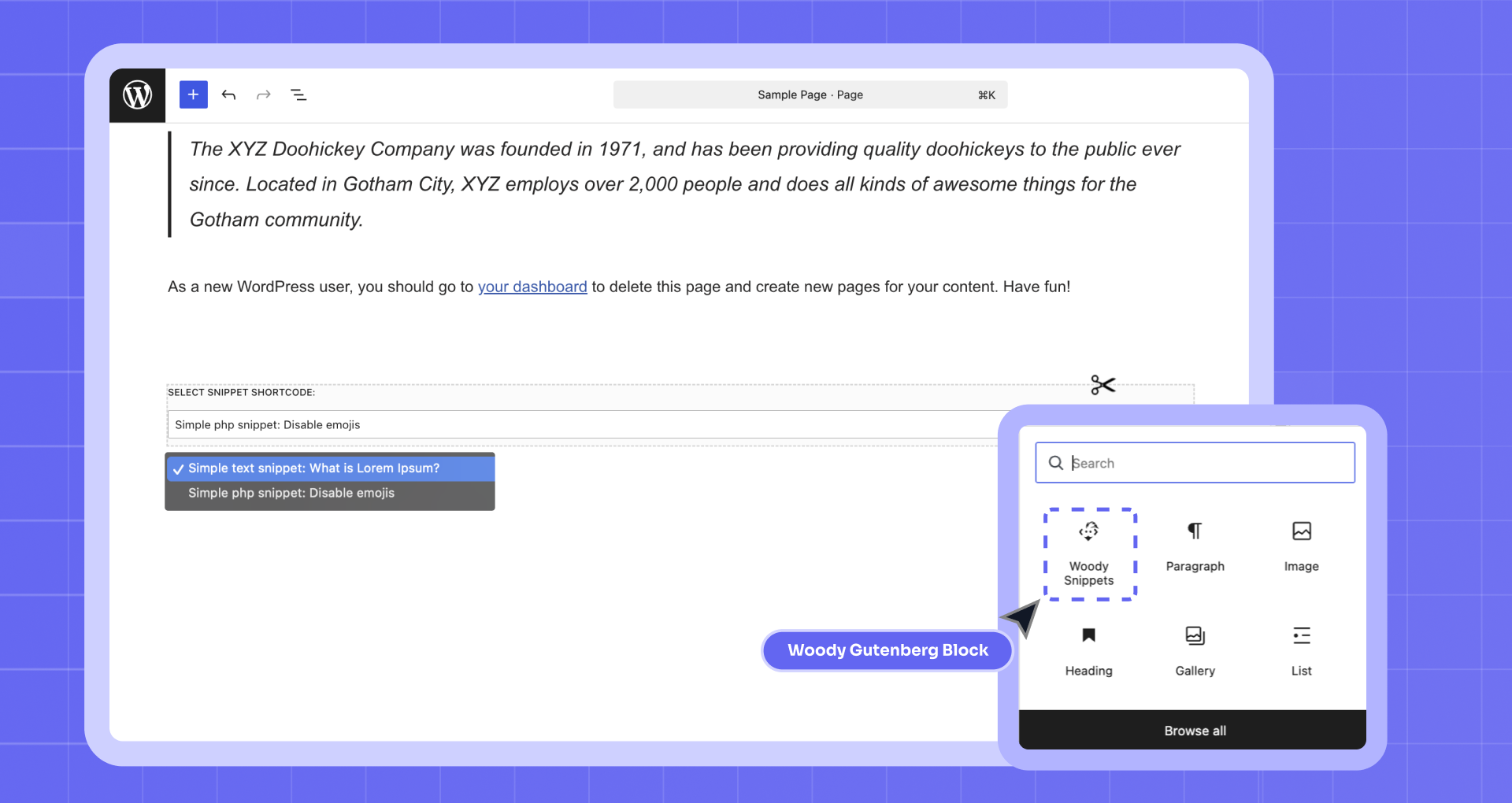
Woody supports shortcodes so you can insert snippets exactly where you need them. You can place snippets inside posts, pages, widgets, and page builders.
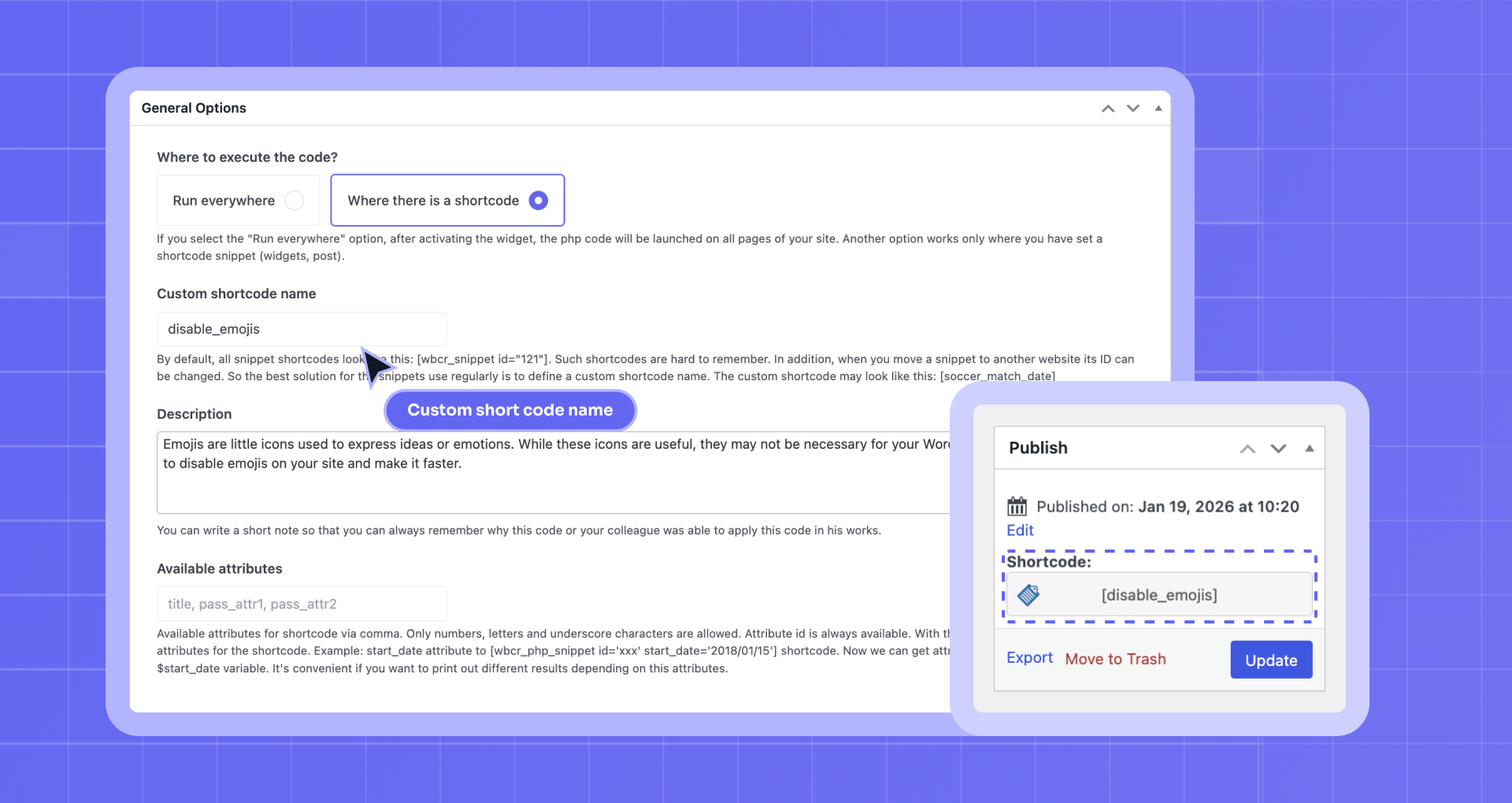
With Pro, you can define custom shortcode names that are readable and portable across sites.
Conditional Logic for Code Snippets
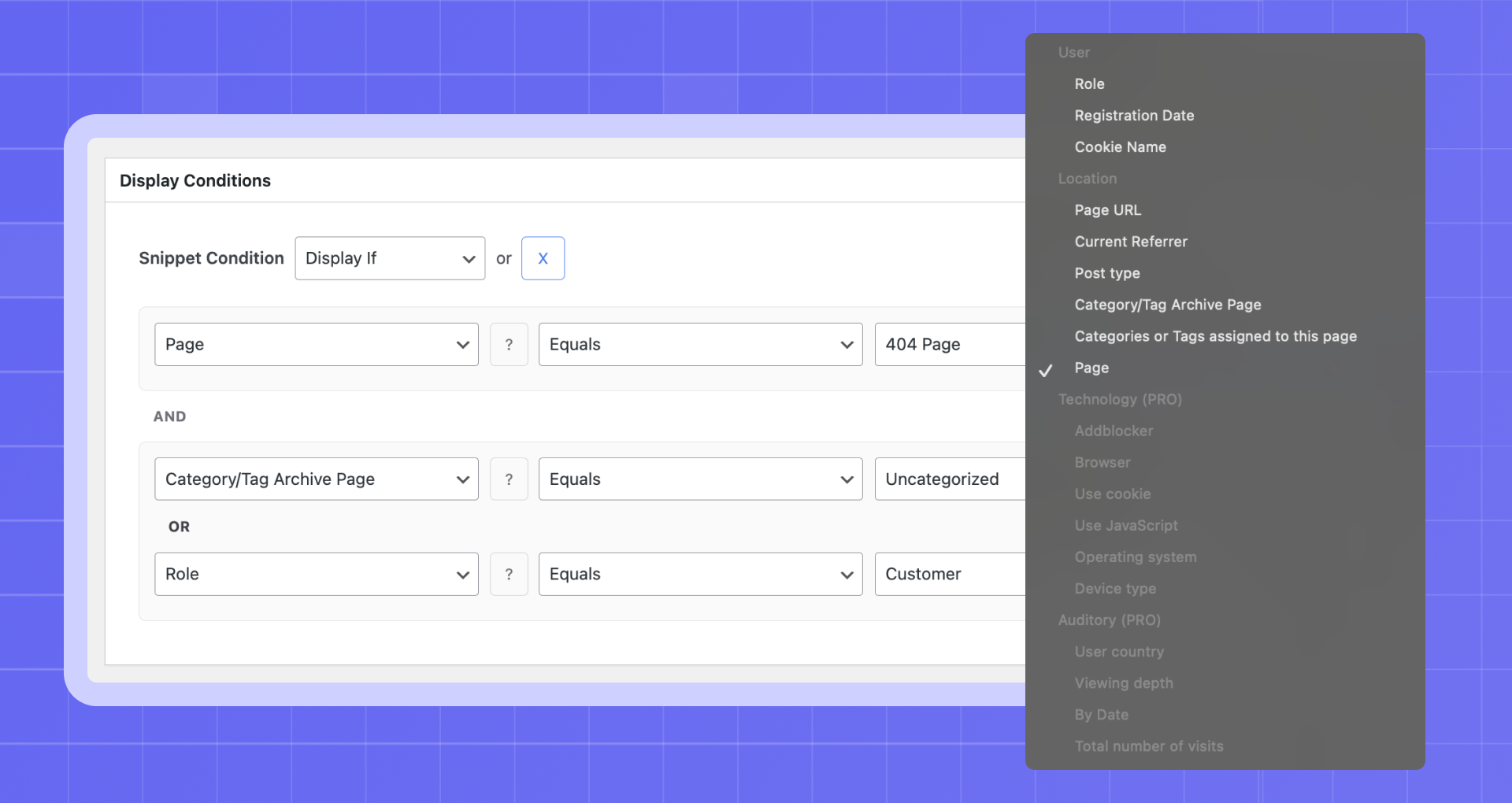
Woody allows you to control when a snippet is displayed.
[FREE] Available in the free version:
– User role and registration date
– Page, post type, or taxonomy
– Referrer or cookie value
[PRO] Advanced conditions available in Pro:
– Device type, browser, and operating system
– JavaScript availability or ad blocker detection
– User country, visit depth, time of day, and total visits
Conditions can be combined using AND and OR logic.
Unlock advanced conditions with Woody Pro.
Snippet Management and Organization
Woody includes features to keep snippets organized and easy to manage.
You can:
– Enable or disable snippets instantly
– Control execution order using priorities
– Tag and clone snippets
– Import and export snippets between sites
Code Revisions and Rollback [PRO]
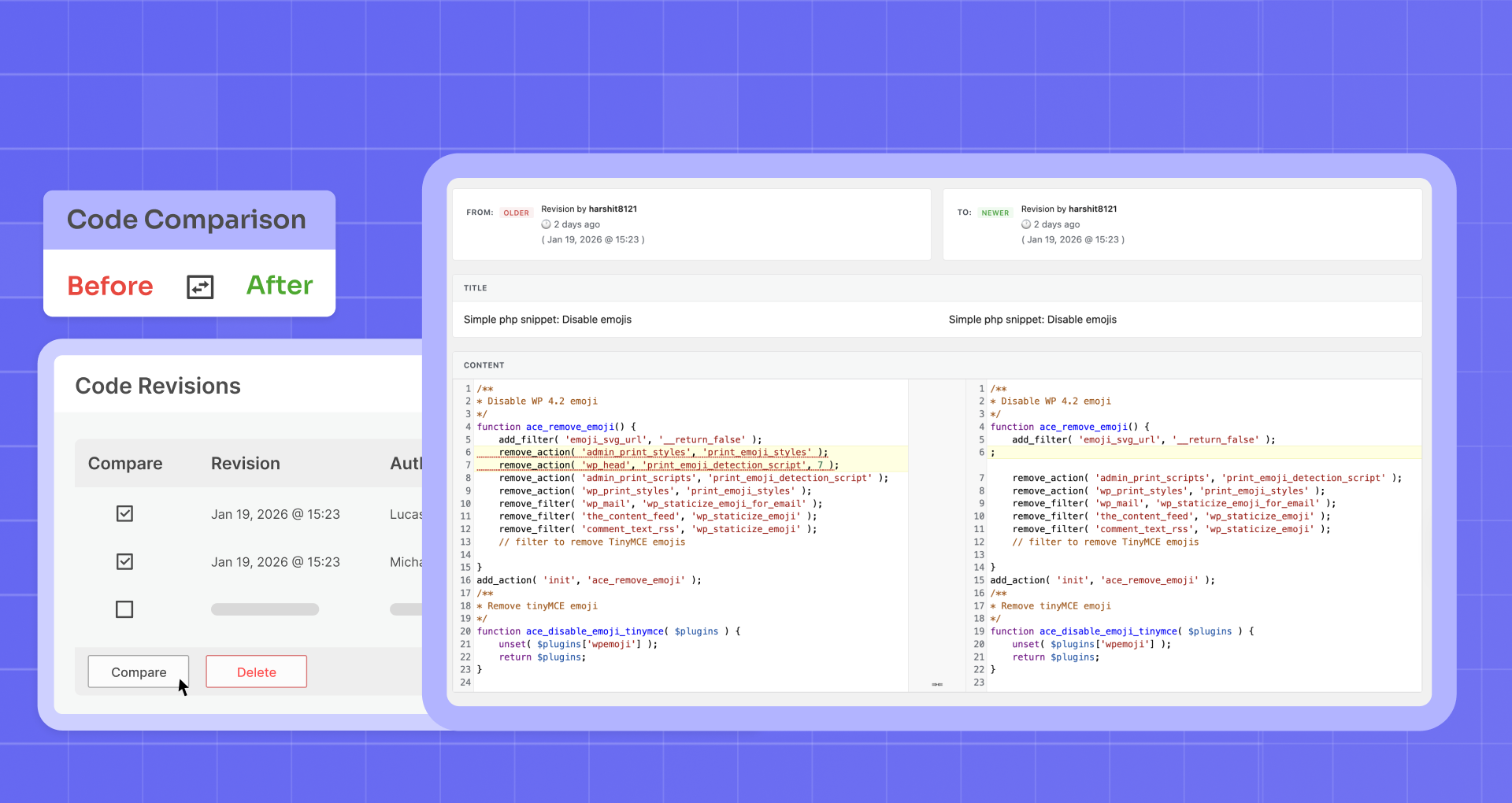
With Pro, Woody automatically saves snippet revisions. You can view previous versions, compare changes, and restore earlier revisions if something goes wrong.
This adds an extra layer of safety when working with custom code.
Cloud Templates and Sync [PRO]
Woody Pro includes cloud-based snippet templates.
You can save snippets as templates and reuse them across multiple sites, which is especially useful for agencies and developers managing repeated setups.
Settings and Developer Options
Woody includes advanced settings for fine-grained control.
You can:
- Preserve HTML entities without automatic conversion
- Execute shortcodes inside snippets
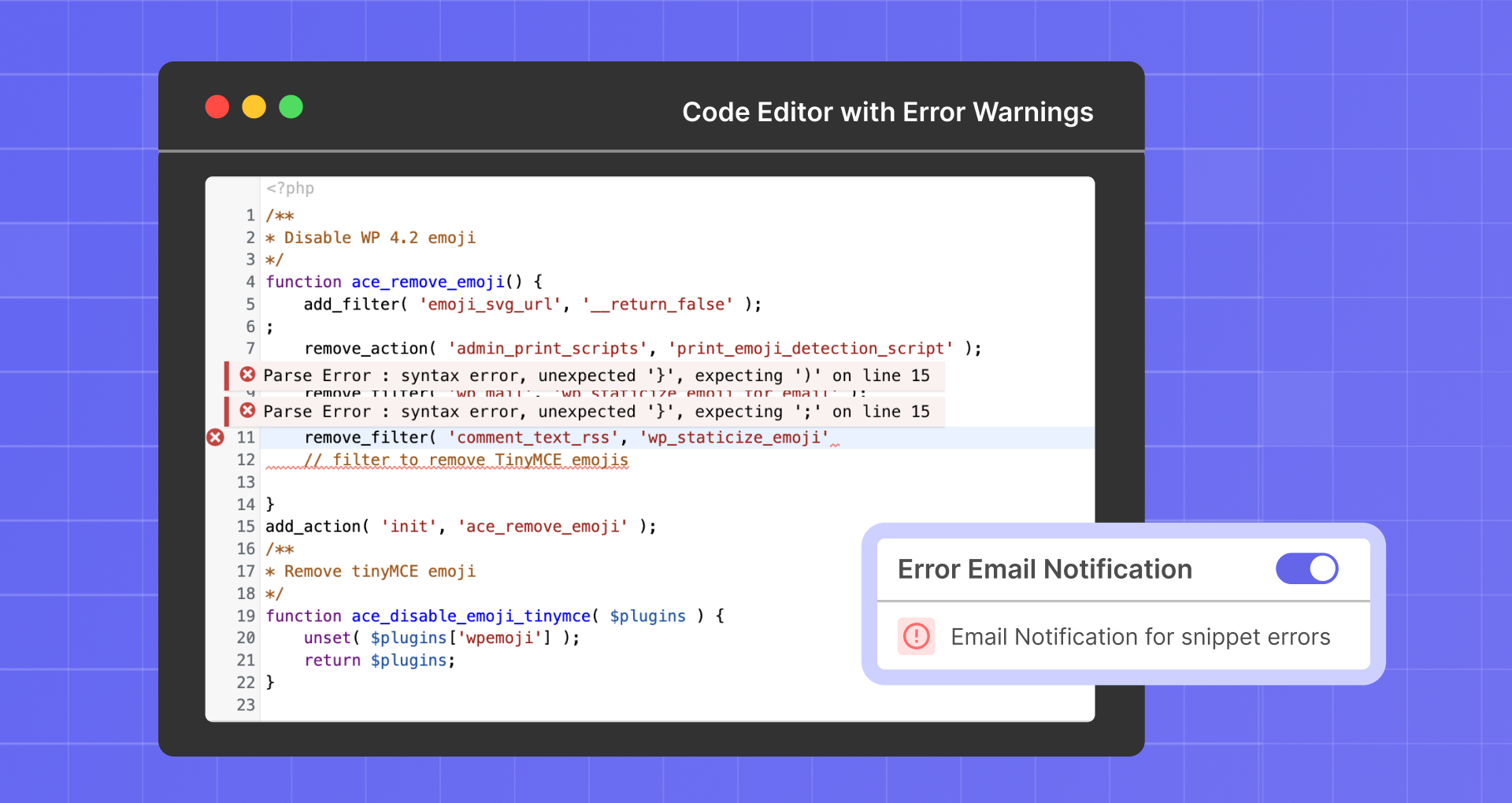
- Enable error email notifications
- Automatically activate snippets on save
- Fully remove plugin data on uninstall
Code Editor
The built-in editor includes:
– Syntax highlighting and line numbers
– Configurable indentation and tab size
– Optional line wrapping
– Automatic bracket and quote closing
– Highlighting of matching variables and functions
Use This Plugin Responsibly
Woody allows you to run custom PHP, JavaScript, and CSS on your site. Always make sure you understand the code you add. Using unverified or outdated scripts may affect site security or stability. On multisite installations, only trusted administrators should have access to snippet creation.
Woody includes safeguards such as snippet disabling, revisions, and error notifications, but it cannot validate third-party code you choose to run.
Apoio
Need help? Open a new thread in the WordPress support forum, and we will be happy to assist.
Documentação
Learn how to make the most of Woody with our detailed and user-friendly documentation.
Woody is backed by Themeisle, trusted by over 1 million WordPress users worldwide.
Instalação
- Carregue os arquivos do plugin no diretório
/wp-content/plugins/plugin-nameou instale o plugin por meio da tela de plugins WordPress diretamente. - Ative o plugin através da tela 'Plugins' em WordPress
- Use the PHP Snippets -> Add snippet, to create a new snippet
Log de Changes
Version 2.8.1 (2026-11-25)
- Dependências atualizadas
Version 2.8.0 (2026-11-25)
- Added AI abilities to trash and restore snippets, restore revisions, read the available locations and condition options, and read the last error of a snippet.
- Added support for CSS and JS snippets in the AI ability that creates and updates snippets.
- Added structured display conditions, tags, priority and list filters to the AI abilities.
- Added a Status switch to the Publish box of the snippet editor.
- Fixed a deactivated snippet being activated again on every Update when Auto-activate New Snippets is on.
- Fixed generated CSS/JS files and cached data not being cleaned up when a snippet is trashed or deleted outside the admin screens.
- Added the list of countries to the condition options that the AI abilities read (needs the premium plugin).
- Fixed the generated CSS/JS folder, three notice options and the Snippets Library cache being left behind after a complete uninstall.
- Fixed a Registration Date condition with Between and absolute dates not using the selected dates.
- Fixed an error in a universal shortcode snippet breaking the whole page.
- Fixed fatal errors being recorded for the wrong snippet, or not at all, when a snippet runs inside another one or as a shortcode.
- Fixed a snippet whose code is exactly 0 being treated as empty.
- Fixed a blank conditions value removing the display conditions of a snippet through the AI abilities.
- Fixed status switches, the priority field and Snippets Library buttons getting stuck after a failed request.
- Fixed settings switches such as Delete All Data on Uninstall showing as on while the option was off on a new install.
- Fixed the AI abilities that create, trash and restore snippets failing on sites with plain permalinks or index.php in their REST URLs.
- Improved the layout of the display conditions, the Snippets Library, the snippet type badges, the settings page and the Woody block.
- Fixed the Viewing depth condition never matching with the Between operator.
- Fixed Black Friday warning when default promotion data was missing.
- Fixed a request from a logged-out visitor being able to stop a snippet from running for that request.
- Fixed the Watch button of the Snippets Library showing a tutorial title as HTML.
- Limited the notices, emails and stored records that a repeating snippet error can create, and removed error notices once the snippet code changes.
- Limited the labels that the AI abilities return to short plain text.
- Fixed the AI abilities dropping backslashes from descriptions and tags, and saving number conditions that never matched.
- Changed the AI ability that saves snippets to refuse more than one condition group, because only the last group was applied.
- Dependências atualizadas
Version 2.7.12 (2026-11-13)
- Segurança aprimorada
Version 2.7.11 (2026-11-09)
- Fixed site crash when URL contains array-style parameters
- Segurança aprimorada
- Dependências atualizadas
Version 2.7.10 (2026-10-23)
- Fixed Universal snippets with strict_types declarations crashing pages
- Set PHP 7.4 as the minimum version required
- Dependências atualizadas
Version 2.7.9 (2026-10-05)
- Fixed a fatal error when activating legacy Premium versions.
- Fixed repeated PHP and Universal shortcodes breaking pages after function declarations.
- Fixed snippet previews and inactive saves running code before activation.
- Dependências atualizadas
Version 2.7.8 (2026-09-29)
- Dependências atualizadas
- Added AI agent support: let AI assistants read and change your Woody code snippets and settings.
Version 2.7.7 (2026-09-14)
- Improved the plugins reliability with expanded automated testing
- Fixed fatal PHP error details missing from the Safe Mode screen for administrators.
- Fixed PHP shortcodes crashing pages when a stored snippet has invalid PHP.
- Improved the Woody Snippets block setup when no snippets are available.
- Fixed PHP shortcodes that stopped page indexing after a snippet error.
- Fixed Safe Mode to stop all shortcode snippets for administrators.
- Fixed PHP shortcodes that could crash pages after a snippet runtime error.
- Fixed snippet saves that crashed when a function name was already in use.
- Fixed frontend pages stopping when a PHP shortcode snippet has a runtime error.
Version 2.7.6 (2026-07-22)
- Fixed a PHP warning that could appear in server logs when the plugin checked incoming REST API requests.
- Fixed an issue where a snippet error message could be shown to site visitors instead of only to administrators.
- Dependências atualizadas
Version 2.7.5 (2026-05-15)
- Improved compatibility with PHP 8.1
- Added display of actual PHP error message on the snippet error splash page
Version 2.7.4 (2026-04-27)
- Fixed error caused by dependencies
Version 2.7.3 (2026-04-23)
- Added an option to disable the Active Snippets notice from the menu
- Fixed issue with tags area is not visible unless you enable/disable it from Screen Options
- Fixed issue with text snippets paragraph formatting when rendered via shortcode
- Fixed issue where Tags and Custom shortcode names are not imported when importing snippets
- Segurança aprimorada
- Dependências atualizadas
Version 2.7.2 (2026-01-27)
- This release focuses on improving the security and robustness of snippet type handling in the codebase.
Version 2.7.1 (2026-01-21)
- Added a compatibility check for the Woody Pro version during activation to prevent fatal errors.
Version 2.7.0 (2026-01-19)
New Features
- Export and clone functionality now available in free version
- Active snippets menu item for better snippet management
- New feature to receive emails during fatal error caused by snippets
- New Improved Plugin UI.
- Non-premium snippets can now be accessed via API
- Use IPHub as Geolocation Tool. [PRO]
Enhancements
- Improved PHP code validation before saving
- Better Location terminology for improved clarity
- Added save hotkey support
- Enhanced snippet labels in library for easier identification
- Improved Add Snippet button UI for better user experience
- Updated license management system (SDK-based approach)
Correções de bugs
- Fixed translation and deprecation errors
- Fixed safe mode functionality
- Fixed location number field not appearing with certain conditions
- Fixed inactive snippets not being exported
- Fixed RTL (right-to-left) issues in toggle controls
- Fixed sync modal not appearing for advert type snippets
- Fixed license message display issues
- Fixed critical error with export logs tool permission checking
- Fixed trashing posts from removing associated metadata
Version 2.6.1 (2025-10-21)
- fix error with missing asset files
Version 2.6.0 (2025-10-20)
Woody Snippets plugin has been acquired by Themeisle 🎉
We’re happy to announce that Themeisle is now the new owner of Woody Snippets. This acquisition will help ensure the plugin’s continued development, better support, and exciting new updates in the future.
Your existing setup will continue to work as usual — no action is required on your part.
2.5.1
- Fixed: [insert_php] shortcodes are no longer supported due to the security risk to your site.
- Fixed: Compatibility with WordPress 6.5
- Fixed: Compatibility with php 8.3
2.5.0
- Fixed: Compatibility with WordPress 6.4
- Fixed: Compatibility with php 8.2
2.4.10
- Minor fixes
- New API for Snippets Library
Capturas de tela
Para desenvolvedores
Este é o seu plugin? Mostre os números.
Adicione um crachá ao vivo ao seu site, Documentos ou Readme do GitHub. Ele é atualizado por conta própria - nenhuma conta necessária.
Best Woody Code Snippets alternatives
All code-snippets plugins →




FAQ
Woody Code Snippets: quick answers
Respostas diretas, extraídas de dados ao vivo WordPress.org.
Fonte: WordPress.org
Is Woody Code Snippets free?
Yes. Woody Code Snippets is free to download and use from the official WordPress.org plugin directory.
Is Woody Code Snippets safe to use in 2026?
Yes — Woody Code Snippets is a safe, well-maintained plugin to use in 2026. It runs on 50K+ sites, is rated 4.5/5 and was last updated 4 days ago, and scores 93/100 on our health check.
How many websites use Woody Code Snippets?
Woody Code Snippets is active on 50K+ WordPress websites and has been downloaded 2,000,375 times since it launched in November 2012. It was downloaded 71,344 times in the last 30 days.
Does Woody Code Snippets work with WordPress 7.1?
Yes. The developer has tested Woody Code Snippets up to WordPress 7.1.5, the latest release. It requires WordPress 5.6 or newer.
What PHP version does Woody Code Snippets need?
Woody Code Snippets requires PHP 7.4 or higher. Most hosts run PHP 8.x today, so it works on any modern WordPress hosting.
When was Woody Code Snippets last updated?
The latest version, 2.8.1, was released on November 25, 2026 (4 days ago).
Who makes Woody Code Snippets?
Woody Code Snippets is developed and maintained by Themeisle.
What are the best alternatives to Woody Code Snippets?
The most popular alternatives to Woody Code Snippets are WPCode (3M+ installs), FluentSnippets (50K+ installs) and WPIDE (40K+ installs).
Alimentado por PageForge
Um modelo e uma planilha. Uma página real para cada pesquisa.
PageForge Transforma cada linha de um CSV em uma página WordPress com seu próprio título, URL, SEO campos e esquema, construído no layout que você já desenhou. Gratuito em WordPress.org.
- CSV e XLSX, mais Google Sheets em Profissional e Empresarial
- Seu próprio título, URL, SEO campos e esquema para cada página
- Funciona com o editor de blocos, Elementor, Divi e Avada
- Gratuito em WordPress.org, sem cartão de crédito