


Inline Preview
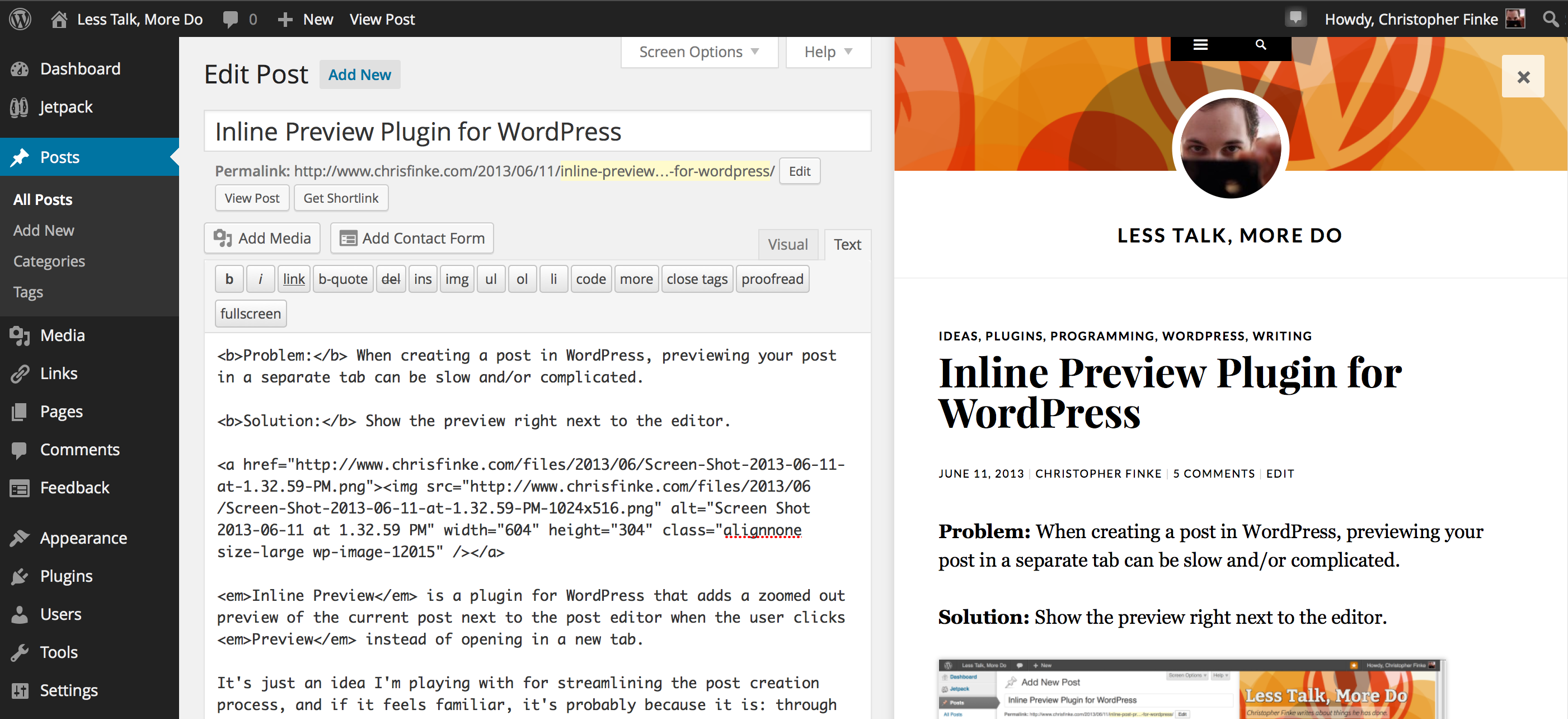
Inline Preview is a plugin for WordPress that adds a live preview of the current post next to the post editor instead of opening the preview in a new tab.

Considere uma alternativa
Inline Preview shows warning signs in 2026 — compare the alternatives below before installing. It runs on 300+ sites, is rated 4.9/5 and was last updated 10 years ago, and scores 38/100 on our health check.
- Base de usuários pequenas (mais de 300 instalações ativas)
- Nenhuma atualização em 9 anos
- Testado apenas até WordPress 4.7 (mais recente é 7.1)
Como ele se acumula?
Lado a lado em instalações, atualizações, avaliações e suporte


Downloads diários
Os picos de download geralmente seguem uma nova versão — cada site que atualiza automaticamente é um download.
Rankings
Where Inline Preview stands todayWordPress.org Classificações de pesquisa
Posição ao vivo na pesquisa de plugins, top 100| Palavra chave | Posição |
|---|---|
| live preview | >100 |
| preview | >100 |
Adoção da versão
Compartilhamento de sites ativos por lançamento.
Divisão de classificação
★★★★★★★★★★ 4.9 from 8 reviews
About Inline Preview
From the official readme · v4.3Descrição
Inline Preview is a plugin for WordPress that adds a live preview of the current post next to the post editor instead of opening the preview in a new tab.
Problem: When creating a post in WordPress, previewing your post in a separate tab can be slow and/or complicated.
Solution: Show the preview right next to the editor.
It’s just an idea I’m playing with for streamlining the post creation process, and if it feels familiar, it’s probably because it is: through version 2.1, WordPress contained a preview iframe at the bottom of the post editing screen, but this is a more elegant implementation.
Log de Changes
4.3
- Better compatibility with WordPress 4.1
- Fixed a bug preventing the preview frame from being resizable.
- Fixed a bug preventing live preview from working sometimes.
4.2
- Better compatibility with WordPress 3.9
4.1
- Better compatibility with WordPress 3.8
- The close button now fits in better with the rest of the WordPress UI.
4
- A better method for seamlessly reloading the preview frame.
- Keep the preview iframe the same relative size when the window is resized.
3
- Seamless reloading (and auto-reloading) of the preview frame.
2
- Added a close button to the preview frame.
- Properly restoring one- or two-column view after the preview closes.
Capturas de tela
Para desenvolvedores
Este é o seu plugin? Mostre os números.
Adicione um crachá ao vivo ao seu site, Documentos ou Readme do GitHub. Ele é atualizado por conta própria - nenhuma conta necessária.
Best Inline Preview alternatives
All live preview plugins →





FAQ
Inline Preview: quick answers
Respostas diretas, extraídas de dados ao vivo WordPress.org.
Fonte: WordPress.org
Is Inline Preview free?
Yes. Inline Preview is free to download and use from the official WordPress.org plugin directory.
Is Inline Preview safe to use in 2026?
Inline Preview shows warning signs in 2026 — compare the alternatives below before installing. It runs on 300+ sites, is rated 4.9/5 and was last updated 10 years ago, and scores 38/100 on our health check.
How many websites use Inline Preview?
Inline Preview is active on 300+ WordPress websites and has been downloaded 10,893 times since it launched in June 2013. It was downloaded 159 times in the last 30 days.
Does Inline Preview work with WordPress 7.1?
Inline Preview is officially tested up to WordPress 4.7.40, while the latest release is 7.1.5. It may still work, but try it on a staging site first.
When was Inline Preview last updated?
The latest version, 4.3, was released on December 7, 2016 (10 years ago).
Who makes Inline Preview?
Inline Preview is developed and maintained by Christopher Finke.
What are the best alternatives to Inline Preview?
The most popular alternatives to Inline Preview are Category Excluder from Them… (60+ installs), Altonet Animated BG (20+ installs) and Kayzart (10+ installs).
Alimentado por PageForge
Um modelo e uma planilha. Uma página real para cada pesquisa.
PageForge Transforma cada linha de um CSV em uma página WordPress com seu próprio título, URL, SEO campos e esquema, construído no layout que você já desenhou. Gratuito em WordPress.org.
- CSV e XLSX, mais Google Sheets em Profissional e Empresarial
- Seu próprio título, URL, SEO campos e esquema para cada página
- Funciona com o editor de blocos, Elementor, Divi e Avada
- Gratuito em WordPress.org, sem cartão de crédito