


Hide Admin Bar Based on User Roles – Disable the WordPress Toolbar by Role or Capability
Hide the WordPress admin bar by user role, block wp-admin access, redirect after login, and tidy the admin menu and notices for each role.

Escolha segura
Yes — Hide Admin Bar Based on User Ro… is a safe, well-maintained plugin to use in 2026. It runs on 20K+ sites, is rated 3.9/5 and was last updated 1 month ago, and scores 81/100 on our health check.
- Comprovado em escala em mais de 20 mil sites ativos
- Testado com as últimas WordPress (7.1)
Como ele se acumula?
Lado a lado em instalações, atualizações, avaliações e suporte


Downloads diários
Os picos de download geralmente seguem uma nova versão — cada site que atualiza automaticamente é um download.
Rankings
Where Hide Admin Bar Based on Use… stands todayWordPress.org Classificações de pesquisa
Posição ao vivo na pesquisa de plugins, top 100| Palavra chave | Posição |
|---|---|
| admin bar | #7 |
| dashboard access | #50 |
| hide admin bar | #5 |
| remove admin bar | #4 |
| toolbar | #6 |
Adoção da versão
Compartilhamento de sites ativos por lançamento.
Divisão de classificação
★★★★★★★★★★ 3.9 from 21 reviews
About Hide Admin Bar Based on User Roles
From the official readme · v7.5.0Descrição
Hide Admin Bar Based on User Roles lets you choose who sees the WordPress admin bar (the toolbar) on the front end of your site, and who can open the dashboard.
Remove the admin bar for subscribers, hide it from WooCommerce customers, turn it off for everyone, or target specific roles and capabilities. You can also keep chosen roles out of wp-admin, send each role to its own page after logging in, and tidy the admin menu, admin bar, notices and dashboard widgets for each role. All from one settings page, without writing code.
The plugin is lightweight and works as soon as you activate it. Trusted on 20,000+ active WordPress sites.
It’s completely free: no Pro version, no locked features, no upsells.
Simple but great plugin. 🙂
– wptoolsdevWorks flawlessly! 🙂
– thebrazeneye
Why hide the WordPress admin bar?
The black toolbar at the top of your site is useful for admins — but for everyone else it exposes backend links, breaks your design, and confuses non-technical users. Hiding it is essential for:
- Membership sites – give members a clean, frontend-only experience with no WordPress branding
- WooCommerce stores – stop showing the toolbar to customers after they log in
- LMS & course platforms – keep students focused on your content, not the WordPress UI
- Client websites – hand over polished sites where editors see only what they need
- Communities & directories – hide backend access hints from registered users
- Anyone who wants a cleaner frontend – remove the admin bar without touching functions.php
Recursos
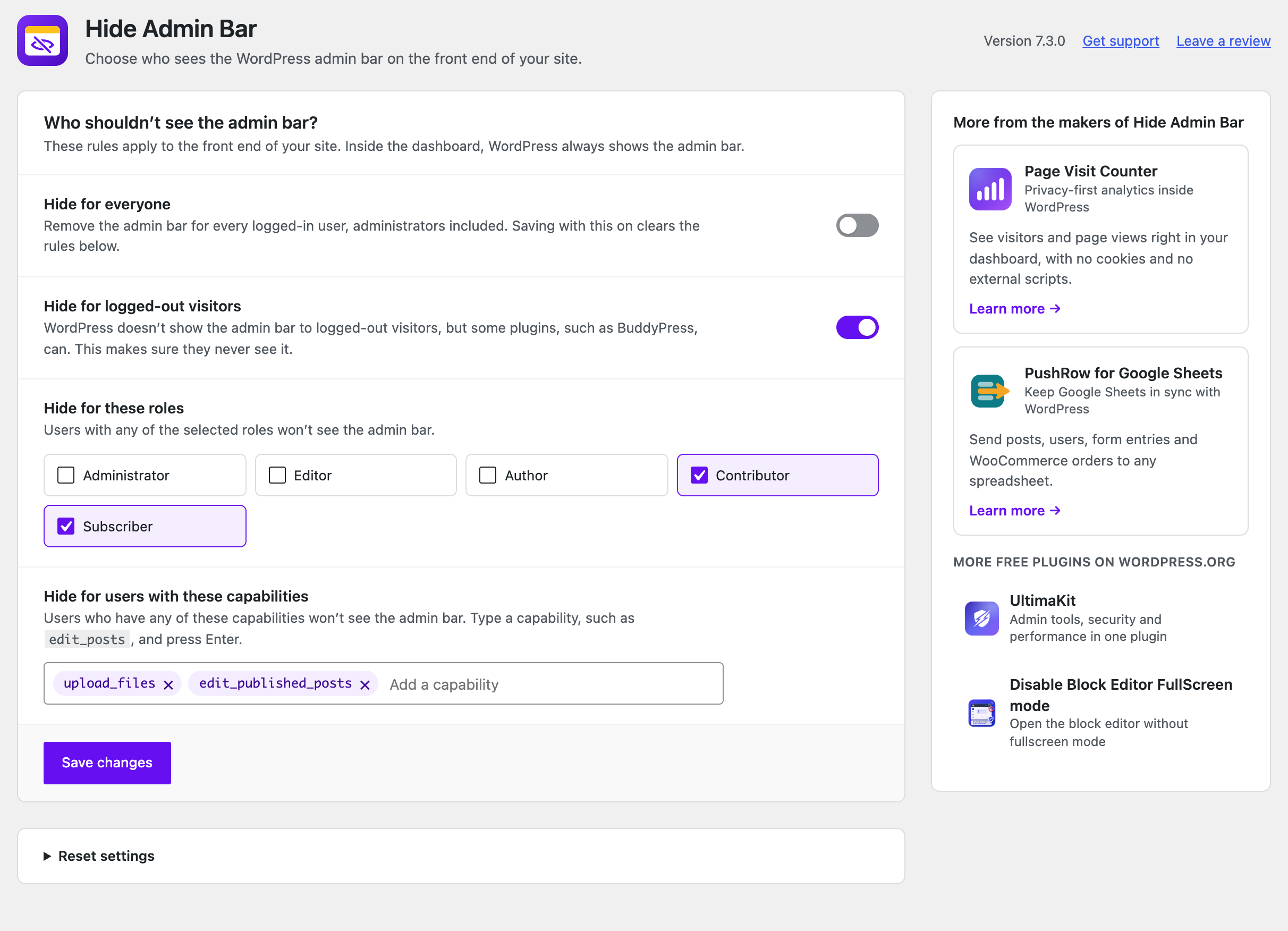
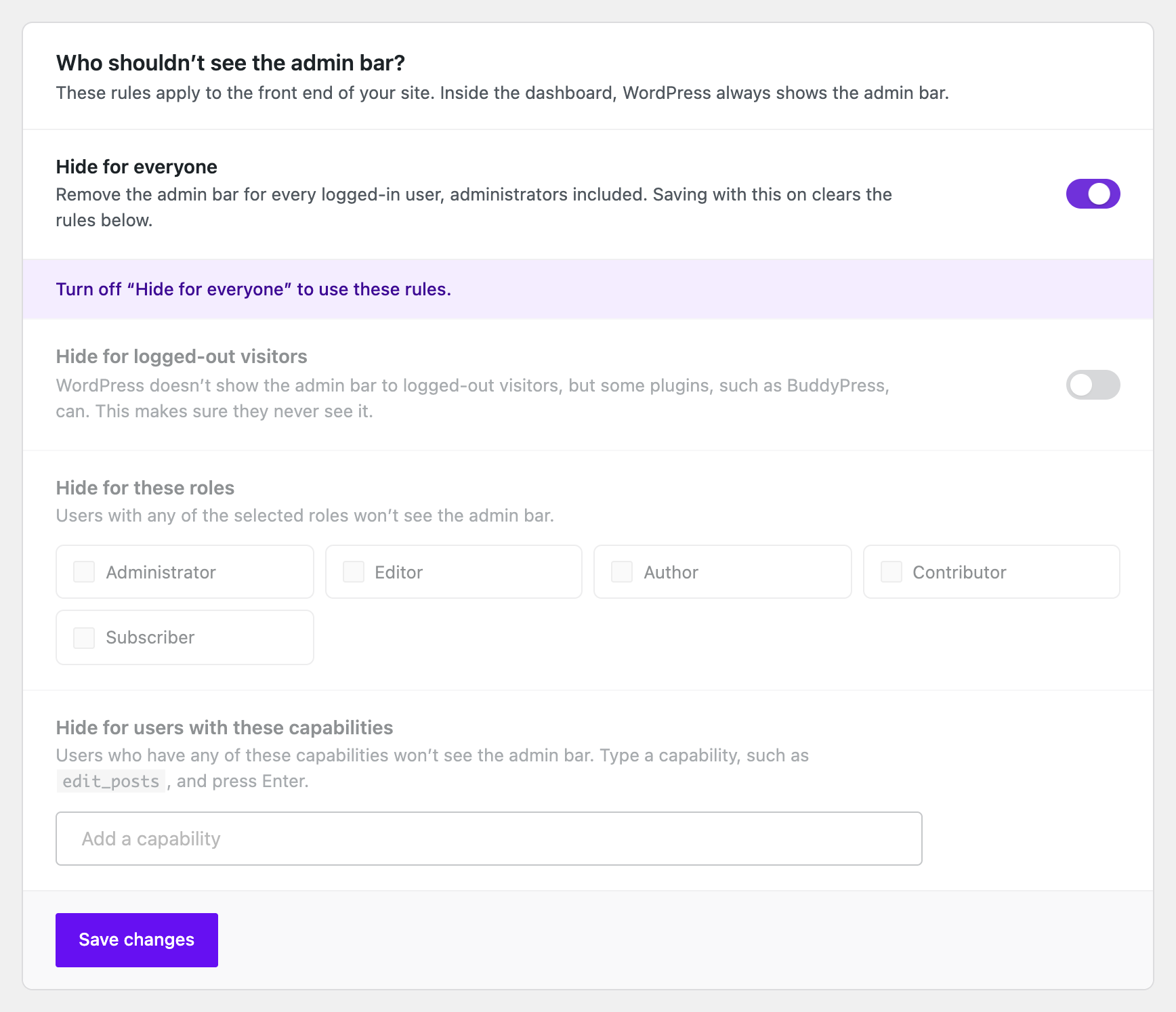
- Hide for everyone: remove the admin bar from the front end for every logged-in user.
- Hide for logged-out visitors: make sure visitors never see it, even when a plugin such as BuddyPress shows it to them.
- Hide by role: pick roles such as Subscriber, Customer or Editor, including custom roles from other plugins.
- Hide by capability: hide it for anyone who has a capability, for example
edit_posts. - Nothing added to your site’s front end: no CSS, no JavaScript, no extra database queries.
Dashboard & login
Optional extras, each off until you switch it on:
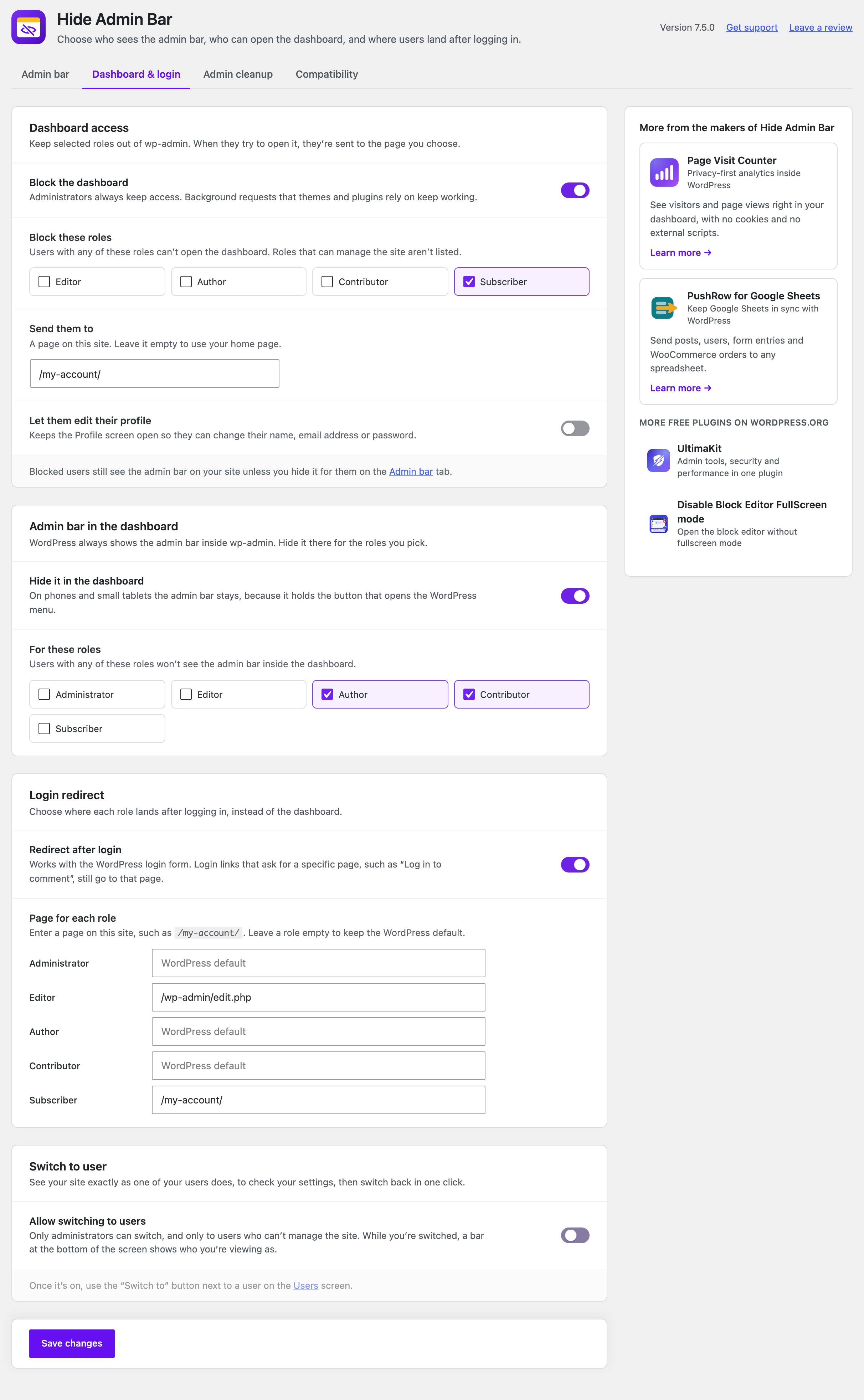
- Dashboard access: keep subscribers, customers or any other role out of wp-admin and send them to a page you choose. Administrators always keep access, and the background requests that themes and plugins rely on keep working.
- Admin bar in the dashboard: hide the admin bar inside wp-admin for the roles you pick.
- Login redirect: choose where each role lands after logging in, such as the home page or a My Account page.
- Strict mode: keep the admin bar hidden when another plugin, such as BuddyPress, wpForo or WC Vendors, turns it back on.
- Switch to user: see your site exactly as one of your users does, then switch back in one click. Only administrators can switch, and only to users who can’t manage the site.
Admin cleanup
Give each role a tidier dashboard. Also off until you switch it on:
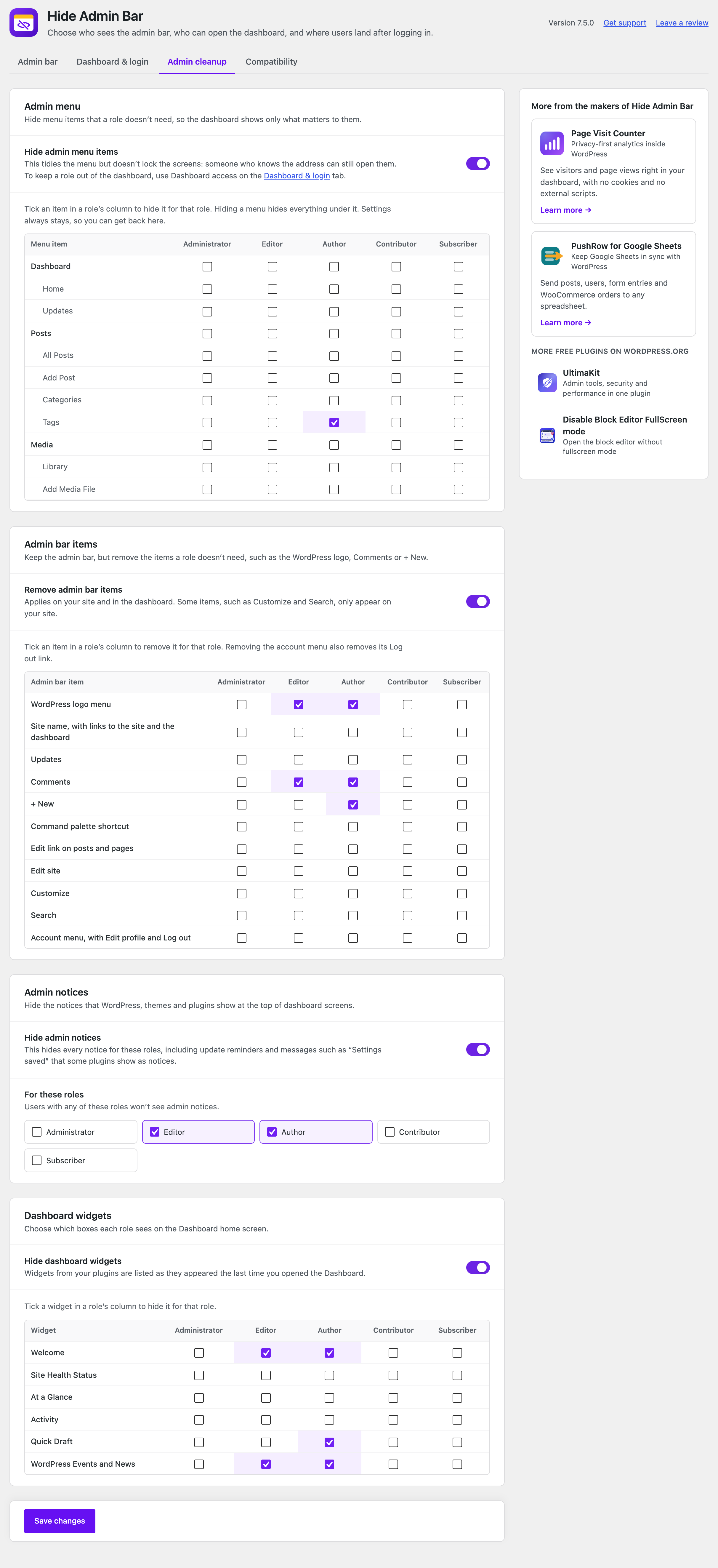
- Admin menu: hide the menu items a role doesn’t need, such as Tools, Comments or a plugin’s menu.
- Admin bar items: keep the admin bar but remove items such as the WordPress logo, Comments or + New.
- Admin notices: hide the notices at the top of dashboard screens for the roles you pick.
- Dashboard widgets: choose which boxes each role sees on the Dashboard home screen.
Works with your setup
Hide Admin Bar Based on User Roles works with any theme and any plugin that registers user roles — including WooCommerce (Customer role), membership plugins, LMS plugins, and custom roles. Fully compatible with Elementor, Divi, Beaver Builder, Bricks, and WordPress Multisite.
More from the makers of Hide Admin Bar
- Page Visit Counter – Privacy-first analytics inside WordPress. See visitors and page views in your dashboard, with no cookies and no external scripts.
- PushRow for Google Sheets – Keep Google Sheets in sync with WordPress. Send posts, users, form entries and WooCommerce orders to any spreadsheet.
- UltimaKit – Admin tools, security and performance in one plugin.
- Disable Block Editor FullScreen mode – Open the block editor without fullscreen mode.
- NoteFlow – Create, organize and manage notes in your WordPress dashboard.
- Like Dislike For WP – Add like and dislike buttons to your posts and pages, with vote stats.
Instalação
- In your dashboard, go to Plugins → Add New Plugin and search for Hide Admin Bar Based on User Roles. Or upload the plugin folder to
/wp-content/plugins/. - Ative o plugin.
- Go to Settings → Hide Admin Bar Settings and choose who shouldn’t see the admin bar.
Log de Changes
New, optional Admin cleanup tab and Switch to user. They're off until you switch them on, and your admin bar settings are kept.
7.5.0
- New: Admin cleanup tab. Hide admin menu items, admin bar items, admin notices and dashboard widgets for each role.
- New: Switch to user. See your site as one of your users, then switch back in one click.
- Every new feature is off until you switch it on. Your admin bar settings and how they work are unchanged.
7.4.0
- New: Dashboard access. Keep chosen roles out of wp-admin and send them to a page you pick. Administrators always keep access.
- New: Hide the admin bar inside the dashboard for chosen roles.
- New: Login redirect. Choose where each role lands after logging in.
- New: Strict mode keeps the admin bar hidden when another plugin, such as BuddyPress or wpForo, turns it back on.
- New: The settings page has tabs: Admin bar, Dashboard & login, and Compatibility.
- Every new feature is off until you switch it on. Your admin bar settings and how they work are unchanged.
7.3.0
- New: Redesigned settings page that looks and works like the rest of WordPress. Changes save without reloading the page.
- New: Add capabilities as tags. They are no longer cut off at 20 characters.
- Improved: The plugin no longer loads any CSS or JavaScript (including jQuery) on the front end of your site.
- Improved: The settings page loads one small stylesheet and script instead of Bootstrap and other libraries, making the plugin about 2 MB smaller.
- Improved: The plugin is now completely free. Upgrade prompts and ads for paid plans are gone.
- Updated: Freemius SDK 2.13.4.
7.2.5
- Fixed: Minor compatibility issues with the latest WordPress version.
7.2.4
- Fixed: Minor compatibility issues with the latest WordPress version.
7.2.3
- Fixed: Minor compatibility issues with the latest WordPress version.
Capturas de tela
Para desenvolvedores
Este é o seu plugin? Mostre os números.
Adicione um crachá ao vivo ao seu site, Documentos ou Readme do GitHub. Ele é atualizado por conta própria - nenhuma conta necessária.
Best Hide Admin Bar Based on User… alternatives
All admin bar plugins →


FAQ
Hide Admin Bar Based on User Roles: quick answers
Respostas diretas, extraídas de dados ao vivo WordPress.org.
Fonte: WordPress.org
Is Hide Admin Bar Based on User Ro… free?
Yes. Hide Admin Bar Based on User Ro… is free to download and use from the official WordPress.org plugin directory.
Is Hide Admin Bar Based on User Ro… safe to use in 2026?
Yes — Hide Admin Bar Based on User Ro… is a safe, well-maintained plugin to use in 2026. It runs on 20K+ sites, is rated 3.9/5 and was last updated 1 month ago, and scores 81/100 on our health check.
How many websites use Hide Admin Bar Based on User Ro…?
Hide Admin Bar Based on User Ro… is active on 20K+ WordPress websites and has been downloaded 880,155 times since it launched in July 2018. It was downloaded 7,255 times in the last 30 days.
Does Hide Admin Bar Based on User Ro… work with WordPress 7.1?
Yes. The developer has tested Hide Admin Bar Based on User Ro… up to WordPress 7.1.5, the latest release. It requires WordPress 5.5 or newer.
What PHP version does Hide Admin Bar Based on User Ro… need?
Hide Admin Bar Based on User Ro… requires PHP 5.6 or higher. Most hosts run PHP 8.x today, so it works on any modern WordPress hosting.
When was Hide Admin Bar Based on User Ro… last updated?
The latest version, 7.5.0, was released on October 12, 2026 (1 month ago).
Who makes Hide Admin Bar Based on User Ro…?
Hide Admin Bar Based on User Ro… is developed and maintained by Ankit Panchal.
What are the best alternatives to Hide Admin Bar Based on User Ro…?
The most popular alternatives to Hide Admin Bar Based on User Ro… are Hide Admin Bar (20K+ installs), Hide Admin Bar from Non-Adm… (10K+ installs) and Bricks Navigator (8K+ installs).
Alimentado por PageForge
Um modelo e uma planilha. Uma página real para cada pesquisa.
PageForge Transforma cada linha de um CSV em uma página WordPress com seu próprio título, URL, SEO campos e esquema, construído no layout que você já desenhou. Gratuito em WordPress.org.
- CSV e XLSX, mais Google Sheets em Profissional e Empresarial
- Seu próprio título, URL, SEO campos e esquema para cada página
- Funciona com o editor de blocos, Elementor, Divi e Avada
- Gratuito em WordPress.org, sem cartão de crédito