


GoSMTP – SMTP for WordPress
GoSMTP allows you to send emails from your WordPress over SMTP or many of the popular email sending services. Many web hosting companies have strict mail sending rules and limitations which restrict email…

Escolha segura
Yes — GoSMTP – SMTP for WordPress is a safe, well-maintained plugin to use in 2026. It runs on 500K+ sites, is rated 4.2/5 and was last updated 1 month ago, and scores 81/100 on our health check.
- Comprovado em escala em mais de 500 mil sites ativos
- Testado com as últimas WordPress (7.1)
Downloads diários
Os picos de download geralmente seguem uma nova versão — cada site que atualiza automaticamente é um download.
Rankings
Where GoSMTP – SMTP for WordPress stands todayWordPress.org Classificações de pesquisa
Posição ao vivo na pesquisa de plugins, top 100| Palavra chave | Posição |
|---|---|
| aws smtp | #4 |
| gmail smtp | #6 |
| sendgrid smtp | #6 |
| SMTP | #6 |
| wordpress smtp | #5 |
Adoção da versão
Compartilhamento de sites ativos por lançamento.
Divisão de classificação
★★★★★★★★★★ 4.2 from 9 reviews
About GoSMTP – SMTP for WordPress
From the official readme · v1.2.5Descrição
GoSMTP allows you to send emails from your WordPress over SMTP or many of the popular email sending services. Many web hosting companies have strict mail sending rules and limitations which restrict email deliverability. With GoSMTP, you will not be using your hosting providers PHP email but rather sending emails over SMTP or using API’s of various email providers.
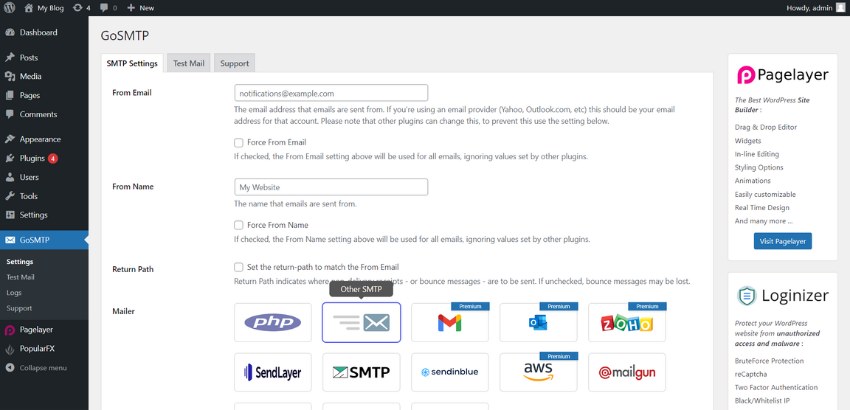
GoSMTP supports many of your preferred SMTP provider(s) :
1) SMTP.com
2) Sendinblue
3) Mailgun
4) Sendgrid
5) Sparkpost
6) Sendlayer
7) Postmark
8) Maileroo
9) ElasticEmail (Pro)
10) SMTP2Go (Pro)
11) Gmail, Gsuite, Google Workspace (Pro)
12) Outlook / Office 365 (Pro)
13) AWS (Pro)
14) Zoho (Pro)
15) Resend (Pro)
16) MailerSend (Pro)
17) Or any custom SMTP provider
WordPress uses the PHP mail function to send emails generated by WordPress. The PHP mail function sends emails over the IP of your hosting provider’s servers which can have a bad reputation and be blacklisted by many email providers like Gmail, Yahoo, Office 365, Zoho, etc. causing your WordPress originated emails to land in the SPAM folder of your users. By using GoSMTP you ensure that your emails reach the inbox of your user(s).
You can find our official documentation on our Website GoSMTP.net We are also active in our community support forums on wordpress.org if you are one of our free users. Our Premium Support Ticket System is at https://softaculous.deskuss.com/open.php?topicId=17
Home Page | Support | Documents
AI Abilities
GoSMTP exposes a set of AI Abilities via the WordPress Abilities API, enabling AI clients, assistants, and MCP (Model Context Protocol) adapters to securely interact with your email sending infrastructure.
Free Abilities
- Get GoSMTP Settings: Returns global configuration settings such as from email, from name, force flags, return path, and logging toggles. Sensitive credentials are never exposed.
- List Configured Mailers: Lists all configured SMTP connections along with their nicknames, mailer types, and backup connections.
- Send a Test Email: Sends a test email through the configured mailer to verify connection settings and reports the execution result.
Pro Abilities
- Export Email Logs (CSV): Exports email logs matching specified filters directly as a CSV string format for reporting and analysis.
- List Email Logs: Returns a paginated list of logged emails including status, mailer provider, timestamp, and recipient details.
- Get Email Log Details: Returns full details of a single email log entry, including body content, header info, and delivery response.
- Resend an Email Log: Re-sends a previously logged email directly from the logs, optionally allowing dispatch to a new recipient.
- Get Email Sending Report: Returns an aggregated report including total sent/failed counts, overall success rate, and daily performance breakdown.
GoSMTP PRO
GoSMTP Pro has many other powerful features and services. Click here to purchase now ! :
Registros de e-mail
With Email Logging you view all emails sent from your site. This is necessary to keep email records and for auditing outgoing emails. Its also helpful to debug any outgoing email issues.
Resend Emails
You can resend any email, from the email log wizard. You can also resend multiple emails in bulk.
Notificações
You can get notified about failed email delivery on your configured channel, we currently support Mail, Slack and Discord.
Smart Routing
Smart Routing dynamically selects SMTP providers based on content, isolating transactional alerts from marketing to ensure critical emails bypass filters.
Premium Features
- Forward Emails
- Email Reports
- Notificações
- Resend Email
- Smart Routing
Coming Soon
- Track Email Views
- Track Clicks
- Print Emails
- Multisite Support
Créditos
GoSMTP’s Mailer API connecters are derived from Fluent SMTP https://wordpress.org/plugins/fluent-smtp/
How to install GoSMTP
Go To your WordPress install -> Plugins -> Add New Button -> In Search Box search For GoSMTP -> Click on Install.
Log de Changes
1.2.5 (October 21, 2026)
- [Bug-Fix Pro] There was issue in updater if Object Cache was enabled on the site, that has been fixed.
- [Bug-Fix] There was an issue related to a capability, that has been fixed.
1.2.4 (October 07, 2026)
- [Security Fix Pro] There was an issue related to Email Logs that has been fixed, reported by Rafie Muhammad – Awesome Motive, Inc [Wordfence]
- [Task] MCP adapter plugin now gets installed through the WordPress repo, and redundant code related to the old way of installing the MCP Adaptor has been removed.
1.2.3 (September 23, 2026)
- [Improvement Pro] Added Code Signing: Every update now verifies the code signature to ensure secure updates.
1.2.2 (September 11, 2026)
- [Improvement Pro] GoSMTP now supports Resend’s reply_to parameter.
- [Bug-Fix] There was an issue with MCP plugin detection in certain cases that has been fixed.
- [Task] Tested with WordPress 7.1.
1.2.1 (August 11, 2026)
- [Pro-Feature] Support for Pro AI Abilities: List Email Logs, Export Email Logs, Get Log Details, Resend Email Logs, and Email Reports.
- [Feature] Support for AI Abilities: Get Settings, List Mailers, and Send Test Email.
1.2.0 (April 13, 2026)
- [Pro-Feature] Smart Routing: Conditionally assign email providers based on message content for optimized delivery.
- [Task] Tested with WordPress 7.0.
Capturas de tela


Para desenvolvedores
Este é o seu plugin? Mostre os números.
Adicione um crachá ao vivo ao seu site, Documentos ou Readme do GitHub. Ele é atualizado por conta própria - nenhuma conta necessária.
FAQ
GoSMTP – SMTP for WordPress: quick answers
Respostas diretas, extraídas de dados ao vivo WordPress.org.
Fonte: WordPress.org
Is GoSMTP – SMTP for WordPress free?
Yes. GoSMTP – SMTP for WordPress is free to download and use from the official WordPress.org plugin directory.
Is GoSMTP – SMTP for WordPress safe to use in 2026?
Yes — GoSMTP – SMTP for WordPress is a safe, well-maintained plugin to use in 2026. It runs on 500K+ sites, is rated 4.2/5 and was last updated 1 month ago, and scores 81/100 on our health check.
How many websites use GoSMTP – SMTP for WordPress?
GoSMTP – SMTP for WordPress is active on 500K+ WordPress websites and has been downloaded 2,990,049 times since it launched in February 2023. It was downloaded 67,981 times in the last 30 days.
Does GoSMTP – SMTP for WordPress work with WordPress 7.1?
Yes. The developer has tested GoSMTP – SMTP for WordPress up to WordPress 7.1.5, the latest release. It requires WordPress 5.5 or newer.
What PHP version does GoSMTP – SMTP for WordPress need?
GoSMTP – SMTP for WordPress requires PHP 5.5 or higher. Most hosts run PHP 8.x today, so it works on any modern WordPress hosting.
When was GoSMTP – SMTP for WordPress last updated?
The latest version, 1.2.5, was released on October 21, 2026 (1 month ago).
Who makes GoSMTP – SMTP for WordPress?
GoSMTP – SMTP for WordPress is developed and maintained by Softaculous.
Alimentado por PageForge
Um modelo e uma planilha. Uma página real para cada pesquisa.
PageForge Transforma cada linha de um CSV em uma página WordPress com seu próprio título, URL, SEO campos e esquema, construído no layout que você já desenhou. Gratuito em WordPress.org.
- CSV e XLSX, mais Google Sheets em Profissional e Empresarial
- Seu próprio título, URL, SEO campos e esquema para cada página
- Funciona com o editor de blocos, Elementor, Divi e Avada
- Gratuito em WordPress.org, sem cartão de crédito