


GCal Days
Shortcode and functions to query your Google Calendar for the number of days since or until the most recent event matching your search criteria.

Considere uma alternativa
GCal Days shows warning signs in 2026 — compare the alternatives below before installing. It runs on 10+ sites and was last updated 11 years ago, and scores 23/100 on our health check.
- Pequena base de usuários (10+ instalações ativas)
- Muito poucos comentários até agora
- Nenhuma atualização em 10 anos
- Testado apenas até WordPress 4.5 (mais recente é 7.1)
Como ele se acumula?
Lado a lado em instalações, atualizações, avaliações e suporte



Downloads diários
Os picos de download geralmente seguem uma nova versão — cada site que atualiza automaticamente é um download.
Rankings
Where GCal Days stands todayWordPress.org Classificações de pesquisa
Posição ao vivo na pesquisa de plugins, top 100| Palavra chave | Posição |
|---|---|
| calendar | >100 |
| days since | >100 |
| gcal | #13 |
| >100 | |
| Shortcode | >100 |
Adoção da versão
Compartilhamento de sites ativos por lançamento.
About GCal Days
Do Readme oficial · v1.2Descrição
This plugin provides a shortcode and a set of functions to return the number of days since the most recent past event in your Google Calendar matching specified search terms. The shortcode can also be used to return the number of days until the closest upcoming event matching specified search terms.
The Shortcode
[gcal-days search="" type="" id=""]
The shortcode name is gcal-days. It has three attributes, but only one of which is absolutely necessary:
search: (Required.) The search term.type: (Optional.) The direction in time to search. Defaults to “since”, which searches past events. “until” will search future events.id: (Conditionally optional.) The ID of the calendar to search. You can discover the IDs of calendars via the plugin’s settings page. This shortcode attribute can only be optionally omitted from shortcodes if you define a default calendar in the plugin’s settings.
The shortcode outputs a number representing the number of days until a matching event. If no event is found, a -1 will be displayed.
Examples: [gcal-days search="dentist"], [gcal-days type="until" search="vacation" id="test_lkjsadf987asdf24@group.calendar.google.com"]
Links: Plugin Homepage | Plugin Directory Page | Author Homepage
Functions
The plugin provides two functions for use in your theme templates, functions.php, or in plugins.
Functions
<?php function gcal_days_since( $search, $calendar_id = '' ) ?><?php function gcal_days_until( $search, $calendar_id = '' ) ?>
Arguments
-
$search(string)
Required. The word or phrase to search for -
$calendar_id(string)
Optional. The ID for the Google Calendar. Check the plugin’s settings page for calendar IDs. This argument is only optional if you have defined a default calendar via the plugin’s settings.
Return Value
An integer value of the number of days since/until the matching event. -1 is returned if no event was found or an error was encountered.
Exemplos
-
<?php // Days until next dentist appointment

$days_until = gcal_days_until( 'dentist' );

?> -
<?php

// Get the days since my last day off

$days_since = gcal_days_since( 'day off' );

// Echo a message using that number

if ( -1 == $days_since ) {

echo "You've never had a day off?! Take one soon!";

} else {

printf( _n( 'Your last day off was %d day ago.', 'Your last day off was $d days ago.', $days_since ), $days_since );

}

?>
Instalação
- Unzip
gcal-days.zipinside the/wp-content/plugins/directory for your site (or install via the built-in WordPress plugin installer). - Activate the plugin through the ‘Plugins’ admin menu in WordPress.
- Visit the plugin’s setting page, ‘Settings’ -> ‘GCal Days’, and follow the link to obtain an authorization code from Google that permits the plugin access to your Google Calendar data.
- Use the provided shortcode or functions, as per instructions.
Log de Changes
Recommended minor update: added more helpful responses to API test submissions; improved support for language packs; noted compatibility through WP 4.5+
1.2 (2016-04-12)
- New: Add
c2c_GCalDaysGoogle::get_calendar_name()to get the name of a specific calendar. - New: In the result notice when testing, specify calendar by name.
- New: Add error message for the test feature if no calendar ID is specified.
- New: Add error message for the test feature if an invalid calendar ID is specified.
- New: Add help message recommending a reset if the authorization code is being changed.
- Bugfix: The test should use the default calendar if no calendar to test against was specified.
- Change: Use
DIRECTORY_SEPARATORrather than hardcoded/for path separator when requiring include files. - Change: Add support for language packs:
- Load the plugin textdomain.
- Remove .pot file and /lang subdirectory.
- Remove ‘Domain Path’ from plugin header.
- Allow translations of more strings.
- Change:
c2c_GCalDaysGoogle::is_valid_calendar()now actual checks that the calendar ID is valid. - Change: Minor code reformatting.
- Change: Sanitize class variables when being output as HTML tag attributes (as a precaution; they should be safe already).
- Change: Add more on-screen help text for ‘Test the API’ fields.
- Change: Prevent direct loading of include files.
- New: Add LICENSE file.
- New: Add empty index.php to prevent files from being listed if web server has enabled directory listings.
- New: Add docblocks to
is_api_error()andget_api_error(). - Change: Note compatibility through WP 4.5+.
- Change: Update copyright date (2016).
1.1.1 (2015-03-06)
- Declare
shortcode()to be static - Add support for localization
- Note compatibility through WP 4.1+
- Change documentation links to wp.org to be https
- Update copyright date (2015)
- Add plugin icon
1.1
- Apply do_shortcode to widget_text so the shortcode works in text widgets
- Add actual documentation for the shortcode
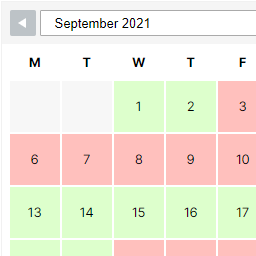
- Add screenshot
- Add banner
- Add another FAQ item
1.0
- Lançamento inicial
Capturas de tela

Para desenvolvedores
Este é o seu plugin? Mostre os números.
Adicione um crachá ao vivo ao seu site, Documentos ou Readme do GitHub. Ele é atualizado por conta própria - nenhuma conta necessária.
Best GCal Days alternatives
All calendar plugins →




FAQ
GCal Days: quick answers
Respostas diretas, extraídas de dados ao vivo WordPress.org.
Fonte: WordPress.org
Is GCal Days free?
Yes. GCal Days is free to download and use from the official WordPress.org plugin directory.
Is GCal Days safe to use in 2026?
GCal Days shows warning signs in 2026 — compare the alternatives below before installing. It runs on 10+ sites and was last updated 11 years ago, and scores 23/100 on our health check.
How many websites use GCal Days?
GCal Days is active on 10+ WordPress websites and has been downloaded 2,553 times since it launched in March 2014. It was downloaded 37 times in the last 30 days.
Does GCal Days work with WordPress 7.1?
GCal Days is officially tested up to WordPress 4.5.33, while the latest release is 7.1.5. It may still work, but try it on a staging site first.
When was GCal Days last updated?
The latest version, 1.2, was released on May 25, 2016 (11 years ago).
Who makes GCal Days?
GCal Days is developed and maintained by Scott Reilly.
What are the best alternatives to GCal Days?
The most popular alternatives to GCal Days are The Events Calendar (600K+ installs), Events Manager (60K+ installs) and SimplyBook.me (30K+ installs).
Alimentado por PageForge
Um modelo e uma planilha. Uma página real para cada pesquisa.
PageForge Transforma cada linha de um CSV em uma página WordPress com seu próprio título, URL, SEO campos e esquema, construído no layout que você já desenhou. Gratuito em WordPress.org.
- CSV e XLSX, mais Google Sheets em Profissional e Empresarial
- Seu próprio título, URL, SEO campos e esquema para cada página
- Funciona com o editor de blocos, Elementor, Divi e Avada
- Gratuito em WordPress.org, sem cartão de crédito