


Fstyle Static HTML Export
Turn your WordPress site into static HTML you can host anywhere. Retries when the server is busy and lists broken links and forms that will break.

Escolha sólida
Fstyle Static HTML Export is a solid plugin choice in 2026, with a few things worth checking first. Was last updated 3 weeks ago, and scores 64/100 on our health check.
- Desenvolvido ativamente — última atualização 3 semanas atrás
- Testado com as últimas WordPress (7.1)
- Base de usuários pequenas (<10 instalações ativas)
- Muito poucos comentários até agora
Como ele se acumula?
Lado a lado em instalações, atualizações, avaliações e suporte



Downloads diários
Os picos de download geralmente seguem uma nova versão — cada site que atualiza automaticamente é um download.
Rankings
Where Fstyle Static HTML Export stands todayWordPress.org Classificações de pesquisa
Posição ao vivo na pesquisa de plugins, top 100| Palavra chave | Posição |
|---|---|
| broken links | >100 |
| export | >100 |
| html | >100 |
| static | >100 |
| static site | >100 |
About Fstyle Static HTML Export
From the official readme · v0.3.3Descrição
Fstyle Static HTML Export crawls your own site and saves every page, together with the CSS, JavaScript, images and other files it uses, as plain HTML files. You can upload the result to any web server or open it locally.
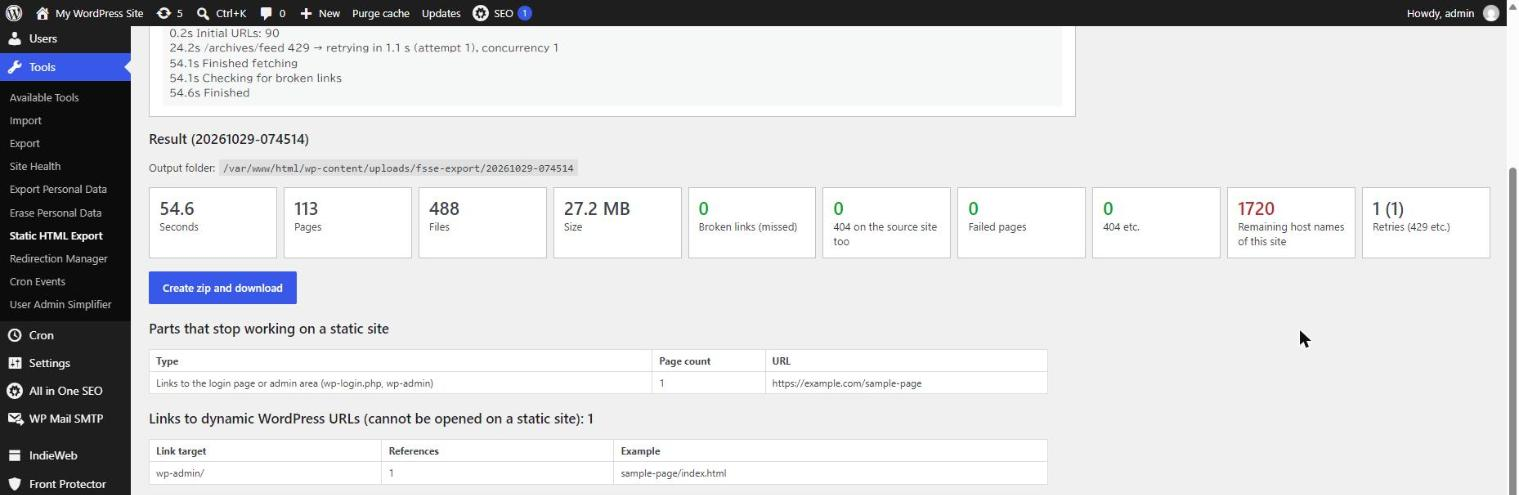
Shared hosting often answers “429 Too Many Requests” when many pages are fetched at once. Instead of skipping those pages, this plugin slows down and retries, and when the export is done it lists the broken internal links and the parts of the site (forms, search, admin-ajax.php, REST API calls) that will not work on the static copy. Everything runs on your own server, with no external service.
Recursos
- Fast, concurrent fetching. Several pages are fetched at the same time (configurable). Static files under wp-content and wp-includes are copied straight from disk instead of over HTTP.
- Automatic retries on 429 and 503. When the server answers “Too Many Requests” or “Service Unavailable” (or a request times out), the page is not skipped. The plugin waits (it honors Retry-After), lowers the number of concurrent requests, and tries again. Once requests succeed again, the concurrency is raised step by step.
- Broken link report. After the export, every internal link and file reference in the exported HTML and CSS is checked. Missing files are listed, separately from links that are also broken on the original site, pages that could not be fetched, and links to dynamic WordPress URLs.
- Relative or absolute URLs. Export with relative URLs, so the folder works from any location, or rewrite all URLs to the domain where the static site will be published. Optionally add index.html to relative links, so the folder can be browsed directly from disk.
- Finds pages that are not linked. Besides following links, it reads robots.txt and the sitemaps (wp-sitemap.xml, sitemap.xml) and, optionally (on by default), the lists of posts, pages, categories and authors. The 404 page is saved as 404.html.
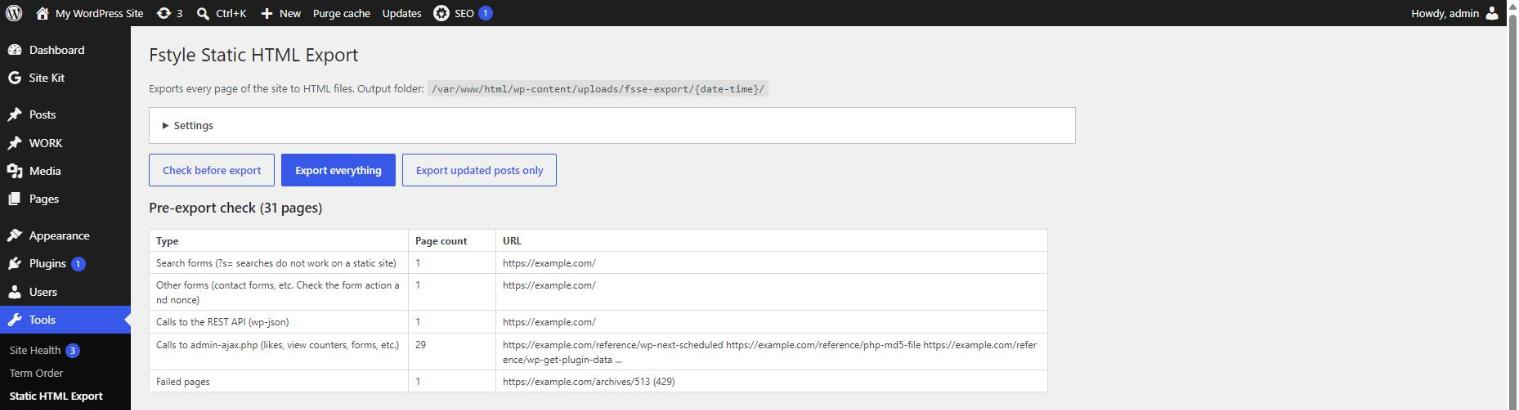
- Pre-export check. Finds parts that will stop working on a static site, such as comment forms, search forms, contact forms, admin-ajax.php and REST API calls, and nonces.
- Resumable. Progress is saved continuously. If the browser is closed or a request fails, the export can be resumed where it stopped.
- Updated posts only. Re-export only the posts that changed since the previous export, reusing the rest.
- Zip download of the finished export.
- WP-CLI support. Run
wp fsse exportto export without the time limits of a web request.
The exported files are saved in wp-content/uploads/fsse-export/{date-time}/. The plugin places .htaccess and an empty index.html in that folder so that the files cannot be accessed from outside. On nginx, .htaccess is not used: configure the server so that this folder cannot be accessed from outside.
Wp-cli
wp fsse export [--concurrency=<n>] [--url-mode=<relative|absolute>] [--target=<url>] [--alias=<hosts>] [--exclude=<prefixes>] [--changed] [--resume=<id>] [--dir-index] [--skip-ssl-verify] [--zip] [--json]

wp fsse report <id> prints the result of an export as JSON.
Serviços externos
This plugin does not connect to any third-party or external service. It only sends HTTP requests to your own site (the home URL and the domains you list as “Domains treated as this site”) to fetch the pages it exports. No data is sent to the plugin author or anyone else.
The plugin removes some WordPress head links from the exported HTML, such as <link rel="https://api.w.org/">. This only matches the text of that link in your own pages; the plugin never sends a request to api.w.org.
Instalação
- Upload the
fstyle-static-exportfolder to/wp-content/plugins/, or install the plugin from the Plugins screen. - Ative o plugin.
- Go to Tools > Static HTML Export.
- Optionally click Check before export to see which parts of your site will not work as static HTML.
- Click Export everything. Keep the page open until the export has finished, then download the zip or copy the folder.
On shared hosting, start with 2 to 3 concurrent requests. On a local copy of the site you can use more (WP-CLI uses 12 by default).
Log de Changes
0.3.3
- The export folder (wp-content/uploads/fsse-export) is now protected from direct access:
.htaccessand an emptyindex.htmlare added if they do not exist yet (existing files are not overwritten), and an emptyindex.htmlis added to each export folder. A notice is shown when they cannot be written. On nginx, block access to the folder in the server settings. - The examples of “Remaining URLs of this site” in the result are shorter: about 40 characters around the match, at most 3 per row.
0.3.2
- Translation files are no longer bundled. Translations are provided through translate.wordpress.org.
- Removed an unnecessary include of wp-admin/includes/file.php.
- Added the “External services” section to the readme.
0.3.1
- Requests to your own site now use the Requests library bundled with WordPress instead of calling cURL directly.
- The URL entered for “Absolute URLs” is sanitized before it is saved.
0.3.0
- All text is now in English and translatable. A Japanese translation is included.
- SSL certificates are verified by default. For local environments with a self-signed certificate, verification can be turned off in the settings, with
--skip-ssl-verify, or with the newfsse_verify_sslfilter. - Files are written with WP_Filesystem.
- Settings are deleted when the plugin is uninstalled.
- Added readme.txt.
0.2.0
- Faster recovery after 429 responses: concurrency is lowered at most once per second and raised by 1.5 times after a series of successful requests.
- New option to add index.html to relative links (settings screen and
wp fsse export --dir-index).
0.1.0
- First prototype: export screen, WP-CLI command, retries on 429/503, broken link report.
Capturas de tela


Para desenvolvedores
Este é o seu plugin? Mostre os números.
Adicione um crachá ao vivo ao seu site, Documentos ou Readme do GitHub. Ele é atualizado por conta própria - nenhuma conta necessária.
Best Fstyle Static HTML Export alternatives
All broken links plugins →





FAQ
Fstyle Static HTML Export: quick answers
Respostas diretas, extraídas de dados ao vivo WordPress.org.
Fonte: WordPress.org
Is Fstyle Static HTML Export free?
Yes. Fstyle Static HTML Export is free to download and use from the official WordPress.org plugin directory.
Is Fstyle Static HTML Export safe to use in 2026?
Fstyle Static HTML Export is a solid plugin choice in 2026, with a few things worth checking first. Was last updated 3 weeks ago, and scores 64/100 on our health check.
How many websites use Fstyle Static HTML Export?
Fstyle Static HTML Export is active on <10 WordPress websites and has been downloaded 324 times since it launched in October 2026. It was downloaded 274 times in the last 30 days.
Does Fstyle Static HTML Export work with WordPress 7.1?
Yes. The developer has tested Fstyle Static HTML Export up to WordPress 7.1.5, the latest release. It requires WordPress 6.0 or newer.
What PHP version does Fstyle Static HTML Export need?
Fstyle Static HTML Export requires PHP 7.4 or higher. Most hosts run PHP 8.x today, so it works on any modern WordPress hosting.
When was Fstyle Static HTML Export last updated?
The latest version, 0.3.3, was released on November 6, 2026 (3 weeks ago).
Who makes Fstyle Static HTML Export?
Fstyle Static HTML Export is developed and maintained by fstylegear09543.
What are the best alternatives to Fstyle Static HTML Export?
The most popular alternatives to Fstyle Static HTML Export are Broken Link Checker (500K+ installs), Broken Link Checker by AIOS… (200K+ installs) and 404 to 301 (100K+ installs).
Alimentado por PageForge
Um modelo e uma planilha. Uma página real para cada pesquisa.
PageForge Transforma cada linha de um CSV em uma página WordPress com seu próprio título, URL, SEO campos e esquema, construído no layout que você já desenhou. Gratuito em WordPress.org.
- CSV e XLSX, mais Google Sheets em Profissional e Empresarial
- Seu próprio título, URL, SEO campos e esquema para cada página
- Funciona com o editor de blocos, Elementor, Divi e Avada
- Gratuito em WordPress.org, sem cartão de crédito