


Fox LMS – eLearning & Course Builder
Easily create online courses, lessons, and quizzes for your WordPress LMS website with this simple eLearning plugin for WordPress.

Escolha segura
Yes — Fox LMS is a safe, well-maintained plugin to use in 2026. It runs on 60+ sites, is rated 5/5 and was last updated 1 month ago, and scores 80/100 on our health check.
- Testado com as últimas WordPress (7.1)
- Base de usuários pequenas (mais de 60 instalações ativas)
Como ele se acumula?
Lado a lado em instalações, atualizações, avaliações e suporte



Downloads diários
Os picos de download geralmente seguem uma nova versão — cada site que atualiza automaticamente é um download.
Rankings
Where Fox LMS stands todayWordPress.org Classificações de pesquisa
Posição ao vivo na pesquisa de plugins, top 100| Palavra chave | Posição |
|---|---|
| course builder | #18 |
| elearning | #7 |
| online courses | #31 |
| wordpress lms | #13 |
| wp lms | #14 |
Adoção da versão
Compartilhamento de sites ativos por lançamento.
Divisão de classificação
★★★★★ ★★★★★ 5 de 19 comentários
About Fox LMS – eLearning & Course Builder
From the official readme · v1.1.0.2Descrição
WordPress LMS plugin
WordPress LMS plugin is a powerful, user-friendly, lightweight LMS plugin that transforms your site into a complete online education platform.
You can easily manage courses, quizzes, and progress tracking to keep learners engaged and motivated making it an easy LMS for any user.
Fox LMS is a WordPress learning management system (LMS plugin) that allows you to transform learning experience through flexible course creation options.
It’s an all-in-one online learning management system with a built-in course builder. It is designed to help you deliver an engaging learning experience right from your WordPress site including student and instructor dashboards.
WordPress LMS as an elearning plugin, helps you get up and running fast without sacrificing quality thanks to its straightforward course and lessons management.
Powerful e-learning platform
Use the potential of your online learning platform with the LMS plugin for WordPress offering full Gutenberg and Elementor support, along with intuitive blocks for courses to structure your lessons easily.
If you’re on the hunt for the modern LMS plugin, Fox LMS plugin is definitely worth checking out.
This e learning lms is designed to turn your WordPress website into a complete powerful e-learning platform, providing everything you need to create, manage, and deliver engaging online courses for LMS.
The WordPress LMS plugin free version, makes it accessible for those just starting their e-learning journey.
Various features available in the plugin, such as certificate building, quizzes will take your e-learning platform to the next level.
Experience the perfect blend of simplicity, functionality, and flexibility with the great LMS plugin for WordPress.
Unlike many other WordPress LMS systems, this one keeps things user-friendly and letting learners track course progress.
It’s hands down one of the magnificent course plugins for WordPress thanks to its course editor.
WordPress LMS Demos
- Digital Marketing Course
- Content Creation Course
- UI/UX Design Course for Beginners
- WordPress for Beginners: The Complete Course
- Content Marketing with WordPress
- Introduction to Website Building
Check out the video guide on how to install and activate the WP LMS
Free Features
- Unlimited Courses
- Unlimited Lessons
- Unlimited Students & Instructors
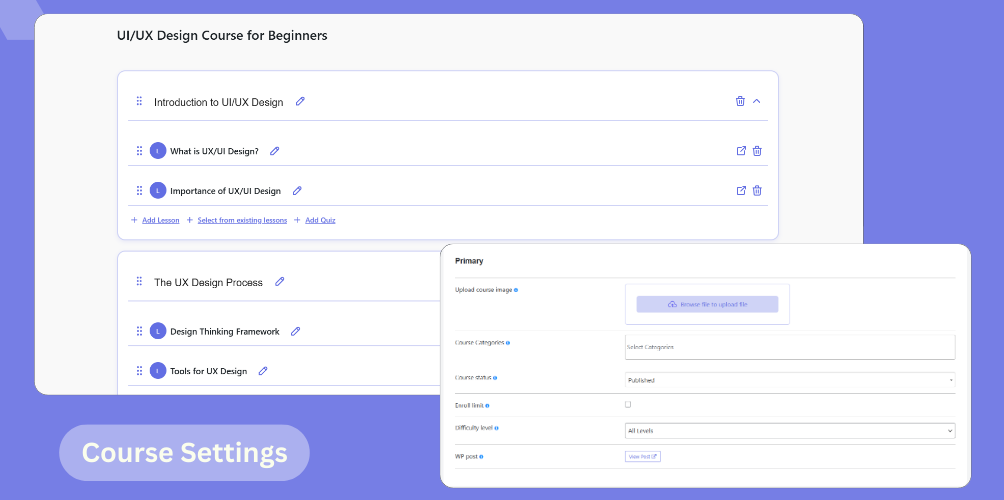
- Drag and drop course builder
- Video Lessons
- Lesson attachments
- Instructor Dashboard
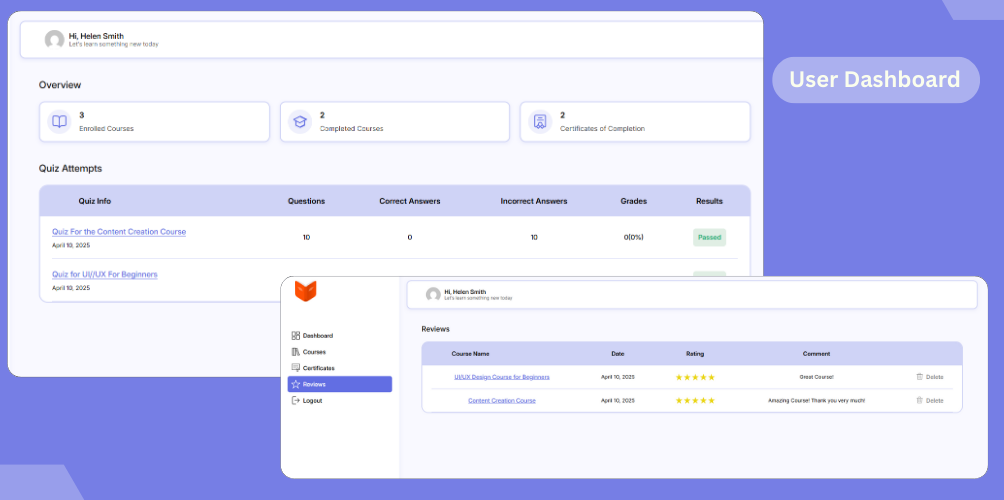
- User Dashboard
- Custom Branding
- Public course
- Unlimited Quizzes
- Questions and Answers (Q&A)
- Course Annoucements
- PayPal Integration
- Lesson Reporting
- Coupons system
- Transactions dashboard
- Course Schedule
- Progressive Learning
- Compatible with Elementor
- Compatibel with Gutenberg
- Compatible with Classic Editor
- Social sharing
- Course custom permalink
- Course Ownership Transfer
- Individual Course Discounts
- Single course analytics
- Single student analytics
- Free/Paid Course
- Certificate builder
- AI Lesson Builder
- Content Drip
- Revenue Sharing
- Stripe Integration
- WooCommerce Integration
- Reviews and ratings
- Advanced Quizzes
- Wishlist
- Export/Import Course
- Course Attachments
- Users Manual Enrollement
- Password protected course
- Course Completion Actions
- Lessons Duplicate
- Email notifications
- Dashboard notifications
- Gamification (GamipPress)
- reCAPTCHA integration
- Advanced Course Settings
- Advanced analytics
- Student groups
- Course bundles
Simple School LMS
Fox LMS is a great choice for any school-based learning platform built on WordPress.
It includes essential tools like LMS Course Builder, exam creation, and certificate issuing, and supports a multi-instructor structure for flexible course management.
Learners can access everything from a clean student dashboard, while teachers work comfortably from an organized instructor dashboard.
Course Marketplace
Create a platform where you and other instructors can effortlessly design and sell courses on a wide range of subjects. Oversee your e-learning marketplace and maintain educational content quality.
The learning management system plugin for WordPress, acting as a complete education plugin it helps you create, manage, and even sell your courses – all in one place.
If you need a complete WordPress LMS website or you’re just starting out with a small e-learning platform for employee training, this plugin has your back.
With Fox LMS, you’re essentially running a full WordPress course management system that’s both powerful and easy to use.
This is a solid WordPress learning management plugin that supports all kinds of course formats, including videos, quizzes.
No matter you’re selling a single course or building a full course library, this WordPress plugin for LMS adapts to your needs.
| PRO | DEMO | DOCUMENTATION |
Sell courses with PayPal Integration
You can easily connect PayPal Integration to your courses. It will allow you to accept secure payments directly through PayPal, simplifying student enrollment and user registration.
The integration supports payments, helping instructors and organizations manage transactions efficiently without technical issues.
With PayPal Integration, you can focus on delivering quality learning experiences while the plugin takes care of all the payment processing.
This makes it a reliable solution for anyone looking to monetize courses safely.
How to set up PayPal Integration
Advanced Quiz Maker
Keep your learners motivated with the WordPress LMS plugin’s quiz integration.
This feature allows you to add quizzes directly into your video lessons, creating an interactive course quiz experience. In case you’re testing knowledge, reinforcing key concepts, or providing practice opportunities, quizzes are a great way to track progress and keep students engaged.
With customizable question types, scoring options, and feedback tools, you can create an advanced quiz using the quiz builder.
You will need to get the WordPress Quiz Maker and create various quizzes based on your lessons.
As part of the WordPress LMS plugin, this quiz integration allows you to customize question types, set scoring options, and provide instant feedback.
It’s a great tool to align quizzes with your course goals, making it a powerful addition to your WordPress learning management system.
With the WordPress eLearning plugin, you’re not only creating an online course but building a complete learning environment.
It’s an excellent learning management system for WordPress, giving you everything you need, from a student dashboard to automated certificates, to deliver a seamless experience.
Analítica
With WordPress LMS plugin, you can understand your learners and improve your courses with the WordPress LMS plugin’s advanced analytics feature. Track student progress and monitor course performance across multi-instructor courses.
With detailed reports on engagement, completion rates, and learner activity in the academy plugin you can identify what’s working and where improvements are needed.
Use this data to refine your content, enhance the learning experience, and ensure your platform’s success.
With support for multiple instructors, flexible courses, and easy ways to sell, it’s a great WP Courses LMS solution for any teaching style.
The WordPress training course plugin is designed to help you create a fully customized WordPress LMS, giving you insights into how to optimize your courses for better learning outcomes and create LMS in WordPress in minutes..
This WordPress teaching plugin is a great tool for monitoring the success of your content and understanding how your students interact with each lesson.
Perfect for:
-
Online school LMS platforms that want to track student engagement and course performance.
-
Single instructor LMS websites that need clear insights into learner progress and course completion.
-
Corporate training LMS solutions that monitor employee learning activity and training results.
The top WordPress LMS gives you in-depth insights into student progress, course performance, and overall engagement. With this LMS WP plugin, you can track learner activity, identify trends, and make data-driven decisions to improve your courses.
Whether you’re using a WP LMS plugin for a single course or managing an entire LMS WordPress website, these analytics tools help you measure success and highlight areas for growth.
For more advanced features upgrade to WordPress LMS Pro and enjoy the process of creating a better learning platform on WordPress.
| Fox LMS PRO | LMS DEMO | DOCUMENTATION |
Questions and Answers (Q&A)
The Q&A option available in the course builder plugin allows the instructors and students to interact directly, ask questions, and get answers inside WordPress LMS platform.
This LMS Q&A system part of a beginner friendly LMS, is designed to improve communication, boost engagement, and build a stronger learning community within your eLearning platform.
Instructors can provide support, clarify lessons, and create discussions that make learning more engaging. Meanwhile the students can also benefit from answers given to others, helping them learn faster and stay motivated.
Annoucements
Course creators can send announcements directly inside your WordPress LMS, using the lesson builder keeping students informed about new lessons, course changes, upcoming events, or deadlines.
The announcements feature in this simple LMS helps instructors and course creators instantly share important updates with their learners. Make sure learners never miss essential information.
Create stronger relationships with your learners whether in corporate training or standard courses, and create a more organized online classroom environment.
Serviços externos
Fox LMS interacts with a few third-party services to provide essential functionality such as payment processing, and user analytics. During plugin activation or uninstallation, the plugin communicates with https://poll-plugin.com/fox-lms/ to track usage and handle user interactions.
For payments, Fox LMS integrates with PayPal, using both the sandbox (https://sandbox.paypal.com/sdk/js, https://api-m.sandbox.paypal.com) and live environments (https://www.paypal.com/sdk/js, https://api-m.paypal.com) to securely process course purchases.
Additionally, Fox LMS includes user behavior tracking through Microsoft Clarity (https://www.clarity.ms/tag/) to monitor engagement and improve the user experience. Tracking only begins after the user gives permission. If the user cancels or declines, no tracking is performed.
Instalação
There are two ways to install the WordPress LMS Plugin: either directly through your WordPress dashboard or by downloading the ZIP file from WordPress.org. Let’s explore both methods in detail.
Let’s begin with the easiest way to install Fox LMS WP plugin:
- Sign in to your WordPress dashboard.
- Navigate to the Plugins section in the left-hand menu.
- Click the Add New button at the top.
- Type “Fox LMS” into the search bar.
- Hit the Install Now button.
That’s it. Installing the Fox LMS plugin on WordPress is quick and easy. Now, let’s look at the second method for installing the plugin:
- First of all, download the ZIP file from https://wordpress.org/plugins/fox-lms/ by clicking the Download button.
- Once the file is downloaded, go to the Plugins section in your WordPress Dashboard.
- Click on Add New, then select Upload Plugin.
- Choose the fox-lms.zip file by clicking Choose File, or simply drag and drop it into the upload area.
- Finally, click the Install button.
That’s it! Now you are ready to have your own LMS platform with the WordPress LMS plugin.
Log de Changes
1.1.0.2 ( Oct 23, 2026 )
- Improved: Made some changes to the admin dashboard
1.1.0.1 ( Oct 16, 2026 )
- Added: Course and unassigned lesson filtering to the Lessons admin list
1.1.0.0 ( Oct 08, 2026 )
- Added: Q&A question placeholder text customization
- Tested: Compatible up to WordPress 7.1.3
1.0.9.9 ( Sep 30, 2026 )
- Added: Q&A search placeholder text customization
- Tested: Compatible up to WordPress 7.1.2
- Improved: Made minor front-end code corrections
1.0.9.8 ( Sep 23, 2026 )
- Added: Empty Q&A message text customization
- Changed: Renamed the Button Texts settings tab to Text Customizations
- Tested: Compatible up to WordPress 7.1.1
1.0.9.7 ( Sep 16, 2026 )
- Added: Ask a Question button text customization
Capturas de tela




Para desenvolvedores
Este é o seu plugin? Mostre os números.
Adicione um crachá ao vivo ao seu site, Documentos ou Readme do GitHub. Ele é atualizado por conta própria - nenhuma conta necessária.
Best Fox LMS alternatives
All course builder plugins →


FAQ
Fox LMS – eLearning & Course Builder: quick answers
Respostas diretas, extraídas de dados ao vivo WordPress.org.
Fonte: WordPress.org
Is Fox LMS free?
Yes. Fox LMS is free to download and use from the official WordPress.org plugin directory.
Is Fox LMS safe to use in 2026?
Yes — Fox LMS is a safe, well-maintained plugin to use in 2026. It runs on 60+ sites, is rated 5/5 and was last updated 1 month ago, and scores 80/100 on our health check.
How many websites use Fox LMS?
Fox LMS is active on 60+ WordPress websites and has been downloaded 12,628 times since it launched in April 2025. It was downloaded 466 times in the last 30 days.
Does Fox LMS work with WordPress 7.1?
Yes. The developer has tested Fox LMS up to WordPress 7.1.5, the latest release. It requires WordPress 5.5 or newer.
What PHP version does Fox LMS need?
Fox LMS requires PHP 7.4 or higher. Most hosts run PHP 8.x today, so it works on any modern WordPress hosting.
When was Fox LMS last updated?
The latest version, 1.1.0.2, was released on October 23, 2026 (1 month ago).
Who makes Fox LMS?
Fox LMS is developed and maintained by Ays Pro.
What are the best alternatives to Fox LMS?
The most popular alternatives to Fox LMS are Masteriyo LMS (6K+ installs), Creator LMS (100+ installs) and WP Courseware for MemberMou… (20+ installs).
Alimentado por PageForge
Um modelo e uma planilha. Uma página real para cada pesquisa.
PageForge Transforma cada linha de um CSV em uma página WordPress com seu próprio título, URL, SEO campos e esquema, construído no layout que você já desenhou. Gratuito em WordPress.org.
- CSV e XLSX, mais Google Sheets em Profissional e Empresarial
- Seu próprio título, URL, SEO campos e esquema para cada página
- Funciona com o editor de blocos, Elementor, Divi e Avada
- Gratuito em WordPress.org, sem cartão de crédito