


EZY.ai – AEO & AI SEO for ChatGPT, Claude & Gemini
AEO for WordPress: get more customers from ChatGPT, Claude & Gemini, then convert with AI blogs + a lead-capturing chatbot. Free.

Escolha sólida
EZY.ai is a solid plugin choice in 2026, with a few things worth checking first. It runs on 100+ sites, is rated 3/5 and was last updated 2 months ago, and scores 65/100 on our health check.
- Testado com as últimas WordPress (7.1)
- Base de usuários pequenas (mais de 100 instalações ativas)
- Low rating so far — 3/5 from only 4 reviews
Como ele se acumula?
Lado a lado em instalações, atualizações, avaliações e suporte



Downloads diários
Os picos de download geralmente seguem uma nova versão — cada site que atualiza automaticamente é um download.
Rankings
Where EZY.ai stands todayWordPress.org Classificações de pesquisa
Posição ao vivo na pesquisa de plugins, top 100| Palavra chave | Posição |
|---|---|
| aeo | #12 |
| ai search | >100 |
| ai seo | >100 |
| ChatGPT | #75 |
| llms.txt | #78 |
Adoção da versão
Compartilhamento de sites ativos por lançamento.
Divisão de classificação
★★★★★★★★★★ 3 from 4 reviews
About EZY.ai
From the official readme · v2.4.1Descrição
EZY.ai is the first all-in-one AEO plugin for WordPress. Get found on ChatGPT, Claude, Perplexity & Gemini – then turn that visibility into customers with AI-written blogs and a lead-capturing chatbot. Free forever analytics: switch on visitor analytics in Settings and watch every AI crawler and AI-referred visitor land on your site, with no card and no trial clock. Analytics is off until you turn it on – nothing is recorded before that.
The way people search is changing. ChatGPT now has 900M+ weekly users asking for recommendations instead of Googling – and AI search visitors convert at significantly higher rates than traditional search traffic. Without proper Answer Engine Optimization, AI engines either skip your site, cite outdated information, or recommend competitors with cleaner signals. Paid plans from $49/month unlock 1-Click Fix All, AI blogs and FAQ Hubs, Prompts & Competitors tracking, and lead-capturing chat.
Real attributed results: Galliard Homes traced an £800,000 property sale to a ChatGPT referral. Transputec hit 774% growth in AI assistant visits in under 90 days. GlocuRX hit 332% growth.
How is EZY.ai different from Yoast and Rank Math?
Yoast and Rank Math are SEO plugins built for Google rankings. They’ve recently added basic llms.txt generation, but they don’t track AI bot visits, prompt visibility, or AI-referred traffic. EZY.ai is purpose-built for AEO from the ground up, and it runs alongside them – it doesn’t replace them.
- Yoast: generates a basic llms.txt URL list. No AEO analytics, no AI bot tracking.
- Rank Math: same – a config screen for llms.txt, no AEO-specific analytics.
- Other AEO plugins: mostly generate schema only. None track AI bot visits, prompt visibility, or competitor citations.
- EZY.ai: the full AEO stack – llms.txt + llms-full.txt + facts + schema + meta + AI analytics + competitor tracking + Reddit monitoring.
- No listing fees, ever: unlike traditional search visibility, winning organic AI citations requires zero paid listing or slotting fees. EZY helps you win recommendations purely on structural authority.
Core Features
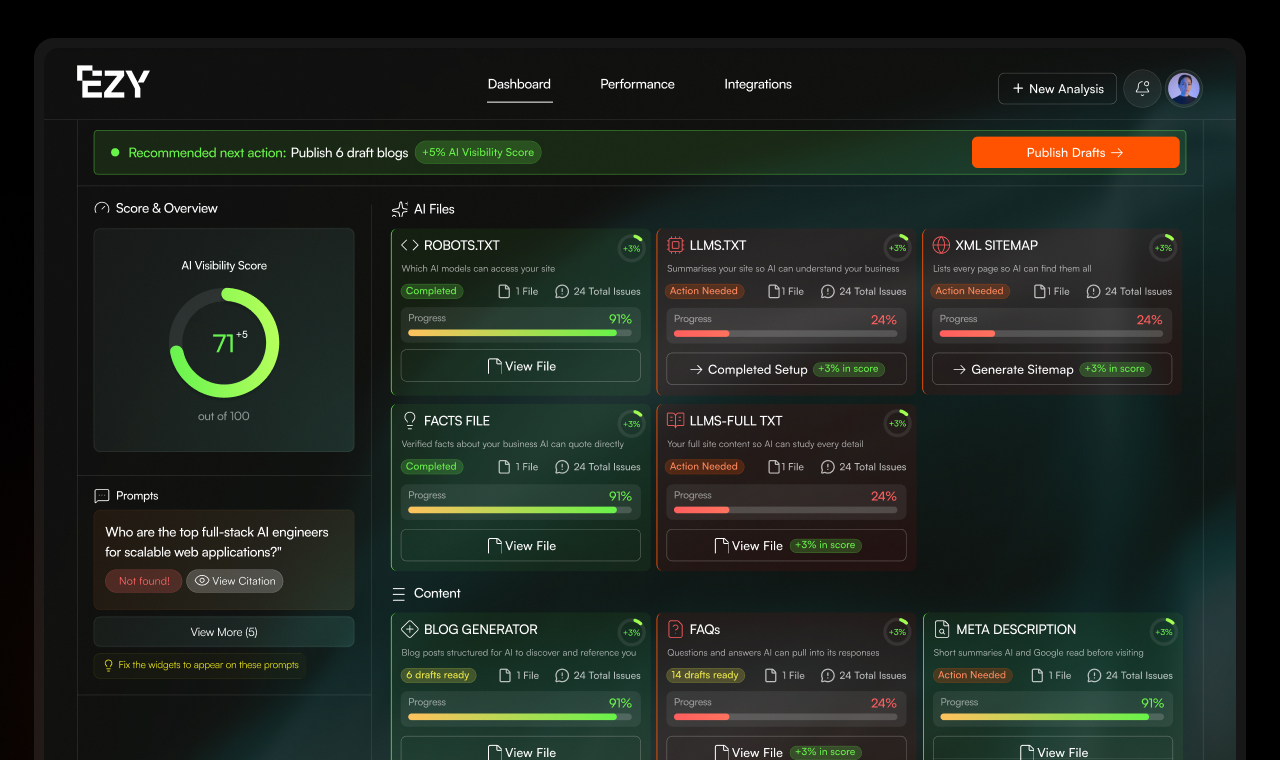
- AI Analytics – every AI crawler visit AND every AI-referred human visitor, across ChatGPT, Claude, Perplexity, Gemini & Copilot – plus weekly prompt tracking, competitor citations, and your AI Visibility Score
- 1-Click Fix All – the only AEO platform that cycles through everything: generates, optimizes and uploads your schema, meta, llms.txt, facts and sitemap in a single click
- Content Engine – original, expert-cited blogs and FAQ Hubs in your brand’s tone of voice, written and published for you. On Growth and Scale, they inherit your site’s own header and footer (theme inheritance)
- EZY Capture – an AI assistant on your site, capturing leads 24/7
- Alerts & Best Practices – citation changes, competitor moves and AI-visit spikes emailed to you, with guidance on what to do next
Planos
Every plan is priced per domain, and annual billing is available on all paid plans.
- Free forever: AI-visit analytics, robots.txt, llms.txt, and XML sitemap for one domain, plus an EZY Capture free trial.
- Growth – $49/month: the full AEO file suite plus 1-Click Fix All (schema, meta, llms.txt, llms-full.txt, facts, sitemap), Prompts & Competitors tracking, email alerts, 4 AI blogs a month, a FAQ Hub every month, theme inheritance (your blogs and FAQ Hubs use your own site’s header and footer), and EZY Capture up to 100 visitor messages a day.
- Scale – $99/month: everything in Growth, plus 8 AI blogs a month, 2 FAQ Hubs a month, and unlimited EZY Capture messages.
What EZY.ai Builds and Maintains on Your Site
1. AI Readiness & Technical Files
- llms.txt and llms-full.txt – machine-readable summaries AI engines use to understand your business
- robots.txt with explicit AI crawler permissions – without it, some AI engines skip your site by default
- AI sitemap.xml – purpose-built for AI crawlers, kept in sync as your site changes
- facts.jsonld – feeds direct facts about your business straight to AI models
2. Structured Data & Schema
- Bulk Schema.org injection – full creation, optimisation and injection across your site
- Entity optimisation – helps machines understand the context of your content
- Meta description automation – created, optimised and injected at scale
3. Analytics & Tracking
- AI agent + AI-referred user tracking – see every AI bot visit (ChatGPT, Claude, Perplexity, Gemini, Copilot) AND every human visitor who arrived from an AI tool. Two views: are AI engines indexing you, and are AI users actually clicking through?
- Prompt tracking – we test your domain against 5+ prompts across ChatGPT, Claude, Perplexity, and Gemini every week. See exactly where you appear and where you don’t.
- Citation tracking – see exactly where you appear (or don’t) for each prompt
- Competitor analysis – automatically track competitor citations across AI engines weekly. See where rivals appear that you don’t.
- Reddit detector – track your Reddit presence and mentions
- AI Visibility Score – proprietary EZY.ai score, tracked over time
- Email alerts & best practices – when your citations change, a competitor gains ground, or AI visits spike, EZY emails you – with best-practice guidance on what to do about it
4. Content & Authority
- AI-assisted blogs – auto-generated and published to your WordPress site on a cadence that matches your plan (from 2 a month on Starter up to 8 a month on Scale). Every post is original (checked against your existing content so nothing is duplicated), written in your brand’s tone of voice, cites experts and sources where possible, includes internal links to your key pages, and embeds a lead-capture form – with submissions tracked in your dashboard.
- FAQ Hubs – automatically generates dedicated, topic-clustered FAQ hub pages, each with FAQ structured data (FAQPage schema) so AI engines can read and cite your answers
- Theme inheritance (Growth and Scale) – published blogs and FAQ Hubs render inside your own site’s header and footer, so they look like a native part of your website
- Authority scanner – see which pages carry high authority for your topics
- Submission tools – submit directly to Google Search Console and Bing Webmaster Tools
Content Quality That Actually Gets Cited
Most AEO plugins generate basic URL lists or thin schema. EZY runs deep LLM analysis on your live, rendered site – producing enriched files that score 95%+ when tested by major AI models. When we asked Google’s Gemini to independently assess EZY’s generated output, it scored it 98/100 and called it “an absolute masterclass in GEO.”
The difference shows up where it matters: in citations. AI engines reward enriched, factual, well-structured content – they ignore generic URL dumps. We’ve spent months tuning our generation to maximise citation eligibility, and the results show in the numbers above.
EZY Capture – Lead Generation, Set Up for You
The same AEO data EZY already holds about your site powers a fast, accurate, lead-capturing assistant – switched on in one click, with no training and no extra setup. It answers visitor questions in your brand’s voice and captures their details (name, email, and what they asked), so you can follow up. Try it free, then it’s included on every paid plan – up to 50 visitor messages a day on Starter, 100 on Growth, and unlimited on Scale.
It gets smarter on its own. Over time it learns what your prospects keep asking – and EZY.ai turns those real questions into FAQs and blog posts that answer them. Those answers lift your AI visibility, which feeds the assistant: a loop that compounds while you do nothing.
Every other chatbot makes you upload content, paste FAQs, train the bot and maintain it. With EZY that’s already done – the assistant is a by-product of your AEO work, so switching it on costs you nothing extra.
Set It and Forget It
EZY runs continuously in the background:
- Weekly: tests your domain against 5+ prompts in ChatGPT, Claude, Perplexity, and Gemini
- Weekly: tracks competitor citations and surfaces content gaps
- On schedule: auto-publishes optimised blog posts and FAQ Hubs to your WordPress site at a cadence that matches your plan
- Real-time: logs every AI bot visit and every AI-referred human user
- Real-time: re-syncs your llms.txt, schema, and meta when content changes
Most AEO plugins are one-time fixes. EZY is an ongoing service.
Why EZY.ai is Different
- Files live on your site, not ours. Generated directly on your WordPress site, under your domain – not served from our cloud. More durable, more in your control.
- Real automation, not just audits. EZY.ai’s Site-Fixer technology doesn’t just find problems – it solves them.
- Cloudflare Worker integration. Built on infrastructure that already powers most of the web, available for non-WordPress sites too.
- Built for agencies too. Manage multiple client domains from one white-label dashboard, with each client on its own plan from $49/month – bundle AEO into your existing offering.
- Free forever on the plugin and analytics. Paid plans from $49/month unlock 1-Click Fix All, the content engine, Prompts & Competitors tracking, and lead-capturing chat.
How It Works
- Install the plugin and activate.
- Connect your free EZY.ai account through the connection wizard.
- Generate and upload your llms.txt, robots.txt and schema in two clicks.
- Watch AI visits, citations and engine breakdown in your dashboard.
Serviços externos
This plugin connects to a small number of external services. Each is listed below with what it is used for, exactly what data is sent and when, and links to the provider’s terms of service and privacy policy. No data is sent to any service beyond what is described here.
1. EZY.ai API
- Service: EZY.ai (https://api.ezy.ai), the platform this plugin is built for.
- Provider: EZY.ai. Terms of Service: https://www.ezy.ai/terms – Privacy Policy: https://www.ezy.ai/privacy
The EZY.ai API powers the plugin’s connected features. It is contacted in the following cases:
- Account connection (only when you start it): when you connect your site from the Connection page, the plugin sends your site URL, WordPress version and plugin version to establish and verify the link (endpoints: /auth/initiate, /auth/exchange, /verify, /disconnect). Connecting requires an EZY.ai account, and creating that account means accepting EZY.ai’s Terms of Service and Privacy Policy. That acceptance is the consent for the connected features below. If you never connect, none of the connected features run.
- Content sync (connected sites only): the plugin fetches your generated AEO content (robots.txt, llms.txt, llms-full.txt, facts.json, sitemap.xml, schema markup, meta descriptions, FAQ hubs, blogs) and reports sync status (endpoints: /robots-txt, /llms-txt, /llms-full-txt, /facts-json, /sitemap-xml, /schemas, /meta-descriptions, /faqs-html, /faq-hubs, /faq-hub/{slug}, /blogs, /blog/{slug}, /listing-template, /integrations/{id}/*, /content-status, /trigger-refetch). Requests carry your site URL and the connection token. EZY may also ask the plugin to run the same fetch you would run from the Widgets screen when a delivery to your site could not get through; that request is authenticated with your connection token, only fetches content you published in EZY, only runs while your site is connected, and never writes a feature you have switched off.
- Referral invitations (only when you send one): if you use the “Recommend EZY.AI to a friend” form on the Connection page, the email address, name and message you type are sent to /invite so EZY.AI can email that person your invitation. Nothing is sent unless you fill in and submit that form.
- Visit analytics sync (connected sites only): visits recorded by the local analytics are also synced to your EZY.ai dashboard (endpoints: /track, /visits/export). Records contain a salted, partially masked IP hash (never the raw IP), the visited URL with sensitive query parameters stripped, the user agent, and the detected agent type.
- EZY Capture chat widget (connected sites only, can be switched off): when the chat assistant is enabled, the public site loads its script from https://api.ezy.ai/api/chatbot/widget/loader.js, and visitor chat messages are processed by EZY.ai to generate answers.
- Install diagnostics (opt-in only, disabled by default): if, and only if, you enable “Share install diagnostics” in Settings, the plugin sends one daily ping to /beacon containing: site URL and domain, plugin / WordPress / PHP versions, locale, multisite flag, a salted hash of the admin email (never the address itself), connection state, and aggregated 7-day visit counts. No per-visitor data is included. Disable the checkbox at any time and all sending stops immediately, including the final uninstall notice.
2. OpenAI (crawler verification data, download only)
- Service: OpenAI publishes machine-readable lists of the IP addresses used by its crawlers (https://openai.com/gptbot.json and https://openai.com/chatgpt-user.json) and a public key directory for verifying signed ChatGPT requests (https://chatgpt.com/.well-known/http-message-signatures-directory).
- Used for: verifying that a visitor claiming to be GPTBot or ChatGPT genuinely comes from OpenAI, so the AI analytics on your dashboard are accurate. The IP lists are refreshed up to once a day and the key directory up to every 6 hours; both are cached locally.
- Data sent: none. These are plain downloads of public files. No information about your site or your visitors is transmitted to OpenAI.
- Provider: OpenAI. Terms of Use: https://openai.com/policies/terms-of-use – Privacy Policy: https://openai.com/policies/privacy-policy
3. Perplexity (crawler verification data, download only)
- Service: Perplexity publishes machine-readable lists of the IP addresses used by its crawlers (https://www.perplexity.com/perplexitybot.json and https://www.perplexity.com/perplexity-user.json).
- Used for: the same crawler verification as above, for PerplexityBot and Perplexity-User traffic. Refreshed up to once a day and cached locally.
- Data sent: none. Plain downloads of public files, no site or visitor data is transmitted.
- Provider: Perplexity. Terms of Service: https://www.perplexity.ai/hub/legal/terms-of-service – Privacy Policy: https://www.perplexity.ai/hub/legal/privacy-policy
4. Cloudflare (cache purge, only if your site uses Cloudflare)
- Service: Cloudflare cache purge API (https://api.cloudflare.com).
- Used for: after content on your site is updated, the plugin asks Cloudflare to clear its edge cache for the affected URLs so visitors see fresh content. This runs only if Cloudflare credentials are already present on your site (stored by the official Cloudflare plugin, or added by you for EZY.ai). If no credentials exist, Cloudflare is never contacted.
- Data sent: the list of your own page URLs to purge, authenticated with your stored Cloudflare zone ID and API token.
- Provider: Cloudflare. Terms: https://www.cloudflare.com/website-terms/ – Privacy Policy: https://www.cloudflare.com/privacypolicy/
Código fonte
The analytics dashboard shown in wp-admin is a compiled JavaScript bundle (assets/dist/app.js and assets/dist/app.css). The complete human-readable source for that bundle is included in this plugin under src/ (TypeScript + React), together with the full build configuration (vite.config.ts, tsconfig.json, tailwind.config.ts, postcss.config.js, package.json, pnpm-lock.yaml).
To rebuild the bundle from source:
- Install Node.js 20+ and pnpm (npm install -g pnpm)
- From the plugin root directory run: pnpm install
- Run: pnpm build
The build writes its output to assets/dist/. Every other script and stylesheet in the plugin (assets/js/, assets/css/) ships uncompiled and human-readable.
Instalação
- Carregue os arquivos do plugin no diretório
/wp-content/plugins/ezy-ai-pluginou instale o plugin por meio da tela de plugins WordPress diretamente. - Ative o plugin através da tela 'Plugins' em WordPress.
- Go to the “EZY AI” tab in the admin menu to connect your account.
- Follow the connection wizard to link your WordPress site to your EZY.ai account.
Log de Changes
Bug fixes for blog content sync, schema markup identification, and UI refresh animation.
2.4.1
- Fix: Unpublishing a FAQ Hub in your EZY dashboard now removes the hub page from your site. Previously the removal request was not understood by the plugin, so the page stayed live and the dashboard could not confirm the unpublish.
- New: Delivery fallback. When EZY cannot deliver content to your site because the request is rejected on the way in (a host request-size limit, a security rule or a bot challenge), EZY can now ask the plugin to fetch that content from your EZY account instead, the same way the Sync button on the Widgets screen does. Only content you published in EZY is fetched, only while your site is connected, and a feature you switched off is never written. Requests are limited to one at a time and thirty per hour.
- Detail: The Widgets screen Sync button and this fallback now share one code path, so both apply the same cache purge and status tracking.
2.4.0
- New: Meta titles. EZY can now write and publish the title tag for each of your pages, the same way it already handles meta descriptions. Titles are generated from your EZY dashboard, sent to your site, and served from the page head with a small marker so EZY can confirm they are live.
- Detail: When an EZY title exists for a page it replaces the title produced by your theme or SEO plugin (Yoast, All in One SEO, Rank Math, SEOPress, The SEO Framework, Slim SEO and Squirrly are all handled), including the Open Graph and Twitter title variants, so the page shows one consistent title everywhere. Pages without an EZY title are left exactly as they were.
- Detail: Meta titles get their own switch on the EZY.ai > Widgets screen and can be turned off per page, like schema and meta descriptions. Switching the feature off hands the title back to your theme or SEO plugin immediately.
- Detail: The title tag inside inline SVG icons is never touched, so accessible names on icons keep working.
- Change: The site now reports meta title support to your EZY dashboard on connect and on each verification, so the Meta Titles widget unlocks for this site as soon as the plugin is updated.
2.3.2
- New: Turn individual features on or off. Every widget EZY publishes – robots.txt, llms.txt, llms-full.txt, facts, sitemap, schema, meta descriptions, blogs and FAQs – now has its own switch on the EZY.ai > Widgets screen. Everything stays on unless you turn it off, so updating changes nothing on your site.
- New: Schema and meta descriptions can additionally be switched off for individual pages, from the same screen. Useful when you want EZY handling most of your site but leaving a few pages to you.
- Detail: Switching a feature off stops it immediately and completely – the file is removed from your web root, the URL returns a proper 404 instead of your homepage, and EZY stops overriding your other SEO plugin for that feature so it can take over again. Nothing is deleted from your EZY account, so switching back on restores everything straight away. A file you have edited yourself is never removed.
- Fix: Switching off llms.txt, llms-full.txt, facts or the sitemap did not always stop them being served. On hosts where the file had been written to the server’s document root rather than the WordPress directory, EZY looked in the wrong place, found nothing, and reported success while the file kept serving. Every location is now checked, deletion is attempted two ways, and the result is verified.
- Fix: If a file cannot be removed – because permissions block it, or because you have edited it since EZY published it – the plugin now says so and names the file, instead of showing the widget as cleanly disabled while it is still being served.
- Fix: Schema markup could be output twice on the same page when Squirrly SEO was active, which some structured-data validators flagged as duplicate entities. Identical blocks are now collapsed to one.
- Change: Your site now tells your EZY dashboard which features are switched on, so the dashboard reflects your real settings and stops suggesting work for features you have turned off.
- Fix: The EZY dashboard screen could hang for up to eight seconds while it checked your Auto Post settings with ezy.ai. That check now runs in the background on a schedule, so the screen loads from settings already stored on your site and never waits on the network.
- Fix: Uninstalling now removes every setting the plugin stored. Several newer options – per-feature switches, Auto Post state, chatbot and content-path settings – were left behind in your database. Uninstall now clears everything the plugin ever wrote, so nothing of EZY’s remains.
2.3.1
- New: Content webhooks can now accept a gzip-compressed payload. Some hosts reject large POST bodies at the web server before PHP runs, which made big pages (themed blog posts, FAQ hubs, long sitemaps) fail to publish. The plugin now advertises whether this site’s PHP can read compressed payloads, and EZY only sends one when it can – so nothing changes on sites where it is not supported. Compressed data is decoded and handled exactly like an ordinary request: it is content only, and is never executed, included or written as code. Size limits are enforced before and after decoding.
- Fix: The “Turn on Auto Post” recommendation on the EZY dashboard could never be ticked off, so sites that already had Auto-Post Blogs, FAQs and Sitemap enabled were still told to switch it on. The recommendation now reflects your real Auto Post settings from your EZY account, and is hidden entirely when those settings cannot be read.
- Change: Unknown webhook content types now report the plugin version in the error, so an out-of-date install can be told apart from a genuine payload problem.
2.3.0
- Privacy: Visitor analytics is now opt-in and disabled by default. No visit is recorded, and nothing is sent to EZY.AI, until you enable it in Settings. The Settings copy now also states that connected sites mirror a copy of each record to EZY.AI.
- Correction: an earlier changelog entry (2.1.x) described a configurable 90-day visit retention window. That option no longer exists – visit history is kept until you disable analytics or uninstall the plugin, and uninstalling removes the table entirely.
- Privacy: The admin dashboard no longer requests favicons from Google. It now uses your site’s own Site Icon (Appearance > Customize > Site Identity), falling back to your site’s own /favicon.ico and then to an icon bundled with the plugin. No third-party service is contacted.
- Privacy: Install diagnostics are now strictly opt-in and disabled by default. The plugin sends no diagnostic data unless you explicitly enable it in Settings, and turning it off stops all sending immediately (including on uninstall). Sites upgrading from older versions are reset to off and asked to opt in again, because the previous default-on value was not an explicit choice.
- Privacy: Admin pages now use the Montserrat font bundled with the plugin instead of loading it from Google Fonts, so the plugin no longer makes any request to Google.
- Change: Content webhooks now use the WordPress REST API endpoint (wp-json/ezy-ai/v1/webhook) exclusively. The legacy direct PHP receiver file has been removed.
- Docs: Added a complete External Services section to this readme covering every external endpoint the plugin can contact (EZY.ai, OpenAI, Perplexity, Cloudflare) with terms of service and privacy policy links.
- Dev: The uncompiled TypeScript/React source for the analytics dashboard bundle now ships inside the plugin (src/) together with build instructions, see the Source Code section.
- Fix: WordPress core admin includes are now loaded conditionally, only when the required function is not already available.
2.2.5
- General enhancements, reliability improvements and bug fixes.
Capturas de tela


Para desenvolvedores
Este é o seu plugin? Mostre os números.
Adicione um crachá ao vivo ao seu site, Documentos ou Readme do GitHub. Ele é atualizado por conta própria - nenhuma conta necessária.
Best EZY.ai alternatives
All aeo plugins →





FAQ
EZY.ai: quick answers
Respostas diretas, extraídas de dados ao vivo WordPress.org.
Fonte: WordPress.org
Is EZY.ai free?
Yes. EZY.ai is free to download and use from the official WordPress.org plugin directory.
Is EZY.ai safe to use in 2026?
EZY.ai is a solid plugin choice in 2026, with a few things worth checking first. It runs on 100+ sites, is rated 3/5 and was last updated 2 months ago, and scores 65/100 on our health check.
How many websites use EZY.ai?
EZY.ai is active on 100+ WordPress websites and has been downloaded 6,033 times since it launched in January 2026. It was downloaded 841 times in the last 30 days.
Does EZY.ai work with WordPress 7.1?
Yes. The developer has tested EZY.ai up to WordPress 7.1.5, the latest release. It requires WordPress 5.7 or newer.
What PHP version does EZY.ai need?
EZY.ai requires PHP 7.4 or higher. Most hosts run PHP 8.x today, so it works on any modern WordPress hosting.
When was EZY.ai last updated?
The latest version, 2.4.1, was released on September 21, 2026 (2 months ago).
Who makes EZY.ai?
EZY.ai is developed and maintained by James Mackie.
What are the best alternatives to EZY.ai?
The most popular alternatives to EZY.ai are GEO Plugin by Squirrly SEO (30K+ installs), Xagio SEO & AEO (10K+ installs) and LovedByAI (1K+ installs).
Alimentado por PageForge
Um modelo e uma planilha. Uma página real para cada pesquisa.
PageForge Transforma cada linha de um CSV em uma página WordPress com seu próprio título, URL, SEO campos e esquema, construído no layout que você já desenhou. Gratuito em WordPress.org.
- CSV e XLSX, mais Google Sheets em Profissional e Empresarial
- Seu próprio título, URL, SEO campos e esquema para cada página
- Funciona com o editor de blocos, Elementor, Divi e Avada
- Gratuito em WordPress.org, sem cartão de crédito