


ezStats Analytics
Cookieless WordPress analytics with a free AI/site-health scan, realtime traffic, AI referrals, three goals, and 10,000 monthly pageviews.

Use com cautela
ezStats Analytics works, but test it on a staging site before relying on it in 2026. It runs on 30+ sites and was last updated 4 months ago, and scores 52/100 on our health check.
- Base de usuários pequenas (mais de 30 instalações ativas)
- Muito poucos comentários até agora
Como ele se acumula?
Lado a lado em instalações, atualizações, avaliações e suporte



Downloads diários
Os picos de download geralmente seguem uma nova versão — cada site que atualiza automaticamente é um download.
Rankings
Where ezStats Analytics stands todayWordPress.org Classificações de pesquisa
Posição ao vivo na pesquisa de plugins, top 100| Palavra chave | Posição |
|---|---|
| ai visibility | >100 |
| analytics | >100 |
| cookieless analytics | #27 |
| privacy | >100 |
| SEO | >100 |
Adoção da versão
Compartilhamento de sites ativos por lançamento.
About ezStats Analytics
From the official readme · v1.0.1Descrição
Understand what is working on your WordPress site without wrestling with GA4.
ezStats Analytics is the official WordPress connector for ezStats, owned and operated by Cavendo. Install the plugin, get an immediate AI Readiness & Site Health snapshot, connect or create an ezStats account, and review clean traffic reports in WordPress or the hosted ezStats dashboard.
Get useful results before signup
Activation itself stays local and makes no external request. When an administrator explicitly clicks Run my free scan, ezStats checks the public website and displays the results directly in WordPress before an account is required.
The scan includes:
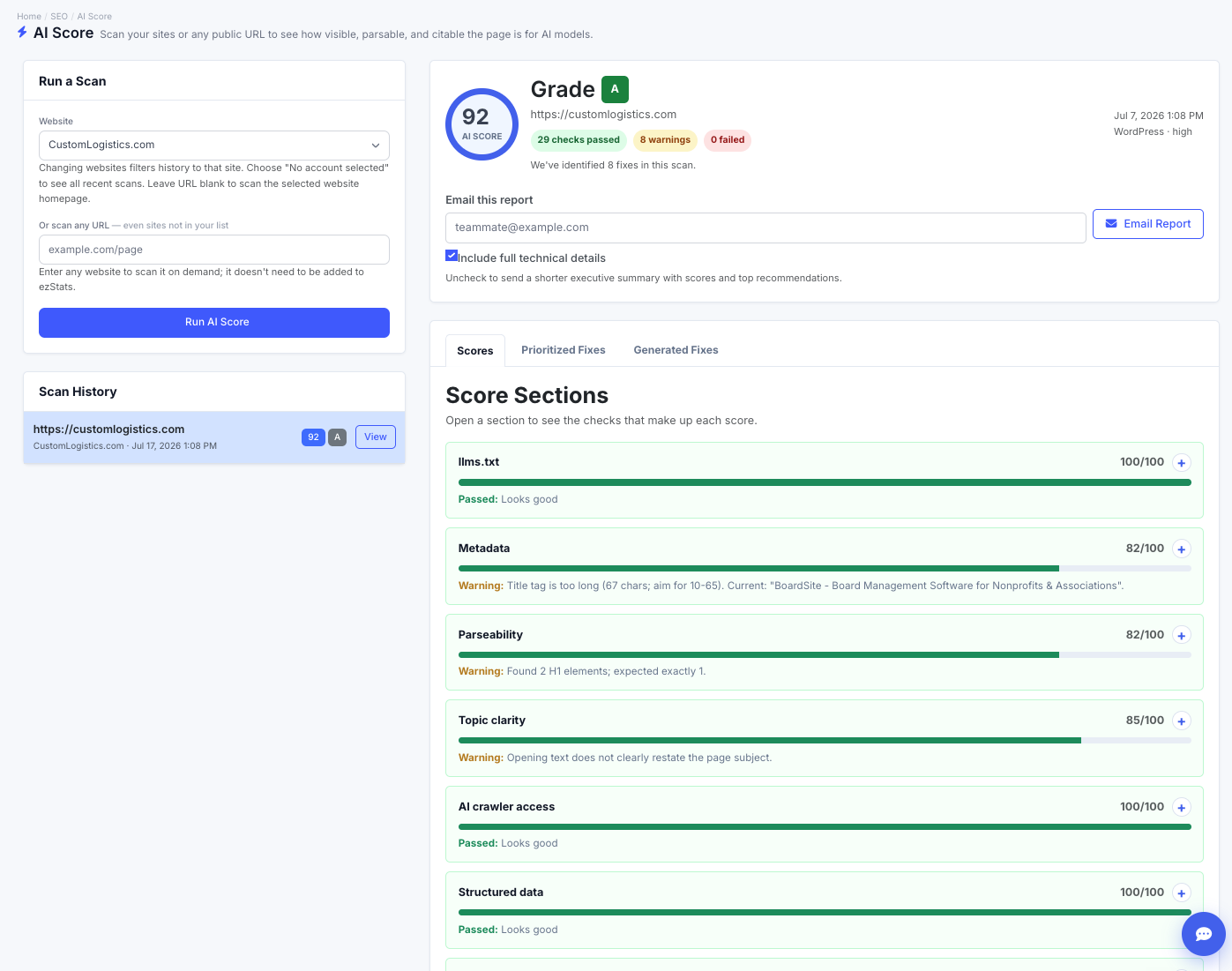
- The established ezStats AI Score and grade
- AI crawler access and page indexability
llms.txt, metadata, and structured-data highlights- Sitemap discovery and validation
- A broken-link sample from up to 25 unique same-site homepage links
- Optional PageSpeed performance, SEO, accessibility, and best-practices gauges
- Available loading signals such as LCP, CLS, FCP, and TTFB, with plain-language explanations
The sitemap, link-health, and PageSpeed results are reported separately and do not silently change the AI Score methodology. If the administrator then connects an account, the scan can be saved as that site’s first AI Score baseline. Connected sites continue to show their latest saved score and scan date in WordPress, with controls to rerun the scan or open the full hosted report.
Start free
Accounts created through the WordPress connection receive a permanent Free plan with:
- One website
- Up to 10,000 pageviews per month
- One month of analytics data retention
- Realtime traffic analytics
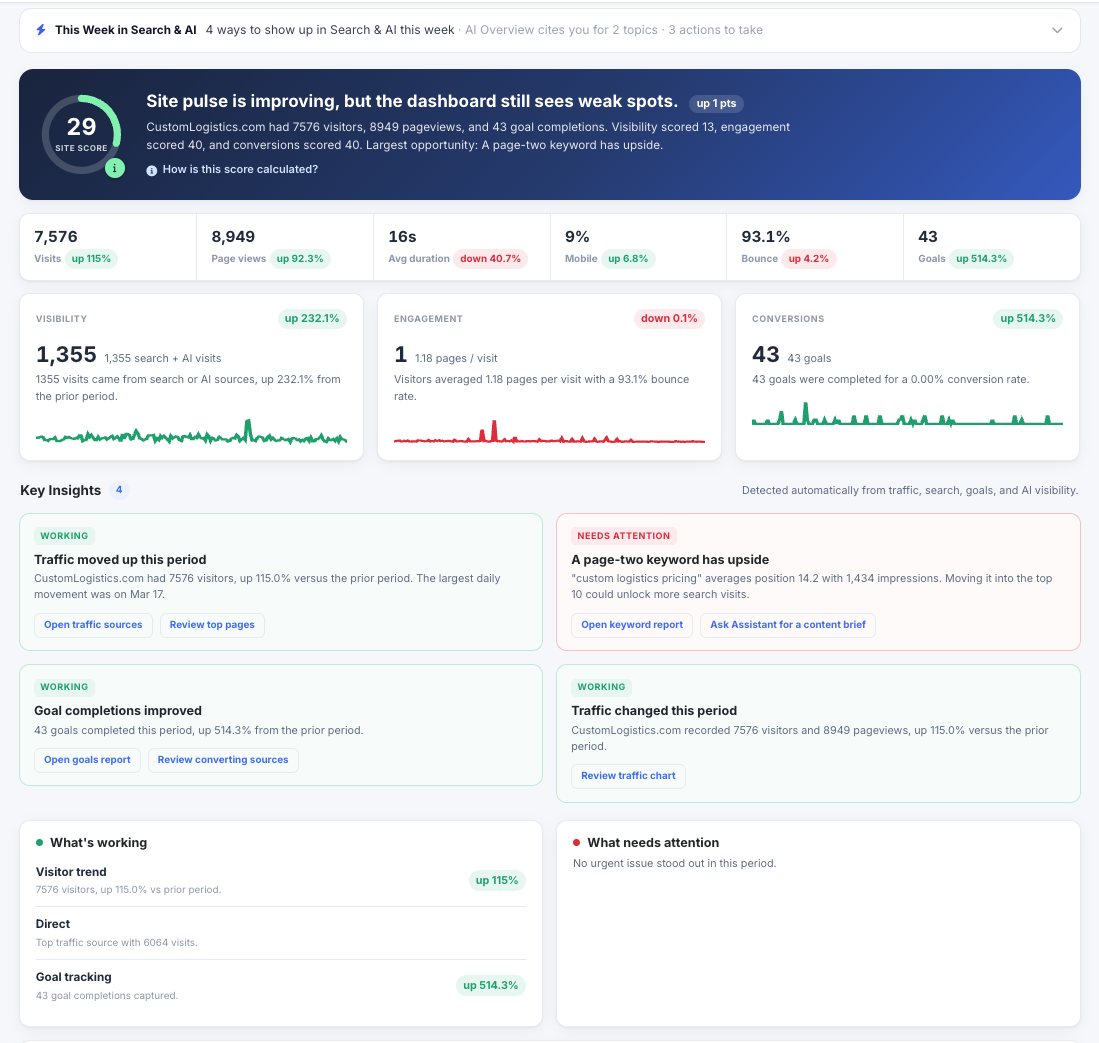
- Top pages, traffic sources, devices, browsers, and coarse geographic reporting
- Search, social, campaign, referral, and recognizable AI-assistant traffic sources
- Up to three conversion goals
- Optional heatmaps for up to three pages with seven-day behavioral-data retention
- Access to the AI Score scanner before and after account connection
- Dashboard, REST API, and hosted MCP access, with actions subject to plan limits
- No credit card and no expiration
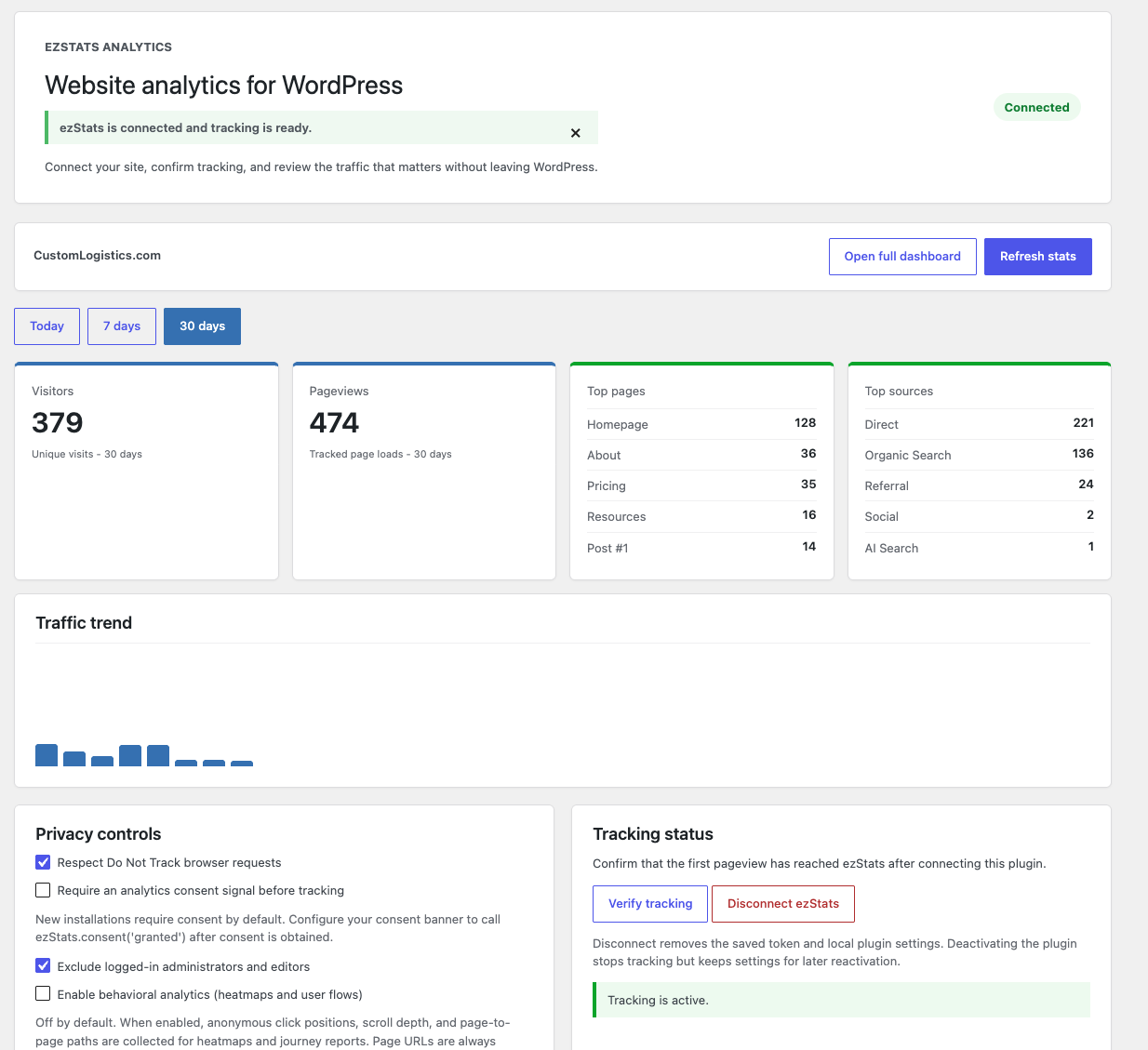
The plugin also provides in-admin summaries, consent and Do Not Track controls, logged-in role exclusions, multisite-aware setup, and WP-CLI support.
Optional SEO and AI visibility upgrades
The plugin and its core analytics work on the permanent Free plan. If you later need higher limits, ongoing AI visibility monitoring, or deeper SEO intelligence, paid ezStats plans add:
- Google Search Console integration
- SEO keyword, competitor, content-gap, and backlink tracking
- Monitored brand mentions and citations across ChatGPT, Claude, Gemini, and Perplexity
- Greater heatmap capacity and longer behavioral-data retention
- User flows, conversion funnels, and GA4 history import
- Multi-site dashboards, client reporting, and agency features
- Alerts, scheduled reports, and additional API and agent actions
You can start free and upgrade later without replacing or reconnecting the plugin. The WordPress plugin is free and open source; your ezStats service plan determines optional hosted-service features, site limits, retention, and monthly usage. Compare plans at https://ezstats.io/pricing.
Privacy-first by design
ezStats analytics operate without cookies and without cross-site tracking. Tracking starts after an administrator connects the site, and consent mode is off by default, so a connected site begins recording eligible visits without waiting for a consent signal. Do Not Track support remains enabled by default. Sites that require prior analytics consent can enable consent mode in the plugin settings and connect it to their consent manager.
When tracking is permitted, the bundled tracker stores a random pseudonymous identifier in the visitor’s first-party browser local storage so repeat visits can be measured. The identifier does not contain a name, email address, or WordPress user information. At ingestion, ezStats converts it to an account-scoped HMAC visitor key, which prevents direct matching between unrelated ezStats accounts.
Visitor IP addresses are resolved from the direct connection or explicitly configured trusted proxy sources, used transiently for coarse geographic and network classification and bot filtering, and are not retained. ezStats does not collect form values, DOM text, link destinations, customer data, or WordPress user details through its analytics tracker.
No analytics product can guarantee legal compliance for every website or jurisdiction. Site owners remain responsible for their privacy disclosures, consent choices, and legal obligations.
External service
This plugin connects to the hosted ezStats service at https://go.ezstats.io. The service is required for analytics collection, processing, storage, and reporting.
The service is used to:
- Connect the WordPress site to an ezStats account.
- Retrieve scoped site tokens and API keys.
- Receive pageview and permitted analytics events. Connected sites relay them through the site’s REST API; manual-token setups send them directly to ezStats.
- Verify tracking status.
- Load aggregated metrics such as visitors, pageviews, top pages, top sources, and traffic trends.
- Run the optional pre-account AI Readiness & Site Health scan after an administrator explicitly clicks the scan button.
Activation itself makes no external request. Before account creation, a scan request sends the public site URL, plugin version, WordPress version, and a random installation identifier to ezStats. The service validates a short-lived, single-use proof on the site’s public REST API. It does not send a WordPress administrator name or email. The resulting baseline can be attached to the account when the administrator chooses to connect.
The scan fetches public pages, sitemap files, and up to 25 unique same-site homepage links through ezStats. When optional PageSpeed results are available, ezStats submits the public website URL to the Google PageSpeed Insights API. Google may process the URL and request metadata under the Google API Terms of Service and Google Privacy Policy:
Google API Terms of Service: https://developers.google.com/terms
Google Privacy Policy: https://policies.google.com/privacy
Tracking may send the canonical page path, documented utm_* campaign parameters, referrer hostname, screen and viewport dimensions, browser, operating system, device type, foreground engagement time, random session and pseudonymous visitor identifiers, and non-personal WordPress metadata such as public post ID, post type, and taxonomy identifiers. If optional behavioral analytics are enabled, anonymous click coordinates and element tags, scroll depth, and page-to-page paths are sent. Element text, link destinations, DOM IDs, selectors, and form values are never sent.
During connection, WordPress sends site URL, site name, WordPress version, plugin version, timezone, and multisite status so ezStats can connect the selected website to the account chosen by the administrator.
Privacy Policy: https://ezstats.io/privacy
Terms of Service: https://ezstats.io/terms
Product and pricing: https://ezstats.io/pricing
Instalação
- Install ezStats Analytics from Plugins > Add New, or upload the plugin ZIP.
- Ative o plugin.
- Open the top-level ezStats menu in WordPress admin.
- Optionally click Run my free scan to review AI readiness and site health before signup.
- Create a Free ezStats account, connect an existing account, or paste an existing tracking token.
- Select or create the website you want to track and complete the connection.
- Visit the public site in a logged-out or private window and verify that tracking is active. If your site requires prior analytics consent, enable consent mode and connect it to your consent manager.
Log de Changes
1.0.1
- Added a one-time activation welcome experience with clear Free-plan setup actions.
- Added an explicit, administrator-initiated AI Readiness & Site Health scan before signup.
- Added sitemap, homepage link-health, and optional PageSpeed highlights without changing AI Score methodology.
- Added PageSpeed score gauges, loading-signal status tiles, and plain-language metric explanations.
- Added the latest saved AI Score, scan date, authenticated reruns, and full-report access to the connected plugin dashboard.
- Kept analytics metrics first on connected sites and condensed AI Readiness into an expandable, action-oriented score summary.
- Added privacy-safe onboarding milestones uploaded only after an administrator clicks Scan or Connect, plus seven-day retention measurement.
- Activation remains entirely local until an administrator clicks Scan or Connect.
- Clarified that consent mode is optional and off by default while Do Not Track remains enabled by default.
1.0.0
- First public WordPress.org release of ezStats Analytics.
- Added a bundled v3 tracker with foreground engagement, SPA navigation, idempotent events, and consent support.
- Added trusted-proxy controls, transient local GeoIP processing, and privacy-limited WordPress metadata.
- Added optional WooCommerce purchase events, behavioral analytics, multisite support, WP-CLI setup, and a top-level ezStats admin menu.
- Made the tracker relay configuration resilient to page optimizers that remove inline scripts.
- Send the hosted dashboard link through a role-aware landing route, so administrators and regular users open the appropriate dashboard.
- Made consent gating opt-in so sites without a consent manager begin recording immediately.
Capturas de tela

Para desenvolvedores
Este é o seu plugin? Mostre os números.
Adicione um crachá ao vivo ao seu site, Documentos ou Readme do GitHub. Ele é atualizado por conta própria - nenhuma conta necessária.
Best ezStats Analytics alternatives
All ai visibility plugins →




FAQ
ezStats Analytics: quick answers
Respostas diretas, extraídas de dados ao vivo WordPress.org.
Fonte: WordPress.org
Is ezStats Analytics free?
Yes. ezStats Analytics is free to download and use from the official WordPress.org plugin directory.
Is ezStats Analytics safe to use in 2026?
ezStats Analytics works, but test it on a staging site before relying on it in 2026. It runs on 30+ sites and was last updated 4 months ago, and scores 52/100 on our health check.
How many websites use ezStats Analytics?
ezStats Analytics is active on 30+ WordPress websites and has been downloaded 1,384 times since it launched in July 2026. It was downloaded 233 times in the last 30 days.
Does ezStats Analytics work with WordPress 7.1?
ezStats Analytics is officially tested up to WordPress 7.0.9, while the latest release is 7.1.5. It may still work, but try it on a staging site first.
What PHP version does ezStats Analytics need?
ezStats Analytics requires PHP 7.4 or higher. Most hosts run PHP 8.x today, so it works on any modern WordPress hosting.
When was ezStats Analytics last updated?
The latest version, 1.0.1, was released on July 19, 2026 (4 months ago).
Who makes ezStats Analytics?
ezStats Analytics is developed and maintained by CAVENDO.
What are the best alternatives to ezStats Analytics?
The most popular alternatives to ezStats Analytics are Check for Broken Links (2K+ installs), TrueRanker (300+ installs) and LLMs.txt Curator (200+ installs).
Alimentado por PageForge
Um modelo e uma planilha. Uma página real para cada pesquisa.
PageForge Transforma cada linha de um CSV em uma página WordPress com seu próprio título, URL, SEO campos e esquema, construído no layout que você já desenhou. Gratuito em WordPress.org.
- CSV e XLSX, mais Google Sheets em Profissional e Empresarial
- Seu próprio título, URL, SEO campos e esquema para cada página
- Funciona com o editor de blocos, Elementor, Divi e Avada
- Gratuito em WordPress.org, sem cartão de crédito