


Gallery for Google Photos – share your albums right on your site
Import Google Photos or paste a shared album link, and show them as responsive grid, masonry, carousel, or story galleries.

Escolha sólida
Gallery for Google Photos is a solid plugin choice in 2026, with a few things worth checking first. It runs on 1K+ sites, is rated 2.4/5 and was last updated 4 days ago, and scores 72/100 on our health check.
- Desenvolvido ativamente — última atualização 4 dias atrás
- Testado com as últimas WordPress (7.1)
- Momentum — downloads up 33.6% vs the previous 30 days
- Low rating so far — 2.4/5 from only 7 reviews
Como ele se acumula?
Lado a lado em instalações, atualizações, avaliações e suporte



Downloads diários
Os picos de download geralmente seguem uma nova versão — cada site que atualiza automaticamente é um download.
Rankings
Where Gallery for Google Photos stands todayWordPress.org Classificações de pesquisa
Posição ao vivo na pesquisa de plugins, top 100| Palavra chave | Posição |
|---|---|
| album | #18 |
| quadra | >100 |
| galeria | >100 |
| Google Photos | #10 |
| photos | #21 |
Adoção da versão
Compartilhamento de sites ativos por lançamento.
Divisão de classificação
★★★★★★★★★★ 2.4 from 7 reviews
About Gallery for Google Photos
From the official readme · v1.3.2Descrição
Import photos and videos from your Google Photos account and show them as responsive grid, masonry, carousel, and story galleries. Pick your media with Google’s official Photos Picker, save it to your own Media Library, then design the gallery in the block editor — block or shortcode.
Gallery for Google Photos | Documentation | Pricing | Support | Demo
Gallery for Google Photos publishes your Google Photos library without coding. Choose a layout, set responsive columns, add captions and hover effects, and open photos in a full-screen lightbox with video playback. Because the photos you pick are copied into your own Media Library, your galleries keep working even after your Google session expires. You can also add a whole shared album by pasting its link, with no Google keys needed, and keep its photos on Google Photos so they use no space on your server.
Use it for photography portfolios, travel blogs, event recaps, real-estate listings, or client galleries. It works with any WordPress theme.
Key Features – Free Version
Import & Connection
- Photo & Video Import: Import from Google Photos with the official Photos Picker.
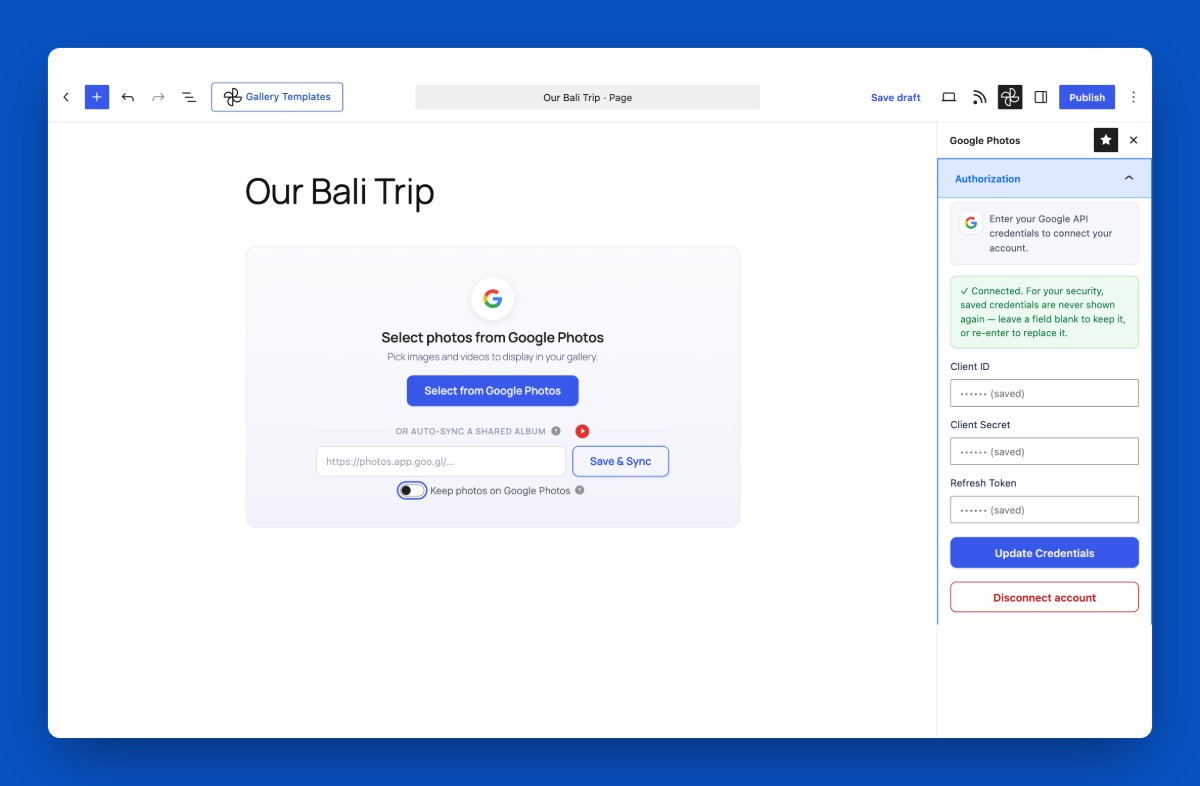
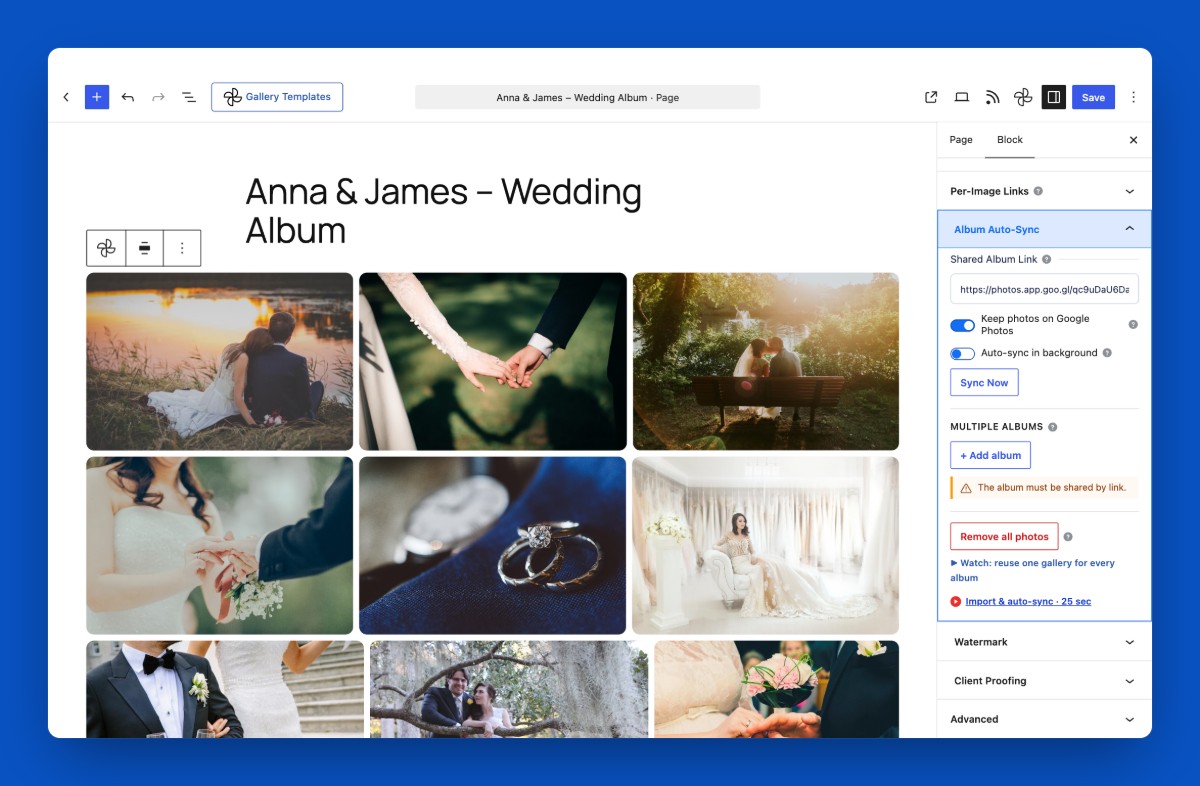
- Shared Album Link: Paste a shared album link and click Save & Sync. No Client ID or Client Secret needed.
- Keep Photos on Google Photos: Album photos load straight from Google and use no space on your server, or copy them to your Media Library instead.
- Saved to Media Library: Media is stored in your own Media Library, so galleries keep working.
- Self-Hosted OAuth: Your Google credentials stay on your server, never sent to us.
- Authorization Sidebar: Field validation, loading state, one-click connect/disconnect.
- Media Type Filter: Show All Media, Photos only, or Videos only.
Layouts
- Grid Layout: A fully responsive photo grid.
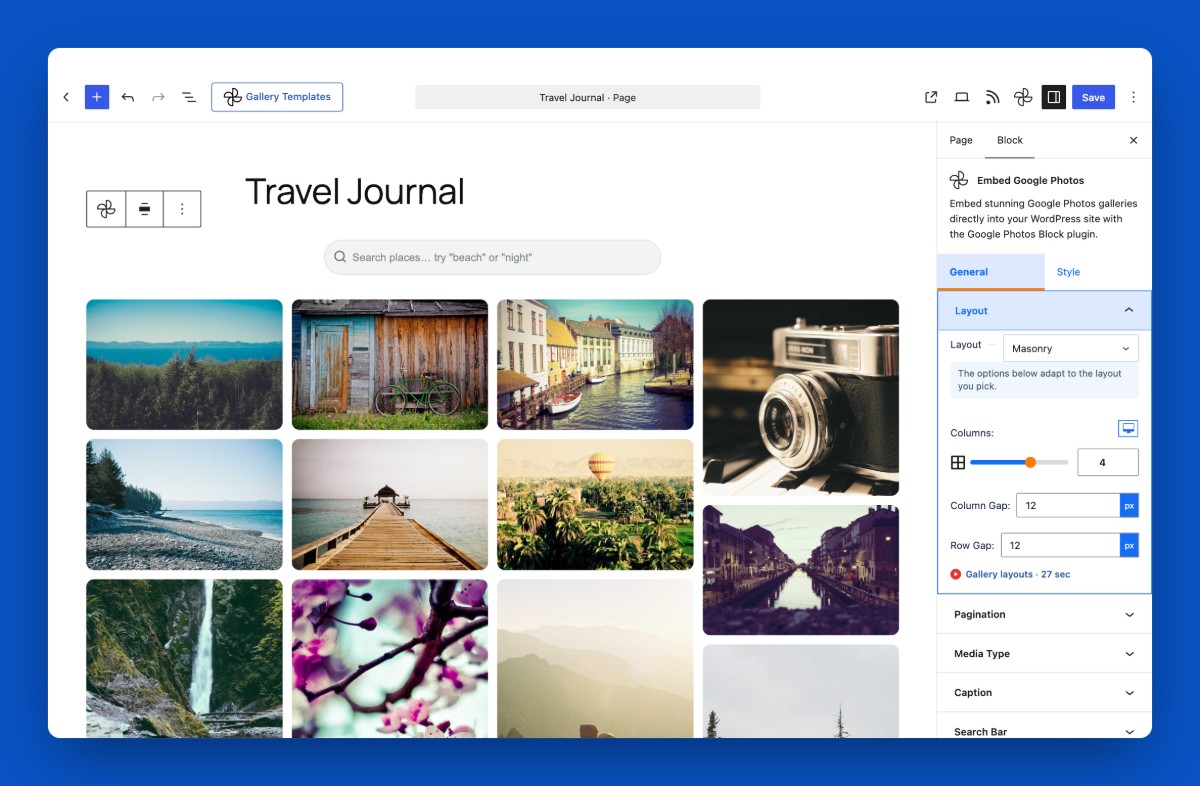
- Masonry Layout: Pinterest-style layout; every image keeps its own ratio.
- Carousel / Slider: Autoplay, loop, arrows, and pagination dots.
- Memories / Stories Layout: Google Photos–style round story bubbles.
- Responsive Columns: Separate column counts for desktop, tablet, and mobile.
- Column & Row Gap: Adjustable spacing in both directions.
- Aspect Ratio Control: 16:9, 4:3, 1:1, 3:4, or 9:16.
- Image Border: Width, style, color, and radius.
Captions & Hover
- Captions: Pull captions from the image title or date.
- Caption Position: Below the image, or overlaid on hover.
- Caption Styling: Typography and color controls.
- Hover Effects: Zoom, overlay, and caption slide-in.
- Meta Overlay: Show each photo’s date and dimensions on hover.
Search & Filtering
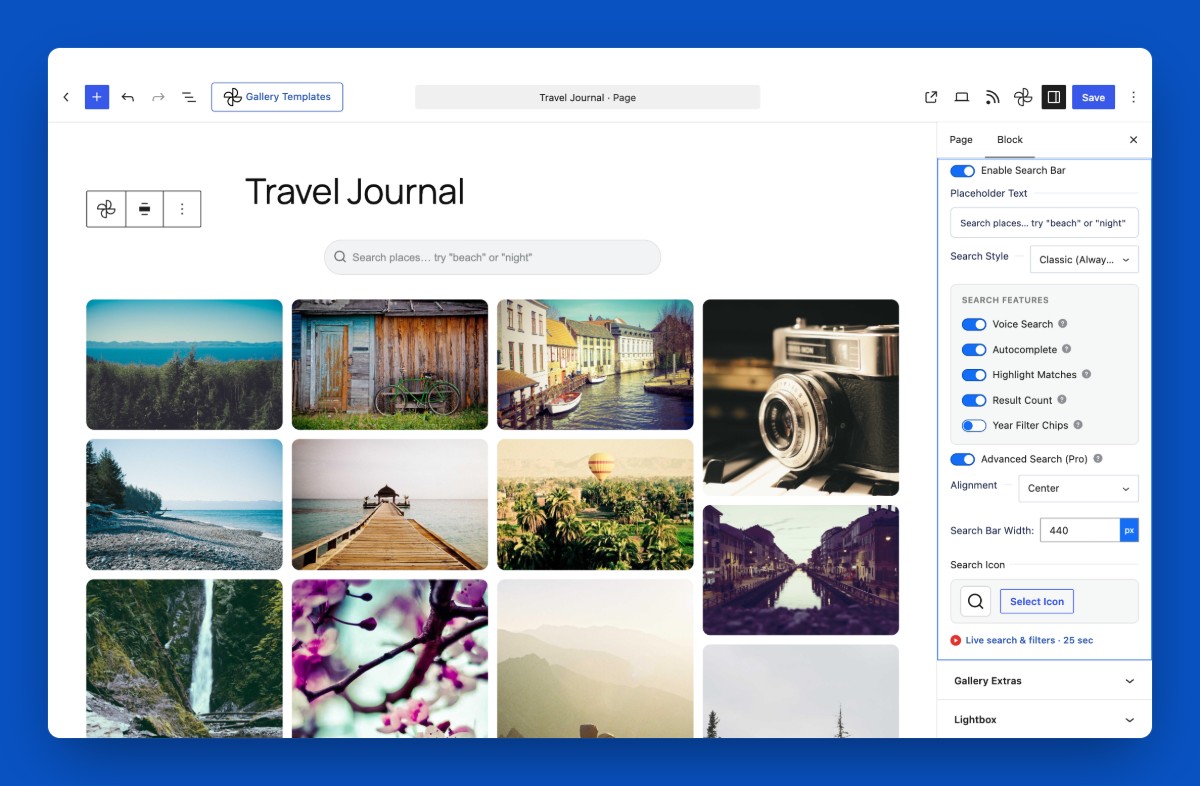
- Live Search Bar: Always-visible or expandable; filters by title or date as visitors type.
- Voice Search: Search by speaking; hidden automatically where unsupported.
- Autocomplete Suggestions: Matching titles and dates drop down while typing.
- Highlighted Matches: Matched text is highlighted in results and suggestions.
- Live Result Count: A “3 of 125 photos” indicator while filtering.
- Year Filter Chips: One-click chips to filter by year.
- Individual Toggles: Every search feature can be turned on or off on its own.
Photo Filters & Cropping
- Visual Filter Presets: Grayscale, Sepia, Vintage, Warm, and Cool, with optional reveal-original on hover.
- Focal Point Crop: One crop focus for all images with a live preview, plus per-photo fine-tuning so faces are never cut off.
- Ken Burns Motion: Continuous zoom / pan at an adjustable speed; great for hero backgrounds and kiosks.
Lightbox
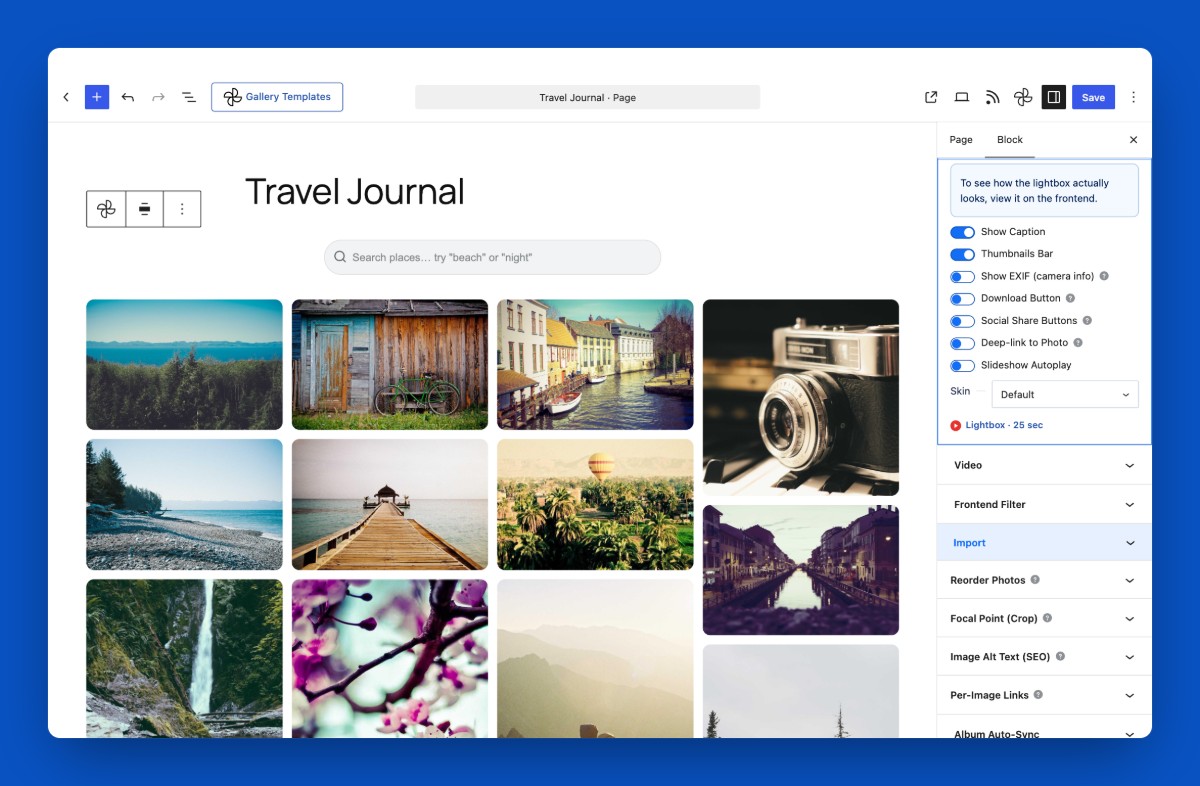
- Fancybox Lightbox: Full-screen viewer with photo and video playback.
- Lightbox Navigation: Caption, keyboard navigation, slideshow autoplay, thumbnails bar.
- Download Button: Optional toolbar button to save the original image.
- Social Share Buttons: Facebook, X, Pinterest, and Copy-link in the toolbar.
- Deep Link to a Photo: The open photo appears in the URL (?photo=N), so a shared link reopens it.
- Video Options: Controls, autoplay, muted, loop, and fit-to-window.
Paginação
- Three Modes: Show All, Load More, or numbered pagination.
- Items Per Page: Set how many photos load at a time.
- Custom Button Text: Set your own “Load More” label.
- Button Styling: Color, typography, border, and padding.
Performance & SEO
- Lazy Loading: Blur / low-res placeholders make the page feel instant.
- Responsive Images: srcset so browsers fetch the right size: faster loads, less bandwidth.
- Schema.org Markup: ImageObject structured data for Google Images and rich results.
- Per-Image Alt Text: Editable alt text for accessibility and SEO.
Usability
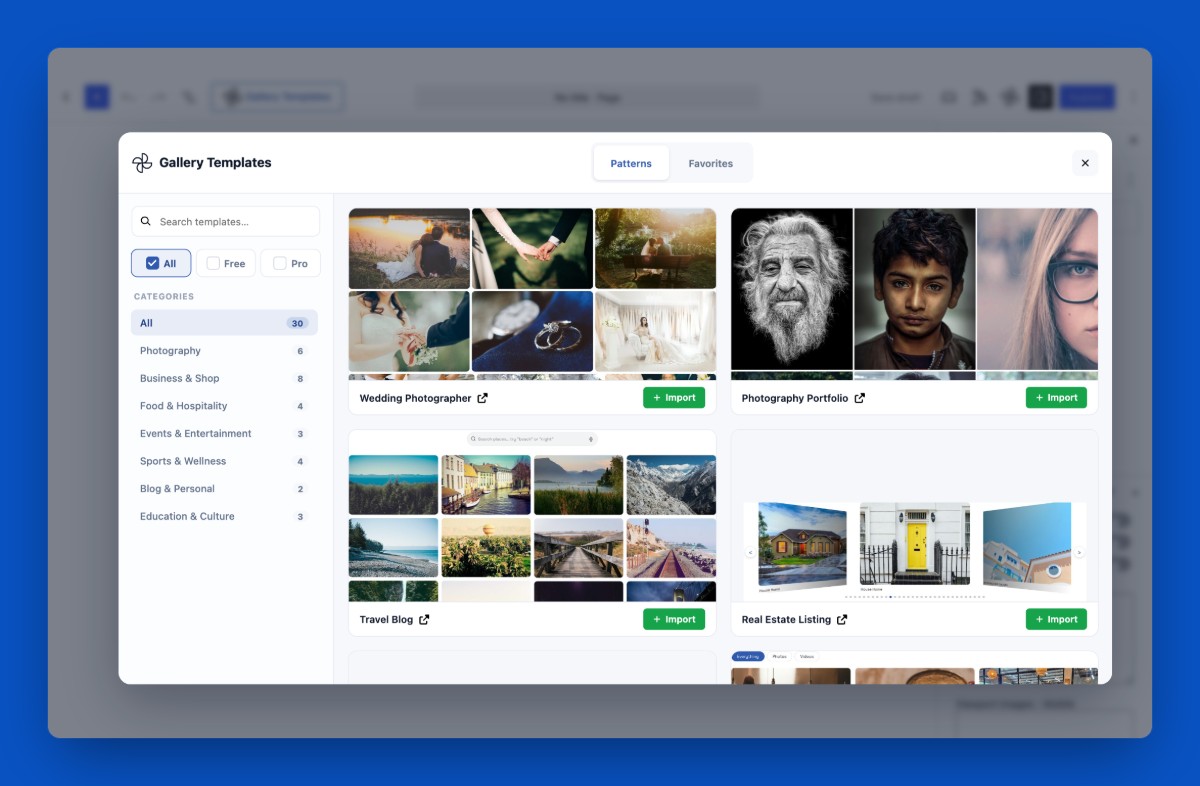
- Gallery Templates: 30 ready-made gallery templates by niche (13 Free, 17 Pro), one click from the editor toolbar. Pro templates are locked in the free version.
- Drag-to-Reorder: Rearrange selected photos in the editor.
- Frontend Sort Dropdown: Visitors reorder by Newest, Oldest, or Random.
- Photo Count Badge: Show a “125 photos” badge above the gallery.
- Preview Limit & View All: Show the first N photos with a button to reveal the rest.
- Import / Export: Copy a gallery’s styling and layout as JSON to reuse elsewhere.
- Shortcode Support: Embed anywhere outside Gutenberg with [google_photos id=..].
- Guided Empty States: Polished empty and not-connected states with clear next actions.
- Modern React Dashboard: Demos and help built into wp-admin.
- Theme Compatible: Works with any theme; supports wide / full alignment.
Gallery for Google Photos Pro – Unlock Premium Features
Gallery for Google Photos Pro adds advanced layouts, album automation, client-delivery tools, and gallery protection, so you can run a professional photo workflow from WordPress.
What’s New in the Pro Version?
Advanced Layouts & Display
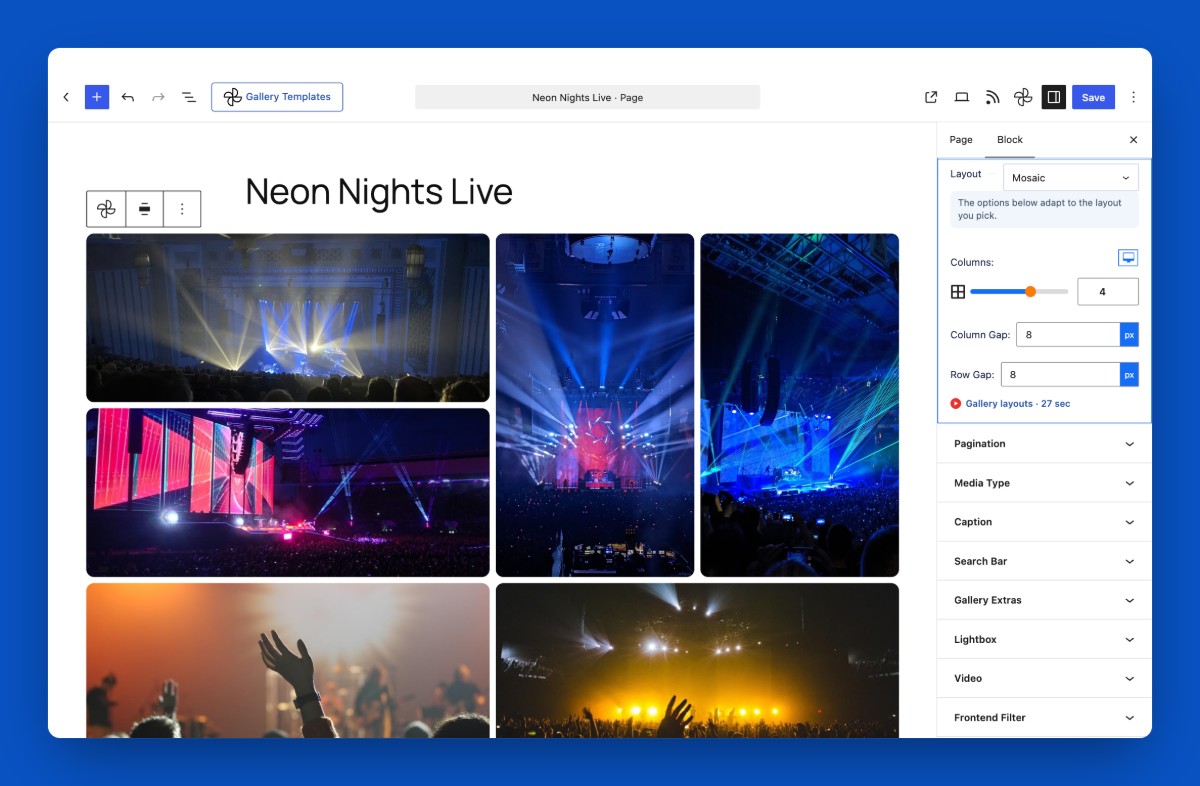
- Justified / Mosaic Layout: Images fill every row edge-to-edge at varying widths.
- Timeline Layout: Group photos by day, month, or year with sticky date headers.
- Advanced Carousel Options: Slide effect, speed, slides-per-group, centered slides, grab cursor, pause-on-hover, free-mode.
- Frontend Media Filter Bar: Visitors filter by Photos, Videos, or All, with custom labels.
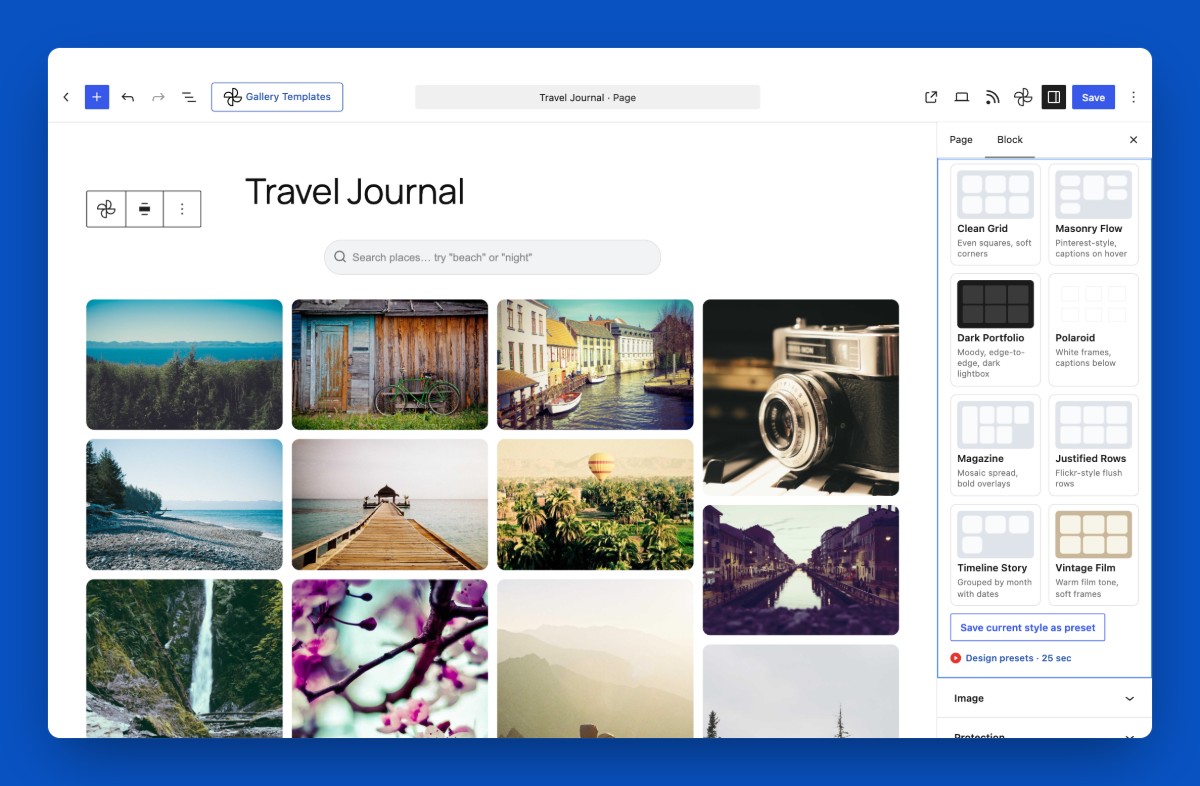
- Design Presets: One-click looks (Clean Grid, Dark Portfolio, Polaroid, Magazine, and more) plus save your own.
Premium Lightbox & Hover
- Premium Lightbox Skins: Multiple visual themes for the viewer.
- Video Autoplay in Lightbox: Videos start playing when opened.
- EXIF Display: Camera, lens, aperture, shutter speed, and ISO from the image data.
- Per-Image Custom Link: Link any image to an external URL in a new tab.
- Advanced Hover Styling: Grayscale effect, hover icon, and gradient overlay.
Advanced Search
- Fuzzy / Typo-Tolerant Search: “beech” still finds “beach”.
- “/” Keyboard Shortcut: Focus the search box from anywhere on the page.
- Recent Searches: Remembered per gallery in a dropdown.
- “Did You Mean…” Suggestion: Offered when a search returns nothing.
- Sticky Search Bar: Follows scroll on long galleries.
Client Delivery for Photographers
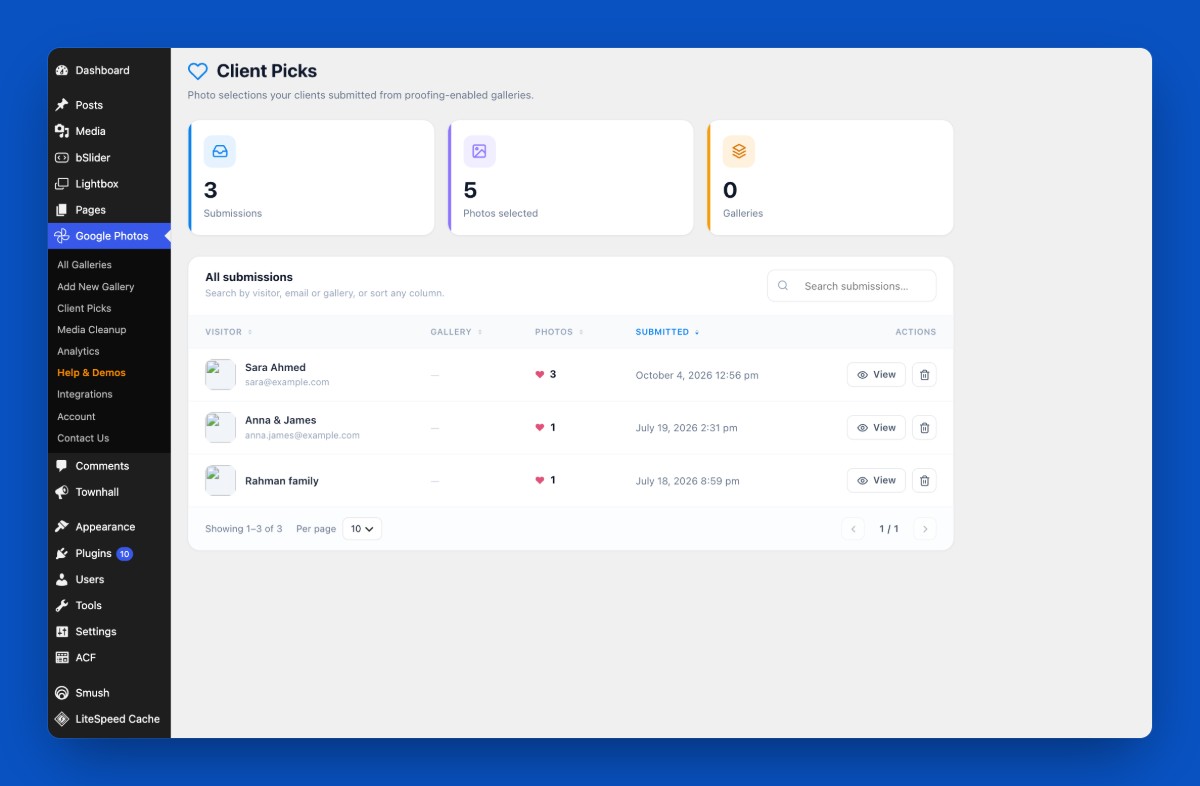
- Client Picks (Proofing): Visitors heart favorites and submit them; the selection is emailed to you and saved under Google Photos → Client Picks, with optional per-photo comments.
- Download as ZIP: Visitors download the whole gallery as one ZIP of the originals.
- Gallery Expiry: Auto-hide a gallery after a chosen date, with a custom message.
Analytics & Maintenance
- Gallery Analytics: Views and lightbox opens, with totals, a most-viewed table, and a bar chart.
- Media Cleanup Manager: Per-gallery storage, one-click orphaned-photo cleanup, and optional delete-photos-with-gallery.
Image Styling
- Image Box Shadow: Add depth with customizable shadows.
- Advanced Border Radius: Per-corner control for unique shapes.
- Gradient Overlays: Apply gradient effects over gallery images.
Album Sync & Automation
- Album Auto-Sync: Paste a shared album URL; new photos appear automatically via WP-Cron.
- Sync Interval Choice: Check every 15 minutes, hourly, or daily.
- Live Event / Wedding Mode: Open pages refresh themselves and reveal newly synced photos with no reload, behind a pulsing “Live · N new” badge. Guests drop photos into the shared album and the wall updates itself.
- Multi-Album per Gallery: Pull from several shared albums, with an optional album-tab switcher.
- Bulk Album Import: Import a whole shared album in one sync.
Gallery Protection
- Password-Protected Gallery: Restrict access with a password.
- Right-Click Protection: Disable the context menu to discourage downloading.
- Automatic Watermark: Server-side logo watermark on import, with position, opacity, and size.
Execução
- Auto WebP Conversion: Convert imported images to WebP for faster loads and smaller files.
Upgrade to Pro to unlock all premium features.
How to Use Gallery for Google Photos – Quick Start Guide
Getting started is easy!
Step-by-Step Setup
- Go to Plugins → Add New.
- Search for Gallery for Google Photos.
- Click Install Now, then Activate.
- Add your own Google API credentials (Client ID, Client Secret, Refresh Token) in the block’s Authorization sidebar and connect. See the Google Authorization guide for the one-time Google Cloud setup.
- Add the Gallery for Google Photos block, click Select Photos, pick your media, choose a layout, configure settings, and publish.
- Or insert the generated shortcode anywhere to show your gallery.
Enjoy fast, responsive Google Photos galleries on your site!
Live Demo | Try the Pro Version
- For installation help click on Installation Tab
User Feedback
– Did you like this plugin? Dislike it? Have a feature request? Please share your feedback with us
Check out our other WordPress Plugins
- bSlider – Responsive image, post, product, and video sliders.
- HTML5 Audio Player – Best audio player for WordPress.
- PDF Poster – A fully-featured PDF viewer.
- StreamCast – A fully-featured radio player.
- 3D Viewer – Display interactive 3D models on the web.
Código fonte
You can find the source code, report bugs, and contribute to the development of this plugin on our GitHub repository:
Gallery for Google Photos on GitHub
Serviços externos
This plugin connects to the following external services. Understanding what is sent, and when, helps clarify how your data is handled.
Google Photos (Google OAuth 2.0 + Google Photos Picker API)
What it is and why it is used: This plugin is a Google Photos gallery. To let you pick photos and videos from your own Google Photos account and display them on your site, it connects to Google’s APIs on your server. This connection only happens after you enter your own Google API credentials (Client ID, Client Secret, Refresh Token) in the plugin settings and use the “Select Photos” flow; it is required for the plugin to function.
Which endpoints are contacted and what data is sent:
- https://oauth2.googleapis.com/token — your Client ID, Client Secret and Refresh Token are sent to exchange them for a short-lived access token.
- https://photospicker.googleapis.com/v1 — the access token is sent (as a Bearer token) to create a picker session, check its status, and list the media items you selected. The selected photos/videos are then downloaded to your own WordPress Media Library.
When it happens: only in wp-admin, triggered by an authenticated administrator connecting an account or clicking “Select Photos”. No data is sent from your visitors’ browsers, and the OAuth credentials/tokens never reach the frontend.
Your credentials and tokens are stored only on your own server (in your WordPress database) and are sent only to Google. This plugin does not transmit them to bPlugins or any other third party.
Google’s terms and privacy policy:
- Terms of Service: https://policies.google.com/terms
- Privacy Policy: https://policies.google.com/privacy
- Google APIs Terms of Service: https://developers.google.com/terms
Schema.org vocabulary (https://schema.org)
What it is and why it is used: On the frontend the plugin outputs Schema.org “ImageObject” structured data (JSON-LD) for each gallery image so search engines such as Google can better understand and index your images (Google Images / rich results, improving SEO).
What data is sent: None. The address “https://schema.org” appears only as the standard @context identifier inside the JSON-LD markup — it is a vocabulary name, not a network request. The plugin does not connect to, load anything from, or send any data to schema.org. All image data stays on your own server.
Terms & privacy: https://schema.org/docs/terms.html
Third-Party Libraries
This plugin bundles the following third-party JavaScript/PHP libraries.
Swiper
- Source: https://swiperjs.com/
- GitHub: https://github.com/nolimits4web/swiper
- License: MIT – https://github.com/nolimits4web/swiper/blob/master/LICENSE
- Purpose: Provides the “Carousel” gallery layout — a touch-enabled slider with autoplay, loop, navigation arrows and pagination dots.
Plyr
- Source: https://plyr.io/
- GitHub: https://github.com/sampotts/plyr
- License: MIT – https://github.com/sampotts/plyr/blob/master/LICENSE.md
- Purpose: A simple, accessible HTML5 media player used to play gallery videos inside the lightbox.
Fancybox (@fancyapps/ui)
- Source: https://fancyapps.com/fancybox/
- GitHub: https://github.com/fancyapps/ui
- License: Fancyapps UI License – https://fancyapps.com/pricing/ (note: this is a proprietary license, not MIT/GPL).
- Purpose: The lightbox that opens photos and videos in a full-screen viewer.
Immer
- Source: https://immerjs.github.io/immer/
- GitHub: https://github.com/immerjs/immer
- License: MIT – https://github.com/immerjs/immer/blob/main/LICENSE
- Purpose: Enables safe, immutable updates of block settings inside the Gutenberg editor.
Axios
- Source: https://axios-http.com/
- GitHub: https://github.com/axios/axios
- License: MIT – https://github.com/axios/axios/blob/v1.x/LICENSE
- Purpose: Promise-based HTTP client used for the plugin’s admin/editor AJAX requests.
React Router (react-router-dom)
- Source: https://reactrouter.com/
- GitHub: https://github.com/remix-run/react-router
- License: MIT – https://github.com/remix-run/react-router/blob/main/LICENSE.md
- Purpose: Client-side routing for the plugin’s admin “Help & Demos” dashboard.
Fonte incrível
- Source: https://fontawesome.com/
- GitHub: https://github.com/FortAwesome/Font-Awesome
- License: SIL OFL 1.1 (Fonts), MIT (CSS), CC BY 4.0 (Icons) – https://fontawesome.com/license/free
- Purpose: Provides scalable vector icons used in the block and editor interface.
bpl-tools
- Source / GitHub: https://github.com/bPlugins/bpl-tools
- License: GPL-2.0-or-later – https://www.gnu.org/licenses/gpl-2.0.html
- Purpose: Shared utility library providing admin dashboard components and common Gutenberg editor controls.
- External Services: The library may connect to bPlugins, WordPress.org, and Freemius services for product data and checkout functionality. See full details: https://github.com/bPlugins/bpl-tools#external-requests–why-they-are-made
Freemius Lite SDK
- Source: https://bplugins.com/
- GitHub: https://github.com/bPlugins/freemius-lite-sdk
- License: GPL-2.0-or-later – https://www.gnu.org/licenses/gpl-2.0.html
- Purpose: Provides an opt-in consent form for usage tracking and analytics to help improve the plugin. No data is sent before explicit user consent.
- External Services: Communicates with
api.bplugins.com(activation events) andwp.freemius.com(opt-in processing) only after user opt-in. See bPlugins Privacy Policy and Freemius Privacy Policy.
Instalação
From Gutenberg Editor:
- Go to the WordPress Block/Gutenberg Editor
- Search For Gallery for Google Photos
- Click on the Gallery for Google Photos block to add the block
Download & Upload:
- Download the Gallery for Google Photos plugin (.zip file)
- In your admin area, go to the Plugins menu and click on Add New
- Click on Upload Plugin and choose the
embed-google-photos.zipfile and click on Install Now - Activate the plugin and Enjoy!
Manually:
- Download and upload the Gallery for Google Photos plugin to the
/wp-content/plugins/directory - Activate the plugin through the Plugins menu in WordPress
Log de Changes
Upgrade to 1.3.2 for Black Friday promotions and latest UI improvements.
1.3.2 – 17 November, 2026
- New: Added Black Friday / Cyber Monday promotional banner and dashboard notifications.
- Update: Added Black Friday special discount action link and UI enhancements.
1.3.1 – 18 October, 2026
- New: Gallery Templates – 30 ready-made gallery templates (13 Free, 17 Pro) in the editor toolbar. Pro templates are locked in the free version.
- New: Add a shared Google Photos album to a gallery. Paste the album link and click Save & Sync — no Google Client ID or Client Secret needed.
- New: “Keep photos on Google Photos” — album photos load straight from Google and use no space on your server. Turn it off to copy them to your Media Library instead.
- Improved: Without a Client ID and Client Secret the block now shows the album link first, with a short note that “Select from Google Photos” needs them.
- Improved: Short video tutorials — a “▶” link at the bottom of the main settings panels opens that feature’s 25-second video on YouTube.
1.3.0 – 18 July, 2026
- New (Pro): Timeline layout — group photos by day / month / year with sticky date headers.
- New (Pro): Live Event / Wedding Mode — the gallery refreshes on its own and shows newly synced photos with no reload; choose a sync interval of 15 minutes, hourly, or daily.
- New (Pro): Multi-album per gallery — pull from several shared albums with an optional frontend album-tab switcher.
- New (Pro): Client Picks (Proofing) — visitors select photos and submit them; the selection is emailed to you and saved under Google Photos → Client Picks, with optional per-photo comments.
- New (Pro): Download as ZIP — visitors download the whole gallery as one ZIP of the local originals.
- New (Pro): Gallery expiry — auto-hide a gallery after a chosen date with a custom message.
- New (Pro): Design Presets — one-click looks (Clean Grid, Dark Portfolio, Polaroid, Magazine, and more) plus save your own.
- New (Pro): Advanced Search — fuzzy / typo-tolerant matching, “/” focus shortcut, recent searches, “Did you mean…”, and a sticky search bar.
- New (Pro): EXIF display in the lightbox — camera, lens, aperture, shutter, and ISO.
- New (Pro): Gallery Analytics — views and lightbox opens with a “most viewed” dashboard.
- New (Pro): Media Cleanup Manager — per-gallery storage, orphaned-photo cleanup, and “delete photos with gallery”.
- Security: sanitized the per-image link (blocks javascript: URIs) and hardened album-URL fetching against SSRF.
- Improved: added uninstall cleanup for stored credentials/tokens; removed retired Library-API dead code.
- New: Live search bar with voice search, autocomplete (titles + dates), highlighted matches, live result count, and year filter chips — each toggleable.
- New: Visual filter presets (Grayscale, Sepia, Vintage, Warm, Cool) with an optional reveal-original-on-hover transition.
- New: Focal point crop control — set one crop focus for all images with a live preview, plus an optional per-image override.
- New: Ken Burns motion — adjustable continuous zoom / pan on images.
- New: Meta overlay — show each photo’s date and dimensions on hover.
- New: Frontend sort dropdown (Newest / Oldest / Random), photo count badge, and preview limit with a “View all” button.
- New: Lightbox social share buttons (Facebook / X / Pinterest / Copy link) and deep-link to a photo via the URL.
- New: Optional download button in the lightbox toolbar.
- New: Import / Export gallery configuration as JSON.
- New: Memories / Stories layout.
1.2.2 – 16 July, 2026
- Minor bug fix.
1.2.1 – 14 July, 2026
- Important: Google retired the old Photos Library API, so older galleries may stop showing images. Now uses Google’s new Photos Picker — reconnect your account and re-select your photos (they import into your Media Library and keep working).
- New: video support, Grid/Masonry/Carousel layouts, Load More & Pagination, captions, and image aspect-ratio & border controls.
- Performance/SEO: lazy-load with blur placeholder, responsive images (srcset), Schema.org image markup, and per-image alt text.
- Security: fixed a stored XSS in the lightbox; made Google credentials (Client ID/Secret/Refresh Token) write-only and server-side only; closed the earlier OAuth token exposure.
- Improved: redesigned authorization flow; resolved all Plugin Check findings; documented external services and bundled third-party libraries.
1.0.9 – 28 Dec, 2024
- Frontend useAjax use.
Capturas de tela
Para desenvolvedores
Este é o seu plugin? Mostre os números.
Adicione um crachá ao vivo ao seu site, Documentos ou Readme do GitHub. Ele é atualizado por conta própria - nenhuma conta necessária.
Best Gallery for Google Photos alternatives
All album plugins →





FAQ
Gallery for Google Photos: quick answers
Respostas diretas, extraídas de dados ao vivo WordPress.org.
Fonte: WordPress.org
Is Gallery for Google Photos free?
Yes. Gallery for Google Photos is free to download and use from the official WordPress.org plugin directory.
Is Gallery for Google Photos safe to use in 2026?
Gallery for Google Photos is a solid plugin choice in 2026, with a few things worth checking first. It runs on 1K+ sites, is rated 2.4/5 and was last updated 4 days ago, and scores 72/100 on our health check.
How many websites use Gallery for Google Photos?
Gallery for Google Photos is active on 1K+ WordPress websites and has been downloaded 16,181 times since it launched in May 2024. It was downloaded 1,958 times in the last 30 days.
Does Gallery for Google Photos work with WordPress 7.1?
Yes. The developer has tested Gallery for Google Photos up to WordPress 7.1.5, the latest release. It requires WordPress 6.5 or newer.
What PHP version does Gallery for Google Photos need?
Gallery for Google Photos requires PHP 7.1 or higher. Most hosts run PHP 8.x today, so it works on any modern WordPress hosting.
When was Gallery for Google Photos last updated?
The latest version, 1.3.2, was released on November 17, 2026 (4 days ago).
Who makes Gallery for Google Photos?
Gallery for Google Photos is developed and maintained by bPlugins.
What are the best alternatives to Gallery for Google Photos?
The most popular alternatives to Gallery for Google Photos are rtMedia for WordPress, Budd… (7K+ installs), Audio Album (4K+ installs) and WoowGallery (1K+ installs).
Alimentado por PageForge
Um modelo e uma planilha. Uma página real para cada pesquisa.
PageForge Transforma cada linha de um CSV em uma página WordPress com seu próprio título, URL, SEO campos e esquema, construído no layout que você já desenhou. Gratuito em WordPress.org.
- CSV e XLSX, mais Google Sheets em Profissional e Empresarial
- Seu próprio título, URL, SEO campos e esquema para cada página
- Funciona com o editor de blocos, Elementor, Divi e Avada
- Gratuito em WordPress.org, sem cartão de crédito