

Quick WordPress Version
Quick WordPress Version adds a small “Powered by WordPress” line to the bottom of your site. Activate it and the line appears, below your theme’s footer, with no theme files to edit. It works with classic and block…

Escolha sólida
Quick WordPress Version is a solid plugin choice in 2026, with a few things worth checking first. It runs on 10+ sites and was last updated 1 month ago, and scores 62/100 on our health check.
- Testado com as últimas WordPress (7.1)
- Pequena base de usuários (10+ instalações ativas)
- Muito poucos comentários até agora
Como ele se acumula?
Lado a lado em instalações, atualizações, avaliações e suporte


Downloads diários
Os picos de download geralmente seguem uma nova versão — cada site que atualiza automaticamente é um download.
Rankings
Where Quick WordPress Version stands todayWordPress.org Classificações de pesquisa
Posição ao vivo na pesquisa de plugins, top 100| Palavra chave | Posição |
|---|---|
| footer | >100 |
| footer credits | >100 |
| powered by wordpress | >100 |
| version check | >100 |
| wordpress version | >100 |
Adoção da versão
Compartilhamento de sites ativos por lançamento.
About Quick WordPress Version
From the official readme · v2.0Descrição
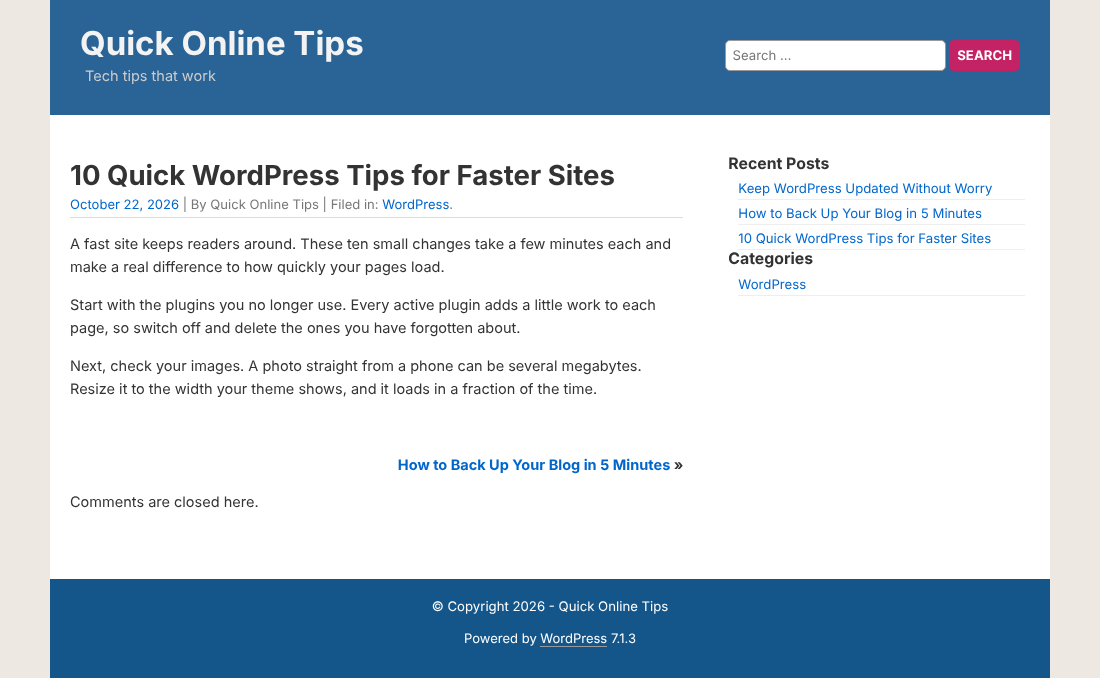
Quick WordPress Version adds a small “Powered by WordPress” line to the bottom of your site. Activate it and the line appears, below your theme’s footer, with no theme files to edit. It works with classic and block themes.
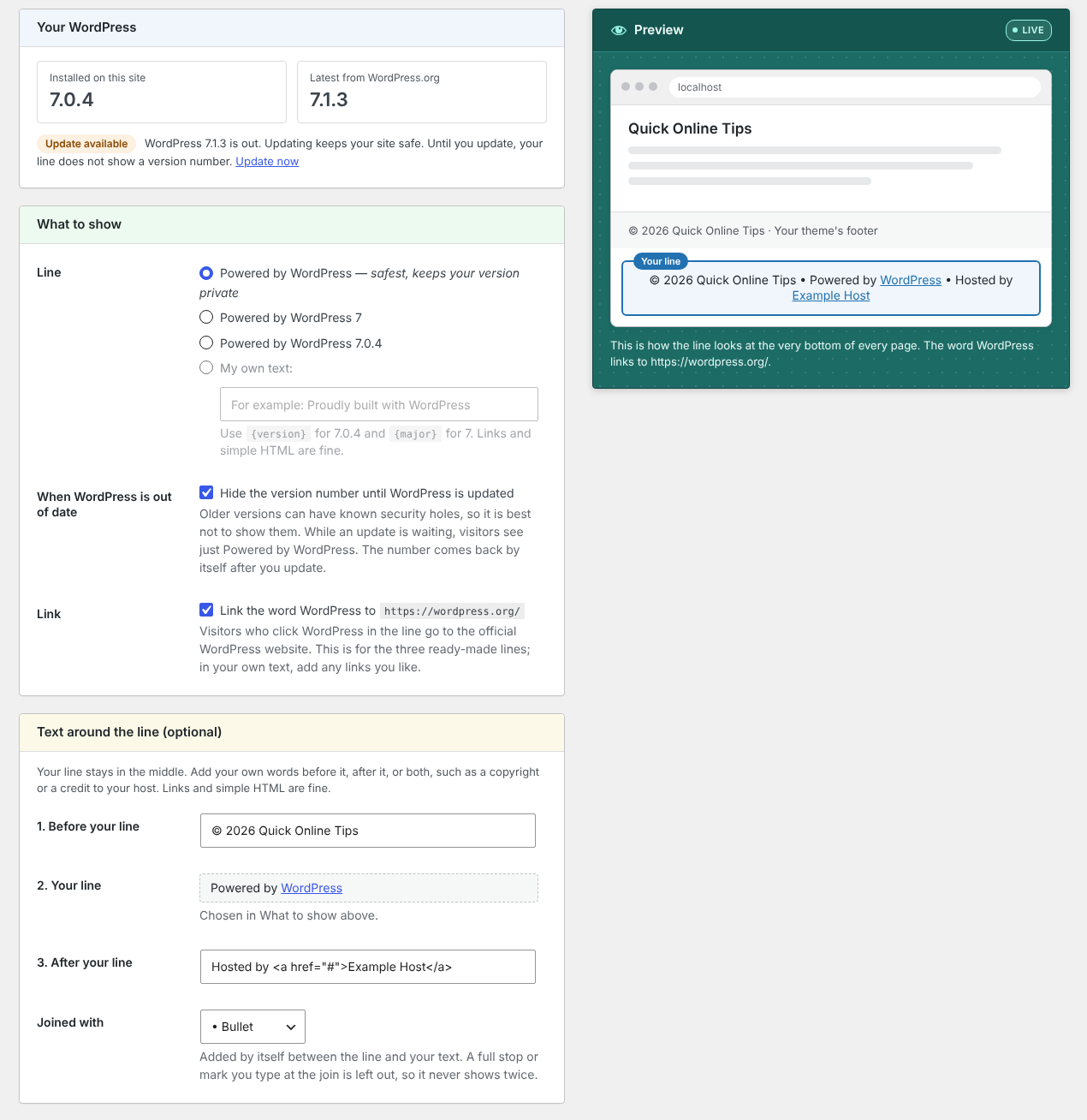
Refreshed for 2026. First released in 2007 as Display WordPress Version, version 2.0 is rebuilt with a settings page and a live preview. Choose the wording, add your own text before and after the line, decide where it shows, and check your WordPress version at a glance. Far more control than the original one-line plugin.
You choose what the line says:
- Powered by WordPress (the default, and the safest)
- Powered by WordPress 7, the main version number only
- Powered by WordPress 7.1.3, the full version
- Your own text, such as “Proudly running WordPress {version}”, or anything else you like
Add your own text before or after the line too, such as a copyright or a link to your host. A bullet joins them up by itself, or choose a line, dash, dot or just a space.
Know your version, keep it private
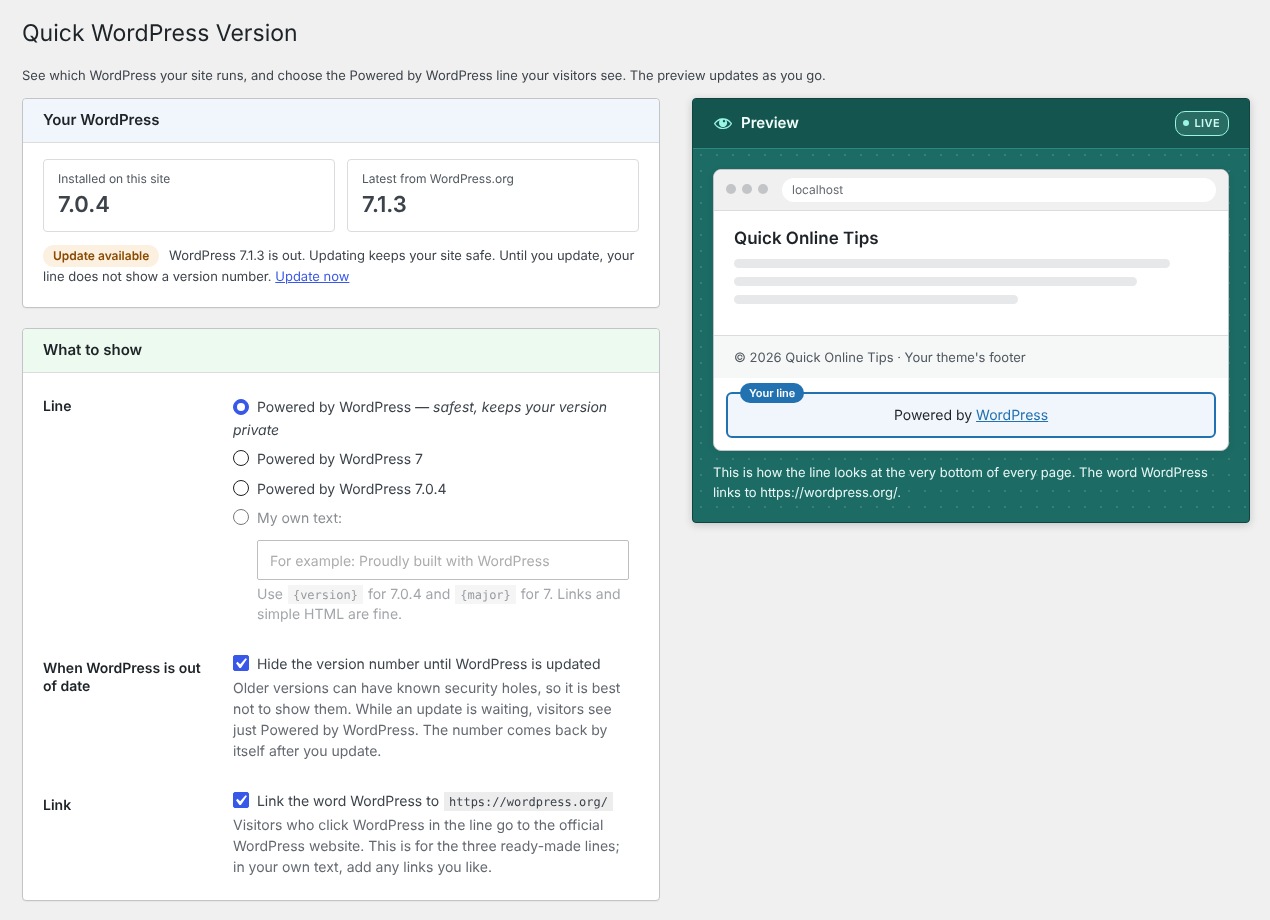
Settings > Quick WordPress Version shows the WordPress version installed on your site, the latest version from WordPress.org, and whether an update is waiting, with a link to update. It uses the update check WordPress already does, so it adds no load to your site.
Showing your exact version number tells everyone, including attackers, which version your site runs. That is why the default line has no number. If you do show the number, it is hidden by itself while a WordPress update is waiting, so your site never advertises an out-of-date version. It comes back as soon as you update. For more ways to keep your site updated and secure, see our WordPress tips.
Put the line where you want it
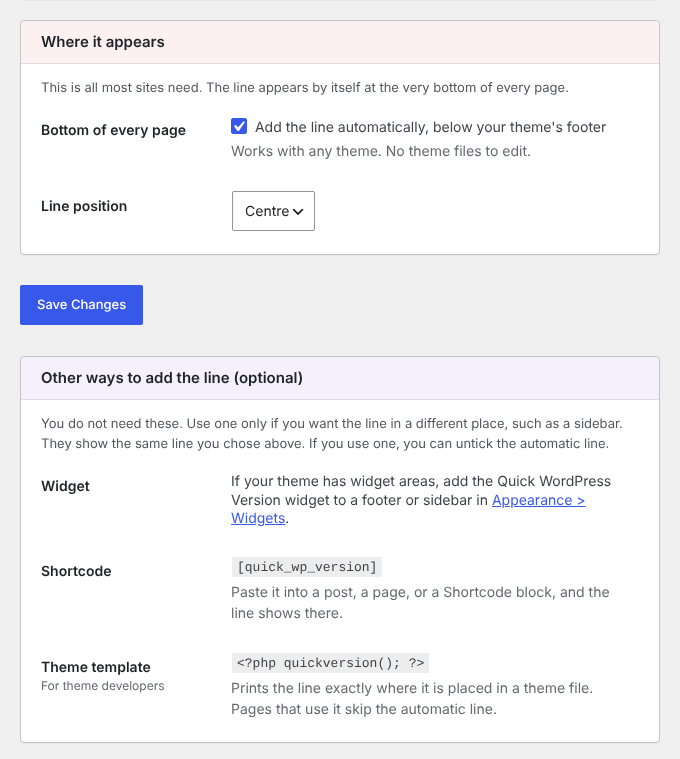
- Automatically at the very bottom of every page, centred, left or right. This is all most sites need.
Optional other ways, if you want the line somewhere else:
- Shortcode
[quick_wp_version]in a post, a page, or a Shortcode block in a block theme footer - Widget in any footer or sidebar widget area
- Template tag
<?php quickversion(); ?>for theme builders
Every place uses the same choices, so the line always looks the same.
Light by design
Tiny: no extra stylesheet or JavaScript on your site, and nothing loaded from outside. The settings page code runs only on its own screen.
Sites already using quickversion() from the original plugin keep working.
Made by Quick Online Tips, tech help that works since 2004. See the Quick WordPress Version plugin page for more.
Instalação
- In your WordPress dashboard, go to Plugins > Add New, search for Quick WordPress Version, then Install and Activate.
- The Powered by WordPress line now shows at the bottom of your site.
- Go to Settings > Quick WordPress Version to choose what the line says and where it shows.
Log de Changes
New settings page with version check, more display choices, shortcode and widget. The line now shows Powered by WordPress without the number by default, and appears at the bottom of every page. Change both in Settings > Quick WordPress Version.
2.0
- 2026 refresh of the plugin first released in 2007, with far more control over the line.
- New name: Quick WordPress Version (was Display WordPress Version). Same plugin, same address.
- Settings page shows your installed and latest WordPress version, and whether an update is waiting.
- Choose the line: Powered by WordPress, main version only, full version, or your own text.
- Text before and after the line, joined with a bullet (or a line, dash, dot or space) added by itself.
- While a WordPress update is waiting, the version number is hidden from visitors until you update.
- The line can now be added automatically at the bottom of every page, with no theme files to edit.
- New
[quick_wp_version]shortcode and widget. quickversion()still works and follows your choices.- Tested with WordPress 7.1. Needs WordPress 6.0 and PHP 7.4 or later.
1.4
- Added class to the text which can be specifically tweaked as required.
1.3
- Now code can be added anywhere in theme template.
- PHP code needs to be manually added to template.
- No longer automatic addition to footer.
1.0
- Lançamento inicial.
Capturas de tela
Para desenvolvedores
Este é o seu plugin? Mostre os números.
Adicione um crachá ao vivo ao seu site, Documentos ou Readme do GitHub. Ele é atualizado por conta própria - nenhuma conta necessária.
Best Quick WordPress Version alternatives
All footer plugins →





FAQ
Quick WordPress Version: quick answers
Respostas diretas, extraídas de dados ao vivo WordPress.org.
Fonte: WordPress.org
Is Quick WordPress Version free?
Yes. Quick WordPress Version is free to download and use from the official WordPress.org plugin directory.
Is Quick WordPress Version safe to use in 2026?
Quick WordPress Version is a solid plugin choice in 2026, with a few things worth checking first. It runs on 10+ sites and was last updated 1 month ago, and scores 62/100 on our health check.
How many websites use Quick WordPress Version?
Quick WordPress Version is active on 10+ WordPress websites and has been downloaded 3,353 times since it launched in December 2007. It was downloaded 86 times in the last 30 days.
Does Quick WordPress Version work with WordPress 7.1?
Yes. The developer has tested Quick WordPress Version up to WordPress 7.1.5, the latest release. It requires WordPress 6.0 or newer.
What PHP version does Quick WordPress Version need?
Quick WordPress Version requires PHP 7.4 or higher. Most hosts run PHP 8.x today, so it works on any modern WordPress hosting.
When was Quick WordPress Version last updated?
The latest version, 2.0, was released on October 25, 2026 (1 month ago).
Who makes Quick WordPress Version?
Quick WordPress Version is developed and maintained by QOT Studio.
What are the best alternatives to Quick WordPress Version?
The most popular alternatives to Quick WordPress Version are Header Footer Code Manager (600K+ installs), Insert Headers And Footers (200K+ installs) and Head, Footer and Post Injec… (200K+ installs).
Alimentado por PageForge
Um modelo e uma planilha. Uma página real para cada pesquisa.
PageForge Transforma cada linha de um CSV em uma página WordPress com seu próprio título, URL, SEO campos e esquema, construído no layout que você já desenhou. Gratuito em WordPress.org.
- CSV e XLSX, mais Google Sheets em Profissional e Empresarial
- Seu próprio título, URL, SEO campos e esquema para cada página
- Funciona com o editor de blocos, Elementor, Divi e Avada
- Gratuito em WordPress.org, sem cartão de crédito