

D613 Pay – Zelle, Venmo, PayPal & Cash App Payments for WooCommerce
Accept Zelle, Venmo, PayPal and Cash App in WooCommerce with branded pay pages and manual confirmation. All four rails in one plugin.

Escolha sólida
D613 Pay is a solid plugin choice in 2026, with a few things worth checking first. It runs on 40+ sites and was last updated 2 weeks ago, and scores 67/100 on our health check.
- Desenvolvido ativamente — última atualização 2 semanas atrás
- Testado com as últimas WordPress (7.1)
- Base de usuários pequenas (mais de 40 instalações ativas)
- Muito poucos comentários até agora
Como ele se acumula?
Lado a lado em instalações, atualizações, avaliações e suporte

Downloads diários
Os picos de download geralmente seguem uma nova versão — cada site que atualiza automaticamente é um download.
Rankings
Where D613 Pay stands todayWordPress.org Classificações de pesquisa
Posição ao vivo na pesquisa de plugins, top 100| Palavra chave | Posição |
|---|---|
| cash app | #11 |
| Gateway de pagamento | >100 |
| Paypal | >100 |
| Venmo | #18 |
| zelle | #4 |
Adoção da versão
Compartilhamento de sites ativos por lançamento.
About D613 Pay
From the official readme · v0.5.8Descrição
D613 Pay lets your WooCommerce store accept Zelle, Venmo, PayPal and Cash App — the peer-to-peer apps your customers already use — with no per-transaction processor fees. It adds four checkout methods in a single plugin.
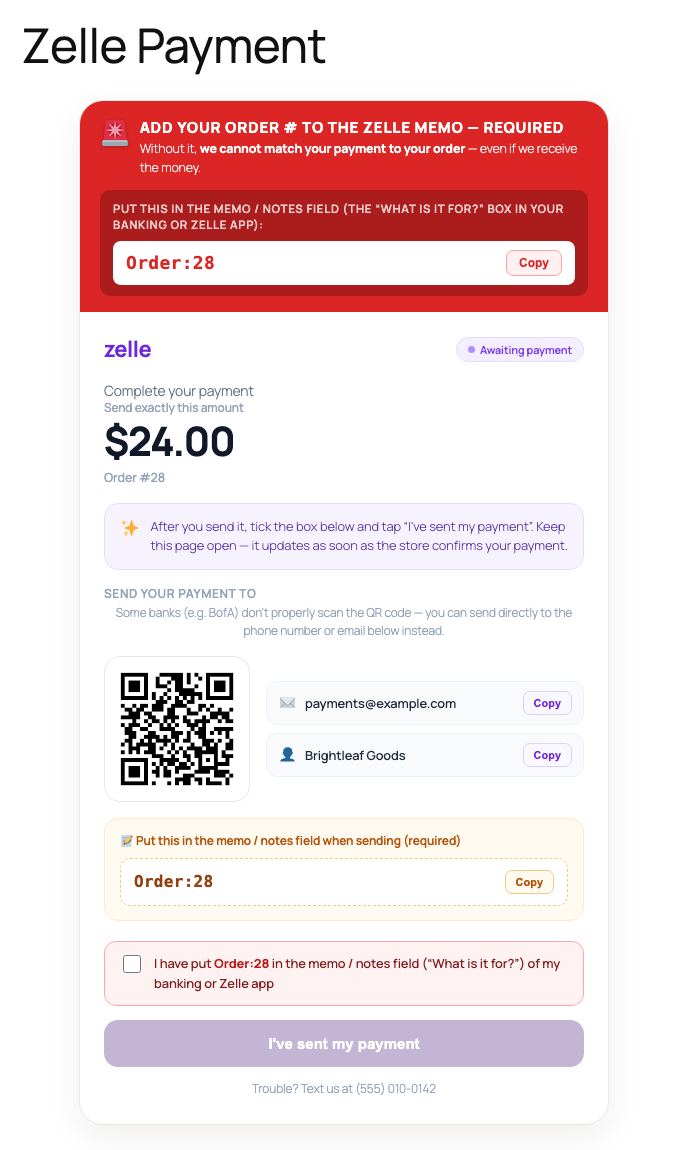
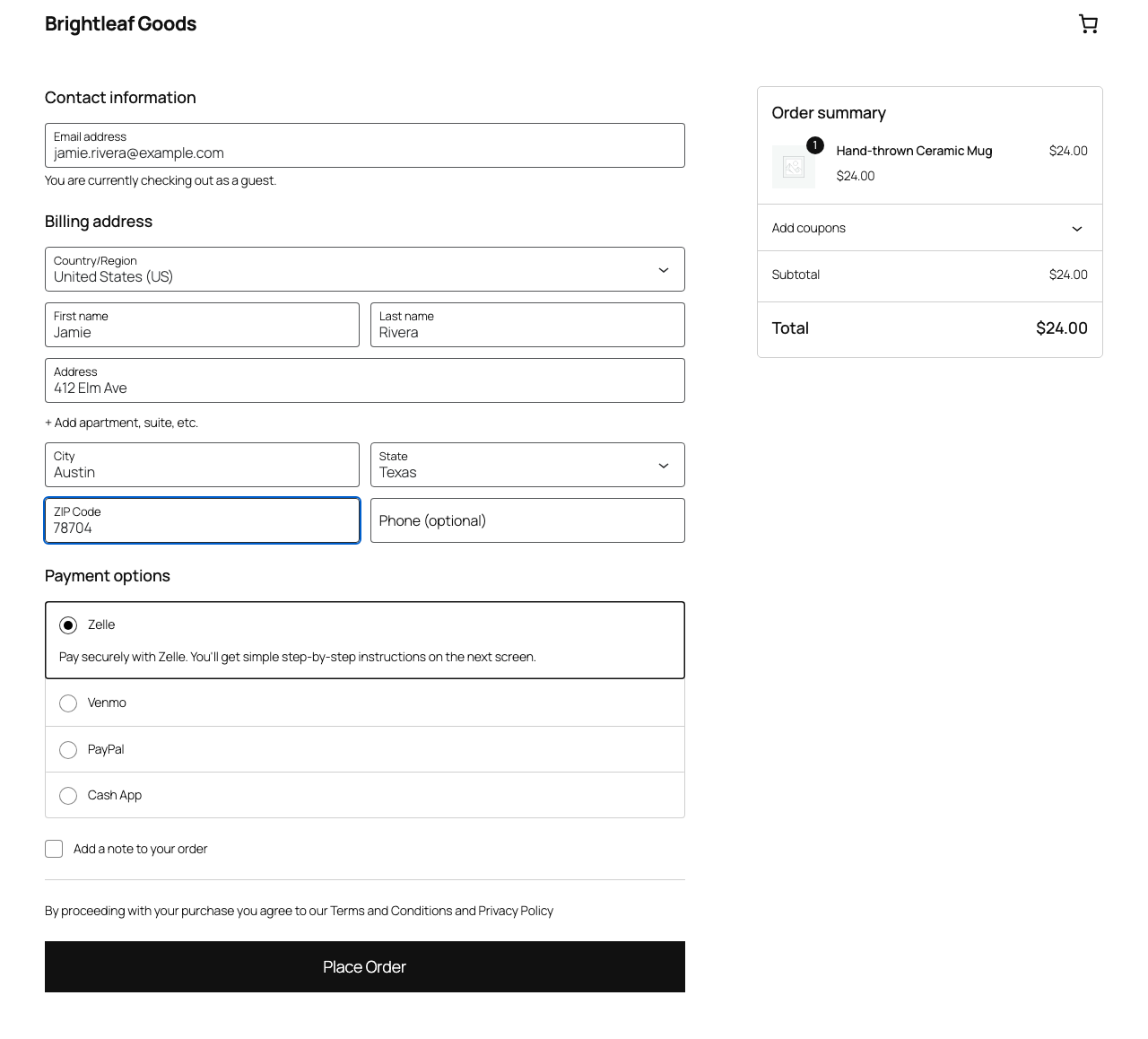
When a customer picks one of these methods at checkout, D613 Pay sends them to a clean, branded pay page that shows exactly where to send the money (your handle / email / phone / $Cashtag, plus an optional QR code) and the order number to put in the payment memo. The order is held as Pending Confirmation — stock is reserved — until you verify the payment and mark it Processing.
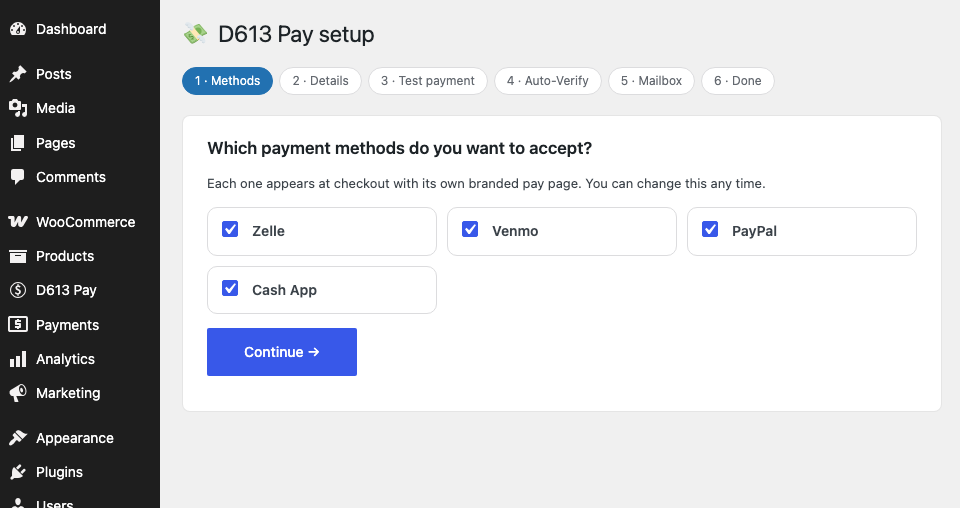
A guided setup wizard walks you through choosing your rails, then sets up each one in turn: its details and, with Auto-Verify, a $1 test payment and the inbox its payment alerts arrive in. It opens with the one tip that makes setup painless: use the same email address on all your payment accounts, so every alert lands in one inbox.
What you get, free
- Zelle, Venmo, PayPal and Cash App as WooCommerce payment methods
- A branded pay page per rail with your handle/email/phone, an optional QR code, and the order memo
- A “Pending Confirmation” order status that holds stock until you confirm
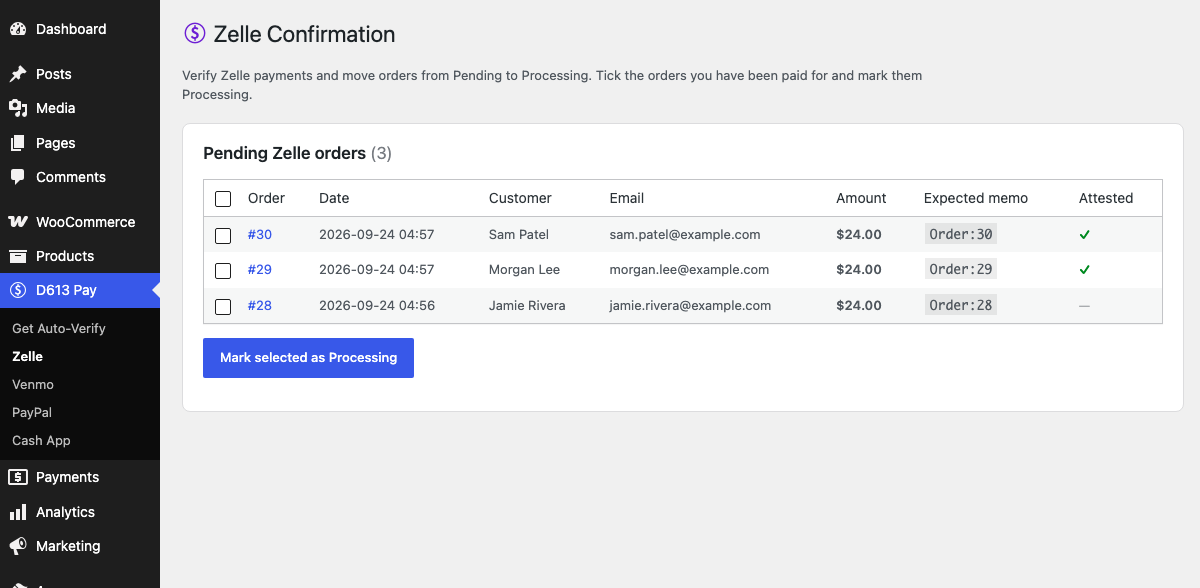
- A per-rail confirmation dashboard: see pending orders, tick the ones you’ve been paid for, and mark them Processing (the customer is emailed automatically)
- A re-runnable setup wizard
Optional upgrade: Auto-Verify — let payments confirm themselves
Confirming each payment by hand gets old fast. D613 Pay Auto-Verify is a separate, paid add-on that confirms orders for you, 24/7. Your bank, Venmo, PayPal and Cash App already email you every time someone pays you; Auto-Verify reads those alerts and marks the matching order paid — usually within a minute of the money arriving.
Como funciona
- Connect the inbox your payment alerts arrive in: Sign in with Google or Microsoft, or use an app password for Yahoo, iCloud or any other IMAP mailbox.
- A customer checks out and pays with the order number in the memo, as your pay page already tells them to.
- Auto-Verify sees the alert, checks the amount against the order, and moves the order to Processing. The customer gets the usual WooCommerce confirmation email.
What it handles
- Zelle from any bank, plus Venmo, PayPal and Cash App. Banks it hasn’t seen before are learned automatically from their first alert.
- Forgotten memos — a payment without an order number is matched on amount, time and payer name.
- Split and partial payments — it keeps a running balance and emails the customer what is still owed.
- Anything unclear goes to you — refunds, reversals, amounts that don’t add up and unknown senders land in a needs-review queue instead of confirming an order. Every payment not read by a proven reader is double-checked by AI before it counts.
- Several stores, one inbox — each store gets its own memo code, so payments are never credited to the wrong store.
Safe by design
- Only alerts that provably come from the bank or wallet (checked against the email’s DKIM/DMARC signatures) can confirm an order, so a forged “you’ve been paid” email is ignored.
- It reads only recent payment alerts — never your whole mailbox — and your mailbox sign-in is stored encrypted.
Pricing: every plan starts with a 30-day free trial. Starter covers one store for $24/month billed annually ($29.99 month to month); Growth (3 stores) and Agency (10 stores) are for multi-store owners.
Start your free trial · See how Auto-Verify works
After you sign up you get a license key and the Auto-Verify add-on; the D613 Pay setup wizard walks you through the rest. The free plugin above is fully functional on its own and never expires — Auto-Verify only adds automatic confirmation.
Requisitos
- WooCommerce 7.0 or newer
- Pretty permalinks (WooCommerce needs these anyway)
Serviços externos
The free plugin does not require any external service. It contacts one service, only if you opt in:
Anonymous install statistics (opt-in)
- What it is: a small ping to D613 Labs so we can count active installs.
- When it runs: never, unless you click “Allow” on the one-time notice after activation. If you click “No thanks”, nothing is ever sent. When allowed, a request is sent once on opt-in and then weekly.
- What is sent: a one-way hash of your site URL (not the URL itself), the plugin version, and which payment rails are enabled. No personal data, no customer data, no order data.
- Where:
https://paycloud.d613labs.com/v1/telemetry/ping, operated by D613 Labs. - Terms and privacy: Terms of Service · Privacy Policy
Links to our website
The plugin links to https://d613pay.d613labs.com when you choose to learn about or purchase the optional Auto-Verify add-on. Following a link sends nothing from your store. Auto-Verify itself is a separate plugin with its own disclosure.
Instalação
- Install and activate WooCommerce.
- Upload the plugin through Plugins → Add New → Upload Plugin, or install it from the WordPress.org directory, then activate it.
- You’ll be offered the D613 Pay setup wizard — it walks you through picking your rails, then each rail in turn. You can re-run it any time from the D613 Pay menu.
- Alternatively, configure each method manually under WooCommerce → Settings → Payments.
Log de Changes
Clearer Auto-Verify step in the setup wizard; no action needed.
0.5.8
- Auto-Verify add-on updates now appear on your Plugins and Updates screens: when the paid Auto-Verify add-on is installed, WordPress shows and installs its updates like any other plugin, and can auto-update it. Previously the add-on had no update path once installed. No store, order, or customer data is sent — it is an anonymous version check.
0.5.7
- Setup wizard: the Auto-Verify step now explains what Auto-Verify does, has a “Get Auto-Verify” button that opens the sign-up page in a new tab, and always shows the license-key box. A key entered before the Auto-Verify add-on is installed is kept and used automatically once the add-on is activated.
- On the free plan the wizard only asks for each method’s payment details; the test payment and inbox steps appear only with Auto-Verify.
0.5.6
- Setup wizard: Gmail inboxes can connect with “Sign in with Google” (with Auto-Verify), no app password needed.
0.5.5
- Setup wizard: Outlook.com, Hotmail and Microsoft 365 inboxes connect with “Sign in with Microsoft” (with Auto-Verify). No app password needed, and Microsoft 365 shared mailboxes are supported.
0.5.4
- With Auto-Verify connected, payment memos use your store’s own code (for example KXQD-1042) so payments stay attributable even when several stores share one bank account. Stores without Auto-Verify keep Order:1042.
- Setup wizard reorganised: after picking your payment methods you set up each one start to finish (details, a $1 test payment, the inbox its alerts arrive in, turn on Auto-Verify) instead of doing every method at every step.
- The wizard now opens with setup advice: use one email address for all your payment accounts, choose an inbox you can get IMAP sign-in details for (an address on your own domain, or a Gmail with an app password), and check payment emails are switched on.
- Each payment method can use its own inbox. The inbox connected for one method is offered for the next with no password needed, or you can connect a different one.
- The wizard script is versioned by file time, so an update is never served from the browser cache.
0.5.3
- New name: D613 Pay – Zelle, Venmo, PayPal & Cash App Payments for WooCommerce.
- Pay and confirmation pages no longer promise automatic payment detection unless the optional Auto-Verify service is connected; without it they tell the customer the store will confirm the payment.
- Setup wizard (Auto-Verify step): choose payment methods (Zelle from any bank, Venmo, PayPal, Cash App) instead of individual banks, and no longer scans the whole mailbox after connecting.
Capturas de tela
Para desenvolvedores
Este é o seu plugin? Mostre os números.
Adicione um crachá ao vivo ao seu site, Documentos ou Readme do GitHub. Ele é atualizado por conta própria - nenhuma conta necessária.
Best D613 Pay alternatives
All cash app plugins →FAQ
D613 Pay: quick answers
Respostas diretas, extraídas de dados ao vivo WordPress.org.
Fonte: WordPress.org
Is D613 Pay free?
Yes. D613 Pay is free to download and use from the official WordPress.org plugin directory.
Is D613 Pay safe to use in 2026?
D613 Pay is a solid plugin choice in 2026, with a few things worth checking first. It runs on 40+ sites and was last updated 2 weeks ago, and scores 67/100 on our health check.
How many websites use D613 Pay?
D613 Pay is active on 40+ WordPress websites and has been downloaded 661 times since it launched in September 2026. It was downloaded 330 times in the last 30 days.
Does D613 Pay work with WordPress 7.1?
Yes. The developer has tested D613 Pay up to WordPress 7.1.5, the latest release. It requires WordPress 6.0 or newer.
What PHP version does D613 Pay need?
D613 Pay requires PHP 7.4 or higher. Most hosts run PHP 8.x today, so it works on any modern WordPress hosting.
When was D613 Pay last updated?
The latest version, 0.5.8, was released on November 18, 2026 (2 weeks ago).
Who makes D613 Pay?
D613 Pay is developed and maintained by ddarvish.
What are the best alternatives to D613 Pay?
The most popular alternatives to D613 Pay are Wallet Up (200+ installs), Wallet Up Checkout for WPFo… (10+ installs) and MemoMatch: Bank and App Pay… (<10 installs).
Alimentado por PageForge
Um modelo e uma planilha. Uma página real para cada pesquisa.
PageForge Transforma cada linha de um CSV em uma página WordPress com seu próprio título, URL, SEO campos e esquema, construído no layout que você já desenhou. Gratuito em WordPress.org.
- CSV e XLSX, mais Google Sheets em Profissional e Empresarial
- Seu próprio título, URL, SEO campos e esquema para cada página
- Funciona com o editor de blocos, Elementor, Divi e Avada
- Gratuito em WordPress.org, sem cartão de crédito