


Customer Cloud Gallery – Google Drive & Dropbox Image Gallery
Connect Dropbox or Google Drive and create beautiful photo and video galleries — fast downloads, favorites, password protection. Sell prints with Pro.

Escolha sólida
Customer Cloud Gallery is a solid plugin choice in 2026, with a few things worth checking first. It runs on 60+ sites, is rated 5/5 and was last updated 4 weeks ago, and scores 75/100 on our health check.
- Desenvolvido ativamente — última atualização 4 semanas atrás
- Testado com as últimas WordPress (7.1)
- Momentum — downloads up 44.7% vs the previous 30 days
- Base de usuários pequenas (mais de 60 instalações ativas)
- Muito poucos comentários até agora
Como ele se acumula?
Lado a lado em instalações, atualizações, avaliações e suporte


Downloads diários
Os picos de download geralmente seguem uma nova versão — cada site que atualiza automaticamente é um download.
Rankings
Where Customer Cloud Gallery stands todayWordPress.org Classificações de pesquisa
Posição ao vivo na pesquisa de plugins, top 100| Palavra chave | Posição |
|---|---|
| Dropbox | #21 |
| galeria | >100 |
| google drive | #31 |
| photo gallery | #96 |
| photography | #80 |
Adoção da versão
Compartilhamento de sites ativos por lançamento.
Divisão de classificação
★★★★★ ★★★★★ 5 de 1 comentários
About Customer Cloud Gallery
From the official readme · v1.18.0Descrição
Tired of subscribing to yet another photo service just to share galleries with your clients? Customer Cloud Gallery lets you deliver beautiful client photo galleries straight from your own Google Drive or Dropbox — on your own WordPress site, with no extra monthly fees.
Connect the Drive or Dropbox folder you already use, add the “Cloud Gallery” block (or the Elementor widget, or a shortcode), and you get a fast, mobile-friendly gallery with downloads, favorites and optional password protection. Your originals stay in the cloud; the plugin streams thumbnails and full-resolution files on demand — so your site stays fast, your hosting disk stays empty, and there are no monthly gallery-hosting fees and no per-gallery limits.
Who it’s for
- Photographers delivering client work — wedding, portrait, family, event, newborn, real-estate and product photography
- Studios & agencies that want galleries on their own domain and brand
- Schools, clubs & teams sharing event photos with parents and members
- Anyone who already keeps photos in Google Drive or Dropbox
What you get (Free)
- Google Drive and Dropbox — connect one or both; pick the folder per gallery
- Folder picker — set your main folder once, then choose each gallery’s subfolder from a dropdown (no more copying folder URLs)
- Block editor & Elementor — insert the “Cloud Gallery” block or Elementor widget and pick your gallery from a list with a live preview; the shortcode still works in any other builder
- Fast lazy-loading grid with full-screen lightbox, keyboard navigation and mobile swipe
- Videos — MP4 films from the same folder play right in the lightbox, streamed in pieces so even large files start within seconds
- Client favorites — visitors heart their picks and filter to just those
- Downloads done right — single originals, a whole-gallery ZIP, or a visitor’s hand-picked selection as one streaming ZIP (multi-GB galleries work)
- Optional password protection for client-only delivery — or keep it public
- GDPR-ready cookie control — master on/off switch per gallery; visitors can clear their cookie
- Design options — accent, hover and border colours
- Works with any theme and builder — block, Elementor widget or shortcode, no template editing
Your files never touch our servers — Drive/Dropbox are accessed with your own OAuth credentials (see “External Services” below).
Earn money with Pro
Don’t just save on fees — earn real money from your galleries. The Pro print shop lets your clients order professional prints right inside their gallery: you set the formats, paper types, prices and shipping, and orders arrive by e-mail with payment via PayPal or SEPA bank transfer. No marketplace commission, no card-processing setup.
Pro also adds:
- Print shop — clients order prints directly from each gallery, with full order management (New → Confirmed → Shipped)
- Title image — a cover photo above the grid (simply the first photo, one you pick from the folder, or an image from your media library), with the gallery title and a subtitle on it, adjustable height, soft gradient and an edge-to-edge option
- Create galleries from the editor — in the block or the Elementor widget, pick a subfolder of your main folder and the gallery is created on the spot
- Automatic galleries (watch folder) — new subfolders in your main folder become galleries automatically; a notice in the gallery list tells you what was created
- A page for every automatic gallery — the watch folder clones a template page for each new gallery, with the block, Elementor widget or shortcode already pointed at it
- Automation interface — create and change galleries from your own scripts, n8n, Zapier or Make, secured with WordPress application passwords
- Webhooks — signed messages to your own address when a gallery is created or published, a client downloads the ZIP or orders prints
- AI assistants — with the plugin “MCP Adapter”, assistants like Claude can list, create and change your galleries
- Chapters — subfolders of the gallery folder become sections with headings and a jump navigation
- Layouts — masonry, square grid or filmstrip besides the justified rows, plus spacing and corner radius per gallery
- Hover, captions & lightbox — hover effect of your choice, file-name captions, light or dark lightbox with a thumbnail strip
- Watermark on previews — your logo on every preview; downloads stay clean
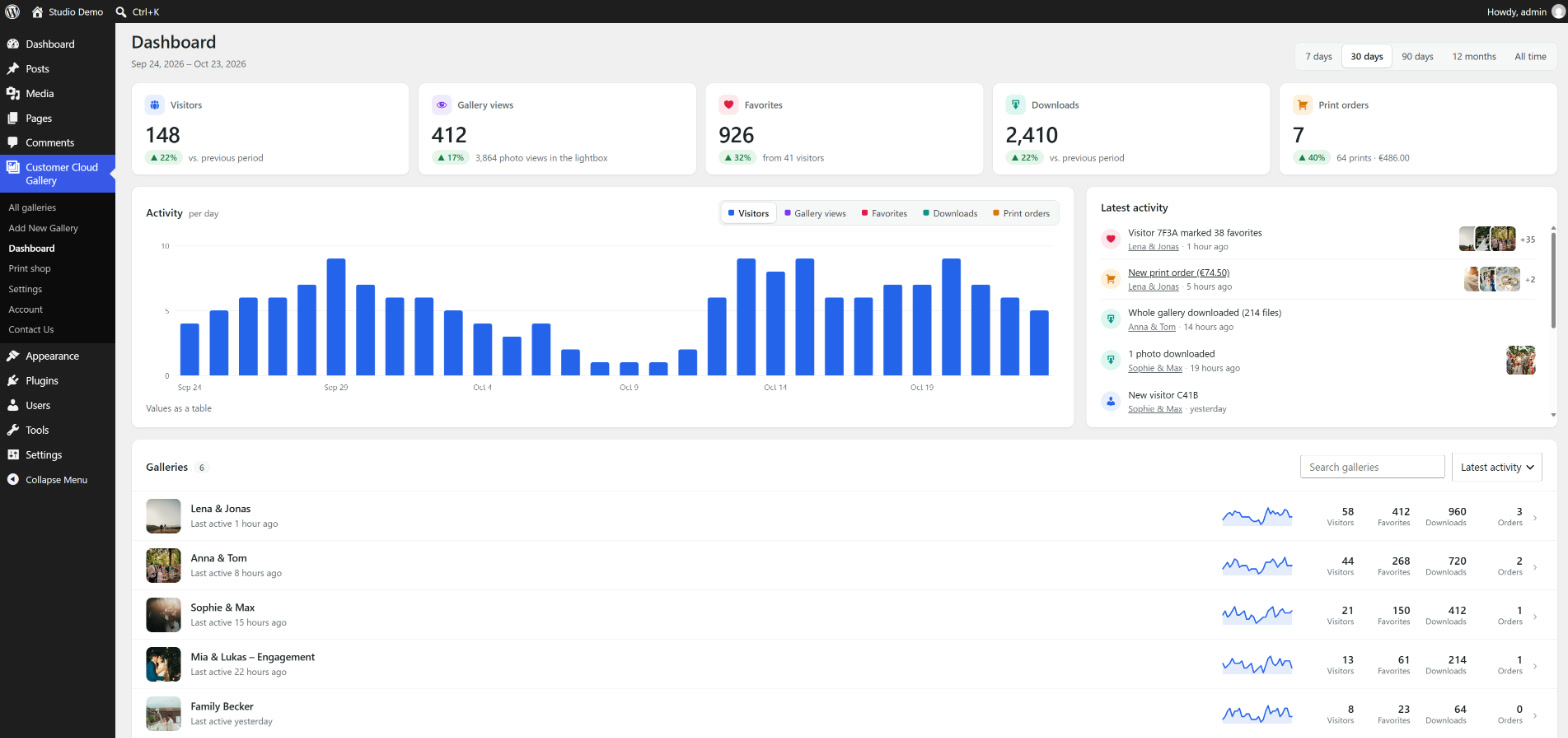
- Statistics dashboard — visitors, favorites and downloads over time, the most-loved photos, and who picked what — for all galleries and per gallery
- CSV export of client favourite selections — ideal for prepping an album or print run
- Suporte prioritário
The Free plugin above is complete and fully functional on its own — Pro adds the print shop, design and automation features, statistics and exports.
Get the most out of it
- Keep one Drive/Dropbox folder per client or event — the gallery mirrors it.
- Create a gallery, password-protect the page, and send your client the link.
- Switch on the Pro print shop to take print orders automatically.
Why cloud storage?
Uploading full-resolution galleries to your web server is slow, wastes disk quota, and makes migration painful. With Customer Cloud Gallery the originals stay in Drive or Dropbox — the plugin fetches thumbnails on first request, caches them locally, and streams originals on demand. Server load is minimal even for 4K RAW previews.
Segurança
- OAuth tokens are stored AES-256-CBC encrypted using WordPress’s AUTH_KEY
- Per-gallery access keys prevent cross-gallery file access (IDOR protection); they are bound to the page the gallery is on and expire after 30–60 days, and gallery data, videos and downloads check that page’s password on every request
- All file-serving endpoints verify that the requested file actually belongs to the requested gallery
- Cache directory blocks PHP execution and directory listing via
.htaccess - Visitor cookies are
httponly+SameSite=Lax
Serviços externos
This plugin connects to third-party services to deliver its core functionality. The connections are listed here so you can include them in your site’s privacy policy.
Google Drive API
Used only when the site administrator connects a Google Drive account in the plugin settings. The plugin uses OAuth 2.0 credentials that you generate yourself in your own Google Cloud Console — your data never passes through any server operated by the plugin author.
What is sent: OAuth tokens, folder IDs and file IDs that you choose to display. When a visitor views a gallery, their browser loads preview images and videos directly from Google’s servers, which receive the visitor’s IP address. With “Load previews and videos through this website” (Settings → Advanced → Privacy) switched on — the default on new installations — everything goes through your server instead and visitors’ browsers never contact Google.
When: whenever a gallery is viewed or downloaded, when an admin browses folders, and on a scheduled cron to refresh thumbnail caches.
- Service URLs: https://www.googleapis.com/drive/v3/ (files), https://oauth2.googleapis.com/ (sign-in, token refresh), https://*.googleusercontent.com/ (preview images and videos)
- Terms of Service: https://policies.google.com/terms
- Privacy Policy: https://policies.google.com/privacy
Dropbox API
Used only when the site administrator connects a Dropbox account in the plugin settings. Uses an OAuth app you register in your own Dropbox developer account.
What is sent: OAuth tokens, folder paths and file IDs that you choose to display. Preview images always come from your server. Videos play in the visitor’s browser from a temporary Dropbox link, which gives Dropbox the visitor’s IP address — unless “Load previews and videos through this website” (Settings → Advanced → Privacy) is switched on.
When: whenever a gallery is viewed or downloaded, when an admin browses folders, and on a scheduled cron to refresh thumbnail caches.
- Service URLs: https://api.dropboxapi.com/ and https://content.dropboxapi.com/ (files, sign-in), https://*.dropboxusercontent.com/ (video playback)
- Terms of Service: https://www.dropbox.com/terms
- Privacy Policy: https://www.dropbox.com/privacy
Freemius
The plugin uses the Freemius SDK to deliver license management for the optional Pro upgrade. Freemius is contacted only after the site administrator explicitly opts in during plugin activation. If you skip the opt-in, no data is sent to Freemius and the Free version remains fully functional.
What is sent (only after opt-in): site URL, WordPress version, PHP version, plugin version, an anonymized site identifier and — if a Pro license is activated — the license key for validation.
- Service URL: https://api.freemius.com/
- Terms of Service: https://freemius.com/terms/
- Privacy Policy: https://freemius.com/privacy/
Política de privacidade
Customer Cloud Gallery stores the following data in your WordPress database:
Visitor cookie (all visitors)
A random visitor ID is generated server-side on the first gallery visit and stored in a browser cookie. The cookie name is wpg_visitor (the legacy name is kept since 1.12.1 so existing visitor favourites remain attached to the correct cookie after the prefix-rename migration; everything else uses the new ccgal_ prefix). The cookie is valid for 365 days. Its value is a random hexadecimal identifier with no relationship to any real-world identity, and is stored as-is in the database — there is no name, e-mail address, or plain-text IP address recorded against it.
Favourites
When a visitor hearts an image, the random visitor ID, the gallery ID, and the cloud file ID are stored in the wp_ccgal_favorites table. No personal data is included.
Download tracking (Pro, if the statistics module is enabled per gallery)
When the Pro statistics module is loaded and enabled per gallery, downloads are recorded in wp_ccgal_downloads: random visitor ID, gallery ID, file ID, download type, and a salted SHA-256 hash of the visitor’s IP address. The original IP address is never persisted — only the one-way hash, salted with the site’s AUTH_SALT. The Free plugin never writes to this table.
Page-view tracking (Pro, if the statistics module is enabled per gallery)
When the Pro statistics module is loaded and the per-gallery statistics sub-switch is on, page and image views are recorded in wp_ccgal_views: random visitor ID, gallery ID, file ID, salted IP-hash and timestamp. The Free plugin never writes to this table.
Print orders (Pro, if the print shop is enabled)
Stores the customer’s name, shipping address, e-mail address, optional phone number, optional message and the ordered items in wp_ccgal_orders and wp_ccgal_order_items. This data is necessary to fulfil the order and is retained until the site administrator deletes the order.
Personal data export & erasure (WP Privacy Tool)
The plugin integrates with the standard Tools → Export Personal Data and Tools → Erase Personal Data workflows. Print orders (Pro) are returned/erased by customer e-mail. Anonymous gallery favorites are, by design, not linkable to an e-mail address; the response message will note this explicitly so the requester knows their cookie-based records cannot be associated with their identity.
Data deletion
In addition to the WP Privacy Tool above, site administrators with the Pro statistics module can delete all tracking data for a specific visitor from the Statistics dashboard. Removing the plugin via Plugins → Delete erases all options, custom tables, gallery posts, and the thumbnail cache.
Suggested privacy policy text
The plugin contributes a ready-made privacy policy paragraph to Settings → Privacy → Policy Guide that you can copy into your public privacy page. It follows the privacy setting below.
Connections from the visitor’s browser
With Settings → Advanced → Privacy → Load previews and videos through this website switched on (the default on new installations), visitors’ browsers only connect to your site. With it off, a visitor’s browser loads Google Drive preview images and videos directly from Google’s servers (googleusercontent.com) and Dropbox videos from Dropbox’s servers (dropboxusercontent.com); these providers receive the visitor’s IP address and browser information. Cloud API calls always use the site administrator’s OAuth credentials — visitor sessions are never used for them.
Photographer’s responsibility
If you use this plugin on your site you are the data controller for your visitors’ data. You should inform your visitors about the visitor cookie in your site’s privacy policy and, where required, obtain consent before enabling statistics tracking (Pro module only).
Instalação
- Upload the
customer-cloud-galleryfolder to/wp-content/plugins/or install via Plugins → Add New → Upload Plugin. - Ative o plugin.
- Go to Customer Cloud Gallery → Settings and connect Google Drive or Dropbox (step-by-step OAuth wizard included).
- Create your first gallery under Customer Cloud Gallery → Add New.
- Add the gallery to a page: insert the Cloud Gallery block or the Elementor widget and pick the gallery from the list — or paste the shortcode from the gallery editor (e.g.
[ccgal_gallery id="42"]). - Set a page password under Page → Visibility → Password protected to restrict access.
Requisitos mínimos
- WordPress 6.2 or higher
- PHP 7.4 or higher (8.1+ recommended)
- PHP extensions:
openssl,gdorimagick - Google Drive API credentials or a Dropbox app (free developer accounts work)
Log de Changes
1.18.0
- New (Pro): automation interface. Settings → Automation turns on endpoints to list, create and change galleries from your own scripts or from n8n, Zapier and Make. You log in with a WordPress application password of an administrator; without one, nobody gets in. One request can create a gallery for a folder, copy the settings of a template gallery, set the title image and create the gallery’s page.
- New (Pro): webhooks. Customer Cloud Gallery sends a signed message to an address of yours when a gallery is created or published, a client downloads a ZIP or a print order arrives — for example to email the gallery link automatically. A test button and a list of recent deliveries help with the setup.
- New (Pro): AI assistants. On WordPress 6.9 or newer the same functions are registered as abilities; with the plugin “MCP Adapter”, assistants like Claude can list, create and change your galleries.
- New (Pro): title image “First photo of the gallery” — no picking needed, ideal for galleries that are created automatically. If the folder is still empty, the title image appears as soon as the first photo is there.
- Improved (Pro): galleries created by the watch folder now also take over the look of the template gallery’s title image.
1.17.3
- New: a third loading mode, “Whole gallery at once”. Every photo gets its place as soon as the page opens, so whatever sits below the gallery — comments, a contact form, the spot a “jump to comments” link leads to — stays where it is. The photos themselves still load as visitors scroll. Choose it in the gallery editor under “Loading mode”, in the block or Elementor widget, or with [ccgal_gallery id=”123″ load=”all”].
1.17.2
- Fixed: with block themes (for example Twenty Twenty-Five, or any theme you edit in the Site Editor), a gallery showed only its toolbar and no photos. The same cause dropped your accent colors there and, in Pro, kept the statistics from counting visits and left the print order page on “Loading images…”.
- Security: updated the Freemius SDK, which handles the opt-in and licensing, to version 2.13.5. It fixes three security issues that were reported to Freemius.
1.17.1
- Improved (Pro): statistics dashboard — “Most popular photos” now has one row per list (favorites, views, downloads and, with the print shop, ordered prints), in rank order with the count written under each photo. Each row switches between the top 10, 50 and 100.
- Improved (Pro): “Latest activity” shows small previews of the photos involved and is as tall as the chart next to it; longer lists scroll inside the card. A click opens the photos large right away, and with the privacy switch off, Google Drive previews in the dashboard load straight from Google, as in the gallery.
- Improved (Pro): an expanded visitor shows three tabs — favorites, downloads (including whole-gallery and selection ZIPs) and the photos they opened most often.
- Fixed: files with the same name could end up twice under one name in a download — for example “Foto.jpg” twice next to a “Foto_1.jpg” — and one photo overwrote the other when unzipping. Every file now gets its own name, also when names differ only in upper and lower case.
- Fixed: when the server-side ZIP (the fallback for old browsers) could not load a file from the cloud, the file was left out without a word. The ZIP now contains a “MISSING FILES.txt” that lists them, and the statistics only count files that were actually included.
- Fixed: the shortcode option per_page, for example [ccgal_gallery id=”123″ per_page=”10″], had no effect; the gallery always loaded its own setting.
- Improved: when you unpublish, trash or delete a gallery, the preview images cached on your server for its photos are deleted too, so a copied preview address stops working. While a gallery is not published, its editors still see previews in the dashboard, but they are no longer stored under a public address.
- Fixed (Pro): in galleries with chapters that load more photos while scrolling, the chapters stayed empty when the main folder fit into the first batch; with more photos, the first ones appeared twice.
- Fixed: the daily clean-up of cached preview images could stop running, for example after switching between the free and the Pro version. It is now rescheduled automatically.
- Fixed: in the folder download (Chrome and Edge save the photos straight into a folder), a photo that could not be loaded left an empty file with its name behind; it is now removed. A download in which no photo arrived no longer counts in the statistics.
1.17.0
- New: videos. Videos in the gallery folder appear in the grid with a play icon and play in the lightbox. Large files start within seconds: the plugin streams them in pieces instead of loading the whole file first, so seeking works too. Google Drive videos get a poster frame; Dropbox videos show a dark tile.
- New: per gallery you choose whether videos are included in “Download all” — off by default, because a film can be several gigabytes. Single downloads and hand-picked selections always include them.
- New: a video the browser cannot play (for example HEVC without codec, MKV or AVI) shows a short note instead of a black player, with a download button when downloads are allowed.
- Fixed: with the free version installed while a Pro license is active, the gallery no longer shows the “Order prints from selection” button of the print shop, which is not part of the free version.
- New (Pro): statistics dashboard. One overview for all galleries with time ranges, visitors, views, favorites and downloads compared with the previous period, an activity chart and a feed of what your clients did last. Each gallery gets its own page: the most-loved photos as a podium, a compact visitor list with each visitor’s favorites, “copy file names” for Lightroom, a CSV per visitor, and reset. A small widget on the WordPress dashboard shows the last 7 days.
- New (Pro): Settings → Statistics turns statistics on automatically for new galleries.
- Improved (Pro): your own visits, downloads and favorites no longer count in the statistics while you are logged in as someone who can edit the gallery.
- Fixed (Pro): a new visitor no longer counts twice, and a “Download all” in the browser counts each file once instead of twice. The comparison with the previous period reappears once that period lies entirely after the update.
- Fixed (Pro): print orders are limited per visitor and per email address; before, the limit could be bypassed, so a form script could send any number of order emails. One order now holds up to 150 photos, and the gallery says so when more are selected — before, the order page silently dropped everything after the first 50. The order CSV no longer lets spreadsheet formulas from customer fields run in Excel.
- New: privacy switch. Settings → Advanced → Privacy → “Load previews and videos through this website”: visitors’ browsers then only connect to your site, never to Google or Dropbox. On for new installations; existing sites keep their current behaviour until you switch it on. The suggested privacy policy text follows the setting.
- Improved: the settings are split into tabs — cloud storage, design, texts and advanced.
- Improved (Pro): simpler menu — All galleries, New gallery, Dashboard, Print shop (orders and print settings as tabs, with the number of new orders) and Settings with an extra Statistics tab. The gallery list shows one Activity column instead of three number columns.
- Improved: “Download all” works for archives over 4 GB and for large videos. Files from 256 MB are streamed instead of being loaded into memory, a dropped connection resumes, and macOS Archive Utility opens the archives.
- Improved: when the cloud cannot be reached, visitors see a neutral message instead of the raw Drive or Dropbox error.
- Fixed: galleries behind a page cache stopped loading photos after 12–24 hours. Galleries now use an access key bound to their page and renewed every 30 days instead of an expiring nonce; the photo list, videos and downloads check the page password on every request, and gallery data is never stored by page caches (LiteSpeed Cache stores REST answers by default).
- Fixed (Pro): the print order page only opens from the gallery. Before, anyone who knew a gallery ID could get its photo list there, even for a password-protected gallery.
- Fixed (Pro): the statistics compared the site’s local time with the database clock, so depending on the time zone repeat views were counted twice or real visits were missed.
- Fixed (Pro): “Order prints” stays off while only videos are selected, quantities are capped at 99 on the page and on the server, the print page shows a short note instead of the raw shortcode when Pro is not active, and it no longer shows Drive previews without the watermark.
- Fixed: with downloads switched off, the video player no longer offers “Save video as” in its right-click menu.
1.16.1
- Fixed: the “Pay now via PayPal” button in the order confirmation email now works when a PayPal email address is set in the print shop settings (not only a PayPal.Me name), and it passes the shop currency.
- Fixed: toolbar buttons that should be hidden (“Load more”, “Download favorites”, “Download selection”, “Clear selection”) stayed visible without any function.
- Fixed: a gallery inside a tab or accordion that is closed when the page loads (Elementor and other page builders) now lays out as soon as it is opened.
- Fixed: clicking “Show favorites only” while images were still loading no longer leaves the view incomplete.
- Fixed: umlauts and other non-ASCII characters in the gallery title are kept in the ZIP file name.
- Fixed: in folders with more than 20,000 images, the images beyond that could not be opened or downloaded.
- Improved: the lightbox opens with the keyboard (Enter or Space on an image). Focus stays inside the lightbox and returns to the image when it closes.
Capturas de tela



Para desenvolvedores
Este é o seu plugin? Mostre os números.
Adicione um crachá ao vivo ao seu site, Documentos ou Readme do GitHub. Ele é atualizado por conta própria - nenhuma conta necessária.
Best Customer Cloud Gallery alternatives
All Dropbox plugins →





FAQ
Customer Cloud Gallery: quick answers
Respostas diretas, extraídas de dados ao vivo WordPress.org.
Fonte: WordPress.org
Is Customer Cloud Gallery free?
Yes. Customer Cloud Gallery is free to download and use from the official WordPress.org plugin directory.
Is Customer Cloud Gallery safe to use in 2026?
Customer Cloud Gallery is a solid plugin choice in 2026, with a few things worth checking first. It runs on 60+ sites, is rated 5/5 and was last updated 4 weeks ago, and scores 75/100 on our health check.
How many websites use Customer Cloud Gallery?
Customer Cloud Gallery is active on 60+ WordPress websites and has been downloaded 2,591 times since it launched in June 2026. It was downloaded 858 times in the last 30 days.
Does Customer Cloud Gallery work with WordPress 7.1?
Yes. The developer has tested Customer Cloud Gallery up to WordPress 7.1.5, the latest release. It requires WordPress 6.2 or newer.
What PHP version does Customer Cloud Gallery need?
Customer Cloud Gallery requires PHP 7.4 or higher. Most hosts run PHP 8.x today, so it works on any modern WordPress hosting.
When was Customer Cloud Gallery last updated?
The latest version, 1.18.0, was released on November 4, 2026 (4 weeks ago).
Who makes Customer Cloud Gallery?
Customer Cloud Gallery is developed and maintained by smartsteve.
What are the best alternatives to Customer Cloud Gallery?
The most popular alternatives to Customer Cloud Gallery are Cloud Storage Manager for F… (400+ installs), Simple Dropbox Upload (200+ installs) and Contact Form 7 Dropbox (200+ installs).
Alimentado por PageForge
Um modelo e uma planilha. Uma página real para cada pesquisa.
PageForge Transforma cada linha de um CSV em uma página WordPress com seu próprio título, URL, SEO campos e esquema, construído no layout que você já desenhou. Gratuito em WordPress.org.
- CSV e XLSX, mais Google Sheets em Profissional e Empresarial
- Seu próprio título, URL, SEO campos e esquema para cada página
- Funciona com o editor de blocos, Elementor, Divi e Avada
- Gratuito em WordPress.org, sem cartão de crédito